Python for DSA
A few tools, and the one slow move in each
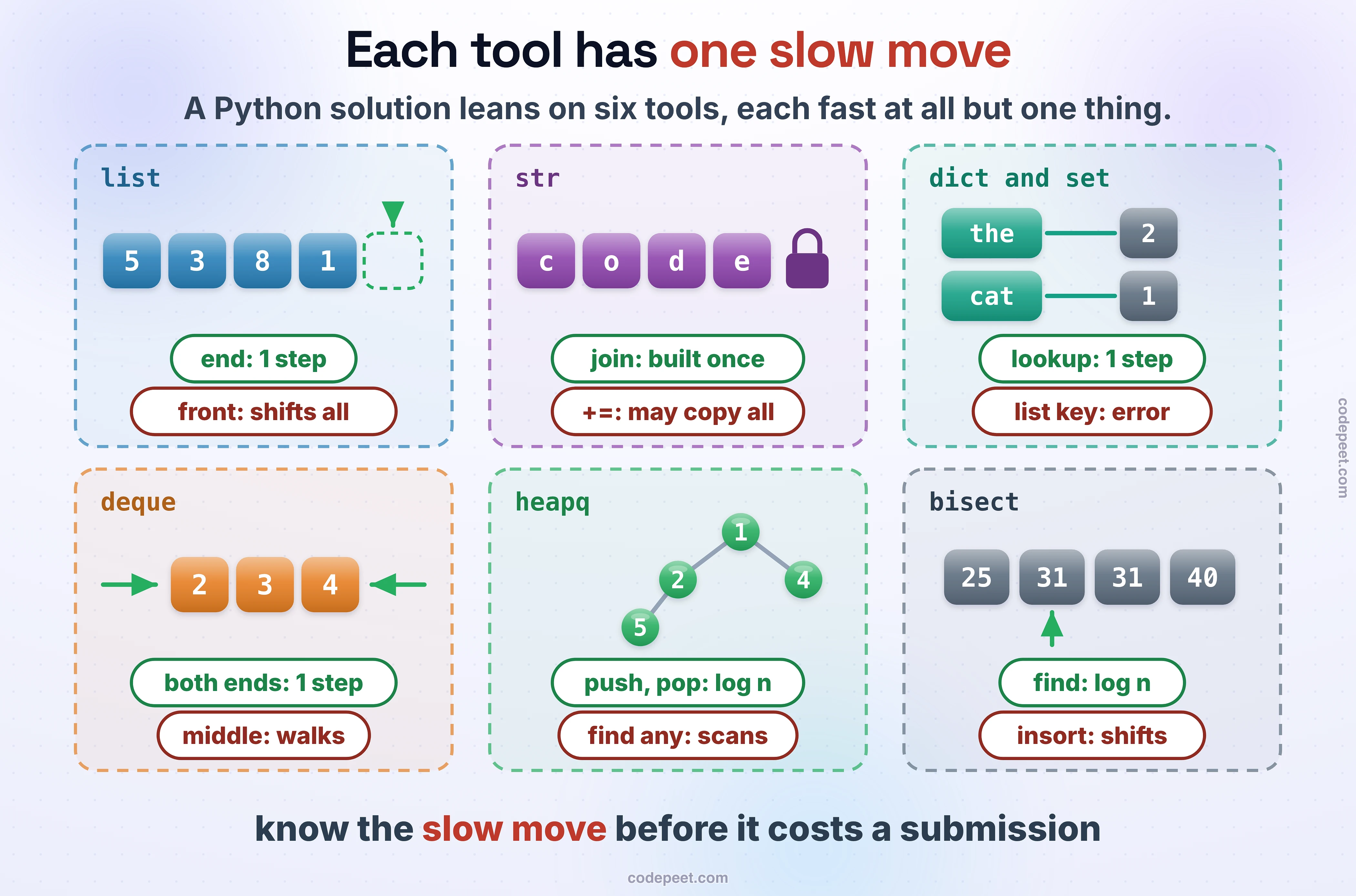
A data-structures solution in Python leans on a handful of tools: the list, the string, the dict and the set, the deque, heapq, sorting with a key and bisect. Each one is fast at most things and slow at one thing that looks harmless, and that one thing decides whether a correct solution passes. On our judge, taking the front item off a list of 100,000, one at a time, took 737.3 ms; a deque did the same in 7.6 ms. Checking 10,000 values against a list of 100,000 took 8,817.9 ms; against a set, 0.9 ms.
This lesson covers each tool's fast moves and its slow one, the numbers and the recursion limit, and what the judge runs: Python 3.10.0, standard library only.
Lists: cheap at the end, slow at the front
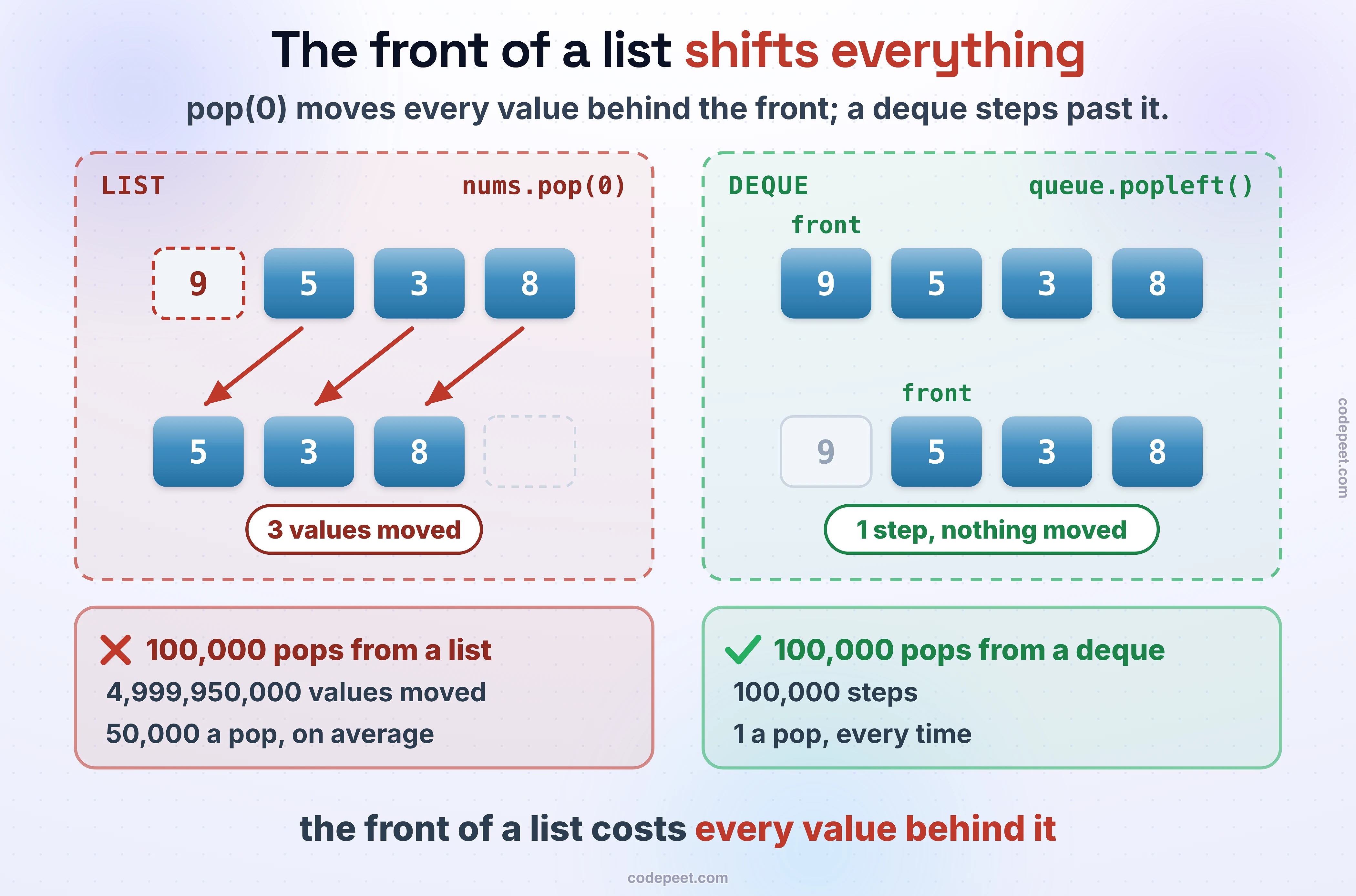
A list is one row of slots in memory, so reading or writing slot i is one step, and so is adding or removing at the end. The front is different: there's no slot before slot 0, so insert(0, x) moves every value one place right, and pop(0) moves every value one place left:
nums = [5, 3, 8]
nums.append(1)           # [5, 3, 8, 1]: written after the last value, O(1)
last = nums.pop()        # 1: taken from the end, O(1)
nums.insert(0, 9)        # [9, 5, 3, 8]: every value moves one slot right, O(n)
first = nums.pop(0)      # 9: every value moves one slot left, O(n)
print(nums, last, first, nums[1], nums[-1])
grid = [[0] * 3 for _ in range(2)]   # a new row for each row
grid[0][1] = 7
print(grid, nums[1:])                # a slice is a new list: it copies
Two habits follow. Use the end of a list as the top of a stack, never the front. And build a grid with a new list for each row, [[0] * cols for _ in range(rows)]; the bugs section shows the shortcut that breaks. A slice like nums[1:] is a new list, so it costs a step per value it copies: fine once, slow inside a loop.
Strings: you can't change one, so build it in a list
A string can't be changed in place: s[0] = "b" raises a TypeError. Reading is cheap, by index, from the end or as a slice, and a letter turns into a number with ord and back with chr. To build a string, collect the pieces in a list and join them once:
s = "code"
print(s[0], s[-1], s[1:3], len(s))
parts = []
for ch in s:
    parts.append(ch.upper())
print("".join(parts))                   # one string built once, from the pieces
print(ord("c") - ord("a"), chr(ord("a") + 2))   # letters as numbers and back
For 100,000 characters, join took 7.2 ms. s += "a" in a loop took 9.4 ms: Python 3.10 grows the string in place when nothing else refers to it, so it isn't as slow as you may have read. Keep any other reference to s and every += copies the whole string: 149 ms. Python's style guide says not to rely on the in-place trick, and join doesn't need it.
Dicts and sets: lookups that don't scan
A dict maps keys to values and a set holds keys alone. Both hash the key to find its place, so adding, finding and removing take one step on average, however many keys there are. Counter counts, defaultdict starts a missing key with a value you choose, and a dict keeps the order keys were added:
from collections import Counter, defaultdict

words = "the cat and the hat".split()
count = Counter(words)
print(count["the"], count["dog"])       # a missing key counts 0
by_first = defaultdict(list)            # a missing key starts as []
for w in words:
    by_first[w[0]].append(w)
print(dict(by_first))
seen, repeats = set(), []
for w in words:
    if w in seen:
        repeats.append(w)
    seen.add(w)
print(repeats, (1, 2) in {(1, 2): "a point"})   # a tuple can be a key
x in some_list checks the values one by one. The 10,000 lookups against a list of 100,000 values took 8,817.9 ms; against a set of the same values, 0.9 ms. Only values that can't change can be keys: a tuple can, a list can't.
Stacks, queues and deques
A stack is a list used at its end: append pushes, pop takes the top, stack[-1] peeks. A queue needs both ends, and collections.deque is built for that: append and popleft both take one step, and so do appendleft and pop:
from collections import deque

stack = [1, 2, 3]
print(stack.pop(), stack[-1])           # the top is the end of the list
queue = deque([1, 2, 3])
queue.append(4)                         # join at the back
print(queue.popleft(), list(queue))     # leave from the front, O(1)
queue.appendleft(0)
print(queue[0], queue[-1])
That's the 737.3 against 7.6 ms from the start of the lesson. Every breadth-first search in this course uses a deque for its queue.
heapq: a min-heap kept in a list
heapq keeps a heap inside an ordinary list, smallest first: heappush and heappop take O(log n) steps, heapify turns a whole list into a heap in O(n), and heap[0] peeks. There's no max-heap, so push the negatives. Entries are often tuples, which compare field by field, so put a counter after the priority to break ties before anything else is compared:
import heapq

tasks = [5, 1, 4, 2]
heapq.heapify(tasks)                    # O(n): rearranged so the smallest is first
heapq.heappush(tasks, 3)
print(heapq.heappop(tasks), tasks[0])   # pop the smallest, then peek at the next
largest = []
for x in [5, 1, 4, 2]:
    heapq.heappush(largest, -x)         # a max-heap: keep the negatives
print(-largest[0])
jobs = []
for order, (priority, name) in enumerate([(2, "email"), (1, "deploy"), (2, "lunch")]):
    heapq.heappush(jobs, (priority, order, name))   # order breaks a tie before names are compared
print([heapq.heappop(jobs)[2] for _ in range(3)])
Sorting with a key, and finding places with bisect
sorted returns a new list and list.sort() sorts in place; both take key=, a function that turns each item into what should be compared, and both are stable, so items that compare equal keep their order. A tuple key sorts by several things at once. When the order can only be decided by looking at two items together, cmp_to_key turns that comparison into a key. On a sorted list, bisect_left and bisect_right find where a value starts and where it ends, in O(log n):
from bisect import bisect_left, bisect_right
from functools import cmp_to_key

people = [("ana", 31), ("bo", 25), ("cy", 31)]
print(sorted(people, key=lambda p: p[1]))            # stable: ana stays before cy
print(sorted(people, key=lambda p: (-p[1], p[0])))   # age high to low, then name


def first(a, b):                        # which order of two pieces makes the bigger number
    if a + b > b + a:
        return -1
    return 1 if a + b < b + a else 0


pieces = sorted(map(str, [3, 30, 34, 5, 9]), key=cmp_to_key(first))
print("".join(pieces))
ages = [25, 31, 31, 31, 40]
print(bisect_left(ages, 31), bisect_right(ages, 31))   # where 31 starts, and where it ends
The comparison puts 9 before 34 because 934 beats 349, so the joined pieces make the biggest number they can. insort finds its place in O(log n) but still shifts the values after it, like insert.
Numbers: no overflow, and division that floors
Python's ints grow as big as they need to, so a sum never wraps around the way it can in C++ or Java. Division is where ported code goes wrong: // rounds towards minus infinity and % takes the sign of the divisor, while C++, Java and JavaScript cut towards zero. Floats are binary fractions, so compare them with a tolerance, and float("inf") is a safe starting value for a minimum:
print(2 ** 100)                         # exact: Python ints never overflow
print(-7 // 2, -7 % 2)                  # // rounds towards minus infinity
print(int(-7 / 2))                      # truncation, as in C++, Java and JavaScript
print(0.1 + 0.2 == 0.3, abs(0.1 + 0.2 - 0.3) < 1e-9)
print(float("inf") > 10 ** 100)         # a safe "nothing found yet"
Recursion: 1,000 frames, then you raise the limit
Python stops a recursion at 1,000 frames by default, well before a tree of 100,000 nodes in a line or a deep graph search is done. sys.setrecursionlimit raises it, and @cache remembers each result, which turns many recursive solutions into fast ones:
import sys
from functools import cache


def depth(n):
    return 0 if n == 0 else depth(n - 1) + 1


print(sys.getrecursionlimit())
try:
    depth(5000)
except RecursionError:
    print("RecursionError")
sys.setrecursionlimit(10 ** 6)
print(depth(5000))


@cache                                  # each fib(k) is computed once, then remembered
def fib(n):
    return n if n < 2 else fib(n - 1) + fib(n - 2)


print(fib(90))
Raising the limit isn't free: each frame still takes memory. On our judge a recursion 256,250 deep finished and one 275,000 deep was killed for using too much memory. For inputs that deep, an explicit stack is the safe choice: Depth-First and Breadth-First Search shows the iterative version.
What our judge runs
The judge runs Python 3.10.0 with the standard library only. sortedcontainers, which LeetCode installs, isn't there: importing it raises ModuleNotFoundError, so a sorted structure here is bisect on a list, heapq, or your own tree. Most problems call your function directly; a problem that reads its own input should read with sys.stdin.readline, not input():
import sys


def main():
    n = int(sys.stdin.readline())
    total = 0
    for _ in range(n):
        total += int(sys.stdin.readline())
    print(total)


main()
Reading 200,000 lines took 87 ms with sys.stdin.readline and 296 ms with input().
Pick the collection for the job
Below, each job is a mix of operations repeated 100,000 times: serve requests in arrival order, undo the last edit, check whether a name is taken, count words, always serve the most urgent ticket, read by position. Pick the collection you'd use. Each operation's cost appears, with the total work for the whole job, so you can see the one slow move before it costs you a submission.
Bugs that cost a submission
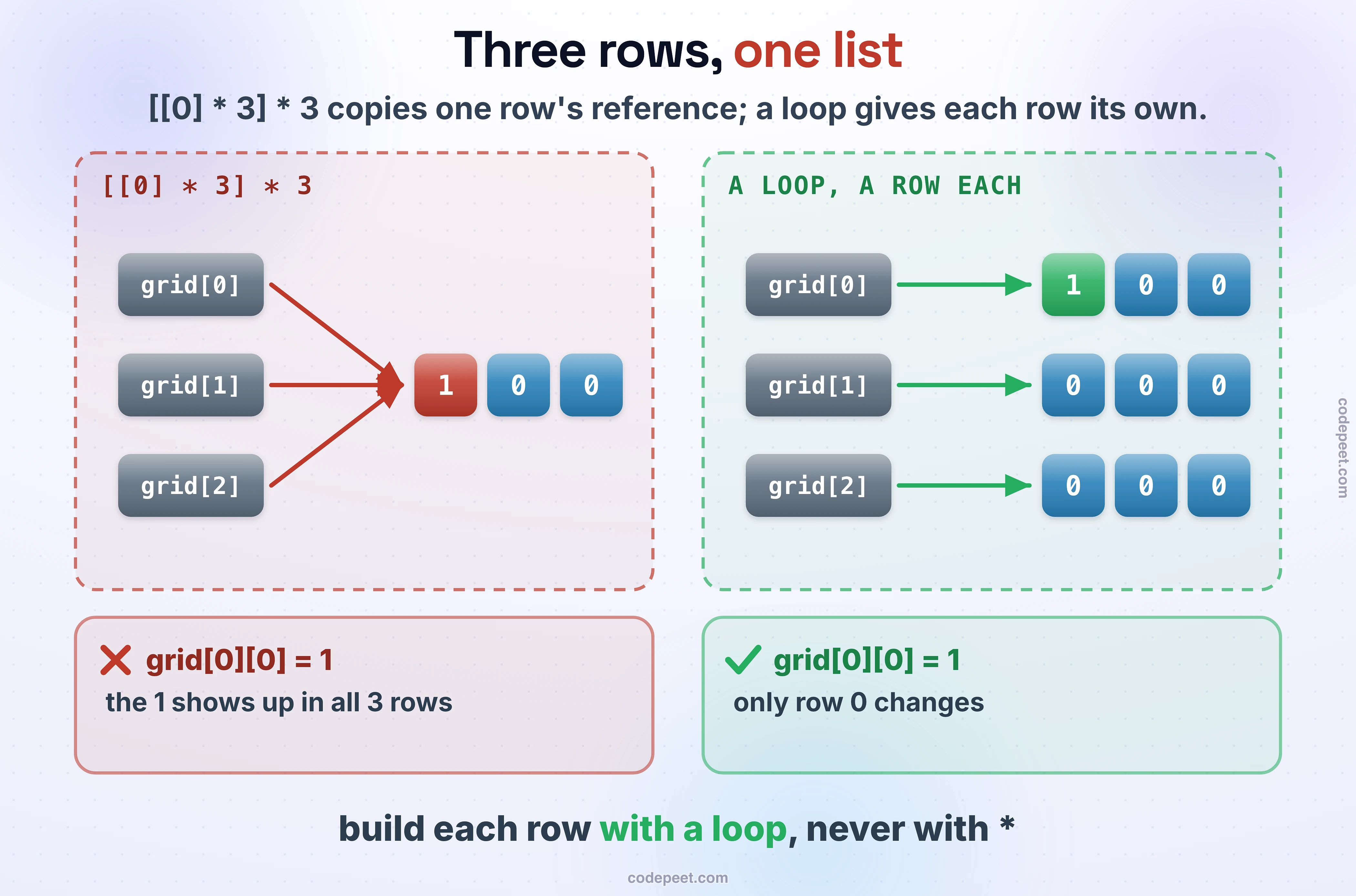
One row, three times.
grid = [[0] * 3] * 3                    # three references to one row
grid[0][0] = 1
print(grid)
It printed [[1, 0, 0], [1, 0, 0], [1, 0, 0]]. [[0] * 3] * 3 copies the reference to one row three times, so writing one cell writes the column:
A default list that remembers.
def collect(x, bucket=[]):              # the default list is made once, when def runs
    bucket.append(x)
    return bucket


print(collect(1), collect(2))
It printed [1, 2] [1, 2]: the default list is made once, when def runs, and every call that doesn't pass one shares it. Default to None and make the list inside.
A heap tie that compares the wrong thing.
import heapq

heap = []
heapq.heappush(heap, (1, {"task": "email"}))
heapq.heappush(heap, (1, {"task": "deploy"}))   # equal priorities: Python compares the dicts
It raised TypeError: '<' not supported between instances of 'dict' and 'dict'. Put a counter after the priority, as in the heapq section.
A list as a dict key.
visited = {}
visited[[0, 1]] = True                  # a list can't be a key
It raised TypeError: unhashable type: 'list'. Use a tuple, visited[(0, 1)]. And a string can't be changed in place either: s[0] = "b" raised TypeError: 'str' object does not support item assignment.
Check yourself
Quiz
1 / 6Multiple choice
-7 // 2 give in Python?Multiple choice
Multiple choice
Multiple choice
grid = [[0] * 2] * 2, then grid[0][1] = 5, then print(grid).Multiple choice
heapq always gives the smallest first. How do you take the largest first?Multiple choice
sortedcontainers. What happens on this course's judge?Practice problems
This section's problems, in Python:
- Reading & Printing Values: read with
sys.stdin.readline. - Linear Search and Check if an Array is Sorted: a list by index.
- Reverse an Array In Place: two indices and a swap, no new list.
- Count Vowels and Consonants and Toggle Case: strings built with
join. - Count Words in a Sentence:
split, then aCounter.
Then Introduction to Recursion, before the patterns.