JavaScript for DSA
A few tools, and the two you write yourself
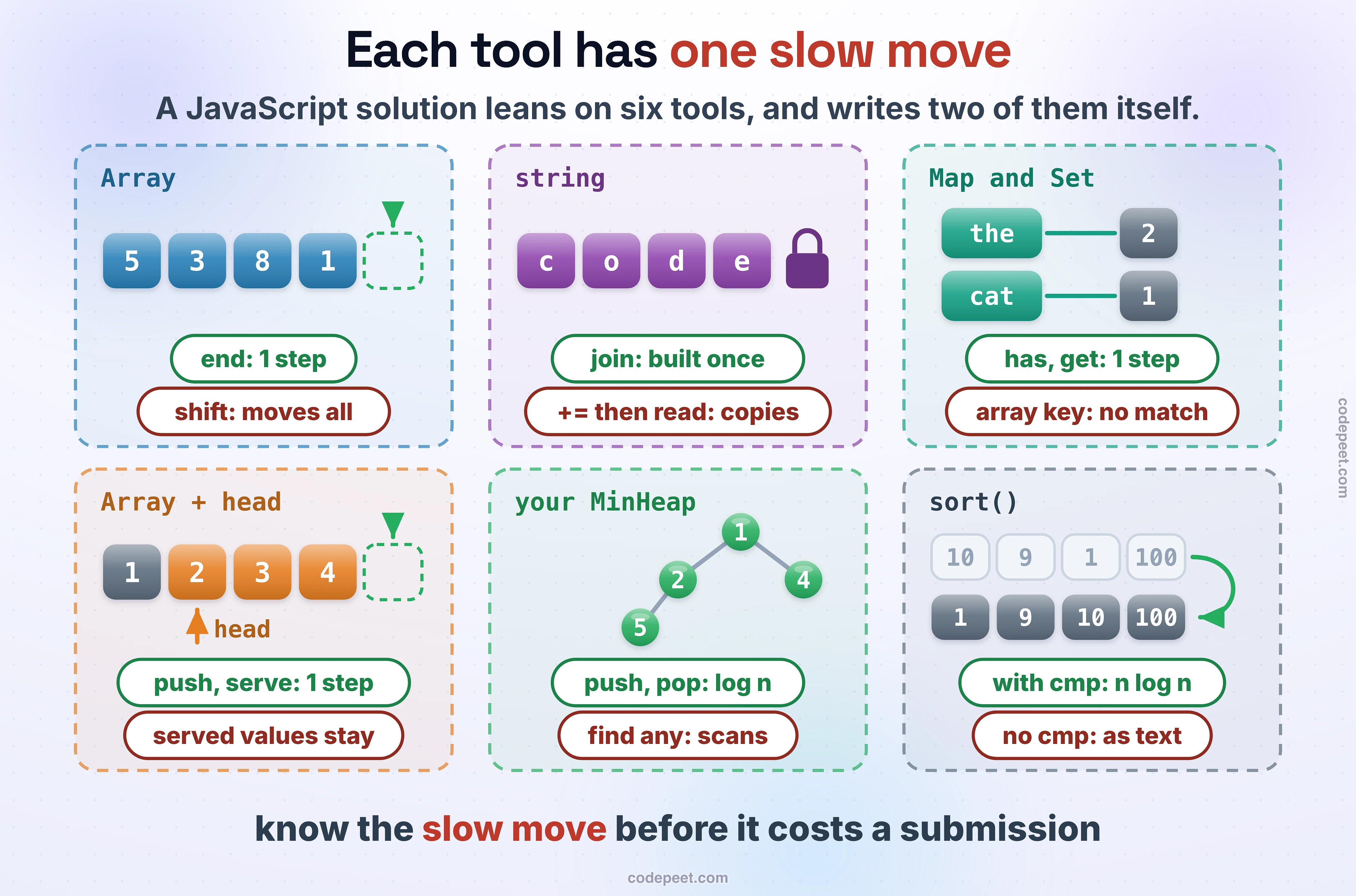
A data-structures solution in JavaScript leans on very little: the Array, the string, Map and Set, and sort. That's the smallest toolkit of the four languages in this course. There's no queue, no deque, no heap and no sorted map, so you build a queue from an array and a heap from a class. Each built-in is still slow at one thing that looks harmless. On our judge, taking the front of an array of 100,000 with shift, one at a time, took 742 ms; reading from a moving head index took 5.0 ms. Checking 10,000 values with includes against an array of 100,000 took 1,470 ms; a Set, 4.0 ms.
This lesson covers each tool's fast moves and its slow one, the queue and the heap you write, then JavaScript's quiet traps: a sort that compares text, numbers that round, the stack, and what the judge runs: Node 18.15.0.
The shape of a solution
A solution is a function: no imports, no class. for...of walks the values of an array, and console.log prints:
function sum(nums) {                       // a solution is a function: no imports, no class
    let total = 0;
    for (const x of nums) total += x;       // for...of gives the values
    return total;
}

const nums = [5, 3, 8];
console.log(sum(nums), nums.length);
Arrays: cheap at the end, slow at the front
An Array is one row of slots: reading by index and push or pop at the end take one step. unshift and shift at the front move every value. Build a grid with a new row for each row:
const nums = [5, 3, 8];
nums.push(1);                               // at the end: O(1)
const last = nums.pop();                    // from the end: O(1)
nums.unshift(9);                            // at the front: every value moves, O(n)
const first = nums.shift();                 // O(n) again, once the array is big
console.log(nums, last, first, nums[1], nums.at(-1));
const grid = Array.from({length: 2}, () => new Array(3).fill(0));   // a new row for each row
grid[0][1] = 7;
console.log(JSON.stringify(grid));
V8, the engine under Node, has a trick for small arrays, so shift looks cheap in small tests and isn't. On our judge it took 3.0 ms to empty an array of 10,000, 742 ms for 100,000 and 4,404 ms for 200,000: twice the values, about 6 times the time.
A queue: an array and a head index
Without a deque, a queue is an array that you never shift. Push at the back, and keep an index to the front that moves forward as values leave:
const queue = [1, 2, 3];
let head = 0;                               // the front is queue[head]; nothing ever shifts
queue.push(4);                              // join at the back
const served = queue[head++];               // leave from the front: O(1)
console.log(served, queue.length - head, queue.slice(head));
Emptying 100,000 values this way took 5.0 ms, against 742 ms with shift. The served values stay in the array until it's thrown away, which is fine for a search that runs once.
Strings: they never change
A string can't change: writing to s[0] is ignored (in strict mode it throws a TypeError), and every change makes a new string. Read with s[i] or at, slice with slice, and turn a letter into a number with charCodeAt. To build a string, collect the pieces in an array and join them once:
const s = "code";
s[0] = "m";                                 // ignored: a string never changes
console.log(s, s[0], s.at(-1), s.slice(1, 3), s.length);
const parts = [];
for (const ch of s) parts.push(ch.toUpperCase());
console.log(parts.join(""));                // one string, built once
console.log(s.charCodeAt(2) - "a".charCodeAt(0), String.fromCharCode(97 + 2));   // letters as numbers
V8 keeps s += "a" cheap by linking the pieces instead of copying them: 100,000 appends took 9.5 ms, close to join's 8.0. But reading from the string while you build it makes V8 copy the pieces into one block first, again and again: the same 100,000 appends with a read after each took 540 ms.
Map and Set: lookups that don't scan
Map maps keys to values and Set holds keys alone; both hash, so get, set, has and delete take one step on average, and both remember the order keys were added. get on a missing key gives undefined, so a count reads count.get(w) ?? 0: ?? replaces only undefined and null. Numbers and strings match by value, but arrays and objects match only themselves: two arrays with the same contents are two different keys, so a pair goes in as a string:
const words = "the cat and the hat".split(" ");
const count = new Map();
for (const w of words) count.set(w, (count.get(w) ?? 0) + 1);   // a missing key gives undefined
console.log(count.get("the"), count.get("dog") ?? 0, count.size);
const seen = new Set(), repeats = [];
for (const w of words) {
    if (seen.has(w)) repeats.push(w);
    seen.add(w);
}
console.log(repeats, seen.has("cat"));
const visited = new Set();
visited.add([0, 1].join(","));              // a pair as a string key, "0,1"
console.log(visited.has("0,1"));
The 10,000 includes checks took 1,470 ms against 4.0 ms for has. A plain object works as a map too, but its keys turn into strings, so 1 and "1" are the same key; Map keeps them apart.
The heap you write
JavaScript has no priority queue, so this course uses one class for every heap, the one from Introduction to Heaps: an array where each parent beats its children, push sifting up and pop sifting down, both O(log n). Its less function decides the order, smallest first unless you pass another:
// A min-heap in an array: the children of i are at 2i + 1 and 2i + 2, its parent at (i - 1) >> 1.
// less(x, y) says x goes above y: smallest on top unless you pass another.
class MinHeap {
    constructor(less = (x, y) => x < y) { this.a = []; this.less = less; }

    push(x) {
        const a = this.a;
        a.push(x);
        let i = a.length - 1;
        while (i > 0 && this.less(a[i], a[(i - 1) >> 1])) {   // sift up while the parent is bigger
            const p = (i - 1) >> 1;
            [a[i], a[p]] = [a[p], a[i]];
            i = p;
        }
    }

    pop() {
        const a = this.a;
        const top = a[0], last = a.pop();
        if (a.length) {
            a[0] = last;                             // the last value takes the root, then sifts down
            let i = 0;
            while (true) {
                const l = 2 * i + 1, r = 2 * i + 2;
                let m = i;
                if (l < a.length && this.less(a[l], a[m])) m = l;
                if (r < a.length && this.less(a[r], a[m])) m = r;   // the smaller child, or the bigger ends up above it
                if (m === i) break;
                [a[i], a[m]] = [a[m], a[i]];
                i = m;
            }
        }
        return top;
    }
}

const heap = new MinHeap();
for (const x of [5, 1, 4, 2]) heap.push(x);
console.log(heap.pop(), heap.a[0]);         // pop the smallest, then peek at the next
const largest = new MinHeap((x, y) => x > y);   // a max-heap: flip the comparison
for (const x of [5, 1, 4, 2]) largest.push(x);
console.log(largest.pop());
Sorting: numbers need a comparator
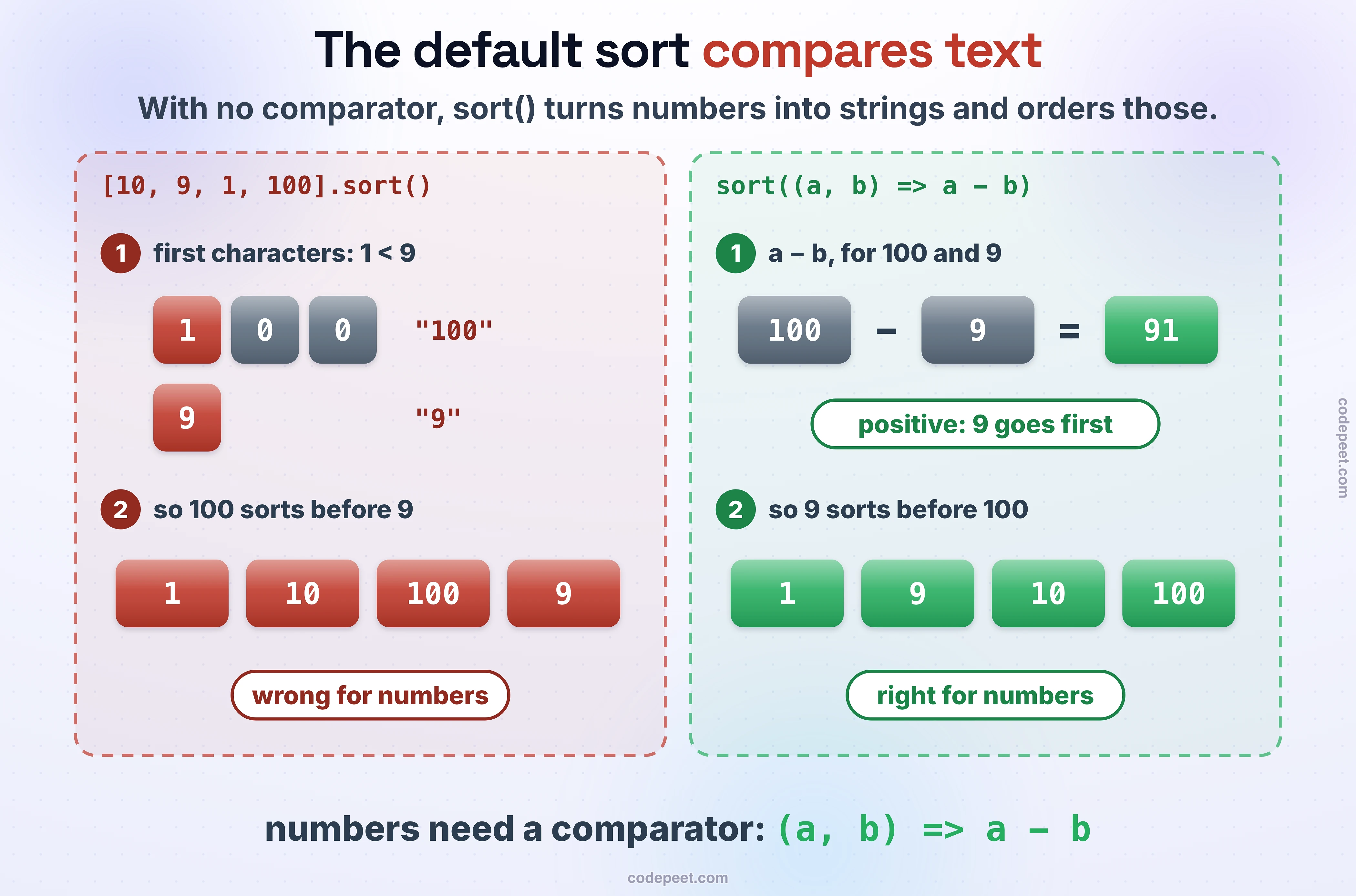
sort() with no comparator turns every value into a string and orders the strings by character code. That's right for strings and wrong for numbers: 10 comes before 9. A comparator returns a negative number when a goes first, a positive one when b does, and 0 for a tie, so (a, b) => a - b puts the smaller number first; cmp below does the same for anything else < can order. The sort is stable, so items that compare equal keep their order, and || chains a second comparison for ties:
const nums = [10, 9, 1, 100];
console.log([...nums].sort());              // no comparator: compared as text
console.log([...nums].sort((a, b) => a - b));   // as numbers, smallest first
console.log(["b", "A", "a", "B"].sort());   // text by character code: right for strings
const cmp = (x, y) => (x < y ? -1 : x > y ? 1 : 0);   // any two values that < can compare
const people = [["ana", 31], ["bo", 25], ["cy", 31]];
people.sort((p, q) => p[1] - q[1]);         // stable: ana stays before cy
console.log(people.map(p => p[0]).join(" "));
people.sort((p, q) => q[1] - p[1] || cmp(p[0], q[0]));   // age high to low, then name
console.log(people.map(p => p[0]).join(" "));
localeCompare, the string comparison much JavaScript code reaches for, follows a language's alphabet instead: on our judge it ordered ["b", "A", "a", "B"] as a A b B, where the character codes give A B a b. A problem that asks for lexicographic order means the codes, so compare strings with < or cmp.
Numbers: one type, and it rounds
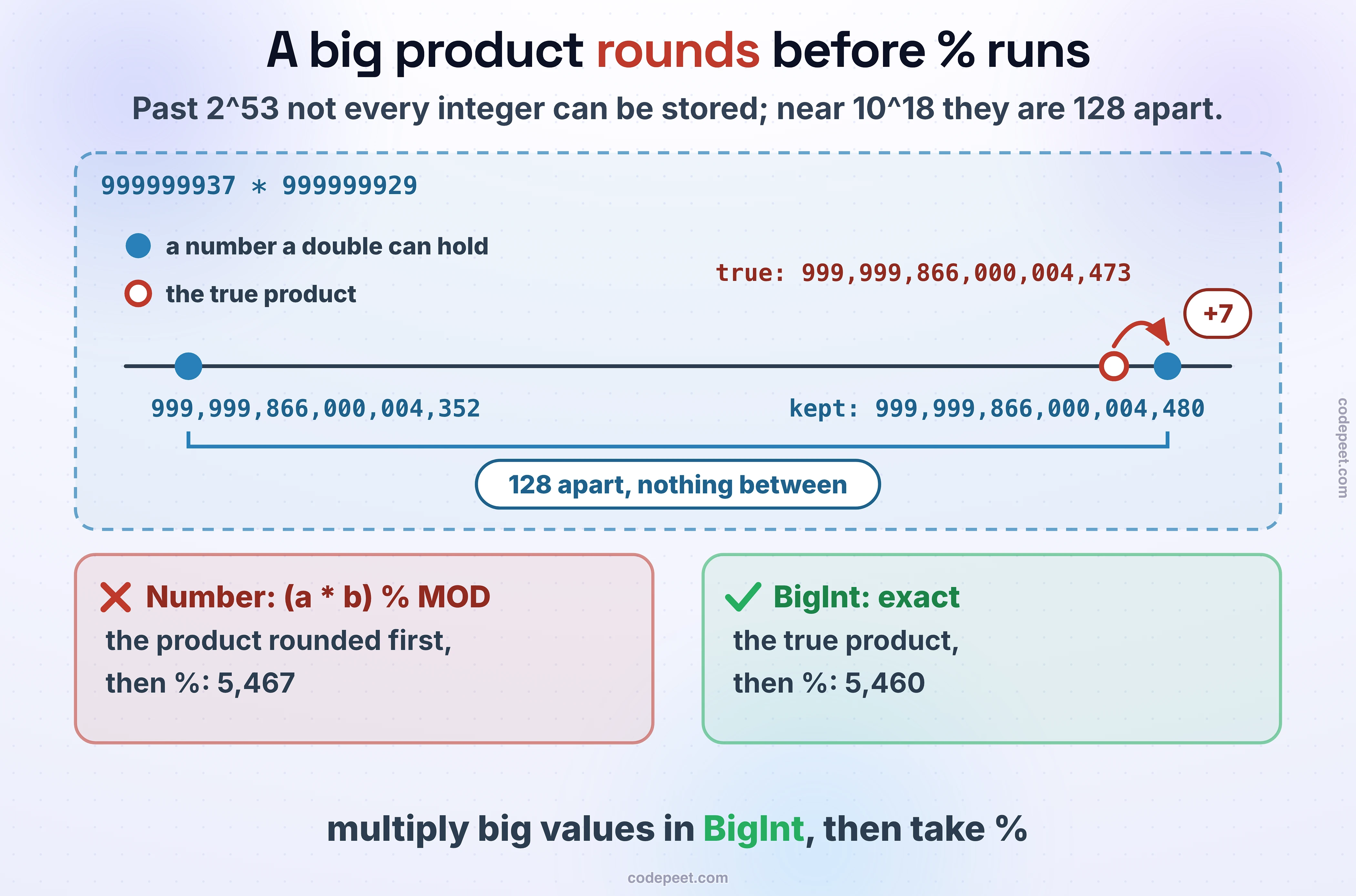
Every JavaScript number is a 64-bit floating-point value. Integers are exact up to 2^53 − 1, 9,007,199,254,740,991; past that, not every integer exists, and the nearest one is used without a word. Division gives fractions, so floor with Math.floor or cut towards zero with Math.trunc. % keeps the sign of the left side. Bitwise operators work on 32-bit integers. BigInt, written with an n, is exact at any size. Compare fractions with a small tolerance, never with ===:
console.log(2 ** 53, 2 ** 53 + 1);          // past 2^53, not every integer exists
console.log(Number.MAX_SAFE_INTEGER, Number.isSafeInteger(2 ** 53));
console.log(7 / 2, Math.floor(-7 / 2), Math.trunc(-7 / 2), -7 % 2);
console.log((2 ** 31) | 0, 1 << 31);        // bitwise operators work on 32 bits
console.log(10n ** 20n);                    // BigInt: exact, written with an n
console.log(0.1 + 0.2 === 0.3, Math.abs(0.1 + 0.2 - 0.3) < 1e-9);
That rounding is what breaks modular arithmetic. Two values near 10^9 multiply to about 10^18, far past 2^53:
const MOD = 1000000007, a = 999999937, b = 999999929;
console.log((a * b) % MOD);                 // the product is past 2^53 and was rounded
console.log(Number((BigInt(a) * BigInt(b)) % BigInt(MOD)));   // BigInt: exact
The true product is 999,999,866,000,004,473. Numbers that large are stored 128 apart, so JavaScript kept the nearest one, 999,999,866,000,004,480: 7 too big, and the remainder came out 7 too big as well, 5,467 instead of 5,460. Multiply in BigInt, then take %.
Recursion: about 11,000 calls deep
On our judge, a recursion 11,328 calls deep finished and one 11,679 deep threw RangeError. Node sets the stack's size when it starts, so a recursion as deep as the input needs an explicit stack once inputs reach the tens of thousands: Depth-First and Breadth-First Search shows the iterative version.
function depth(n) {
    return n === 0 ? 0 : depth(n - 1) + 1;
}

try {
    depth(100000);
} catch (e) {
    console.log(e.constructor.name);        // too deep for Node's stack
}
console.log(depth(5000));
What our judge runs
The judge runs Node 18.15.0, so ??, at, BigInt and classes all work. Most problems call your function directly; a problem that reads its own input can read it all at once:
const lines = require("fs").readFileSync(0, "utf8").split("\n");   // all of the input at once
const n = Number(lines[0]);
let total = 0;
for (let i = 1; i <= n; i++) total += Number(lines[i]);
console.log(total);
Reading 200,000 lines took 40 ms with readFileSync and 71 ms line by line with readline.
Pick the structure for the job
Below, each job is a mix of operations repeated 100,000 times. Pick the JavaScript structure you'd use, built-in or your own; each operation's cost appears with the total work for the whole job, and every structure you try keeps its verdict, so you can compare them.
Bugs that cost a submission
Sorting numbers without a comparator.
const scores = [100, 25, 9];
console.log(scores.sort());                 // "100" < "25" < "9", as text
It printed [ 100, 25, 9 ], unchanged: as text, "100" comes before "25", which comes before "9". Pass (a, b) => a - b.
A grid filled with one row.
const grid = new Array(3).fill(new Array(3).fill(0));   // one row array, put in three places
grid[0][0] = 1;
console.log(JSON.stringify(grid));
It printed [[1,0,0],[1,0,0],[1,0,0]]: fill put the same array in all three places, so one write shows in every row. Build rows with Array.from({length: 3}, () => new Array(3).fill(0)).
An array as a Set key.
const seen = new Set();
seen.add([0, 1]);
console.log(seen.has([0, 1]));              // a new array: a different key
It printed false: the second [0, 1] is a new array, a different key. Store "0,1".
A stored 0 read as missing.
const seen = new Map([[7, 0]]);             // 7 was seen at index 0
if (seen.get(7)) console.log("found");
else console.log("missing");                // 0 counts as false
It printed missing: the stored index is 0, and if treats 0 as false. This is how Two Sum fails when the match sits at index 0. Ask seen.has(7) instead.
for...in over an array.
const nums = [5, 6];
for (const i in nums) console.log(i + 1);   // for...in gives the indexes as strings
It printed 01 and 11: for...in gives the indexes as strings, so + 1 joins text. Use for...of for values, or a counted for loop for indexes. And compare with ===: "0" == 0 is true.
Check yourself
Quiz
1 / 6Multiple choice
[10, 9, 1].sort() return?Multiple choice
Multiple choice
const seen = new Set([[1, 2]]); What does seen.has([1, 2]) give?Multiple choice
(a * b) % 1000000007 be wrong when a and b are near 10^9?Multiple choice
Math.trunc(-7 / 2) give?Multiple choice
Practice problems
This section's problems, in JavaScript:
- Reading & Printing Values: read the whole input with
readFileSync. - Linear Search and Check if an Array is Sorted: an array by index.
- Reverse an Array In Place: two indices and a swap.
- Count Vowels and Consonants and Toggle Case: strings built with
join. - Count Words in a Sentence:
split, then aMap.
Then Introduction to Recursion, before the patterns.