Variable Types & Storage
Description
Write a program that demonstrates how different data types in C store values in memory. Your program should:
- Declare variables of each fundamental type:
int,char,float, anddouble. - Assign values to each variable.
- Print each variable's value using the correct format specifier.
- Print the size in bytes of each data type using the
sizeof()operator.
This problem teaches the foundations of how computers represent and store different kinds of data — whole numbers, single characters, and decimal numbers — and why choosing the right data type matters for both correctness and memory efficiency.
In C, every variable must be declared with a specific type before it can be used. The type determines:
- How many bytes of memory the variable occupies.
- What range of values can be stored.
- How the bits are interpreted (as an integer, a floating-point number, or a character code).
Examples
Example 1
Input:
No input required — values are hardcoded in the program.
int age = 25;
char grade = 'A';
float height = 5.9;
double pi = 3.14159265358979;
Output:
Age: 25
Grade: A
Height: 5.900000
Pi: 3.141593

Size of int: 4 bytes
Size of char: 1 byte
Size of float: 4 bytes
Size of double: 8 bytes
Explanation: Each variable is printed with its corresponding format specifier: %d for int, %c for char, %f for float, and %lf for double. The sizeof() operator reveals how many bytes each type occupies in memory. Notice that float prints 6 decimal places by default (5.900000), and double also prints 6 digits but stores more precision internally (up to ~15 significant digits versus float's ~7).
Example 2
Input:
int big_number = 2147483647;    // Maximum int value
int overflow = 2147483648;      // Attempt to exceed maximum
Output:
big_number: 2147483647
overflow: -2147483648
Explanation: The maximum value a 32-bit signed integer can hold is 2,147,483,647. When we try to store 2,147,483,648 (one more than the max), the value wraps around to the most negative integer: -2,147,483,648. This is called integer overflow and happens because the binary representation cycles back to the negative range when the highest bit flips. Understanding data type ranges prevents subtle bugs where numbers silently wrap to unexpected values.
Example 3
Input:
char letter = 'A';
int ascii_value = letter;
Output:
Character: A
ASCII value: 65
Explanation: In C, a char is stored as a small integer representing the ASCII code of the character. The character 'A' has ASCII value 65. By assigning a char to an int, we see the underlying numeric representation. This dual nature of char — both a character and a number — is fundamental to how C handles text data.
Constraints
intsize: typically 4 bytes (platform-dependent), range: -2,147,483,648 to 2,147,483,647charsize: 1 byte, range: -128 to 127 (signed) or 0 to 255 (unsigned)floatsize: 4 bytes, approximate range: 3.4×10⁻³⁸ to 3.4×10³⁸, precision: ~7 significant digitsdoublesize: 8 bytes, approximate range: 1.7×10⁻³⁰⁸ to 1.7×10³⁰⁸, precision: ~15 significant digitsvoidrepresents an empty type — used for functions that return nothing- Sizes may vary across different compilers and architectures
- C is statically typed — variable type cannot change after declaration
Editorial
Brute Force
Intuition
The most straightforward way to understand data types is to simply declare one variable of each type, assign it a value, and print it. We do not need any clever tricks — just direct, one-by-one declarations and print statements.
Think of computer memory as a warehouse full of boxes of different sizes. An int is a medium box that holds whole numbers. A char is a tiny box that holds a single letter. A float is a medium box with a special divider inside for decimal numbers. A double is a large box with an even finer divider, allowing more precise decimal values.
When you declare int age = 25;, you are telling the warehouse: "Give me a 4-byte box, label it 'age', and put the number 25 inside." The type tells C exactly how large the box should be and how to interpret the bits stored inside.
In this brute force approach, we declare each variable individually, print its value using printf with the correct format specifier, and then separately print each type's size. This is verbose but makes every concept explicit.
Step-by-Step Explanation
Let's trace through the program step by step:
Step 1: Declare int age = 25;. The compiler allocates 4 bytes of memory. The number 25 is stored in binary as 00000000 00000000 00000000 00011001.
Step 2: Declare char grade = 'A';. The compiler allocates 1 byte. The character 'A' is stored as its ASCII code: 01000001 (decimal 65).
Step 3: Declare float height = 5.9;. The compiler allocates 4 bytes. The number 5.9 is stored in IEEE 754 single-precision format. Due to binary representation, 5.9 cannot be stored exactly — it becomes approximately 5.900000095367431640625.
Step 4: Declare double pi = 3.14159265358979;. The compiler allocates 8 bytes. Double-precision format stores this with about 15 significant digits of precision — much more than float's ~7 digits.
Step 5: Print age with printf("%d", age). The format specifier %d tells printf to interpret the 4 bytes as a signed decimal integer. Output: 25.
Step 6: Print grade with printf("%c", grade). The specifier %c tells printf to interpret the 1 byte as an ASCII character. Output: A.
Step 7: Print height with printf("%f", height). The specifier %f prints the float with 6 decimal places by default. Output: 5.900000.
Step 8: Print pi with printf("%lf", pi). The specifier %lf is for double. Output: 3.141593 (6 decimal places by default, but internally 15 digits are stored).
Step 9: Use sizeof(int) to query the memory size. Returns 4 on most modern systems. Print: Size of int: 4 bytes.
Step 10: Similarly print sizeof for char (1), float (4), and double (8).
Memory Allocation for Different Data Types — Watch how the compiler allocates different amounts of memory for each data type and stores values using different binary representations.
Algorithm
- Declare an
intvariable and assign a whole number - Declare a
charvariable and assign a single character - Declare a
floatvariable and assign a decimal number - Declare a
doublevariable and assign a high-precision decimal number - Print each variable using the correct format specifier (
%d,%c,%f,%lf) - Print the size of each type using
sizeof()with format specifier%zu(for size_t)
Code
#include <iostream>
#include <iomanip>
using namespace std;

int main() {
    // Declare variables of each fundamental type
    int age = 25;
    char grade = 'A';
    float height = 5.9f;   // 'f' suffix for float literal
    double pi = 3.14159265358979;

    // Print values
    cout << "Age: " << age << endl;
    cout << "Grade: " << grade << endl;
    cout << "Height: " << fixed << setprecision(6) << height << endl;
    cout << "Pi: " << fixed << setprecision(6) << pi << endl;

    // Print sizes using sizeof
    cout << "\nSize of int: " << sizeof(int) << " bytes" << endl;
    cout << "Size of char: " << sizeof(char) << " byte" << endl;
    cout << "Size of float: " << sizeof(float) << " bytes" << endl;
    cout << "Size of double: " << sizeof(double) << " bytes" << endl;

    return 0;
}
import sys
# Python is dynamically typed — no explicit type declarations needed
age = 25 # int
grade = 'A' # str (Python has no char type)
height = 5.9 # float (Python floats are double-precision)
pi = 3.14159265358979 # float (same precision as C's double)
# Print values
print(f"Age: {age}")
print(f"Grade: {grade}")
print(f"Height: {height:.6f}")
print(f"Pi: {pi:.6f}")
# Print sizes using sys.getsizeof()
# Note: Python object sizes include overhead (type info, reference count)
print(f"\nSize of int: {sys.getsizeof(age)} bytes")
print(f"Size of str: {sys.getsizeof(grade)} bytes")
print(f"Size of float: {sys.getsizeof(height)} bytes")
# Check types dynamically
print(f"\nType of age: {type(age)}")
print(f"Type of grade: {type(grade)}")
print(f"Type of height: {type(height)}")public class Solution {
public static void main(String[] args) {
// Declare variables of each primitive type
int age = 25;
char grade = 'A';
float height = 5.9f; // 'f' suffix for float literal
double pi = 3.14159265358979;
// Print values
System.out.println("Age: " + age);
System.out.println("Grade: " + grade);
System.out.printf("Height: %.6f%n", height);
System.out.printf("Pi: %.6f%n", pi);
// Java has fixed sizes (platform-independent)
System.out.println("\nSize of int: " + Integer.BYTES + " bytes");
System.out.println("Size of char: " + Character.BYTES + " bytes");
System.out.println("Size of float: " + Float.BYTES + " bytes");
System.out.println("Size of double: " + Double.BYTES + " bytes");
// Print ranges
System.out.println("\nInt range: " + Integer.MIN_VALUE + " to " + Integer.MAX_VALUE);
}
}Complexity Analysis
Time Complexity: O(1)
Declaring variables, assigning values, and printing them are all constant-time operations. The sizeof() operator is resolved at compile time, not at runtime — it has zero runtime cost.
Space Complexity: O(1)
We use a fixed number of variables regardless of any input. The total memory is 17 bytes for our four variables (4 + 1 + 4 + 8), plus some overhead for the program itself.
Why This Approach Is Not Efficient
The brute force approach of declaring individual variables one at a time works for learning, but it has educational and practical limitations:
-
No type safety awareness: We declared and printed values without demonstrating what happens when you use the wrong format specifier or the wrong type. A learner might not understand why types matter until they see a failure.
-
No type conversion understanding: Real programs constantly convert between types — an
intgets promoted todoublein arithmetic, achargets treated as a number, or a user tries to store a float in an int. Without covering conversions, the understanding is incomplete. -
No range awareness: We picked safe values that fit easily. But what happens when a number exceeds a type's range? Integer overflow is a critical concept that the brute force approach ignores.
A better approach would demonstrate type interactions — what happens when types mix in expressions, when values overflow, and when implicit conversions change your data.
Better Approach - Type Conversion and Casting
Intuition
In real programs, different data types constantly interact. When you add an int to a float, divide two integers, or assign a double to an int, the compiler performs type conversion — sometimes automatically (implicit), sometimes at your request (explicit casting).
Think of type conversion like pouring liquid between different-sized containers. Pouring from a small cup (int) into a large bucket (double) is safe — nothing spills. But pouring from a bucket (double) into a cup (int) might lose some liquid — the decimal part gets chopped off.
This approach covers three essential concepts:
- Implicit conversion (promotion): The compiler automatically converts a smaller type to a larger one in mixed expressions (int → float → double).
- Explicit casting: You manually request a conversion using
(type)syntax, like(int)3.7→3. - Data loss: When converting from a larger type to a smaller one, precision or magnitude can be lost.
Step-by-Step Explanation
Let's trace through several type conversion scenarios:
Step 1: Declare int a = 5; and int b = 2;. Both are integers occupying 4 bytes each.
Step 2: Compute int result = a / b;. Since both operands are integers, C performs integer division: 5 / 2 = 2 (the decimal part .5 is discarded). result = 2.
Step 3: Compute double precise = (double)a / b;. We explicitly cast a to double. Now the expression is 5.0 / 2, which triggers implicit promotion of b from int to double. Result: 2.5. The cast prevented the truncation.
Step 4: Declare double temperature = 36.7;. Assign to int: int temp_int = (int)temperature;. The explicit cast truncates the decimal: temp_int = 36. The .7 is permanently lost — not rounded, but chopped.
Step 5: Declare char ch = 'A';. Compute int ascii = ch;. The char value 'A' (stored as 65) is implicitly promoted to int. ascii = 65. This works because char is effectively a small integer.
Step 6: Compute char next = ch + 1;. The expression ch + 1 promotes ch to int (65 + 1 = 66), then the result is narrowed back to char. next = 'B' (ASCII 66). This demonstrates that arithmetic works on characters.
Step 7: Declare float f = 3.14f; and double d = f;. The float is promoted to double safely — no precision is lost. d = 3.14 (stored with 15-digit precision, though only ~7 meaningful digits from the float).
Step 8: Declare double big = 1.23456789012345; and float small = (float)big;. The double has 15 significant digits, but float can only store ~7. small ≈ 1.2345679. Digits beyond the 7th are lost.
Type Conversions — Implicit Promotion and Explicit Casting — Watch how values change when converting between types: integer division truncates, casting to double preserves precision, and narrowing conversions lose data.
Algorithm
- Declare two int variables and perform integer division → observe truncation
- Cast one operand to double before dividing → observe floating-point result
- Assign a double to an int using explicit cast → observe truncation of decimal
- Assign a char to an int → observe implicit promotion (ASCII value)
- Perform arithmetic on a char (char + integer) → observe character arithmetic
- Demonstrate float-to-double promotion (safe, no loss)
- Demonstrate double-to-float narrowing (precision loss)
Code
#include <iostream>
#include <iomanip>
using namespace std;

int main() {
    // Integer division vs floating-point division
    int a = 5, b = 2;
    cout << "Integer division: " << a << " / " << b << " = " << (a / b) << endl;
    cout << "Float division: " << a << " / " << b << " = " << ((double)a / b) << endl;

    // Narrowing conversion: double to int
    double temperature = 36.7;
    int temp_int = (int)temperature;
    cout << "\nDouble: " << temperature << " -> Int: " << temp_int << " (truncated)" << endl;

    // Char as integer
    char ch = 'A';
    int ascii = ch;  // Implicit promotion
    cout << "\nChar: " << ch << " -> ASCII: " << ascii << endl;
    cout << "Next char: " << (char)(ch + 1) << " (ASCII " << (ch + 1) << ")" << endl;

    // Float vs double precision
    double precise = 1.23456789012345;
    float less_precise = (float)precise;
    cout << "\nDouble: " << fixed << setprecision(15) << precise << endl;
    cout << "Float:  " << fixed << setprecision(15) << less_precise << endl;

    return 0;
}
# Python handles types differently than C — it's dynamically typed
# and has arbitrary-precision integers
# Integer division vs float division
a = 5
b = 2
print(f"Integer division: {a} // {b} = {a // b}") # Floor division: 2
print(f"Float division: {a} / {b} = {a / b}") # True division: 2.5
# Type conversion (explicit)
temperature = 36.7
temp_int = int(temperature) # Truncates toward zero
print(f"\nFloat: {temperature} -> Int: {temp_int} (truncated)")
# Character and ASCII
ch = 'A'
ascii_val = ord(ch) # ord() gives ASCII value
print(f"\nChar: {ch} -> ASCII: {ascii_val}")
next_ch = chr(ascii_val + 1) # chr() converts back to character
print(f"Next char: {next_ch} (ASCII {ascii_val + 1})")
# Python floats are always double-precision (64-bit)
import struct
f_val = 1.23456789012345
# Pack as float (32-bit) then unpack to see precision loss
f_as_32bit = struct.unpack('f', struct.pack('f', f_val))[0]
print(f"\nDouble precision: {f_val:.15f}")
print(f"Float precision: {f_as_32bit:.15f}")
# Dynamic typing demo
x = 42
print(f"\nType of x: {type(x)}") # <class 'int'>
x = 3.14
print(f"Type of x: {type(x)}") # <class 'float'> — type changed!public class Solution {
public static void main(String[] args) {
// Integer division vs floating-point division
int a = 5, b = 2;
System.out.println("Integer division: " + a + " / " + b + " = " + (a / b));
System.out.println("Float division: " + a + " / " + b + " = " + ((double) a / b));
// Narrowing conversion: double to int (requires explicit cast)
double temperature = 36.7;
int tempInt = (int) temperature;
System.out.println("\nDouble: " + temperature + " -> Int: " + tempInt + " (truncated)");
// Char as integer
char ch = 'A';
int ascii = ch; // Implicit widening
System.out.println("\nChar: " + ch + " -> ASCII: " + ascii);
System.out.println("Next char: " + (char)(ch + 1) + " (ASCII " + (ch + 1) + ")");
// Float vs double precision
double precise = 1.23456789012345;
float lessPrecise = (float) precise; // Explicit narrowing
System.out.printf("\nDouble: %.15f%n", precise);
System.out.printf("Float: %.15f%n", lessPrecise);
// Integer overflow demonstration
int maxInt = Integer.MAX_VALUE;
System.out.println("\nMax int: " + maxInt);
System.out.println("Max int + 1: " + (maxInt + 1)); // Overflow!
}
}Complexity Analysis
Time Complexity: O(1)
All type conversion operations are constant time. Casting between numeric types is a single CPU instruction (or a small constant number of instructions). The total number of operations is fixed and does not depend on any input.
Space Complexity: O(1)
We use a fixed number of variables. Type casting does not allocate additional memory — it reinterprets existing data or creates a single new variable to hold the converted value.
Why This Approach Is Not Efficient
The type conversion approach teaches important concepts, but it still treats data types as individual, disconnected entities. In practice, developers need to understand:
-
Type modifiers: How
short,long,unsigned, andsignedchange a type's size and range. Anunsigned intcan store values up to 4,294,967,295 (twice the positive range ofint), but cannot represent negative numbers. -
Overflow behavior: What actually happens at the bit level when a value exceeds its type's range. Simply knowing that overflow exists is not enough — understanding the binary wrapping mechanism prevents security vulnerabilities.
-
Best practices for type selection: When should you use
intvslong long? When isfloatappropriate vsdouble? These decisions affect both memory usage and program correctness.
An optimal understanding combines type fundamentals, conversion rules, and practical guidelines into a cohesive mental model.
Optimal Approach - Complete Type System with Modifiers and Overflow
Intuition
The complete picture of C's type system involves three layers:
Layer 1 — Base types: int, char, float, double, void. These are the building blocks.
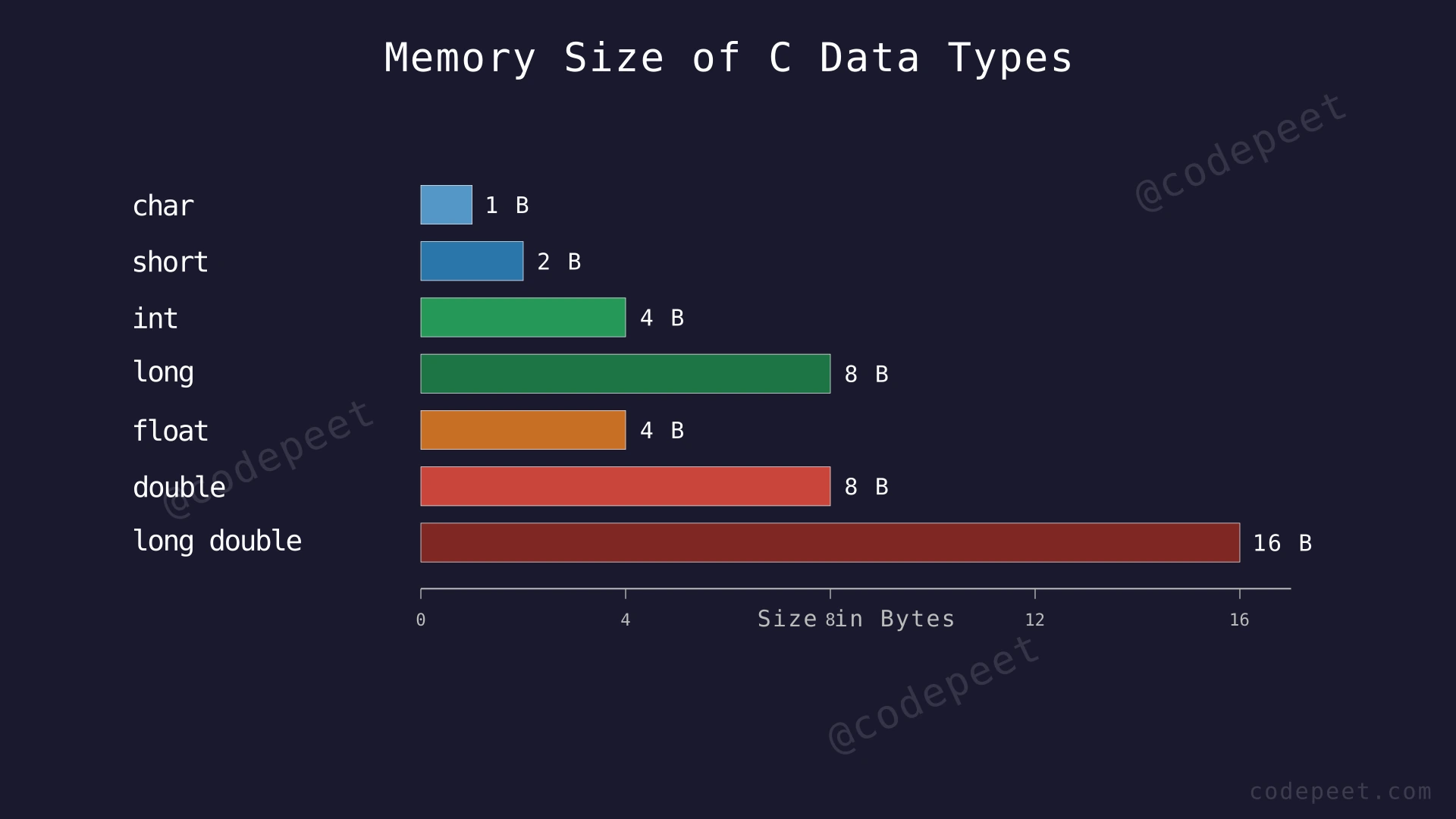
Layer 2 — Type modifiers: short, long, unsigned, signed. These modify the base types to change their size and range. For example, short int uses 2 bytes instead of 4, and unsigned int gives up negative numbers to double the positive range.
Layer 3 — Type behavior: How types interact in expressions (promotion rules), what happens at boundaries (overflow/underflow), and best practices for choosing the right type.
Think of it as a toolbox: the base types are your basic tools (hammer, screwdriver, wrench). The modifiers are like adjustable settings on those tools (bigger hammer, smaller screwdriver). Knowing WHEN to use which combination is what separates a beginner from an expert.
The key insight is that all data in a computer is just bits (0s and 1s). The data type tells the compiler how to interpret those bits. The same 8 bits 11111111 could mean 255 (unsigned char), -1 (signed char), or the character 'ÿ' — it depends entirely on the type you declared.
Step-by-Step Explanation
Let's trace through a complete type system demonstration:
Step 1: Declare type modifier variants: short s = 32767; (2 bytes, max value), long long ll = 9223372036854775807; (8 bytes, max value), unsigned int u = 4294967295; (4 bytes, max unsigned).
Step 2: Demonstrate signed vs unsigned. signed char sc = -1; stores as 11111111 in binary. unsigned char uc = (unsigned char)sc; reinterprets the SAME bits as unsigned: 11111111 = 255. The bits didn't change — only the interpretation did.
Step 3: Demonstrate integer overflow. Start with short s = 32767; (maximum for 16-bit signed). Add 1: s = s + 1;. In binary, 32767 = 0111111111111111. Adding 1 gives 1000000000000000, which in two's complement is -32768. The number wrapped from maximum positive to maximum negative.
Step 4: Demonstrate unsigned overflow. unsigned char uc = 255; (maximum for 8-bit unsigned). Add 1: uc = uc + 1;. In binary, 255 = 11111111. Adding 1 gives 100000000 (9 bits), but we only have 8 bits, so the top bit is dropped: 00000000 = 0. The number wraps from 255 to 0.
Step 5: Show float precision limitation. float f = 16777217; (2^24 + 1). Print f → displays 16777216, not 16777217! Because float has only 23 mantissa bits, it cannot distinguish between 2^24 and 2^24 + 1. This silent precision loss is dangerous.
Step 6: Show double handling the same value correctly. double d = 16777217; Print d → displays 16777217 correctly. Double has 52 mantissa bits, so it can represent integers up to 2^53 exactly.
Step 7: Practical guideline summary: Use int for most integers, long long for large counts/IDs, double for decimals (prefer over float), char for characters, unsigned only when values are inherently non-negative (sizes, counts) and you need the extra range.
Step 8: Print a summary table showing each modifier combination with its size and range.
Integer Overflow and Unsigned Wrapping — Watch what happens at the bit level when a value exceeds a type's maximum: signed integers flip from positive to negative, and unsigned integers wrap around to zero.
Algorithm
- Declare variables using type modifiers:
short,long,long long,unsigned - Demonstrate signed overflow: increment a
shortpast its maximum (32767 → -32768) - Demonstrate unsigned wrapping: increment an
unsigned charpast its maximum (255 → 0) - Demonstrate float precision loss: store 2^24 + 1 in float (silently rounds to 2^24)
- Demonstrate double precision: store the same value in double (stores correctly)
- Print a reference table with size and range for each type + modifier combination
- Apply best-practice guidelines: prefer
intfor integers,doublefor decimals,charfor characters
Code
#include <iostream>
#include <limits>
#include <iomanip>
using namespace std;

int main() {
    // Type modifiers demonstration
    short s = 32767;            // 2 bytes, max signed value
    long long ll = 9223372036854775807LL; // 8 bytes
    unsigned int u = 4294967295U;          // 4 bytes, max unsigned

    cout << "=== Type Sizes and Ranges ===" << endl;
    cout << "short: " << sizeof(short) << " bytes, max: " << SHRT_MAX << endl;
    cout << "int: " << sizeof(int) << " bytes, max: " << INT_MAX << endl;
    cout << "long long: " << sizeof(long long) << " bytes, max: " << LLONG_MAX << endl;
    cout << "unsigned int: " << sizeof(unsigned int) << " bytes, max: " << UINT_MAX << endl;

    // Signed overflow (undefined behavior in C/C++!)
    cout << "\n=== Signed Overflow ===" << endl;
    short before = s;
    s = s + 1;  // UB in theory, wraps in practice
    cout << "short: " << before << " + 1 = " << s << endl;

    // Unsigned wrapping (well-defined)
    cout << "\n=== Unsigned Wrapping ===" << endl;
    unsigned char uc = 255;
    unsigned char after = uc + 1;
    cout << "unsigned char: " << (int)uc << " + 1 = " << (int)after << endl;

    // Float vs double precision
    cout << "\n=== Float vs Double Precision ===" << endl;
    float f = 16777217.0f;
    double d = 16777217.0;
    cout << fixed << setprecision(1);
    cout << "float stores 16777217 as: " << f << endl;
    cout << "double stores 16777217 as: " << d << endl;

    // Signed vs unsigned interpretation
    cout << "\n=== Same Bits, Different Interpretation ===" << endl;
    signed char sc = -1;             // bits: 11111111
    unsigned char uc2 = (unsigned char)sc;  // same bits: 11111111 = 255
    cout << "signed char: " << (int)sc << " -> unsigned: " << (int)uc2 << endl;

    return 0;
}
import sys
import struct
# Python's int has arbitrary precision — no overflow!
print("=== Python Integer: No Overflow ===")
huge = 2 ** 100 # This would overflow ANY C integer type
print(f"2^100 = {huge}")
print(f"Digits: {len(str(huge))}")
# But floats DO have limits (they are C doubles internally)
print("\n=== Float Precision Limits ===")
f1 = 16777217.0
print(f"16777217 as float: {f1}") # Python float is double-precision
# Demonstrate precision loss using struct (simulating C float)
f_packed = struct.pack('f', 16777217.0)
f_unpacked = struct.unpack('f', f_packed)[0]
print(f"As C float (32-bit): {f_unpacked:.1f}") # 16777216.0 — lost 1!
print(f"As C double (64-bit): {16777217.0:.1f}") # 16777217.0 — exact
# Simulating signed vs unsigned interpretation
print("\n=== Signed vs Unsigned Bits ===")
signed_val = -1
# In C, signed char -1 has bits 11111111
# As unsigned: those same bits = 255
unsigned_val = signed_val & 0xFF # Mask to 8 bits
print(f"Signed: {signed_val} -> Unsigned (8-bit): {unsigned_val}")
# Python's dynamic typing
print("\n=== Dynamic Typing ===")
x = 42
print(f"x = {x}, type: {type(x).__name__}")
x = 3.14
print(f"x = {x}, type: {type(x).__name__}")
x = 'hello'
print(f"x = {x}, type: {type(x).__name__}")
# Type checking and conversion
print("\n=== Type Conversion ===")
print(f"int(3.7) = {int(3.7)}") # Truncates: 3
print(f"float(5) = {float(5)}") # Widens: 5.0
print(f"int('42') = {int('42')}") # String to int: 42
print(f"str(100) = '{str(100)}'") # Int to string: '100'public class Solution {
public static void main(String[] args) {
// Java has fixed-size types (platform-independent)
System.out.println("=== Java Type Sizes and Ranges ===");
System.out.println("byte: " + Byte.BYTES + " byte, range: " + Byte.MIN_VALUE + " to " + Byte.MAX_VALUE);
System.out.println("short: " + Short.BYTES + " bytes, range: " + Short.MIN_VALUE + " to " + Short.MAX_VALUE);
System.out.println("int: " + Integer.BYTES + " bytes, range: " + Integer.MIN_VALUE + " to " + Integer.MAX_VALUE);
System.out.println("long: " + Long.BYTES + " bytes, range: " + Long.MIN_VALUE + " to " + Long.MAX_VALUE);
System.out.println("float: " + Float.BYTES + " bytes");
System.out.println("double: " + Double.BYTES + " bytes");
// Signed overflow (wraps silently in Java)
System.out.println("\n=== Signed Overflow ===");
short s = 32767;
s++; // Wraps to -32768
System.out.println("short 32767 + 1 = " + s);
int maxInt = Integer.MAX_VALUE;
System.out.println("int " + maxInt + " + 1 = " + (maxInt + 1));
// Float vs double precision
System.out.println("\n=== Float vs Double Precision ===");
float f = 16777217.0f;
double d = 16777217.0;
System.out.printf("float stores 16777217 as: %.1f%n", f); // 16777216.0
System.out.printf("double stores 16777217 as: %.1f%n", d); // 16777217.0
// Char in Java is unsigned 16-bit (Unicode)
System.out.println("\n=== Java char (16-bit Unicode) ===");
char ch = 'A';
int ascii = ch;
System.out.println("char '" + ch + "' = " + ascii + " (Unicode/ASCII)");
System.out.println("Next: '" + (char)(ch + 1) + "'");
// Autoboxing and wrapper types
System.out.println("\n=== Wrapper Types ===");
Integer boxed = 42; // Autoboxing: int -> Integer
int unboxed = boxed; // Unboxing: Integer -> int
System.out.println("Boxed: " + boxed + ", Unboxed: " + unboxed);
}
}Complexity Analysis
Time Complexity: O(1)
All operations — declarations, assignments, arithmetic, type conversions, sizeof queries, and print statements — execute in constant time. The number of operations is fixed regardless of any input values.
Space Complexity: O(1)
We use a constant number of variables. The total memory depends on the types chosen:
- Using all
charvariables: minimal memory (1 byte each) - Using all
long longvariables: more memory (8 bytes each) - Using all
doublevariables: 8 bytes each
The key takeaway is that type selection directly impacts memory usage. In embedded systems or when storing millions of values, choosing short (2 bytes) over int (4 bytes) saves significant memory. In most modern applications, the difference is negligible and correctness/readability should be prioritized over saving a few bytes.