Java Collections Framework
Description
The Java Collections Framework (JCF) is a unified architecture built into the java.util package that provides ready-to-use data structures and algorithms for storing, retrieving, and manipulating groups of objects. Instead of writing your own linked list, hash table, or sorting routine, you use well-tested, high-performance implementations that follow standard interfaces.
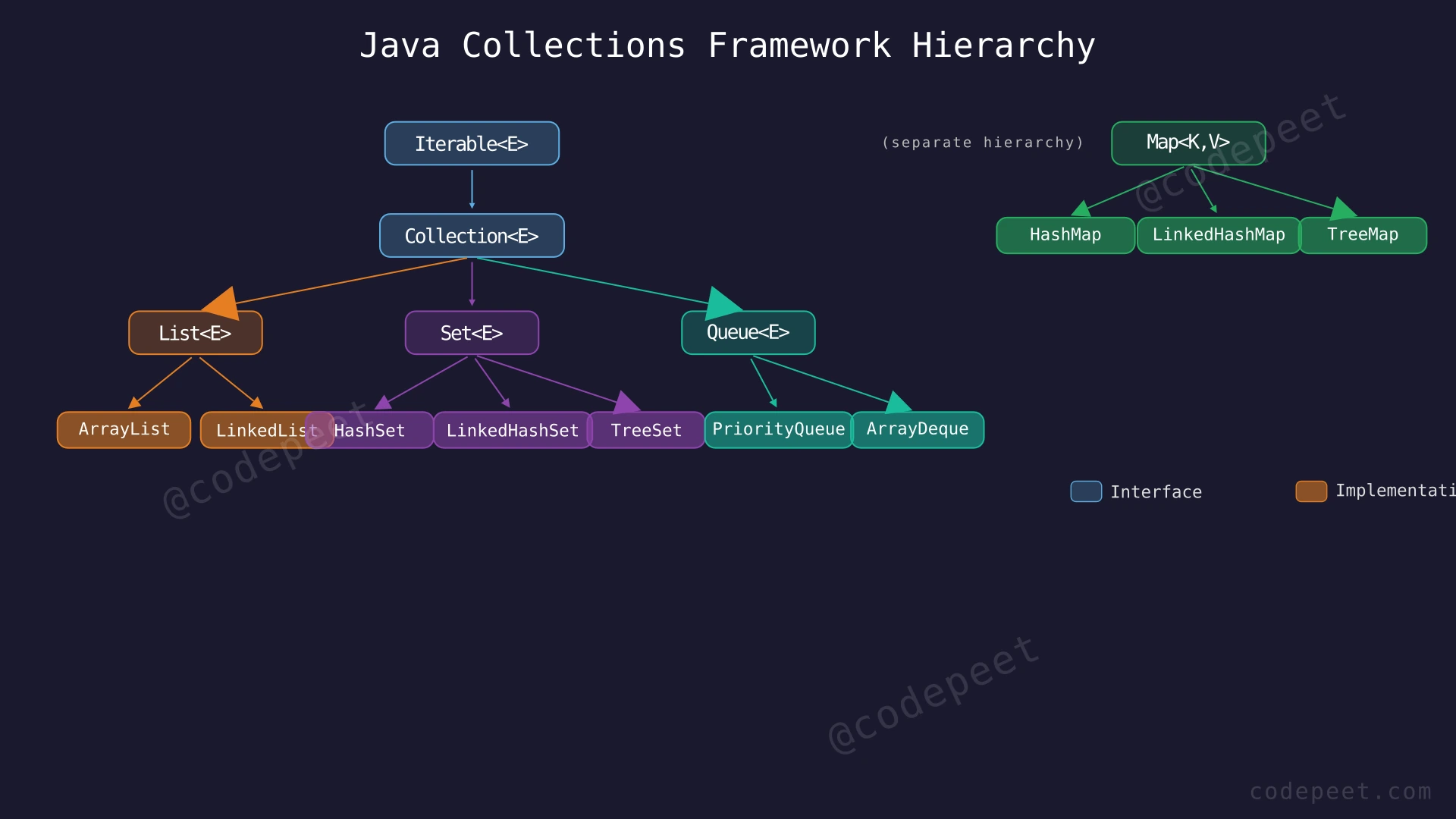
The framework is organized around a hierarchy of interfaces and their concrete implementations:
-
Collection Interface — The root interface for most collections, with three main sub-interfaces:
- List — Ordered collections that allow duplicates (e.g.,
ArrayList,LinkedList) - Set — Collections that forbid duplicates (e.g.,
HashSet,TreeSet) - Queue / Deque — Collections designed for holding elements before processing (e.g.,
PriorityQueue,ArrayDeque)
- List — Ordered collections that allow duplicates (e.g.,
-
Map Interface — Stores key-value pairs where each key is unique (e.g.,
HashMap,TreeMap). Maps are NOT part of theCollectionhierarchy but are a core part of the framework. -
Utility Classes —
Collections(static helper methods like sort, binarySearch, reverse) andArrays(array manipulation utilities).
The key innovation of the JCF is programming to interfaces: you declare variables using interface types (List, Set, Map) and can swap implementations (ArrayList ↔ LinkedList) without changing the rest of your code. This makes programs flexible, maintainable, and easy to optimize.
Examples
Example 1
Using ArrayList (Dynamic Array)
import java.util.*;

public class Example1 {
    public static void main(String[] args) {
        List<String> fruits = new ArrayList<>();
        fruits.add("Apple");
        fruits.add("Banana");
        fruits.add("Cherry");
        fruits.add("Banana"); // Duplicates allowed

        System.out.println(fruits);       // [Apple, Banana, Cherry, Banana]
        System.out.println(fruits.get(1)); // Banana (index-based access)
        System.out.println(fruits.size()); // 4
    }
}
Output: [Apple, Banana, Cherry, Banana]
Explanation: ArrayList is the most commonly used List implementation. It stores elements in a resizable internal array, providing O(1) random access via get(index) and amortized O(1) add() at the end. Duplicates are allowed, and insertion order is preserved. Notice the variable is declared as List<String> (interface type) but instantiated as ArrayList — this is the "program to interfaces" principle.
Example 2
Using HashMap (Key-Value Store)
import java.util.*;

public class Example2 {
    public static void main(String[] args) {
        Map<String, Integer> scores = new HashMap<>();
        scores.put("Alice", 95);
        scores.put("Bob", 87);
        scores.put("Charlie", 92);

        System.out.println(scores.get("Bob")); // 87
        System.out.println(scores.containsKey("Alice")); // true
        System.out.println(scores.size()); // 3

        // Iterate over entries
        for (Map.Entry<String, Integer> entry : scores.entrySet()) {
            System.out.println(entry.getKey() + ": " + entry.getValue());
        }
    }
}
Output: 87, true, 3, followed by all entries (in no guaranteed order)
Explanation: HashMap stores key-value pairs using a hash table internally. It provides O(1) average-case put, get, and containsKey operations. Keys must be unique — inserting a duplicate key overwrites the old value. Unlike TreeMap, HashMap does NOT guarantee any particular iteration order.
Example 3
Using HashSet (Unique Elements) and Collections Utility
import java.util.*;

public class Example3 {
    public static void main(String[] args) {
        // HashSet - no duplicates
        Set<Integer> nums = new HashSet<>(Arrays.asList(3, 1, 4, 1, 5, 9, 2, 6, 5));
        System.out.println(nums); // [1, 2, 3, 4, 5, 6, 9] (no duplicates, unordered)

        // Collections utility
        List<Integer> list = new ArrayList<>(Arrays.asList(5, 2, 8, 1, 9));
        Collections.sort(list);             // [1, 2, 5, 8, 9]
        int idx = Collections.binarySearch(list, 5); // 2
        Collections.reverse(list);          // [9, 8, 5, 2, 1]
        int maxVal = Collections.max(list); // 9

        System.out.println("Sorted then reversed: " + list);
        System.out.println("Max value: " + maxVal);
    }
}
Output: Set with duplicates removed, sorted then reversed list, max value
Explanation: HashSet automatically eliminates duplicates using hash-based equality checking. The Collections utility class provides static methods like sort (O(n log n) using TimSort), binarySearch (O(log n) on sorted list), reverse (O(n)), and max (O(n)). These algorithms work on any List implementation.
Constraints
When choosing a Java Collection implementation, consider these guidelines:
- Need fast random access by index? → Use
ArrayList(O(1) access) - Need fast insertion/removal in the middle? → Use
LinkedList(O(1) with iterator, but O(n) to find position) - Need unique elements, no order requirement? → Use
HashSet(O(1) add/contains) - Need unique elements in sorted order? → Use
TreeSet(O(log n) operations) - Need unique elements in insertion order? → Use
LinkedHashSet(O(1) operations + insertion order) - Need key-value pairs, fastest lookup? → Use
HashMap(O(1) average) - Need key-value pairs in sorted key order? → Use
TreeMap(O(log n) operations) - Need key-value pairs in insertion order? → Use
LinkedHashMap(O(1) + insertion order) - Need FIFO (First In, First Out)? → Use
ArrayDequeorLinkedListasQueue - Need priority-based ordering? → Use
PriorityQueue(O(log n) add/poll) - Need LIFO (Last In, First Out)? → Use
ArrayDequeas stack (preferred over legacyStackclass)
Common complexity guarantees:
ArrayList.get(i)→ O(1),ArrayList.add()→ Amortized O(1),ArrayList.add(i, e)→ O(n)HashMap.put/get/containsKey→ O(1) average, O(n) worst caseTreeMap.put/get/containsKey→ O(log n) guaranteedHashSet.add/contains/remove→ O(1) averageTreeSet.add/contains/remove→ O(log n) guaranteedPriorityQueue.add/poll→ O(log n),peek→ O(1)Collections.sort→ O(n log n) using TimSort
Editorial
List Implementations
Intuition
The List interface represents an ordered collection where elements are accessed by their integer index (position). Duplicates are allowed, and insertion order is preserved.
Java provides two primary List implementations, each with different performance characteristics:
-
ArrayList— Backed by a resizable array. Fast random access O(1) and fast append O(1) amortized. Slow insertion/removal in the middle O(n) because elements must be shifted. This is the default choice for most situations — just likevectorin C++ orlistin Python. -
LinkedList— Backed by a doubly-linked list. Fast insertion/removal at any position O(1) if you already have an iterator there. But random access is slow O(n) because you must traverse from the head.LinkedListalso implementsDeque, so it can be used as a queue or stack.
Rule of thumb: Use ArrayList unless you specifically need frequent insertions/removals in the middle of the list and already have iterators to those positions. In practice, ArrayList wins 95% of the time due to better cache performance from contiguous memory layout.
Step-by-Step Explanation
Let's trace through common ArrayList operations:
Step 1: Create an empty ArrayList.
List<Integer> list = new ArrayList<>();- Internal array: [], Size = 0, Capacity = 10 (default initial capacity)
Step 2: Add element 10.
list.add(10);- Internal array: [10], Size = 1
Step 3: Add element 20.
list.add(20);- Internal array: [10, 20], Size = 2
Step 4: Add element 30.
list.add(30);- Internal array: [10, 20, 30], Size = 3
Step 5: Insert 15 at index 1 (shifts elements right).
list.add(1, 15);- Elements at index 1, 2, 3 shift right by one position.
- Internal array: [10, 15, 20, 30], Size = 4
Step 6: Get element at index 2.
list.get(2)→ returns 20 in O(1)
Step 7: Remove element at index 0.
list.remove(0);- All elements shift left by one position.
- Internal array: [15, 20, 30], Size = 3
Step 8: Final state: [15, 20, 30].
ArrayList — Add, Insert, and Remove Operations — Watch how ArrayList manages its internal array: appending at end is fast, but inserting and removing in the middle requires shifting elements.
Algorithm
Key List Operations:
add(element)— Append to end. O(1) amortized for ArrayList.add(index, element)— Insert at position. O(n) for ArrayList (shifting), O(1) for LinkedList (with iterator).get(index)— Access by position. O(1) for ArrayList, O(n) for LinkedList.set(index, element)— Replace at position. O(1) for ArrayList.remove(index)— Remove by position. O(n) for ArrayList (shifting).remove(Object)— Remove first occurrence by value. O(n) for both.contains(Object)— Search. O(n) for both (linear scan).size()/isEmpty()— O(1) for both.indexOf(Object)— Find position. O(n).subList(from, to)— Create a view of a range. O(1).
Choosing Between ArrayList and LinkedList:
- Default to
ArrayListfor almost everything. - Use
LinkedListonly if you frequently add/remove near the beginning or use it as a Deque. - Never use
LinkedListif you need random access by index.
Code
import java.util.*;

public class ListDemo {
    public static void main(String[] args) {
        // --- ArrayList (default choice) ---
        List<Integer> arrayList = new ArrayList<>();
        arrayList.add(10);                // Append: [10]
        arrayList.add(20);                // Append: [10, 20]
        arrayList.add(30);                // Append: [10, 20, 30]
        arrayList.add(1, 15);             // Insert at index 1: [10, 15, 20, 30]
        System.out.println(arrayList.get(2));  // Random access: 20 (O(1))
        arrayList.remove(0);              // Remove first: [15, 20, 30]
        System.out.println(arrayList);    // [15, 20, 30]

        // --- LinkedList (also implements Deque) ---
        LinkedList<String> linkedList = new LinkedList<>();
        linkedList.add("B");              // [B]
        linkedList.addFirst("A");          // [A, B]
        linkedList.addLast("C");           // [A, B, C]
        System.out.println(linkedList.getFirst()); // A
        linkedList.removeFirst();          // [B, C]
        System.out.println(linkedList);   // [B, C]

        // --- Common operations ---
        List<Integer> nums = new ArrayList<>(Arrays.asList(5, 2, 8, 2, 1));
        System.out.println(nums.contains(8));     // true
        System.out.println(nums.indexOf(2));      // 1 (first occurrence)
        System.out.println(nums.lastIndexOf(2));  // 3 (last occurrence)
        System.out.println(nums.subList(1, 4));   // [2, 8, 2] (view)
    }
}
# Python equivalents of Java List implementations
# --- list (equivalent to Java ArrayList) ---
array_list = []
array_list.append(10) # Append: [10]
array_list.append(20) # Append: [10, 20]
array_list.append(30) # Append: [10, 20, 30]
array_list.insert(1, 15) # Insert at index 1: [10, 15, 20, 30]
print(array_list[2]) # Random access: 20 (O(1))
array_list.pop(0) # Remove first: [15, 20, 30]
print(array_list) # [15, 20, 30]
# --- collections.deque (equivalent to Java LinkedList as Deque) ---
from collections import deque
linked = deque()
linked.append("B") # [B]
linked.appendleft("A") # [A, B]
linked.append("C") # [A, B, C]
print(linked[0]) # A
linked.popleft() # [B, C]
# --- Common operations ---
nums = [5, 2, 8, 2, 1]
print(8 in nums) # True (O(n))
print(nums.index(2)) # 1 (first occurrence)
nums_slice = nums[1:4] # [2, 8, 2] (copy, not view)#include <vector>
#include <list>
#include <deque>
#include <algorithm>
#include <iostream>
using namespace std;
int main() {
// --- vector (equivalent to Java ArrayList) ---
vector<int> vec;
vec.push_back(10); // Append: {10}
vec.push_back(20); // Append: {10, 20}
vec.push_back(30); // Append: {10, 20, 30}
vec.insert(vec.begin() + 1, 15); // Insert at index 1: {10, 15, 20, 30}
cout << vec[2] << endl; // Random access: 20 (O(1))
vec.erase(vec.begin()); // Remove first: {15, 20, 30}
// --- list (equivalent to Java LinkedList) ---
list<string> lst;
lst.push_back("B"); // {B}
lst.push_front("A"); // {A, B}
lst.push_back("C"); // {A, B, C}
cout << lst.front() << endl; // A
lst.pop_front(); // {B, C}
// --- Common operations ---
vector<int> nums = {5, 2, 8, 2, 1};
bool found = find(nums.begin(), nums.end(), 8) != nums.end(); // true
auto it = find(nums.begin(), nums.end(), 2);
int idx = distance(nums.begin(), it); // 1 (first occurrence)
return 0;
}Complexity Analysis
List Implementation Complexities:
| Operation | ArrayList | LinkedList |
|---|---|---|
get(index) | O(1) | O(n) |
add(element) (end) | O(1)* | O(1) |
add(index, element) | O(n) | O(1)** |
remove(index) | O(n) | O(1)** |
contains(Object) | O(n) | O(n) |
size() | O(1) | O(1) |
iterator.next() | O(1) | O(1) |
*Amortized O(1) — when the internal array is full, ArrayList grows by 50% (newCapacity = oldCapacity + oldCapacity/2), copies all elements, then adds. The copy is O(n) but happens rarely enough that the average cost per add is O(1).
**O(1) only if you already have an iterator/reference to the node. Finding the node by index is O(n).
Space Complexity: ArrayList uses O(n) space with up to 50% wasted capacity. LinkedList uses O(n) space with additional overhead per node (~3 references: prev, next, element).
Why ArrayList usually wins: Contiguous memory layout means CPU cache prefetching works efficiently. LinkedList nodes are scattered in heap memory, causing frequent cache misses. For most workloads, ArrayList's O(n) shifting is faster in practice than LinkedList's O(n) traversal due to this cache effect.
Set Implementations
Intuition
The Set interface represents a collection that contains no duplicate elements. Attempting to add a duplicate is silently ignored (the add method returns false). Sets are ideal when you need to track unique items, check membership, or eliminate duplicates.
Java provides three main Set implementations:
-
HashSet— Backed by a hash table (HashMapinternally). Fastest operations: O(1) average for add, remove, and contains. Elements are stored in no particular order — the iteration order can change between runs. This is the default choice when you just need uniqueness and fast lookups. -
LinkedHashSet— ExtendsHashSetwith a linked list that maintains insertion order. Same O(1) performance asHashSet, but iterating always produces elements in the order they were first added. Use when you need both uniqueness and predictable iteration order. -
TreeSet— Backed by a red-black tree (TreeMapinternally). All operations are O(log n). Elements are stored in sorted order (natural ordering or a customComparator). Use when you need elements sorted or need range operations likeheadSet,tailSet,subSet.
Think of it this way:
HashSet= a bag with unique items tossed in randomlyLinkedHashSet= a numbered checklist of unique itemsTreeSet= a sorted shelf of unique items
Step-by-Step Explanation
Let's trace through building a HashSet to find unique elements and detect duplicates:
Input array: [4, 2, 7, 2, 9, 4, 1]
Step 1: Initialize an empty HashSet.
Set<Integer> seen = new HashSet<>();- Set: {}
Step 2: Process element 4.
seen.add(4)→ returnstrue(new element)- Set: {4}
Step 3: Process element 2.
seen.add(2)→ returnstrue(new element)- Set: {4, 2}
Step 4: Process element 7.
seen.add(7)→ returnstrue(new element)- Set: {4, 2, 7}
Step 5: Process element 2 (duplicate!).
seen.add(2)→ returnsfalse(2 already exists)- Set unchanged: {4, 2, 7}
- We detected a duplicate!
Step 6: Process element 9.
seen.add(9)→ returnstrue- Set: {4, 2, 7, 9}
Step 7: Process element 4 (duplicate!).
seen.add(4)→ returnsfalse(4 already exists)- Set unchanged: {4, 2, 7, 9}
- Another duplicate detected.
Step 8: Process element 1.
seen.add(1)→ returnstrue- Set: {4, 2, 7, 9, 1}
Result: 5 unique elements found, 2 duplicates detected.
HashSet — Building a Set and Detecting Duplicates — Watch how a HashSet stores unique elements and silently rejects duplicates, enabling O(1) membership testing.
Algorithm
Key Set Operations:
add(element)— Adds if not already present. Returnstrueif added,falseif duplicate.remove(element)— Removes the element. Returnstrueif found and removed.contains(element)— Checks membership. The most common Set operation.size()/isEmpty()— Count elements.clear()— Remove all elements.iterator()— Iterate over elements (order depends on implementation).
Set Operations (Mathematical):
- Union:
setA.addAll(setB)— A ∪ B - Intersection:
setA.retainAll(setB)— A ∩ B - Difference:
setA.removeAll(setB)— A \ B - Subset check:
setB.containsAll(setA)— A ⊆ B?
TreeSet Bonus Operations (because elements are sorted):
first()/last()— Smallest / largest elementheadSet(e)— All elements < etailSet(e)— All elements ≥ esubSet(from, to)— Elements in range [from, to)floor(e)/ceiling(e)— Greatest ≤ e / Smallest ≥ e
Code
import java.util.*;

public class SetDemo {
    public static void main(String[] args) {
        // --- HashSet (unordered, fastest) ---
        Set<Integer> hashSet = new HashSet<>();
        hashSet.add(5);
        hashSet.add(2);
        hashSet.add(8);
        hashSet.add(2);  // Duplicate - ignored
        System.out.println(hashSet);            // e.g., [2, 5, 8] (order varies)
        System.out.println(hashSet.contains(5)); // true (O(1))

        // --- LinkedHashSet (insertion order preserved) ---
        Set<String> linkedSet = new LinkedHashSet<>();
        linkedSet.add("Banana");
        linkedSet.add("Apple");
        linkedSet.add("Cherry");
        linkedSet.add("Apple");  // Duplicate - ignored
        System.out.println(linkedSet);  // [Banana, Apple, Cherry] (insertion order)

        // --- TreeSet (sorted) ---
        TreeSet<Integer> treeSet = new TreeSet<>(Arrays.asList(5, 2, 8, 1, 9));
        System.out.println(treeSet);         // [1, 2, 5, 8, 9] (sorted)
        System.out.println(treeSet.first()); // 1 (smallest)
        System.out.println(treeSet.last());  // 9 (largest)
        System.out.println(treeSet.headSet(5));    // [1, 2] (elements < 5)
        System.out.println(treeSet.tailSet(5));    // [5, 8, 9] (elements >= 5)
        System.out.println(treeSet.subSet(2, 9));  // [2, 5, 8] (2 <= x < 9)
        System.out.println(treeSet.floor(6));      // 5 (greatest <= 6)
        System.out.println(treeSet.ceiling(6));    // 8 (smallest >= 6)

        // --- Set operations ---
        Set<Integer> a = new HashSet<>(Arrays.asList(1, 2, 3, 4));
        Set<Integer> b = new HashSet<>(Arrays.asList(3, 4, 5, 6));

        Set<Integer> union = new HashSet<>(a);
        union.addAll(b);  // {1, 2, 3, 4, 5, 6}

        Set<Integer> intersection = new HashSet<>(a);
        intersection.retainAll(b);  // {3, 4}

        Set<Integer> difference = new HashSet<>(a);
        difference.removeAll(b);  // {1, 2}

        System.out.println("Union: " + union);
        System.out.println("Intersection: " + intersection);
        System.out.println("Difference: " + difference);
    }
}
# Python equivalents of Java Set implementations
# --- set (equivalent to Java HashSet — unordered, unique) ---
hash_set = {5, 2, 8, 2} # Duplicate removed: {2, 5, 8}
hash_set.add(10)
print(5 in hash_set) # True (O(1))
# --- No direct equivalent to LinkedHashSet ---
# Use dict.fromkeys() to maintain insertion order with uniqueness
linked_set = dict.fromkeys(["Banana", "Apple", "Cherry", "Apple"])
print(list(linked_set.keys())) # ['Banana', 'Apple', 'Cherry']
# --- SortedContainers (equivalent to Java TreeSet) ---
# from sortedcontainers import SortedSet
# tree_set = SortedSet([5, 2, 8, 1, 9]) # Sorted: [1, 2, 5, 8, 9]
# --- Set operations (built-in in Python!) ---
a = {1, 2, 3, 4}
b = {3, 4, 5, 6}
print(a | b) # Union: {1, 2, 3, 4, 5, 6}
print(a & b) # Intersection: {3, 4}
print(a - b) # Difference: {1, 2}
print(a <= b) # Subset check: False#include <set>
#include <unordered_set>
#include <iostream>
#include <vector>
using namespace std;
int main() {
// --- unordered_set (equivalent to Java HashSet) ---
unordered_set<int> hashSet = {5, 2, 8, 2}; // {5, 2, 8}
hashSet.insert(10);
cout << hashSet.count(5) << endl; // 1 (true, O(1))
// --- set (equivalent to Java TreeSet — sorted) ---
set<int> treeSet = {5, 2, 8, 1, 9}; // {1, 2, 5, 8, 9}
cout << *treeSet.begin() << endl; // 1 (smallest)
cout << *treeSet.rbegin() << endl; // 9 (largest)
// Range query: elements >= 2 and < 9
auto lo = treeSet.lower_bound(2);
auto hi = treeSet.lower_bound(9);
for (auto it = lo; it != hi; ++it)
cout << *it << " "; // 2 5 8
cout << endl;
// --- Set operations ---
set<int> a = {1, 2, 3, 4};
set<int> b = {3, 4, 5, 6};
vector<int> uni, inter, diff;
set_union(a.begin(), a.end(), b.begin(), b.end(), back_inserter(uni));
set_intersection(a.begin(), a.end(), b.begin(), b.end(), back_inserter(inter));
set_difference(a.begin(), a.end(), b.begin(), b.end(), back_inserter(diff));
return 0;
}Complexity Analysis
Set Implementation Complexities:
| Operation | HashSet | LinkedHashSet | TreeSet |
|---|---|---|---|
add(e) | O(1) avg | O(1) avg | O(log n) |
remove(e) | O(1) avg | O(1) avg | O(log n) |
contains(e) | O(1) avg | O(1) avg | O(log n) |
| Iteration | O(n) unordered | O(n) insertion order | O(n) sorted order |
first() / last() | N/A | N/A | O(log n) |
headSet / tailSet | N/A | N/A | O(log n) |
Space Complexity: All three use O(n) space. HashSet has hash table overhead (bucket array + entries). LinkedHashSet adds two extra references per entry for the linked list. TreeSet has tree node overhead (left, right, parent, color).
When to use which:
HashSet— Default choice. Fastest operations when you don't care about order.LinkedHashSet— When you need insertion-order iteration (e.g., maintaining a unique history).TreeSet— When you need sorted elements or range queries. The O(log n) cost is worth it forfloor(),ceiling(),subSet()capabilities that hash-based sets cannot provide.
Map Implementations
Intuition
The Map interface stores data as key-value pairs where each key is unique. If you insert a pair with a key that already exists, the old value is replaced. Maps are the most versatile data structure in the JCF — used for caching, counting, grouping, indexing, and much more.
Java provides three primary Map implementations:
-
HashMap— The workhorse. Uses a hash table internally. O(1) average forput,get,containsKey, andremove. No guaranteed iteration order. This is your default choice. -
LinkedHashMap— ExtendsHashMapto maintain insertion order (or optionally access order for LRU cache implementations). Same O(1) performance asHashMap. -
TreeMap— Uses a red-black tree. O(log n) for all operations. Keys are stored in sorted order. Provides additional navigation methods likefirstKey(),lastKey(),floorKey(),ceilingKey(), and range views.
Key insight: Map is NOT part of the Collection interface hierarchy, but it's tightly integrated with the framework. You can get collection views via keySet(), values(), and entrySet().
A common pattern is map.getOrDefault(key, defaultValue) which returns the value for the key if present, or a default value if not — avoiding null checks. Another powerful method is map.merge(key, value, remappingFunction) for combining old and new values.
Step-by-Step Explanation
Let's trace building a word frequency counter using HashMap:
Input: words = ["cat", "dog", "cat", "bird", "dog", "cat"]
Step 1: Initialize an empty HashMap.
Map<String, Integer> freq = new HashMap<>();- Map: {}
Step 2: Process "cat".
- Not in map →
freq.put("cat", 1) - Map: {"cat": 1}
Step 3: Process "dog".
- Not in map →
freq.put("dog", 1) - Map: {"cat": 1, "dog": 1}
Step 4: Process "cat" (second occurrence).
- Already in map with value 1 →
freq.put("cat", 2) - Map: {"cat": 2, "dog": 1}
Step 5: Process "bird".
- Not in map →
freq.put("bird", 1) - Map: {"cat": 2, "dog": 1, "bird": 1}
Step 6: Process "dog" (second occurrence).
- Already in map with value 1 →
freq.put("dog", 2) - Map: {"cat": 2, "dog": 2, "bird": 1}
Step 7: Process "cat" (third occurrence).
- Already in map with value 2 →
freq.put("cat", 3) - Map: {"cat": 3, "dog": 2, "bird": 1}
Result: cat=3, dog=2, bird=1.
HashMap — Building a Word Frequency Counter — Watch how HashMap stores word counts: new words get inserted with count 1, while repeated words have their count incremented.
Algorithm
Key Map Operations:
put(key, value)— Insert or update a key-value pair.get(key)— Retrieve value by key. Returnsnullif not found.getOrDefault(key, default)— Retrieve value or return default if absent.containsKey(key)/containsValue(value)— Check existence.remove(key)— Remove entry by key.size()/isEmpty()— Count entries.keySet()— Get all keys as aSet.values()— Get all values as aCollection.entrySet()— Get all key-value pairs as aSet<Map.Entry>.putIfAbsent(key, value)— Only insert if key is not already present.merge(key, value, remappingFunction)— Combine old and new values.computeIfAbsent(key, function)— Compute value lazily if key absent.
TreeMap Bonus Operations (sorted keys):
firstKey()/lastKey()— Smallest / largest keyfloorKey(k)/ceilingKey(k)— Greatest key ≤ k / Smallest key ≥ kheadMap(k)/tailMap(k)/subMap(from, to)— Range views
Code
import java.util.*;

public class MapDemo {
    public static void main(String[] args) {
        // --- HashMap (default choice) ---
        Map<String, Integer> hashMap = new HashMap<>();
        hashMap.put("Alice", 95);
        hashMap.put("Bob", 87);
        hashMap.put("Charlie", 92);
        System.out.println(hashMap.get("Bob"));       // 87
        System.out.println(hashMap.containsKey("Alice")); // true
        System.out.println(hashMap.getOrDefault("Dave", 0)); // 0

        // Frequency counting pattern
        String[] words = {"cat", "dog", "cat", "bird", "dog", "cat"};
        Map<String, Integer> freq = new HashMap<>();
        for (String w : words) {
            freq.merge(w, 1, Integer::sum); // Elegant counting
        }
        System.out.println(freq); // {cat=3, bird=1, dog=2}

        // --- LinkedHashMap (insertion order) ---
        Map<String, Integer> linkedMap = new LinkedHashMap<>();
        linkedMap.put("Banana", 2);
        linkedMap.put("Apple", 5);
        linkedMap.put("Cherry", 3);
        System.out.println(linkedMap); // {Banana=2, Apple=5, Cherry=3}

        // --- TreeMap (sorted by key) ---
        TreeMap<String, Integer> treeMap = new TreeMap<>();
        treeMap.put("Charlie", 92);
        treeMap.put("Alice", 95);
        treeMap.put("Bob", 87);
        System.out.println(treeMap);           // {Alice=95, Bob=87, Charlie=92}
        System.out.println(treeMap.firstKey()); // Alice
        System.out.println(treeMap.lastKey());  // Charlie
        System.out.println(treeMap.floorKey("Bob")); // Bob
        System.out.println(treeMap.headMap("Charlie")); // {Alice=95, Bob=87}

        // --- Iterating over Map ---
        for (Map.Entry<String, Integer> entry : hashMap.entrySet()) {
            System.out.println(entry.getKey() + " -> " + entry.getValue());
        }

        // Using forEach with lambda
        hashMap.forEach((key, value) -> System.out.println(key + ": " + value));
    }
}
# Python equivalents of Java Map implementations
# --- dict (equivalent to Java HashMap + LinkedHashMap) ---
# Python dicts maintain insertion order since Python 3.7
hash_map = {}
hash_map["Alice"] = 95
hash_map["Bob"] = 87
hash_map["Charlie"] = 92
print(hash_map.get("Bob")) # 87
print("Alice" in hash_map) # True
print(hash_map.get("Dave", 0)) # 0 (default)
# Frequency counting (using Counter — cleanest)
from collections import Counter
words = ["cat", "dog", "cat", "bird", "dog", "cat"]
freq = Counter(words)
print(freq) # Counter({'cat': 3, 'dog': 2, 'bird': 1})
# Frequency counting (manual — like Java)
freq2 = {}
for w in words:
freq2[w] = freq2.get(w, 0) + 1
# --- SortedDict (equivalent to Java TreeMap) ---
# from sortedcontainers import SortedDict
# tree_map = SortedDict({"Charlie": 92, "Alice": 95, "Bob": 87})
# --- Iterating over dict ---
for key, value in hash_map.items():
print(f"{key} -> {value}")#include <map>
#include <unordered_map>
#include <string>
#include <iostream>
#include <vector>
using namespace std;
int main() {
// --- unordered_map (equivalent to Java HashMap) ---
unordered_map<string, int> hashMap;
hashMap["Alice"] = 95;
hashMap["Bob"] = 87;
hashMap["Charlie"] = 92;
cout << hashMap["Bob"] << endl; // 87
cout << (hashMap.count("Alice") > 0) << endl; // 1 (true)
// Frequency counting
vector<string> words = {"cat", "dog", "cat", "bird", "dog", "cat"};
unordered_map<string, int> freq;
for (const auto& w : words) {
freq[w]++; // Auto-initializes to 0, then increments
}
// freq: {cat:3, dog:2, bird:1}
// --- map (equivalent to Java TreeMap — sorted by key) ---
map<string, int> treeMap;
treeMap["Charlie"] = 92;
treeMap["Alice"] = 95;
treeMap["Bob"] = 87;
cout << treeMap.begin()->first << endl; // Alice (smallest)
cout << treeMap.rbegin()->first << endl; // Charlie (largest)
// Iterating (sorted order)
for (const auto& [key, val] : treeMap) {
cout << key << " -> " << val << endl;
}
return 0;
}Complexity Analysis
Map Implementation Complexities:
| Operation | HashMap | LinkedHashMap | TreeMap |
|---|---|---|---|
put(k, v) | O(1) avg | O(1) avg | O(log n) |
get(k) | O(1) avg | O(1) avg | O(log n) |
containsKey(k) | O(1) avg | O(1) avg | O(log n) |
remove(k) | O(1) avg | O(1) avg | O(log n) |
containsValue(v) | O(n) | O(n) | O(n) |
| Iteration order | No guarantee | Insertion order | Sorted by key |
firstKey()/lastKey() | N/A | N/A | O(log n) |
| Range views | N/A | N/A | O(log n) |
Space Complexity: O(n) for all three. HashMap uses a bucket array (default initial capacity 16, load factor 0.75). When the load factor threshold is exceeded, the table rehashes — doubles in size and redistributes entries.
HashMap internals (Java 8+): Each bucket starts as a linked list for collision handling. When a bucket exceeds 8 entries (and total capacity ≥ 64), the bucket converts to a balanced binary tree, improving worst-case lookup from O(n) to O(log n). This treeification is why Java 8 HashMap has O(log n) worst case instead of O(n).
Choosing the right Map:
HashMap— Default for 95% of use cases. Fastest overall.LinkedHashMap— When you need predictable iteration order or LRU cache.TreeMap— When you need sorted keys, range queries, or navigable operations.
Queue and Deque Implementations
Intuition
The Queue interface represents a collection designed for holding elements before processing, typically in FIFO (First-In-First-Out) order. The Deque (Double-Ended Queue) interface extends Queue to support insertion and removal at both ends.
Key implementations:
-
ArrayDeque— A resizable circular array that implements bothQueueandDeque. It is the recommended implementation for both queue and stack use cases. It's faster thanLinkedListfor queue operations and faster than the legacyStackclass for stack operations. -
PriorityQueue— A min-heap by default that always gives you the smallest element first viapoll(). Elements are not stored in sorted order internally — only the heap property is maintained (parent ≤ children). Use for priority-based processing, like Dijkstra's algorithm or processing tasks by urgency. -
LinkedList— Also implementsQueueandDeque, butArrayDequeis preferred for most cases.
Important: Java's PriorityQueue is a min-heap by default (smallest element first). For a max-heap, pass Collections.reverseOrder() or Comparator.reverseOrder() to the constructor.
Modern best practices:
- For stack behavior: Use
ArrayDequewithpush()andpop(). Do NOT use the legacyStackclass. - For queue behavior: Use
ArrayDequewithoffer()andpoll(). - For priority-based processing: Use
PriorityQueue.
Step-by-Step Explanation
Let's trace through PriorityQueue operations to see how a min-heap works:
Step 1: Create an empty PriorityQueue.
Queue<Integer> pq = new PriorityQueue<>();- Heap: []
Step 2: Add 30.
- Heap: [30]
- Min element: 30
Step 3: Add 10.
- Insert 10 at end, then "bubble up" because 10 < 30.
- After heapify: [10, 30]
- Min element: 10
Step 4: Add 50.
- Insert 50 at end. 50 > 10 (parent), so no bubbling needed.
- Heap: [10, 30, 50]
- Min element: 10
Step 5: Add 20.
- Insert 20 at end (position 3). Parent is 30 (position 1). 20 < 30, so bubble up.
- After heapify: [10, 20, 50, 30]
- Min element: 10
Step 6: Poll (remove min) → returns 10.
- Move last element (30) to root. Sink down: 30 > 20 (left child), so swap.
- After heapify: [20, 30, 50]
- New min: 20
Step 7: Peek → returns 20 (without removing).
- Heap unchanged: [20, 30, 50]
Step 8: Poll → returns 20.
- Heap: [30, 50]
- New min: 30
PriorityQueue (Min-Heap) — Insert and Poll Operations — Watch how a min-heap maintains the smallest element at the top through bubble-up on insert and sink-down on removal.
Algorithm
Queue and Deque Operations:
| Operation | Description | Throws Exception | Returns Special Value |
|---|---|---|---|
| Insert | Add element | add(e) | offer(e) → returns false |
| Remove | Remove head | remove() | poll() → returns null |
| Examine | Peek at head | element() | peek() → returns null |
Deque-specific (both ends):
offerFirst(e)/offerLast(e)— Add to front/backpollFirst()/pollLast()— Remove from front/backpeekFirst()/peekLast()— Examine front/backpush(e)/pop()— Stack operations (front end)
PriorityQueue-specific:
- Always dequeues the minimum element (by natural order or Comparator)
add(e)/offer(e)— O(log n) insert with bubble-uppoll()— O(log n) remove-min with sink-downpeek()— O(1) view minimum without removing
Common Use Cases:
- ArrayDeque as Queue: BFS traversal, task scheduling
- ArrayDeque as Stack: DFS, parenthesis matching, backtracking
- PriorityQueue: Dijkstra's algorithm, K-th smallest/largest, median finding, merge K sorted lists
Code
import java.util.*;

public class QueueDemo {
    public static void main(String[] args) {
        // --- ArrayDeque as Queue (FIFO) ---
        Queue<String> queue = new ArrayDeque<>();
        queue.offer("Task A");
        queue.offer("Task B");
        queue.offer("Task C");
        System.out.println(queue.peek());  // Task A (front)
        System.out.println(queue.poll());  // Task A (removed)
        System.out.println(queue.poll());  // Task B (removed)
        System.out.println(queue);         // [Task C]

        // --- ArrayDeque as Stack (LIFO) ---
        Deque<Integer> stack = new ArrayDeque<>();
        stack.push(10);
        stack.push(20);
        stack.push(30);
        System.out.println(stack.peek());  // 30 (top)
        System.out.println(stack.pop());   // 30 (removed)
        System.out.println(stack.pop());   // 20 (removed)

        // --- PriorityQueue (Min-Heap) ---
        PriorityQueue<Integer> minHeap = new PriorityQueue<>();
        minHeap.add(30);
        minHeap.add(10);
        minHeap.add(50);
        minHeap.add(20);
        System.out.println(minHeap.peek()); // 10 (minimum)
        System.out.println(minHeap.poll()); // 10 (removed)
        System.out.println(minHeap.poll()); // 20 (next minimum)

        // --- PriorityQueue (Max-Heap) ---
        PriorityQueue<Integer> maxHeap = new PriorityQueue<>(Comparator.reverseOrder());
        maxHeap.add(30);
        maxHeap.add(10);
        maxHeap.add(50);
        System.out.println(maxHeap.peek()); // 50 (maximum)

        // --- PriorityQueue with custom comparator ---
        PriorityQueue<int[]> taskQueue = new PriorityQueue<>(
            (a, b) -> a[0] - b[0]  // Sort by priority (first element)
        );
        taskQueue.offer(new int[]{3, 1}); // priority 3, task 1
        taskQueue.offer(new int[]{1, 2}); // priority 1, task 2
        taskQueue.offer(new int[]{2, 3}); // priority 2, task 3
        System.out.println(Arrays.toString(taskQueue.poll())); // [1, 2] (highest priority)
    }
}
# Python equivalents of Java Queue/Deque/PriorityQueue
# --- deque as Queue (FIFO) ---
from collections import deque
queue = deque()
queue.append("Task A") # enqueue
queue.append("Task B")
queue.append("Task C")
print(queue[0]) # Task A (peek front)
print(queue.popleft()) # Task A (dequeue)
print(queue.popleft()) # Task B
# --- list as Stack (LIFO) or deque ---
stack = []
stack.append(10) # push
stack.append(20)
stack.append(30)
print(stack[-1]) # 30 (peek top)
print(stack.pop()) # 30 (pop)
# --- heapq (Min-Heap — equivalent to Java PriorityQueue) ---
import heapq
min_heap = []
heapq.heappush(min_heap, 30)
heapq.heappush(min_heap, 10)
heapq.heappush(min_heap, 50)
heapq.heappush(min_heap, 20)
print(min_heap[0]) # 10 (peek min)
print(heapq.heappop(min_heap)) # 10 (remove min)
print(heapq.heappop(min_heap)) # 20
# --- Max-Heap (negate values) ---
max_heap = []
heapq.heappush(max_heap, -30)
heapq.heappush(max_heap, -10)
heapq.heappush(max_heap, -50)
print(-max_heap[0]) # 50 (peek max)#include <queue>
#include <stack>
#include <iostream>
#include <functional>
using namespace std;
int main() {
// --- queue (FIFO — equivalent to Java ArrayDeque as Queue) ---
queue<string> q;
q.push("Task A");
q.push("Task B");
q.push("Task C");
cout << q.front() << endl; // Task A
q.pop(); // Remove Task A
cout << q.front() << endl; // Task B
// --- stack (LIFO) ---
stack<int> st;
st.push(10);
st.push(20);
st.push(30);
cout << st.top() << endl; // 30
st.pop(); // Remove 30
cout << st.top() << endl; // 20
// --- priority_queue (Max-Heap by default in C++) ---
priority_queue<int> maxPQ;
maxPQ.push(30);
maxPQ.push(10);
maxPQ.push(50);
maxPQ.push(20);
cout << maxPQ.top() << endl; // 50 (max)
maxPQ.pop(); // Remove 50
// --- Min-Heap ---
priority_queue<int, vector<int>, greater<int>> minPQ;
minPQ.push(30);
minPQ.push(10);
minPQ.push(50);
cout << minPQ.top() << endl; // 10 (min)
return 0;
}Complexity Analysis
Queue/Deque Implementation Complexities:
| Operation | ArrayDeque | PriorityQueue | LinkedList |
|---|---|---|---|
offer / add | O(1)* | O(log n) | O(1) |
poll / remove | O(1) | O(log n) | O(1) |
peek | O(1) | O(1) | O(1) |
push / pop (stack) | O(1) | N/A | O(1) |
contains | O(n) | O(n) | O(n) |
remove(Object) | O(n) | O(n) | O(n) |
*Amortized O(1) — ArrayDeque uses a circular array that doubles when full.
Space Complexity: O(n) for all.
Why ArrayDeque > LinkedList for Queue/Stack:
ArrayDequeuses contiguous memory (circular array), leading to much better cache performance.LinkedListallocates a separate node object for each element, scattered across the heap.- Benchmarks show
ArrayDequeis typically 2-3× faster thanLinkedListfor queue operations.
Why ArrayDeque > Stack class:
- The legacy
Stackclass extendsVector, which is synchronized — unnecessary overhead in single-threaded code. Stackallows indexed access viaget(), breaking the stack abstraction.ArrayDequeprovides a clean Deque interface with better performance.
Collections Utility Class
Intuition
The java.util.Collections class is a utility class containing only static methods. It provides algorithms that operate on collections (sorting, searching, shuffling, reversing) and factory methods for creating special collection wrappers (unmodifiable, synchronized, singleton collections).
Think of Collections as the Swiss Army knife for collections — instead of writing your own sort or binary search, you call a well-optimized library method. Java uses TimSort internally for Collections.sort(), which is a stable, O(n log n) sorting algorithm optimized for real-world data.
Key capabilities:
- Sorting:
sort(list),sort(list, comparator) - Searching:
binarySearch(list, key)(requires sorted list) - Extremes:
min(collection),max(collection) - Ordering:
reverse(list),shuffle(list),rotate(list, distance) - Frequency:
frequency(collection, object) - Wrappers:
unmodifiableList(list),synchronizedMap(map),singleton(object)
Step-by-Step Explanation
Let's trace through sorting and binary searching a list:
Input: list = [5, 2, 8, 1, 9, 3], search target = 8
Step 1: Call Collections.sort(list).
- TimSort runs: the algorithm identifies existing sorted runs and merges them.
- After sort:
list = [1, 2, 3, 5, 8, 9]
Step 2: Call Collections.binarySearch(list, 8).
- Binary search on sorted list.
- Check middle index 2: value 3. Since 3 < 8, search right half.
- Check index 4: value 8. Found! Return index 4.
Step 3: Call Collections.binarySearch(list, 4).
- 4 is not in the list.
- Returns -(insertion point) - 1 = -(3) - 1 = -4.
- This tells us: 4 would be inserted at index 3 to maintain sorted order.
Step 4: Call Collections.max(list) → returns 9.
Step 5: Call Collections.frequency(list, 5) → returns 1.
Step 6: Call Collections.reverse(list).
- List becomes: [9, 8, 5, 3, 2, 1].
Collections.sort + binarySearch — Sort Then Search — Watch the array get sorted by TimSort, then see binary search find a target value in O(log n) time.
Algorithm
Most Important Collections Utility Methods:
- Sorting:
Collections.sort(list)— O(n log n), stable sort. Usesort(list, comparator)for custom ordering. - Searching:
Collections.binarySearch(list, key)— O(log n) on sorted list. Returns index if found, or -(insertion point)-1 if not. - Extremes:
Collections.min(collection),Collections.max(collection)— O(n). - Ordering:
Collections.reverse(list)O(n),Collections.shuffle(list)O(n),Collections.rotate(list, distance)O(n). - Counting:
Collections.frequency(collection, object)— O(n). - Immutable:
Collections.unmodifiableList(list)— Wraps list to prevent modification. - Thread-safe:
Collections.synchronizedMap(map)— Wraps map for thread safety. - Singletons:
Collections.singletonList(element)— Immutable single-element list. - Fill:
Collections.fill(list, value)— Set all elements to value. O(n). - Swap:
Collections.swap(list, i, j)— Swap elements at two positions. O(1).
Code
import java.util.*;

public class CollectionsUtilDemo {
    public static void main(String[] args) {
        List<Integer> nums = new ArrayList<>(Arrays.asList(5, 2, 8, 1, 9, 3));

        // --- Sorting ---
        Collections.sort(nums);                    // [1, 2, 3, 5, 8, 9]
        Collections.sort(nums, Comparator.reverseOrder()); // [9, 8, 5, 3, 2, 1]
        Collections.sort(nums);                    // Back to [1, 2, 3, 5, 8, 9]

        // --- Binary Search ---
        int idx = Collections.binarySearch(nums, 8);  // 4
        int missing = Collections.binarySearch(nums, 4); // -4 (not found)
        System.out.println("Index of 8: " + idx);      // 4
        System.out.println("Search for 4: " + missing); // -4

        // --- Min, Max, Frequency ---
        System.out.println("Max: " + Collections.max(nums)); // 9
        System.out.println("Min: " + Collections.min(nums)); // 1

        List<Integer> withDups = Arrays.asList(1, 2, 2, 3, 3, 3);
        System.out.println("Freq of 3: " + Collections.frequency(withDups, 3)); // 3

        // --- Reverse, Shuffle, Swap ---
        Collections.reverse(nums);              // [9, 8, 5, 3, 2, 1]
        Collections.shuffle(nums);              // Random order
        Collections.swap(nums, 0, nums.size() - 1); // Swap first and last

        // --- Immutable collections ---
        List<String> immutable = Collections.unmodifiableList(
            Arrays.asList("A", "B", "C")
        );
        // immutable.add("D"); // Throws UnsupportedOperationException!

        // --- Java 9+ List.of / Map.of ---
        List<String> imm2 = List.of("X", "Y", "Z");    // Immutable
        Map<String, Integer> imm3 = Map.of("a", 1, "b", 2); // Immutable
    }
}
# Python equivalents of Java Collections utility methods
import random
from bisect import bisect_left, insort
nums = [5, 2, 8, 1, 9, 3]
# --- Sorting ---
nums.sort() # [1, 2, 3, 5, 8, 9]
nums.sort(reverse=True) # [9, 8, 5, 3, 2, 1]
nums.sort() # [1, 2, 3, 5, 8, 9]
# --- Binary Search (bisect module) ---
idx = bisect_left(nums, 8) # 4
found = idx < len(nums) and nums[idx] == 8 # True
# --- Min, Max ---
print(max(nums)) # 9
print(min(nums)) # 1
# --- Reverse, Shuffle ---
nums.reverse() # [9, 8, 5, 3, 2, 1]
random.shuffle(nums) # Random order
# --- Frequency ---
with_dups = [1, 2, 2, 3, 3, 3]
print(with_dups.count(3)) # 3
# --- Immutable (tuple) ---
immutable = tuple(["A", "B", "C"])
# immutable[0] = "X" # TypeError!#include <vector>
#include <algorithm>
#include <numeric>
#include <random>
#include <iostream>
using namespace std;
int main() {
vector<int> nums = {5, 2, 8, 1, 9, 3};
// --- Sorting ---
sort(nums.begin(), nums.end()); // {1, 2, 3, 5, 8, 9}
sort(nums.begin(), nums.end(), greater<int>()); // {9, 8, 5, 3, 2, 1}
sort(nums.begin(), nums.end()); // {1, 2, 3, 5, 8, 9}
// --- Binary Search ---
bool found = binary_search(nums.begin(), nums.end(), 8); // true
auto it = lower_bound(nums.begin(), nums.end(), 8); // Iterator to 8
int idx = distance(nums.begin(), it); // 4
// --- Min, Max ---
cout << *max_element(nums.begin(), nums.end()) << endl; // 9
cout << *min_element(nums.begin(), nums.end()) << endl; // 1
// --- Reverse, Shuffle ---
reverse(nums.begin(), nums.end()); // {9, 8, 5, 3, 2, 1}
random_device rd;
mt19937 gen(rd());
shuffle(nums.begin(), nums.end(), gen); // Random
// --- Count ---
vector<int> dups = {1, 2, 2, 3, 3, 3};
cout << count(dups.begin(), dups.end(), 3) << endl; // 3
// --- Sum ---
int total = accumulate(nums.begin(), nums.end(), 0);
return 0;
}Complexity Analysis
Collections Utility Method Complexities:
| Method | Time Complexity | Notes |
|---|---|---|
sort(list) | O(n log n) | TimSort — stable, adaptive |
binarySearch(list, key) | O(log n) | Requires sorted list |
min(collection) / max(collection) | O(n) | Scans entire collection |
reverse(list) | O(n) | Swaps pairs from ends |
shuffle(list) | O(n) | Fisher-Yates shuffle |
frequency(collection, obj) | O(n) | Linear scan |
swap(list, i, j) | O(1) | Direct swap |
fill(list, value) | O(n) | Sets every element |
rotate(list, distance) | O(n) | Rotates elements |
TimSort Details: Java's Collections.sort() uses TimSort, which:
- Finds existing sorted "runs" in the data (ascending or descending sequences)
- Merges these runs using a merge sort strategy
- Falls back to insertion sort for very small runs (< 32 elements)
- Is stable: equal elements maintain their relative order
- Is adaptive: nearly-sorted data is sorted in O(n) time
- Uses O(n) auxiliary space for merging
TimSort was invented by Tim Peters in 2002 for Python and later adopted by Java (since Java 7). It performs exceptionally well on real-world data that often contains partially sorted sequences.