Linked List Fundamentals
Description
A Linked List is a linear data structure where elements are stored in individual objects called nodes. Unlike arrays, linked list elements are not placed in contiguous memory locations. Instead, each node holds two things: the data it stores, and a reference (pointer) to the next node in the sequence.
Imagine a treasure hunt where each clue tells you where to find the next clue. That is exactly how a linked list works — every node knows the address of the node that comes after it, but has no idea about the nodes before it or far ahead.
The first node in the list is called the head. The last node's next pointer points to null (or None in Python), signaling the end of the list. If the head itself is null, the list is empty.
Linked lists come in three main flavors:
- Singly Linked List — Each node points only to the next node. Traversal is one-directional (forward only).
- Doubly Linked List — Each node has two pointers: one to the next node and one to the previous node. You can traverse in both directions.
- Circular Linked List — The last node points back to the first node instead of null, forming a closed loop.
In this article, we will build a solid understanding of linked lists from the ground up — how they are structured, how basic operations work, and how they compare to arrays.
Examples
Example 1
Creating a Simple Singly Linked List
Suppose we want to store the numbers 10, 20, and 30 in a singly linked list.
Head → [10 | *] → [20 | *] → [30 | null]
Explanation: We create three nodes. The first node stores 10 and points to the second node. The second node stores 20 and points to the third. The third node stores 30 and its next pointer is null, marking the end. The head pointer stores the address of the first node so we know where the list begins.
Example 2
Traversing a Linked List
Given the linked list: Head → [5 | *] → [15 | *] → [25 | *] → [35 | null]
To print every element, we start at the head and follow the next pointers:
- Visit node with data 5, move to next
- Visit node with data 15, move to next
- Visit node with data 25, move to next
- Visit node with data 35, next is null → stop
Output: 5 15 25 35
Explanation: Traversal always starts at the head. We keep a temporary pointer (often called current or temp) and advance it one node at a time. When the pointer becomes null, we have visited every node exactly once. The time complexity of traversal is O(n) where n is the number of nodes.
Example 3
Inserting at the Beginning
Given the linked list: Head → [20 | *] → [30 | null]
We want to insert a new node with value 10 at the beginning.
- Create a new node with data = 10.
- Set the new node's next pointer to the current head (the node containing 20).
- Update head to point to the new node.
Result: Head → [10 | *] → [20 | *] → [30 | null]
Explanation: Inserting at the head of a linked list is always O(1) because we never need to traverse the list. We simply create the new node, link it to the old head, and update the head pointer. Compare this to inserting at the beginning of an array, which requires shifting every existing element — an O(n) operation.
Constraints
Key Characteristics and Constraints of Linked Lists:
- Each node contains a data field and at least one pointer/reference to another node.
- The head pointer is the only direct entry point into the list — losing the head means losing the entire list.
- Linked lists use dynamic memory allocation, so their size can grow or shrink at runtime without pre-allocating a fixed block of memory.
- No random access — to reach the k-th element, you must traverse k nodes from the head. This takes O(k) time.
- Insertion and deletion at a known position is O(1) once you have a reference to the relevant node. However, finding that position takes O(n) time.
- A singly linked list node uses extra memory for one pointer per node. A doubly linked list node uses two extra pointers (next and prev).
- The last node in a singly linked list has its next pointer set to
null. In a circular linked list, the last node points back to the head.
Editorial
Node Structure and List Creation
Intuition
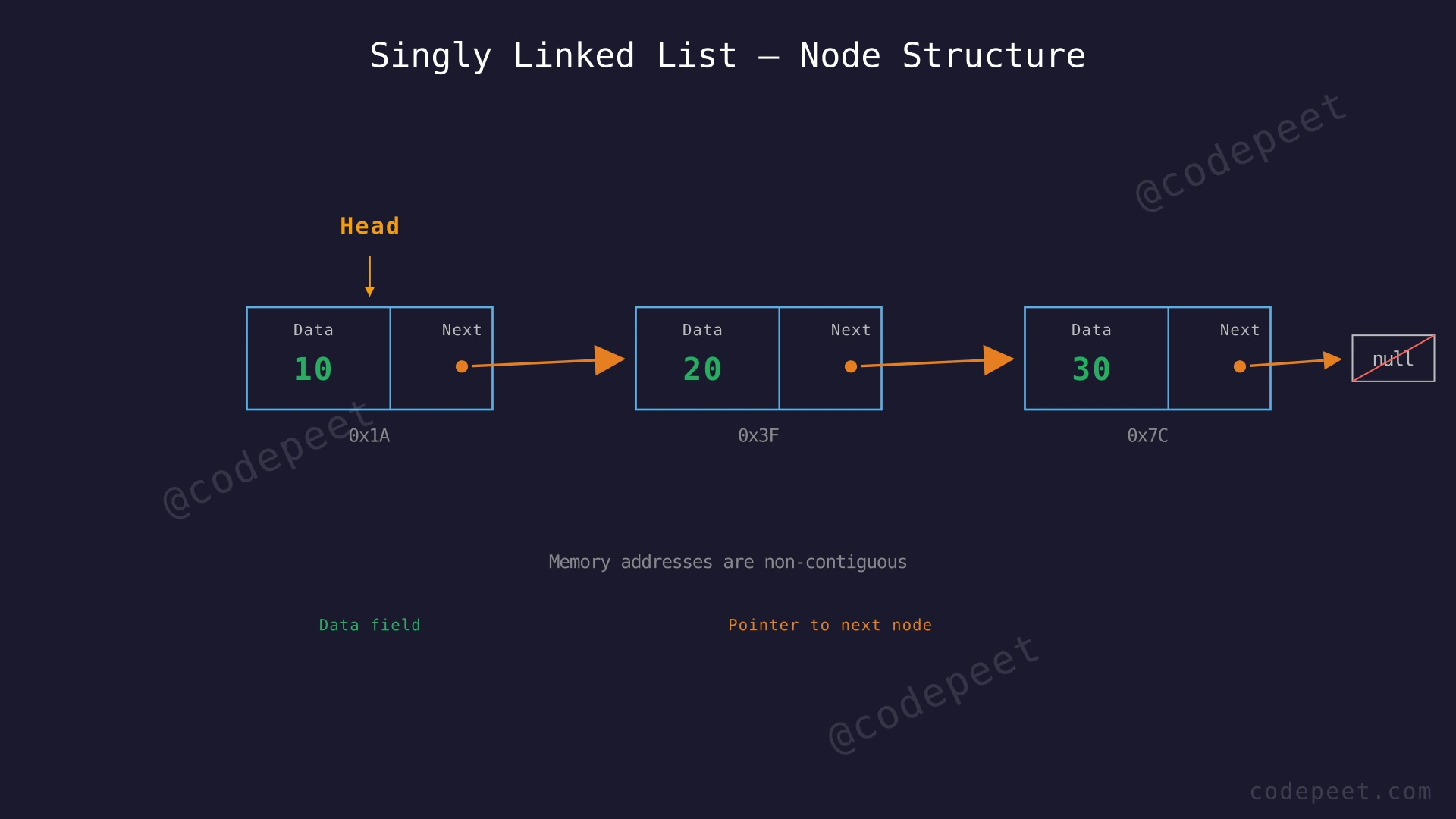
The foundation of every linked list is the node. A node is a small container that holds two things: the actual data you want to store, and a pointer (or reference) that tells you where the next node lives in memory.
Think of each node like a railway car in a train. Each car carries passengers (data) and is coupled to the next car (pointer). The engine at the front is the head pointer — it tells you where the train begins. The last car has no coupling at the back — its "next" is null.
To create a linked list, you:
- Define what a single node looks like (a class or struct with
dataandnext). - Create individual nodes.
- Connect them by setting each node's
nextpointer to the following node. - Store the address of the first node in a variable called
head.
Unlike arrays, these nodes can live anywhere in memory. They don't need to be side by side. The pointers are the invisible thread that stitches them into a meaningful sequence.
Step-by-Step Explanation
Let's trace through building a singly linked list with values 10 → 20 → 30 from scratch:
Step 1: Define the Node class/struct with two fields: data (stores the value) and next (stores the address of the next node, initially null).
Step 2: Create the first node with data = 10. Its next pointer is null because no other node exists yet. Set head to point to this node.
- State: Head → [10 | null]
Step 3: Create the second node with data = 20. Its next pointer is also null initially.
- State: Head → [10 | null], standalone [20 | null]
Step 4: Link the first node to the second node by setting head.next = second_node.
- State: Head → [10 | *] → [20 | null]
Step 5: Create the third node with data = 30.
- State: Head → [10 | *] → [20 | null], standalone [30 | null]
Step 6: Link the second node to the third node by setting second_node.next = third_node.
- State: Head → [10 | *] → [20 | *] → [30 | null]
Step 7: The linked list is now complete. We can traverse it by starting at head, visiting each node, and following the next pointers until we reach null.
Building a Singly Linked List — Step by Step — Watch how nodes are created one by one and connected via next pointers to form a singly linked list with values 10, 20, and 30.
Algorithm
Creating a Singly Linked List:
- Define a Node class with two attributes:
data(the value) andnext(pointer to the next node, default null). - Create each node by instantiating the Node class with the desired data.
- Connect the nodes sequentially by setting each node's
nextto the following node. - Store the first node's address in a
headvariable — this is the entry point to the entire list. - The last node's
nextremains null to indicate the end of the list.
Code
#include <iostream>
using namespace std;

struct Node {
    int data;
    Node* next;
    Node(int val) : data(val), next(nullptr) {}
};

int main() {
    // Create individual nodes
    Node* head = new Node(10);
    Node* second = new Node(20);
    Node* third = new Node(30);

    // Connect the nodes
    head->next = second;
    second->next = third;
    // third->next remains nullptr (end of list)

    // Traverse and print
    Node* current = head;
    while (current != nullptr) {
        cout << current->data << " -> ";
        current = current->next;
    }
    cout << "null" << endl;
    // Output: 10 -> 20 -> 30 -> null

    // Clean up memory
    delete head;
    delete second;
    delete third;
    return 0;
}
class Node:
def __init__(self, data):
self.data = data
self.next = None
# Create individual nodes
head = Node(10)
second = Node(20)
third = Node(30)
# Connect the nodes
head.next = second
second.next = third
# third.next remains None (end of list)
# Traverse and print
current = head
while current is not None:
print(current.data, end=" -> ")
current = current.next
print("None")
# Output: 10 -> 20 -> 30 -> Noneclass Node {
int data;
Node next;
Node(int data) {
this.data = data;
this.next = null;
}
}
public class LinkedListDemo {
public static void main(String[] args) {
// Create individual nodes
Node head = new Node(10);
Node second = new Node(20);
Node third = new Node(30);
// Connect the nodes
head.next = second;
second.next = third;
// third.next remains null (end of list)
// Traverse and print
Node current = head;
while (current != null) {
System.out.print(current.data + " -> ");
current = current.next;
}
System.out.println("null");
// Output: 10 -> 20 -> 30 -> null
}
}Complexity Analysis
Time Complexity: O(n)
Creating n nodes takes O(n) time since each node creation is O(1). Linking them together is also O(n) — one pointer assignment per node. Traversal visits each node exactly once, so it is also O(n).
Space Complexity: O(n)
Each node occupies memory for its data field and one pointer. For n nodes, the total space used is O(n). Unlike arrays, there is additional overhead per element due to the pointer field, but the total asymptotic space remains linear.
Traversal and Search
Intuition
Once you have a linked list, the two most fundamental things you will want to do are traverse it (visit every node) and search it (find a node with a specific value).
Traversal is like reading a book page by page — you start at the first page (head) and turn pages (follow next pointers) until there are no more pages left (you hit null). You cannot skip to page 50 directly because there is no table of contents. You must go through pages 1, 2, 3, ... sequentially.
Searching works the same way. To find a particular value, you traverse the list node by node, checking each node's data against your target. If you find a match, you return that node (or its position). If you reach null without finding it, the value is not in the list.
This is fundamentally different from arrays, where you can jump to any index in O(1). In a linked list, both traversal and search are inherently O(n) operations because you must follow the chain of pointers.
Step-by-Step Explanation
Let's search for the value 25 in the linked list: Head → [10 | *] → [20 | *] → [25 | *] → [30 | null].
Step 1: Start at the head. Set current = head and target = 25.
Step 2: Check current node: data = 10. Is 10 == 25? No. Move to the next node.
Step 3: Check current node: data = 20. Is 20 == 25? No. Move to the next node.
Step 4: Check current node: data = 25. Is 25 == 25? Yes! We found the target.
Step 5: Return true (or the node reference). The value 25 exists in the list at position 2 (0-indexed).
If the target were 99 instead, we would continue past node 30, reach null, and return false — indicating the value does not exist in the list.
Searching for Value 25 in a Linked List — Watch the search pointer traverse the linked list node by node, comparing each node's data to the target value 25, until the match is found.
Algorithm
Traversal:
- Set
current = head. - While
currentis not null:
a. Process the current node (print, accumulate, etc.).
b. Setcurrent = current.next. - When current becomes null, every node has been visited.
Search (for a target value):
- Set
current = head. - While
currentis not null:
a. Ifcurrent.data == target, return true (or the node).
b. Setcurrent = current.next. - If the loop ends, the target was not found — return false.
Code
#include <iostream>
using namespace std;

struct Node {
    int data;
    Node* next;
    Node(int val) : data(val), next(nullptr) {}
};

// Traverse and print all nodes
void printList(Node* head) {
    Node* current = head;
    while (current != nullptr) {
        cout << current->data << " -> ";
        current = current->next;
    }
    cout << "null" << endl;
}

// Search for a target value
bool search(Node* head, int target) {
    Node* current = head;
    while (current != nullptr) {
        if (current->data == target)
            return true;
        current = current->next;
    }
    return false;
}

int main() {
    Node* head = new Node(10);
    head->next = new Node(20);
    head->next->next = new Node(25);
    head->next->next->next = new Node(30);

    printList(head);
    // Output: 10 -> 20 -> 25 -> 30 -> null

    cout << "Search 25: " << (search(head, 25) ? "Found" : "Not Found") << endl;
    // Output: Search 25: Found

    cout << "Search 99: " << (search(head, 99) ? "Found" : "Not Found") << endl;
    // Output: Search 99: Not Found

    return 0;
}
class Node:
def __init__(self, data):
self.data = data
self.next = None
def print_list(head):
"""Traverse and print all nodes."""
current = head
while current is not None:
print(current.data, end=" -> ")
current = current.next
print("None")
def search(head, target):
"""Search for a target value in the linked list."""
current = head
while current is not None:
if current.data == target:
return True
current = current.next
return False
# Build the list: 10 -> 20 -> 25 -> 30 -> None
head = Node(10)
head.next = Node(20)
head.next.next = Node(25)
head.next.next.next = Node(30)
print_list(head)
# Output: 10 -> 20 -> 25 -> 30 -> None
print("Search 25:", search(head, 25))
# Output: Search 25: True
print("Search 99:", search(head, 99))
# Output: Search 99: Falseclass Node {
int data;
Node next;
Node(int data) {
this.data = data;
this.next = null;
}
}
public class LinkedListTraversal {
// Traverse and print all nodes
static void printList(Node head) {
Node current = head;
while (current != null) {
System.out.print(current.data + " -> ");
current = current.next;
}
System.out.println("null");
}
// Search for a target value
static boolean search(Node head, int target) {
Node current = head;
while (current != null) {
if (current.data == target)
return true;
current = current.next;
}
return false;
}
public static void main(String[] args) {
Node head = new Node(10);
head.next = new Node(20);
head.next.next = new Node(25);
head.next.next.next = new Node(30);
printList(head);
// Output: 10 -> 20 -> 25 -> 30 -> null
System.out.println("Search 25: " + (search(head, 25) ? "Found" : "Not Found"));
// Output: Search 25: Found
System.out.println("Search 99: " + (search(head, 99) ? "Found" : "Not Found"));
// Output: Search 99: Not Found
}
}Complexity Analysis
Time Complexity: O(n)
Both traversal and search visit each node at most once. In the worst case (target is the last element or not present), we visit all n nodes. Each visit does O(1) work (one comparison and one pointer follow), so the total time is O(n).
Space Complexity: O(1)
We only use a single current pointer variable regardless of the list size. No additional data structures are created during traversal or search.
Insertion Operations
Intuition
One of the biggest advantages of linked lists over arrays is how efficiently they handle insertions. In an array, inserting an element in the middle means shifting every element after it to make room — an O(n) operation. In a linked list, once you have a pointer to the right location, insertion is just a matter of adjusting two pointers — an O(1) operation.
There are three common insertion positions:
-
At the beginning (head): Create a new node, point its next to the current head, and update head to the new node. This is always O(1) — no traversal needed.
-
At the end (tail): Create a new node, traverse to the last node, and set the last node's next to the new node. This takes O(n) for traversal, but if you maintain a tail pointer, it becomes O(1).
-
At a specific position: Traverse to the node just before the desired position, then adjust pointers to splice in the new node. Traversal takes O(n), but the pointer manipulation itself is O(1).
The key insight is that the actual insertion (pointer rewiring) is always constant time. It is the traversal to find the right spot that costs O(n).
Step-by-Step Explanation
Let's trace inserting value 15 at position 1 (between 10 and 20) in the list: Head → [10 | *] → [20 | *] → [30 | null].
Step 1: Create a new node with data = 15. Its next pointer is null initially.
Step 2: We need to insert at position 1. Start at head and traverse to position 0 (the node just before the insertion point). That is the node with data 10.
Step 3: Set the new node's next pointer to point where node(10).next currently points — which is node(20).
- new_node.next = node(10).next → new_node now points to node(20)
Step 4: Update node(10).next to point to the new node.
- node(10).next = new_node → node(10) now points to node(15)
Step 5: The list is now: Head → [10 | *] → [15 | *] → [20 | *] → [30 | null].
Notice the order of Steps 3 and 4 is critical. If we updated node(10).next first (Step 4 before Step 3), we would lose the reference to node(20) — it would become unreachable.
Inserting Value 15 at Position 1 in a Linked List — Watch how a new node is created and spliced into the middle of a linked list by carefully rewiring the next pointers in the correct order.
Algorithm
Insert at Beginning:
- Create a new node with the given data.
- Set
new_node.next = head. - Set
head = new_node.
Insert at End:
- Create a new node with the given data.
- If the list is empty, set
head = new_nodeand return. - Traverse to the last node (where
current.next == null). - Set
last_node.next = new_node.
Insert at Position k:
- Create a new node with the given data.
- If k == 0, insert at the beginning (use the algorithm above).
- Traverse to the node at position k-1 (call it
prev). - Set
new_node.next = prev.next. - Set
prev.next = new_node.
Code
#include <iostream>
using namespace std;

struct Node {
    int data;
    Node* next;
    Node(int val) : data(val), next(nullptr) {}
};

// Insert at the beginning — O(1)
Node* insertAtBeginning(Node* head, int data) {
    Node* newNode = new Node(data);
    newNode->next = head;
    return newNode; // new head
}

// Insert at the end — O(n)
Node* insertAtEnd(Node* head, int data) {
    Node* newNode = new Node(data);
    if (head == nullptr) return newNode;
    Node* current = head;
    while (current->next != nullptr)
        current = current->next;
    current->next = newNode;
    return head;
}

// Insert at position k (0-indexed) — O(k)
Node* insertAtPosition(Node* head, int data, int position) {
    Node* newNode = new Node(data);
    if (position == 0) {
        newNode->next = head;
        return newNode;
    }
    Node* current = head;
    for (int i = 0; i < position - 1 && current != nullptr; i++)
        current = current->next;
    if (current == nullptr) return head; // position out of bounds
    newNode->next = current->next;
    current->next = newNode;
    return head;
}

void printList(Node* head) {
    Node* current = head;
    while (current) {
        cout << current->data << " -> ";
        current = current->next;
    }
    cout << "null" << endl;
}

int main() {
    Node* head = nullptr;
    head = insertAtEnd(head, 10);
    head = insertAtEnd(head, 20);
    head = insertAtEnd(head, 30);
    printList(head); // 10 -> 20 -> 30 -> null

    head = insertAtBeginning(head, 5);
    printList(head); // 5 -> 10 -> 20 -> 30 -> null

    head = insertAtPosition(head, 15, 2);
    printList(head); // 5 -> 10 -> 15 -> 20 -> 30 -> null

    return 0;
}
class Node:
def __init__(self, data):
self.data = data
self.next = None
def insert_at_beginning(head, data):
"""Insert at the beginning — O(1)."""
new_node = Node(data)
new_node.next = head
return new_node # new head
def insert_at_end(head, data):
"""Insert at the end — O(n)."""
new_node = Node(data)
if head is None:
return new_node
current = head
while current.next is not None:
current = current.next
current.next = new_node
return head
def insert_at_position(head, data, position):
"""Insert at position k (0-indexed) — O(k)."""
new_node = Node(data)
if position == 0:
new_node.next = head
return new_node
current = head
for _ in range(position - 1):
if current is None:
return head # position out of bounds
current = current.next
if current is None:
return head
new_node.next = current.next
current.next = new_node
return head
def print_list(head):
current = head
while current:
print(current.data, end=" -> ")
current = current.next
print("None")
# Build and test
head = None
head = insert_at_end(head, 10)
head = insert_at_end(head, 20)
head = insert_at_end(head, 30)
print_list(head) # 10 -> 20 -> 30 -> None
head = insert_at_beginning(head, 5)
print_list(head) # 5 -> 10 -> 20 -> 30 -> None
head = insert_at_position(head, 15, 2)
print_list(head) # 5 -> 10 -> 15 -> 20 -> 30 -> Noneclass Node {
int data;
Node next;
Node(int data) {
this.data = data;
this.next = null;
}
}
public class LinkedListInsertion {
// Insert at the beginning — O(1)
static Node insertAtBeginning(Node head, int data) {
Node newNode = new Node(data);
newNode.next = head;
return newNode;
}
// Insert at the end — O(n)
static Node insertAtEnd(Node head, int data) {
Node newNode = new Node(data);
if (head == null) return newNode;
Node current = head;
while (current.next != null)
current = current.next;
current.next = newNode;
return head;
}
// Insert at position k (0-indexed) — O(k)
static Node insertAtPosition(Node head, int data, int position) {
Node newNode = new Node(data);
if (position == 0) {
newNode.next = head;
return newNode;
}
Node current = head;
for (int i = 0; i < position - 1 && current != null; i++)
current = current.next;
if (current == null) return head;
newNode.next = current.next;
current.next = newNode;
return head;
}
static void printList(Node head) {
Node current = head;
while (current != null) {
System.out.print(current.data + " -> ");
current = current.next;
}
System.out.println("null");
}
public static void main(String[] args) {
Node head = null;
head = insertAtEnd(head, 10);
head = insertAtEnd(head, 20);
head = insertAtEnd(head, 30);
printList(head); // 10 -> 20 -> 30 -> null
head = insertAtBeginning(head, 5);
printList(head); // 5 -> 10 -> 20 -> 30 -> null
head = insertAtPosition(head, 15, 2);
printList(head); // 5 -> 10 -> 15 -> 20 -> 30 -> null
}
}Complexity Analysis
Insert at Beginning:
- Time: O(1) — just create a node and update two pointers.
- Space: O(1) — only one new node created.
Insert at End:
- Time: O(n) — must traverse the entire list to find the last node. This can be reduced to O(1) by maintaining a tail pointer.
- Space: O(1) — only one new node created.
Insert at Position k:
- Time: O(k) — traverse k nodes to find the insertion point. In the worst case (k = n), this is O(n).
- Space: O(1) — only one new node created.
Deletion Operations
Intuition
Deletion in a linked list is the mirror image of insertion: instead of splicing a node in, you splice one out by rerouting pointers around it.
The core idea is simple: to remove a node, make the previous node's next pointer skip over the target node and point directly to the node after it. The deleted node is then disconnected from the chain and can be freed from memory.
There are three common deletion scenarios:
-
Delete the head node: Update head to point to the second node. The original first node is now disconnected. This is O(1).
-
Delete the last node: Traverse to the second-to-last node and set its next pointer to null. This takes O(n) because you must find the predecessor.
-
Delete a node at a specific position: Traverse to the node just before the target, then bypass the target by setting
prev.next = target.next. Finding the predecessor takes O(n), but the pointer adjustment is O(1).
A common pitfall: always make sure you don't lose references. If you update pointers in the wrong order, you may strand part of the list with no way to reach it.
Step-by-Step Explanation
Let's trace deleting the node with value 20 from the list: Head → [10 | *] → [20 | *] → [30 | *] → [40 | null].
Step 1: We want to delete the node containing 20. Start at head and identify the target.
Step 2: Set prev = head (node 10) and current = head.next (node 20). Check: is current.data == 20? Yes, this is the node to delete.
Step 3: Bypass the target: set prev.next = current.next. Now node(10) points directly to node(30), skipping node(20).
Step 4: Node(20) is now disconnected from the list. It can be freed from memory (in C++) or will be garbage collected (in Java/Python).
Step 5: The resulting list is: Head → [10 | *] → [30 | *] → [40 | null].
Deleting Node with Value 20 from a Linked List — Watch how the pointers are rewired to remove a node from the middle of a linked list, bypassing the deleted node while keeping the rest of the chain intact.
Algorithm
Delete Head Node:
- If the list is empty, return.
- Store
headin a temporary variable. - Set
head = head.next. - Free/discard the old head node.
Delete by Value:
- If the head node contains the target value, delete the head (use the algorithm above).
- Set
prev = headandcurrent = head.next. - While
currentis not null:
a. Ifcurrent.data == target:- Set
prev.next = current.next(bypass the current node). - Free/discard
current. - Return.
b. Setprev = current,current = current.next.
- Set
- If the loop ends, the target was not found in the list.
Code
#include <iostream>
using namespace std;

struct Node {
    int data;
    Node* next;
    Node(int val) : data(val), next(nullptr) {}
};

// Delete the first occurrence of a value
Node* deleteByValue(Node* head, int target) {
    if (head == nullptr) return nullptr;

    // If head node holds the target
    if (head->data == target) {
        Node* newHead = head->next;
        delete head;
        return newHead;
    }

    Node* prev = head;
    Node* current = head->next;
    while (current != nullptr) {
        if (current->data == target) {
            prev->next = current->next;
            delete current;
            return head;
        }
        prev = current;
        current = current->next;
    }
    return head; // target not found
}

void printList(Node* head) {
    Node* current = head;
    while (current) {
        cout << current->data << " -> ";
        current = current->next;
    }
    cout << "null" << endl;
}

int main() {
    Node* head = new Node(10);
    head->next = new Node(20);
    head->next->next = new Node(30);
    head->next->next->next = new Node(40);
    printList(head); // 10 -> 20 -> 30 -> 40 -> null

    head = deleteByValue(head, 20);
    printList(head); // 10 -> 30 -> 40 -> null

    head = deleteByValue(head, 10);
    printList(head); // 30 -> 40 -> null

    return 0;
}
class Node:
def __init__(self, data):
self.data = data
self.next = None
def delete_by_value(head, target):
"""Delete the first occurrence of target from the list."""
if head is None:
return None
# If head node holds the target
if head.data == target:
return head.next
prev = head
current = head.next
while current is not None:
if current.data == target:
prev.next = current.next
return head
prev = current
current = current.next
return head # target not found
def print_list(head):
current = head
while current:
print(current.data, end=" -> ")
current = current.next
print("None")
# Build the list: 10 -> 20 -> 30 -> 40 -> None
head = Node(10)
head.next = Node(20)
head.next.next = Node(30)
head.next.next.next = Node(40)
print_list(head) # 10 -> 20 -> 30 -> 40 -> None
head = delete_by_value(head, 20)
print_list(head) # 10 -> 30 -> 40 -> None
head = delete_by_value(head, 10)
print_list(head) # 30 -> 40 -> Noneclass Node {
int data;
Node next;
Node(int data) {
this.data = data;
this.next = null;
}
}
public class LinkedListDeletion {
// Delete the first occurrence of a value
static Node deleteByValue(Node head, int target) {
if (head == null) return null;
// If head node holds the target
if (head.data == target)
return head.next;
Node prev = head;
Node current = head.next;
while (current != null) {
if (current.data == target) {
prev.next = current.next;
return head;
}
prev = current;
current = current.next;
}
return head; // target not found
}
static void printList(Node head) {
Node current = head;
while (current != null) {
System.out.print(current.data + " -> ");
current = current.next;
}
System.out.println("null");
}
public static void main(String[] args) {
Node head = new Node(10);
head.next = new Node(20);
head.next.next = new Node(30);
head.next.next.next = new Node(40);
printList(head); // 10 -> 20 -> 30 -> 40 -> null
head = deleteByValue(head, 20);
printList(head); // 10 -> 30 -> 40 -> null
head = deleteByValue(head, 10);
printList(head); // 30 -> 40 -> null
}
}Complexity Analysis
Time Complexity: O(n)
In the worst case, the target node is at the end of the list (or not present), requiring a full traversal of all n nodes. Deleting the head is O(1) since no traversal is needed.
Space Complexity: O(1)
We use only a constant number of pointer variables (prev and current) regardless of the list size. No additional data structures are created.
Linked List vs Array — When to Use Which
Intuition
Understanding when to use a linked list versus an array is one of the most important decisions in data structure selection. Each has strengths and weaknesses, and the right choice depends on your access patterns.
Use an Array when:
- You need fast random access by index (O(1) with arrays vs O(n) with linked lists).
- Your data size is known in advance or changes infrequently.
- You need cache-friendly memory access (array elements are stored contiguously, making CPU cache usage efficient).
- You are doing many lookups/reads and few insertions/deletions.
Use a Linked List when:
- You need frequent insertions and deletions, especially at the beginning or middle of the collection.
- Your data size is highly unpredictable and changes frequently.
- You cannot afford to shift elements on every insertion/deletion.
- You are implementing other data structures like stacks, queues, or adjacency lists for graphs.
The fundamental tradeoff is: arrays trade insertion/deletion speed for fast access, while linked lists trade access speed for fast insertion/deletion.
![Array versus linked list on the section's scenario, [10, 20, 30, 40, 50], in two panels. Top, read index 3: the array row shows five cells indexed 0 to 4, with one green arrow jumping from cell 0 straight to cell 3 (value 40, amber), costed 1 step, O(1); the list row shows nodes 10 → 20 → 30 → 40 → 50, with three red hop arrows from 10 to 40, costed 3 hops, O(n). Bottom, insert 5 at the front: the array row shows 5, 10, 20, 30, 40, 50, with a red arrow over each of the old five elements moving it one cell right and the new 5 in amber, costed 5 shifts + 1 write, O(n); the list row shows a new node 5 labelled head with a green link to 10 → 20 → 30 → 40 → 50, costed 2 pointer updates, O(1). The title reads: arrays read fast, linked lists insert fast. The point: arrays trade insertion speed for fast access, and linked lists trade access speed for fast insertion.](https://pub-a1b3030acfb94e84ba8a89fb182c53bc.r2.dev/public/923807b8-8c07-4cf1-9015-05a3274d8eec/array_vs_linkedlist_comparison_v1.webp)
Step-by-Step Explanation
Let's compare inserting an element at the beginning of an array vs a linked list to see the performance difference clearly.
Scenario: We have 5 elements [10, 20, 30, 40, 50] and want to insert 5 at position 0.
Array Approach:
- Step 1: Shift element at index 4 to index 5.
- Step 2: Shift element at index 3 to index 4.
- Step 3: Shift element at index 2 to index 3.
- Step 4: Shift element at index 1 to index 2.
- Step 5: Shift element at index 0 to index 1.
- Step 6: Place 5 at index 0.
- Total work: 5 shifts + 1 placement = O(n)
Linked List Approach:
- Step 1: Create a new node with data = 5.
- Step 2: Set new_node.next = current head.
- Step 3: Update head = new_node.
- Total work: 1 node creation + 2 pointer updates = O(1)
For this specific operation, the linked list is dramatically faster. But if we then needed to access the element at index 3, the array would return it in O(1) while the linked list would need to traverse 3 nodes to get there.
Algorithm
Decision Framework for Choosing Array vs Linked List:
- Identify your primary operations (read-heavy vs write-heavy).
- If you need frequent random access by index → choose Array.
- If you need frequent insertions/deletions at arbitrary positions → choose Linked List.
- If memory is constrained and you want minimal overhead per element → choose Array.
- If the data size is highly dynamic and unpredictable → choose Linked List.
- If cache performance matters (processing large datasets sequentially) → choose Array.
- For implementing stacks and queues → Linked List is often simpler and more natural.
- For most general-purpose use → Array (or dynamic array like
vector/ArrayList) is the default starting point.
Code
// Comparison: Inserting at the beginning
// Array approach — O(n)
#include <iostream>
#include <vector>
using namespace std;

void insertAtBeginningArray(vector<int>& arr, int value) {
    arr.insert(arr.begin(), value);
    // Internally: shifts ALL existing elements right by 1
}

// Linked List approach — O(1)
struct Node {
    int data;
    Node* next;
    Node(int val) : data(val), next(nullptr) {}
};

Node* insertAtBeginningList(Node* head, int value) {
    Node* newNode = new Node(value);
    newNode->next = head;
    return newNode; // No shifting needed!
}

int main() {
    // Array: Insert 5 at beginning of [10, 20, 30, 40, 50]
    vector<int> arr = {10, 20, 30, 40, 50};
    insertAtBeginningArray(arr, 5);
    // arr = [5, 10, 20, 30, 40, 50] — required shifting 5 elements

    // Linked List: Insert 5 at beginning of 10 -> 20 -> 30 -> 40 -> 50
    Node* head = new Node(10);
    head->next = new Node(20);
    head->next->next = new Node(30);
    head = insertAtBeginningList(head, 5);
    // 5 -> 10 -> 20 -> 30 — required zero shifts, just 2 pointer updates

    return 0;
}
# Comparison: Inserting at the beginning
# Array approach — O(n)
def insert_at_beginning_array(arr, value):
arr.insert(0, value)
# Internally: shifts ALL existing elements right by 1
# Linked List approach — O(1)
class Node:
def __init__(self, data):
self.data = data
self.next = None
def insert_at_beginning_list(head, value):
new_node = Node(value)
new_node.next = head
return new_node # No shifting needed!
# Array: Insert 5 at beginning of [10, 20, 30, 40, 50]
arr = [10, 20, 30, 40, 50]
insert_at_beginning_array(arr, 5)
print(arr) # [5, 10, 20, 30, 40, 50] — required shifting 5 elements
# Linked List: Insert 5 at beginning
head = Node(10)
head.next = Node(20)
head.next.next = Node(30)
head = insert_at_beginning_list(head, 5)
# 5 -> 10 -> 20 -> 30 — required zero shifts, just 2 pointer updatesimport java.util.ArrayList;
import java.util.List;
class Node {
int data;
Node next;
Node(int data) {
this.data = data;
this.next = null;
}
}
public class ArrayVsLinkedList {
// Array approach — O(n)
static void insertAtBeginningArray(List<Integer> arr, int value) {
arr.add(0, value);
// Internally: shifts ALL existing elements right by 1
}
// Linked List approach — O(1)
static Node insertAtBeginningList(Node head, int value) {
Node newNode = new Node(value);
newNode.next = head;
return newNode; // No shifting needed!
}
public static void main(String[] args) {
// Array: Insert 5 at beginning
List<Integer> arr = new ArrayList<>(List.of(10, 20, 30, 40, 50));
insertAtBeginningArray(arr, 5);
System.out.println(arr);
// [5, 10, 20, 30, 40, 50] — required shifting 5 elements
// Linked List: Insert 5 at beginning
Node head = new Node(10);
head.next = new Node(20);
head.next.next = new Node(30);
head = insertAtBeginningList(head, 5);
// 5 -> 10 -> 20 -> 30 — required zero shifts
}
}Complexity Analysis
Summary of Time Complexities:
| Operation | Array | Linked List |
|---|---|---|
| Access by index | O(1) | O(n) |
| Search by value | O(n) | O(n) |
| Insert at beginning | O(n) | O(1) |
| Insert at end | O(1) amortized | O(n) without tail, O(1) with tail |
| Insert at position k | O(n) | O(k) traversal + O(1) insertion |
| Delete at beginning | O(n) | O(1) |
| Delete at end | O(1) | O(n) |
| Delete by value | O(n) | O(n) |
Space Complexity:
- Array: O(n) for n elements, with minimal per-element overhead (just the data).
- Linked List: O(n) for n elements, but each node has additional overhead for the pointer field (4–8 bytes per node depending on architecture).