C++ Standard Library Overview
Description
The C++ Standard Template Library (STL) is a powerful collection of pre-built, generic classes and functions bundled with every modern C++ compiler. It provides ready-to-use implementations of the most commonly needed data structures (called containers), algorithms for searching, sorting, and transforming data, and iterators that act as the bridge between containers and algorithms.
Instead of writing your own linked list, hash map, or sorting routine from scratch, you simply include the appropriate header and use a well-tested, highly optimized component. Because every STL component is implemented as a template, it works with any data type — integers, strings, custom objects — without modification.
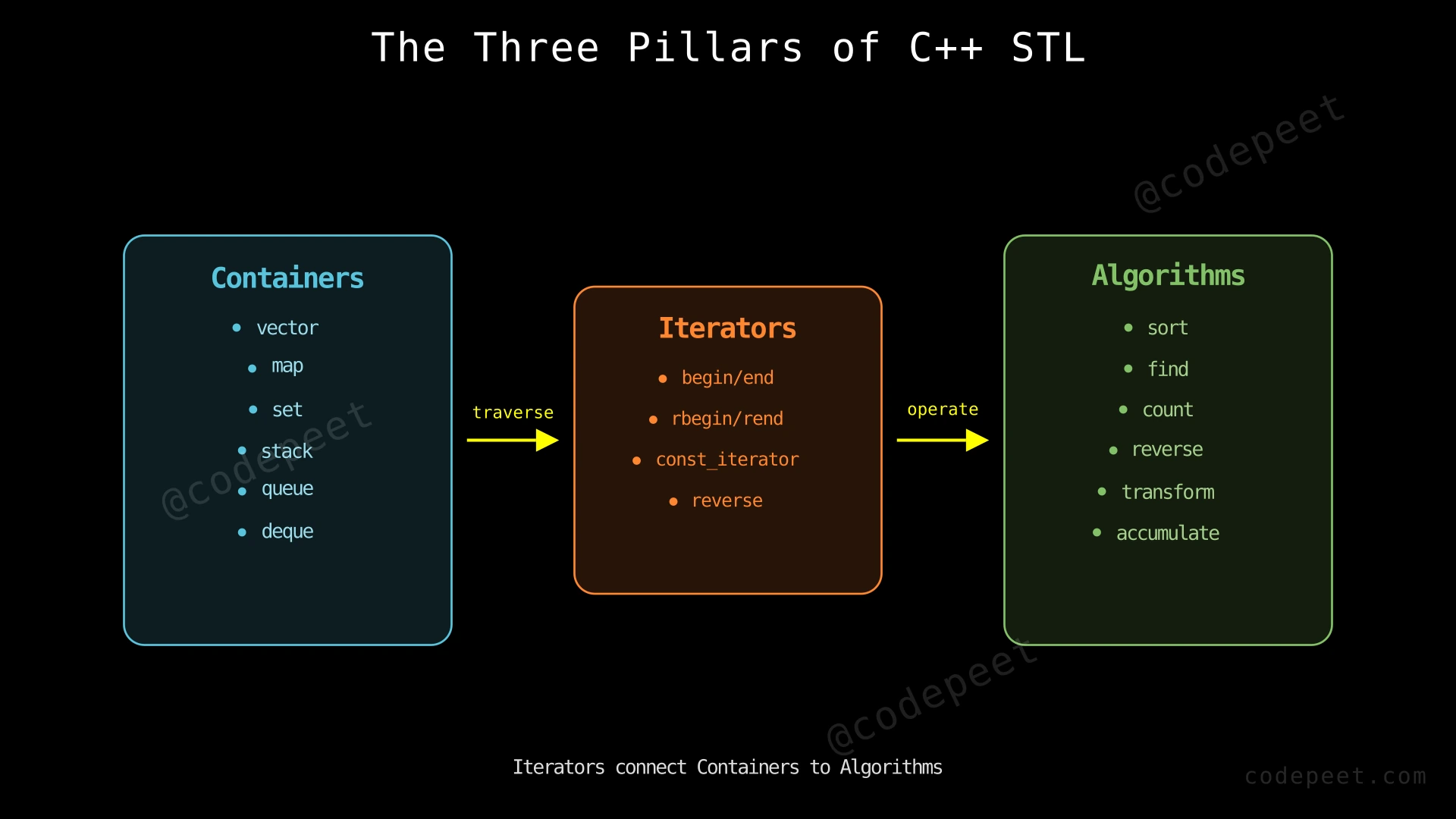
The STL is organized around three pillars:
- Containers — Objects that store collections of elements (e.g.,
vector,map,set,stack). - Algorithms — Functions that operate on containers through iterators (e.g.,
sort,find,binary_search,accumulate). - Iterators — Pointer-like objects that let algorithms traverse containers without knowing the container's internal structure.
Mastering the STL is essential for writing efficient, readable, and bug-free C++ code, and it forms the backbone of nearly every competitive programming solution and production C++ codebase.
Examples
Example 1
Using a Vector (Dynamic Array)
#include <vector>
#include <iostream>
using namespace std;

int main() {
    vector<int> nums = {5, 2, 8, 1, 9};
    nums.push_back(3);  // Add element at end

    for (int x : nums) {
        cout << x << " ";
    }
    // Output: 5 2 8 1 9 3
}
Explanation: A vector is the most commonly used STL container. It behaves like a dynamic array that automatically resizes as you add elements. The push_back function appends an element at the end in amortized O(1) time. You can iterate over all elements using a range-based for loop.
Example 2
Using a Map (Key-Value Store)
#include <map>
#include <iostream>
using namespace std;

int main() {
    map<string, int> ages;
    ages["Alice"] = 25;
    ages["Bob"] = 30;
    ages["Charlie"] = 22;

    cout << "Bob's age: " << ages["Bob"] << endl;
    // Output: Bob's age: 30

    // Keys are automatically sorted
    for (auto& [name, age] : ages) {
        cout << name << ": " << age << endl;
    }
    // Output: Alice: 25, Bob: 30, Charlie: 22
}
Explanation: A map stores key-value pairs sorted by key. Internally it uses a balanced binary search tree (typically a red-black tree), giving O(log n) lookup, insertion, and deletion. The operator[] inserts a new entry if the key doesn't exist, or retrieves the value if it does.
Example 3
Using STL Algorithms with Iterators
#include <vector>
#include <algorithm>
#include <iostream>
using namespace std;

int main() {
    vector<int> nums = {5, 2, 8, 1, 9};

    sort(nums.begin(), nums.end());  // Sort ascending
    // nums is now: {1, 2, 5, 8, 9}

    bool found = binary_search(nums.begin(), nums.end(), 5);
    cout << "Found 5: " << (found ? "Yes" : "No") << endl;
    // Output: Found 5: Yes

    auto it = find(nums.begin(), nums.end(), 8);
    cout << "8 is at index: " << (it - nums.begin()) << endl;
    // Output: 8 is at index: 3
}
Explanation: STL algorithms work on ranges defined by iterators. sort sorts elements in O(n log n) time. binary_search checks existence in O(log n) on a sorted range. find performs a linear search returning an iterator to the first match. Notice how the algorithms don't know or care that the data is in a vector — they work through iterators, making them reusable across any container.
Constraints
When choosing an STL container, consider these guidelines:
- Need fast random access by index? → Use
vector(O(1) access) ordeque - Need fast insertion/removal at both ends? → Use
deque(O(1) at both ends) - Need fast insertion/removal anywhere? → Use
list(O(1) insert/remove with iterator) - Need sorted unique keys? → Use
set(O(log n) operations) - Need sorted key-value pairs? → Use
map(O(log n) operations) - Need fastest possible lookup (O(1) average)? → Use
unordered_maporunordered_set - Need LIFO (Last In, First Out)? → Use
stack - Need FIFO (First In, First Out)? → Use
queue - Need elements sorted by priority? → Use
priority_queue(O(log n) push/pop)
Common complexity guarantees:
vector::push_back→ Amortized O(1)vector::operator[]→ O(1)map/setinsert, find, erase → O(log n)unordered_map/unordered_setinsert, find, erase → O(1) average, O(n) worst casesort→ O(n log n) guaranteedbinary_search→ O(log n) on sorted range
Editorial
Sequence Containers
Intuition
Sequence containers store elements in a specific linear order determined by when and where you insert them. Think of them like different types of shelves:
vectoris like a stretchy row of boxes. You can quickly look at any box by its number, and adding boxes at the end is fast. But inserting a box in the middle means shifting everything after it.deque(double-ended queue) is like a row of boxes where you can efficiently add or remove from both the front and the back.listis like a chain of linked boxes. You can insert or remove a box anywhere in the chain instantly (if you already have a pointer to that spot), but you can't jump to the 50th box directly — you have to walk the chain.arrayis a fixed-size row of boxes. Its size is set at compile time and cannot change. It's the simplest and fastest when you know the size in advance.
The most commonly used sequence container is vector. If you're unsure which container to use, start with vector — it's the right choice about 90% of the time.
Step-by-Step Explanation
Let's trace through common vector operations to see how it works internally:
Step 1: Create an empty vector with internal capacity 0.
vector<int> v;- Size = 0, Capacity = 0
Step 2: Push back element 10.
- No capacity available, so the vector allocates space (typically capacity becomes 1).
v = [10], Size = 1, Capacity = 1
Step 3: Push back element 20.
- Current capacity (1) is full. Vector doubles capacity to 2, copies old data, then appends.
v = [10, 20], Size = 2, Capacity = 2
Step 4: Push back element 30.
- Capacity (2) is full again. Vector doubles to capacity 4, copies old data, appends.
v = [10, 20, 30], Size = 3, Capacity = 4
Step 5: Push back element 40.
- Capacity 4 has room (size is 3). No reallocation needed — just append.
v = [10, 20, 30, 40], Size = 4, Capacity = 4
Step 6: Access element at index 2.
- Direct memory access:
v[2]returns 30 in O(1) time.
Step 7: Pop back (remove last element).
- Simply decrements size. No memory deallocation.
v = [10, 20, 30], Size = 3, Capacity = 4
Vector — Dynamic Resizing and Operations — Watch how a vector grows dynamically by doubling its capacity when full, and how push_back, access, and pop_back operations work.
Algorithm
Key Sequence Container Operations:
- vector — Use
push_back()to add,pop_back()to remove from end,operator[]orat()for access,size()for count,begin()/end()for iterators. - deque — Same as vector but also supports
push_front()andpop_front()in O(1). - list — Use
push_back(),push_front(),insert()anywhere with O(1) (given iterator),remove()to delete by value. Nooperator[]. - array — Fixed size, declared as
array<int, 5>. Same interface as vector but size is compile-time constant.
Choosing Between Them:
- Default to
vectorunless you have a specific reason not to. - Use
dequewhen you need fast front insertions. - Use
listwhen you frequently insert/remove in the middle and don't need random access. - Use
arraywhen the size is known at compile time.
Code
#include <vector>
#include <deque>
#include <list>
#include <array>
#include <iostream>
using namespace std;

int main() {
    // --- Vector ---
    vector<int> vec = {1, 2, 3};
    vec.push_back(4);          // Add to end: {1, 2, 3, 4}
    vec.pop_back();            // Remove from end: {1, 2, 3}
    cout << vec[1] << endl;    // Random access: 2
    cout << "Vector size: " << vec.size() << endl; // 3

    // --- Deque ---
    deque<int> dq = {2, 3, 4};
    dq.push_front(1);          // Add to front: {1, 2, 3, 4}
    dq.push_back(5);           // Add to end: {1, 2, 3, 4, 5}
    dq.pop_front();            // Remove from front: {2, 3, 4, 5}
    cout << dq[0] << endl;     // Random access: 2

    // --- List ---
    list<int> lst = {1, 2, 3};
    lst.push_front(0);         // {0, 1, 2, 3}
    auto it = lst.begin();
    advance(it, 2);            // Move iterator to index 2
    lst.insert(it, 99);        // Insert 99 before index 2: {0, 1, 99, 2, 3}
    lst.remove(99);            // Remove all 99s: {0, 1, 2, 3}

    // --- Array (fixed-size) ---
    array<int, 4> arr = {10, 20, 30, 40};
    cout << arr[2] << endl;    // 30
    cout << "Array size: " << arr.size() << endl; // 4

    return 0;
}
# Python equivalents of C++ sequence containers
# --- list (equivalent to C++ vector) ---
vec = [1, 2, 3]
vec.append(4) # Add to end: [1, 2, 3, 4]
vec.pop() # Remove from end: [1, 2, 3]
print(vec[1]) # Random access: 2
print(f"List size: {len(vec)}") # 3
# --- collections.deque (equivalent to C++ deque) ---
from collections import deque
dq = deque([2, 3, 4])
dq.appendleft(1) # Add to front: deque([1, 2, 3, 4])
dq.append(5) # Add to end: deque([1, 2, 3, 4, 5])
dq.popleft() # Remove from front: deque([2, 3, 4, 5])
print(dq[0]) # Random access: 2
# Note: Python's list is a dynamic array (like C++ vector)
# Python has no built-in doubly linked list equivalent to C++ list
# Python has no fixed-size array equivalent to C++ array
# (but you can use tuple for immutable fixed-size sequences)import java.util.*;
public class SequenceContainers {
public static void main(String[] args) {
// --- ArrayList (equivalent to C++ vector) ---
ArrayList<Integer> vec = new ArrayList<>(Arrays.asList(1, 2, 3));
vec.add(4); // Add to end: [1, 2, 3, 4]
vec.remove(vec.size() - 1); // Remove from end: [1, 2, 3]
System.out.println(vec.get(1)); // Random access: 2
System.out.println("Size: " + vec.size()); // 3
// --- ArrayDeque (equivalent to C++ deque) ---
ArrayDeque<Integer> dq = new ArrayDeque<>(Arrays.asList(2, 3, 4));
dq.addFirst(1); // Add to front: [1, 2, 3, 4]
dq.addLast(5); // Add to end: [1, 2, 3, 4, 5]
dq.removeFirst(); // Remove from front: [2, 3, 4, 5]
System.out.println(dq.peek()); // Front element: 2
// --- LinkedList (equivalent to C++ list) ---
LinkedList<Integer> lst = new LinkedList<>(Arrays.asList(1, 2, 3));
lst.addFirst(0); // {0, 1, 2, 3}
lst.add(2, 99); // Insert 99 at index 2: {0, 1, 99, 2, 3}
lst.remove(Integer.valueOf(99)); // Remove first 99: {0, 1, 2, 3}
// --- Array (fixed-size) ---
int[] arr = {10, 20, 30, 40};
System.out.println(arr[2]); // 30
System.out.println("Array length: " + arr.length); // 4
}
}Complexity Analysis
Sequence Container Time Complexities:
| Operation | vector | deque | list | array |
|---|---|---|---|---|
| Access by index | O(1) | O(1) | O(n) | O(1) |
| Push/pop back | O(1)* | O(1)* | O(1) | N/A |
| Push/pop front | O(n) | O(1)* | O(1) | N/A |
| Insert in middle | O(n) | O(n) | O(1)** | N/A |
| Search (unsorted) | O(n) | O(n) | O(n) | O(n) |
*Amortized O(1).
**O(1) if you already have an iterator to the position; O(n) to find the position first.
Space Complexity: All sequence containers use O(n) space where n is the number of elements. vector may have extra unused capacity (up to 2× the size due to doubling).
Why vector is usually the best choice: Contiguous memory layout means excellent cache performance. Modern CPUs load data in cache lines — vector's contiguous elements are loaded together, while list's scattered nodes cause cache misses. This hardware advantage often makes vector faster than list even for operations where list has better theoretical complexity.
Associative Containers
Intuition
Associative containers organize elements by their keys rather than by insertion order. Think of them as smart filing cabinets that automatically sort and organize your data.
C++ provides two families of associative containers:
Ordered (tree-based): set, map, multiset, multimap
- Internally use a balanced binary search tree (typically a red-black tree)
- All operations are O(log n)
- Elements are always sorted by key
- Great when you need sorted traversal or range queries
Unordered (hash-based): unordered_set, unordered_map, unordered_multiset, unordered_multimap
- Internally use a hash table
- Average O(1) operations, worst case O(n)
- Elements are NOT sorted
- Great when you only need fast lookup and don't care about order
The difference between set and map:
setstores only keys (unique values). Think of it as a bag where every item is unique.mapstores key-value pairs. Think of it as a dictionary where each word (key) has a definition (value).
The multi variants (multiset, multimap) allow duplicate keys.
Step-by-Step Explanation
Let's trace through building an unordered_map to count character frequencies in the string "hello":
Step 1: Initialize an empty hash map.
unordered_map<char, int> freq;- Map: {}
Step 2: Process character 'h'.
- 'h' not in map → insert with count 1
- Map: {'h': 1}
Step 3: Process character 'e'.
- 'e' not in map → insert with count 1
- Map: {'h': 1, 'e': 1}
Step 4: Process character 'l' (first occurrence).
- 'l' not in map → insert with count 1
- Map: {'h': 1, 'e': 1, 'l': 1}
Step 5: Process character 'l' (second occurrence).
- 'l' IS in map → increment count to 2
- Map: {'h': 1, 'e': 1, 'l': 2}
Step 6: Process character 'o'.
- 'o' not in map → insert with count 1
- Map: {'h': 1, 'e': 1, 'l': 2, 'o': 1}
Result: Character frequencies: h=1, e=1, l=2, o=1.
Building a Frequency Map — Character Counting — Watch how an unordered_map builds up as we scan each character of 'hello', inserting new keys or incrementing existing counts.
Algorithm
Key Associative Container Operations:
set—insert(val)adds a unique value,find(val)searches,erase(val)removes,count(val)returns 0 or 1. All O(log n).map—map[key] = valinserts or updates,find(key)searches,erase(key)removes,count(key)checks existence. All O(log n).unordered_set— Same interface asset, but O(1) average instead of O(log n). No sorted order.unordered_map— Same interface asmap, but O(1) average. No sorted order.multiset/multimap— Allow duplicate keys.count(val)can return values > 1.
Choosing Between Ordered and Unordered:
- Need sorted iteration or range queries (
lower_bound,upper_bound)? → Usemap/set - Just need fast lookup, insert, delete? → Use
unordered_map/unordered_set - Need guaranteed O(log n) worst case (no hash collisions)? → Use
map/set
Code
#include <set>
#include <map>
#include <unordered_set>
#include <unordered_map>
#include <iostream>
using namespace std;

int main() {
    // --- Set (sorted, unique) ---
    set<int> s = {3, 1, 4, 1, 5};  // Duplicates removed: {1, 3, 4, 5}
    s.insert(2);                    // {1, 2, 3, 4, 5}
    cout << "Contains 3: " << s.count(3) << endl;  // 1 (true)
    s.erase(4);                     // {1, 2, 3, 5}

    // Sorted iteration
    for (int x : s) cout << x << " ";  // 1 2 3 5
    cout << endl;

    // Range query: elements >= 2 and < 5
    auto lo = s.lower_bound(2);
    auto hi = s.lower_bound(5);
    for (auto it = lo; it != hi; ++it)
        cout << *it << " ";  // 2 3
    cout << endl;

    // --- Map (sorted key-value) ---
    map<string, int> scores;
    scores["Alice"] = 95;
    scores["Bob"] = 87;
    scores["Charlie"] = 92;

    if (scores.find("Bob") != scores.end())
        cout << "Bob's score: " << scores["Bob"] << endl;  // 87

    // --- Unordered Map (hash-based, fastest lookup) ---
    unordered_map<char, int> freq;
    string word = "hello";
    for (char c : word) {
        freq[c]++;  // Auto-initializes to 0, then increments
    }
    cout << "'l' appears " << freq['l'] << " times" << endl;  // 2

    return 0;
}
# Python equivalents of C++ associative containers
# --- set (equivalent to C++ unordered_set — NOT sorted in Python) ---
s = {3, 1, 4, 1, 5} # Duplicates removed: {1, 3, 4, 5}
s.add(2) # {1, 2, 3, 4, 5}
print(3 in s) # True (O(1) average)
s.discard(4) # {1, 2, 3, 5}
# --- dict (equivalent to C++ unordered_map) ---
scores = {}
scores["Alice"] = 95
scores["Bob"] = 87
scores["Charlie"] = 92
if "Bob" in scores:
print(f"Bob's score: {scores['Bob']}") # 87
# --- Counter (frequency counting shortcut) ---
from collections import Counter
freq = Counter("hello")
print(f"'l' appears {freq['l']} times") # 2
# --- SortedDict (equivalent to C++ map — requires sortedcontainers) ---
# from sortedcontainers import SortedDict
# Python has no built-in sorted map; use sortedcontainers library
# or sort dict keys manually when neededimport java.util.*;
public class AssociativeContainers {
public static void main(String[] args) {
// --- TreeSet (equivalent to C++ set — sorted, unique) ---
TreeSet<Integer> s = new TreeSet<>(Arrays.asList(3, 1, 4, 1, 5));
s.add(2); // {1, 2, 3, 4, 5}
System.out.println(s.contains(3)); // true (O(log n))
s.remove(4); // {1, 2, 3, 5}
// Range query: elements >= 2 and < 5
System.out.println(s.subSet(2, 5)); // [2, 3]
// --- TreeMap (equivalent to C++ map — sorted key-value) ---
TreeMap<String, Integer> scores = new TreeMap<>();
scores.put("Alice", 95);
scores.put("Bob", 87);
scores.put("Charlie", 92);
if (scores.containsKey("Bob"))
System.out.println("Bob's score: " + scores.get("Bob")); // 87
// --- HashMap (equivalent to C++ unordered_map) ---
HashMap<Character, Integer> freq = new HashMap<>();
String word = "hello";
for (char c : word.toCharArray()) {
freq.put(c, freq.getOrDefault(c, 0) + 1);
}
System.out.println("'l' appears " + freq.get('l') + " times"); // 2
}
}Complexity Analysis
Associative Container Time Complexities:
| Operation | set / map | unordered_set / unordered_map |
|---|---|---|
| Insert | O(log n) | O(1) avg, O(n) worst |
| Find/Lookup | O(log n) | O(1) avg, O(n) worst |
| Erase | O(log n) | O(1) avg, O(n) worst |
| Iterate (sorted) | O(n) ✅ | O(n) ❌ (unsorted) |
| Range query | O(log n + k) ✅ | Not supported ❌ |
Space Complexity: O(n) for all associative containers. Ordered containers have overhead for tree node pointers (typically ~3 pointers per node). Unordered containers have overhead for the hash table (bucket array + linked list nodes).
Why ordered vs unordered matters: unordered_map is ~2-5× faster than map for pure lookups due to O(1) vs O(log n). But map shines when you need sorted order, range queries (lower_bound, upper_bound), or guaranteed worst-case performance (no hash collision vulnerability).
Container Adaptors
Intuition
Container adaptors are not full containers themselves — they are wrappers that restrict the interface of an underlying container to provide a specific data structure abstraction:
stackwrapsdeque(by default) to provide LIFO (Last In, First Out) access. You can onlypushto the top,popfrom the top, andtopto peek at the top element.queuewrapsdequeto provide FIFO (First In, First Out) access. Youpushto the back andfront/popfrom the front.priority_queuewrapsvectorwith a heap structure to always give you the largest element first. Thetopis always the maximum (max-heap by default).
Think of it this way:
- A stack is like a stack of plates — you always add and remove from the top.
- A queue is like a line at a ticket counter — first come, first served.
- A priority_queue is like an emergency room — the most critical patient is always seen first, regardless of arrival order.
Step-by-Step Explanation
Let's trace through stack operations to see LIFO behavior:
Step 1: Create an empty stack.
- Stack (bottom → top): []
Step 2: Push 10.
- Stack: [10]
- Top = 10
Step 3: Push 20.
- Stack: [10, 20]
- Top = 20 (most recently added)
Step 4: Push 30.
- Stack: [10, 20, 30]
- Top = 30
Step 5: Peek at top → returns 30 (without removing).
- Stack unchanged: [10, 20, 30]
Step 6: Pop → removes and returns 30.
- Stack: [10, 20]
- Top = 20 (30 is gone)
Step 7: Pop → removes 20.
- Stack: [10]
- Top = 10
Step 8: Stack has 1 element remaining. LIFO means the first element pushed (10) is the last one out.
Stack LIFO — Push and Pop Operations — Watch how a stack enforces Last-In-First-Out order: elements are always added and removed from the top.
Algorithm
Container Adaptor Operations:
stack—push(val),pop(),top(),empty(),size(). All O(1).queue—push(val)(enqueue to back),pop()(dequeue from front),front(),back(),empty(),size(). All O(1).priority_queue—push(val)O(log n),pop()O(log n),top()O(1) returns the maximum,empty(),size().
Common Use Cases:
- Stack: Balanced parentheses, DFS, undo/redo, function call simulation
- Queue: BFS, task scheduling, buffer management
- Priority Queue: Dijkstra's algorithm, K-th largest element, event-driven simulation, merge K sorted lists
Code
#include <stack>
#include <queue>
#include <iostream>
using namespace std;

int main() {
    // --- Stack (LIFO) ---
    stack<int> st;
    st.push(10);
    st.push(20);
    st.push(30);
    cout << "Stack top: " << st.top() << endl;  // 30
    st.pop();  // Removes 30
    cout << "Stack top after pop: " << st.top() << endl;  // 20

    // --- Queue (FIFO) ---
    queue<int> q;
    q.push(10);
    q.push(20);
    q.push(30);
    cout << "Queue front: " << q.front() << endl;  // 10
    q.pop();  // Removes 10 (front)
    cout << "Queue front after pop: " << q.front() << endl;  // 20

    // --- Priority Queue (Max-Heap by default) ---
    priority_queue<int> pq;
    pq.push(30);
    pq.push(10);
    pq.push(50);
    pq.push(20);
    cout << "PQ top (max): " << pq.top() << endl;  // 50
    pq.pop();  // Removes 50
    cout << "PQ top after pop: " << pq.top() << endl;  // 30

    // --- Min-Heap (using greater<int>) ---
    priority_queue<int, vector<int>, greater<int>> minPQ;
    minPQ.push(30);
    minPQ.push(10);
    minPQ.push(50);
    cout << "Min-PQ top: " << minPQ.top() << endl;  // 10

    return 0;
}
# Python equivalents of C++ container adaptors
# --- Stack (using list) ---
stack = []
stack.append(10) # push
stack.append(20)
stack.append(30)
print(f"Stack top: {stack[-1]}") # 30 (peek)
stack.pop() # Removes 30
print(f"Stack top after pop: {stack[-1]}") # 20
# --- Queue (using collections.deque) ---
from collections import deque
q = deque()
q.append(10) # enqueue
q.append(20)
q.append(30)
print(f"Queue front: {q[0]}") # 10
q.popleft() # dequeue: removes 10
print(f"Queue front after pop: {q[0]}") # 20
# --- Priority Queue (Min-Heap using heapq) ---
import heapq
pq = []
heapq.heappush(pq, 30)
heapq.heappush(pq, 10)
heapq.heappush(pq, 50)
heapq.heappush(pq, 20)
print(f"PQ top (min): {pq[0]}") # 10 (Python heapq is min-heap)
heapq.heappop(pq) # Removes 10
print(f"PQ top after pop: {pq[0]}") # 20
# For max-heap, negate values:
max_pq = []
heapq.heappush(max_pq, -30)
heapq.heappush(max_pq, -10)
heapq.heappush(max_pq, -50)
print(f"Max-PQ top: {-max_pq[0]}") # 50import java.util.*;
public class ContainerAdaptors {
public static void main(String[] args) {
// --- Stack (LIFO) ---
Stack<Integer> st = new Stack<>();
st.push(10);
st.push(20);
st.push(30);
System.out.println("Stack top: " + st.peek()); // 30
st.pop(); // Removes 30
System.out.println("Stack top after pop: " + st.peek()); // 20
// --- Queue (FIFO) ---
Queue<Integer> q = new LinkedList<>();
q.add(10);
q.add(20);
q.add(30);
System.out.println("Queue front: " + q.peek()); // 10
q.poll(); // Removes 10
System.out.println("Queue front after pop: " + q.peek()); // 20
// --- PriorityQueue (Min-Heap by default in Java) ---
PriorityQueue<Integer> pq = new PriorityQueue<>();
pq.add(30);
pq.add(10);
pq.add(50);
pq.add(20);
System.out.println("PQ top (min): " + pq.peek()); // 10
pq.poll(); // Removes 10
System.out.println("PQ top after poll: " + pq.peek()); // 20
// --- Max-Heap ---
PriorityQueue<Integer> maxPQ = new PriorityQueue<>(Collections.reverseOrder());
maxPQ.add(30);
maxPQ.add(10);
maxPQ.add(50);
System.out.println("Max-PQ top: " + maxPQ.peek()); // 50
}
}Complexity Analysis
Container Adaptor Time Complexities:
| Operation | stack | queue | priority_queue |
|---|---|---|---|
| Push / Enqueue | O(1) | O(1) | O(log n) |
| Pop / Dequeue | O(1) | O(1) | O(log n) |
| Peek (top/front) | O(1) | O(1) | O(1) |
| Size / Empty | O(1) | O(1) | O(1) |
Space Complexity: O(n) for all three, where n is the number of elements.
Why priority_queue operations are O(log n): Internally, it maintains a binary heap. Inserting an element requires "bubbling up" through at most log n levels to maintain the heap property. Removing the top requires "sinking down" through at most log n levels. Peeking at the top is O(1) because the maximum is always at the root of the heap.
STL Algorithms and Iterators
Intuition
STL algorithms are a library of pre-built functions that perform common operations like sorting, searching, counting, and transforming data. The key innovation is that algorithms operate on iterators rather than directly on containers. This means the same sort function works on a vector, a deque, or a raw array — it doesn't care what the container is, only that it can traverse the elements.
Iterators are the glue between containers and algorithms. Think of an iterator as a smart pointer that knows how to:
- Point to an element (
*itgives the value) - Move to the next element (
++it) - Compare positions (
it1 == it2)
Every container provides begin() (points to first element) and end() (points one past the last element). This pair defines a range — and nearly every STL algorithm takes a range as input.
The most commonly used algorithms are:
sort— Sorts a range in O(n log n)find— Linear search for a valuebinary_search— O(log n) search on sorted datalower_bound/upper_bound— Find insertion point in sorted datareverse— Reverses element orderaccumulate— Computes sum (or other fold) of a rangecount— Counts occurrences of a valuemin_element/max_element— Finds extremes
Step-by-Step Explanation
Let's trace through using sort and lower_bound together on a vector:
Input: v = [5, 2, 8, 1, 9, 3]
Step 1: Call sort(v.begin(), v.end()).
- The algorithm uses IntroSort internally (a hybrid of quicksort, heapsort, and insertion sort).
- After sorting:
v = [1, 2, 3, 5, 8, 9]
Step 2: Call lower_bound(v.begin(), v.end(), 5).
- Binary search for the first position where 5 can be inserted while maintaining sorted order.
- Check middle element at index 2: value is 3. Since 3 < 5, search right half.
- Check middle of right half at index 4: value is 8. Since 8 ≥ 5, search left half.
- Check index 3: value is 5. Since 5 ≥ 5, this could be the answer. Search left.
- Converge: lower_bound returns iterator at index 3 (pointing to value 5).
Step 3: Call upper_bound(v.begin(), v.end(), 5).
- Returns iterator to first element strictly greater than 5.
- Result: iterator at index 4 (pointing to value 8).
Step 4: The range [lower_bound, upper_bound) gives all elements equal to 5.
- In this case: one element at index 3.
Step 5: Call accumulate(v.begin(), v.end(), 0).
- Sums all elements: 0 + 1 + 2 + 3 + 5 + 8 + 9 = 28.
Step 6: Call count(v.begin(), v.end(), 5).
- Counts occurrences of 5: returns 1.
Sort + Lower Bound — Sorting and Binary Search — Watch the array get sorted, then see how lower_bound performs binary search to find the position of a target value in the sorted array.
Algorithm
Most Important STL Algorithms:
- Sorting:
sort(begin, end)— O(n log n),stable_sortpreserves equal element order,partial_sortfor top-k. - Searching:
find(begin, end, val)— O(n) linear,binary_search(begin, end, val)— O(log n) on sorted data. - Bounds:
lower_bound(begin, end, val)— first ≥ val,upper_bound(begin, end, val)— first > val. - Counting:
count(begin, end, val)— O(n). - Aggregation:
accumulate(begin, end, init)— sum/fold,min_element/max_element— O(n). - Modification:
reverse(begin, end),rotate(begin, middle, end),unique(begin, end)— removes consecutive duplicates. - Transformation:
transform(begin, end, out, func)— apply function to each element.
Iterator Types:
- Input/Output — Single pass (read/write once)
- Forward — Multi-pass forward (forward_list)
- Bidirectional — Forward + backward (list, set, map)
- Random Access — Jump to any position (vector, deque, array)
Code
#include <vector>
#include <algorithm>
#include <numeric>
#include <iostream>
using namespace std;

int main() {
    vector<int> v = {5, 2, 8, 1, 9, 3, 5, 2};

    // --- Sorting ---
    sort(v.begin(), v.end());  // {1, 2, 2, 3, 5, 5, 8, 9}

    // --- Binary Search ---
    bool found = binary_search(v.begin(), v.end(), 5);  // true
    cout << "Found 5: " << found << endl;

    // --- Lower/Upper Bound ---
    auto lo = lower_bound(v.begin(), v.end(), 5);  // iterator to first 5
    auto hi = upper_bound(v.begin(), v.end(), 5);  // iterator past last 5
    cout << "Number of 5s: " << (hi - lo) << endl;  // 2
    cout << "First 5 at index: " << (lo - v.begin()) << endl;  // 4

    // --- Counting ---
    int cnt = count(v.begin(), v.end(), 2);  // 2
    cout << "Count of 2: " << cnt << endl;

    // --- Accumulate (sum) ---
    int total = accumulate(v.begin(), v.end(), 0);  // 35
    cout << "Sum: " << total << endl;

    // --- Min/Max ---
    auto minIt = min_element(v.begin(), v.end());
    auto maxIt = max_element(v.begin(), v.end());
    cout << "Min: " << *minIt << ", Max: " << *maxIt << endl;  // 1, 9

    // --- Reverse ---
    reverse(v.begin(), v.end());  // {9, 8, 5, 5, 3, 2, 2, 1}

    // --- Unique (remove consecutive duplicates) ---
    sort(v.begin(), v.end());          // Must sort first: {1, 2, 2, 3, 5, 5, 8, 9}
    auto last = unique(v.begin(), v.end());
    v.erase(last, v.end());            // {1, 2, 3, 5, 8, 9}
    cout << "After unique: ";
    for (int x : v) cout << x << " ";
    cout << endl;

    // --- Custom sort (descending) ---
    sort(v.begin(), v.end(), greater<int>());  // {9, 8, 5, 3, 2, 1}

    // --- Sort by custom comparator ---
    sort(v.begin(), v.end(), [](int a, int b) {
        return abs(a - 5) < abs(b - 5);  // Sort by distance from 5
    });

    return 0;
}
# Python equivalents of C++ STL algorithms
from bisect import bisect_left, bisect_right
v = [5, 2, 8, 1, 9, 3, 5, 2]
# --- Sorting ---
v.sort() # [1, 2, 2, 3, 5, 5, 8, 9]
# --- Binary Search (using bisect on sorted list) ---
idx = bisect_left(v, 5)
found = idx < len(v) and v[idx] == 5 # True
print(f"Found 5: {found}")
# --- Lower/Upper Bound ---
lo = bisect_left(v, 5) # Index of first 5: 4
hi = bisect_right(v, 5) # Index past last 5: 6
print(f"Number of 5s: {hi - lo}") # 2
# --- Counting ---
cnt = v.count(2) # 2
print(f"Count of 2: {cnt}")
# --- Sum ---
total = sum(v) # 35
print(f"Sum: {total}")
# --- Min/Max ---
print(f"Min: {min(v)}, Max: {max(v)}") # 1, 9
# --- Reverse ---
v.reverse() # [9, 8, 5, 5, 3, 2, 2, 1]
# --- Unique (remove duplicates) ---
v = sorted(set(v)) # [1, 2, 3, 5, 8, 9]
# --- Custom sort (descending) ---
v.sort(reverse=True) # [9, 8, 5, 3, 2, 1]
# --- Sort by custom key ---
v.sort(key=lambda x: abs(x - 5)) # Sort by distance from 5import java.util.*;
import java.util.stream.*;
public class STLAlgorithms {
public static void main(String[] args) {
List<Integer> v = new ArrayList<>(Arrays.asList(5, 2, 8, 1, 9, 3, 5, 2));
// --- Sorting ---
Collections.sort(v); // [1, 2, 2, 3, 5, 5, 8, 9]
// --- Binary Search ---
int idx = Collections.binarySearch(v, 5); // Returns index (4 or 5)
System.out.println("Found 5 at index: " + idx);
// --- Counting ---
long cnt = v.stream().filter(x -> x == 2).count(); // 2
System.out.println("Count of 2: " + cnt);
// --- Sum ---
int total = v.stream().mapToInt(Integer::intValue).sum(); // 35
System.out.println("Sum: " + total);
// --- Min/Max ---
int minVal = Collections.min(v); // 1
int maxVal = Collections.max(v); // 9
System.out.println("Min: " + minVal + ", Max: " + maxVal);
// --- Reverse ---
Collections.reverse(v); // [9, 8, 5, 5, 3, 2, 2, 1]
// --- Unique (remove duplicates using Set) ---
List<Integer> unique = new ArrayList<>(new TreeSet<>(v));
System.out.println("Unique sorted: " + unique); // [1, 2, 3, 5, 8, 9]
// --- Custom sort (descending) ---
v.sort(Collections.reverseOrder()); // [9, 8, 5, 5, 3, 2, 2, 1]
// --- Sort by custom comparator ---
v.sort(Comparator.comparingInt(x -> Math.abs(x - 5))); // By distance from 5
}
}Complexity Analysis
STL Algorithm Complexities:
| Algorithm | Time Complexity | Requirement |
|---|---|---|
sort | O(n log n) | Random access iterators |
stable_sort | O(n log n) | Extra memory available |
partial_sort (top k) | O(n log k) | Random access iterators |
nth_element | O(n) average | Random access iterators |
find | O(n) | Input iterators |
binary_search | O(log n) | Sorted range, forward iterators |
lower_bound / upper_bound | O(log n) | Sorted range |
count | O(n) | Input iterators |
accumulate | O(n) | Input iterators |
min_element / max_element | O(n) | Forward iterators |
reverse | O(n) | Bidirectional iterators |
unique | O(n) | Forward iterators, sorted range |
Space Complexity: Most algorithms are in-place O(1) extra space. Exceptions: stable_sort uses O(n) extra space, sort uses O(log n) for recursion stack.
Iterator Requirements Matter: sort requires random access iterators, which is why you can sort a vector or deque but NOT a list or set using std::sort. (Lists have their own .sort() member function.) This design means algorithms can be optimized for the capabilities of the iterator they receive.