What is SQL and What are Databases?
Introduction
Welcome to your journey into the world of data management! Before you can write powerful queries and analyze data, you need to understand two fundamental concepts: databases and SQL.
In this tutorial, you will learn:
- What a database is and why we need them
- Different types of databases
- What SQL is and its purpose
- How SQL interacts with databases
- Basic SQL capabilities
What is a Database?
A database is an organized collection of structured information or data, typically stored electronically in a computer system.
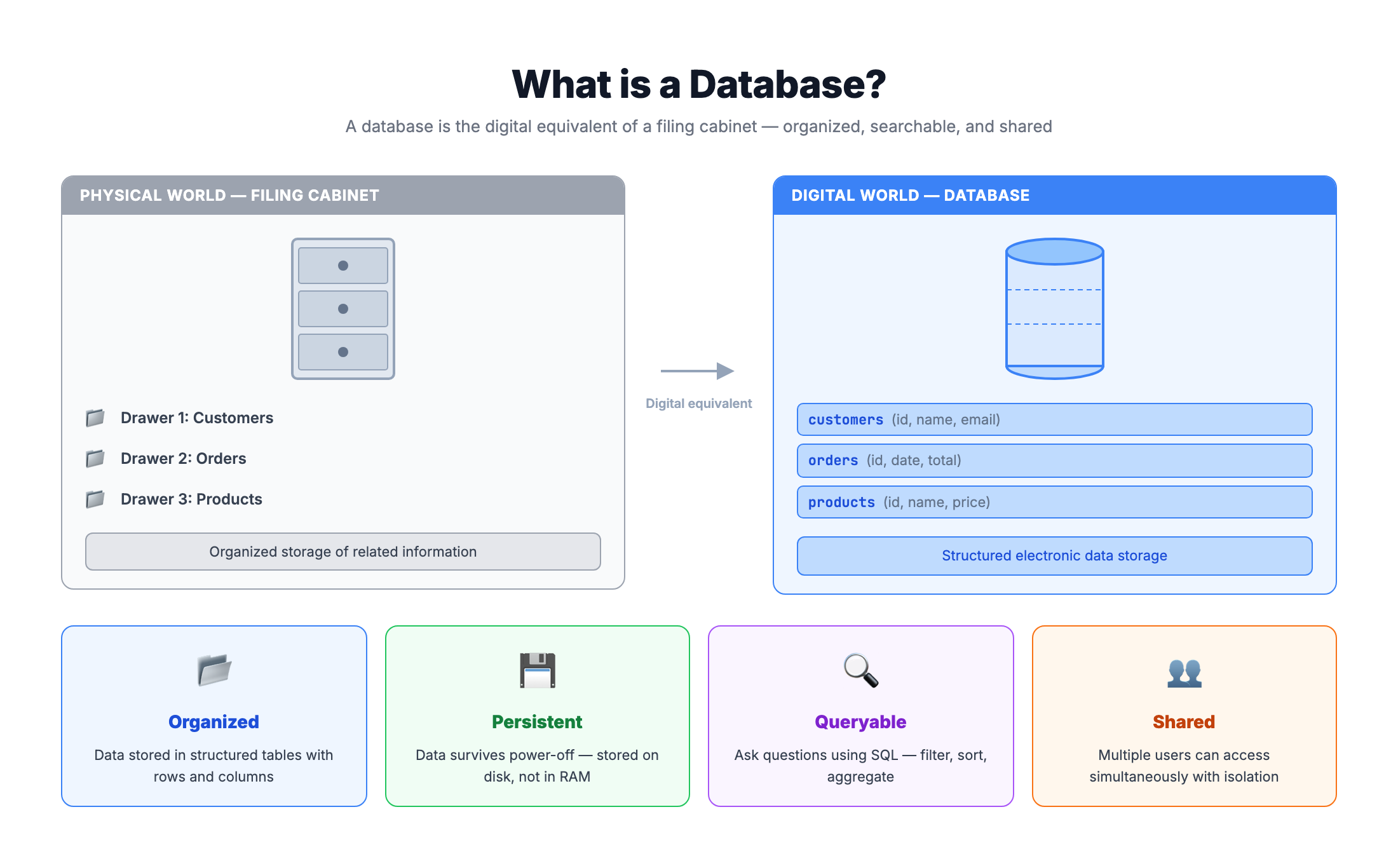
Think of a database like a digital filing cabinet. Just as a filing cabinet stores documents in an organized manner with folders and labels, a database stores data in an organized way that makes it easy to find, manage, and update information.
Real-World Examples
Databases are everywhere in our daily lives:
| Application | What's Stored |
|---|---|
| Online Shopping | Products, customers, orders, payments |
| Social Media | User profiles, posts, comments, likes |
| Banking | Accounts, transactions, customer details |
| Healthcare | Patient records, appointments, prescriptions |
| Streaming Services | Movies, shows, user preferences, watch history |
Why Use a Database?
Without a database, you might store data in spreadsheets or text files. This works for small amounts of data, but quickly becomes problematic:
- Duplicate data across multiple files
- Inconsistent information when updates are missed
- Slow searches through large files
- No security controls over who can access what
- Difficult to share data between applications
With a database, you get:
- Centralized storage - One source of truth
- Data integrity - Rules ensure data stays consistent
- Fast access - Optimized for quick retrieval
- Security - Control who can see or modify data
- Concurrent access - Multiple users can work simultaneously
Understanding Relational Databases
The most common type of database is a Relational Database. It stores data in tables (also called relations), which are organized into rows and columns.
Tables, Rows, and Columns
Imagine a simple customers table:
| customer_id | customer_name | city | |
|---|---|---|---|
| 1 | Alice Johnson | alice@email.com | New York |
| 2 | Bob Smith | bob@email.com | Los Angeles |
| 3 | Carol Davis | carol@email.com | Chicago |
Key terminology:
- Table: A collection of related data (like "customers" above)
- Column (Field): A specific attribute or property (like "customer_name" or "email")
- Row (Record): A single entry in the table (like Alice Johnson's information)
- Primary Key: A unique identifier for each row (like "customer_id")
Why "Relational"?
The name comes from the ability to create relationships between tables. For example:
Customers Table:
| customer_id | customer_name |
|---|---|
| 1 | Alice Johnson |
| 2 | Bob Smith |
Orders Table:
| order_id | customer_id | product | amount |
|---|---|---|---|
| 101 | 1 | Laptop | 999.99 |
| 102 | 1 | Mouse | 29.99 |
| 103 | 2 | Keyboard | 79.99 |
The customer_id column connects these tables. We can see that customer 1 (Alice) has two orders, while customer 2 (Bob) has one order. This connection is called a relationship.
What is RDBMS?
RDBMS stands for Relational Database Management System. It is the software that manages relational databases.
An RDBMS provides:
- Data storage and retrieval - Efficiently stores data and retrieves it when needed
- Query processing - Interprets and executes SQL commands
- Transaction management - Ensures data operations complete fully or not at all
- Security features - Controls access through users and permissions
- Backup and recovery - Protects against data loss
Popular RDBMS Systems
| RDBMS | Description | Common Use Cases |
|---|---|---|
| MySQL | Open-source, widely used | Web applications, small to medium businesses |
| PostgreSQL | Advanced open-source | Complex applications, data analytics |
| SQLite | Lightweight, file-based | Mobile apps, embedded systems, learning |
| Microsoft SQL Server | Enterprise solution | Corporate environments, Windows ecosystems |
| Oracle Database | Enterprise-grade | Large corporations, high-performance needs |
| MariaDB | MySQL fork, open-source | Drop-in MySQL replacement |
How Data is Stored
In an RDBMS, all data is stored in tables. A database can contain many tables, and tables can be linked through relationships.
Database: E-Commerce
├── Table: customers
├── Table: products
├── Table: orders
├── Table: order_items
└── Table: payments
Each table has a defined schema - the structure that specifies column names, data types, and constraints.
What is SQL?
SQL stands for Structured Query Language. It is the standard language used to communicate with relational databases.
Think of SQL as the language you use to "talk" to a database. Just as you use English to ask someone a question, you use SQL to ask a database for information or tell it to make changes.
Key Facts About SQL
- Pronounced as "S-Q-L" or "sequel" (both are correct)
- Standardized by ANSI (American National Standards Institute) and ISO
- Declarative language - You describe WHAT you want, not HOW to get it
- Not case-sensitive -
SELECTandselectwork the same (but uppercase is conventional for keywords)
What Can SQL Do?
SQL is incredibly powerful and versatile:
| Capability | Description | Example Action |
|---|---|---|
| Query data | Retrieve information from databases | Find all customers from New York |
| Insert data | Add new records to tables | Add a new customer |
| Update data | Modify existing records | Change a customer's email address |
| Delete data | Remove records from tables | Remove an inactive customer |
| Create structures | Build new tables and databases | Create a new orders table |
| Manage access | Control permissions | Grant read access to a user |
SQL is Declarative
Unlike programming languages where you write step-by-step instructions, SQL lets you describe the result you want:
In a programming language (pseudocode):
Create empty list
For each customer in customers:
    If customer.city equals "New York":
        Add customer to list
Return list
In SQL:
SELECT * FROM customers WHERE city = 'New York';
The database figures out the most efficient way to get your result!
Categories of SQL Commands
SQL commands are organized into categories based on their function:
1. DQL - Data Query Language
Used to retrieve data from the database.
| Command | Purpose |
|---|---|
SELECT | Fetch data from one or more tables |
Example:
SELECT customer_name, email FROM customers;
2. DML - Data Manipulation Language
Used to modify data in the database.
| Command | Purpose |
|---|---|
INSERT | Add new records |
UPDATE | Modify existing records |
DELETE | Remove records |
Examples:
INSERT INTO customers (customer_name, email) VALUES ('John Doe', 'john@email.com');
UPDATE customers SET email = 'newemail@email.com' WHERE customer_id = 1;
DELETE FROM customers WHERE customer_id = 5;
3. DDL - Data Definition Language
Used to define and modify database structures.
| Command | Purpose |
|---|---|
CREATE | Create new tables, databases, indexes |
ALTER | Modify existing structures |
DROP | Delete tables or databases |
TRUNCATE | Remove all records from a table |
Examples:
CREATE TABLE products (product_id INT, product_name TEXT, price DECIMAL);
ALTER TABLE products ADD COLUMN stock_quantity INT;
DROP TABLE old_products;
4. DCL - Data Control Language
Used to control access to data.
| Command | Purpose |
|---|---|
GRANT | Give permissions to users |
REVOKE | Remove permissions from users |
Examples:
GRANT SELECT ON customers TO analyst_user;
REVOKE DELETE ON customers FROM intern_user;
5. TCL - Transaction Control Language
Used to manage transactions (groups of operations).
| Command | Purpose |
|---|---|
COMMIT | Save all changes permanently |
ROLLBACK | Undo changes since last commit |
SAVEPOINT | Create a point to rollback to |
Example:
BEGIN TRANSACTION;
UPDATE accounts SET balance = balance - 100 WHERE account_id = 1;
UPDATE accounts SET balance = balance + 100 WHERE account_id = 2;
COMMIT;
Your First SQL Query
The most fundamental SQL command is SELECT. Let's understand its basic structure:
SELECT column1, column2, ...
FROM table_name;
Breaking It Down
SELECT- The keyword that starts a querycolumn1, column2- The columns you want to retrieveFROM- Specifies which table to get data fromtable_name- The name of the table;- Semicolon marks the end of the statement
Select All Columns
To get all columns, use the asterisk *:
SELECT * FROM customers;
This returns every column for every row in the customers table.
Select Specific Columns
To get only certain columns:
SELECT customer_name, email FROM customers;
This returns just the name and email columns, which is more efficient if you don't need other data.
Practice
Now it's your turn! Let's practice with our Brazilian E-Commerce database.
Try writing a simple SELECT query to explore the customers table. Click Run Code to execute your query against our live database.
Exercise 1: View All Customers
Write a query to select all columns from the olist_customers_dataset table. Limit to 10 rows to see a sample.
-- Select all columns from the customers table
-- Use LIMIT to restrict the number of rows returned

SELECT *
FROM olist_customers_dataset
LIMIT 10;
Exercise 2: Select Specific Columns
Now try selecting only the customer_city and customer_state columns from the customers table.
-- Select only city and state columns
-- Modify this query to select customer_city and customer_state

SELECT customer_city, customer_state
FROM olist_customers_dataset
LIMIT 10;
Exercise 3: Explore the Orders Table
Let's look at another table. Write a query to see data from olist_orders_dataset.
-- Explore the orders table
-- Write your SELECT query below

SELECT *
FROM olist_orders_dataset
LIMIT 10;
SQL Syntax Rules
Before moving forward, let's establish some important SQL syntax rules:
1. Case Sensitivity
Keywords (SELECT, FROM, WHERE) are NOT case-sensitive:
SELECT * FROM customers;  -- Works
select * from customers;  -- Also works
Select * From Customers;  -- Also works
However, table names and column names may be case-sensitive depending on the database system.
Best Practice: Use UPPERCASE for SQL keywords and lowercase for table/column names:
SELECT customer_name FROM customers;
2. Whitespace
SQL ignores extra whitespace. These are equivalent:
SELECT customer_name,email FROM customers;

SELECT
    customer_name,
    email
FROM
    customers;
Best Practice: Use line breaks and indentation for readability.
3. Statement Termination
End each SQL statement with a semicolon ;:
SELECT * FROM customers;
SELECT * FROM orders;
Some database tools work without semicolons for single queries, but it's good practice to always include them.
4. Comments
Single-line comments use two dashes:
-- This is a comment
SELECT * FROM customers; -- This also works
Multi-line comments use /* */:
/*
   This is a
   multi-line comment
*/
SELECT * FROM customers;
5. String Values
Text values (strings) are enclosed in single quotes:
SELECT * FROM customers WHERE city = 'New York';
Note: Double quotes are typically used for identifiers (column/table names), not string values.
Summary
Congratulations! You've learned the foundations of databases and SQL. Let's recap the key concepts:
Key Takeaways
✅ Database - An organized collection of data stored electronically
✅ Relational Database - Stores data in tables with rows and columns
✅ RDBMS - Software that manages relational databases (MySQL, PostgreSQL, SQLite, etc.)
✅ SQL - Structured Query Language, the standard language for interacting with relational databases
✅ SQL Command Categories:
- DQL (SELECT) - Query data
- DML (INSERT, UPDATE, DELETE) - Modify data
- DDL (CREATE, ALTER, DROP) - Define structures
- DCL (GRANT, REVOKE) - Control access
- TCL (COMMIT, ROLLBACK) - Manage transactions
✅ Basic SELECT syntax:
SELECT column1, column2 FROM table_name;
What's Next?
Now that you understand the basics, you're ready to learn:
- Filtering data with
WHERE - Sorting results with
ORDER BY - Combining tables with
JOIN - Aggregating data with
GROUP BY
Keep practicing with the exercises above and explore our database tables!
Additional Resources
Want to learn more? Here are some helpful resources:
- W3Schools SQL Tutorial - Beginner-friendly interactive lessons
- SQLite Documentation - Reference for SQLite-specific syntax
- PostgreSQL Tutorial - Comprehensive SQL learning path
- Khan Academy SQL - Free video-based SQL course
Database Used in This Course
Throughout CodePeet's SQL tutorials, you'll work with the Brazilian E-Commerce Public Dataset. This real-world dataset includes:
| Table | Description |
|---|---|
olist_customers_dataset | Customer information |
olist_orders_dataset | Order details |
olist_order_items_dataset | Items within each order |
olist_products_dataset | Product catalog |
olist_sellers_dataset | Seller information |
olist_order_payments_dataset | Payment records |
olist_order_reviews_dataset | Customer reviews |
This gives you hands-on experience with real data structures and relationships!