GROUP BY
Introduction
The GROUP BY clause is one of the most powerful features in SQL. It allows you to group rows together and perform aggregate calculations on each group.
In this tutorial, you will learn:
- How GROUP BY organizes data into groups
- Aggregate functions (COUNT, SUM, AVG, MIN, MAX)
- The relationship between SELECT and GROUP BY
- Grouping by multiple columns
- Common use cases and patterns
What is GROUP BY?
GROUP BY combines rows that have the same values in specified columns into summary rows.
Conceptual Example
Imagine you have customer data:
| customer_id | customer_state |
|---|---|
| 1 | SP |
| 2 | SP |
| 3 | RJ |
| 4 | SP |
| 5 | RJ |
With GROUP BY customer_state, SQL groups these into:
| Group | Rows |
|---|---|
| SP | customer 1, 2, 4 |
| RJ | customer 3, 5 |
Then you can count, sum, or calculate other statistics for each group.
Basic Syntax
SELECT
    column_to_group_by,
    AGGREGATE_FUNCTION(column)
FROM table_name
GROUP BY column_to_group_by;
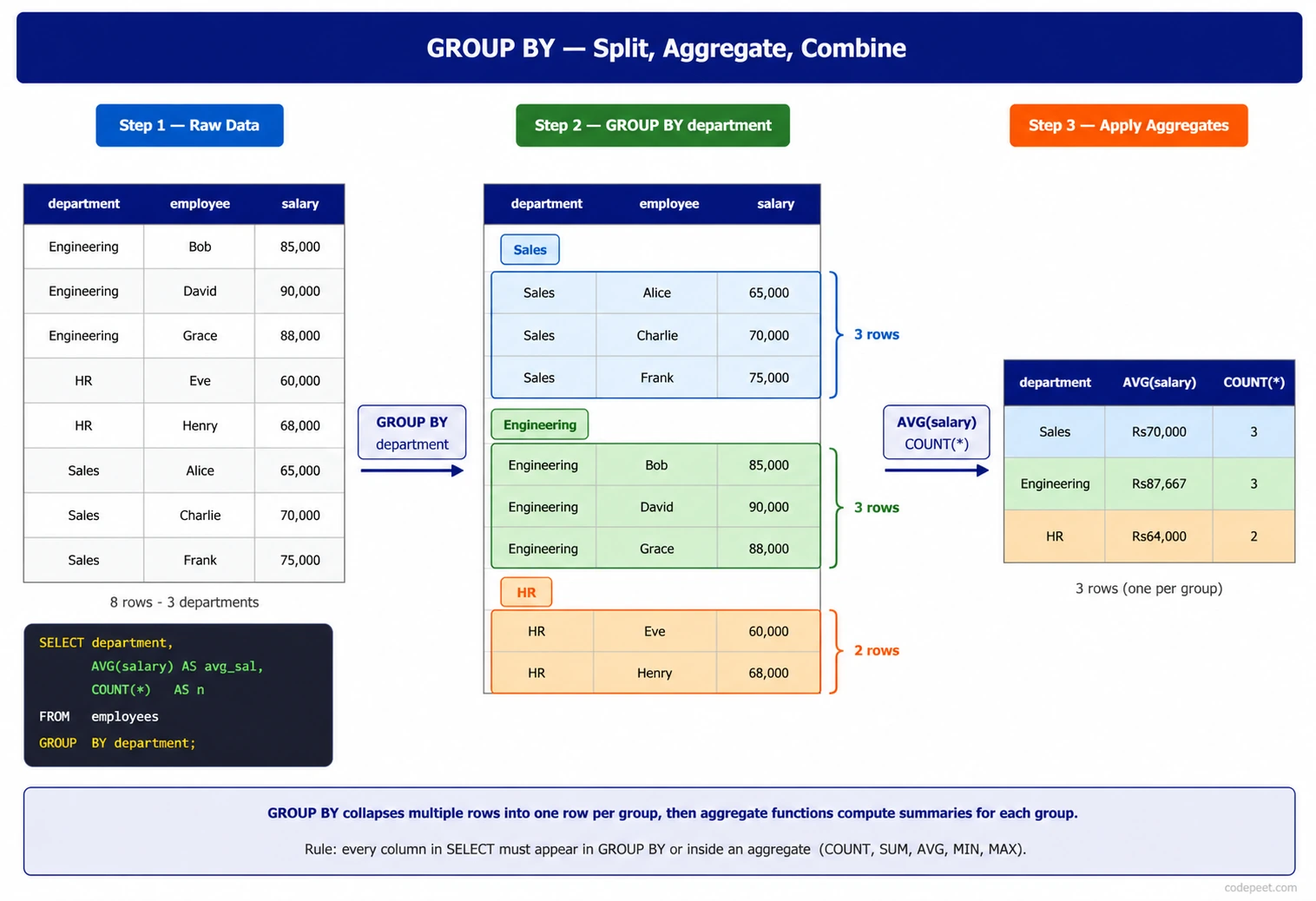
Visualization
GROUP BY — How Rows Group and Aggregate Step by Step
Aggregate Functions
Aggregate functions perform calculations on a group of rows and return a single value.
Common Aggregate Functions
| Function | Purpose | Example |
|---|---|---|
COUNT(*) | Count all rows | How many orders? |
COUNT(column) | Count non-NULL values | How many have reviews? |
SUM(column) | Add up values | Total revenue |
AVG(column) | Calculate average | Average order value |
MIN(column) | Find smallest value | Cheapest product |
MAX(column) | Find largest value | Most expensive order |
Examples Without GROUP BY
Aggregate functions work on the entire table:
-- Count all customers
SELECT COUNT(*) AS total_customers
FROM olist_customers_dataset;

-- Average order item price
SELECT AVG(price) AS avg_price
FROM olist_order_items_dataset;
Examples With GROUP BY
Aggregate functions work on each group:
-- Count customers per state
SELECT
    customer_state,
    COUNT(*) AS customers_in_state
FROM olist_customers_dataset
GROUP BY customer_state;
COUNT Function
COUNT is the most commonly used aggregate function.
COUNT(*) vs COUNT(column)
| Syntax | What It Counts |
|---|---|
COUNT(*) | All rows, including NULLs |
COUNT(column) | Only rows where column is NOT NULL |
COUNT(DISTINCT column) | Unique non-NULL values |
Example: COUNT(*)
-- Count all orders per status
SELECT
    order_status,
    COUNT(*) AS order_count
FROM olist_orders_dataset
GROUP BY order_status;
Example: COUNT(column)
-- Count orders that have review comments
SELECT
    review_score,
    COUNT(review_comment_message) AS reviews_with_comments
FROM olist_order_reviews_dataset
GROUP BY review_score;
Example: COUNT(DISTINCT)
-- Count unique cities per state
SELECT
    customer_state,
    COUNT(DISTINCT customer_city) AS unique_cities
FROM olist_customers_dataset
GROUP BY customer_state;
SUM and AVG Functions
SUM adds values together. AVG calculates the mean.
SUM Example
-- Total payment value per payment type
SELECT
    payment_type,
    SUM(payment_value) AS total_value
FROM olist_order_payments_dataset
GROUP BY payment_type;
AVG Example
-- Average price per product category
SELECT
    p.product_category_name,
    AVG(i.price) AS avg_price
FROM olist_order_items_dataset AS i
JOIN olist_products_dataset AS p ON i.product_id = p.product_id
GROUP BY p.product_category_name;
Combining SUM and AVG
-- Payment statistics per type
SELECT
    payment_type,
    COUNT(*) AS payment_count,
    SUM(payment_value) AS total_value,
    AVG(payment_value) AS avg_value
FROM olist_order_payments_dataset
GROUP BY payment_type;
MIN and MAX Functions
MIN finds the smallest value. MAX finds the largest.
Example: Price Range
-- Find price range per seller
SELECT
    seller_id,
    MIN(price) AS lowest_price,
    MAX(price) AS highest_price
FROM olist_order_items_dataset
GROUP BY seller_id;
Example: Date Range
-- Find first and last order per customer
SELECT
    customer_id,
    MIN(order_purchase_timestamp) AS first_order,
    MAX(order_purchase_timestamp) AS last_order
FROM olist_orders_dataset
GROUP BY customer_id;
Combining Multiple Aggregates
-- Complete order item statistics per order
SELECT
    order_id,
    COUNT(*) AS item_count,
    SUM(price) AS total_price,
    MIN(price) AS cheapest_item,
    MAX(price) AS most_expensive_item,
    AVG(price) AS avg_item_price
FROM olist_order_items_dataset
GROUP BY order_id;
The SELECT and GROUP BY Rule
This is a critical rule to understand:
The Rule
Every column in SELECT must either be:
- In the GROUP BY clause, OR
- Inside an aggregate function
Valid Query
SELECT
    customer_state,           -- In GROUP BY ✓
    COUNT(*) AS customer_count -- Aggregate function ✓
FROM olist_customers_dataset
GROUP BY customer_state;
Invalid Query
-- ERROR: customer_city is not in GROUP BY or an aggregate
SELECT
    customer_state,
    customer_city,             -- NOT in GROUP BY, NOT aggregated ✗
    COUNT(*)
FROM olist_customers_dataset
GROUP BY customer_state;
Why This Rule Exists
When you GROUP BY customer_state, multiple cities are combined into each group. SQL doesn't know which city value to show for the group.
Solutions
Option 1: Add to GROUP BY
GROUP BY customer_state, customer_city
Option 2: Use aggregate function
SELECT
    customer_state,
    COUNT(DISTINCT customer_city) AS city_count
Grouping by Multiple Columns
You can GROUP BY multiple columns to create finer-grained groups.
Syntax
GROUP BY column1, column2, column3
Example: State and City
-- Customer count per city (within each state)
SELECT
    customer_state,
    customer_city,
    COUNT(*) AS customer_count
FROM olist_customers_dataset
GROUP BY customer_state, customer_city
ORDER BY customer_state, customer_count DESC;
How It Works
With GROUP BY customer_state, customer_city:
- Each unique (state, city) combination becomes a group
- ('SP', 'sao paulo') is one group
- ('SP', 'campinas') is a different group
- ('RJ', 'rio de janeiro') is another group
Practical Example
-- Payment statistics by type and installment count
SELECT
    payment_type,
    payment_installments,
    COUNT(*) AS payment_count,
    AVG(payment_value) AS avg_value
FROM olist_order_payments_dataset
GROUP BY payment_type, payment_installments
ORDER BY payment_type, payment_installments;
GROUP BY with WHERE
WHERE filters rows BEFORE grouping.
Execution Order
- FROM - Get the table
- WHERE - Filter individual rows
- GROUP BY - Group the filtered rows
- SELECT - Calculate aggregates and select columns
Example
-- Count customers per state, but only in major cities
SELECT
    customer_state,
    COUNT(*) AS customer_count
FROM olist_customers_dataset
WHERE customer_city IN ('sao paulo', 'rio de janeiro', 'brasilia')
GROUP BY customer_state
ORDER BY customer_count DESC;
The WHERE clause removes rows before grouping, so only customers from those three cities are counted.
Another Example
-- Average price per seller, only for items over $50
SELECT
    seller_id,
    COUNT(*) AS item_count,
    AVG(price) AS avg_price
FROM olist_order_items_dataset
WHERE price > 50
GROUP BY seller_id
ORDER BY avg_price DESC;
Practice
Let's practice grouping and aggregating data.
Exercise 1: Basic COUNT with GROUP BY
Count customers in each state:
-- Count customers per state

SELECT
    customer_state,
    COUNT(*) AS customer_count
FROM olist_customers_dataset
GROUP BY customer_state
ORDER BY customer_count DESC
LIMIT 10;
Exercise 2: SUM with GROUP BY
Calculate total payment value per payment type:
-- Total payment value by payment type

SELECT
    payment_type,
    SUM(payment_value) AS total_value,
    COUNT(*) AS payment_count
FROM olist_order_payments_dataset
GROUP BY payment_type
ORDER BY total_value DESC;
Exercise 3: AVG, MIN, MAX
Find price statistics per seller:
-- Price statistics per seller

SELECT
    seller_id,
    COUNT(*) AS items_sold,
    AVG(price) AS avg_price,
    MIN(price) AS min_price,
    MAX(price) AS max_price
FROM olist_order_items_dataset
GROUP BY seller_id
ORDER BY items_sold DESC
LIMIT 10;
Exercise 4: Multiple Column GROUP BY
Count customers by state and city:
-- Customer count by state and city

SELECT
    customer_state,
    customer_city,
    COUNT(*) AS customer_count
FROM olist_customers_dataset
GROUP BY customer_state, customer_city
ORDER BY customer_count DESC
LIMIT 15;
Exercise 5: GROUP BY with WHERE Filter
Count delivered orders per status for orders with known delivery dates:
-- Order count by status (only where delivery date exists)

SELECT
    order_status,
    COUNT(*) AS order_count
FROM olist_orders_dataset
WHERE order_delivered_customer_date IS NOT NULL
GROUP BY order_status
ORDER BY order_count DESC;
Exercise 6: COUNT DISTINCT
Count unique customers and unique products per order:
-- Unique products per order

SELECT
    order_id,
    COUNT(*) AS total_items,
    COUNT(DISTINCT product_id) AS unique_products
FROM olist_order_items_dataset
GROUP BY order_id
ORDER BY total_items DESC
LIMIT 10;
Common Use Cases
1. Top N Analysis
-- Top 5 states by customer count
SELECT customer_state, COUNT(*) AS customers
FROM olist_customers_dataset
GROUP BY customer_state
ORDER BY customers DESC
LIMIT 5;
2. Time-Based Aggregation
-- Orders per month (using strftime for SQLite)
SELECT
    strftime('%Y-%m', order_purchase_timestamp) AS order_month,
    COUNT(*) AS order_count
FROM olist_orders_dataset
GROUP BY strftime('%Y-%m', order_purchase_timestamp)
ORDER BY order_month;
3. Distribution Analysis
-- Distribution of review scores
SELECT
    review_score,
    COUNT(*) AS review_count,
    ROUND(COUNT(*) * 100.0 / (SELECT COUNT(*) FROM olist_order_reviews_dataset), 2) AS percentage
FROM olist_order_reviews_dataset
GROUP BY review_score
ORDER BY review_score;
4. Summary Statistics
-- Order summary statistics
SELECT
    order_status,
    COUNT(*) AS count,
    SUM(CASE WHEN order_delivered_customer_date IS NOT NULL THEN 1 ELSE 0 END) AS delivered_count
FROM olist_orders_dataset
GROUP BY order_status;
Summary
You now understand how to group and aggregate data with GROUP BY!
Key Takeaways
✅ GROUP BY combines rows with matching values into groups
✅ Aggregate functions calculate values for each group:
COUNT(*)- count rowsSUM()- add valuesAVG()- calculate averageMIN()/MAX()- find extremes
✅ SELECT rule: columns must be in GROUP BY or inside an aggregate function
✅ Multiple columns: GROUP BY col1, col2 creates finer groups
✅ WHERE filters rows BEFORE grouping
Quick Reference
-- Basic GROUP BY
SELECT column, COUNT(*)
FROM table
GROUP BY column;

-- Multiple aggregates
SELECT column, COUNT(*), SUM(val), AVG(val)
FROM table
GROUP BY column;

-- Multiple grouping columns
SELECT col1, col2, COUNT(*)
FROM table
GROUP BY col1, col2;

-- With WHERE filter
SELECT column, COUNT(*)
FROM table
WHERE condition
GROUP BY column;
What's Next?
Next, we'll learn about HAVING - which filters groups AFTER aggregation (unlike WHERE which filters before).