INNER JOIN
Introduction
The INNER JOIN is the most common type of JOIN in SQL. It returns only the rows that have matching values in both tables.
When you simply write JOIN without specifying a type, SQL defaults to INNER JOIN.
In this tutorial, you will learn:
- What an INNER JOIN is and how it works
- The syntax for INNER JOIN
- When to use INNER JOIN
- Common use cases and examples
What is an INNER JOIN?
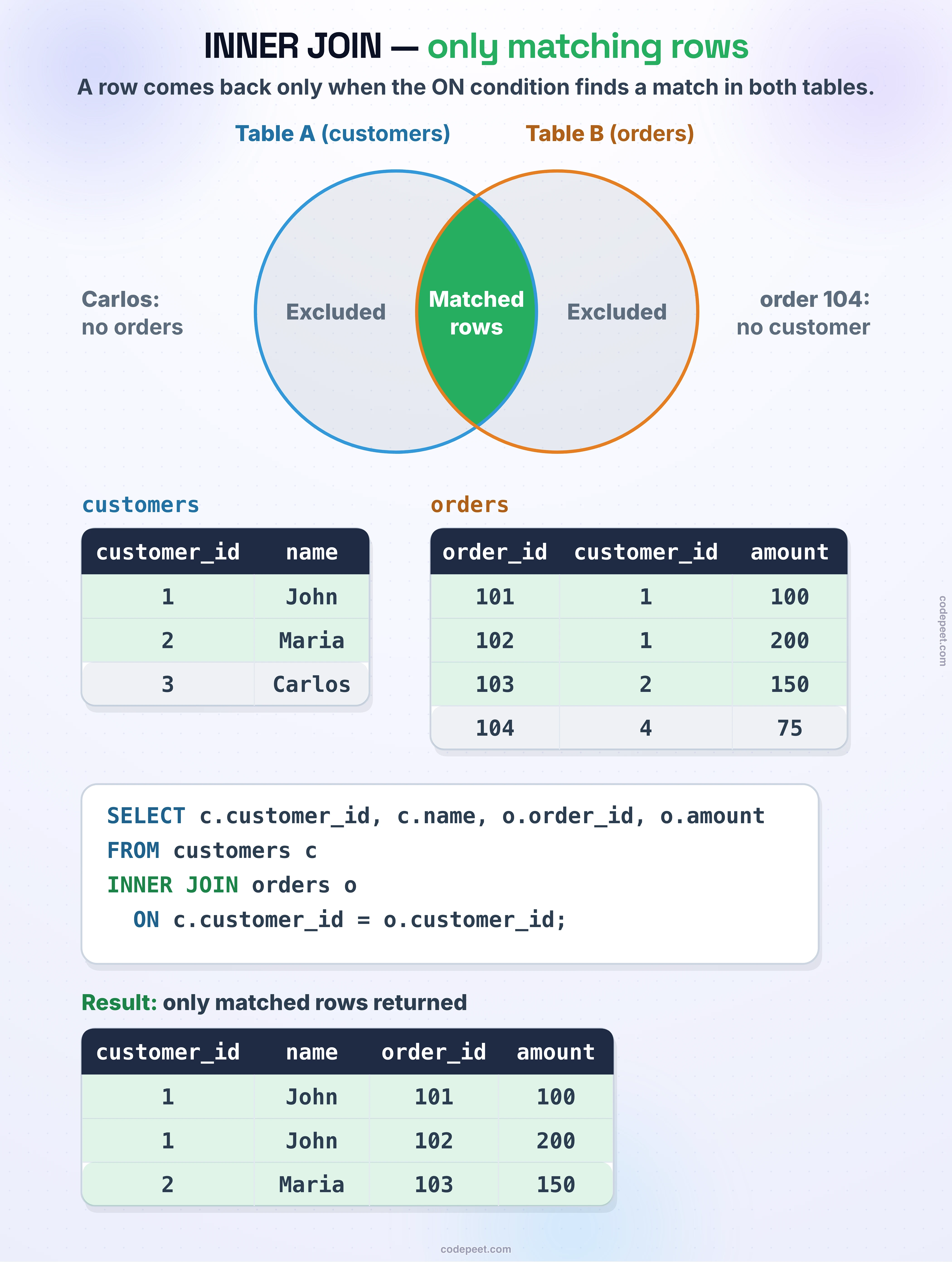
An INNER JOIN returns only rows where there is a match in both tables.
Visual Representation
Example
customers table:
| customer_id | name |
|---|---|
| 1 | John |
| 2 | Maria |
| 3 | Carlos |
orders table:
| order_id | customer_id | amount |
|---|---|---|
| 101 | 1 | 100 |
| 102 | 1 | 200 |
| 103 | 2 | 150 |
| 104 | 4 | 75 |
INNER JOIN Result:
| customer_id | name | order_id | amount |
|---|---|---|---|
| 1 | John | 101 | 100 |
| 1 | John | 102 | 200 |
| 2 | Maria | 103 | 150 |
Notice:
- Carlos (customer_id=3) is NOT included - no matching orders
- Order 104 (customer_id=4) is NOT included - no matching customer
- Only rows with matches in BOTH tables appear
Visualization
INNER JOIN — Row-by-Row Matching Process
INNER JOIN Syntax
Standard Syntax
SELECT columns
FROM table1
INNER JOIN table2
    ON table1.column = table2.column;
Simplified Syntax
Since INNER JOIN is the default, you can simply write JOIN:
SELECT columns
FROM table1
JOIN table2
    ON table1.column = table2.column;
Both are equivalent.
With Table Aliases
SELECT
    c.customer_city,
    o.order_id,
    o.order_status
FROM olist_customers_dataset c
INNER JOIN olist_orders_dataset o
    ON c.customer_id = o.customer_id;
How INNER JOIN Works
Conceptually, an INNER JOIN follows these steps:
Step 1: Take Each Row from Table 1
For each row in the left table (customers):
Row 1: customer_id = 1, name = 'John'
Step 2: Find Matches in Table 2
Look for rows in the right table (orders) where customer_id matches:
Found: order_id = 101, customer_id = 1
Found: order_id = 102, customer_id = 1
Step 3: Combine Matching Rows
Create result rows by combining the matched data:
Result: (1, 'John', 101, 100)
Result: (1, 'John', 102, 200)
Step 4: Repeat for All Rows
Repeat for customer_id=2, 3, etc.
Step 5: Discard Non-Matches
- Customer 3 (Carlos) has no orders → excluded
- Order 104 has no matching customer → excluded
Multiple Matches
When one row matches multiple rows, you get multiple result rows.
One-to-Many Relationship
One customer can have many orders:
customers              orders
┌────────────┐         ┌────────────┐
│ id=1 John  │────────▶│ order 101  │
│            │────────▶│ order 102  │
│            │────────▶│ order 103  │
└────────────┘         └────────────┘

Result: 3 rows for John (one per order)
Impact on Row Count
The INNER JOIN result can have:
- Fewer rows than either table (when there are non-matches)
- More rows than either table (when there are multiple matches)
- Same rows as either table (perfect 1:1 matching)
Example Query
SELECT
    c.customer_id,
    COUNT(o.order_id) AS order_count
FROM olist_customers_dataset c
INNER JOIN olist_orders_dataset o
    ON c.customer_id = o.customer_id
GROUP BY c.customer_id
HAVING COUNT(o.order_id) > 1;
This finds customers with multiple orders.
When to Use INNER JOIN
Use INNER JOIN when you only want rows that exist in both tables.
Good Use Cases
1. Showing Orders with Customer Details
You only care about orders that have a valid customer:
SELECT c.customer_city, o.order_id
FROM customers c
INNER JOIN orders o ON c.customer_id = o.customer_id;
2. Finding Products That Have Been Sold
SELECT DISTINCT p.product_id, p.product_category_name
FROM products p
INNER JOIN order_items oi ON p.product_id = oi.product_id;
3. Matching Related Data
Any time both sides must have corresponding records.
When NOT to Use INNER JOIN
❌ When you want to see ALL items from one side, even without matches
Example: Show all customers, even those without orders → Use LEFT JOIN
❌ When missing data on one side is significant
Example: Find customers who haven't ordered → Use LEFT ANTI JOIN
INNER JOIN with Multiple Conditions
You can use multiple conditions in the ON clause.
Using AND
SELECT *
FROM table1 t1
INNER JOIN table2 t2
    ON t1.column1 = t2.column1
    AND t1.column2 = t2.column2;
Example: Matching on Multiple Keys
SELECT
    g.geolocation_city,
    c.customer_city
FROM olist_geolocation_dataset g
INNER JOIN olist_customers_dataset c
    ON g.geolocation_zip_code_prefix = c.customer_zip_code_prefix
    AND g.geolocation_city = c.customer_city
LIMIT 10;
ON vs WHERE for Filtering
With INNER JOIN, filtering in ON vs WHERE gives the same result:
-- Filter in ON
FROM customers c
INNER JOIN orders o
    ON c.customer_id = o.customer_id
    AND o.order_status = 'delivered'

-- Filter in WHERE (equivalent for INNER JOIN)
FROM customers c
INNER JOIN orders o
    ON c.customer_id = o.customer_id
WHERE o.order_status = 'delivered'
Best Practice: Put join conditions in ON, and filter conditions in WHERE for clarity.
Practice
Let's practice using INNER JOIN with our e-commerce dataset.
Exercise 1: Basic INNER JOIN
Join customers with their orders:
-- Basic INNER JOIN: customers with their orders
-- Only customers who have placed orders will appear

SELECT
    c.customer_id,
    c.customer_city,
    c.customer_state,
    o.order_id,
    o.order_status
FROM olist_customers_dataset c
INNER JOIN olist_orders_dataset o
    ON c.customer_id = o.customer_id
LIMIT 10;
Exercise 2: INNER JOIN with Aggregation
Count orders per customer state using INNER JOIN:
-- Count orders per state
-- Uses INNER JOIN to connect customers with their orders

SELECT
    c.customer_state,
    COUNT(o.order_id) AS total_orders
FROM olist_customers_dataset c
INNER JOIN olist_orders_dataset o
    ON c.customer_id = o.customer_id
GROUP BY c.customer_state
ORDER BY total_orders DESC
LIMIT 10;
Exercise 3: Three Table INNER JOIN
Chain multiple INNER JOINs to connect customers → orders → order items:
-- Three table INNER JOIN
-- Customer → Order → Order Items

SELECT
    c.customer_city,
    o.order_id,
    oi.product_id,
    oi.price
FROM olist_customers_dataset c
INNER JOIN olist_orders_dataset o
    ON c.customer_id = o.customer_id
INNER JOIN olist_order_items_dataset oi
    ON o.order_id = oi.order_id
LIMIT 10;
Exercise 4: Calculate Revenue by City
Use INNER JOIN to find the top revenue-generating cities:
-- Total revenue by customer city
-- Requires joining customers → orders → order_items

SELECT
    c.customer_city,
    c.customer_state,
    COUNT(DISTINCT o.order_id) AS order_count,
    ROUND(SUM(oi.price), 2) AS total_revenue
FROM olist_customers_dataset c
INNER JOIN olist_orders_dataset o
    ON c.customer_id = o.customer_id
INNER JOIN olist_order_items_dataset oi
    ON o.order_id = oi.order_id
GROUP BY c.customer_city, c.customer_state
ORDER BY total_revenue DESC
LIMIT 10;
Common Mistakes
Mistake 1: Forgetting the ON Clause
❌ Wrong:
SELECT * FROM customers INNER JOIN orders;
✅ Correct:
SELECT * FROM customers c
INNER JOIN orders o ON c.customer_id = o.customer_id;
Mistake 2: Joining on Wrong Columns
❌ Wrong:
ON c.customer_city = o.order_id -- Unrelated columns!
✅ Correct:
ON c.customer_id = o.customer_id -- Related columns
Mistake 3: Expecting Non-Matches
❌ Expecting: All customers including those without orders
Reality: INNER JOIN only returns matching rows
✅ Solution: Use LEFT JOIN to include non-matching rows
Mistake 4: Duplicate Columns
When both tables have same column names:
-- Both tables have customer_id
SELECT customer_id  -- Ambiguous! Which one?
FROM customers c
INNER JOIN orders o ON c.customer_id = o.customer_id;

-- Fix: Use table alias
SELECT c.customer_id
Summary
Key Takeaways
-
INNER JOIN returns only rows that have matches in both tables
-
Syntax:
SELECT columns
FROM table1
INNER JOIN table2 ON table1.key = table2.key
``

`3. `JOIN` without a type keyword defaults to `INNER JOIN`

4. **Non-matching rows are excluded** from both sides

5. **One-to-many relationships** produce multiple result rows

6. **Use INNER JOIN when:**
- You only want matching records
- Missing data on either side is irrelevant
- Both tables must have corresponding entries

7. **Don't use INNER JOIN when:**
- You need ALL rows from one table regardless of matches
- You want to find non-matching rows

### What's Next?

Next, we'll learn about LEFT JOIN, which keeps all rows from the left table even when there's no match in the right table.