WHERE
Introduction
The WHERE clause is your filter - it determines which rows appear in your results. Instead of retrieving every row from a table, WHERE lets you specify conditions that rows must meet.
In this tutorial, you will learn:
- How to filter rows using WHERE
- Comparison operators (=, >, <, !=, etc.)
- Working with text and numeric conditions
- Combining conditions with AND, OR, NOT
- Special operators like BETWEEN, IN, and LIKE
What is the WHERE Clause?
The WHERE clause filters rows based on specified conditions. Only rows that satisfy the condition are included in the results.
Basic Syntax
SELECT columns
FROM table_name
WHERE condition;
How It Works
- Database reads each row from the table
- For each row, it evaluates the WHERE condition
- If condition is TRUE → row is included
- If condition is FALSE → row is excluded
Example
SELECT customer_id, customer_city, customer_state
FROM olist_customers_dataset
WHERE customer_state = 'SP';
This returns only customers from São Paulo state (SP).
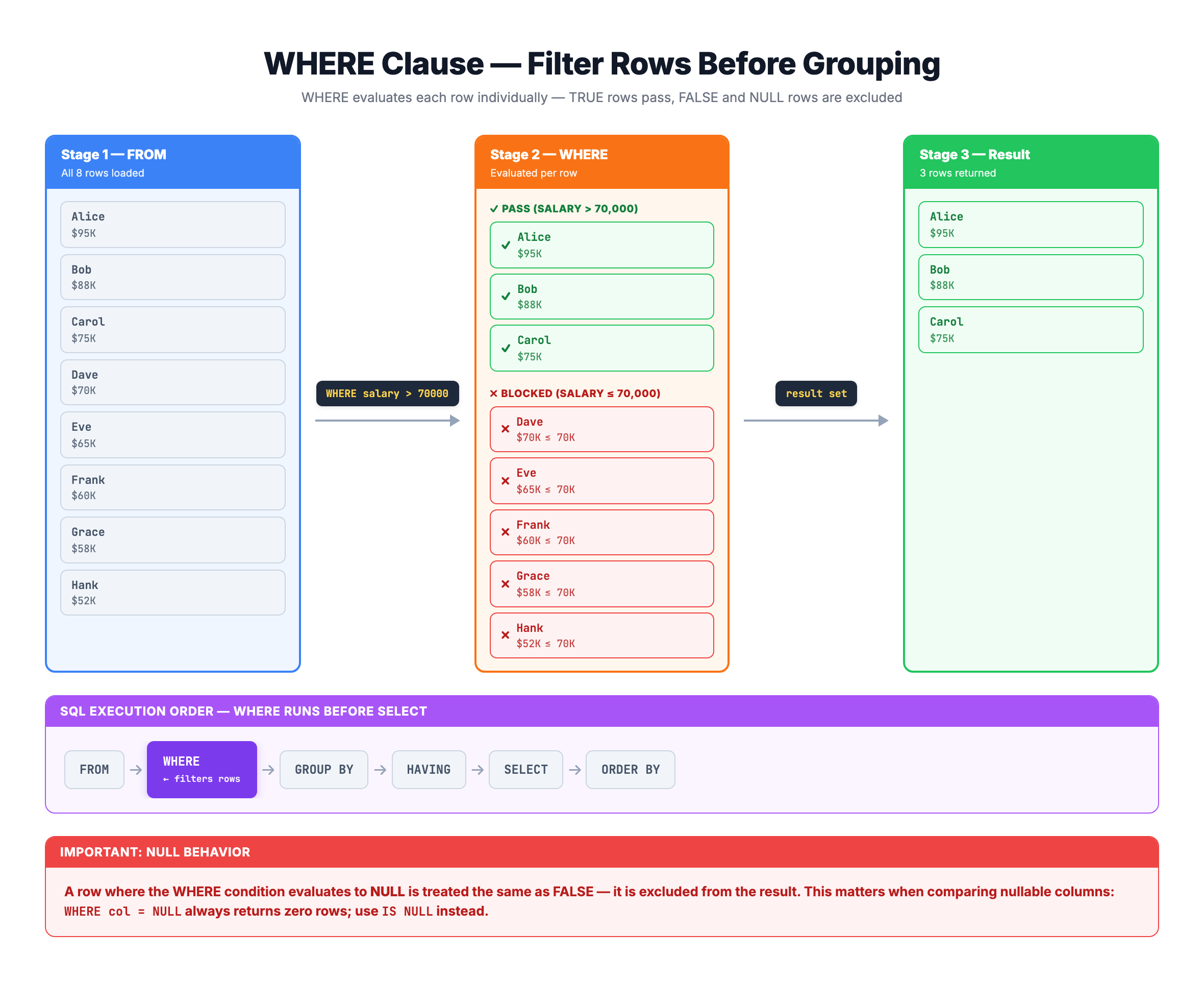
Visualization
WHERE Clause — How Row Filtering Works Step by Step
Comparison Operators
Comparison operators compare values and return TRUE or FALSE.
Available Operators
| Operator | Meaning | Example |
|---|---|---|
= | Equal to | price = 100 |
!= or <> | Not equal to | status != 'canceled' |
> | Greater than | price > 50 |
< | Less than | quantity < 10 |
>= | Greater than or equal | rating >= 4 |
<= | Less than or equal | stock <= 5 |
Numeric Comparisons
-- Products with price greater than 100
SELECT * FROM olist_order_items_dataset
WHERE price > 100;

-- Orders with at least 3 payment installments
SELECT * FROM olist_order_payments_dataset
WHERE payment_installments >= 3;
Text Comparisons
-- Customers from São Paulo
SELECT * FROM olist_customers_dataset
WHERE customer_state = 'SP';

-- Orders that are not delivered
SELECT * FROM olist_orders_dataset
WHERE order_status != 'delivered';
Important: Text values must be enclosed in single quotes: 'SP'
Combining Conditions with AND
The AND operator combines multiple conditions. ALL conditions must be TRUE for a row to be included.
Syntax
WHERE condition1 AND condition2
Example
-- Customers from São Paulo city in SP state
SELECT * FROM olist_customers_dataset
WHERE customer_state = 'SP'
  AND customer_city = 'sao paulo';
Multiple AND Conditions
-- Items with price between 50 and 200, and low freight
SELECT * FROM olist_order_items_dataset
WHERE price >= 50
  AND price <= 200
  AND freight_value < 20;
Truth Table for AND
| Condition 1 | Condition 2 | Result |
|---|---|---|
| TRUE | TRUE | TRUE |
| TRUE | FALSE | FALSE |
| FALSE | TRUE | FALSE |
| FALSE | FALSE | FALSE |
Combining Conditions with OR
The OR operator returns rows where ANY condition is TRUE.
Syntax
WHERE condition1 OR condition2
Example
-- Customers from SP or RJ states
SELECT * FROM olist_customers_dataset
WHERE customer_state = 'SP'
   OR customer_state = 'RJ';
Multiple OR Conditions
-- Orders that are shipped, delivered, or invoiced
SELECT * FROM olist_orders_dataset
WHERE order_status = 'shipped'
   OR order_status = 'delivered'
   OR order_status = 'invoiced';
Truth Table for OR
| Condition 1 | Condition 2 | Result |
|---|---|---|
| TRUE | TRUE | TRUE |
| TRUE | FALSE | TRUE |
| FALSE | TRUE | TRUE |
| FALSE | FALSE | FALSE |
The NOT Operator
The NOT operator reverses a condition - TRUE becomes FALSE and vice versa.
Syntax
WHERE NOT condition
Examples
-- Customers NOT from SP state
SELECT * FROM olist_customers_dataset
WHERE NOT customer_state = 'SP';

-- Same result using !=
SELECT * FROM olist_customers_dataset
WHERE customer_state != 'SP';
NOT with Other Operators
-- Orders NOT in the specified statuses
SELECT * FROM olist_orders_dataset
WHERE order_status NOT IN ('canceled', 'unavailable');

-- Products where category is NOT NULL
SELECT * FROM olist_products_dataset
WHERE product_category_name IS NOT NULL;
Combining AND and OR
You can combine AND and OR, but be careful about operator precedence.
Precedence Rule
AND is evaluated before OR (like multiplication before addition in math).
Problem Example
-- This might not do what you expect!
SELECT * FROM olist_customers_dataset
WHERE customer_state = 'SP' OR customer_state = 'RJ'
  AND customer_city = 'rio de janeiro';
This actually means:
customer_state = 'SP'- OR (
customer_state = 'RJ'ANDcustomer_city = 'rio de janeiro')
Solution: Use Parentheses
-- Clear and correct
SELECT * FROM olist_customers_dataset
WHERE (customer_state = 'SP' OR customer_state = 'RJ')
  AND customer_city = 'rio de janeiro';
Best Practice: Always use parentheses to make your logic explicit and clear.
BETWEEN Operator
The BETWEEN operator filters values within a range (inclusive of both endpoints).
Syntax
WHERE column BETWEEN value1 AND value2
Example
-- Items priced between 50 and 100 (inclusive)
SELECT * FROM olist_order_items_dataset
WHERE price BETWEEN 50 AND 100;

-- Equivalent to:
SELECT * FROM olist_order_items_dataset
WHERE price >= 50 AND price <= 100;
NOT BETWEEN
-- Items NOT in the 50-100 price range
SELECT * FROM olist_order_items_dataset
WHERE price NOT BETWEEN 50 AND 100;
BETWEEN with Dates
-- Orders from January 2018
SELECT * FROM olist_orders_dataset
WHERE order_purchase_timestamp BETWEEN '2018-01-01' AND '2018-01-31';
IN Operator
The IN operator checks if a value matches ANY value in a list.
Syntax
WHERE column IN (value1, value2, value3)
Example
-- Customers from major states
SELECT * FROM olist_customers_dataset
WHERE customer_state IN ('SP', 'RJ', 'MG', 'RS');

-- Equivalent to multiple OR conditions:
SELECT * FROM olist_customers_dataset
WHERE customer_state = 'SP'
   OR customer_state = 'RJ'
   OR customer_state = 'MG'
   OR customer_state = 'RS';
NOT IN
-- Orders NOT in canceled or unavailable status
SELECT * FROM olist_orders_dataset
WHERE order_status NOT IN ('canceled', 'unavailable');
IN is Cleaner Than Multiple ORs
-- Hard to read with OR
WHERE payment_type = 'credit_card'
   OR payment_type = 'debit_card'
   OR payment_type = 'voucher'

-- Clean with IN
WHERE payment_type IN ('credit_card', 'debit_card', 'voucher')
LIKE Operator for Pattern Matching
The LIKE operator searches for patterns in text columns.
Wildcards
| Wildcard | Meaning | Example |
|---|---|---|
% | Any sequence of characters | 'sao%' matches 'sao paulo', 'sao carlos' |
_ | Any single character | '_ao' matches 'sao', 'cao' |
Syntax
WHERE column LIKE 'pattern'
Examples
-- Cities starting with 'sao'
SELECT * FROM olist_customers_dataset
WHERE customer_city LIKE 'sao%';

-- Cities ending with 'paulo'
SELECT * FROM olist_customers_dataset
WHERE customer_city LIKE '%paulo';

-- Cities containing 'de'
SELECT * FROM olist_customers_dataset
WHERE customer_city LIKE '%de%';
Case Sensitivity
In SQLite, LIKE is case-insensitive by default for ASCII characters.
NOT LIKE
-- Cities NOT starting with 'sao'
SELECT * FROM olist_customers_dataset
WHERE customer_city NOT LIKE 'sao%';
Working with NULL Values
NULL represents missing or unknown values. You cannot compare NULL using = or !=.
IS NULL and IS NOT NULL
-- Products with no category
SELECT * FROM olist_products_dataset
WHERE product_category_name IS NULL;

-- Products that have a category
SELECT * FROM olist_products_dataset
WHERE product_category_name IS NOT NULL;
Wrong Way to Check for NULL
-- WRONG: This doesn't work!
SELECT * FROM olist_products_dataset
WHERE product_category_name = NULL;

-- CORRECT: Use IS NULL
SELECT * FROM olist_products_dataset
WHERE product_category_name IS NULL;
Why This Matters
In SQL, NULL = NULL returns UNKNOWN (not TRUE), so comparison operators don't work with NULL values.
Practice
Let's practice filtering data with WHERE.
Exercise 1: Simple Comparison
Find all delivered orders:
-- Filter orders by status

SELECT order_id, customer_id, order_status
FROM olist_orders_dataset
WHERE order_status = 'delivered'
LIMIT 10;
Exercise 2: Numeric Comparison
Find order items with price greater than 500:
-- Filter by price

SELECT order_id, product_id, price
FROM olist_order_items_dataset
WHERE price > 500
LIMIT 10;
Exercise 3: Multiple Conditions with AND
Find customers from São Paulo city in SP state:
-- Combine conditions with AND

SELECT customer_id, customer_city, customer_state
FROM olist_customers_dataset
WHERE customer_state = 'SP'
  AND customer_city = 'sao paulo'
LIMIT 10;
Exercise 4: Using IN Operator
Find customers from the top 4 states (SP, RJ, MG, RS):
-- Use IN to check multiple values

SELECT customer_id, customer_city, customer_state
FROM olist_customers_dataset
WHERE customer_state IN ('SP', 'RJ', 'MG', 'RS')
LIMIT 10;
Exercise 5: Pattern Matching with LIKE
Find cities that start with 'rio':
-- Use LIKE for pattern matching

SELECT DISTINCT customer_city, customer_state
FROM olist_customers_dataset
WHERE customer_city LIKE 'rio%'
LIMIT 10;
Exercise 6: BETWEEN for Ranges
Find order items priced between 100 and 300:
-- Use BETWEEN for range filtering

SELECT order_id, product_id, price
FROM olist_order_items_dataset
WHERE price BETWEEN 100 AND 300
LIMIT 10;
Summary
You now know how to filter data using the WHERE clause!
Key Takeaways
✅ WHERE filters rows based on conditions
✅ Comparison operators: =, !=, >, <, >=, <=
✅ AND - All conditions must be TRUE
✅ OR - Any condition can be TRUE
✅ NOT - Reverses a condition
✅ BETWEEN - Filter within a range (inclusive)
✅ IN - Match any value in a list
✅ LIKE - Pattern matching with % and _ wildcards
✅ IS NULL / IS NOT NULL - Check for missing values
Quick Reference
-- Basic comparison
WHERE column = value

-- Multiple conditions
WHERE condition1 AND condition2
WHERE condition1 OR condition2

-- Range
WHERE column BETWEEN low AND high

-- List of values
WHERE column IN (val1, val2, val3)

-- Pattern matching
WHERE column LIKE 'pattern%'

-- NULL check
WHERE column IS NULL
WHERE column IS NOT NULL
What's Next?
Next, we'll learn about ORDER BY to sort our query results in meaningful ways.