CROSS JOIN
Introduction
A CROSS JOIN returns the Cartesian product of two tables - every possible combination of rows from both tables.
Unlike other JOINs, CROSS JOIN does not require a join condition because it intentionally combines every row with every other row.
In this tutorial, you will learn:
- What a CROSS JOIN is and how it works
- The syntax for CROSS JOIN
- When CROSS JOIN is actually useful
- How to avoid accidental Cartesian products
What is a CROSS JOIN?
A CROSS JOIN combines every row from the first table with every row from the second table.
Example
sizes table:
| size |
|---|
| S |
| M |
| L |
colors table:
| color |
|---|
| Red |
| Blue |
CROSS JOIN Result:
| size | color |
|---|---|
| S | Red |
| S | Blue |
| M | Red |
| M | Blue |
| L | Red |
| L | Blue |
Every size paired with every color = 3 × 2 = 6 rows
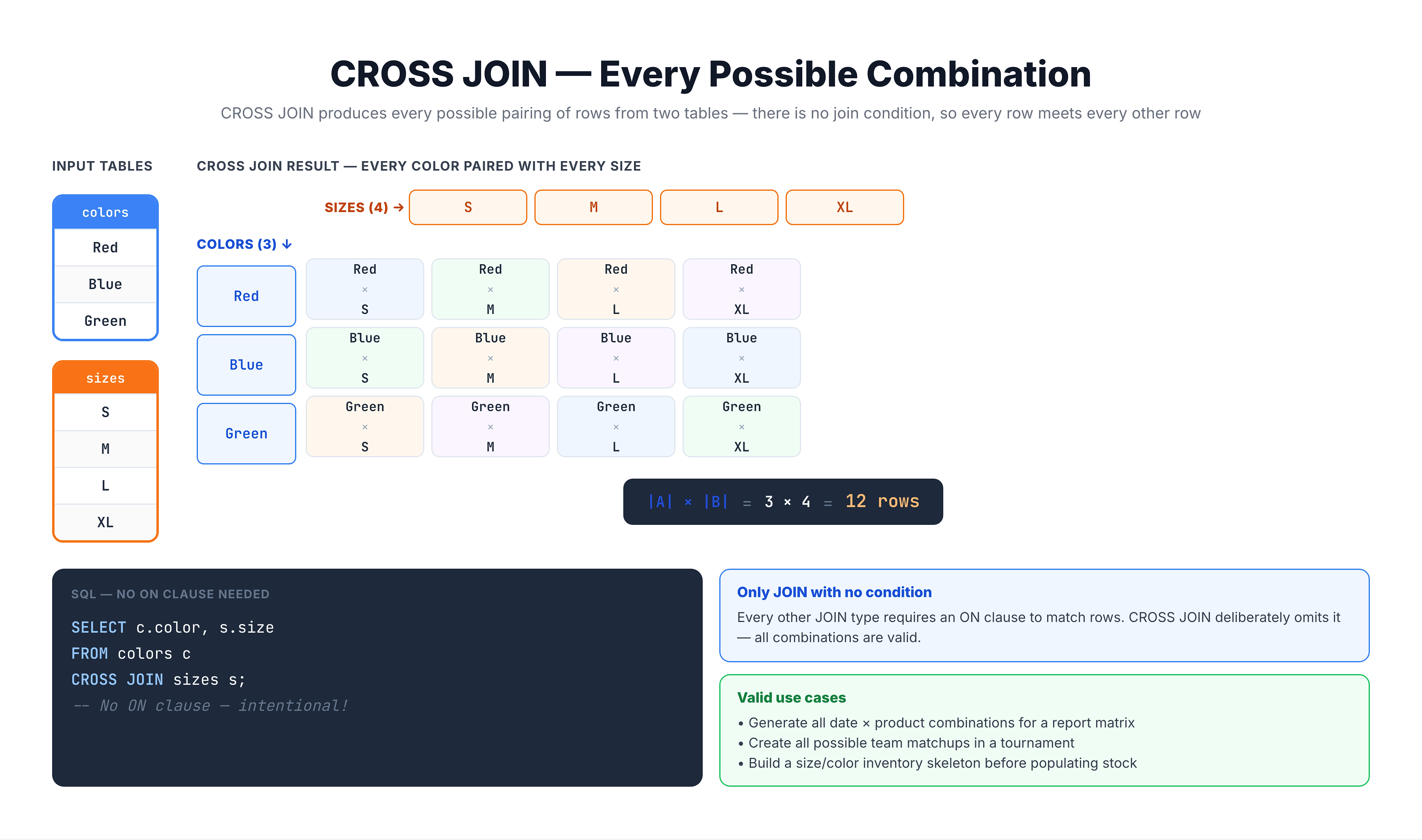
Visualization
CROSS JOIN — Every Possible Combination
CROSS JOIN Syntax
Explicit Syntax (Recommended)
SELECT *
FROM table1
CROSS JOIN table2;
Implicit Syntax (Comma)
SELECT *
FROM table1, table2;
Both produce the same result, but explicit CROSS JOIN is clearer.
No ON Clause!
Unlike other JOINs, CROSS JOIN does NOT use an ON clause:
-- Correct
SELECT * FROM table1 CROSS JOIN table2;

-- Wrong! CROSS JOIN doesn't need ON
SELECT * FROM table1 CROSS JOIN table2 ON table1.id = table2.id;
If you add an ON clause, you've essentially created an INNER JOIN.
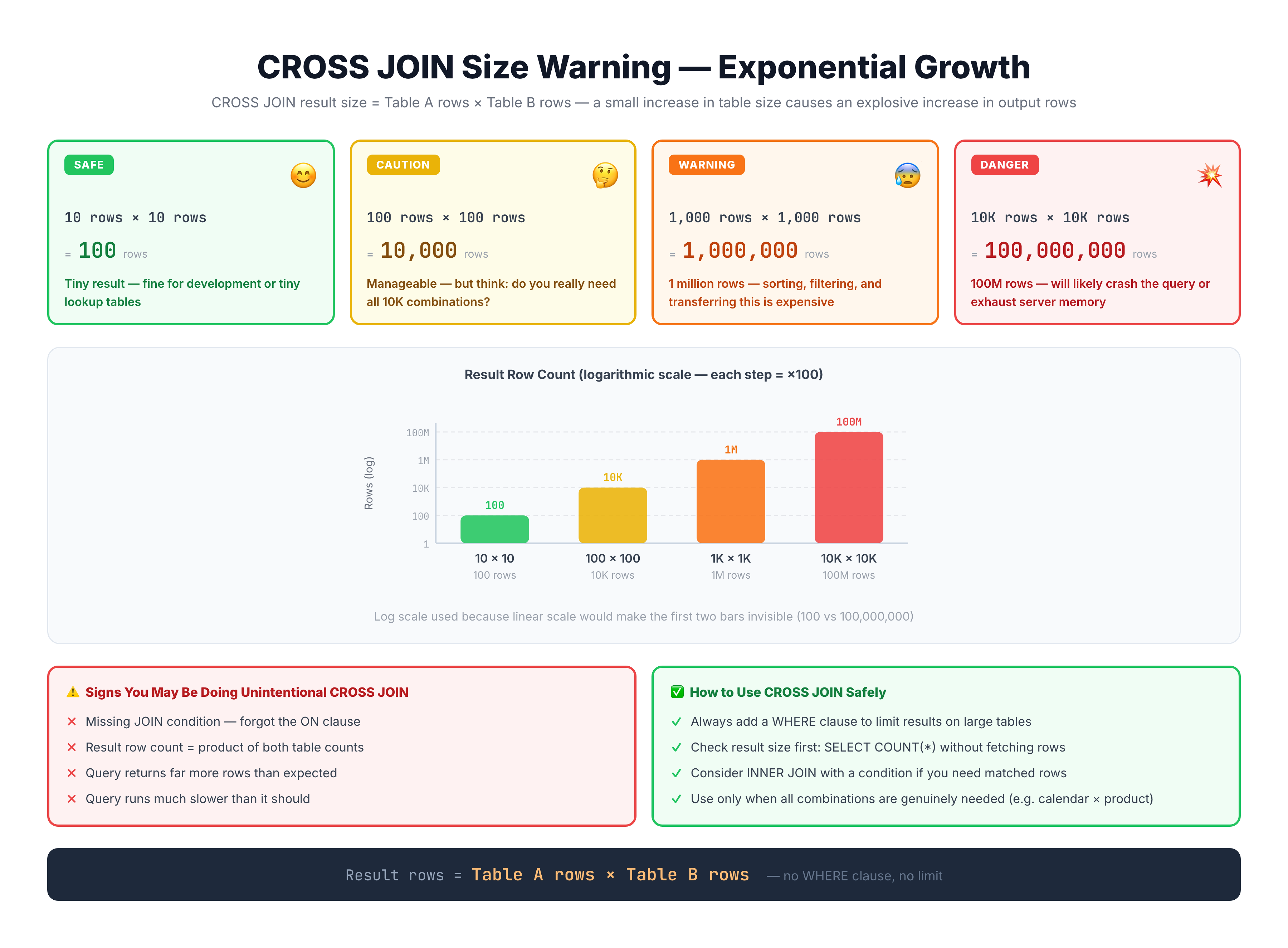
Result Size Warning
The Multiplication Effect
CROSS JOIN result size = rows in A × rows in B
| Table A Rows | Table B Rows | Result Rows |
|---|---|---|
| 10 | 10 | 100 |
| 100 | 100 | 10,000 |
| 1,000 | 1,000 | 1,000,000 |
| 10,000 | 10,000 | 100,000,000 |
⚠️ Danger Zone
CROSS JOINing large tables can:
- Consume all available memory
- Take hours or days to complete
- Crash your database
Safe Practice
- Only CROSS JOIN small tables (typically < 100 rows each)
- Use LIMIT when experimenting
- Check row counts first:
-- Check sizes before CROSS JOIN
SELECT
    (SELECT COUNT(*) FROM table1) AS rows_table1,
    (SELECT COUNT(*) FROM table2) AS rows_table2,
    (SELECT COUNT(*) FROM table1) *
    (SELECT COUNT(*) FROM table2) AS cross_join_rows;
When to Use CROSS JOIN
CROSS JOIN has legitimate use cases when you actually need all combinations.
Use Case 1: Generate All Combinations
Product variants (size × color):
SELECT s.size, c.color
FROM sizes s
CROSS JOIN colors c;
Use Case 2: Calendar/Report Scaffolding
All dates × all categories for reporting:
SELECT d.date, c.category
FROM dates d
CROSS JOIN categories c;
This ensures every category appears for every date, even with zero values.
Use Case 3: Pairing for Comparison
Compare every item to every other item:
SELECT
    a.product_name AS product_a,
    b.product_name AS product_b
FROM products a
CROSS JOIN products b
WHERE a.product_id < b.product_id;  -- Avoid duplicates
Use Case 4: Multiplying Reference Tables
Time slots × rooms for scheduling:
SELECT t.time_slot, r.room_name
FROM time_slots t
CROSS JOIN rooms r;
CROSS JOIN vs Accidental Cartesian Product
The difference is intent.
Accidental Cartesian Product (BAD)
-- Forgot the WHERE clause - creates millions of rows!
SELECT c.customer_city, o.order_id
FROM olist_customers_dataset c, olist_orders_dataset o;
Intentional CROSS JOIN (GOOD)
-- Explicitly creating all combinations - clear intent
SELECT s.size, c.color
FROM sizes s
CROSS JOIN colors c;
Best Practice: Be Explicit
| Intent | Use |
|---|---|
| Matching rows | INNER JOIN ... ON ... |
| All left + matches | LEFT JOIN ... ON ... |
| All combinations | CROSS JOIN |
Never rely on comma syntax (FROM a, b) - always use explicit JOIN keywords.
CROSS JOIN with Filtering
You can filter CROSS JOIN results with WHERE.
Generate Then Filter
-- All unique pairs (no self-pairs, no duplicates)
SELECT
    a.customer_state AS state_a,
    b.customer_state AS state_b
FROM (SELECT DISTINCT customer_state FROM olist_customers_dataset) a
CROSS JOIN (SELECT DISTINCT customer_state FROM olist_customers_dataset) b
WHERE a.customer_state < b.customer_state;
Pattern: Self Cross Join
Comparing a table to itself:
-- Find products in same category with different prices
SELECT
    p1.product_id AS product1,
    p2.product_id AS product2,
    p1.product_category_name
FROM products p1
CROSS JOIN products p2
WHERE p1.product_category_name = p2.product_category_name
    AND p1.product_id < p2.product_id;
Note: Adding a WHERE condition to CROSS JOIN is similar to INNER JOIN, but CROSS JOIN + WHERE is evaluated differently by the query optimizer.
Practice
Let's practice CROSS JOIN with small result sets.
Exercise 1: All State Combinations
Create all pairs of distinct customer states:
-- CROSS JOIN: All pairs of states
-- Using subquery to get distinct states first (limits size)

SELECT
    a.state AS state_a,
    b.state AS state_b
FROM (SELECT DISTINCT customer_state AS state
      FROM olist_customers_dataset LIMIT 5) a
CROSS JOIN (SELECT DISTINCT customer_state AS state
            FROM olist_customers_dataset LIMIT 5) b
LIMIT 25;
Exercise 2: Unique Pairs Only
Generate unique pairs (excluding self-pairs and duplicates):
-- Unique pairs: state_a < state_b (no duplicates, no self-pairs)

SELECT
    a.state AS state_a,
    b.state AS state_b
FROM (SELECT DISTINCT customer_state AS state
      FROM olist_customers_dataset) a
CROSS JOIN (SELECT DISTINCT customer_state AS state
            FROM olist_customers_dataset) b
WHERE a.state < b.state
LIMIT 20;
Exercise 3: Payment Type × Status Matrix
Create a scaffold of all payment types with all order statuses:
-- All combinations of payment types and order statuses
-- Useful for ensuring complete reporting

SELECT
    pt.payment_type,
    os.order_status
FROM (SELECT DISTINCT payment_type
      FROM olist_order_payments_dataset) pt
CROSS JOIN (SELECT DISTINCT order_status
            FROM olist_orders_dataset) os
ORDER BY pt.payment_type, os.order_status;
Exercise 4: Complete Report with Zeros
Use CROSS JOIN to ensure all combinations appear in a report, even with count = 0:
-- Complete matrix: payment type × order status with counts
-- CROSS JOIN ensures all combinations appear (even with 0)

SELECT
    scaffold.payment_type,
    scaffold.order_status,
    COALESCE(counts.order_count, 0) AS order_count
FROM (
    -- Create all combinations first
    SELECT pt.payment_type, os.order_status
    FROM (SELECT DISTINCT payment_type FROM olist_order_payments_dataset) pt
    CROSS JOIN (SELECT DISTINCT order_status FROM olist_orders_dataset) os
) scaffold
LEFT JOIN (
    -- Then get actual counts
    SELECT
        p.payment_type,
        o.order_status,
        COUNT(*) AS order_count
    FROM olist_orders_dataset o
    JOIN olist_order_payments_dataset p ON o.order_id = p.order_id
    GROUP BY p.payment_type, o.order_status
) counts
ON scaffold.payment_type = counts.payment_type
    AND scaffold.order_status = counts.order_status
ORDER BY scaffold.payment_type, order_count DESC;
Common Mistakes
Mistake 1: CROSS JOIN on Large Tables
❌ Dangerous:
-- This creates ~10 billion rows!
SELECT *
FROM olist_customers_dataset
CROSS JOIN olist_orders_dataset;
✅ Safe: Only CROSS JOIN small tables or use aggregated subqueries.
Mistake 2: Using CROSS JOIN Instead of INNER JOIN
❌ Wrong approach:
SELECT *
FROM customers c
CROSS JOIN orders o
WHERE c.customer_id = o.customer_id;  -- This is just a slow INNER JOIN!
✅ Correct:
SELECT *
FROM customers c
INNER JOIN orders o ON c.customer_id = o.customer_id;
Mistake 3: Forgetting CROSS JOIN is Intentional
If you don't specifically need all combinations, you probably want a different JOIN type.
Summary
Key Takeaways
-
CROSS JOIN returns all possible combinations (Cartesian product)
-
Result size = Table A rows × Table B rows
-
Syntax:
SELECT * FROM table1 CROSS JOIN table2
-- No ON clause!
- Use CROSS JOIN when:
- Generating all possible combinations
- Creating report scaffolds
- Building complete matrices
- Pairing items for comparison
- Safety Rules:
- Only CROSS JOIN small tables
- Check row counts before running
- Use LIMIT when experimenting
- Use explicit CROSS JOIN syntax for clarity
- Don't confuse with:
- Accidental Cartesian products (missing WHERE/ON)
- INNER JOIN with WHERE filter
What's Next?
Next, we'll learn how to choose the right JOIN for your specific use case.