IS NULL & IS NOT NULL
Introduction
IS NULL and IS NOT NULL are the only correct ways to check for NULL values in SQL. Using equality operators (= or <>) with NULL will not work as expected because NULL represents an unknown value.
In this tutorial, you will learn:
- Why you must use IS NULL instead of = NULL
- IS NULL and IS NOT NULL syntax
- Common use cases and patterns
- Combining NULL checks with other conditions
Why Not Use = NULL?
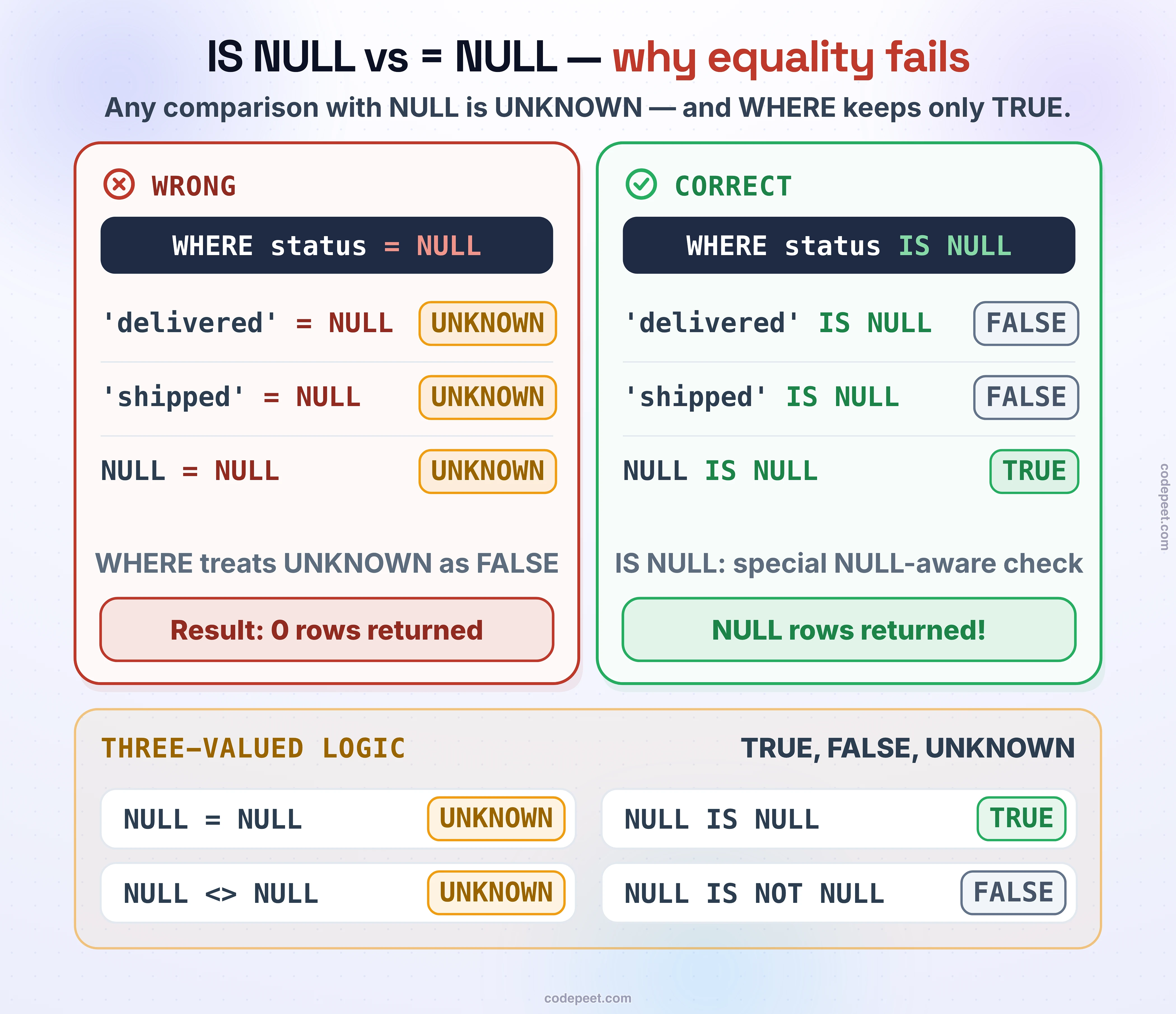
A common mistake is using = NULL or <> NULL to check for NULL values. This never works!
The Problem
In SQL's three-valued logic:
value = NULLalways returns UNKNOWNvalue <> NULLalways returns UNKNOWN- UNKNOWN is treated as FALSE in WHERE clauses
This means WHERE column = NULL finds zero rows even when NULL values exist!
-- WRONG: Using = NULL (returns no rows!)
SELECT
    order_id,
    order_status,
    order_delivered_customer_date
FROM olist_orders_dataset
WHERE order_delivered_customer_date = NULL  -- This is WRONG!
LIMIT 10;
Notice the query returns zero rows, even though we know many orders have NULL delivery dates.
IS NULL Syntax
The correct way to check for NULL is with IS NULL:
WHERE column IS NULL
This properly returns TRUE when the column contains NULL.
-- CORRECT: Using IS NULL
SELECT
    order_id,
    order_status,
    order_delivered_customer_date
FROM olist_orders_dataset
WHERE order_delivered_customer_date IS NULL
LIMIT 15;
IS NOT NULL Syntax
To find rows where a column has a value (not NULL), use IS NOT NULL:
WHERE column IS NOT NULL
-- Find orders that HAVE been delivered
SELECT
    order_id,
    order_status,
    order_delivered_customer_date
FROM olist_orders_dataset
WHERE order_delivered_customer_date IS NOT NULL
LIMIT 15;
Counting NULL vs Non-NULL
Use IS NULL in conditional aggregations to count NULL values:
-- Count NULL and non-NULL values
SELECT
    COUNT(*) AS total_rows,
    SUM(CASE WHEN order_delivered_customer_date IS NULL THEN 1 ELSE 0 END) AS null_count,
    SUM(CASE WHEN order_delivered_customer_date IS NOT NULL THEN 1 ELSE 0 END) AS non_null_count,
    -- Alternative using COUNT
    COUNT(*) - COUNT(order_delivered_customer_date) AS null_count_alt,
    COUNT(order_delivered_customer_date) AS non_null_count_alt
FROM olist_orders_dataset;
Combining IS NULL with AND/OR
You can combine IS NULL with other conditions using AND and OR:
-- Orders that are shipped but not yet delivered
SELECT
    order_id,
    order_status,
    order_delivered_carrier_date,
    order_delivered_customer_date
FROM olist_orders_dataset
WHERE order_delivered_carrier_date IS NOT NULL  -- Has shipped
  AND order_delivered_customer_date IS NULL      -- Not yet delivered
LIMIT 15;
-- Orders with either missing approval OR missing delivery
SELECT
order_id,
order_status,
order_approved_at,
order_delivered_customer_date
FROM olist_orders_dataset
WHERE order_approved_at IS NULL
OR order_delivered_customer_date IS NULL
LIMIT 15;IS NULL in CASE Statements
IS NULL is commonly used in CASE statements for conditional logic:
-- Create status based on NULL checks
SELECT
    order_id,
    order_status,
    order_approved_at,
    order_delivered_carrier_date,
    order_delivered_customer_date,
    CASE
        WHEN order_delivered_customer_date IS NOT NULL THEN 'Delivered'
        WHEN order_delivered_carrier_date IS NOT NULL THEN 'In Transit'
        WHEN order_approved_at IS NOT NULL THEN 'Approved'
        ELSE 'Pending'
    END AS order_progress
FROM olist_orders_dataset
LIMIT 15;
Checking Multiple Columns for NULL
Check if any of several columns is NULL:
-- Find products with ANY missing dimension
SELECT
    product_id,
    product_weight_g,
    product_length_cm,
    product_height_cm,
    product_width_cm,
    CASE
        WHEN product_weight_g IS NULL
          OR product_length_cm IS NULL
          OR product_height_cm IS NULL
          OR product_width_cm IS NULL
        THEN 'Incomplete'
        ELSE 'Complete'
    END AS data_status
FROM olist_products_dataset
LIMIT 20;
-- Count products with complete vs incomplete dimensions
SELECT
CASE
WHEN product_weight_g IS NOT NULL
AND product_length_cm IS NOT NULL
AND product_height_cm IS NOT NULL
AND product_width_cm IS NOT NULL
THEN 'Complete'
ELSE 'Missing Data'
END AS completeness,
COUNT(*) AS product_count
FROM olist_products_dataset
GROUP BY completeness;IS NULL in JOIN Conditions
While you typically don't use IS NULL in JOIN ON clauses, you use it in WHERE to find unmatched records (anti-join):
-- Find orders WITHOUT any reviews (LEFT ANTI JOIN)
SELECT
    o.order_id,
    o.order_status,
    o.order_purchase_timestamp
FROM olist_orders_dataset o
LEFT JOIN olist_order_reviews_dataset r ON o.order_id = r.order_id
WHERE r.order_id IS NULL  -- No matching review
LIMIT 15;
IS NULL with Subqueries
Check if a subquery returns NULL:
-- Find customers with no orders
SELECT
    c.customer_id,
    c.customer_city,
    c.customer_state
FROM olist_customers_dataset c
WHERE (
    SELECT COUNT(*)
    FROM olist_orders_dataset o
    WHERE o.customer_id = c.customer_id
) = 0
LIMIT 15;
Data Quality Analysis with IS NULL
IS NULL is essential for data quality analysis:
-- Data quality report: NULL analysis by column
SELECT
    'order_approved_at' AS column_name,
    SUM(CASE WHEN order_approved_at IS NULL THEN 1 ELSE 0 END) AS null_count,
    COUNT(*) AS total_count,
    ROUND(SUM(CASE WHEN order_approved_at IS NULL THEN 1.0 ELSE 0 END) / COUNT(*) * 100, 2) AS null_pct
FROM olist_orders_dataset
UNION ALL
SELECT
    'order_delivered_carrier_date',
    SUM(CASE WHEN order_delivered_carrier_date IS NULL THEN 1 ELSE 0 END),
    COUNT(*),
    ROUND(SUM(CASE WHEN order_delivered_carrier_date IS NULL THEN 1.0 ELSE 0 END) / COUNT(*) * 100, 2)
FROM olist_orders_dataset
UNION ALL
SELECT
    'order_delivered_customer_date',
    SUM(CASE WHEN order_delivered_customer_date IS NULL THEN 1 ELSE 0 END),
    COUNT(*),
    ROUND(SUM(CASE WHEN order_delivered_customer_date IS NULL THEN 1.0 ELSE 0 END) / COUNT(*) * 100, 2)
FROM olist_orders_dataset;
NOT vs IS NOT NULL
Be careful with NOT and NULL - they don't combine the way you might expect:
-- NOT with NULL comparisons
SELECT
    -- NOT with IS NULL (correct)
    CASE WHEN NOT (NULL IS NULL) THEN 'TRUE' ELSE 'FALSE/UNKNOWN' END AS not_is_null,
    -- NOT with comparison (still unknown)
    CASE WHEN NOT (NULL = 5) THEN 'TRUE' ELSE 'FALSE/UNKNOWN' END AS not_null_equals,
    -- Correct: IS NOT NULL
    CASE WHEN 5 IS NOT NULL THEN 'TRUE' ELSE 'FALSE' END AS is_not_null;
Always use IS NOT NULL, not NOT (column IS NULL) for clarity, even though they're equivalent.
Practice: IS NULL and IS NOT NULL
Practice various NULL checking patterns:
-- Practice: Order completion analysis
SELECT
    order_status,
    COUNT(*) AS total,
    -- Count each stage
    SUM(CASE WHEN order_approved_at IS NOT NULL THEN 1 ELSE 0 END) AS approved,
    SUM(CASE WHEN order_delivered_carrier_date IS NOT NULL THEN 1 ELSE 0 END) AS shipped,
    SUM(CASE WHEN order_delivered_customer_date IS NOT NULL THEN 1 ELSE 0 END) AS delivered,
    -- Calculate completion rates
    ROUND(SUM(CASE WHEN order_approved_at IS NOT NULL THEN 1.0 ELSE 0 END) / COUNT(*) * 100, 1) AS approval_rate,
    ROUND(SUM(CASE WHEN order_delivered_customer_date IS NOT NULL THEN 1.0 ELSE 0 END) / COUNT(*) * 100, 1) AS delivery_rate
FROM olist_orders_dataset
GROUP BY order_status
ORDER BY total DESC;
Summary
Key Takeaways
-
Never Use = NULL
-- WRONG (always returns 0 rows) WHERE column = NULL -- CORRECT WHERE column IS NULL -
Syntax Comparison
Check Correct Syntax Is NULL column IS NULLIs Not NULL column IS NOT NULLNot equal to value or NULL column <> value OR column IS NULL -
Common Patterns
-- Find NULLs WHERE column IS NULL -- Exclude NULLs WHERE column IS NOT NULL -- Anti-join (find unmatched) LEFT JOIN ... WHERE right.key IS NULL -- Conditional logic CASE WHEN column IS NULL THEN 'Missing' ELSE column END -
Counting NULLs
SUM(CASE WHEN column IS NULL THEN 1 ELSE 0 END) -- or COUNT(*) - COUNT(column) -
Best Practices
- Always use IS NULL / IS NOT NULL
- Check for NULL in data validation queries
- Use in CASE statements for conditional handling
- Document expected NULL behavior
What's Next?
In the next lesson, we'll explore NULL vs Empty vs Blank - understanding the differences between these commonly confused concepts.