CREATE
Introduction
The CREATE statement is one of the most fundamental Data Definition Language (DDL) commands in SQL. It allows you to build the structure of your database by creating new database objects such as tables, indexes, views, and databases themselves.
In this tutorial, you will learn:
- How to create new databases
- How to create tables with columns and data types
- How to define constraints on columns
- How to create tables from existing data
- Best practices for database and table creation
CREATE DATABASE
A database is a container that holds all your tables and other database objects. Before creating tables, you typically need a database to store them in.
Syntax
CREATE DATABASE database_name;
Example
CREATE DATABASE ecommerce_store;
This creates a new empty database called ecommerce_store. You can then use this database to store your tables.
SQLite Note
In SQLite, databases are files. You create a database simply by connecting to a file path. The CREATE DATABASE statement is not supported in SQLite—the database is created automatically when you first connect to it.
Checking If Database Exists
To avoid errors when the database already exists, use:
CREATE DATABASE IF NOT EXISTS ecommerce_store;
This only creates the database if it doesn't already exist.
CREATE TABLE - Basics
The CREATE TABLE statement defines a new table with its columns and data types.
Basic Syntax
CREATE TABLE table_name (
    column1 datatype,
    column2 datatype,
    column3 datatype,
    ...
);
Example
CREATE TABLE customers (
    customer_id INTEGER,
    first_name TEXT,
    last_name TEXT,
    email TEXT,
    signup_date TEXT
);
This creates a table named customers with five columns. Each column has a name and a data type that defines what kind of values it can store.
Common Data Types
| Data Type | Description | Example Values |
|---|---|---|
| INTEGER | Whole numbers | 1, 42, -100 |
| REAL | Decimal numbers | 3.14, 99.99 |
| TEXT | Text strings | 'Hello', 'John Doe' |
| BLOB | Binary data | Images, files |
| NULL | No value | NULL |
SQLite Data Types
SQLite uses dynamic typing with type affinity. This means SQLite is flexible about data types, but it's good practice to declare appropriate types for documentation and compatibility with other databases.
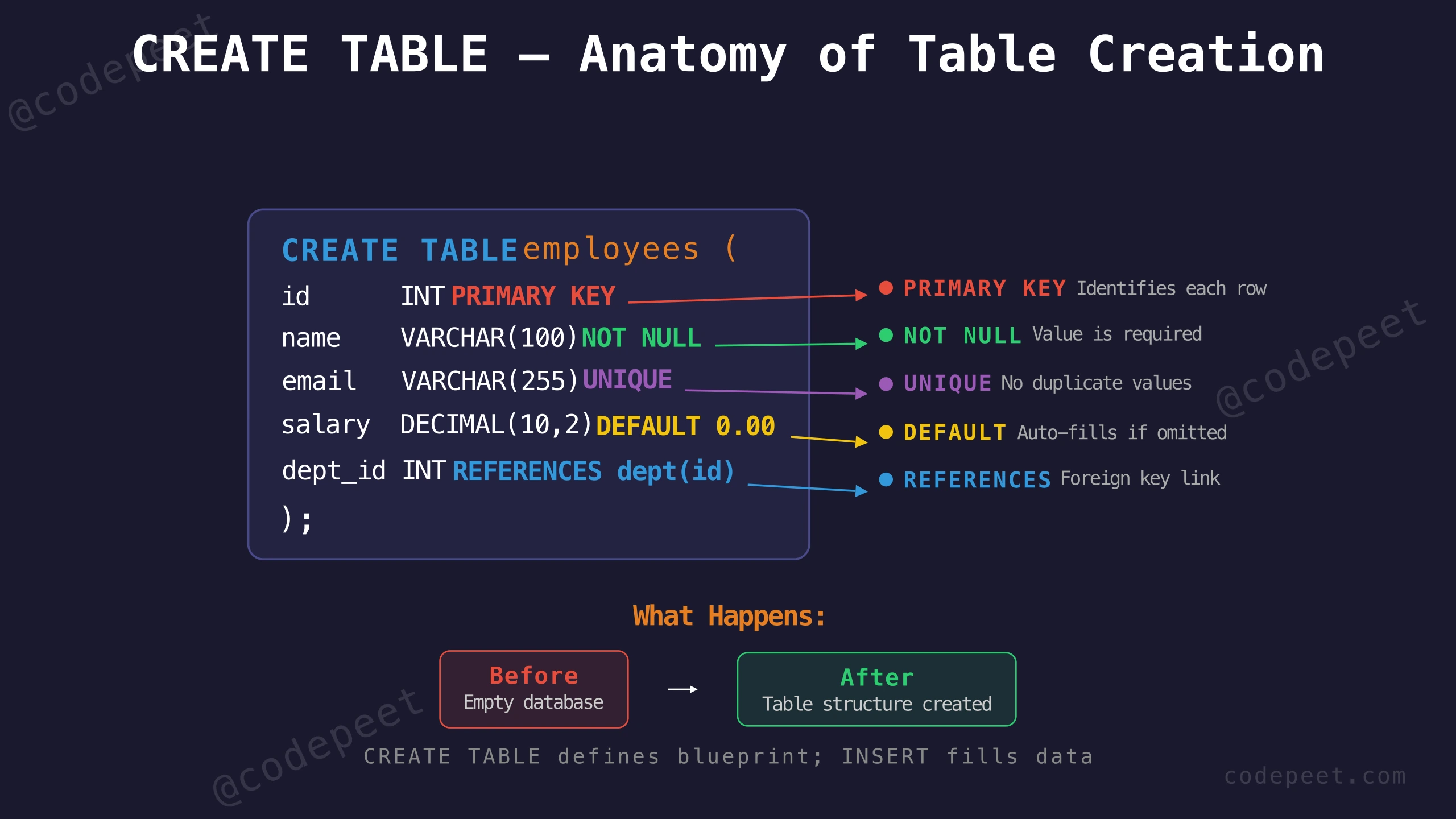
Column Constraints
Constraints are rules that enforce data integrity in your tables. They restrict what values can be stored in columns.
PRIMARY KEY
Uniquely identifies each row in the table. No two rows can have the same primary key value.
CREATE TABLE customers (
    customer_id INTEGER PRIMARY KEY,
    first_name TEXT,
    last_name TEXT
);
NOT NULL
Ensures a column cannot contain NULL values. Every row must have a value for this column.
CREATE TABLE products (
    product_id INTEGER PRIMARY KEY,
    product_name TEXT NOT NULL,
    price REAL NOT NULL
);
UNIQUE
Ensures all values in a column are different. Unlike PRIMARY KEY, you can have multiple UNIQUE columns.
CREATE TABLE users (
    user_id INTEGER PRIMARY KEY,
    username TEXT UNIQUE,
    email TEXT UNIQUE
);
DEFAULT
Provides a default value when no value is specified during insertion.
CREATE TABLE orders (
    order_id INTEGER PRIMARY KEY,
    order_date TEXT DEFAULT CURRENT_TIMESTAMP,
    status TEXT DEFAULT 'pending'
);
CHECK
Defines a condition that values must satisfy.
CREATE TABLE products (
    product_id INTEGER PRIMARY KEY,
    product_name TEXT NOT NULL,
    price REAL CHECK(price > 0),
    quantity INTEGER CHECK(quantity >= 0)
);
FOREIGN KEY Constraint
Foreign keys establish relationships between tables by referencing the primary key of another table.
Syntax
CREATE TABLE child_table (
    column1 datatype,
    column2 datatype,
    FOREIGN KEY (column2) REFERENCES parent_table(parent_column)
);
Example
-- Parent table
CREATE TABLE customers (
    customer_id INTEGER PRIMARY KEY,
    name TEXT NOT NULL
);

-- Child table with foreign key
CREATE TABLE orders (
    order_id INTEGER PRIMARY KEY,
    order_date TEXT,
    customer_id INTEGER,
    FOREIGN KEY (customer_id) REFERENCES customers(customer_id)
);
This ensures that every customer_id in the orders table must exist in the customers table.
SQLite Foreign Key Support
In SQLite, foreign key enforcement is disabled by default. To enable it:
PRAGMA foreign_keys = ON;
ON DELETE and ON UPDATE Actions
CREATE TABLE orders (
    order_id INTEGER PRIMARY KEY,
    customer_id INTEGER,
    FOREIGN KEY (customer_id) REFERENCES customers(customer_id)
        ON DELETE CASCADE
        ON UPDATE CASCADE
);
| Action | Effect |
|---|---|
| CASCADE | Delete/update child rows when parent changes |
| SET NULL | Set foreign key to NULL when parent is deleted |
| SET DEFAULT | Set foreign key to default value |
| RESTRICT | Prevent deletion if child rows exist |
| NO ACTION | Similar to RESTRICT (default) |
CREATE TABLE with Multiple Constraints
You can combine multiple constraints on a single column or across columns.
Column-Level Constraints
CREATE TABLE employees (
    employee_id INTEGER PRIMARY KEY,
    first_name TEXT NOT NULL,
    last_name TEXT NOT NULL,
    email TEXT UNIQUE NOT NULL,
    hire_date TEXT DEFAULT CURRENT_DATE,
    salary REAL CHECK(salary > 0) NOT NULL,
    department_id INTEGER
);
Table-Level Constraints
Some constraints can be defined at the table level, especially when they involve multiple columns.
CREATE TABLE order_items (
    order_id INTEGER,
    product_id INTEGER,
    quantity INTEGER CHECK(quantity > 0),
    price REAL CHECK(price >= 0),
    PRIMARY KEY (order_id, product_id),
    FOREIGN KEY (order_id) REFERENCES orders(order_id),
    FOREIGN KEY (product_id) REFERENCES products(product_id)
);
The composite primary key (order_id, product_id) means the combination of these two columns must be unique.
CREATE TABLE IF NOT EXISTS
To prevent errors when a table might already exist, use the IF NOT EXISTS clause.
Syntax
CREATE TABLE IF NOT EXISTS table_name (
    column1 datatype,
    column2 datatype
);
Example
CREATE TABLE IF NOT EXISTS audit_log (
    log_id INTEGER PRIMARY KEY,
    action TEXT NOT NULL,
    timestamp TEXT DEFAULT CURRENT_TIMESTAMP,
    user_id INTEGER
);
This is useful in scripts that might be run multiple times, or when you're not sure if a table already exists.
CREATE TABLE AS SELECT (CTAS)
You can create a new table based on the results of a SELECT query. This is called CTAS (Create Table As Select).
Syntax
CREATE TABLE new_table AS
SELECT column1, column2, ...
FROM existing_table
WHERE condition;
Example
CREATE TABLE brazilian_customers AS
SELECT customer_id, customer_city, customer_state
FROM olist_customers_dataset
WHERE customer_state = 'SP';
This creates a new table containing only customers from São Paulo state.
Use Cases for CTAS
- Creating backup copies of tables
- Filtering data into separate tables
- Aggregating data into summary tables
- Joining data from multiple tables into one
- Creating snapshots of data at a point in time
Note on Constraints
CTAS copies the data and column types but does not copy constraints like PRIMARY KEY or FOREIGN KEY. You'll need to add those separately if needed.
CREATE INDEX
Indexes speed up data retrieval by creating a lookup structure for specific columns.
Basic Syntax
CREATE INDEX index_name ON table_name (column_name);
Example
CREATE INDEX idx_customer_city ON customers (customer_city);
This creates an index on the customer_city column, making searches by city faster.
Unique Index
CREATE UNIQUE INDEX idx_email ON users (email);
A unique index ensures all values in the indexed column are unique.
Composite Index
CREATE INDEX idx_city_state ON customers (customer_city, customer_state);
A composite index spans multiple columns and is useful when you frequently filter by both columns.
When to Create Indexes
Good candidates for indexing:
- Columns frequently used in WHERE clauses
- Columns used in JOIN conditions
- Columns used in ORDER BY
- Foreign key columns
Avoid indexing:
- Columns with few unique values (low cardinality)
- Columns that are rarely used in queries
- Very small tables
CREATE VIEW
A view is a virtual table based on the result of a SELECT query. Views don't store data—they store the query definition.
Syntax
CREATE VIEW view_name AS
SELECT column1, column2, ...
FROM table_name
WHERE condition;
Example
CREATE VIEW high_value_orders AS
SELECT
    o.order_id,
    o.customer_id,
    SUM(oi.price) AS total_value
FROM olist_orders_dataset o
JOIN olist_order_items_dataset oi ON o.order_id = oi.order_id
GROUP BY o.order_id, o.customer_id
HAVING SUM(oi.price) > 1000;
Using Views
Once created, you can query a view like a regular table:
SELECT * FROM high_value_orders
WHERE customer_id = 'abc123';
Benefits of Views
- Simplify complex queries - Store complex joins for easy reuse
- Data security - Expose only specific columns to users
- Abstraction - Hide table complexity from end users
- Consistency - Ensure everyone uses the same query logic
Practice
Let's practice creating various database objects. Note that for CREATE statements, the results show confirmation of the operation rather than data.
Exercise 1: Create a Simple Table
Create a basic table to store product categories:
-- Create a categories table
CREATE TABLE IF NOT EXISTS categories (
    category_id INTEGER PRIMARY KEY,
    category_name TEXT NOT NULL,
    description TEXT
);
Exercise 2: Create Table with Constraints
Create a table with multiple constraints including CHECK and DEFAULT:
-- Create an inventory table with constraints
CREATE TABLE IF NOT EXISTS inventory (
    item_id INTEGER PRIMARY KEY,
    product_name TEXT NOT NULL,
    quantity INTEGER DEFAULT 0 CHECK(quantity >= 0),
    price REAL NOT NULL CHECK(price > 0),
    last_updated TEXT DEFAULT CURRENT_TIMESTAMP
);
Exercise 3: Create Table with Foreign Key
Create a table that references another table using a foreign key:
-- First, create the parent table
CREATE TABLE IF NOT EXISTS suppliers (
    supplier_id INTEGER PRIMARY KEY,
    supplier_name TEXT NOT NULL,
    contact_email TEXT UNIQUE
);

-- Then create the child table with foreign key
CREATE TABLE IF NOT EXISTS products_new (
    product_id INTEGER PRIMARY KEY,
    product_name TEXT NOT NULL,
    supplier_id INTEGER,
    FOREIGN KEY (supplier_id) REFERENCES suppliers(supplier_id)
);
Exercise 4: Create Table from Query (CTAS)
Create a new table based on an aggregation of existing data:
-- Create a summary table from existing data
CREATE TABLE IF NOT EXISTS customer_summary AS
SELECT
    customer_state,
    COUNT(*) AS customer_count
FROM olist_customers_dataset
GROUP BY customer_state;
Exercise 5: Verify Created Table
After creating the customer_summary table, query it to see the results:
-- Query the created summary table
SELECT *
FROM customer_summary
ORDER BY customer_count DESC
LIMIT 10;
Best Practices
Naming Conventions
- Use lowercase with underscores -
customer_ordersnotCustomerOrders - Be descriptive -
customer_shipping_addressnotcsa - Use singular nouns for table names -
customerorcustomers(be consistent) - Prefix indexes -
idx_for regular indexes,uq_for unique
Design Guidelines
- Always define a primary key - Every table should have a unique identifier
- Use appropriate data types - Don't store numbers as TEXT
- Add NOT NULL where appropriate - Enforce data integrity
- Use foreign keys - Maintain referential integrity between tables
- Add indexes strategically - On columns used in WHERE and JOIN
Common Mistakes to Avoid
| Mistake | Better Approach |
|---|---|
| No primary key | Always define a PRIMARY KEY |
| All columns nullable | Use NOT NULL for required fields |
| Storing calculated values | Calculate in queries instead |
| Too many indexes | Index only frequently queried columns |
| Using reserved words as names | Avoid names like order, table, select |
Summary
What You Learned
✅ CREATE DATABASE initializes a new database container
✅ CREATE TABLE defines table structure with columns and data types
✅ Constraints enforce data integrity: PRIMARY KEY, NOT NULL, UNIQUE, DEFAULT, CHECK, FOREIGN KEY
✅ IF NOT EXISTS prevents errors when objects already exist
✅ CREATE TABLE AS SELECT creates tables from query results
✅ CREATE INDEX speeds up data retrieval on specific columns
✅ CREATE VIEW creates virtual tables from saved queries
Key Takeaways
- The CREATE statement builds database structure
- Constraints are essential for data integrity
- Use IF NOT EXISTS for safer scripts
- Indexes improve query performance but have overhead
- Views simplify complex queries and enhance security
Next Up
Continue to ALTER to learn how to modify existing database objects, or jump to DROP to learn how to remove them.