INTERSECT
Introduction
The INTERSECT operator returns only rows that appear in both the first and second query results. It's the SQL equivalent of finding the common ground between two datasets.
INTERSECT is particularly useful for finding matches, validating data consistency, and identifying overlapping records between sources.
In this tutorial, you will learn:
- What INTERSECT does and how it works
- The syntax for using INTERSECT
- Common use cases for INTERSECT
- How INTERSECT compares to INNER JOIN
- Practical examples with our e-commerce dataset
What is INTERSECT?
INTERSECT returns all distinct rows that exist in both query results.
Key Characteristics
| Feature | INTERSECT Behavior |
|---|---|
| Returns | Rows that exist in BOTH queries |
| Duplicates | Automatically removed (returns distinct) |
| Order matters | No - A INTERSECT B = B INTERSECT A |
| NULL handling | Two NULLs are considered equal |
| Comparison | All columns must match |
Visualization
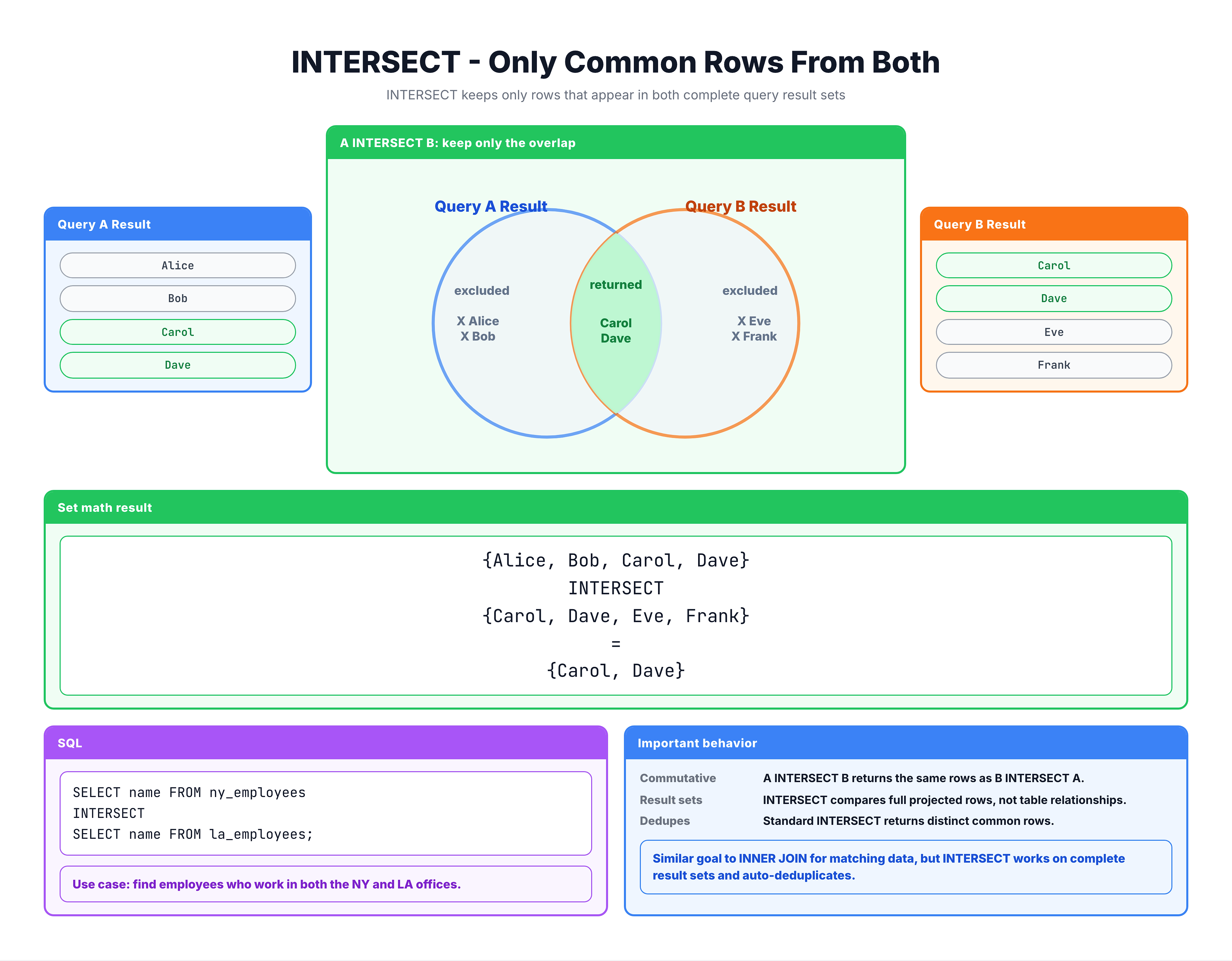
INTERSECT — Finding Rows Common to Both Queries
INTERSECT Syntax
Basic Syntax
SELECT column1, column2, ...
FROM table1
[WHERE condition]

INTERSECT

SELECT column1, column2, ...
FROM table2
[WHERE condition];
With ORDER BY
SELECT city FROM customers
INTERSECT
SELECT city FROM sellers
ORDER BY city;
Multiple INTERSECT Operations
-- Rows that exist in ALL three queries
SELECT columns FROM table1
INTERSECT
SELECT columns FROM table2
INTERSECT
SELECT columns FROM table3;
With LIMIT
SELECT city FROM customers
INTERSECT
SELECT city FROM sellers
ORDER BY city
LIMIT 10;
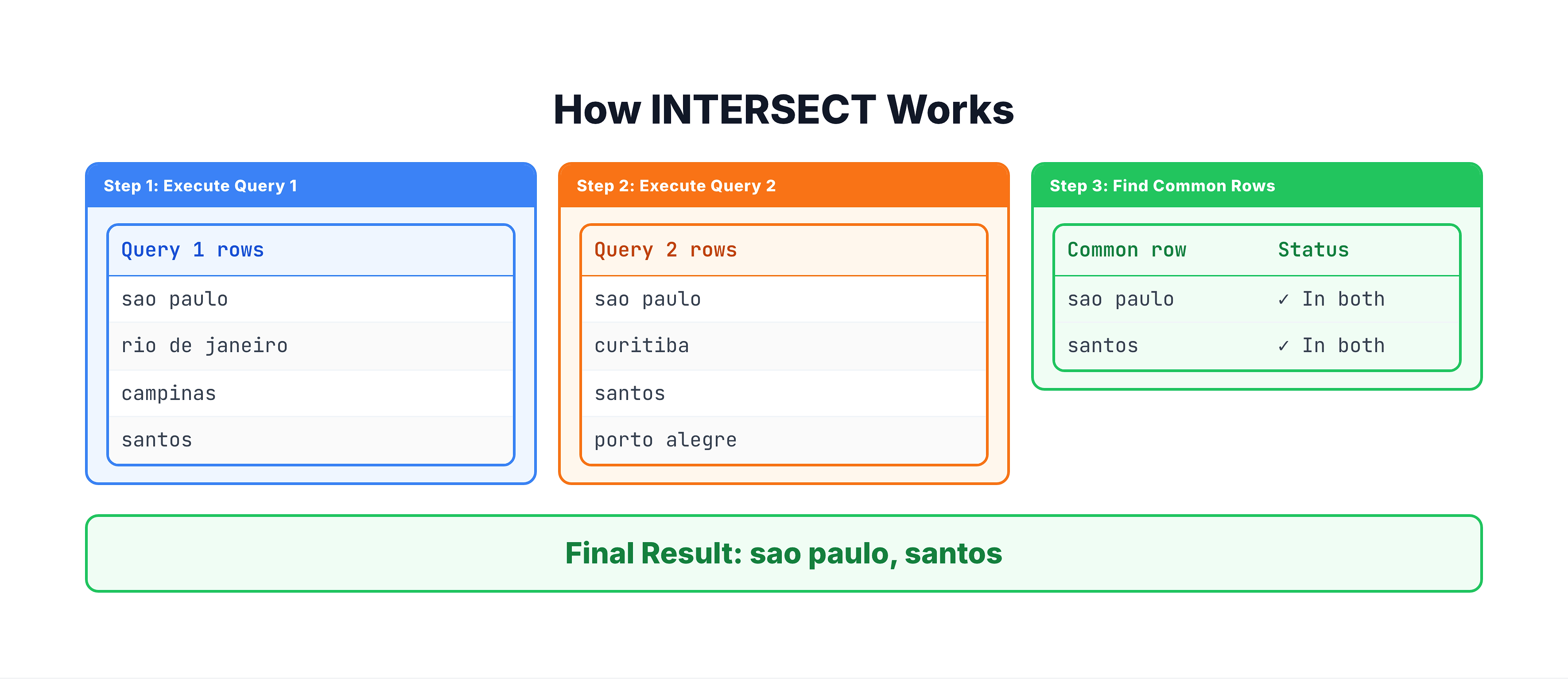
How INTERSECT Works
Step-by-Step Process
All Columns Must Match
For a row to be included in the result, every column value must match:
Query 1:                    Query 2:
| city      | state |       | city      | state |
|-----------|-------|       |-----------|-------|
| sao paulo | SP    |       | sao paulo | SP    |  ← Match!
| sao paulo | RJ    |       | curitiba  | PR    |  ← No match

Result: Only (sao paulo, SP)
Order Doesn't Matter
Unlike EXCEPT, INTERSECT is commutative:
-- These give the SAME result
Query1 INTERSECT Query2
Query2 INTERSECT Query1
Practice Exercises
Let's practice using INTERSECT with our e-commerce dataset.
Exercise 1: Basic INTERSECT
Find states where both customers AND sellers exist:
-- States with both customers and sellers
SELECT customer_state AS state
FROM olist_customers_dataset

INTERSECT

SELECT seller_state AS state
FROM olist_sellers_dataset

ORDER BY state;
Exercise 2: INTERSECT with Multiple Columns
Find city-state combinations where both customers and sellers are located:
-- Cities with both customers AND sellers
SELECT
    customer_city AS city,
    customer_state AS state
FROM olist_customers_dataset

INTERSECT

SELECT
    seller_city AS city,
    seller_state AS state
FROM olist_sellers_dataset

ORDER BY state, city
LIMIT 20;
Exercise 3: Counting Common Elements
Count how many states have both customers and sellers:
-- Count of states with both customers and sellers
SELECT COUNT(*) AS states_with_both
FROM (
    SELECT customer_state AS state
    FROM olist_customers_dataset

    INTERSECT

    SELECT seller_state AS state
    FROM olist_sellers_dataset
);
Exercise 4: Finding Overlapping Zip Codes
Find zip code prefixes where both customers and sellers are located:
-- Zip codes with both customers and sellers
SELECT customer_zip_code_prefix AS zip_code
FROM olist_customers_dataset

INTERSECT

SELECT seller_zip_code_prefix AS zip_code
FROM olist_sellers_dataset

ORDER BY zip_code
LIMIT 20;
INTERSECT vs INNER JOIN
Both INTERSECT and INNER JOIN find "matching" data, but they work differently:
INTERSECT
SELECT city FROM customers
INTERSECT
SELECT city FROM sellers;
- Compares complete rows
- Returns distinct values only
- Same column structure required
- Returns the overlapping values themselves
INNER JOIN
SELECT DISTINCT c.city
FROM customers c
INNER JOIN sellers s ON c.city = s.city;
- Compares specified columns only
- Can return duplicates (unless DISTINCT)
- Can combine different column structures
- Can return additional columns from either table
When to Use Each
| Scenario | Use |
|---|---|
| Find common values in same-structured data | INTERSECT |
| Need to combine columns from both tables | INNER JOIN |
| Check if complete rows match | INTERSECT |
| Match on subset of columns | INNER JOIN |
| Need simple, readable query | INTERSECT |
| Need maximum flexibility | INNER JOIN |
Example Comparison
-- Using INTERSECT: Find cities with both customers and sellers
SELECT customer_city AS city
FROM olist_customers_dataset
INTERSECT
SELECT seller_city AS city
FROM olist_sellers_dataset
ORDER BY city
LIMIT 10;
Compare with the INNER JOIN approach:
-- Same result using INNER JOIN
SELECT DISTINCT c.customer_city AS city
FROM olist_customers_dataset c
INNER JOIN olist_sellers_dataset s
    ON c.customer_city = s.seller_city
ORDER BY city
LIMIT 10;
Common Use Cases
1. Finding Overlapping Markets
-- Cities where we have both supply (sellers) and demand (customers)
SELECT city FROM customers
INTERSECT
SELECT city FROM sellers;
2. Data Validation
-- Verify all order IDs in payments exist in orders
SELECT order_id FROM order_payments
INTERSECT
SELECT order_id FROM orders;
-- Should match all payment order_ids if data is consistent
3. Finding Repeat Conditions
-- Products ordered in both January and February
SELECT product_id FROM orders
WHERE order_month = 'January'
INTERSECT
SELECT product_id FROM orders
WHERE order_month = 'February';
4. Multi-Criteria Matching
-- Customers who ordered AND left reviews
SELECT customer_id FROM orders
INTERSECT
SELECT customer_id FROM (
    SELECT o.customer_id
    FROM orders o
    JOIN order_reviews r ON o.order_id = r.order_id
);
5. Finding Common Attributes
-- Payment types used for both high-value and low-value orders
SELECT payment_type FROM order_payments
WHERE payment_value > 500
INTERSECT
SELECT payment_type FROM order_payments
WHERE payment_value < 50;
INTERSECT with Multiple Queries
You can chain multiple INTERSECT operations to find values common to ALL queries:
Example: Cities in All Three Sources
-- Cities that have customers, sellers, AND geolocation data
SELECT customer_city AS city
FROM olist_customers_dataset

INTERSECT

SELECT seller_city AS city
FROM olist_sellers_dataset

INTERSECT

SELECT geolocation_city AS city
FROM olist_geolocation_dataset;
Evaluation Order
INTERSECT has higher precedence than UNION and EXCEPT:
A UNION B INTERSECT C
-- Evaluates as: A UNION (B INTERSECT C)
-- NOT as: (A UNION B) INTERSECT C

-- Use parentheses for clarity:
(A UNION B) INTERSECT C
NULL Handling in INTERSECT
NULLs are Considered Equal
In INTERSECT, two NULL values are treated as equal:
-- Query 1 returns: 'A', 'B', NULL
-- Query 2 returns: 'A', NULL, 'C'

Query1 INTERSECT Query2
-- Result: 'A', NULL
-- NULL appears in both, so it's included
Example with Real Data
-- If some customer cities are NULL and some seller cities are NULL
SELECT customer_city FROM customers  -- includes NULL
INTERSECT
SELECT seller_city FROM sellers;     -- includes NULL

-- Result will include NULL if both have NULL values
This is Different from Normal SQL
Normally in SQL, NULL = NULL returns NULL (unknown), not TRUE. But in SET operations, NULLs are treated as equal for comparison purposes.
Common Mistakes
Mistake 1: Expecting INTERSECT to Keep Duplicates
❌ Wrong assumption: INTERSECT preserves duplicate rows
-- Even if 'SP' appears 1000 times in customers
-- and 500 times in sellers
-- Result shows 'SP' only ONCE
Mistake 2: Mismatched Columns
❌ Wrong:
SELECT city, state FROM customers
INTERSECT
SELECT city FROM sellers;  -- Different column count!
Mistake 3: Wrong Column Order
❌ Wrong:
SELECT city, state FROM customers
INTERSECT
SELECT state, city FROM sellers;  -- Columns swapped!
This compares cities to states, producing incorrect (or empty) results.
Mistake 4: Using INTERSECT When JOIN is Better
❌ Inefficient:
-- When you need additional data from both tables
SELECT city FROM customers
INTERSECT
SELECT city FROM sellers;
-- Then a separate query to get counts...
✅ Better:
-- Use JOIN to get all needed data in one query
SELECT
    c.city,
    COUNT(DISTINCT c.customer_id) AS customer_count,
    COUNT(DISTINCT s.seller_id) AS seller_count
FROM customers c
INNER JOIN sellers s ON c.city = s.city
GROUP BY c.city;
Summary
Key Takeaways
-
INTERSECT returns rows that exist in both query results
-
Returns distinct rows (duplicates automatically removed)
-
Order doesn't matter: A INTERSECT B = B INTERSECT A
-
Syntax:
SELECT columns FROM table1
INTERSECT
SELECT columns FROM table2;
-
All columns must match for a row to be included
-
NULL handling: Two NULLs are considered equal
-
Common use cases:
- Finding overlapping markets
- Data validation
- Finding repeat conditions
- Multi-criteria matching
- INTERSECT vs INNER JOIN:
- INTERSECT: Compare complete rows, returns distinct values
- INNER JOIN: More flexible, can return additional columns
- Precedence: INTERSECT is evaluated before UNION and EXCEPT
What's Next?
Now that you know all four SET operators, let's look at practical use cases that combine them for real-world scenarios.