LIKE Operator
Introduction
When you need to search for text patterns rather than exact matches, the LIKE operator is essential. It allows you to find text that starts with, ends with, or contains specific characters - perfect for search functionality and flexible data filtering.
In this lesson, you will learn:
- How the LIKE operator works
- The two wildcard characters:
%and_ - Common pattern matching scenarios
- NOT LIKE for exclusion
- Case sensitivity considerations
- Performance implications
What is the LIKE Operator?
The LIKE operator performs pattern matching on text data. Instead of checking for exact equality, it checks if a string matches a specified pattern.
Syntax
SELECT columns
FROM table_name
WHERE column LIKE 'pattern';
How It Works
- The database takes the text value from each row
- It compares the value against the pattern
- If the value matches the pattern → row is included
- If no match → row is excluded
Basic Example
-- Find cities starting with 'sao'
SELECT customer_id, customer_city
FROM olist_customers_dataset
WHERE customer_city LIKE 'sao%';
This finds:
- 'sao paulo'
- 'sao carlos'
- 'sao jose dos campos'
- Any city beginning with 'sao'
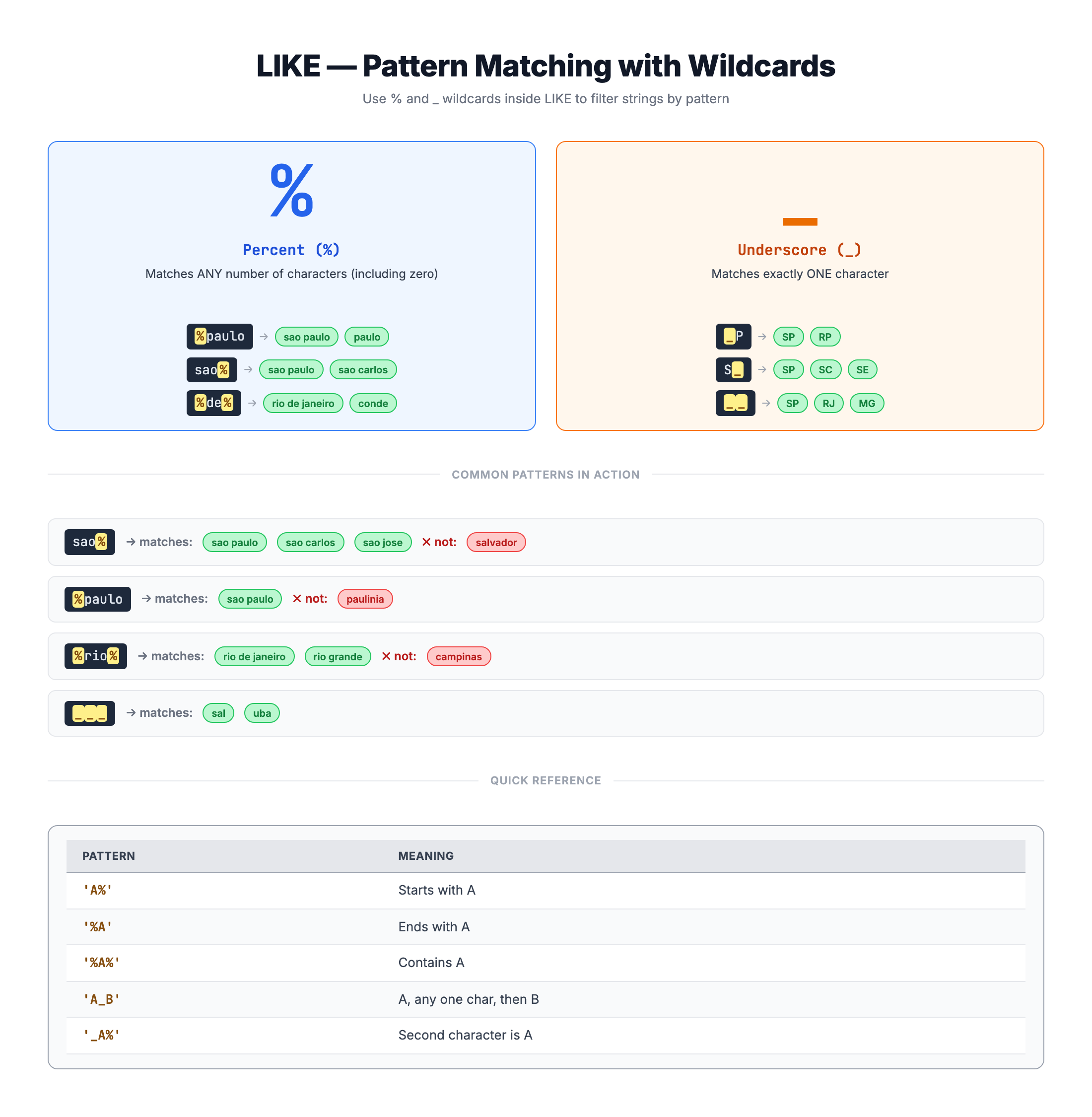
The Percent Wildcard (%)
The % wildcard matches any sequence of zero or more characters.
Starts With Pattern
Find text that starts with specific characters:
-- Cities starting with 'sao'
WHERE customer_city LIKE 'sao%'

-- Matches: 'sao paulo', 'sao carlos', 'sao jose'
-- No match: 'rio de janeiro', 'campinas'
Ends With Pattern
Find text that ends with specific characters:
-- Cities ending with 'paulo'
WHERE customer_city LIKE '%paulo'

-- Matches: 'sao paulo'
-- No match: 'paulinia'
Contains Pattern
Find text that contains specific characters anywhere:
-- Cities containing 'de'
WHERE customer_city LIKE '%de%'

-- Matches: 'rio de janeiro', 'sao jose de ribamar', 'conde'
Multiple Wildcards
You can use multiple % in one pattern:
-- Cities that have 'a' somewhere and 'o' somewhere after
WHERE customer_city LIKE '%a%o%'

-- Matches: 'sao paulo', 'campinas', 'brasilia'
Pattern Examples Table
| Pattern | Matches | Doesn't Match |
|---|---|---|
'sao%' | sao paulo, sao carlos | rio, campinas |
'%paulo' | sao paulo | paulinia |
'%de%' | rio de janeiro, conde | sao paulo |
'%' | Everything | Nothing (matches all) |
The Underscore Wildcard (_)
The _ wildcard matches exactly one character - no more, no less.
Single Character Match
-- Two-letter state codes starting with 'S'
WHERE customer_state LIKE 'S_'

-- Matches: 'SP', 'SC'
-- No match: 'S', 'SAO' (wrong length)
Fixed Position Pattern
-- Cities with 3 letters
WHERE customer_city LIKE '___'

-- Matches: 'rio', 'sao' (if they exist as separate words)
-- No match: 'campinas' (too long)
Combining _ with %
-- Cities starting with any character, then 'ao', then anything
WHERE customer_city LIKE '_ao%'

-- Matches: 'sao paulo', 'cao' (if exists)
-- No match: 'paulo', 'ao'
Pattern Examples Table
| Pattern | Matches | Doesn't Match |
|---|---|---|
'S_' | SP, SC, SE | S, SAO |
'___' | rio, sao | paulo, campinas |
'_a%' | sao paulo, campinas | paulo |
'%__%' | Any string with 2+ chars | single char |
Common Pattern Matching Scenarios
Scenario 1: Search Functionality
Build a search feature for cities:
-- Search for cities containing 'camp'
SELECT DISTINCT customer_city
FROM olist_customers_dataset
WHERE customer_city LIKE '%camp%';

-- Finds: campinas, campina grande, campo grande, etc.
Scenario 2: Category Filtering
Find product categories by keyword:
-- Find electronics-related categories
SELECT DISTINCT product_category_name
FROM olist_products_dataset
WHERE product_category_name LIKE '%eletro%'
   OR product_category_name LIKE '%eletr%';
Scenario 3: State Code Pattern
Find all two-letter state codes:
-- All valid 2-letter state codes
SELECT DISTINCT customer_state
FROM olist_customers_dataset
WHERE customer_state LIKE '__';
Scenario 4: Prefix-Based Grouping
Find cities by regional prefix:
-- Cities in the 'rio' region
SELECT DISTINCT customer_city, customer_state
FROM olist_customers_dataset
WHERE customer_city LIKE 'rio%';

-- Finds: rio de janeiro, rio branco, rio grande, etc.
Scenario 5: Suffix-Based Filtering
Find cities with common suffixes:
-- Cities ending with 'polis' (meaning 'city')
SELECT DISTINCT customer_city
FROM olist_customers_dataset
WHERE customer_city LIKE '%polis';

-- Finds: florianopolis, petropolis, etc.
NOT LIKE
NOT LIKE excludes rows that match the pattern.
Syntax
WHERE column NOT LIKE 'pattern'
Example: Exclude Specific Prefix
-- Cities NOT starting with 'sao'
SELECT DISTINCT customer_city
FROM olist_customers_dataset
WHERE customer_city NOT LIKE 'sao%';
Example: Exclude Specific Suffix
-- Categories NOT ending with 'moveis' (furniture)
SELECT DISTINCT product_category_name
FROM olist_products_dataset
WHERE product_category_name NOT LIKE '%moveis'
  AND product_category_name IS NOT NULL;
Example: Exclude Containing Pattern
-- Cities NOT containing 'de'
SELECT DISTINCT customer_city
FROM olist_customers_dataset
WHERE customer_city NOT LIKE '%de%';
Combining NOT LIKE with AND
-- Cities not starting with common prefixes
SELECT DISTINCT customer_city
FROM olist_customers_dataset
WHERE customer_city NOT LIKE 'sao%'
  AND customer_city NOT LIKE 'rio%'
  AND customer_city NOT LIKE 'santa%'
LIMIT 20;
Case Sensitivity
Case sensitivity in LIKE depends on the database system.
SQLite Behavior
In SQLite, LIKE is case-insensitive for ASCII letters by default:
-- These are equivalent in SQLite:
WHERE city LIKE 'SAO%'
WHERE city LIKE 'sao%'
WHERE city LIKE 'Sao%'
For Case-Sensitive Matching
Use the GLOB operator in SQLite for case-sensitive matching:
-- Case-sensitive: only matches lowercase 'sao'
WHERE city GLOB 'sao*'

-- GLOB uses * and ? instead of % and _
Standardize Case for Safety
For cross-database compatibility, standardize the case:
-- Force lowercase comparison
WHERE LOWER(customer_city) LIKE 'sao%'

-- Force uppercase comparison
WHERE UPPER(customer_city) LIKE 'SAO%'
Best Practice
If your data might have inconsistent casing:
-- Safe pattern matching
SELECT customer_id, customer_city
FROM olist_customers_dataset
WHERE LOWER(customer_city) LIKE 'sao%';
Escaping Special Characters
What if you need to search for actual % or _ characters in your data?
The ESCAPE Clause
Use the ESCAPE clause to define an escape character:
-- Find values containing a literal '%'
WHERE column LIKE '%!%%' ESCAPE '!'

-- The !% means a literal '%', while other % are wildcards
Examples
-- Find text containing '50%'
WHERE comment LIKE '%50!%%' ESCAPE '!'
-- Matches: 'Save 50% today!', '50% discount'

-- Find text containing '_'
WHERE code LIKE '%!_%' ESCAPE '!'
-- Matches: 'product_123', 'user_name'
Common Escape Characters
You can use any character as the escape character:
-- Using backslash
WHERE text LIKE '%\%%' ESCAPE '\'

-- Using tilde
WHERE text LIKE '%~%%' ESCAPE '~'
Note: In most SQL databases including SQLite, the need to escape wildcards is rare since % and _ typically don't appear in regular data.
Performance Considerations
LIKE can have significant performance implications.
Leading Wildcard = Slow
A pattern starting with % cannot use indexes efficiently:
-- SLOW: Must scan entire table
WHERE city LIKE '%paulo'

-- FAST: Can use index on city
WHERE city LIKE 'sao%'
Why Leading Wildcards Are Slow
With LIKE 'sao%':
- Database can jump to 's' section of the index
- Then narrow down to 'sa', then 'sao'
- Very efficient
With LIKE '%paulo':
- Any city could end with 'paulo'
- Must check every single row
- Cannot use index
Performance Tips
-
Avoid leading wildcards when possible:
-- Prefer this (if logic allows) WHERE city LIKE 'sao%' -- Over this WHERE city LIKE '%sao%' -
Consider full-text search for complex searching:
-- For frequent text searches, use FTS -- SQLite: FTS5 extension -
Combine with other filters to reduce the dataset first:
-- Filter by state first (uses index), then LIKE
WHERE customer_state = 'SP'
  AND customer_city LIKE '%camp%'
Practice
Practice using the LIKE operator for pattern matching.
Exercise 1: Starts With
Find all cities that start with 'rio':
-- Find cities starting with 'rio'

SELECT DISTINCT customer_city, customer_state
FROM olist_customers_dataset
WHERE customer_city LIKE 'rio%'
LIMIT 10;
Exercise 2: Ends With
Find all cities that end with 'polis':
-- Find cities ending with 'polis'

SELECT DISTINCT customer_city, customer_state
FROM olist_customers_dataset
WHERE customer_city LIKE '%polis'
LIMIT 10;
Exercise 3: Contains
Find all cities that contain 'jose' anywhere in the name:
-- Find cities containing 'jose'

SELECT DISTINCT customer_city, customer_state
FROM olist_customers_dataset
WHERE customer_city LIKE '%jose%'
LIMIT 10;
Exercise 4: Underscore Wildcard
Find all state codes that start with 'S' (2-letter codes):
-- Find state codes starting with 'S'

SELECT DISTINCT customer_state
FROM olist_customers_dataset
WHERE customer_state LIKE 'S_';
Exercise 5: NOT LIKE
Find cities that do NOT start with 'sao' or 'rio':
-- Find cities not starting with 'sao' or 'rio'

SELECT DISTINCT customer_city, customer_state
FROM olist_customers_dataset
WHERE customer_city NOT LIKE 'sao%'
  AND customer_city NOT LIKE 'rio%'
LIMIT 10;
Exercise 6: Product Categories
Find product categories that contain 'casa' (home) or 'moveis' (furniture):
-- Find home and furniture categories

SELECT DISTINCT product_category_name
FROM olist_products_dataset
WHERE (product_category_name LIKE '%casa%'
   OR product_category_name LIKE '%moveis%')
  AND product_category_name IS NOT NULL;
Summary
You now know how to use the LIKE operator for pattern matching!
Key Takeaways
✅ LIKE performs pattern matching on text
✅ % matches any sequence of characters (zero or more)
✅ _ matches exactly one character
✅ NOT LIKE excludes matching patterns
✅ Leading wildcards ('%pattern') are slow - avoid when possible
✅ SQLite LIKE is case-insensitive for ASCII
Wildcard Reference
| Wildcard | Matches | Example |
|---|---|---|
% | Any sequence (0+) | 'sao%' → 'sao paulo' |
_ | Exactly one char | 'S_' → 'SP', 'SC' |
Pattern Reference
-- Starts with
WHERE column LIKE 'prefix%'

-- Ends with
WHERE column LIKE '%suffix'

-- Contains
WHERE column LIKE '%middle%'

-- Exact length (3 chars)
WHERE column LIKE '___'

-- Exclude pattern
WHERE column NOT LIKE 'pattern%'

-- Case-safe matching
WHERE LOWER(column) LIKE 'pattern%'
Performance Tips
- ✅ Use
'prefix%'(can use index) - ⚠️ Avoid
'%suffix'(full table scan) - ⚠️ Avoid
'%contains%'(full table scan) - ✅ Combine with other filters to reduce dataset first
What's Next?
Congratulations! You've completed the Filtering Data module. You now have a solid understanding of all the major filtering operators in SQL:
- Comparison Operators (
=,!=,>,<,>=,<=) - Logical Operators (
AND,OR,NOT) - Range Operator (
BETWEEN) - List Operator (
IN) - Pattern Matching (
LIKE)
Next, you'll learn about SQL Joins to combine data from multiple tables!