HAVING
Introduction
The HAVING clause filters groups after aggregation. While WHERE filters individual rows before grouping, HAVING filters the grouped results.
In this tutorial, you will learn:
- The difference between WHERE and HAVING
- How to filter groups based on aggregate values
- When to use HAVING vs WHERE
- Combining WHERE and HAVING in the same query
- Common HAVING patterns
Why Do We Need HAVING?
Consider this scenario: You want to find states with more than 1,000 customers.
The Problem
You can't use WHERE because the count doesn't exist until after grouping:
-- ERROR: This won't work!
SELECT customer_state, COUNT(*) AS customer_count
FROM olist_customers_dataset
WHERE COUNT(*) > 1000  -- Can't use aggregate in WHERE!
GROUP BY customer_state;
The Solution
Use HAVING to filter after aggregation:
-- CORRECT: Use HAVING for aggregate conditions
SELECT customer_state, COUNT(*) AS customer_count
FROM olist_customers_dataset
GROUP BY customer_state
HAVING COUNT(*) > 1000;
Execution Order
1. FROM     → Get the table
2. WHERE    → Filter individual rows
3. GROUP BY → Create groups
4. HAVING   → Filter groups (aggregate conditions)
5. SELECT   → Choose output columns
6. ORDER BY → Sort results
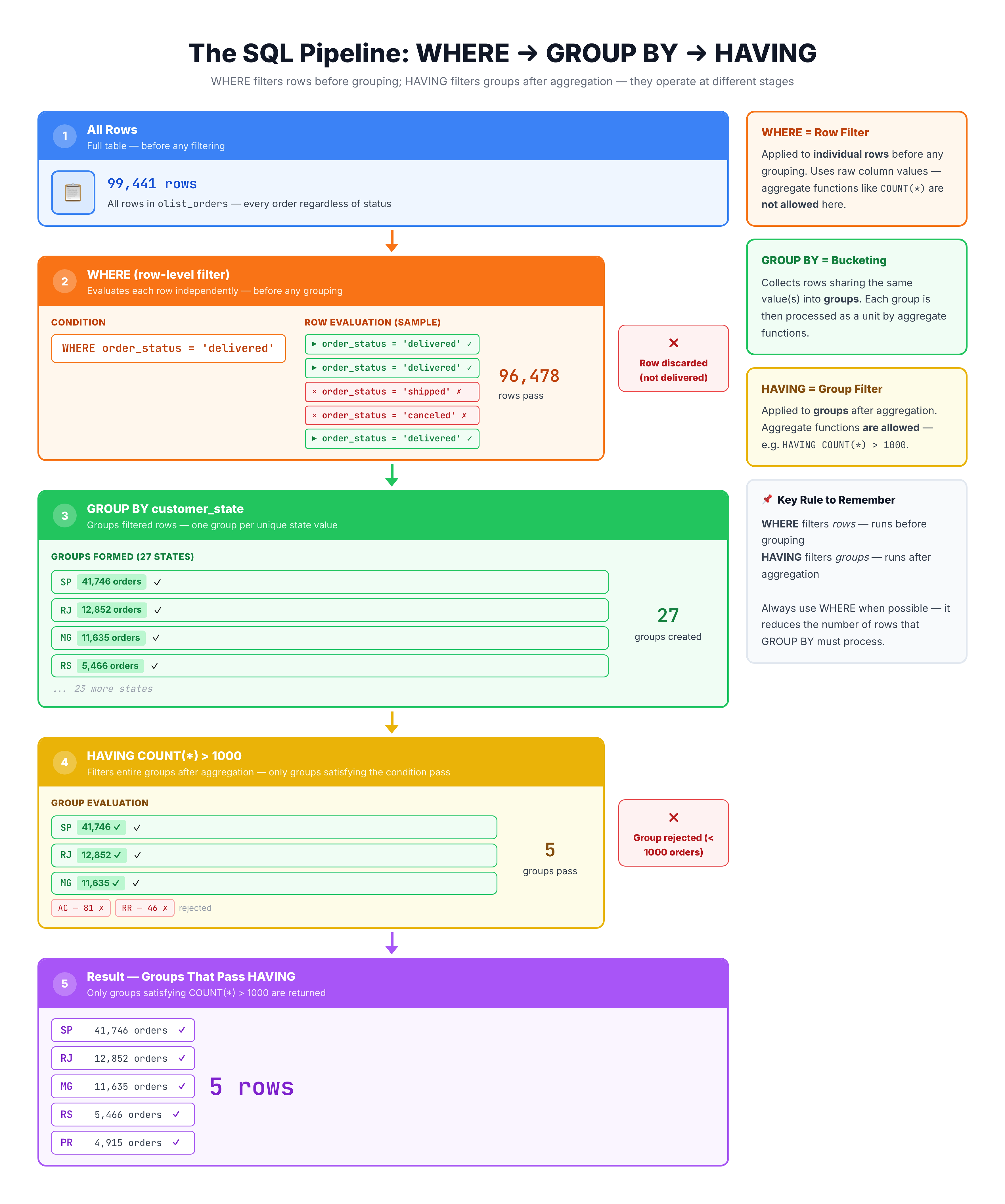
Visualization
HAVING Clause — Filtering Groups After Aggregation
Basic HAVING Syntax
HAVING appears after GROUP BY and uses aggregate functions in its conditions.
Syntax
SELECT
    column,
    AGGREGATE_FUNCTION(column)
FROM table_name
GROUP BY column
HAVING aggregate_condition;
Example: Minimum Count
-- States with at least 1000 customers
SELECT
    customer_state,
    COUNT(*) AS customer_count
FROM olist_customers_dataset
GROUP BY customer_state
HAVING COUNT(*) >= 1000
ORDER BY customer_count DESC;
Example: Minimum Sum
-- Payment types with total value over $1,000,000
SELECT
    payment_type,
    SUM(payment_value) AS total_value
FROM olist_order_payments_dataset
GROUP BY payment_type
HAVING SUM(payment_value) > 1000000;
WHERE vs HAVING
This is one of the most important distinctions in SQL.
Comparison Table
| Aspect | WHERE | HAVING |
|---|---|---|
| Filters | Individual rows | Groups |
| When | Before grouping | After grouping |
| Can use | Column values | Aggregate functions |
| Requires GROUP BY | No | Yes |
Visual Explanation
Table Data
    ↓
[WHERE] ─── Filters rows BEFORE grouping
    ↓
[GROUP BY] ─── Creates groups
    ↓
[HAVING] ─── Filters groups AFTER aggregation
    ↓
Results
Example Comparison
WHERE - Filter individual rows:
-- Only consider delivered orders
SELECT customer_id, COUNT(*) AS order_count
FROM olist_orders_dataset
WHERE order_status = 'delivered'  -- Filters rows
GROUP BY customer_id;
HAVING - Filter groups:
-- Only show customers with multiple orders
SELECT customer_id, COUNT(*) AS order_count
FROM olist_orders_dataset
GROUP BY customer_id
HAVING COUNT(*) > 1;  -- Filters groups
HAVING with Different Aggregates
HAVING works with any aggregate function.
HAVING with COUNT
-- Cities with more than 100 customers
SELECT
    customer_city,
    COUNT(*) AS customer_count
FROM olist_customers_dataset
GROUP BY customer_city
HAVING COUNT(*) > 100
ORDER BY customer_count DESC;
HAVING with SUM
-- Sellers with total sales over $10,000
SELECT
    seller_id,
    SUM(price) AS total_sales
FROM olist_order_items_dataset
GROUP BY seller_id
HAVING SUM(price) > 10000
ORDER BY total_sales DESC;
HAVING with AVG
-- Sellers with average item price over $200
SELECT
    seller_id,
    AVG(price) AS avg_price,
    COUNT(*) AS items_sold
FROM olist_order_items_dataset
GROUP BY seller_id
HAVING AVG(price) > 200
ORDER BY avg_price DESC;
HAVING with MIN/MAX
-- Sellers where the cheapest item is still over $100
SELECT
    seller_id,
    MIN(price) AS cheapest_item,
    MAX(price) AS most_expensive
FROM olist_order_items_dataset
GROUP BY seller_id
HAVING MIN(price) > 100;
Multiple HAVING Conditions
You can combine multiple conditions in HAVING using AND and OR.
Example: Multiple Conditions with AND
-- Sellers with high volume AND high average price
SELECT
    seller_id,
    COUNT(*) AS items_sold,
    AVG(price) AS avg_price
FROM olist_order_items_dataset
GROUP BY seller_id
HAVING COUNT(*) > 50
   AND AVG(price) > 100
ORDER BY items_sold DESC;
Example: Conditions with OR
-- Sellers with either very high volume OR very high avg price
SELECT
    seller_id,
    COUNT(*) AS items_sold,
    AVG(price) AS avg_price
FROM olist_order_items_dataset
GROUP BY seller_id
HAVING COUNT(*) > 500
    OR AVG(price) > 500
ORDER BY items_sold DESC;
Example: Range Condition
-- States with customer count between 1000 and 5000
SELECT
    customer_state,
    COUNT(*) AS customer_count
FROM olist_customers_dataset
GROUP BY customer_state
HAVING COUNT(*) BETWEEN 1000 AND 5000
ORDER BY customer_count DESC;
Combining WHERE and HAVING
You can use both WHERE and HAVING in the same query. They work at different stages.
Syntax
SELECT columns
FROM table
WHERE row_conditions        -- First: filter rows
GROUP BY column
HAVING group_conditions     -- Then: filter groups
ORDER BY column;
Example: Both WHERE and HAVING
-- States with 500+ customers who are from cities starting with 'S'
SELECT
    customer_state,
    COUNT(*) AS customer_count
FROM olist_customers_dataset
WHERE customer_city LIKE 's%'       -- Filter rows first
GROUP BY customer_state
HAVING COUNT(*) >= 500              -- Then filter groups
ORDER BY customer_count DESC;
Practical Example
-- Find high-performing sellers (>50 items) for delivered orders only
SELECT
    i.seller_id,
    COUNT(*) AS items_sold,
    SUM(i.price) AS total_revenue
FROM olist_order_items_dataset AS i
JOIN olist_orders_dataset AS o ON i.order_id = o.order_id
WHERE o.order_status = 'delivered'   -- Only delivered orders
GROUP BY i.seller_id
HAVING COUNT(*) > 50                 -- Minimum 50 items
ORDER BY total_revenue DESC
LIMIT 10;
Execution Flow
- FROM/JOIN: Combine tables
- WHERE: Keep only delivered orders
- GROUP BY: Group by seller
- HAVING: Keep sellers with 50+ items
- SELECT: Calculate totals
- ORDER BY: Sort by revenue
- LIMIT: Take top 10
Common Mistakes
Mistake 1: Using Aggregate in WHERE
-- WRONG: Can't use COUNT() in WHERE
SELECT customer_state, COUNT(*)
FROM olist_customers_dataset
WHERE COUNT(*) > 1000
GROUP BY customer_state;

-- CORRECT: Use HAVING
SELECT customer_state, COUNT(*)
FROM olist_customers_dataset
GROUP BY customer_state
HAVING COUNT(*) > 1000;
Mistake 2: Using Non-Aggregated Column in HAVING
-- WRONG: customer_city isn't aggregated or in GROUP BY
SELECT customer_state, COUNT(*)
FROM olist_customers_dataset
GROUP BY customer_state
HAVING customer_city = 'sao paulo';

-- CORRECT: Use WHERE for row-level conditions
SELECT customer_state, COUNT(*)
FROM olist_customers_dataset
WHERE customer_city = 'sao paulo'
GROUP BY customer_state;
Mistake 3: Using Column Alias in HAVING (Some Databases)
-- May not work in all databases
SELECT customer_state, COUNT(*) AS cnt
FROM olist_customers_dataset
GROUP BY customer_state
HAVING cnt > 1000;  -- 'cnt' alias may not be recognized

-- Always works: repeat the aggregate
SELECT customer_state, COUNT(*) AS cnt
FROM olist_customers_dataset
GROUP BY customer_state
HAVING COUNT(*) > 1000;
Note: SQLite does allow using aliases in HAVING, but it's safer to use the full aggregate expression for portability.
Practice
Let's practice filtering groups with HAVING.
Exercise 1: Basic HAVING
Find states with more than 1000 customers:
-- States with 1000+ customers

SELECT
    customer_state,
    COUNT(*) AS customer_count
FROM olist_customers_dataset
GROUP BY customer_state
HAVING COUNT(*) > 1000
ORDER BY customer_count DESC;
Exercise 2: HAVING with SUM
Find payment types with total value over $5 million:
-- Payment types with high total value

SELECT
    payment_type,
    COUNT(*) AS payment_count,
    SUM(payment_value) AS total_value
FROM olist_order_payments_dataset
GROUP BY payment_type
HAVING SUM(payment_value) > 5000000
ORDER BY total_value DESC;
Exercise 3: HAVING with AVG
Find sellers with average price above $150:
-- Sellers with high average price

SELECT
    seller_id,
    COUNT(*) AS items_sold,
    AVG(price) AS avg_price
FROM olist_order_items_dataset
GROUP BY seller_id
HAVING AVG(price) > 150
ORDER BY avg_price DESC
LIMIT 10;
Exercise 4: Multiple HAVING Conditions
Find sellers with at least 20 items AND average price over $100:
-- Sellers with volume AND quality

SELECT
    seller_id,
    COUNT(*) AS items_sold,
    AVG(price) AS avg_price,
    SUM(price) AS total_revenue
FROM olist_order_items_dataset
GROUP BY seller_id
HAVING COUNT(*) >= 20
   AND AVG(price) > 100
ORDER BY total_revenue DESC
LIMIT 10;
Exercise 5: WHERE and HAVING Together
Find review scores with at least 1000 reviews, but only for reviews that have comments:
-- Review scores with many commented reviews

SELECT
    review_score,
    COUNT(*) AS review_count
FROM olist_order_reviews_dataset
WHERE review_comment_message IS NOT NULL  -- Only reviews with comments
GROUP BY review_score
HAVING COUNT(*) >= 1000                   -- At least 1000 such reviews
ORDER BY review_score DESC;
Decision Guide: WHERE vs HAVING
Use this guide to decide which clause to use:
Use WHERE When:
- Filtering by column values (not aggregates)
- Condition applies to individual rows
- Filtering before grouping
WHERE order_status = 'delivered'
WHERE price > 100
WHERE customer_city LIKE 'sao%'
Use HAVING When:
- Filtering by aggregate function results
- Condition applies to groups
- Filtering after grouping
HAVING COUNT(*) > 10
HAVING SUM(price) > 1000
HAVING AVG(rating) >= 4
Quick Decision Tree
Does your condition involve COUNT, SUM, AVG, MIN, or MAX?
    │
    ├── YES → Use HAVING
    │
    └── NO → Use WHERE
Summary
You now understand how to filter groups with HAVING!
Key Takeaways
✅ HAVING filters groups AFTER aggregation
✅ WHERE filters rows BEFORE grouping
✅ Use HAVING with aggregate functions: COUNT, SUM, AVG, MIN, MAX
✅ Can combine WHERE and HAVING in the same query
✅ HAVING requires GROUP BY
Comparison Summary
| Feature | WHERE | HAVING |
|---|---|---|
| Filters | Rows | Groups |
| Timing | Before GROUP BY | After GROUP BY |
| Uses aggregates | No | Yes |
| Requires GROUP BY | No | Yes |
Quick Reference
-- Basic HAVING
SELECT column, COUNT(*)
FROM table
GROUP BY column
HAVING COUNT(*) > 10;

-- WHERE and HAVING together
SELECT column, SUM(value)
FROM table
WHERE status = 'active'    -- Filter rows first
GROUP BY column
HAVING SUM(value) > 1000;  -- Then filter groups

-- Multiple HAVING conditions
HAVING COUNT(*) > 10 AND AVG(price) > 50
What's Next?
Next, we'll learn about DISTINCT to remove duplicate values from our query results.