IN Operator
Introduction
When you need to check if a value matches any item in a list of possibilities, the IN operator is your best friend. Instead of writing multiple OR conditions, IN lets you specify all acceptable values in a clean, readable way.
In this lesson, you will learn:
- How the IN operator works
- IN vs multiple OR conditions
- Using IN with different data types
- NOT IN for exclusion
- IN with subqueries
- Common pitfalls (especially with NULL)
What is the IN Operator?
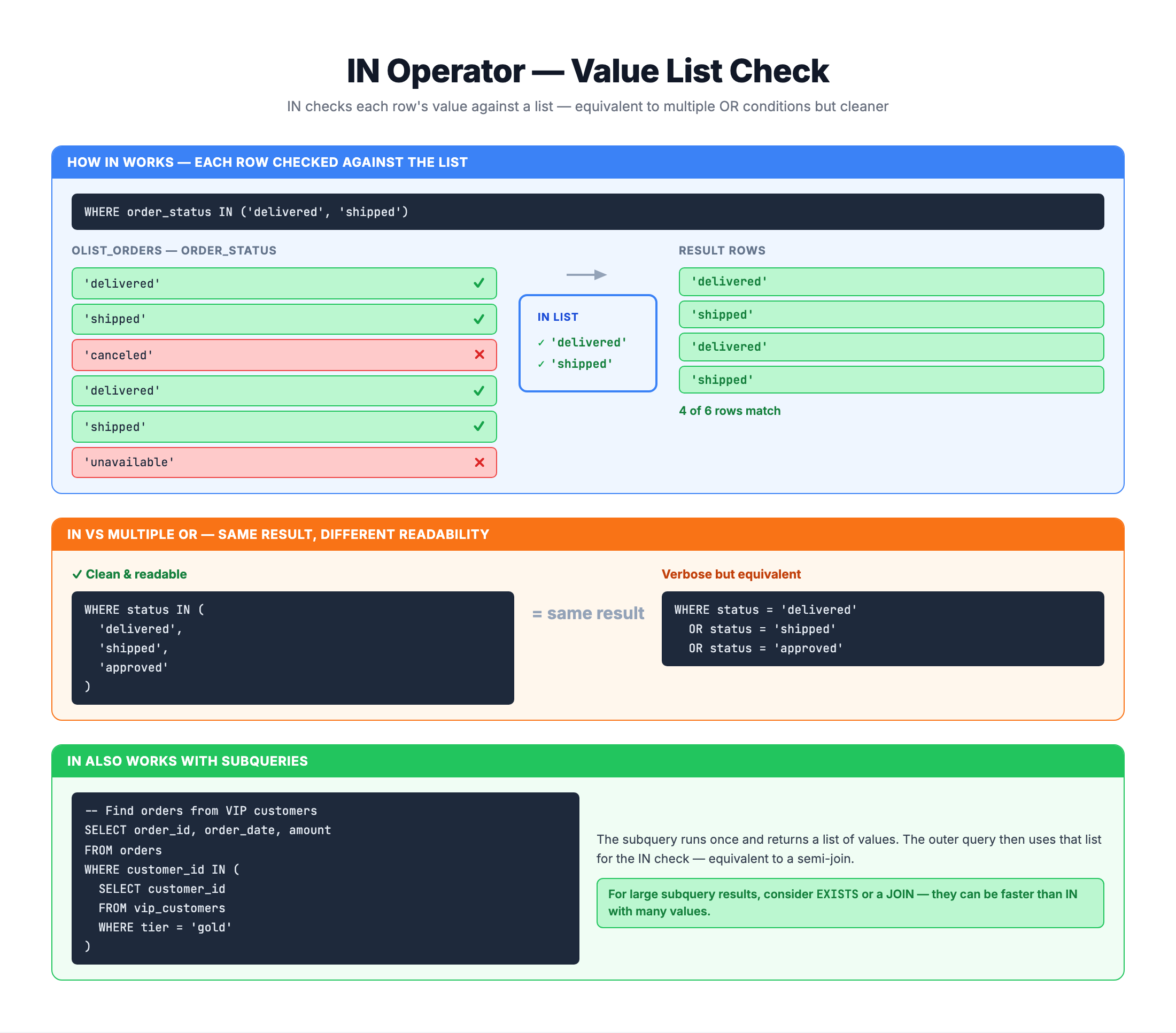
The IN operator checks whether a value matches any value in a specified list. It returns TRUE if there's a match, FALSE otherwise.
Syntax
SELECT columns
FROM table_name
WHERE column IN (value1, value2, value3, ...);
How It Works
- The database takes the column value for each row
- It checks if that value equals ANY value in the list
- If a match is found → row is included
- If no match is found → row is excluded
Basic Example
-- Find customers from three specific states
SELECT customer_id, customer_city, customer_state
FROM olist_customers_dataset
WHERE customer_state IN ('SP', 'RJ', 'MG');
This returns customers who are from:
- São Paulo (SP) OR
- Rio de Janeiro (RJ) OR
- Minas Gerais (MG)
IN vs Multiple OR Conditions
IN is essentially shorthand for multiple OR conditions on the same column.
Comparison
Using OR (verbose):
WHERE customer_state = 'SP'
   OR customer_state = 'RJ'
   OR customer_state = 'MG'
   OR customer_state = 'RS';
Using IN (clean):
WHERE customer_state IN ('SP', 'RJ', 'MG', 'RS');
Benefits of IN
- Readability: Much easier to understand at a glance
- Maintainability: Easy to add or remove values
- Less Error-Prone: Fewer repetitions mean fewer typos
- Performance: Database can optimize IN operations efficiently
When to Use Each
Use IN when:
- Checking one column against multiple values
- Values are known/static
- List is reasonably sized
Use OR when:
- Conditions involve different columns
- Conditions use different operators
- Complex expressions are needed
-- Must use OR: Different columns
WHERE customer_state = 'SP'
   OR customer_city = 'rio de janeiro';

-- Must use OR: Different operators
WHERE price > 100
   OR quantity > 5;
IN with Text Values
IN is commonly used with text (string) values.
State/Region Filtering
-- Find customers from Southeast Brazil
SELECT customer_id, customer_city, customer_state
FROM olist_customers_dataset
WHERE customer_state IN ('SP', 'RJ', 'MG', 'ES');
Order Status Filtering
-- Find orders that are in progress
SELECT order_id, order_status, order_purchase_timestamp
FROM olist_orders_dataset
WHERE order_status IN ('processing', 'invoiced', 'shipped');
Payment Type Filtering
-- Find card payments (credit or debit)
SELECT order_id, payment_type, payment_value
FROM olist_order_payments_dataset
WHERE payment_type IN ('credit_card', 'debit_card');
City Filtering
-- Find customers in major cities
SELECT customer_id, customer_city, customer_state
FROM olist_customers_dataset
WHERE customer_city IN ('sao paulo', 'rio de janeiro', 'belo horizonte', 'brasilia');
Remember: Single Quotes for Text
-- CORRECT: Text values in single quotes
WHERE status IN ('delivered', 'shipped')

-- WRONG: No quotes
WHERE status IN (delivered, shipped)  -- Error!
IN with Numeric Values
IN works well with numbers when checking against specific values.
Review Score Filtering
-- Find positive reviews (4 or 5 stars)
SELECT order_id, review_score
FROM olist_order_reviews_dataset
WHERE review_score IN (4, 5);
Payment Installments
-- Find payments with common installment options
SELECT order_id, payment_type, payment_installments, payment_value
FROM olist_order_payments_dataset
WHERE payment_installments IN (1, 3, 6, 12);
Specific Item Numbers
-- Find orders with multiple items (2nd, 3rd, or 4th item)
SELECT order_id, order_item_id, product_id, price
FROM olist_order_items_dataset
WHERE order_item_id IN (2, 3, 4);
No Quotes for Numbers
-- CORRECT: Numbers without quotes
WHERE score IN (1, 2, 3)

-- ALSO WORKS but unnecessary: Numbers in quotes
WHERE score IN ('1', '2', '3')  -- Works due to type coercion
NOT IN
NOT IN excludes rows where the value matches any item in the list.
Syntax
WHERE column NOT IN (value1, value2, value3)
Example: Exclude Specific States
-- Find customers NOT from the top 3 states
SELECT customer_id, customer_city, customer_state
FROM olist_customers_dataset
WHERE customer_state NOT IN ('SP', 'RJ', 'MG');
Example: Exclude Problem Statuses
-- Find orders that completed successfully
SELECT order_id, order_status
FROM olist_orders_dataset
WHERE order_status NOT IN ('canceled', 'unavailable');
Example: Exclude Low Ratings
-- Find reviews that are not negative (exclude 1 and 2)
SELECT order_id, review_score
FROM olist_order_reviews_dataset
WHERE review_score NOT IN (1, 2);
Example: Exclude Specific Payment Types
-- Find non-standard payments
SELECT order_id, payment_type, payment_value
FROM olist_order_payments_dataset
WHERE payment_type NOT IN ('credit_card', 'boleto');
IN with Subqueries
One powerful feature of IN is using it with subqueries. Instead of a static list, the list of values comes from another query.
Syntax
WHERE column IN (SELECT column FROM table WHERE condition)
Example: Find Customers Who Placed Orders
-- Find customers who have at least one order
SELECT customer_id, customer_city, customer_state
FROM olist_customers_dataset
WHERE customer_id IN (
    SELECT DISTINCT customer_id
    FROM olist_orders_dataset
);
Example: Find Products That Were Ordered
-- Find products that appear in orders
SELECT product_id, product_category_name
FROM olist_products_dataset
WHERE product_id IN (
    SELECT DISTINCT product_id
    FROM olist_order_items_dataset
);
Example: Find Orders from Specific Cities
-- Find orders from customers in 'sao paulo' city
SELECT order_id, customer_id, order_status
FROM olist_orders_dataset
WHERE customer_id IN (
    SELECT customer_id
    FROM olist_customers_dataset
    WHERE customer_city = 'sao paulo'
);
NOT IN with Subqueries
-- Find customers who have never placed an order
SELECT customer_id, customer_city
FROM olist_customers_dataset
WHERE customer_id NOT IN (
    SELECT DISTINCT customer_id
    FROM olist_orders_dataset
    WHERE customer_id IS NOT NULL  -- Important!
);
Common Pitfalls
Pitfall 1: NULL in NOT IN (CRITICAL!)
If your NOT IN list contains NULL, you may get unexpected empty results:
-- DANGEROUS: If any subquery result is NULL
WHERE order_id NOT IN (
    SELECT order_id FROM other_table  -- What if this returns NULL?
)
-- May return NO rows!
Why? value NOT IN (1, 2, NULL) is evaluated as:
value != 1 AND value != 2 AND value != NULL- Since
value != NULLis always UNKNOWN (not TRUE) - The entire expression is UNKNOWN, so the row is excluded
Solution: Filter out NULLs
-- SAFE: Explicitly exclude NULLs
WHERE order_id NOT IN (
    SELECT order_id
    FROM other_table
    WHERE order_id IS NOT NULL
)
Pitfall 2: Empty List
-- IN with empty list returns no rows
WHERE status IN ()  -- Syntax error or no matches
Pitfall 3: Large Lists
IN with very large lists (thousands of values) can be slow:
-- Potentially slow with huge list
WHERE id IN (1, 2, 3, ..., 10000)

-- Better: Use a temporary table or subquery
Pitfall 4: Case Sensitivity
Remember that text comparison in SQLite is case-sensitive:
-- This might miss 'SP' if stored as 'sp'
WHERE state IN ('SP', 'RJ')

-- Solution: Standardize case
WHERE UPPER(state) IN ('SP', 'RJ')
Practice
Practice using the IN operator in various scenarios.
Exercise 1: Basic IN
Find customers from the South region states (RS, SC, PR):
-- Find customers from Southern Brazil

SELECT customer_id, customer_city, customer_state
FROM olist_customers_dataset
WHERE customer_state IN ('RS', 'SC', 'PR')
LIMIT 10;
Exercise 2: IN with Order Status
Find orders that are either delivered, shipped, or invoiced:
-- Find orders in completed stages

SELECT order_id, order_status, order_purchase_timestamp
FROM olist_orders_dataset
WHERE order_status IN ('delivered', 'shipped', 'invoiced')
LIMIT 10;
Exercise 3: IN with Numbers
Find reviews with perfect or near-perfect scores (4 or 5):
-- Find positive reviews

SELECT order_id, review_score, review_comment_title
FROM olist_order_reviews_dataset
WHERE review_score IN (4, 5)
LIMIT 10;
Exercise 4: NOT IN
Find payment methods that are NOT credit_card or boleto:
-- Find alternative payment methods

SELECT order_id, payment_type, payment_value
FROM olist_order_payments_dataset
WHERE payment_type NOT IN ('credit_card', 'boleto')
LIMIT 10;
Exercise 5: IN with Subquery
Find products that have been sold (appear in order_items):
-- Find products with sales

SELECT product_id, product_category_name
FROM olist_products_dataset
WHERE product_id IN (
    SELECT DISTINCT product_id
    FROM olist_order_items_dataset
)
LIMIT 10;
Summary
You now know how to use the IN operator for matching against lists of values!
Key Takeaways
✅ IN checks if a value matches any value in a list
✅ Much cleaner than multiple OR conditions
✅ Use single quotes for text, no quotes for numbers
✅ NOT IN excludes values in the list
✅ Can use subqueries to generate dynamic lists
✅ Beware of NULL in NOT IN operations
Quick Reference
-- Basic IN with text
WHERE column IN ('value1', 'value2', 'value3')

-- IN with numbers
WHERE score IN (1, 2, 3, 4, 5)

-- NOT IN
WHERE status NOT IN ('canceled', 'unavailable')

-- IN with subquery
WHERE id IN (SELECT id FROM other_table)

-- SAFE NOT IN with subquery
WHERE id NOT IN (
    SELECT id FROM other_table
    WHERE id IS NOT NULL
)
IN vs OR vs BETWEEN
| Scenario | Best Operator |
|---|---|
| Specific discrete values | IN |
| Different columns/conditions | OR |
| Continuous numeric range | BETWEEN |
| Exclude specific values | NOT IN |
What's Next?
Next, we'll learn about the LIKE operator for pattern matching in text data.