FULL JOIN
Introduction
A FULL JOIN (also called FULL OUTER JOIN) returns all rows from both tables. When a row from one table doesn't have a match in the other, the missing side's columns contain NULL.
FULL JOIN is like combining LEFT JOIN and RIGHT JOIN into one operation.
In this tutorial, you will learn:
- What a FULL JOIN is and how it works
- When to use FULL JOIN
- How FULL JOIN compares to other JOIN types
- SQLite workaround (FULL JOIN not natively supported)
What is a FULL JOIN?
A FULL JOIN returns all rows from both the left and right tables, regardless of whether they have matches.
Example
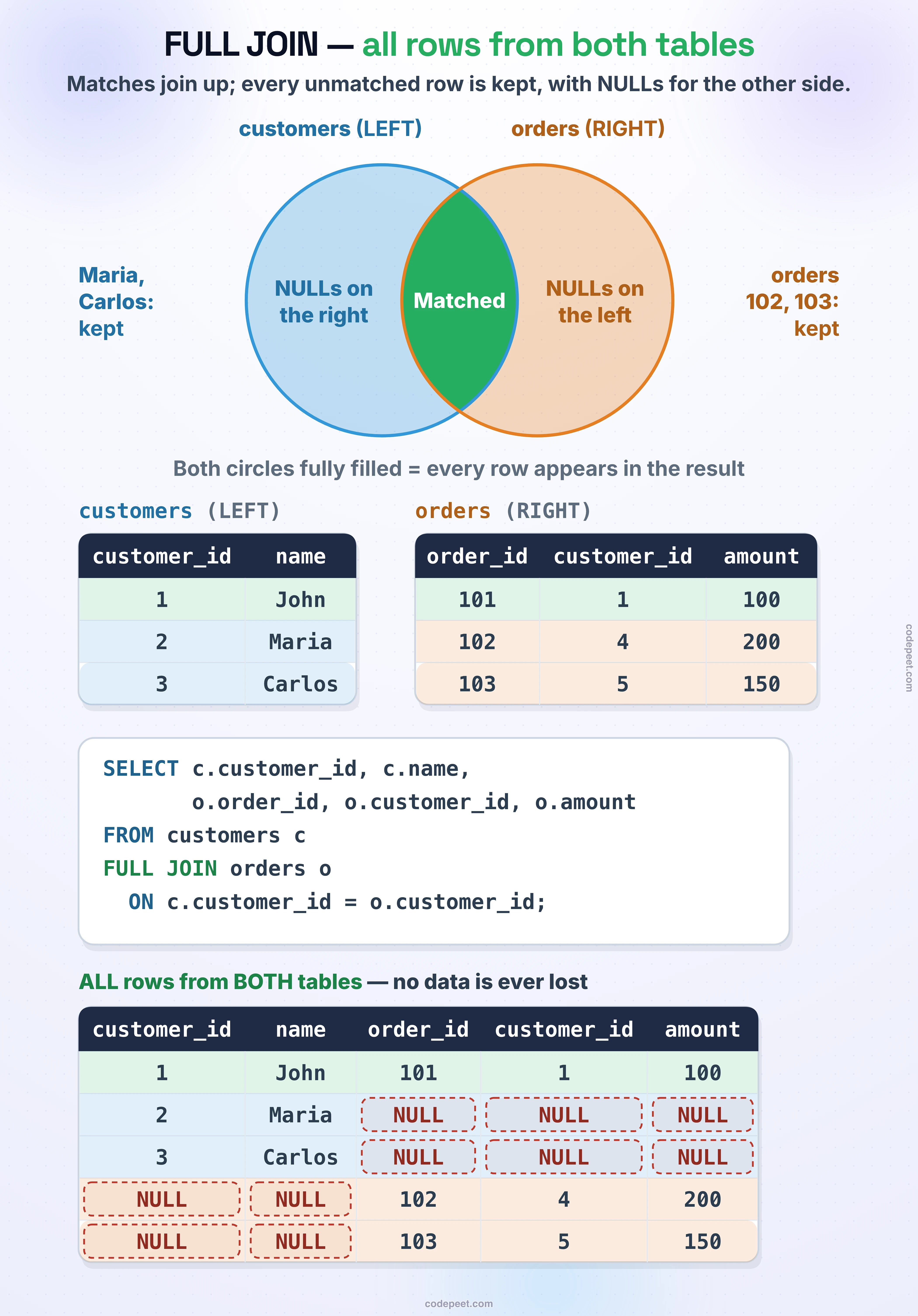
customers table (LEFT):
| customer_id | name |
|---|---|
| 1 | John |
| 2 | Maria |
| 3 | Carlos |
orders table (RIGHT):
| order_id | customer_id | amount |
|---|---|---|
| 101 | 1 | 100 |
| 102 | 4 | 200 |
| 103 | 5 | 150 |
FULL JOIN Result:
| customer_id | name | order_id | customer_id | amount |
|---|---|---|---|---|
| 1 | John | 101 | 1 | 100 |
| 2 | Maria | NULL | NULL | NULL |
| 3 | Carlos | NULL | NULL | NULL |
| NULL | NULL | 102 | 4 | 200 |
| NULL | NULL | 103 | 5 | 150 |
Notice:
- John appears with his matching order (101)
- Maria and Carlos appear with NULLs (no matching orders)
- Orders 102 and 103 appear with NULLs (no matching customers)
- ALL rows from BOTH tables are included
Visualization
FULL JOIN — Keeping All Rows from Both Tables
FULL JOIN Syntax
Standard Syntax (PostgreSQL, SQL Server, Oracle)
SELECT columns
FROM table1
FULL JOIN table2
    ON table1.column = table2.column;
Alternative Syntax
You can also write FULL OUTER JOIN (same meaning):
SELECT columns
FROM table1
FULL OUTER JOIN table2
    ON table1.column = table2.column;
SQLite Limitation
Important: SQLite does NOT support FULL JOIN directly!
To simulate FULL JOIN in SQLite, use UNION of LEFT JOIN and RIGHT JOIN (covered later in this tutorial).
FULL JOIN Compared to Other JOINs
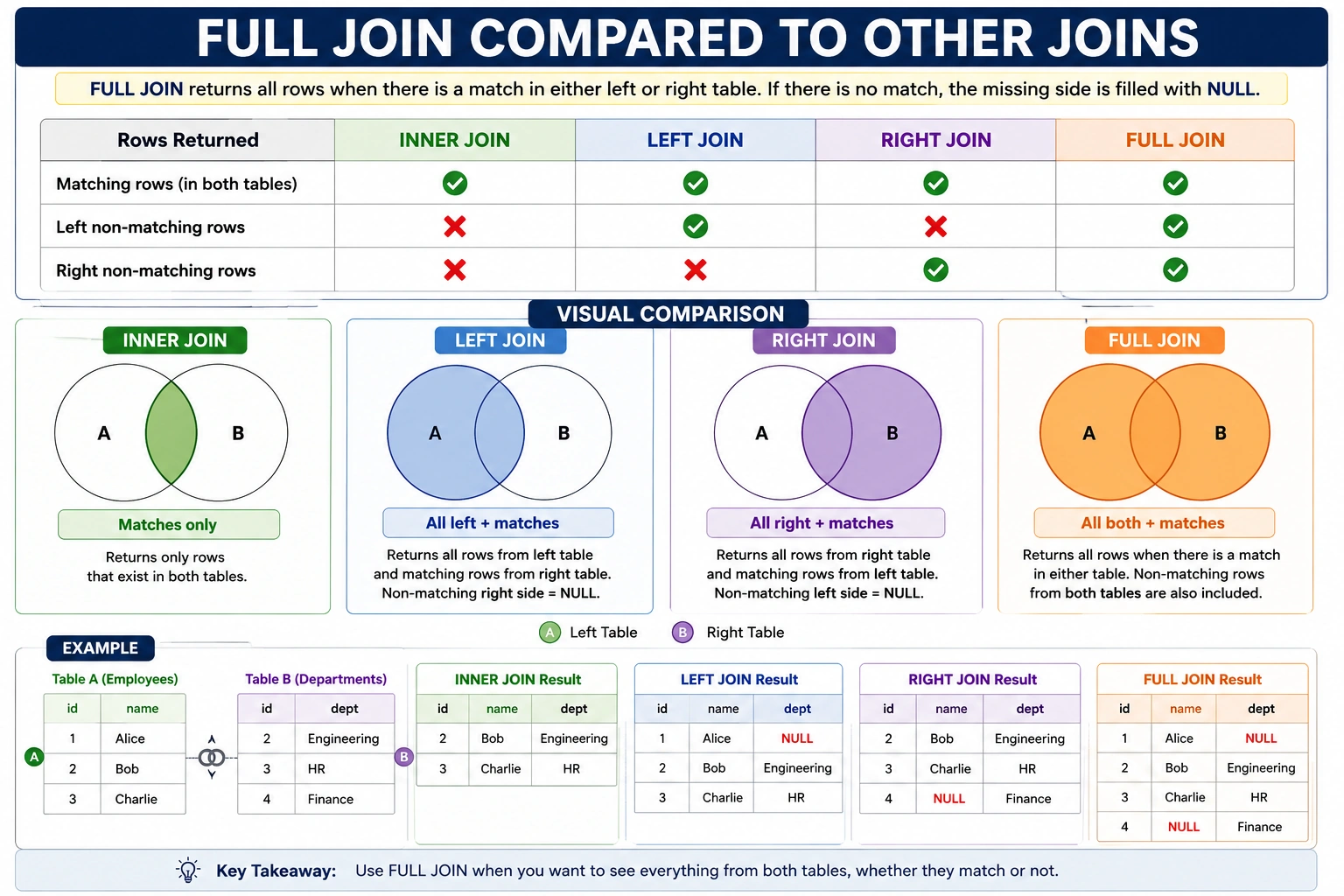
Here's how FULL JOIN relates to other JOIN types:
Comparison Table
| Rows Returned | INNER | LEFT | RIGHT | FULL |
|---|---|---|---|---|
| Matching rows | ✅ | ✅ | ✅ | ✅ |
| Left non-matching | ❌ | ✅ | ❌ | ✅ |
| Right non-matching | ❌ | ❌ | ✅ | ✅ |
Visual Comparison
Mathematical Relationship
FULL JOIN = LEFT JOIN ∪ RIGHT JOIN = INNER JOIN + Left non-matches + Right non-matches
When to Use FULL JOIN
FULL JOIN is useful when you need to see all data from both tables, highlighting matches and mismatches.
Use Case 1: Data Reconciliation
Compare two datasets to find matches and differences:
-- Compare old and new product catalogs
SELECT
    old.product_id AS old_id,
    new.product_id AS new_id,
    old.product_name AS old_name,
    new.product_name AS new_name
FROM old_products old
FULL JOIN new_products new ON old.product_id = new.product_id;
Result shows:
- Products in both (matched)
- Products only in old (deleted?)
- Products only in new (added?)
Use Case 2: Finding Orphaned Records on Both Sides
-- Find customers without orders AND orders without customers
SELECT
    c.customer_id,
    o.order_id
FROM customers c
FULL JOIN orders o ON c.customer_id = o.customer_id
WHERE c.customer_id IS NULL OR o.order_id IS NULL;
Use Case 3: Merging Data Sources
Combine data from two tables that may not perfectly match:
-- Combine sales from two regions
SELECT
    COALESCE(east.product, west.product) AS product,
    east.sales AS east_sales,
    west.sales AS west_sales
FROM east_region east
FULL JOIN west_region west ON east.product = west.product;
Simulating FULL JOIN in SQLite
Since SQLite doesn't support FULL JOIN, we can simulate it using UNION.
The Pattern
-- FULL JOIN simulation in SQLite

-- LEFT JOIN (all from left + matches)
SELECT a.*, b.*
FROM table_a a
LEFT JOIN table_b b ON a.id = b.id

UNION

-- RIGHT JOIN simulation (all from right + matches)
SELECT a.*, b.*
FROM table_b b
LEFT JOIN table_a a ON b.id = a.id;
How It Works
- First query: LEFT JOIN gets all from A + matches from B
- Second query: LEFT JOIN (with tables swapped) gets all from B + matches from A
- UNION: Combines both, removing duplicates (matching rows appear once)
Example with Our Database
-- Simulate FULL JOIN between products and order_items

SELECT
    p.product_id,
    p.product_category_name,
    oi.order_id
FROM olist_products_dataset p
LEFT JOIN olist_order_items_dataset oi
    ON p.product_id = oi.product_id

UNION

SELECT
    p.product_id,
    p.product_category_name,
    oi.order_id
FROM olist_order_items_dataset oi
LEFT JOIN olist_products_dataset p
    ON oi.product_id = p.product_id;
Practice
Let's practice FULL JOIN concepts using SQLite's UNION simulation.
Exercise 1: Simulated FULL JOIN
Simulate a FULL JOIN between sellers and order_items:
-- Simulated FULL JOIN: All sellers and all order items
-- Shows sellers without orders AND order items without seller info

SELECT
    s.seller_id AS seller_table_id,
    s.seller_city,
    oi.order_id,
    oi.seller_id AS order_seller_id
FROM olist_sellers_dataset s
LEFT JOIN olist_order_items_dataset oi
    ON s.seller_id = oi.seller_id

UNION

SELECT
    s.seller_id AS seller_table_id,
    s.seller_city,
    oi.order_id,
    oi.seller_id AS order_seller_id
FROM olist_order_items_dataset oi
LEFT JOIN olist_sellers_dataset s
    ON oi.seller_id = s.seller_id

LIMIT 20;
Exercise 2: Find Non-Matching Rows
Find products without orders OR order items without product info:
-- Find orphaned records on both sides
-- Products not ordered OR order items with missing product

SELECT
    p.product_id AS product_table_id,
    oi.product_id AS order_item_product_id,
    CASE
        WHEN p.product_id IS NULL THEN 'Missing Product'
        WHEN oi.product_id IS NULL THEN 'Product Never Ordered'
    END AS status
FROM olist_products_dataset p
LEFT JOIN olist_order_items_dataset oi
    ON p.product_id = oi.product_id
WHERE oi.product_id IS NULL

UNION

SELECT
    p.product_id AS product_table_id,
    oi.product_id AS order_item_product_id,
    CASE
        WHEN p.product_id IS NULL THEN 'Missing Product'
        WHEN oi.product_id IS NULL THEN 'Product Never Ordered'
    END AS status
FROM olist_order_items_dataset oi
LEFT JOIN olist_products_dataset p
    ON oi.product_id = p.product_id
WHERE p.product_id IS NULL

LIMIT 20;
Exercise 3: Data Completeness Check
Count how many records match vs. don't match:
-- Check data completeness between customers and orders

SELECT
    'Customers with orders' AS category,
    COUNT(*) AS count
FROM olist_customers_dataset c
INNER JOIN olist_orders_dataset o ON c.customer_id = o.customer_id

UNION ALL

SELECT
    'Customers without orders' AS category,
    COUNT(*) AS count
FROM olist_customers_dataset c
LEFT JOIN olist_orders_dataset o ON c.customer_id = o.customer_id
WHERE o.order_id IS NULL

UNION ALL

SELECT
    'Orders without valid customer' AS category,
    COUNT(*) AS count
FROM olist_orders_dataset o
LEFT JOIN olist_customers_dataset c ON o.customer_id = c.customer_id
WHERE c.customer_id IS NULL;
FULL JOIN vs UNION
Don't confuse FULL JOIN with UNION - they do different things:
FULL JOIN
- Combines columns horizontally
- Matches rows based on a condition
- Adds NULLs where no match exists
Table A    FULL JOIN    Table B    =    Combined Columns
[a1, a2]                [b1, b2]        [a1, a2, b1, b2]
UNION
- Combines rows vertically
- Stacks rows from multiple queries
- No matching or NULLs involved
Table A    UNION    Table B    =    Stacked Rows
[row1]              [row3]          [row1]
[row2]              [row4]          [row2]
                                    [row3]
                                    [row4]
When to Use Which
- FULL JOIN: You need related data side-by-side
- UNION: You need to combine similar data from different sources
Summary
Key Takeaways
- FULL JOIN returns ALL rows from both tables
- Matching rows are combined
- Non-matching rows from left get NULLs for right columns
- Non-matching rows from right get NULLs for left columns
- Standard Syntax:
SELECT columns
FROM table1
FULL JOIN table2 ON table1.key = table2.key
-
SQLite workaround: Use LEFT JOIN + UNION + reversed LEFT JOIN
-
FULL JOIN = LEFT JOIN ∪ RIGHT JOIN
-
Use FULL JOIN when:
- Comparing or reconciling two datasets
- Finding orphaned records on both sides
- Merging imperfectly matching data sources
- Don't confuse with UNION:
- FULL JOIN combines columns (horizontal)
- UNION stacks rows (vertical)
What's Next?
Next, we'll learn about Anti JOINs - patterns that find rows that DON'T have matches, starting with LEFT ANTI JOIN.