ORDER BY
Introduction
Query results from a database have no guaranteed order by default. The ORDER BY clause lets you sort results in a specific, predictable order.
In this tutorial, you will learn:
- How to sort results with ORDER BY
- Ascending vs descending order
- Sorting by multiple columns
- Sorting by column position
- Handling NULL values in sorting
- Performance considerations
Why Sorting Matters
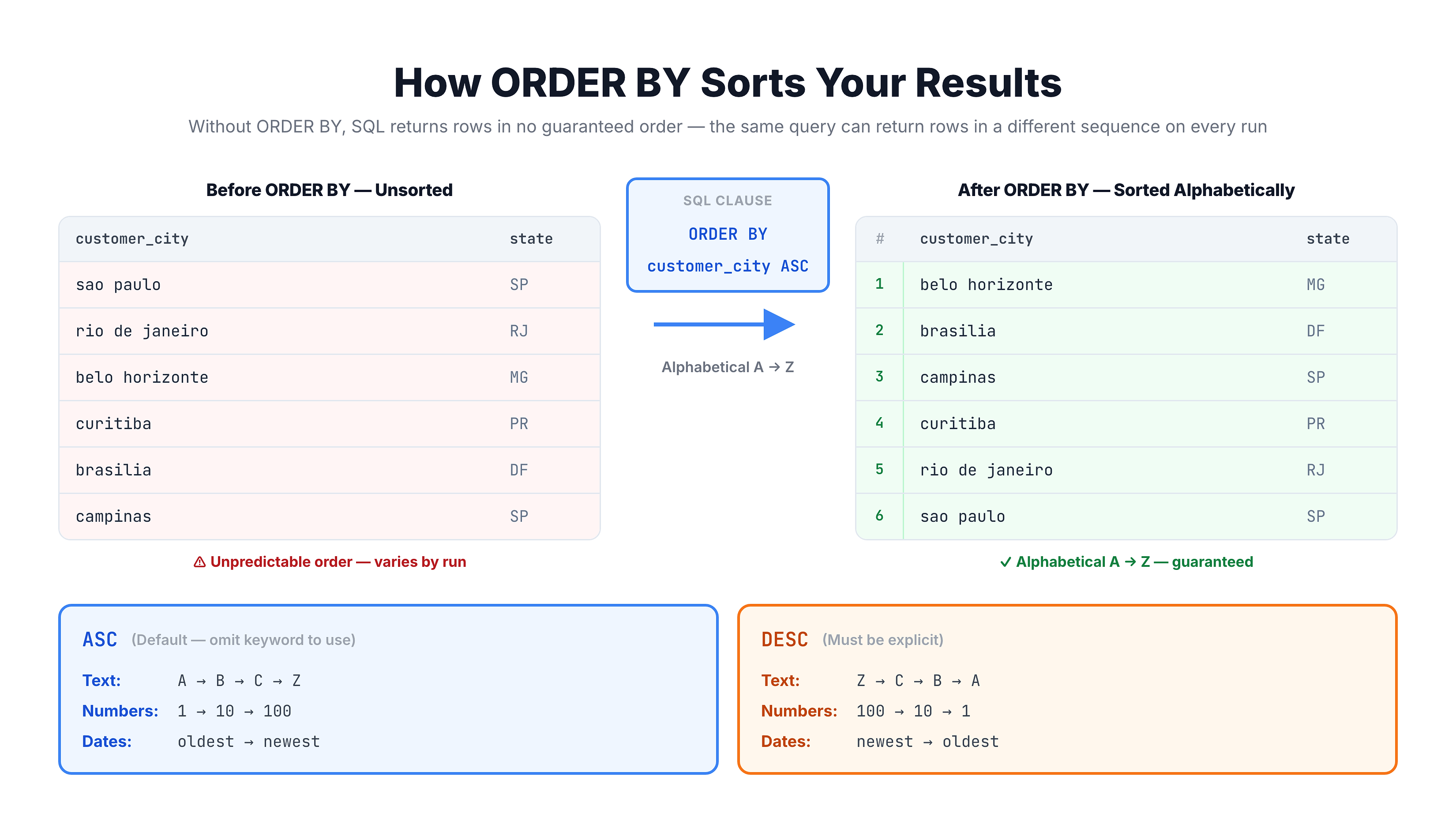
Without ORDER BY, databases return rows in an undefined order. This order might change between queries, even on the same data.
The Problem
-- Without ORDER BY, results could be in any order
SELECT customer_city, customer_state
FROM olist_customers_dataset
LIMIT 10;
Running this twice might return different rows in different orders.
The Solution
-- With ORDER BY, results are predictable
SELECT customer_city, customer_state
FROM olist_customers_dataset
ORDER BY customer_city
LIMIT 10;
Now results are always alphabetically sorted by city.
Basic ORDER BY Syntax
The ORDER BY clause appears at the end of your query (before LIMIT).
Syntax
SELECT columns
FROM table_name
ORDER BY column_name [ASC|DESC];
Sort Directions
| Direction | Meaning | Order | Default? |
|---|---|---|---|
ASC | Ascending | A→Z, 1→100 | Yes |
DESC | Descending | Z→A, 100→1 | No |
Examples
-- Ascending (A to Z) - default
SELECT * FROM olist_customers_dataset
ORDER BY customer_city ASC;

-- Same as above (ASC is default)
SELECT * FROM olist_customers_dataset
ORDER BY customer_city;

-- Descending (Z to A)
SELECT * FROM olist_customers_dataset
ORDER BY customer_city DESC;
Sorting Text Data
Text columns are sorted alphabetically.
Ascending Text Sort (A→Z)
SELECT customer_city, customer_state
FROM olist_customers_dataset
ORDER BY customer_city ASC
LIMIT 10;
Results start with 'a' cities (abel figueiredo, abre campo, etc.)
Descending Text Sort (Z→A)
SELECT customer_city, customer_state
FROM olist_customers_dataset
ORDER BY customer_city DESC
LIMIT 10;
Results start with 'z' cities (zortea, xaxim, etc.)
Case Sensitivity
In SQLite, text sorting is case-insensitive by default. 'Apple' and 'apple' are treated as equal for ordering purposes.
Sorting Numeric Data
Numeric columns are sorted by value.
Ascending Numeric Sort (Smallest First)
SELECT order_id, product_id, price
FROM olist_order_items_dataset
ORDER BY price ASC
LIMIT 10;
Shows cheapest items first.
Descending Numeric Sort (Largest First)
SELECT order_id, product_id, price
FROM olist_order_items_dataset
ORDER BY price DESC
LIMIT 10;
Shows most expensive items first.
Practical Use Cases
| Scenario | ORDER BY |
|---|---|
| Top sellers | ORDER BY sales_count DESC |
| Cheapest products | ORDER BY price ASC |
| Highest rated | ORDER BY rating DESC |
| Oldest orders | ORDER BY order_date ASC |
| Most recent | ORDER BY order_date DESC |
Sorting by Multiple Columns
You can sort by multiple columns. The second column breaks ties in the first.
Syntax
ORDER BY column1 [ASC|DESC], column2 [ASC|DESC], ...
Example: State then City
SELECT customer_state, customer_city
FROM olist_customers_dataset
ORDER BY customer_state ASC, customer_city ASC
LIMIT 20;
This sorts by state first. Within each state, cities are sorted alphabetically.
Mixed Directions
Each column can have its own direction:
-- Sort by state ascending, but within each state,
-- show most expensive items first
SELECT
    s.seller_state,
    i.price
FROM olist_order_items_dataset AS i
JOIN olist_sellers_dataset AS s ON i.seller_id = s.seller_id
ORDER BY s.seller_state ASC, i.price DESC
LIMIT 20;
Sorting by Column Position
Instead of column names, you can use column position numbers.
Syntax
SELECT col1, col2, col3
FROM table
ORDER BY 2;  -- Sort by second column
Example
SELECT customer_state, customer_city, customer_zip_code_prefix
FROM olist_customers_dataset
ORDER BY 1, 2;
-- Same as: ORDER BY customer_state, customer_city
When to Use Position Numbers
Useful for:
- Complex expressions that would be tedious to repeat
- Quick ad-hoc queries
Avoid for:
- Production code (fragile if SELECT changes)
- Shared/team code (unclear to others)
-- Column position is helpful for complex expressions
SELECT
    customer_city || ', ' || customer_state AS location,
    customer_zip_code_prefix
FROM olist_customers_dataset
ORDER BY 1;  -- Easier than repeating the expression
Sorting by Aliases
You can sort by column aliases defined in SELECT.
Example
SELECT
    customer_state,
    COUNT(*) AS customer_count
FROM olist_customers_dataset
GROUP BY customer_state
ORDER BY customer_count DESC;
Here we sort by the alias customer_count, not by COUNT(*).
Both Approaches Work
-- Using alias
ORDER BY customer_count DESC

-- Using the expression directly
ORDER BY COUNT(*) DESC

-- Using column position
ORDER BY 2 DESC
All three achieve the same result.
Handling NULL Values
NULL values need special consideration when sorting.
Default NULL Behavior
In SQLite:
- ASC: NULLs appear first
- DESC: NULLs appear last
Example
-- Products with NULL categories appear first
SELECT product_id, product_category_name
FROM olist_products_dataset
ORDER BY product_category_name ASC
LIMIT 10;
Controlling NULL Position
Some databases support NULLS FIRST or NULLS LAST. In SQLite, you can simulate this:
-- Put NULLs at the end when sorting ASC
SELECT product_id, product_category_name
FROM olist_products_dataset
ORDER BY
    CASE WHEN product_category_name IS NULL THEN 1 ELSE 0 END,
    product_category_name ASC
LIMIT 10;
This sorts non-NULL values first, then NULLs.
Sorting with Expressions
You can sort by calculated expressions, not just column values.
Example: Sort by Total Cost
SELECT
    order_id,
    price,
    freight_value,
    price + freight_value AS total_cost
FROM olist_order_items_dataset
ORDER BY price + freight_value DESC
LIMIT 10;
Example: Sort by String Length
SELECT
    customer_city,
    LENGTH(customer_city) AS city_name_length
FROM olist_customers_dataset
ORDER BY LENGTH(customer_city) DESC
LIMIT 10;
Shows cities with the longest names first.
Practice
Let's practice sorting query results.
Exercise 1: Basic Ascending Sort
Sort customers alphabetically by city:
-- Sort by city name (A to Z)

SELECT customer_id, customer_city, customer_state
FROM olist_customers_dataset
ORDER BY customer_city ASC
LIMIT 10;
Exercise 2: Descending Numeric Sort
Find the most expensive order items:
-- Sort by price, highest first

SELECT order_id, product_id, price
FROM olist_order_items_dataset
ORDER BY price DESC
LIMIT 10;
Exercise 3: Multiple Column Sort
Sort customers by state, then by city within each state:
-- Primary sort: state, Secondary sort: city

SELECT customer_state, customer_city, customer_id
FROM olist_customers_dataset
ORDER BY customer_state ASC, customer_city ASC
LIMIT 20;
Exercise 4: Sort with Aggregation
Find states with the most customers, sorted by count:
-- Count customers per state and sort by count

SELECT
    customer_state,
    COUNT(*) AS customer_count
FROM olist_customers_dataset
GROUP BY customer_state
ORDER BY customer_count DESC
LIMIT 10;
Exercise 5: Mixed Sort Directions
Sort payment types alphabetically, but show highest payment values first within each type:
-- Mixed sort: type ASC, value DESC

SELECT payment_type, payment_value, order_id
FROM olist_order_payments_dataset
ORDER BY payment_type ASC, payment_value DESC
LIMIT 20;
Performance Considerations
Sorting can be expensive for large datasets.
How Sorting Works
- Database retrieves all matching rows
- Rows are sorted in memory (or on disk if too large)
- Sorted results are returned
Performance Tips
1. Use Indexes
If you frequently sort by a column, an index on that column can speed up sorting significantly.
2. Limit Results Early
When you only need top results, LIMIT reduces the sorting work:
-- More efficient: only find top 10
SELECT * FROM large_table
ORDER BY column DESC
LIMIT 10;
3. Avoid Sorting Large Result Sets
Sort only what you need. Use WHERE to filter first:
-- Filter first, then sort fewer rows
SELECT * FROM olist_orders_dataset
WHERE order_status = 'delivered'
ORDER BY order_purchase_timestamp DESC;
4. Avoid Sorting by Expressions
Sorting by calculated values is slower than sorting by indexed columns.
Summary
You now know how to sort query results with ORDER BY!
Key Takeaways
✅ ORDER BY sorts results in a specified order
✅ ASC (ascending) is the default - A→Z, small→large
✅ DESC (descending) reverses the order - Z→A, large→small
✅ Multiple columns - sort by first column, break ties with second
✅ Column position - use numbers (1, 2, 3) instead of names
✅ Aliases - you can sort by SELECT aliases
✅ NULLs - appear first in ASC, last in DESC (in SQLite)
Quick Reference
-- Ascending (default)
ORDER BY column_name ASC

-- Descending
ORDER BY column_name DESC

-- Multiple columns
ORDER BY col1 ASC, col2 DESC

-- By position
ORDER BY 1, 2

-- By alias
ORDER BY my_alias DESC

-- By expression
ORDER BY price + freight DESC
What's Next?
Next, we'll learn about GROUP BY for aggregating data and calculating statistics across groups of rows.