SELECT & FROM
Introduction
The SELECT and FROM clauses are the foundation of every SQL query. They work together to retrieve data from your database.
In this tutorial, you will learn:
- How to use SELECT to choose columns
- How FROM specifies the data source
- Column and table aliases
- Selecting expressions and calculated values
- Best practices for writing SELECT statements
The SELECT Statement
The SELECT clause tells the database which columns you want in your results.
Basic Syntax
SELECT column1, column2, column3
FROM table_name;
What SELECT Does
- Chooses columns - You specify which columns to include
- Orders columns - Columns appear in the order you list them
- Allows expressions - You can include calculations, not just column names
- Renames output - You can give columns custom names using aliases
Example
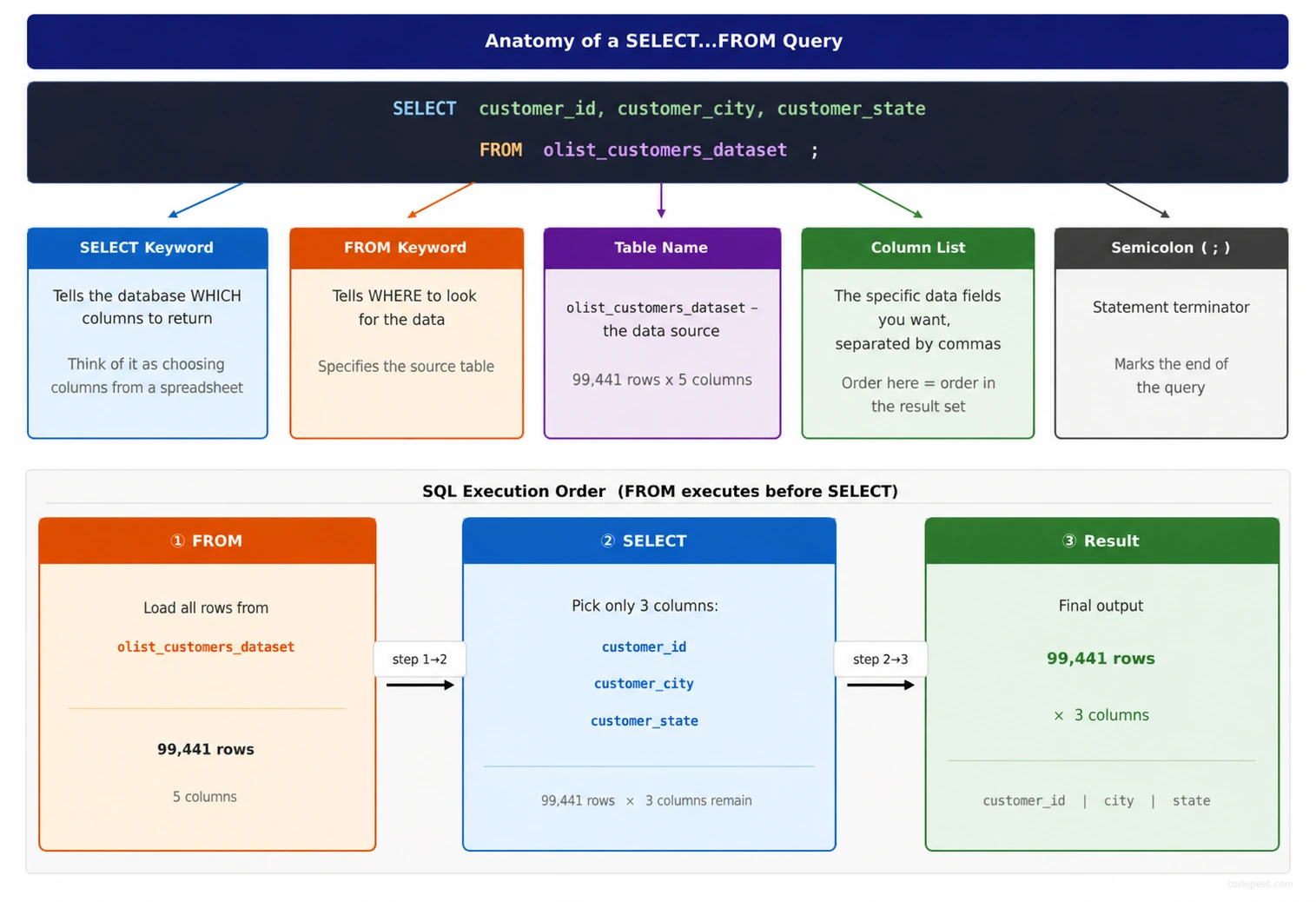
SELECT customer_id, customer_city, customer_state
FROM olist_customers_dataset;
This returns three columns for every row in the customers table.
Selecting All Columns
The asterisk * is a shortcut to select every column in the table.
Syntax
SELECT *
FROM table_name;
When to Use SELECT *
Good use cases:
- Exploring a table you're unfamiliar with
- Quick data inspection during development
- When you genuinely need all columns
Avoid SELECT * when:
- In production applications (slower, fragile)
- When you only need specific columns
- In stored procedures or views
Why Explicit Columns Are Better
-- Not recommended for production
SELECT * FROM olist_customers_dataset;

-- Better: Be explicit about what you need
SELECT customer_id, customer_city, customer_state
FROM olist_customers_dataset;
Benefits of explicit columns:
- Query is self-documenting
- Faster performance (less data transferred)
- Won't break if table structure changes
- Clearer for other developers
The FROM Clause
The FROM clause specifies which table (or tables) to retrieve data from.
Basic Syntax
SELECT columns
FROM table_name;
What FROM Does
- Identifies the data source - Which table contains your data
- Enables access to columns - Columns in SELECT must exist in FROM tables
- Can reference multiple tables - For JOINs and subqueries
Example
SELECT order_id, order_status, order_purchase_timestamp
FROM olist_orders_dataset;
The database looks in olist_orders_dataset to find these columns.
Column Aliases
Aliases give columns custom names in the output. Use the AS keyword.
Syntax
SELECT column_name AS alias_name
FROM table_name;
Why Use Aliases?
- Shorter names - Make long column names more readable
- Descriptive names - Clarify what the column represents
- Required for expressions - Calculated columns need names
- Avoid conflicts - Distinguish columns from different tables
Examples
-- Simple renaming
SELECT
    customer_city AS city,
    customer_state AS state
FROM olist_customers_dataset;
Output columns will be city and state instead of the original names.
Alias Rules
-- With AS (recommended)
SELECT customer_city AS city FROM customers;

-- Without AS (also works, but less clear)
SELECT customer_city city FROM customers;

-- Aliases with spaces (use quotes)
SELECT customer_city AS "Customer City" FROM customers;
Best Practice: Always use AS for clarity.
Table Aliases
Tables can also have aliases, which is especially useful with long table names or when joining multiple tables.
Syntax
SELECT t.column_name
FROM long_table_name AS t;
Example
-- Without alias (verbose)
SELECT
    olist_customers_dataset.customer_city,
    olist_customers_dataset.customer_state
FROM olist_customers_dataset;

-- With alias (cleaner)
SELECT
    c.customer_city,
    c.customer_state
FROM olist_customers_dataset AS c;
Common Table Alias Patterns
| Table | Common Alias |
|---|---|
| customers | c |
| orders | o |
| products | p |
| items | i |
SELECT o.order_id, o.order_status
FROM olist_orders_dataset AS o;
Expressions in SELECT
SELECT can include calculations, not just column names.
Arithmetic Expressions
SELECT
    price,
    freight_value,
    price + freight_value AS total_cost
FROM olist_order_items_dataset;
Common Operators
| Operator | Operation | Example |
|---|---|---|
+ | Addition | price + tax |
- | Subtraction | price - discount |
* | Multiplication | quantity * price |
/ | Division | total / count |
% | Modulo (remainder) | value % 2 |
String Concatenation
In SQLite, use || to join strings:
SELECT
    customer_city || ', ' || customer_state AS location
FROM olist_customers_dataset;
Result: sao paulo, SP
Functions in SELECT
SELECT
    customer_city,
    UPPER(customer_city) AS city_uppercase,
    LENGTH(customer_city) AS city_length
FROM olist_customers_dataset;
Literal Values
You can include constant (literal) values in your SELECT.
Text Literals
SELECT
    customer_id,
    customer_city,
    'Brazil' AS country
FROM olist_customers_dataset;
Every row will have 'Brazil' in the country column.
Numeric Literals
SELECT
    product_id,
    price,
    price * 1.1 AS price_with_tax,
    10 AS tax_percent
FROM olist_order_items_dataset;
Use Cases for Literals
- Adding context to query results
- Creating default values
- Flagging or tagging rows
- Preparing data for UNION operations
Practice
Let's practice various SELECT and FROM patterns.
Exercise 1: Basic SELECT
Select specific columns from the orders table:
-- Select order_id, customer_id, and order_status
-- from the orders table

SELECT
    order_id,
    customer_id,
    order_status
FROM olist_orders_dataset
LIMIT 10;
Exercise 2: Using Column Aliases
Rename columns to friendlier names using AS:
-- Use aliases to rename columns

SELECT
    customer_id AS id,
    customer_city AS city,
    customer_state AS state
FROM olist_customers_dataset
LIMIT 10;
Exercise 3: Calculated Columns
Create a calculated column that adds price and freight:
-- Calculate total cost (price + freight)

SELECT
    order_id,
    product_id,
    price,
    freight_value,
    price + freight_value AS total_cost
FROM olist_order_items_dataset
LIMIT 10;
Exercise 4: Table Aliases
Use a table alias to shorten the query:
-- Use 'p' as an alias for the products table

SELECT
    p.product_id,
    p.product_category_name,
    p.product_weight_g
FROM olist_products_dataset AS p
LIMIT 10;
Exercise 5: String Concatenation
Combine city and state into a single location column:
-- Concatenate city and state with a comma separator

SELECT
    customer_id,
    customer_city || ', ' || customer_state AS full_location
FROM olist_customers_dataset
LIMIT 10;
Common Mistakes
Mistake 1: Selecting Columns Not in FROM Table
-- ERROR: customer_city doesn't exist in orders table
SELECT customer_city
FROM olist_orders_dataset;
Fix: Make sure columns exist in the table you're querying.
Mistake 2: Missing Commas Between Columns
-- ERROR: Missing comma
SELECT order_id customer_id order_status
FROM olist_orders_dataset;

-- CORRECT
SELECT order_id, customer_id, order_status
FROM olist_orders_dataset;
Mistake 3: Forgetting FROM Clause
-- ERROR: No FROM clause
SELECT customer_city;

-- CORRECT
SELECT customer_city
FROM olist_customers_dataset;
Mistake 4: Using Alias in Same SELECT
-- ERROR: Can't use alias 'total' within the same SELECT
SELECT
    price + freight_value AS total,
    total * 0.1 AS tax  -- 'total' not recognized here!
FROM olist_order_items_dataset;

-- CORRECT: Repeat the expression or use a subquery
SELECT
    price + freight_value AS total,
    (price + freight_value) * 0.1 AS tax
FROM olist_order_items_dataset;
Best Practices
1. Be Explicit About Columns
-- Avoid in production
SELECT * FROM customers;

-- Better
SELECT customer_id, customer_city, customer_state
FROM customers;
2. Use Meaningful Aliases
-- Poor
SELECT customer_city AS c FROM customers;

-- Better
SELECT customer_city AS city FROM customers;
3. Format for Readability
-- Hard to read
SELECT customer_id,customer_city,customer_state,customer_zip_code_prefix FROM olist_customers_dataset;

-- Easy to read
SELECT
    customer_id,
    customer_city,
    customer_state,
    customer_zip_code_prefix
FROM olist_customers_dataset;
4. Comment Complex Expressions
SELECT
    order_id,
    -- Calculate total including 10% tax
    price * 1.1 AS price_with_tax
FROM olist_order_items_dataset;
Summary
You now have a solid understanding of SELECT and FROM!
Key Takeaways
✅ SELECT specifies which columns to retrieve
✅ FROM specifies which table to query
✅ Use * to select all columns (but prefer explicit columns)
✅ Aliases rename columns and tables using AS
✅ SELECT can include expressions and calculations
✅ Use || for string concatenation in SQLite
Quick Reference
-- Basic query
SELECT column1, column2 FROM table_name;

-- Select all
SELECT * FROM table_name;

-- With column aliases
SELECT column1 AS alias1, column2 AS alias2 FROM table_name;

-- With table alias
SELECT t.column1, t.column2 FROM table_name AS t;

-- With expressions
SELECT col1, col2, col1 + col2 AS sum FROM table_name;
What's Next?
Next, we'll learn about the WHERE clause to filter which rows are returned in our queries.