Intro to JOINS
Introduction
A JOIN is a SQL operation that combines rows from two or more tables based on a related column between them.
JOINs are one of the most powerful features of SQL, allowing you to reconstruct meaningful information from normalized databases.
In this tutorial, you will learn:
- What a JOIN is and how it works
- The basic syntax of a JOIN
- The different types of JOINs available
- How to choose which JOIN to use
What is a JOIN?
A JOIN combines rows from two tables by matching values in related columns.
The Concept
Imagine you have two tables:
Table A: customers
| customer_id | name |
|---|---|
| 1 | John |
| 2 | Maria |
| 3 | Carlos |
Table B: orders
| order_id | customer_id | amount |
|---|---|---|
| 101 | 1 | 100 |
| 102 | 1 | 200 |
| 103 | 2 | 150 |
The JOIN Result
When we JOIN these tables on customer_id, we get:
| customer_id | name | order_id | amount |
|---|---|---|---|
| 1 | John | 101 | 100 |
| 1 | John | 102 | 200 |
| 2 | Maria | 103 | 150 |
Notice:
- John appears twice (he has 2 orders)
- Maria appears once (she has 1 order)
- Carlos doesn't appear (he has no orders)
Visualization
Introduction to SQL JOINs — Combining Tables
Basic JOIN Syntax
The basic syntax for a JOIN is:
SELECT columns
FROM table1
JOIN table2 ON table1.column = table2.column;
Breaking It Down
| Part | Purpose |
|---|---|
FROM table1 | The first (left) table |
JOIN table2 | The second (right) table to combine |
ON condition | How to match rows between tables |
Example
SELECT
    c.customer_city,
    o.order_id
FROM olist_customers_dataset c
JOIN olist_orders_dataset o
    ON c.customer_id = o.customer_id;
This matches customers with their orders using the common customer_id column.
Table Aliases in JOINs
When working with multiple tables, use aliases to keep your queries readable.
Without Aliases (Verbose)
SELECT
    olist_customers_dataset.customer_city,
    olist_orders_dataset.order_id
FROM olist_customers_dataset
JOIN olist_orders_dataset
    ON olist_customers_dataset.customer_id = olist_orders_dataset.customer_id;
With Aliases (Clean)
SELECT
    c.customer_city,
    o.order_id
FROM olist_customers_dataset c
JOIN olist_orders_dataset o
    ON c.customer_id = o.customer_id;
Alias Rules
- Define aliases in the
FROMandJOINclauses - Use aliases throughout the query for that table
- Choose short but meaningful aliases (c for customers, o for orders)
- Be consistent in your naming
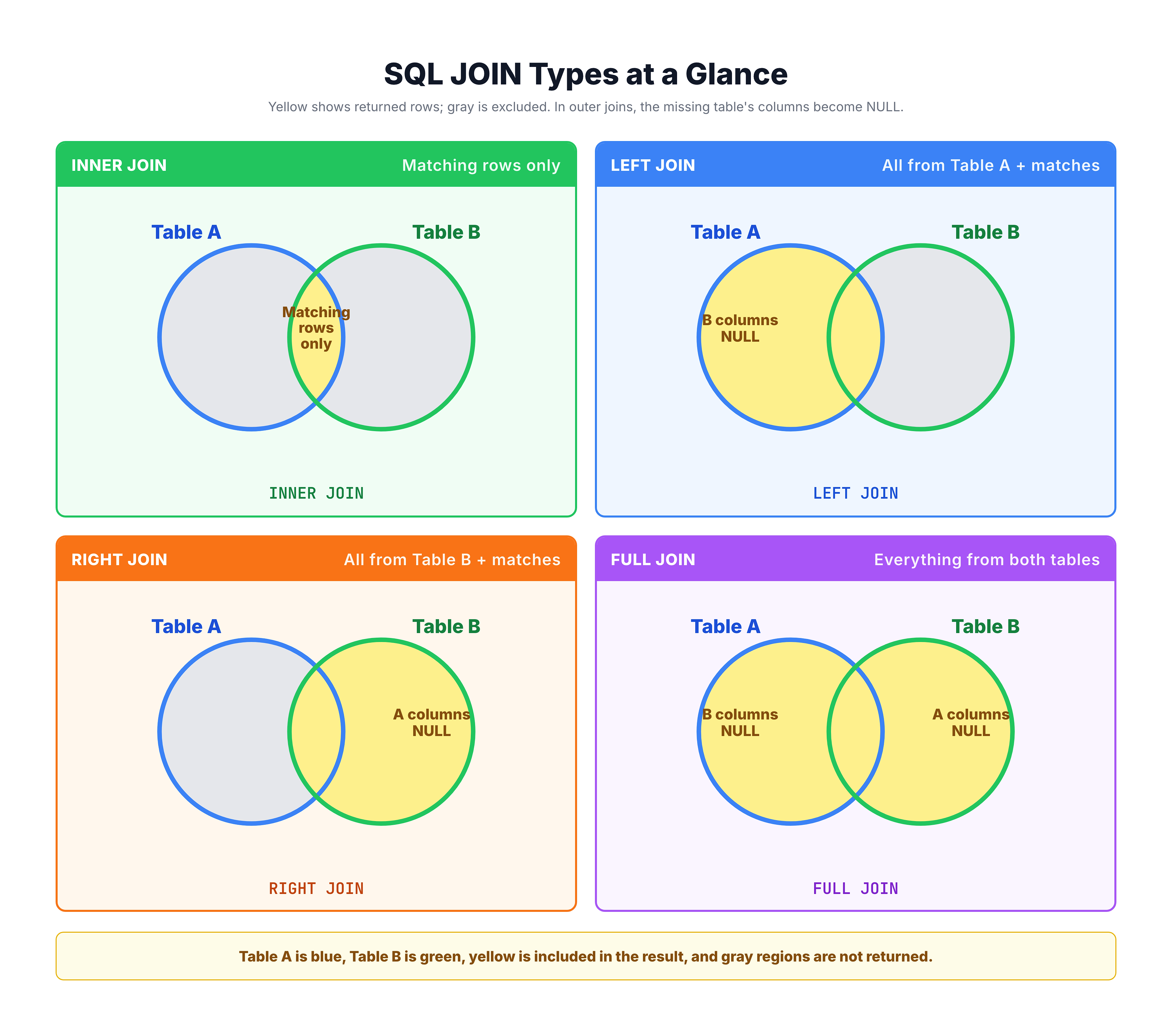
Types of JOINs Overview
SQL provides several types of JOINs for different use cases:
Standard JOINs
| JOIN Type | What It Returns |
|---|---|
| INNER JOIN | Only rows that match in both tables |
| LEFT JOIN | All rows from left table + matches from right |
| RIGHT JOIN | All rows from right table + matches from left |
| FULL JOIN | All rows from both tables |
| CROSS JOIN | Every possible combination of rows |
Anti JOINs (Exclusion Patterns)
| JOIN Type | What It Returns |
|---|---|
| LEFT ANTI JOIN | Left rows with NO match in right table |
| RIGHT ANTI JOIN | Right rows with NO match in left table |
| FULL ANTI JOIN | Rows from either table with NO match |
Visual Representation
The ON Clause
The ON clause specifies the join condition - how rows from each table should be matched.
Simple Condition
ON customers.customer_id = orders.customer_id
Matches rows where customer_id is equal in both tables.
Multiple Conditions
You can join on multiple columns:
ON a.column1 = b.column1
   AND a.column2 = b.column2
Comparison Operators
While equality is most common, other operators work too:
-- Non-equality join (less common)
ON a.date >= b.start_date AND a.date <= b.end_date
Common Mistakes
❌ Wrong: Forgetting the ON clause
SELECT * FROM customers JOIN orders; -- Error or CROSS JOIN
❌ Wrong: Joining on wrong columns
ON customers.customer_city = orders.order_id -- Meaningless!
✅ Correct: Join on related columns
ON customers.customer_id = orders.customer_id
JOIN vs WHERE for Matching
You might see older SQL using WHERE instead of JOIN:
Old Style (Implicit JOIN)
SELECT c.customer_city, o.order_id
FROM olist_customers_dataset c, olist_orders_dataset o
WHERE c.customer_id = o.customer_id;
Modern Style (Explicit JOIN)
SELECT c.customer_city, o.order_id
FROM olist_customers_dataset c
JOIN olist_orders_dataset o
    ON c.customer_id = o.customer_id;
Why Use Explicit JOINs?
| Aspect | Implicit (WHERE) | Explicit (JOIN ON) |
|---|---|---|
| Readability | Harder to read | Clear intent |
| Error-prone | Easy to forget conditions | JOIN won't run without ON |
| OUTER JOINs | Not possible | Fully supported |
| Standard | Older style | Modern standard |
Recommendation: Always use explicit JOIN syntax.
Practice
Let's practice the basic JOIN syntax.
Exercise 1: Basic JOIN
Join customers with their orders to see customer cities and order statuses:
-- Join customers with orders
-- The ON clause matches customer_id in both tables

SELECT
    c.customer_city,
    c.customer_state,
    o.order_status,
    o.order_purchase_timestamp
FROM olist_customers_dataset c
JOIN olist_orders_dataset o
    ON c.customer_id = o.customer_id
LIMIT 10;
Exercise 2: JOIN with Filtering
Add a WHERE clause to filter results after joining:
-- Join and filter for delivered orders only

SELECT
    c.customer_city,
    o.order_id,
    o.order_status
FROM olist_customers_dataset c
JOIN olist_orders_dataset o
    ON c.customer_id = o.customer_id
WHERE o.order_status = 'delivered'
LIMIT 10;
Exercise 3: JOIN with Aggregation
Combine JOIN with GROUP BY to count orders per city:
-- Count orders per customer city

SELECT
    c.customer_city,
    COUNT(o.order_id) AS order_count
FROM olist_customers_dataset c
JOIN olist_orders_dataset o
    ON c.customer_id = o.customer_id
GROUP BY c.customer_city
ORDER BY order_count DESC
LIMIT 10;
Summary
Key Takeaways
-
JOIN combines rows from two or more tables based on related columns
-
Basic syntax:
SELECT columns
FROM table1
JOIN table2 ON table1.column = table2.column
-
Table aliases make JOIN queries more readable
-
The ON clause specifies how to match rows between tables
-
Types of JOINs:
- INNER JOIN: Matching rows only
- LEFT/RIGHT JOIN: All from one side + matches
- FULL JOIN: All from both sides
- CROSS JOIN: All combinations
- Always use explicit JOIN syntax (JOIN...ON) instead of implicit (comma + WHERE)
What's Next?
In the following tutorials, we'll explore each JOIN type in detail, starting with understanding what happens when you don't use a JOIN at all.