UNION
Introduction
The UNION operator is one of the most frequently used SET operators in SQL. It combines the results of two or more SELECT statements into a single result set while automatically removing duplicate rows.
In this tutorial, you will learn:
- What UNION does and how it works
- The syntax for using UNION
- How UNION handles duplicates
- Performance considerations when using UNION
- Practical examples with our e-commerce dataset
What is UNION?
UNION combines the results of two or more SELECT statements and returns only distinct (unique) rows.
Key Characteristics
| Feature | UNION Behavior |
|---|---|
| Duplicate handling | Removes duplicate rows |
| Row comparison | Compares all columns for uniqueness |
| NULL values | Two NULL values are considered equal |
| Performance | Slower than UNION ALL (requires deduplication) |
Visualization
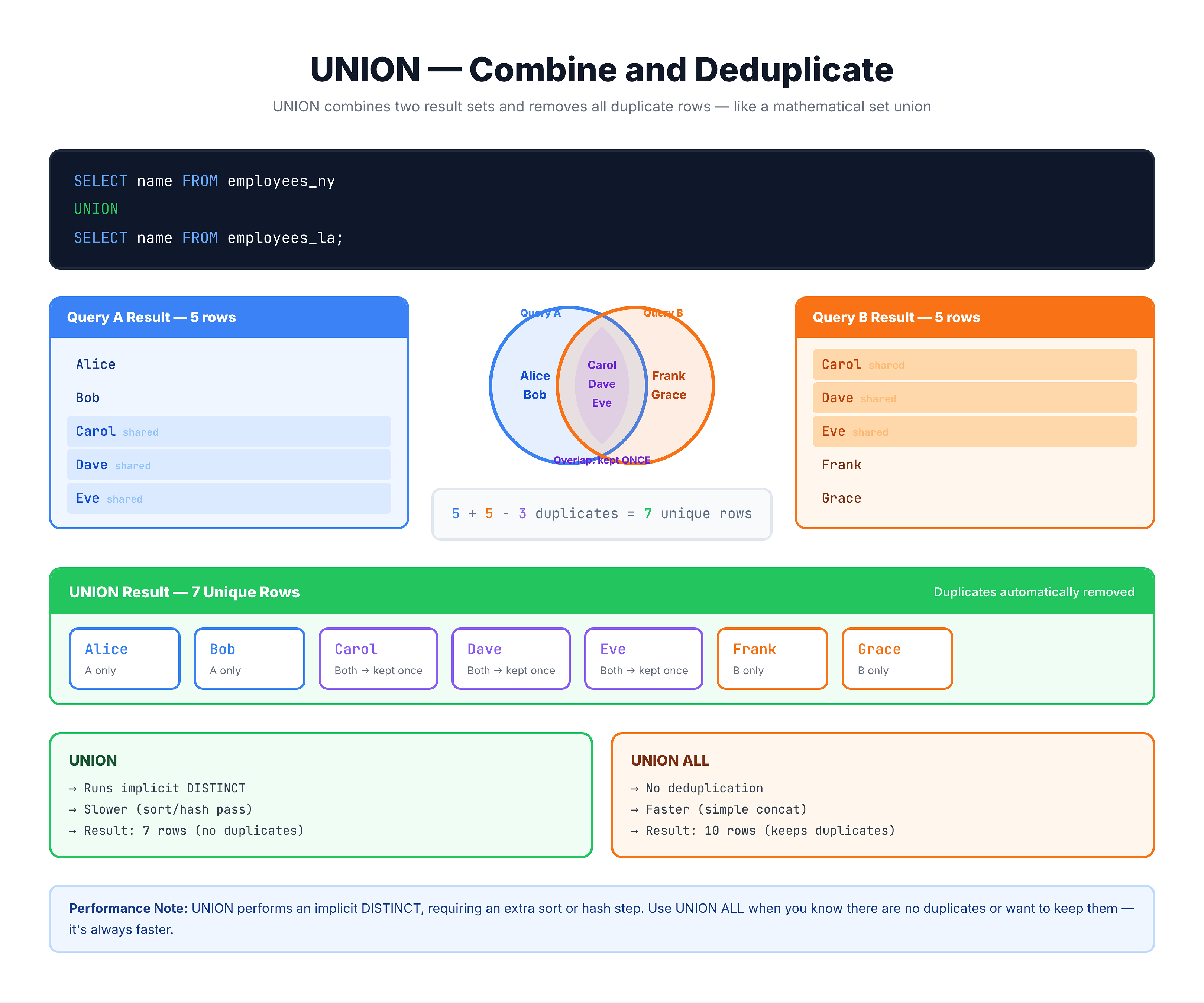
UNION — Combining Results and Removing Duplicates
UNION Syntax
Basic Syntax
SELECT column1, column2, ...
FROM table1
[WHERE condition]

UNION

SELECT column1, column2, ...
FROM table2
[WHERE condition];
Multiple UNIONs
SELECT columns FROM table1
UNION
SELECT columns FROM table2
UNION
SELECT columns FROM table3;
With ORDER BY
SELECT city FROM customers
UNION
SELECT city FROM sellers
ORDER BY city;  -- Applied to the combined result
With LIMIT
SELECT city FROM customers
UNION
SELECT city FROM sellers
ORDER BY city
LIMIT 10;  -- Limits the final result
How UNION Handles Duplicates
Full Row Comparison
UNION determines uniqueness by comparing all columns in each row:
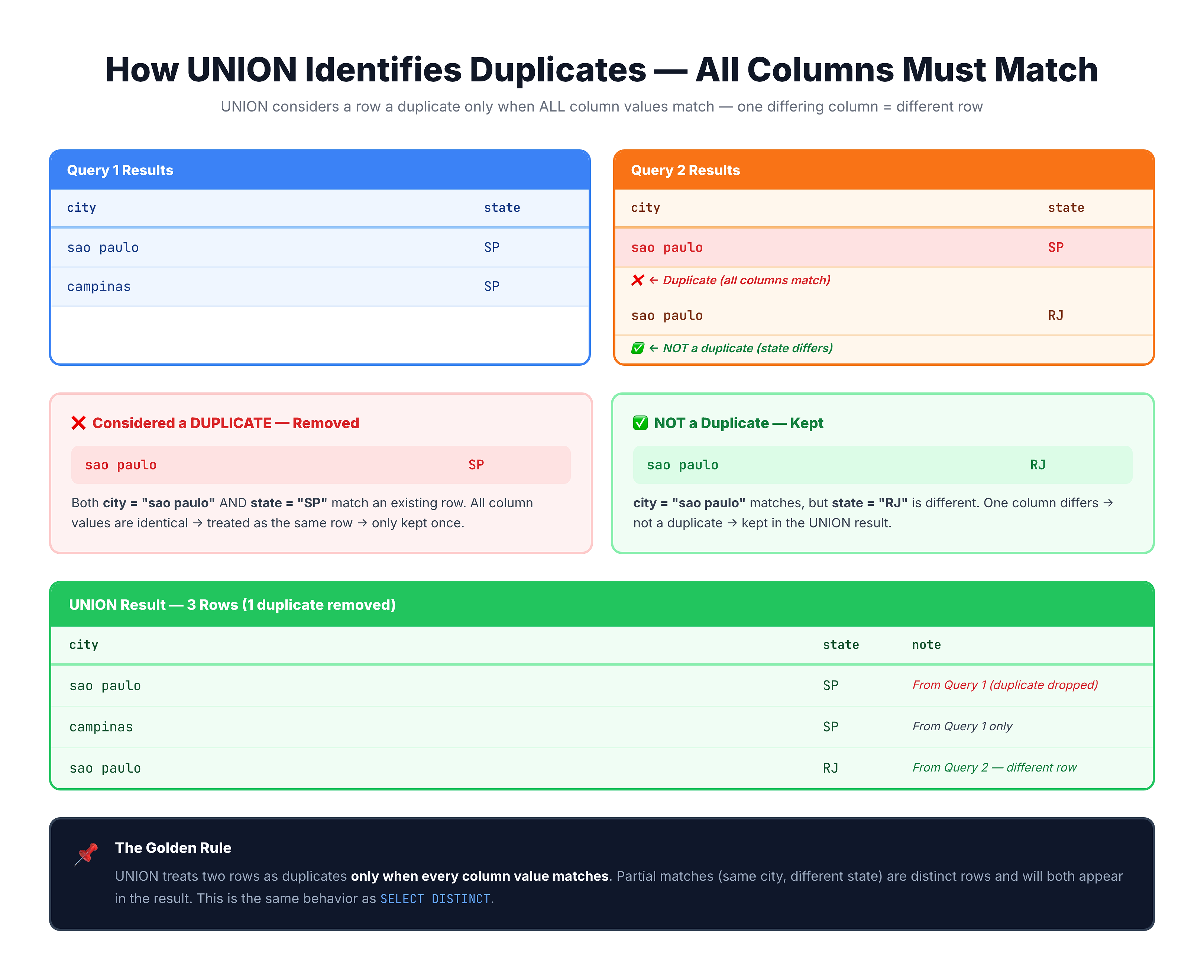
Important: All Columns Must Match
A row is only considered a duplicate if every single column matches:
-- These are NOT duplicates:
('sao paulo', 'SP', 'Customer')
('sao paulo', 'SP', 'Seller')
-- The third column differs, so both rows are kept
NULL Handling
In UNION, two NULL values are treated as equal:
(NULL, 'SP') + (NULL, 'SP') → (NULL, 'SP') -- One row kept
Practice Exercises
Let's practice using UNION with our e-commerce dataset.
Exercise 1: Basic UNION
Find all unique states where either customers or sellers are located:
-- All unique states with customers or sellers
SELECT customer_state AS state
FROM olist_customers_dataset

UNION

SELECT seller_state AS state
FROM olist_sellers_dataset

ORDER BY state;
Exercise 2: UNION with Multiple Columns
Combine city and state information from both customers and sellers:
-- All unique city-state combinations
SELECT
    customer_city AS city,
    customer_state AS state
FROM olist_customers_dataset

UNION

SELECT
    seller_city AS city,
    seller_state AS state
FROM olist_sellers_dataset

ORDER BY state, city
LIMIT 25;
Exercise 3: UNION with Source Tracking
Add a source column to track where each row came from. Note how duplicates are handled when sources differ:
-- Cities with source tracking
-- Notice: Same city from different sources = different rows
SELECT
    customer_city AS city,
    customer_state AS state,
    'Customer' AS source
FROM olist_customers_dataset
WHERE customer_state = 'SP'

UNION

SELECT
    seller_city AS city,
    seller_state AS state,
    'Seller' AS source
FROM olist_sellers_dataset
WHERE seller_state = 'SP'

ORDER BY city
LIMIT 20;
Exercise 4: UNION with Aggregation
Combine summarized data from different sources:
-- State-level counts from both tables
SELECT
    customer_state AS state,
    COUNT(*) AS entity_count,
    'Customers' AS entity_type
FROM olist_customers_dataset
GROUP BY customer_state

UNION

SELECT
    seller_state AS state,
    COUNT(*) AS entity_count,
    'Sellers' AS entity_type
FROM olist_sellers_dataset
GROUP BY seller_state

ORDER BY state, entity_type
LIMIT 20;
Performance Considerations
Why UNION Can Be Slower
To remove duplicates, UNION must:
- Execute both queries and collect all rows
- Sort or hash the combined result
- Compare rows to find and remove duplicates
- Return the distinct result
Query 1 (1000 rows) + Query 2 (1000 rows)
         ↓
   Combined (2000 rows)
         ↓
   Deduplication process
         ↓
   Final Result (possibly fewer rows)
When to Use UNION vs UNION ALL
| Scenario | Recommended |
|---|---|
| Need only unique rows | Use UNION |
| Source data already unique | Use UNION ALL (faster) |
| Duplicates are meaningful | Use UNION ALL |
| Performance is critical | Consider UNION ALL + GROUP BY |
Performance Tip: Consider UNION ALL + DISTINCT
For complex queries, sometimes this pattern is more efficient:
-- Instead of UNION:
SELECT DISTINCT *
FROM (
    SELECT columns FROM table1
    UNION ALL
    SELECT columns FROM table2
);

-- This can sometimes be optimized better by the query planner
Common Use Cases
1. Creating Master Reference Lists
-- All payment types ever used
SELECT DISTINCT payment_type
FROM olist_order_payments_dataset;

-- If payment types came from multiple sources:
SELECT payment_type FROM payment_source_1
UNION
SELECT payment_type FROM payment_source_2;
2. Combining Historical and Current Data
-- Combine archived and current orders
SELECT order_id, order_status, order_date
FROM current_orders
UNION
SELECT order_id, order_status, order_date
FROM archived_orders;
3. Creating Lookup Tables
-- All unique locations for a dropdown menu
SELECT city, state FROM customers
UNION
SELECT city, state FROM sellers
ORDER BY state, city;
4. Reporting Across Entities
-- Activity report from multiple entity types
SELECT 'Order' AS type, order_id AS id, order_purchase_timestamp AS date
FROM orders
UNION
SELECT 'Review' AS type, review_id AS id, review_creation_date AS date
FROM reviews
ORDER BY date;
Common Mistakes
Mistake 1: Expecting UNION to Preserve Duplicates
❌ Assumption: UNION keeps all rows
-- If both tables have 'sao paulo, SP', UNION returns it once
SELECT city, state FROM customers  -- Has 'sao paulo, SP'
UNION
SELECT city, state FROM sellers;   -- Also has 'sao paulo, SP'
-- Result: Only ONE row for 'sao paulo, SP'
✅ Solution: Use UNION ALL if you need all rows
Mistake 2: Different Column Counts
❌ Wrong:
SELECT city, state, zip FROM customers
UNION
SELECT city, state FROM sellers;  -- Missing column!
✅ Correct:
SELECT city, state, zip FROM customers
UNION
SELECT city, state, NULL AS zip FROM sellers;  -- Add placeholder
Mistake 3: Mismatched Column Order
❌ Wrong:
SELECT city, state FROM customers
UNION
SELECT state, city FROM sellers;  -- Columns are swapped!
This will run but produce incorrect results because columns are matched by position.
Mistake 4: ORDER BY in Individual Queries
❌ Wrong:
SELECT city FROM customers ORDER BY city
UNION
SELECT city FROM sellers;
✅ Correct:
SELECT city FROM customers
UNION
SELECT city FROM sellers
ORDER BY city;  -- Only at the end
Summary
Key Takeaways
-
UNION combines results from multiple SELECT statements
-
Automatically removes duplicates - returns only unique rows
-
Duplicate detection compares ALL columns in each row
-
Syntax:
SELECT columns FROM table1
UNION
SELECT columns FROM table2
[ORDER BY column];
- Requirements:
- Same number of columns
- Compatible data types
- Columns matched by position
-
Performance: Slower than UNION ALL due to deduplication
-
Common use cases:
- Creating master reference lists
- Combining data from multiple sources
- Building lookup tables
- Cross-entity reporting
UNION vs UNION ALL Quick Reference
| UNION | UNION ALL |
|---|---|
| Removes duplicates | Keeps all rows |
| Slower | Faster |
| Use when uniqueness matters | Use when duplicates are OK |
What's Next?
Next, we'll learn about UNION ALL, which is similar to UNION but preserves all rows including duplicates.