BETWEEN Operator
Introduction
When you need to filter data within a range - like prices between 200, or dates between January and March - the BETWEEN operator provides an elegant and readable solution.
In this lesson, you will learn:
- How the BETWEEN operator works
- The inclusive nature of BETWEEN
- Using BETWEEN with numbers, dates, and text
- BETWEEN vs using AND with comparison operators
- NOT BETWEEN for excluding ranges
- Common pitfalls and best practices
What is the BETWEEN Operator?
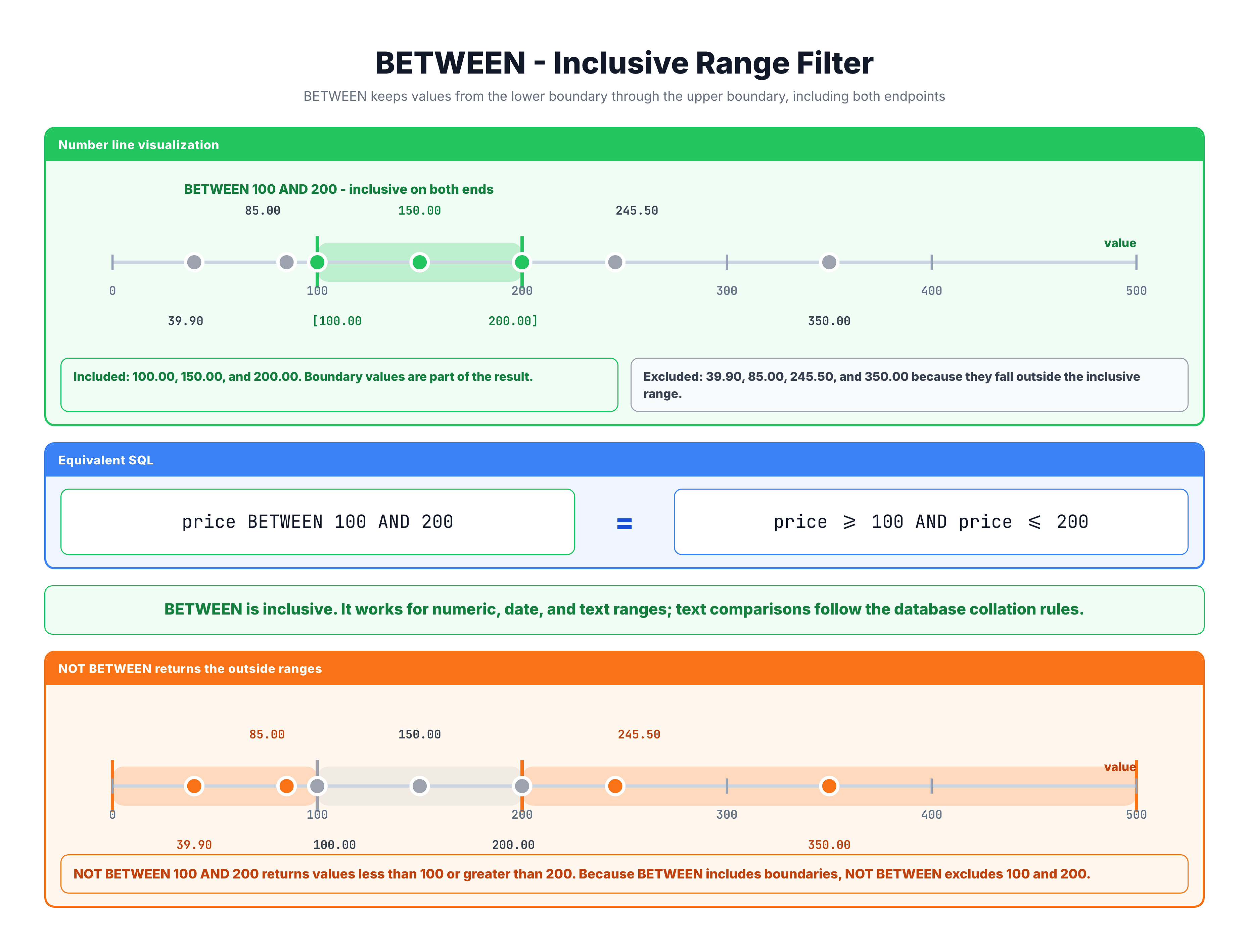
The BETWEEN operator filters rows where a column's value falls within a specified range. The range includes both the start and end values.
Syntax
SELECT columns
FROM table_name
WHERE column BETWEEN value1 AND value2;
Key Point: Inclusive Range
BETWEEN is inclusive on both ends:
BETWEEN 10 AND 20includes 10, 11, 12, ..., 19, 20- Both boundary values (10 and 20) are included
Basic Example
-- Find items priced between $50 and $100
SELECT order_id, product_id, price
FROM olist_order_items_dataset
WHERE price BETWEEN 50 AND 100;
This returns items where:
- Price is 50 (included)
- Price is 100 (included)
- Price is anything in between
BETWEEN vs Comparison Operators
BETWEEN is shorthand for combining two comparisons with AND.
Equivalent Expressions
-- Using BETWEEN
WHERE price BETWEEN 50 AND 100

-- Equivalent using AND
WHERE price >= 50 AND price <= 100
Both return exactly the same results.
When to Use BETWEEN
Use BETWEEN when:
- You want both boundaries included
- It makes your code more readable
- You're checking a continuous range
Use >= and <= when:
- You need to exclude one boundary
- You have complex conditions mixed in
- You want to be explicit about the comparison
Examples Where BETWEEN is Cleaner
-- BETWEEN is cleaner for simple ranges
WHERE review_score BETWEEN 1 AND 3

-- vs.
WHERE review_score >= 1 AND review_score <= 3
Examples Where Comparisons are Better
-- Need to exclude upper bound
WHERE price >= 50 AND price < 100

-- Complex condition
WHERE price >= 50 AND price <= 100 AND stock > 0
BETWEEN with Numbers
BETWEEN works naturally with numeric values.
Price Ranges
-- Budget items ($0 to $50)
SELECT order_id, product_id, price
FROM olist_order_items_dataset
WHERE price BETWEEN 0 AND 50;

-- Mid-range items ($50 to $200)
SELECT order_id, product_id, price
FROM olist_order_items_dataset
WHERE price BETWEEN 50 AND 200;

-- Premium items ($200 to $1000)
SELECT order_id, product_id, price
FROM olist_order_items_dataset
WHERE price BETWEEN 200 AND 1000;
Quantity Ranges
-- Orders with 2 to 5 items
SELECT order_id, order_item_id, price
FROM olist_order_items_dataset
WHERE order_item_id BETWEEN 2 AND 5;
Rating Ranges
-- Find neutral reviews (scores 3-4)
SELECT order_id, review_score
FROM olist_order_reviews_dataset
WHERE review_score BETWEEN 3 AND 4;

-- Find positive reviews (scores 4-5)
SELECT order_id, review_score
FROM olist_order_reviews_dataset
WHERE review_score BETWEEN 4 AND 5;
Payment Installments
-- Find payments with moderate installments (3 to 6)
SELECT order_id, payment_type, payment_installments, payment_value
FROM olist_order_payments_dataset
WHERE payment_installments BETWEEN 3 AND 6;
BETWEEN with Dates
BETWEEN is extremely useful for date range filtering.
Basic Date Range
-- Find orders from January 2018
SELECT order_id, order_purchase_timestamp
FROM olist_orders_dataset
WHERE DATE(order_purchase_timestamp) BETWEEN '2018-01-01' AND '2018-01-31';
Quarter Filtering
-- Q1 2018 (January - March)
SELECT order_id, order_purchase_timestamp
FROM olist_orders_dataset
WHERE order_purchase_timestamp BETWEEN '2018-01-01' AND '2018-03-31 23:59:59';
Year Filtering
-- All orders from 2017
SELECT order_id, order_purchase_timestamp
FROM olist_orders_dataset
WHERE order_purchase_timestamp BETWEEN '2017-01-01' AND '2017-12-31 23:59:59';
Important: Timestamp Precision
When working with timestamps, be careful about the time component:
-- PROBLEM: Misses orders on 2018-01-31 after midnight
WHERE order_purchase_timestamp BETWEEN '2018-01-01' AND '2018-01-31'
-- '2018-01-31 15:30:00' is AFTER '2018-01-31 00:00:00'

-- SOLUTION 1: Include full day
WHERE order_purchase_timestamp BETWEEN '2018-01-01' AND '2018-01-31 23:59:59'

-- SOLUTION 2: Use DATE() function
WHERE DATE(order_purchase_timestamp) BETWEEN '2018-01-01' AND '2018-01-31'

-- SOLUTION 3: Use < with next day (often best)
WHERE order_purchase_timestamp >= '2018-01-01'
  AND order_purchase_timestamp < '2018-02-01'
BETWEEN with Text
BETWEEN can also work with text values, comparing alphabetically.
Alphabetical Range
-- Cities starting with letters A through M
SELECT DISTINCT customer_city
FROM olist_customers_dataset
WHERE customer_city BETWEEN 'a' AND 'm';
How Text Comparison Works
Text is compared character by character using alphabetical (lexicographical) order:
- 'a' < 'b' < 'c' < ... < 'z'
- 'apple' < 'banana' (because 'a' < 'b')
- 'cat' < 'category' (prefix comes first)
Example: State Code Range
-- States with codes between 'A' and 'M'
SELECT DISTINCT customer_state
FROM olist_customers_dataset
WHERE customer_state BETWEEN 'A' AND 'M';
Practical Use Case
-- Product categories starting with 'a' through 'f'
SELECT DISTINCT product_category_name
FROM olist_products_dataset
WHERE product_category_name BETWEEN 'a' AND 'g'
  AND product_category_name IS NOT NULL;
Note: Text BETWEEN is less common than numeric or date BETWEEN. For text filtering, LIKE is often more practical.
NOT BETWEEN
NOT BETWEEN excludes rows where the value falls within the specified range.
Syntax
WHERE column NOT BETWEEN value1 AND value2
Example
-- Find items NOT in the mid-price range
SELECT order_id, product_id, price
FROM olist_order_items_dataset
WHERE price NOT BETWEEN 50 AND 200;
This returns items where:
- Price is less than 50 (cheap items)
- OR price is greater than 200 (expensive items)
Equivalent Expression
-- NOT BETWEEN is equivalent to:
WHERE price < 50 OR price > 200
Practical Use Cases
-- Find extreme reviews (very positive or very negative)
SELECT order_id, review_score
FROM olist_order_reviews_dataset
WHERE review_score NOT BETWEEN 2 AND 4;
-- Returns reviews with score 1 or 5

-- Find orders outside normal hours (if tracking time)
SELECT order_id, order_purchase_timestamp
FROM olist_orders_dataset
WHERE strftime('%H', order_purchase_timestamp) NOT BETWEEN '09' AND '18';
Common Pitfalls
Pitfall 1: Wrong Order of Values
The first value must be less than or equal to the second:
-- CORRECT: Lower value first
WHERE price BETWEEN 50 AND 100

-- WRONG: Higher value first (returns no rows!)
WHERE price BETWEEN 100 AND 50
If you swap the values, no rows will match because no number can be >= 100 AND <= 50 simultaneously.
Pitfall 2: Forgetting BETWEEN is Inclusive
-- If you want to EXCLUDE boundaries:
WHERE price > 50 AND price < 100  -- Use comparison operators

-- NOT this (includes 50 and 100):
WHERE price BETWEEN 50 AND 100
Pitfall 3: Timestamp Truncation
-- PROBLEM: May miss some records on the end date
WHERE order_date BETWEEN '2018-01-01' AND '2018-01-31'
-- Records at '2018-01-31 10:30:00' might be excluded

-- SOLUTION: Use appropriate end timestamp
WHERE order_date BETWEEN '2018-01-01' AND '2018-01-31 23:59:59'

-- BETTER SOLUTION: Use < with exclusive end date
WHERE order_date >= '2018-01-01' AND order_date < '2018-02-01'
Pitfall 4: NULL Values
BETWEEN does not include NULL values:
-- NULLs are NOT returned by BETWEEN
WHERE price BETWEEN 50 AND 100
-- If price is NULL, the row is NOT included
Practice
Practice using the BETWEEN operator with different data types.
Exercise 1: Numeric Range
Find order items priced between 500:
-- Find mid-to-high priced items

SELECT order_id, product_id, price
FROM olist_order_items_dataset
WHERE price BETWEEN 100 AND 500
LIMIT 10;
Exercise 2: Date Range
Find orders placed between March 1, 2018 and March 31, 2018:
-- Find March 2018 orders

SELECT order_id, order_purchase_timestamp, order_status
FROM olist_orders_dataset
WHERE DATE(order_purchase_timestamp) BETWEEN '2018-03-01' AND '2018-03-31'
LIMIT 10;
Exercise 3: Payment Installments
Find payments with 4 to 8 installments:
-- Find payments with moderate installment plans

SELECT order_id, payment_type, payment_installments, payment_value
FROM olist_order_payments_dataset
WHERE payment_installments BETWEEN 4 AND 8
LIMIT 10;
Exercise 4: NOT BETWEEN
Find reviews that are NOT in the neutral range (not 2, 3, or 4):
-- Find extreme reviews (very positive or very negative)

SELECT order_id, review_score, review_comment_title
FROM olist_order_reviews_dataset
WHERE review_score NOT BETWEEN 2 AND 4
LIMIT 10;
Exercise 5: Combined Conditions
Find delivered orders with payment value between 500:
-- Find delivered orders in a specific payment range

SELECT o.order_id, o.order_status, op.payment_value
FROM olist_orders_dataset o
JOIN olist_order_payments_dataset op ON o.order_id = op.order_id
WHERE o.order_status = 'delivered'
  AND op.payment_value BETWEEN 200 AND 500
LIMIT 10;
Summary
You now know how to use the BETWEEN operator for range filtering!
Key Takeaways
✅ BETWEEN filters values within a range
✅ Inclusive: Both boundary values are included
✅ Equivalent to: column >= value1 AND column <= value2
✅ Works with numbers, dates, and text
✅ First value must be less than or equal to second value
✅ Use NOT BETWEEN to exclude a range
Quick Reference
-- Numeric range (inclusive)
WHERE price BETWEEN 50 AND 100

-- Date range
WHERE order_date BETWEEN '2018-01-01' AND '2018-12-31'

-- For timestamps, be careful:
WHERE order_timestamp >= '2018-01-01'
  AND order_timestamp < '2018-02-01'  -- Exclusive end

-- Exclude a range
WHERE price NOT BETWEEN 50 AND 100

-- Equivalent to:
WHERE price < 50 OR price > 100
When to Use BETWEEN vs Comparison Operators
| Scenario | Use |
|---|---|
| Include both boundaries | BETWEEN |
| Exclude one boundary | >= and < |
| Simple range check | BETWEEN |
| Complex conditions | Comparison operators |
What's Next?
Next, we'll learn about the IN operator for filtering against a list of values.