Introduction to CASE Statements
Introduction
The CASE statement is SQL's way of implementing conditional logic, similar to IF-ELSE statements in programming languages. It allows you to evaluate conditions and return different values based on those conditions.
In this tutorial, you will learn:
- What the CASE statement is and why it's useful
- The two forms of CASE: Simple and Searched
- Basic syntax and structure
- How SQL evaluates CASE expressions
What is the CASE Statement?
The CASE statement is a conditional expression that lets you add decision-making logic to your SQL queries. Think of it as asking questions about your data and getting different answers based on the conditions you set.
Why Use CASE?
| Use Case | Example |
|---|---|
| Categorize data | Convert numeric scores to letter grades |
| Transform values | Map status codes to readable labels |
| Handle special cases | Replace NULL with default values |
| Conditional aggregation | Count only specific conditions |
| Custom sorting | Sort by custom business logic |
Real-World Analogy
Imagine you're a teacher grading exams:
- If the score is 90 or above → "A"
- If the score is 80-89 → "B"
- If the score is 70-79 → "C"
- Otherwise → "F"
This is exactly what CASE does in SQL - it checks conditions and returns the appropriate result.
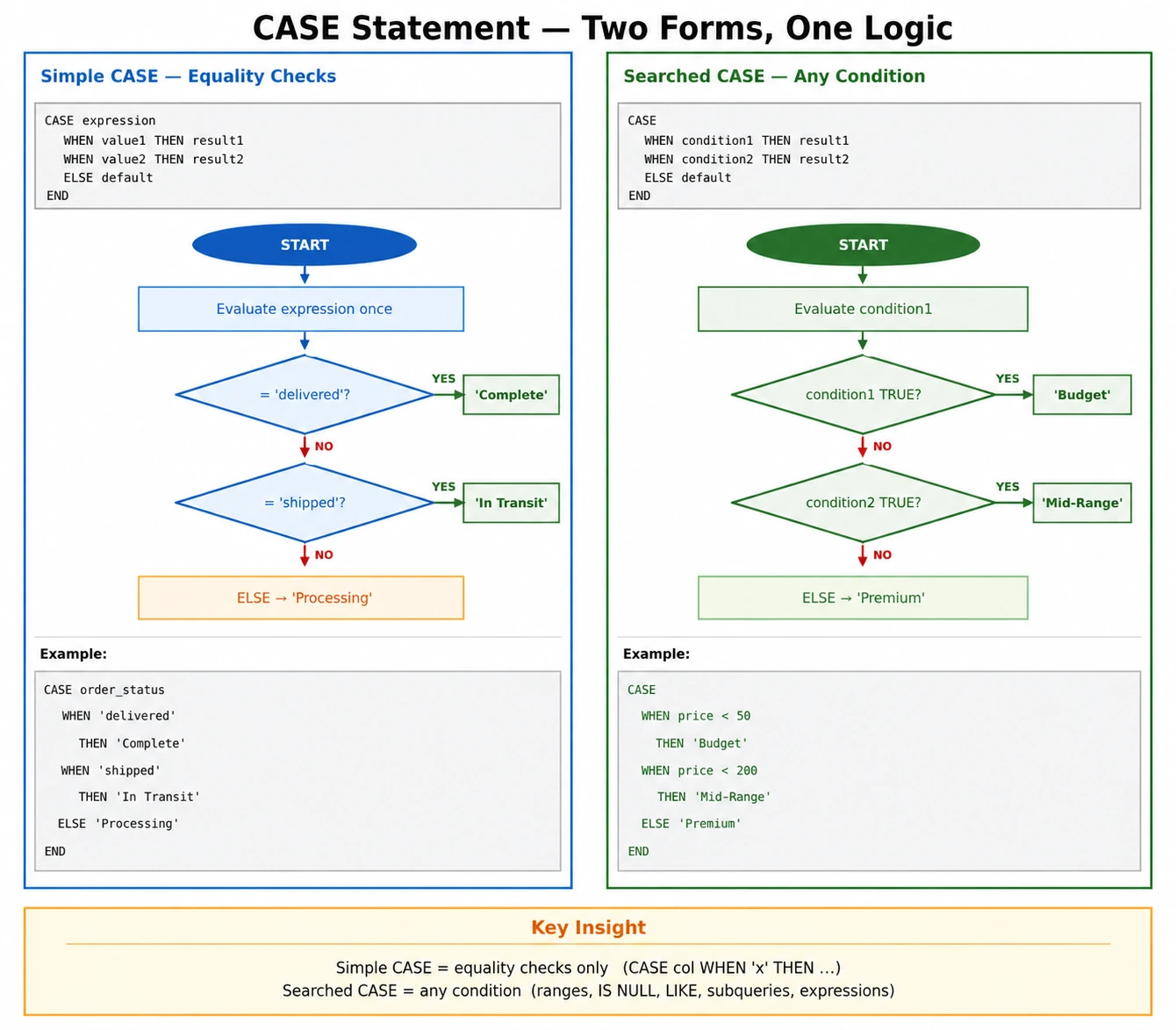
Two Forms of CASE
SQL provides two forms of the CASE statement. Understanding when to use each is important for writing clean, efficient queries.
1. Simple CASE Expression
Compares one expression to multiple possible values:
CASE expression
    WHEN value1 THEN result1
    WHEN value2 THEN result2
    ELSE default_result
END
Best for: Checking if a single column equals specific values.
2. Searched CASE Expression
Evaluates multiple Boolean conditions:
CASE
    WHEN condition1 THEN result1
    WHEN condition2 THEN result2
    ELSE default_result
END
Best for: Complex conditions, ranges, or comparing multiple columns.
Simple CASE Example
Let's see the Simple CASE in action. We'll convert order statuses to more readable labels:
-- Simple CASE: Convert order status codes to labels
SELECT
    order_id,
    order_status,
    CASE order_status
        WHEN 'delivered' THEN 'Completed'
        WHEN 'shipped' THEN 'In Transit'
        WHEN 'processing' THEN 'Being Prepared'
        WHEN 'canceled' THEN 'Cancelled'
        ELSE 'Other Status'
    END AS status_label
FROM olist_orders_dataset
LIMIT 15;
In this example:
- We check the
order_statuscolumn - Each
WHENmatches a specific value - The matching
THENprovides the result ELSEhandles any unmatched values
Searched CASE Example
The Searched CASE is more flexible because each WHEN can have any Boolean condition. Let's categorize orders by their total payment value:
-- Searched CASE: Categorize orders by payment value
SELECT
    order_id,
    payment_value,
    CASE
        WHEN payment_value >= 500 THEN 'Premium Order'
        WHEN payment_value >= 200 THEN 'Standard Order'
        WHEN payment_value >= 50 THEN 'Basic Order'
        ELSE 'Small Order'
    END AS order_tier
FROM olist_order_payments_dataset
LIMIT 15;
Key Difference: Notice there's no expression after CASE. Each WHEN has its own complete condition (payment_value >= 500), allowing for range checks and complex comparisons.
How SQL Evaluates CASE
Understanding how SQL processes CASE statements helps you avoid common mistakes:
Evaluation Order
- Top to bottom: Conditions are checked in order
- First match wins: Once a condition is TRUE, that result is returned
- Short-circuit: Remaining conditions are NOT evaluated after a match
- ELSE is optional: If no WHEN matches and no ELSE exists, returns NULL
Important Implication
Order matters! Put more specific conditions before general ones:
-- Demonstrating evaluation order
-- Run this to see how order matters
SELECT
    payment_value,
    -- WRONG ORDER: General condition first catches everything
    CASE
        WHEN payment_value > 0 THEN 'Has Payment'      -- This matches first!
        WHEN payment_value > 100 THEN 'Medium Payment' -- Never reached
        WHEN payment_value > 500 THEN 'Large Payment'  -- Never reached
    END AS wrong_order,
    -- CORRECT ORDER: Most specific first
    CASE
        WHEN payment_value > 500 THEN 'Large Payment'
        WHEN payment_value > 100 THEN 'Medium Payment'
        WHEN payment_value > 0 THEN 'Has Payment'
    END AS correct_order
FROM olist_order_payments_dataset
WHERE payment_value > 0
LIMIT 10;
CASE in Different Query Clauses
CASE can be used in multiple parts of a SQL query:
In SELECT (most common)
Transform values for display:
SELECT CASE WHEN score >= 70 THEN 'Pass' ELSE 'Fail' END AS result
In WHERE
Filter based on conditional logic:
WHERE CASE WHEN type = 'VIP' THEN 1 ELSE 0 END = 1
In ORDER BY
Custom sorting logic:
ORDER BY CASE status WHEN 'urgent' THEN 1 WHEN 'normal' THEN 2 ELSE 3 END
In GROUP BY
Group by computed categories:
GROUP BY CASE WHEN amount > 100 THEN 'High' ELSE 'Low' END
-- CASE in ORDER BY: Custom sort priority
SELECT
    order_id,
    order_status,
    order_purchase_timestamp
FROM olist_orders_dataset
ORDER BY
    CASE order_status
        WHEN 'processing' THEN 1  -- Show processing first
        WHEN 'shipped' THEN 2     -- Then shipped
        WHEN 'delivered' THEN 3   -- Then delivered
        ELSE 4                    -- Everything else last
    END,
    order_purchase_timestamp DESC
LIMIT 20;
Aliasing CASE Results
Always give your CASE expression a meaningful alias using AS. Without an alias, the column name in results will be the entire CASE expression, which is hard to read.
-- Always use AS to name your CASE columns
SELECT
    order_id,
    payment_type,
    payment_value,
    CASE payment_type
        WHEN 'credit_card' THEN 'Card Payment'
        WHEN 'boleto' THEN 'Bank Slip'
        WHEN 'voucher' THEN 'Gift Voucher'
        WHEN 'debit_card' THEN 'Debit Payment'
        ELSE 'Other'
    END AS payment_method_label  -- Meaningful alias!
FROM olist_order_payments_dataset
LIMIT 10;
Summary
Key Takeaways
-
CASE adds conditional logic to SQL
- Similar to IF-ELSE in programming
- Returns values based on conditions
-
Two forms of CASE
-- Simple CASE (equality checks) CASE column WHEN value1 THEN result1 END -- Searched CASE (any condition) CASE WHEN condition1 THEN result1 END -
Evaluation rules
- Conditions checked top-to-bottom
- First match wins (short-circuit)
- NULL returned if no match and no ELSE
-
Can be used in many clauses
- SELECT, WHERE, ORDER BY, GROUP BY, HAVING
-
Always use meaningful aliases
- Makes results readable
- Required for reuse in other parts of query
What's Next?
In the next lesson, we'll explore practical use cases for CASE statements, starting with Categorizing Data into meaningful groups.