RIGHT JOIN
Introduction
A RIGHT JOIN (also called RIGHT OUTER JOIN) is the mirror image of LEFT JOIN. It returns all rows from the right table, along with matching rows from the left table. When there's no match, the left side columns contain NULL.
In this tutorial, you will learn:
- What a RIGHT JOIN is and how it works
- The relationship between RIGHT JOIN and LEFT JOIN
- When to use RIGHT JOIN
- Why LEFT JOIN is often preferred
What is a RIGHT JOIN?
A RIGHT JOIN keeps all rows from the right table, and adds matching data from the left table where available.
Example
customers table (LEFT):
| customer_id | name |
|---|---|
| 1 | John |
| 2 | Maria |
orders table (RIGHT):
| order_id | customer_id | amount |
|---|---|---|
| 101 | 1 | 100 |
| 102 | 2 | 200 |
| 103 | 3 | 150 |
| 104 | 4 | 75 |
RIGHT JOIN Result:
| customer_id | name | order_id | amount |
|---|---|---|---|
| 1 | John | 101 | 100 |
| 2 | Maria | 102 | 200 |
| NULL | NULL | 103 | 150 |
| NULL | NULL | 104 | 75 |
Notice:
- ALL orders appear (including orders 103 and 104)
- Orders without matching customers show NULL for customer columns
- Only matching customers appear
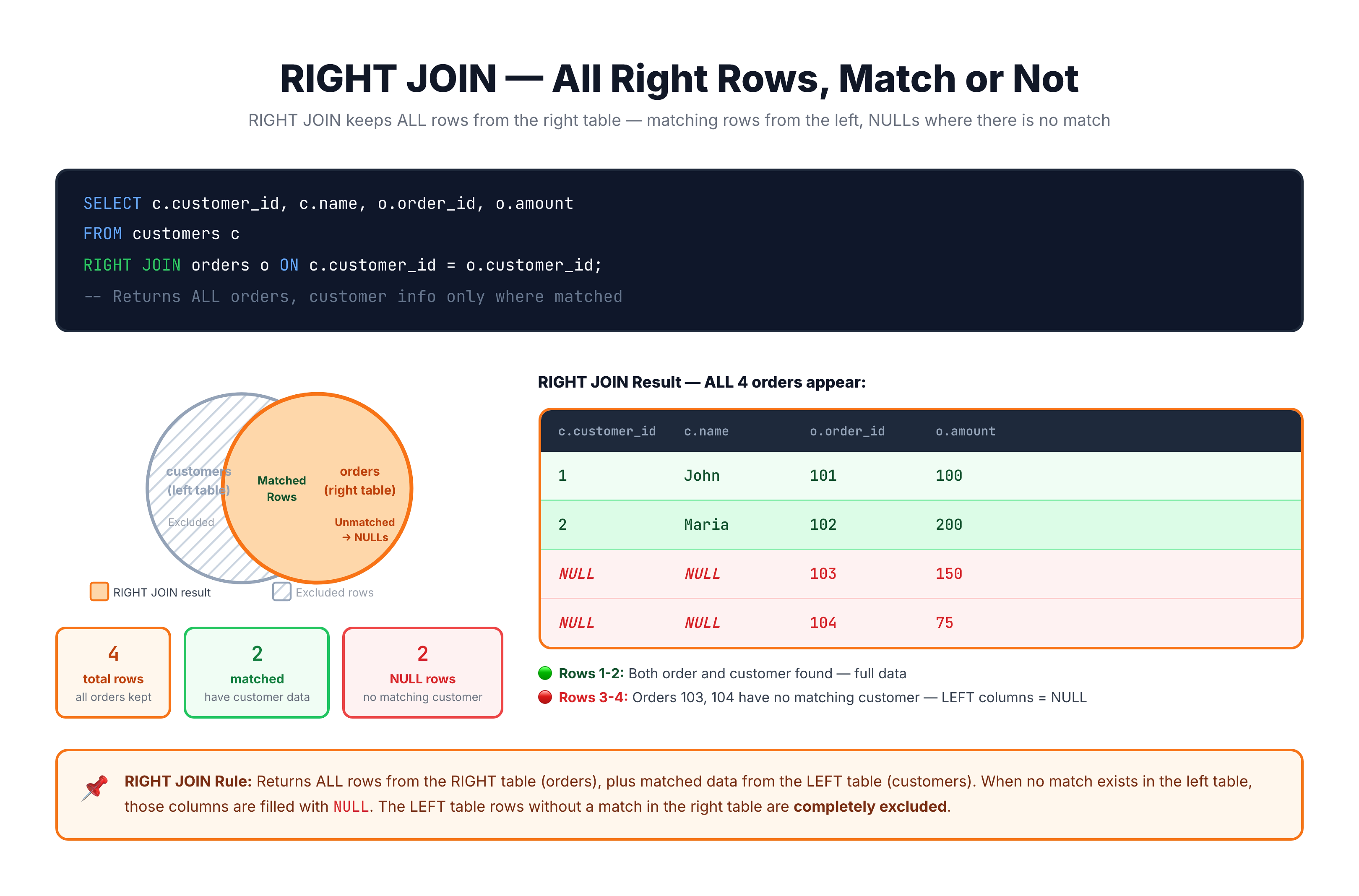
Visualization
RIGHT JOIN — Keeping All Right Rows
RIGHT JOIN Syntax
Standard Syntax
SELECT columns
FROM left_table
RIGHT JOIN right_table
    ON left_table.column = right_table.column;
Alternative Syntax
You can also write RIGHT OUTER JOIN (same meaning):
SELECT columns
FROM left_table
RIGHT OUTER JOIN right_table
    ON left_table.column = right_table.column;
Example with Our Database
SELECT
    c.customer_id,
    c.customer_city,
    o.order_id,
    o.order_status
FROM olist_customers_dataset c
RIGHT JOIN olist_orders_dataset o
    ON c.customer_id = o.customer_id;
This returns ALL orders, with customer info where available.
RIGHT JOIN vs LEFT JOIN
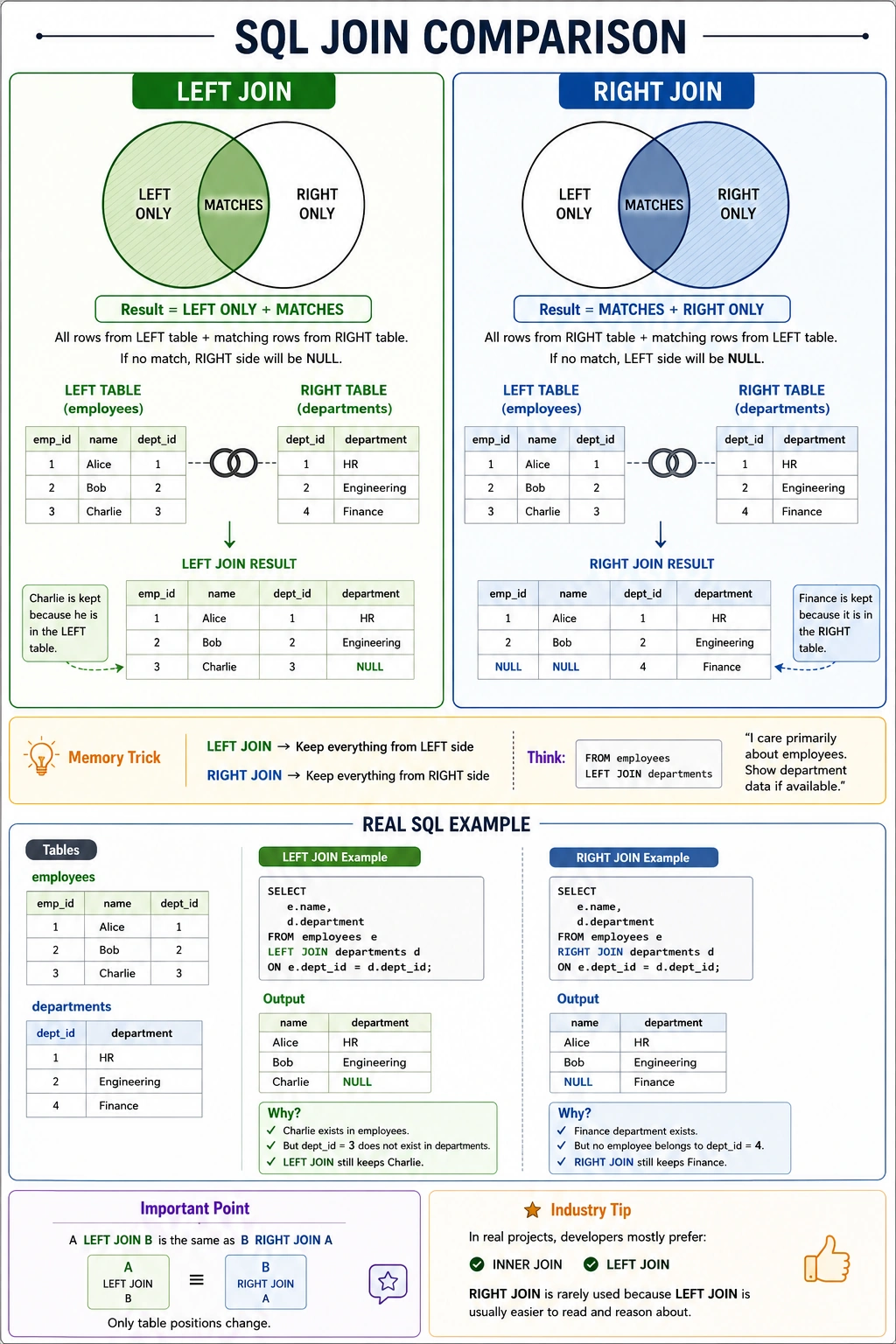
RIGHT JOIN and LEFT JOIN are mirror images of each other.
Comparison
| Aspect | LEFT JOIN | RIGHT JOIN |
|---|---|---|
| All rows from | Left table | Right table |
| Matches from | Right table | Left table |
| NULLs appear in | Right columns | Left columns |
Any RIGHT JOIN Can Be Rewritten as LEFT JOIN
RIGHT JOIN:
SELECT c.name, o.order_id
FROM customers c
RIGHT JOIN orders o ON c.customer_id = o.customer_id;
``

`Equivalent LEFT JOIN (swap table order):
```sql
SELECT c.name, o.order_id
FROM orders o
LEFT JOIN customers c ON o.customer_id = c.customer_id;
Both queries produce identical results!
When to Use RIGHT JOIN
RIGHT JOIN is useful when you need all rows from the second (right) table.
Use Case 1: All Orders Including Orphaned Ones
Find all orders, even those without a valid customer:
SELECT c.customer_city, o.order_id, o.order_status
FROM olist_customers_dataset c
RIGHT JOIN olist_orders_dataset o
    ON c.customer_id = o.customer_id;
Use Case 2: Preserve Earlier JOIN Results
In multi-table JOINs, RIGHT JOIN can preserve results from an earlier JOIN:
FROM table_a a
LEFT JOIN table_b b ON a.id = b.id
RIGHT JOIN table_c c ON b.id = c.id  -- Keeps all from table_c
Use Case 3: Matching External Data
When loading data from external sources and you need to keep all external records:
FROM internal_products ip
RIGHT JOIN external_catalog ec ON ip.sku = ec.sku;
Why LEFT JOIN is Preferred
In practice, LEFT JOIN is used much more often than RIGHT JOIN.
Reasons to Prefer LEFT JOIN
1. Natural Reading Order
SQL reads left to right. LEFT JOIN keeps the "primary" table first:
-- Natural: Start with customers, add their orders
FROM customers c
LEFT JOIN orders o ON c.customer_id = o.customer_id

-- Less natural: Orders are the focus but listed second
FROM customers c
RIGHT JOIN orders o ON c.customer_id = o.customer_id
2. Consistency
Using only LEFT JOIN makes queries easier to understand:
-- Consistent: All LEFT JOINs
FROM customers c
LEFT JOIN orders o ON ...
LEFT JOIN payments p ON ...
LEFT JOIN reviews r ON ...

-- Confusing: Mixed directions
FROM customers c
LEFT JOIN orders o ON ...
RIGHT JOIN payments p ON ...
LEFT JOIN reviews r ON ...
3. Better Support
Some databases and tools optimize LEFT JOIN better than RIGHT JOIN.
Best Practice
Instead of RIGHT JOIN, reorder tables and use LEFT JOIN:
-- Avoid
FROM customers c RIGHT JOIN orders o ON ...

-- Prefer
FROM orders o LEFT JOIN customers c ON ...
Practice
Let's practice RIGHT JOIN and compare it with LEFT JOIN.
Exercise 1: Basic RIGHT JOIN
Get all orders with their customer info (if available):
-- RIGHT JOIN: All orders with customer info
-- Orders without matching customers show NULL for customer columns

SELECT
    c.customer_id,
    c.customer_city,
    o.order_id,
    o.order_status
FROM olist_customers_dataset c
RIGHT JOIN olist_orders_dataset o
    ON c.customer_id = o.customer_id
LIMIT 10;
Exercise 2: Equivalent LEFT JOIN
Rewrite the above as a LEFT JOIN by swapping table order:
-- Same result as RIGHT JOIN, but using LEFT JOIN
-- Notice tables are swapped in FROM and JOIN clauses

SELECT
    c.customer_id,
    c.customer_city,
    o.order_id,
    o.order_status
FROM olist_orders_dataset o
LEFT JOIN olist_customers_dataset c
    ON o.customer_id = c.customer_id
LIMIT 10;
Exercise 3: Finding Orphaned Records
Find order items where the product no longer exists in the products table:
-- Find order items with missing product info
-- RIGHT JOIN keeps all order_items, even without matching product

SELECT
    p.product_id AS product_table_id,
    oi.product_id AS order_item_product_id,
    oi.order_id,
    oi.price
FROM olist_products_dataset p
RIGHT JOIN olist_order_items_dataset oi
    ON p.product_id = oi.product_id
WHERE p.product_id IS NULL
LIMIT 10;
Exercise 4: Count Comparison
Compare row counts between different JOIN types:
-- Compare JOIN type row counts

SELECT 'INNER JOIN' AS join_type, COUNT(*) AS rows
FROM olist_customers_dataset c
INNER JOIN olist_orders_dataset o ON c.customer_id = o.customer_id

UNION ALL

SELECT 'LEFT JOIN' AS join_type, COUNT(*) AS rows
FROM olist_customers_dataset c
LEFT JOIN olist_orders_dataset o ON c.customer_id = o.customer_id

UNION ALL

SELECT 'RIGHT JOIN' AS join_type, COUNT(*) AS rows
FROM olist_customers_dataset c
RIGHT JOIN olist_orders_dataset o ON c.customer_id = o.customer_id;
Common Mistakes
Mistake 1: Confusing Which Side Gets All Rows
❌ Thinking: "RIGHT JOIN gives me all customers on the right"
✅ Reality: RIGHT JOIN gives all rows from the RIGHT table in the JOIN clause
FROM customers c                    -- This is LEFT
RIGHT JOIN orders o ON ...          -- This is RIGHT (gets all rows)
Mistake 2: Using RIGHT JOIN When LEFT JOIN is Clearer
❌ Less clear:
FROM customers c
RIGHT JOIN orders o ON c.customer_id = o.customer_id
✅ More clear:
FROM orders o
LEFT JOIN customers c ON o.customer_id = c.customer_id
Mistake 3: Mixing JOIN Directions
❌ Confusing:
FROM a
LEFT JOIN b ON ...
RIGHT JOIN c ON ...
LEFT JOIN d ON ...
✅ Consistent:
FROM a
LEFT JOIN b ON ...
LEFT JOIN c ON ...
LEFT JOIN d ON ...
Summary
Key Takeaways
-
RIGHT JOIN returns ALL rows from the right table plus matching rows from the left
-
Non-matching rows from the right table appear with NULL values for left table columns
-
Syntax:
SELECT columns
FROM left_table
RIGHT JOIN right_table ON left_table.key = right_table.key
-
RIGHT JOIN = LEFT JOIN with tables swapped
-
Best Practice: Prefer LEFT JOIN over RIGHT JOIN for clarity
- Swap table order instead of using RIGHT JOIN
- Maintain consistent JOIN direction in complex queries
- Use RIGHT JOIN when:
- You need all rows from the second table
- You're maintaining existing query structure
- It genuinely makes the logic clearer
What's Next?
Next, we'll learn about FULL JOIN, which returns all rows from both tables, whether they match or not.