LEFT JOIN
Introduction
A LEFT JOIN (also called LEFT OUTER JOIN) returns all rows from the left table, along with matching rows from the right table. When there's no match, the right side columns contain NULL.
This is one of the most commonly used JOIN types in real-world SQL queries.
In this tutorial, you will learn:
- What a LEFT JOIN is and how it works
- The difference between LEFT JOIN and INNER JOIN
- How NULL values appear in LEFT JOIN results
- When to use LEFT JOIN
What is a LEFT JOIN?
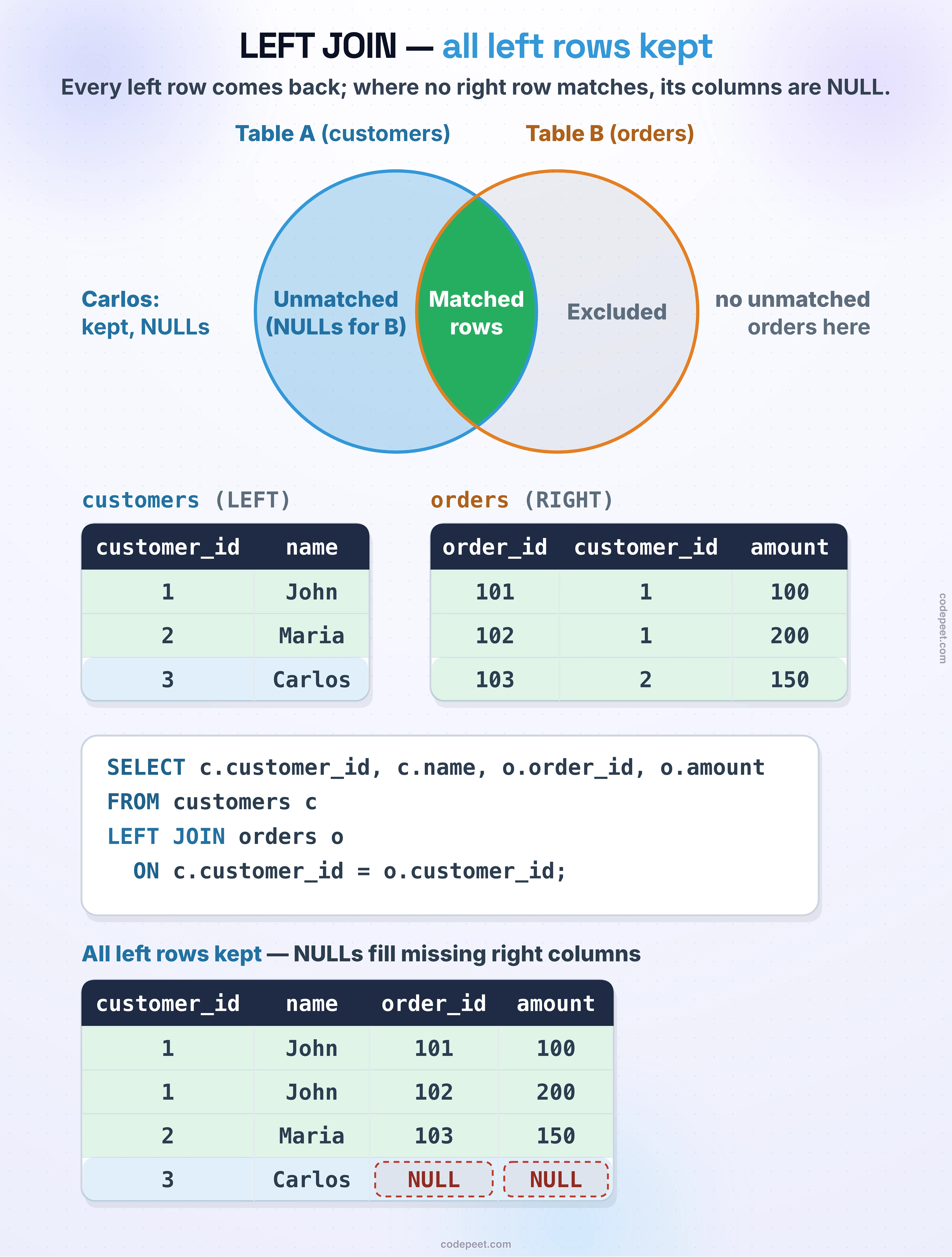
A LEFT JOIN keeps all rows from the left table, and adds matching data from the right table where available.
Visual Representation
Example
customers table (LEFT):
| customer_id | name |
|---|---|
| 1 | John |
| 2 | Maria |
| 3 | Carlos |
orders table (RIGHT):
| order_id | customer_id | amount |
|---|---|---|
| 101 | 1 | 100 |
| 102 | 1 | 200 |
| 103 | 2 | 150 |
LEFT JOIN Result:
| customer_id | name | order_id | amount |
|---|---|---|---|
| 1 | John | 101 | 100 |
| 1 | John | 102 | 200 |
| 2 | Maria | 103 | 150 |
| 3 | Carlos | NULL | NULL |
Notice:
- ALL customers appear (including Carlos who has no orders)
- Carlos's order columns show NULL (no matching order)
- John appears twice (2 matching orders)
Visualization
LEFT JOIN — Keeping All Left Rows
LEFT JOIN Syntax
Standard Syntax
SELECT columns
FROM left_table
LEFT JOIN right_table
    ON left_table.column = right_table.column;
Alternative Syntax
You can also write LEFT OUTER JOIN (same meaning):
SELECT columns
FROM left_table
LEFT OUTER JOIN right_table
    ON left_table.column = right_table.column;
Example with Our Database
SELECT
    c.customer_id,
    c.customer_city,
    o.order_id,
    o.order_status
FROM olist_customers_dataset c
LEFT JOIN olist_orders_dataset o
    ON c.customer_id = o.customer_id;
LEFT JOIN vs INNER JOIN
Understanding the difference is crucial:
Comparison
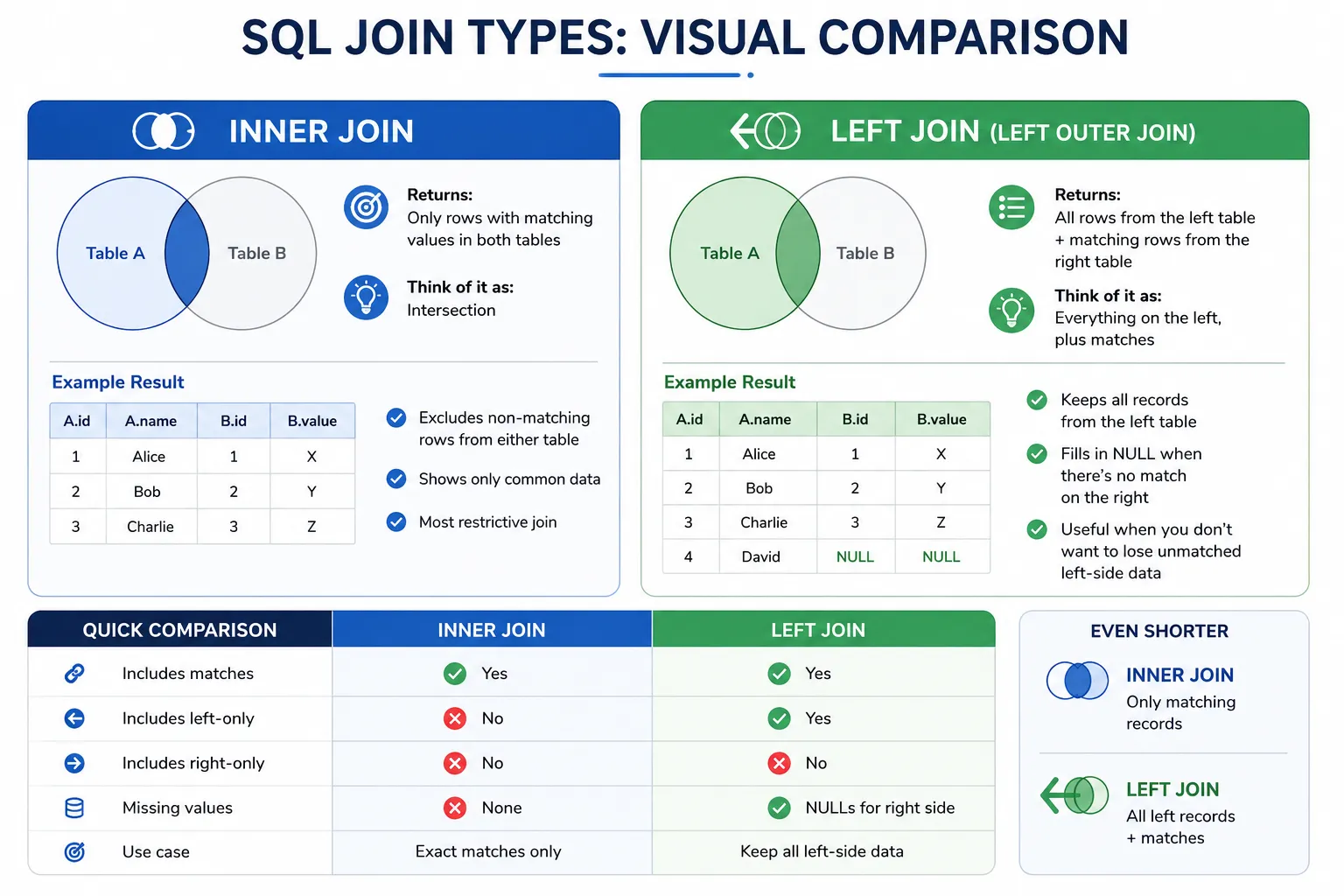
| Aspect | INNER JOIN | LEFT JOIN |
|---|---|---|
| Left table rows | Only matching | All rows |
| Right table rows | Only matching | Only matching |
| Non-matching left | Excluded | Included (with NULLs) |
| Non-matching right | Excluded | Excluded |
Visual Comparison
Same Tables, Different Results
INNER JOIN: "Show me customers who have orders"
SELECT c.name, o.order_id
FROM customers c
INNER JOIN orders o ON c.customer_id = o.customer_id;
-- Carlos excluded (no orders)
LEFT JOIN: "Show me all customers and their orders (if any)"
SELECT c.name, o.order_id
FROM customers c
LEFT JOIN orders o ON c.customer_id = o.customer_id;
-- Carlos included with NULL order_id
Understanding NULL in LEFT JOIN
When there's no match, all columns from the right table become NULL.
What NULL Means Here
NULL indicates no matching row exists in the right table.
Example Result
customer_id | name   | order_id | order_status
------------|--------|----------|-------------
1           | John   | 101      | delivered
2           | Maria  | 102      | shipped
3           | Carlos | NULL     | NULL        ← No matching order
Working with NULLs
Checking for NULL:
WHERE o.order_id IS NULL      -- Correct
WHERE o.order_id = NULL       -- Wrong! Never works
Handling NULL in output:
SELECT
    c.customer_id,
    COALESCE(o.order_id, 'No orders') AS order_info
FROM customers c
LEFT JOIN orders o ON c.customer_id = o.customer_id;
Counting with NULL awareness:
SELECT
    c.customer_id,
    COUNT(o.order_id) AS order_count  -- NULL orders not counted
FROM customers c
LEFT JOIN orders o ON c.customer_id = o.customer_id
GROUP BY c.customer_id;
When to Use LEFT JOIN
Use LEFT JOIN when you need all rows from the left table, regardless of whether they have matches.
Good Use Cases
1. Include All Entities with Optional Related Data
Show all customers and their orders (including customers with no orders):
SELECT c.name, o.order_id
FROM customers c
LEFT JOIN orders o ON c.customer_id = o.customer_id;
2. Counting Including Zeros
Count orders per customer (including customers with 0 orders):
SELECT c.customer_id, COUNT(o.order_id) AS order_count
FROM customers c
LEFT JOIN orders o ON c.customer_id = o.customer_id
GROUP BY c.customer_id;
With INNER JOIN, customers with 0 orders wouldn't appear at all!
3. Finding Missing Relationships
Find products that have never been sold:
SELECT p.product_id, p.product_name
FROM products p
LEFT JOIN order_items oi ON p.product_id = oi.product_id
WHERE oi.order_id IS NULL;  -- LEFT ANTI JOIN pattern
4. Optional Data Enhancement
Show orders with product details (even if product info is missing):
SELECT o.order_id, p.product_name
FROM orders o
LEFT JOIN products p ON o.product_id = p.product_id;
Table Order Matters
In LEFT JOIN, the order of tables matters.
Left Table = Primary Table
The table in the FROM clause is the "left" table and keeps all its rows.
Example: Different Results
Customers LEFT JOIN Orders:
FROM customers c
LEFT JOIN orders o ON c.customer_id = o.customer_id
- All customers appear
- Customers without orders show NULL for order columns
Orders LEFT JOIN Customers:
FROM orders o
LEFT JOIN customers c ON o.customer_id = c.customer_id
- All orders appear
- Orders without valid customers show NULL for customer columns
Choosing the Left Table
Ask yourself: "Which table's rows must ALL appear?"
- "Show all customers..." → Customers on LEFT
- "Show all orders..." → Orders on LEFT
- "Show all products..." → Products on LEFT
Practice
Let's practice LEFT JOIN with our e-commerce dataset.
Exercise 1: Basic LEFT JOIN
Get all products with their order history (if any):
-- LEFT JOIN: All products with their order items
-- Products that were never ordered will show NULL for order columns

SELECT
    p.product_id,
    p.product_category_name,
    oi.order_id,
    oi.price
FROM olist_products_dataset p
LEFT JOIN olist_order_items_dataset oi
    ON p.product_id = oi.product_id
LIMIT 15;
Exercise 2: Count with LEFT JOIN
Count orders per customer state, including states with zero orders (if any):
-- Count orders per customer city using LEFT JOIN
-- Cities with 0 orders would appear with count = 0

SELECT
    c.customer_city,
    c.customer_state,
    COUNT(o.order_id) AS order_count
FROM olist_customers_dataset c
LEFT JOIN olist_orders_dataset o
    ON c.customer_id = o.customer_id
GROUP BY c.customer_city, c.customer_state
ORDER BY order_count ASC
LIMIT 15;
Exercise 3: Compare INNER vs LEFT JOIN Counts
See the difference in row counts between INNER and LEFT JOIN:
-- Compare INNER JOIN vs LEFT JOIN counts

SELECT
    'INNER JOIN' AS join_type,
    COUNT(*) AS row_count
FROM olist_products_dataset p
INNER JOIN olist_order_items_dataset oi
    ON p.product_id = oi.product_id

UNION ALL

SELECT
    'LEFT JOIN' AS join_type,
    COUNT(*) AS row_count
FROM olist_products_dataset p
LEFT JOIN olist_order_items_dataset oi
    ON p.product_id = oi.product_id;
Exercise 4: Find Rows with NULL (Preview of Anti Join)
Use LEFT JOIN to find products that have never been ordered:
-- Find products that have never been ordered
-- LEFT JOIN + WHERE NULL = LEFT ANTI JOIN

SELECT
    p.product_id,
    p.product_category_name
FROM olist_products_dataset p
LEFT JOIN olist_order_items_dataset oi
    ON p.product_id = oi.product_id
WHERE oi.order_id IS NULL
LIMIT 10;
Common Mistakes
Mistake 1: Wrong Table Order
❌ Problem: You want all customers but put orders on the left:
FROM orders o
LEFT JOIN customers c ON ...  -- Wrong order!
✅ Fix: Put customers on the left:
FROM customers c
LEFT JOIN orders o ON ...  -- Correct
Mistake 2: Filtering Nullifies LEFT JOIN
❌ Problem: WHERE clause on right table removes NULL rows:
FROM customers c
LEFT JOIN orders o ON c.customer_id = o.customer_id
WHERE o.order_status = 'delivered'  -- Removes customers without orders!
✅ Fix: Move condition to ON clause:
FROM customers c
LEFT JOIN orders o
    ON c.customer_id = o.customer_id
    AND o.order_status = 'delivered'  -- Correct
Mistake 3: Using = Instead of IS NULL
❌ Wrong:
WHERE o.order_id = NULL -- Never matches!
✅ Correct:
WHERE o.order_id IS NULL -- Works correctly
Summary
Key Takeaways
-
LEFT JOIN returns ALL rows from the left table plus matching rows from the right
-
Non-matching rows from the left table appear with NULL values for right table columns
-
Syntax:
SELECT columns
FROM left_table
LEFT JOIN right_table ON left_table.key = right_table.key
-
Table order matters - the FROM table is the "left" table
-
Use LEFT JOIN when:
- You need ALL rows from the primary table
- You want to include counts of zero
- You're looking for missing relationships
- Watch out for:
- WHERE clauses that filter out NULLs
- Putting the wrong table on the left
- Using = instead of IS NULL for comparisons
What's Next?
Next, we'll learn about RIGHT JOIN, which is the mirror image of LEFT JOIN - keeping all rows from the right table instead.