UNION ALL
Introduction
UNION ALL is a SET operator that combines the results of two or more SELECT statements while preserving all rows, including duplicates.
Unlike UNION, which removes duplicate rows, UNION ALL keeps every single row from all queries, making it faster and more suitable for certain use cases.
In this tutorial, you will learn:
- The difference between UNION and UNION ALL
- When to use UNION ALL over UNION
- Performance benefits of UNION ALL
- Practical examples with our e-commerce dataset
What is UNION ALL?
UNION ALL combines results from multiple SELECT statements and returns all rows, including duplicates.
UNION vs UNION ALL Comparison
| Feature | UNION | UNION ALL |
|---|---|---|
| Duplicates | Removed | Kept |
| Row count | ≤ sum of input rows | = sum of input rows |
| Performance | Slower (needs dedup) | Faster |
| Memory usage | Higher | Lower |
| Use case | Need unique rows | Need all rows |
Visualization
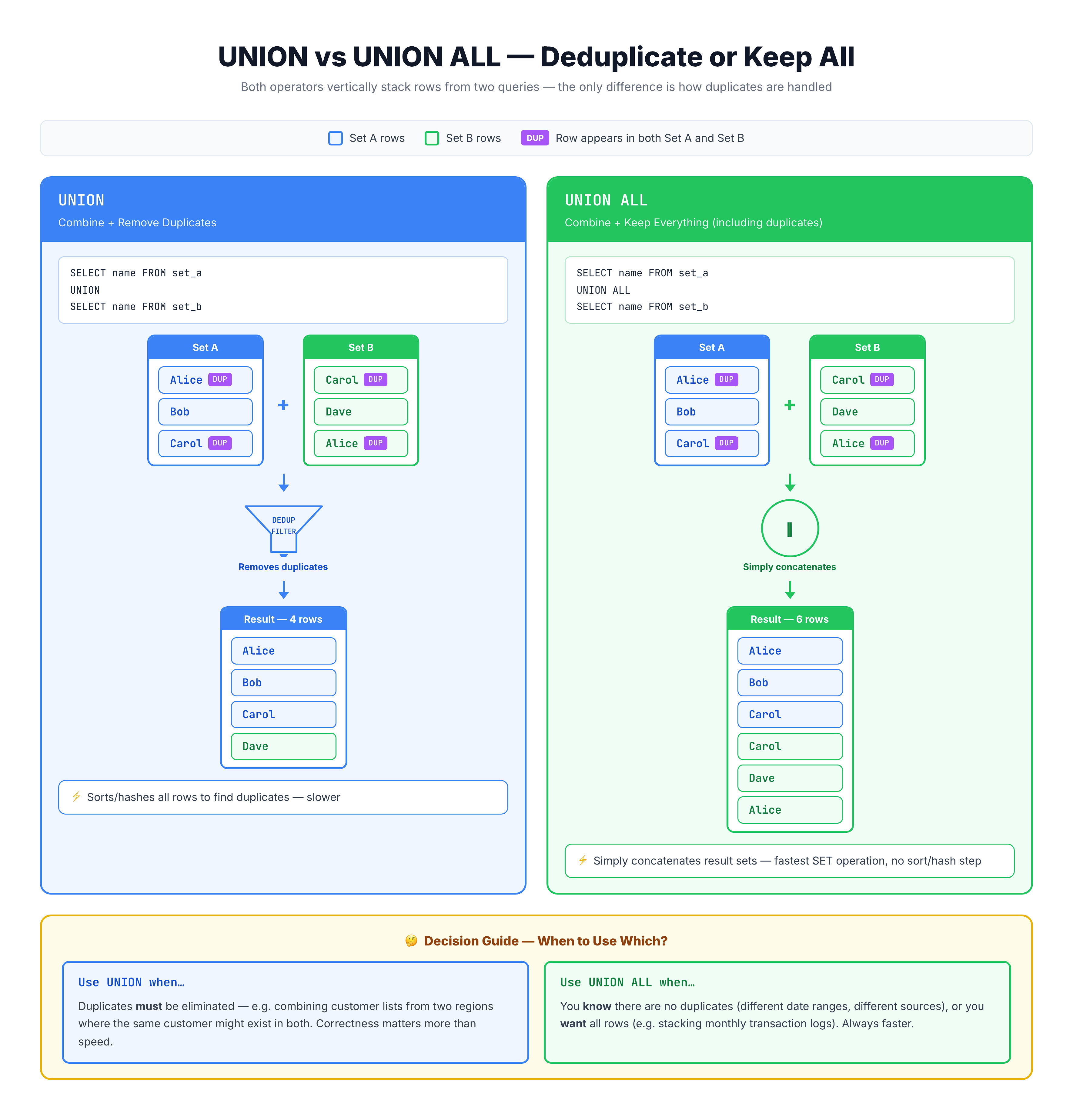
UNION ALL — Combining All Rows Without Deduplication
UNION ALL Syntax
Basic Syntax
SELECT column1, column2, ...
FROM table1
[WHERE condition]

UNION ALL

SELECT column1, column2, ...
FROM table2
[WHERE condition];
Multiple UNION ALLs
SELECT columns FROM table1
UNION ALL
SELECT columns FROM table2
UNION ALL
SELECT columns FROM table3;
With ORDER BY and LIMIT
SELECT city FROM customers
UNION ALL
SELECT city FROM sellers
ORDER BY city
LIMIT 20;
The Same Rules Apply
Like UNION, UNION ALL requires:
- Same number of columns in each query
- Compatible data types in corresponding columns
- ORDER BY only at the end of the entire statement
When to Use UNION ALL
1. When Source Data is Already Unique
If you know there are no duplicates between sources, use UNION ALL:
-- Orders from January (no overlap with February orders)
SELECT * FROM january_orders
UNION ALL
SELECT * FROM february_orders;
2. When You Need to Count Total Occurrences
Preserving duplicates is essential for accurate counting:
-- Count ALL transactions (even if same amount)
SELECT payment_value FROM order_payments
UNION ALL
SELECT refund_value FROM refunds;
3. When Adding Source Identifiers
When you add a source column, rows become unique anyway:
-- Source column makes rows unique
SELECT city, 'Customer' AS source FROM customers
UNION ALL  -- UNION would work but ALL is faster
SELECT city, 'Seller' AS source FROM sellers;
4. When Performance is Critical
For large datasets, UNION ALL avoids expensive deduplication:
-- Millions of log entries - UNION ALL is much faster
SELECT * FROM log_2024
UNION ALL
SELECT * FROM log_2023;
5. For Aggregation Queries
When you'll aggregate the result anyway:
-- Sum will aggregate, so duplicates don't matter
SELECT SUM(total_value) FROM (
    SELECT price AS total_value FROM online_sales
    UNION ALL
    SELECT price AS total_value FROM store_sales
);
Practice Exercises
Let's practice using UNION ALL with our e-commerce dataset.
Exercise 1: Basic UNION ALL
Combine customer and seller states, keeping duplicates:
-- All states (with duplicates)
-- Notice: Same state appears multiple times
SELECT customer_state AS state
FROM olist_customers_dataset

UNION ALL

SELECT seller_state AS state
FROM olist_sellers_dataset

LIMIT 20;
Exercise 2: Counting with UNION ALL
Count total entities per state by combining data with UNION ALL:
-- Total entities (customers + sellers) per state
SELECT
    state,
    COUNT(*) AS total_entities
FROM (
    SELECT customer_state AS state FROM olist_customers_dataset
    UNION ALL
    SELECT seller_state AS state FROM olist_sellers_dataset
)
GROUP BY state
ORDER BY total_entities DESC
LIMIT 10;
Exercise 3: UNION ALL with Source Tracking
Add a source column and see how UNION ALL preserves all rows:
-- Track source while combining data
SELECT
    customer_city AS city,
    customer_state AS state,
    'Customer' AS entity_type
FROM olist_customers_dataset
WHERE customer_state = 'SP'

UNION ALL

SELECT
    seller_city AS city,
    seller_state AS state,
    'Seller' AS entity_type
FROM olist_sellers_dataset
WHERE seller_state = 'SP'

LIMIT 25;
Exercise 4: Comparing UNION vs UNION ALL
Run this query to see how counts differ between UNION and UNION ALL. First with UNION ALL:
-- Count with UNION ALL (all rows)
SELECT 'UNION ALL' AS method, COUNT(*) AS row_count
FROM (
    SELECT customer_state AS state FROM olist_customers_dataset
    UNION ALL
    SELECT seller_state AS state FROM olist_sellers_dataset
);
Now compare with UNION (duplicates removed):
-- Count with UNION (unique rows only)
SELECT 'UNION' AS method, COUNT(*) AS row_count
FROM (
    SELECT customer_state AS state FROM olist_customers_dataset
    UNION
    SELECT seller_state AS state FROM olist_sellers_dataset
);
Performance Comparison
Why UNION ALL is Faster
UNION Processing:
1. Execute Query 1        → 100,000 rows
2. Execute Query 2        → 50,000 rows
3. Combine results        → 150,000 rows
4. Sort/Hash for dedup    → CPU + Memory intensive
5. Remove duplicates      → Final: ~120,000 unique rows
UNION ALL Processing:
1. Execute Query 1        → 100,000 rows
2. Execute Query 2        → 50,000 rows
3. Return combined result → 150,000 rows (Done!)
Performance Guidelines
| Data Size | Recommendation |
|---|---|
| < 1,000 rows | UNION or UNION ALL (negligible difference) |
| 1,000 - 100,000 rows | Prefer UNION ALL if duplicates OK |
| > 100,000 rows | Strongly prefer UNION ALL |
Memory Considerations
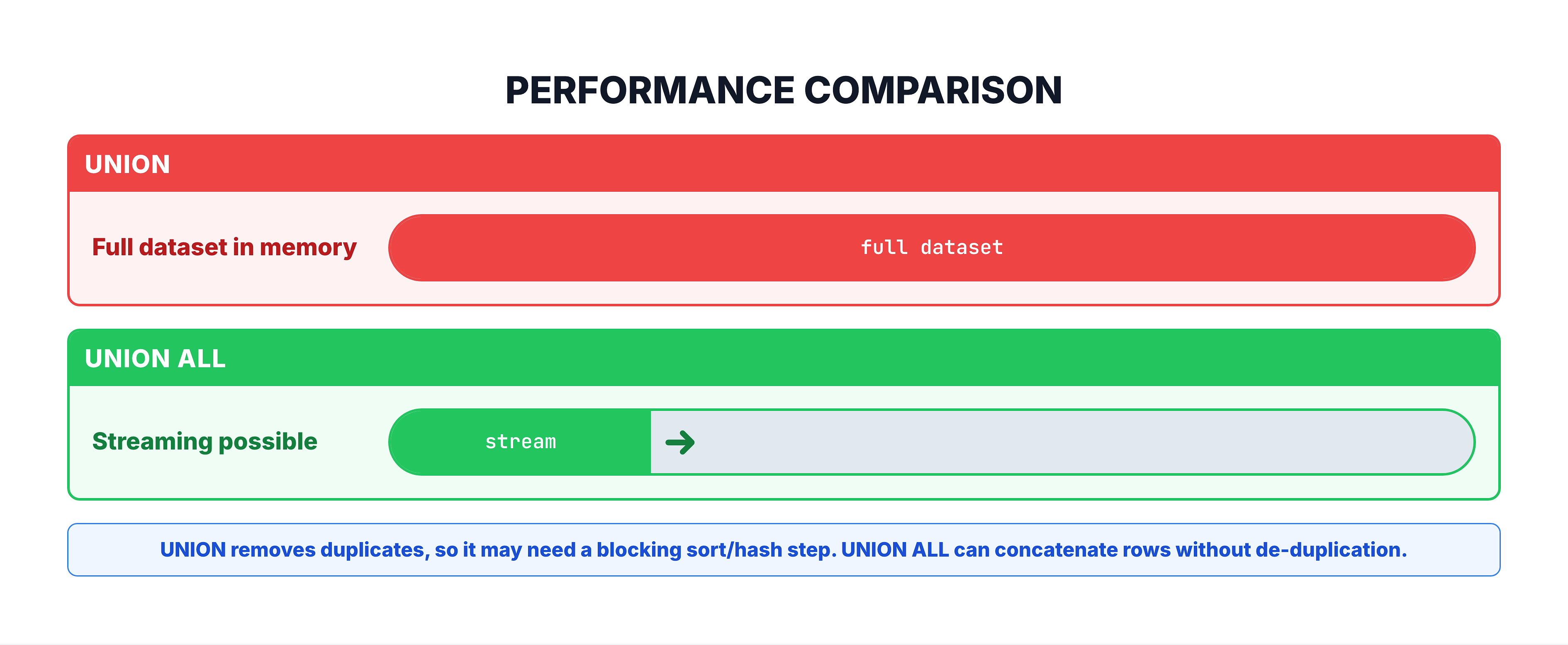
UNION requires holding all rows in memory for deduplication, while UNION ALL can stream results:
Common Patterns
Pattern 1: Combining Time-Series Data
-- Combine log data from multiple time periods
SELECT * FROM events_january
UNION ALL
SELECT * FROM events_february
UNION ALL
SELECT * FROM events_march;
Pattern 2: Multi-Source Aggregation
-- Total revenue from all channels
SELECT SUM(revenue) AS total_revenue
FROM (
    SELECT amount AS revenue FROM online_orders
    UNION ALL
    SELECT amount AS revenue FROM store_orders
    UNION ALL
    SELECT amount AS revenue FROM phone_orders
);
Pattern 3: Creating Fact Tables
-- Combine different event types into one table
SELECT
    order_id AS event_id,
    'ORDER' AS event_type,
    order_purchase_timestamp AS event_time
FROM olist_orders_dataset

UNION ALL

SELECT
    review_id AS event_id,
    'REVIEW' AS event_type,
    review_creation_date AS event_time
FROM olist_order_reviews_dataset;
Pattern 4: Adding Synthetic Rows
-- Add a 'Total' row to a summary
SELECT state, COUNT(*) as customer_count
FROM customers
GROUP BY state

UNION ALL

SELECT 'TOTAL', COUNT(*)
FROM customers;
Common Mistakes
Mistake 1: Using UNION ALL When You Need Unique Results
❌ Wrong: Getting duplicate entries in a dropdown list
-- For a dropdown, you want unique values!
SELECT city FROM customers
UNION ALL  -- Wrong! Will have duplicates
SELECT city FROM sellers;
✅ Correct:
SELECT city FROM customers
UNION  -- Correct! Returns unique cities
SELECT city FROM sellers;
Mistake 2: Expecting UNION ALL to Remove Duplicates
❌ Wrong assumption: "UNION ALL will clean up my data"
UNION ALL keeps everything. If you need deduplication, use UNION or add DISTINCT.
Mistake 3: Forgetting About Data Quality
❌ Issue: Different formatting in source tables
-- 'Sao Paulo' vs 'sao paulo' vs 'SAO PAULO'
-- UNION ALL will keep all three as separate rows
✅ Solution: Normalize data before combining
SELECT LOWER(TRIM(city)) FROM customers
UNION ALL
SELECT LOWER(TRIM(city)) FROM sellers;
UNION ALL vs UNION Decision Guide
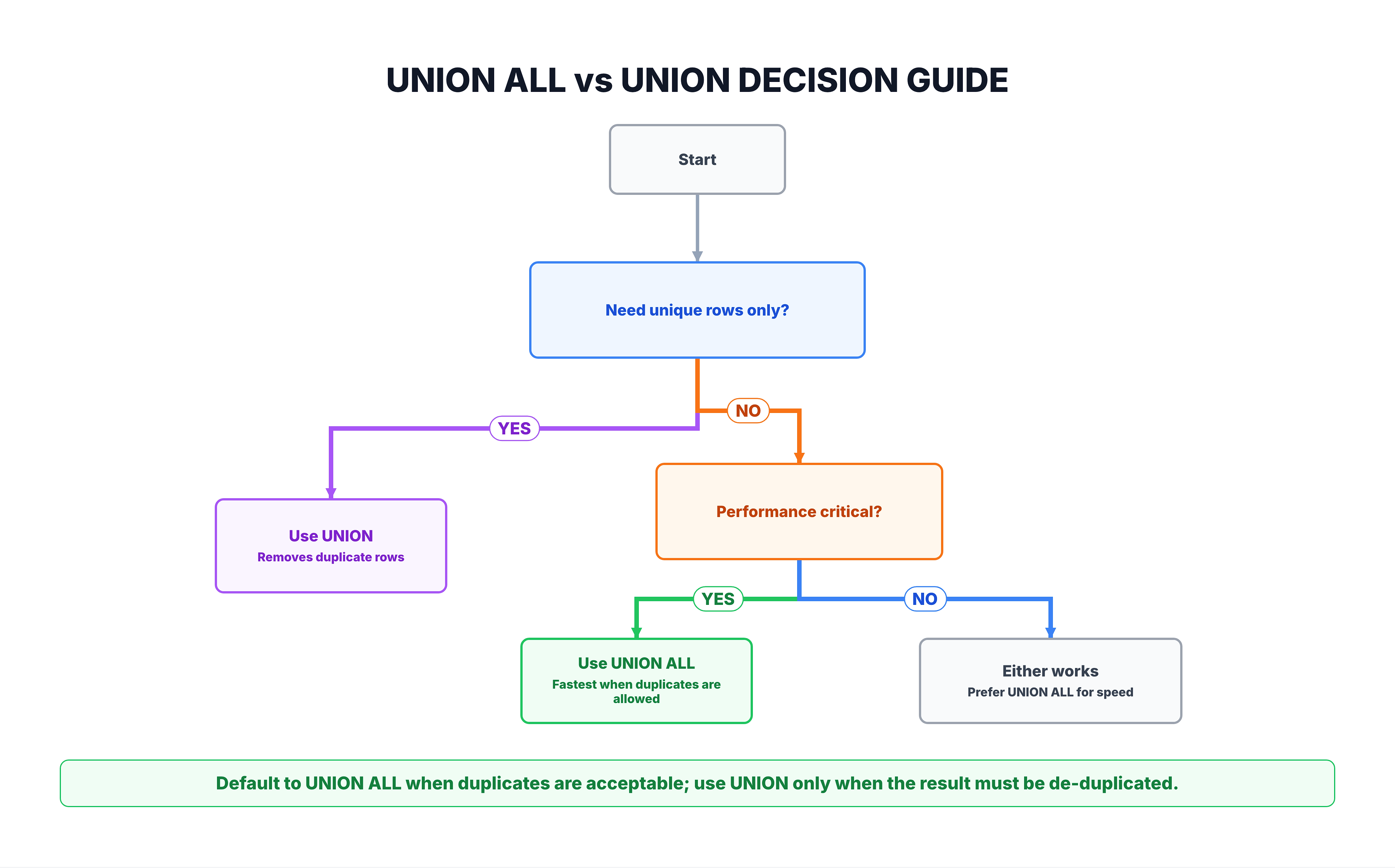
Decision Flowchart
Quick Reference
| Use Case | Recommendation |
|---|---|
| Creating dropdown options | UNION |
| Combining log files | UNION ALL |
| Counting total occurrences | UNION ALL |
| Building reference tables | UNION |
| ETL data loading | UNION ALL |
| Report generation | Depends on requirements |
Summary
Key Takeaways
-
UNION ALL combines results and keeps all rows including duplicates
-
Faster than UNION because it skips deduplication
-
Syntax:
SELECT columns FROM table1
UNION ALL
SELECT columns FROM table2;
- Use UNION ALL when:
- Source data is already unique
- You need to count total occurrences
- Performance is critical
- You're adding source identifiers
- You'll aggregate the results anyway
- Use UNION when:
- You need unique results
- Building reference/lookup tables
- Creating dropdown options
- Same rules apply:
- Same number of columns
- Compatible data types
- ORDER BY only at the end
What's Next?
Next, we'll learn about EXCEPT, which returns rows that exist in the first query but not in the second.