Course Resources
Introduction
This page provides all the resources you need to succeed in this SQL course. From official documentation to the dataset reference, everything is organized here for easy access.
In this tutorial, you will find:
- Official database documentation links
- Information about the practice database
- Tips for effective learning
- How to get help when stuck
Official Database Documentation
While this course teaches you everything you need to know, having access to official documentation is valuable for deep dives into specific topics.
SQLite Documentation
Our platform uses SQLite, a lightweight but powerful database. The official documentation is an excellent reference:
- SQLite Official Site: https://www.sqlite.org/docs.html
- SQL Syntax Reference: https://www.sqlite.org/lang.html
- Built-in Functions: https://www.sqlite.org/lang_corefunc.html
Other Database Documentation
The SQL skills you learn here transfer to other database systems. When you work with specific databases in the future, these references will be helpful:
| Database | Documentation Link |
|---|---|
| PostgreSQL | https://www.postgresql.org/docs/current/sql.html |
| MySQL | https://dev.mysql.com/doc/refman/8.0/en/ |
| Microsoft SQL Server | https://learn.microsoft.com/en-us/sql/t-sql/ |
| Oracle Database | https://docs.oracle.com/en/database/ |
SQL Standards
SQL is standardized by ANSI and ISO. While each database has its own extensions, the core syntax is universal. Learning standard SQL ensures your skills are portable across all major database systems.
Practice Database: Brazilian E-Commerce Dataset
Throughout this course, you will work with a real-world dataset that simulates the challenges you will face in professional settings.
About the Dataset
The Brazilian E-Commerce Public Dataset contains information about orders made at an e-commerce marketplace in Brazil. It includes:
- 99,441 orders from 2016 to 2018
- Multiple tables with customer, order, product, and seller information
- Real-world data issues like NULL values, inconsistent formatting, and complex relationships
Available Tables
| Table Name | Description | Key Information |
|---|---|---|
olist_customers_dataset | Customer information | Cities, states, zip codes |
olist_orders_dataset | Order header data | Status, timestamps, customer link |
olist_order_items_dataset | Items within orders | Products, prices, shipping |
olist_products_dataset | Product catalog | Categories, dimensions, weights |
olist_sellers_dataset | Seller information | Location data |
olist_order_payments_dataset | Payment details | Types, installments, amounts |
olist_order_reviews_dataset | Customer reviews | Scores, comments |
olist_geolocation_dataset | Geographic data | Coordinates, cities |
product_category_name_translation | Category translations | Portuguese to English |
Why Real Data?
Using real data prepares you for actual work scenarios:
- Data is messy - You'll learn to handle NULL values and inconsistencies
- Tables are connected - Practice joining related information
- Business context - Understand why queries matter for decision-making
- Scale matters - Work with thousands of records, not just toy examples
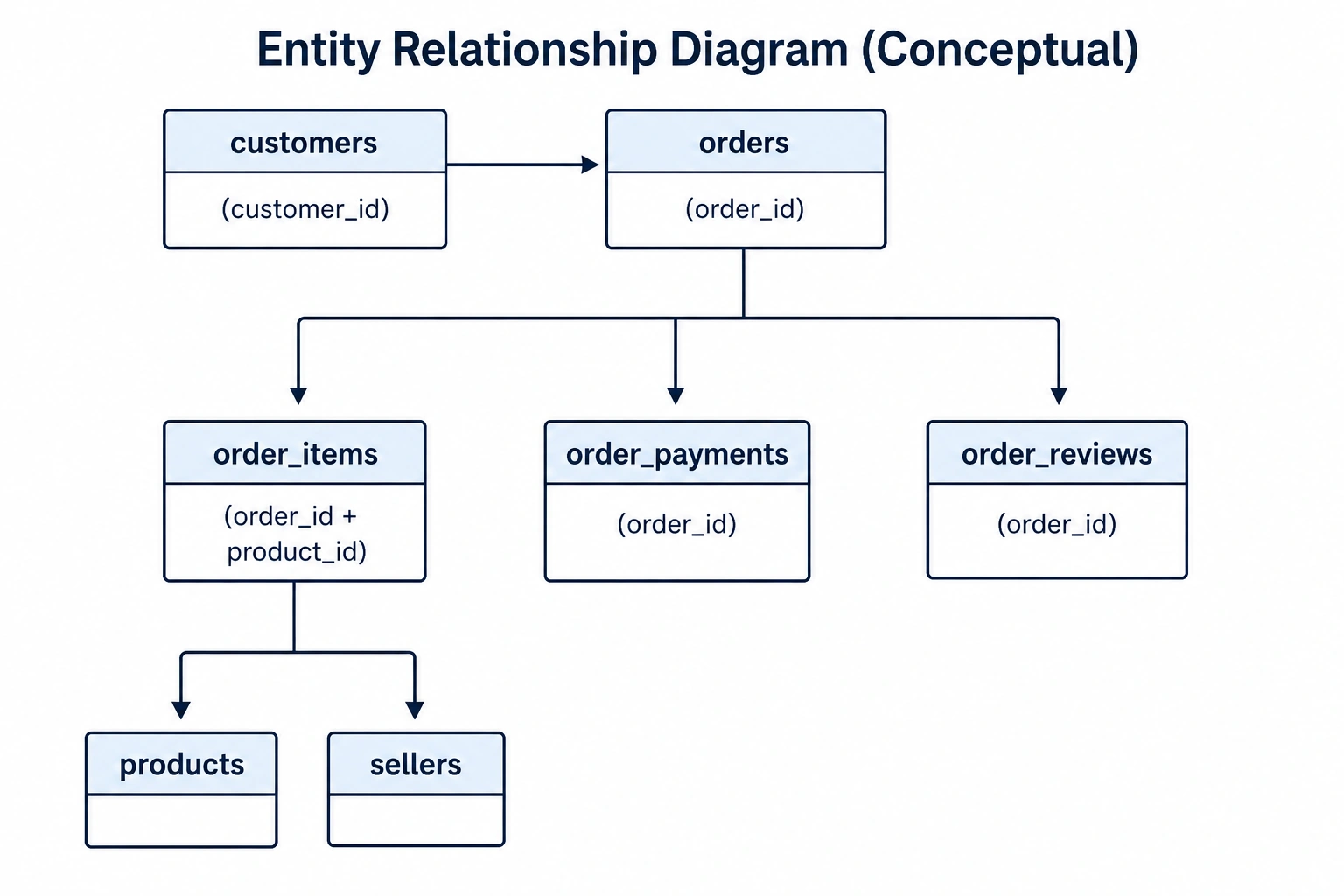
Table Relationships Overview
Understanding how tables connect is crucial for writing effective SQL queries. Here's how our database tables relate to each other:
Key Relationships
| From Table | To Table | Join Key |
|---|---|---|
| customers | orders | customer_id |
| orders | order_items | order_id |
| orders | order_payments | order_id |
| orders | order_reviews | order_id |
| order_items | products | product_id |
| order_items | sellers | seller_id |
| products | category_translation | product_category_name |
You will learn to navigate these relationships using SQL JOINs later in the course.
Tips for Effective Learning
Active Practice
The most effective way to learn SQL is through hands-on practice:
| Do This | Not This |
|---|---|
| Run every code example | Just read the queries |
| Modify queries to experiment | Copy-paste without understanding |
| Try exercises before solutions | Jump to answers immediately |
| Break complex queries into parts | Try to understand everything at once |
Building Mental Models
Think of SQL queries as instructions for processing data:
- FROM - Start with a pile of data
- WHERE - Filter out rows you don't need
- GROUP BY - Organize into groups
- SELECT - Pick the columns you want to see
- ORDER BY - Sort the results
Visualize the data flowing through each step.
Common Beginner Mistakes to Avoid
| Mistake | Solution |
|---|---|
| Forgetting GROUP BY with aggregates | Always group when using COUNT, SUM, etc. |
| Using WHERE instead of HAVING for groups | WHERE filters rows, HAVING filters groups |
| Selecting columns not in GROUP BY | Include all non-aggregate columns in GROUP BY |
| Missing quotation marks around strings | Text values need 'single quotes' |
| Confusing = and == | SQL uses single = for comparison |
Getting Help
When You're Stuck
Getting stuck is a normal part of learning. Here's how to work through it:
Step 1: Re-read the Error Message
SQL error messages often tell you exactly what's wrong. Common messages include:
- "no such column" - Check column name spelling
- "syntax error" - Check for missing commas, parentheses, or keywords
- "ambiguous column name" - Specify which table the column comes from
Step 2: Simplify Your Query
Break complex queries into smaller parts:
-- Instead of writing everything at once:
SELECT ... FROM ... JOIN ... WHERE ... GROUP BY ... HAVING ... ORDER BY ...

-- Build step by step:
-- First, just SELECT and FROM
-- Then add WHERE
-- Then add GROUP BY
-- And so on...
Step 3: Check Your Assumptions
Run a simple query to verify your understanding:
-- What columns exist?
SELECT * FROM table_name LIMIT 5;

-- What values are in a column?
SELECT DISTINCT column_name FROM table_name LIMIT 10;
Step 4: Compare with Working Examples
Refer back to the tutorial examples and compare syntax.
Quick Reference Cheat Sheet
Keep this reference handy as you progress through the course:
Basic Query Structure
SELECT column1, column2
FROM table_name
WHERE condition
GROUP BY column1
HAVING aggregate_condition
ORDER BY column1 DESC
LIMIT 10;
Common Aggregate Functions
| Function | Purpose | Example |
|---|---|---|
COUNT(*) | Count rows | COUNT(*) |
COUNT(column) | Count non-NULL values | COUNT(customer_id) |
SUM(column) | Total of values | SUM(price) |
AVG(column) | Average value | AVG(review_score) |
MIN(column) | Smallest value | MIN(order_date) |
MAX(column) | Largest value | MAX(payment_value) |
Common Operators
| Operator | Meaning | Example |
|---|---|---|
= | Equal to | WHERE state = 'SP' |
!= or <> | Not equal | WHERE status != 'canceled' |
>, < | Greater/less than | WHERE price > 100 |
>=, <= | Greater/less or equal | WHERE score >= 4 |
AND | Both conditions true | WHERE a = 1 AND b = 2 |
OR | Either condition true | WHERE a = 1 OR a = 2 |
IN | Match any in list | WHERE state IN ('SP', 'RJ') |
BETWEEN | Range inclusive | WHERE price BETWEEN 10 AND 100 |
LIKE | Pattern matching | WHERE name LIKE 'John%' |
IS NULL | Check for NULL | WHERE email IS NULL |
Summary
What You Learned
✅ Official database documentation is available for deeper learning
✅ The practice database contains real Brazilian e-commerce data
✅ Nine interconnected tables provide realistic practice scenarios
✅ Active practice and experimentation are key to learning
✅ Breaking down complex queries helps when stuck
Next Up
Continue to Course Roadmap & Structure to see the complete learning path, or jump to What is SQL and What are Databases? to start learning the fundamentals!