DISTINCT
Introduction
The DISTINCT keyword removes duplicate rows from your query results. When you need unique values only, DISTINCT is your tool.
In this tutorial, you will learn:
- How DISTINCT eliminates duplicates
- DISTINCT with single and multiple columns
- DISTINCT vs GROUP BY
- COUNT(DISTINCT) for unique counting
- Performance considerations
What is DISTINCT?
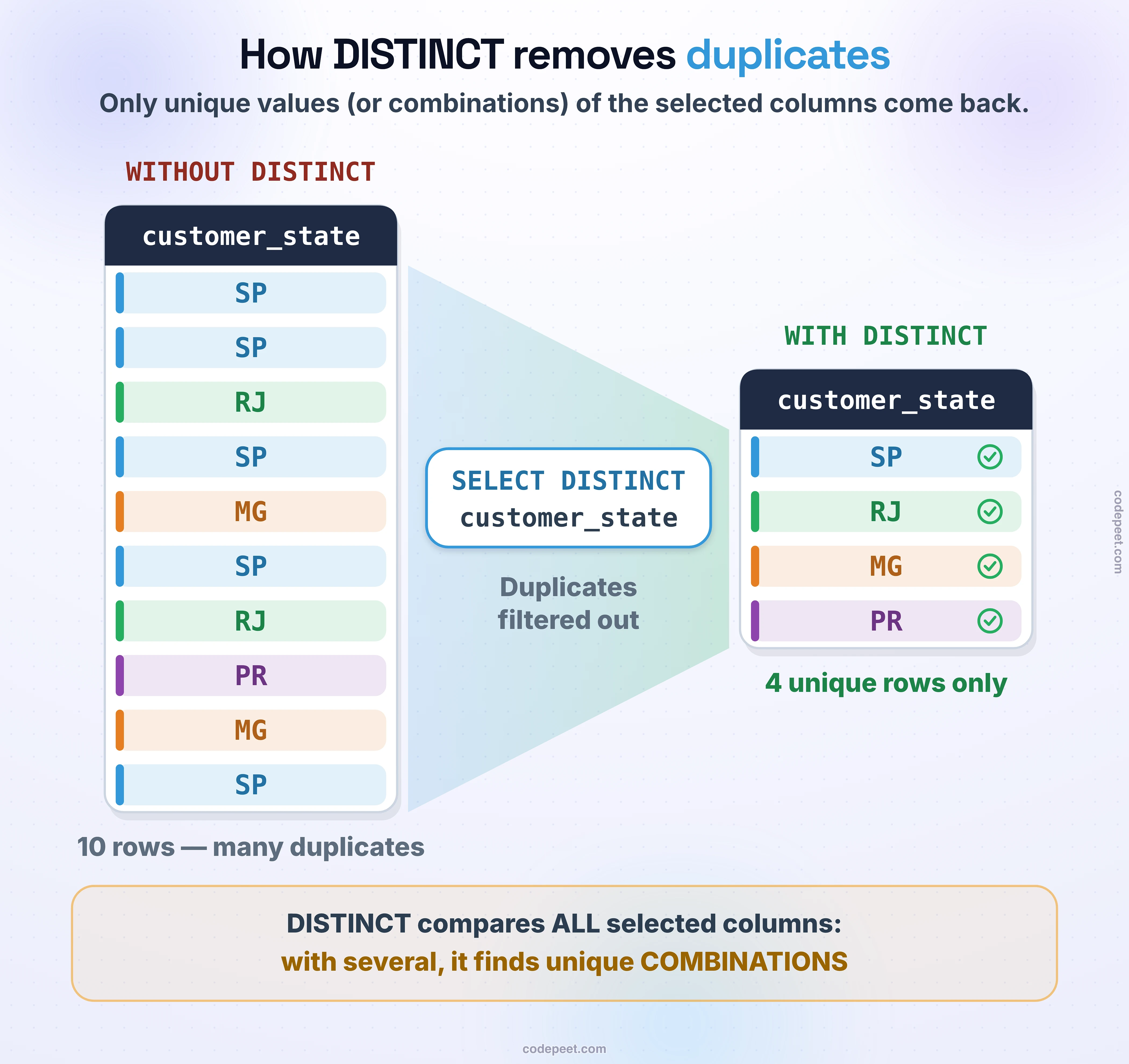
DISTINCT removes duplicate rows from your results. Only unique combinations of the selected columns are returned.
Without DISTINCT
SELECT customer_state
FROM olist_customers_dataset
LIMIT 10;
Result might show:
SP
SP
RJ
SP
MG
SP
RJ
...
With DISTINCT
SELECT DISTINCT customer_state
FROM olist_customers_dataset;
Result shows each state only once:
SP
RJ
MG
RS
PR
...
Basic DISTINCT Syntax
DISTINCT comes immediately after SELECT.
Syntax
SELECT DISTINCT column1, column2
FROM table_name;
Single Column Example
-- List all unique states
SELECT DISTINCT customer_state
FROM olist_customers_dataset
ORDER BY customer_state;
Another Example
-- List all unique order statuses
SELECT DISTINCT order_status
FROM olist_orders_dataset;
Result
delivered
shipped
canceled
unavailable
invoiced
processing
created
approved
DISTINCT with Multiple Columns
When you use DISTINCT with multiple columns, it returns unique combinations of those columns.
Syntax
SELECT DISTINCT column1, column2
FROM table_name;
Example: State and City Combinations
SELECT DISTINCT customer_state, customer_city
FROM olist_customers_dataset
ORDER BY customer_state, customer_city
LIMIT 20;
This returns each unique (state, city) pair:
| customer_state | customer_city |
|---|---|
| AC | cruzeiro do sul |
| AC | rio branco |
| AL | arapiraca |
| AL | maceio |
| ... | ... |
Key Point
The combination matters. If you have:
- ('SP', 'sao paulo') - unique
- ('SP', 'campinas') - unique
- ('RJ', 'rio de janeiro') - unique
All three rows are kept because the combinations are different.
DISTINCT with All Columns
DISTINCT applies to ALL columns in the SELECT clause.
Common Misconception
-- WRONG interpretation:
-- "Give me distinct customer_state, and also show customer_city"

-- CORRECT interpretation:
-- "Give me distinct (customer_state, customer_city) combinations"
SELECT DISTINCT customer_state, customer_city
FROM olist_customers_dataset;
With SELECT *
-- Removes rows that are completely identical in ALL columns
SELECT DISTINCT *
FROM olist_customers_dataset
LIMIT 10;
This is rarely needed since tables typically have unique IDs.
COUNT(DISTINCT column)
COUNT(DISTINCT) counts unique values, not total occurrences.
Syntax
SELECT COUNT(DISTINCT column_name)
FROM table_name;
Examples
-- How many unique states do we have customers in?
SELECT COUNT(DISTINCT customer_state) AS unique_states
FROM olist_customers_dataset;
-- How many unique cities?
SELECT COUNT(DISTINCT customer_city) AS unique_cities
FROM olist_customers_dataset;
Comparing COUNT vs COUNT(DISTINCT)
SELECT
    COUNT(*) AS total_customers,
    COUNT(DISTINCT customer_state) AS unique_states,
    COUNT(DISTINCT customer_city) AS unique_cities
FROM olist_customers_dataset;
Result:
total_customers | unique_states | unique_cities
99441          | 27            | 4119
COUNT(DISTINCT) with GROUP BY
-- Unique cities per state
SELECT
    customer_state,
    COUNT(*) AS total_customers,
    COUNT(DISTINCT customer_city) AS unique_cities
FROM olist_customers_dataset
GROUP BY customer_state
ORDER BY unique_cities DESC;
DISTINCT vs GROUP BY
Both can produce unique values, but they serve different purposes.
When They're Equivalent
For just getting unique values:
-- Using DISTINCT
SELECT DISTINCT customer_state
FROM olist_customers_dataset
ORDER BY customer_state;

-- Using GROUP BY (same result)
SELECT customer_state
FROM olist_customers_dataset
GROUP BY customer_state
ORDER BY customer_state;
When to Use Each
| Use Case | Recommended |
|---|---|
| Just need unique values | DISTINCT |
| Need aggregations (COUNT, SUM, etc.) | GROUP BY |
| Need to filter aggregates (HAVING) | GROUP BY |
GROUP BY is Required For Aggregation
-- DISTINCT alone can't do this:
SELECT
    customer_state,
    COUNT(*) AS customer_count  -- Requires GROUP BY!
FROM olist_customers_dataset
GROUP BY customer_state;
Which is Faster?
For simple unique value queries, performance is usually similar. Modern databases optimize both effectively.
DISTINCT with ORDER BY
You can combine DISTINCT with ORDER BY.
Example
-- Unique states sorted alphabetically
SELECT DISTINCT customer_state
FROM olist_customers_dataset
ORDER BY customer_state ASC;
Important Rule
With DISTINCT, you can only ORDER BY columns that are in the SELECT clause:
-- WRONG: Can't order by a column not in SELECT DISTINCT
SELECT DISTINCT customer_state
FROM olist_customers_dataset
ORDER BY customer_city;  -- Error! customer_city not in SELECT

-- CORRECT: Include the column in SELECT
SELECT DISTINCT customer_state, customer_city
FROM olist_customers_dataset
ORDER BY customer_city;
DISTINCT with NULL Values
DISTINCT treats NULL as a single unique value.
Example
-- NULL counts as one distinct value
SELECT DISTINCT product_category_name
FROM olist_products_dataset
ORDER BY product_category_name;
If multiple products have NULL category, you'll see NULL listed once in results.
COUNT(DISTINCT) and NULL
-- COUNT(DISTINCT) ignores NULL values
SELECT
    COUNT(*) AS total_products,
    COUNT(product_category_name) AS with_category,
    COUNT(DISTINCT product_category_name) AS unique_categories
FROM olist_products_dataset;
Practice
Let's practice using DISTINCT to find unique values.
Exercise 1: Basic DISTINCT
Find all unique order statuses:
-- List all unique order statuses

SELECT DISTINCT order_status
FROM olist_orders_dataset
ORDER BY order_status;
Exercise 2: DISTINCT with Multiple Columns
Find unique state-city combinations:
-- Unique state and city combinations

SELECT DISTINCT customer_state, customer_city
FROM olist_customers_dataset
ORDER BY customer_state, customer_city
LIMIT 20;
Exercise 3: COUNT(DISTINCT)
Count unique customers, products, and sellers in order items:
-- Count unique entities in order items

SELECT
    COUNT(*) AS total_order_items,
    COUNT(DISTINCT order_id) AS unique_orders,
    COUNT(DISTINCT product_id) AS unique_products,
    COUNT(DISTINCT seller_id) AS unique_sellers
FROM olist_order_items_dataset;
Exercise 4: DISTINCT with GROUP BY
Find how many unique cities each state has:
-- Unique cities per state

SELECT
    customer_state,
    COUNT(DISTINCT customer_city) AS unique_cities,
    COUNT(*) AS total_customers
FROM olist_customers_dataset
GROUP BY customer_state
ORDER BY unique_cities DESC
LIMIT 10;
Exercise 5: Find Unique Payment Types per Order
Count orders that use multiple payment types:
-- Orders with multiple payment types

SELECT
    order_id,
    COUNT(DISTINCT payment_type) AS payment_types_used,
    SUM(payment_value) AS total_paid
FROM olist_order_payments_dataset
GROUP BY order_id
HAVING COUNT(DISTINCT payment_type) > 1
ORDER BY payment_types_used DESC
LIMIT 10;
Common Use Cases
1. List Available Options
-- What payment types are available?
SELECT DISTINCT payment_type
FROM olist_order_payments_dataset;
2. Find Unique Participants
-- Which sellers have made sales?
SELECT DISTINCT seller_id
FROM olist_order_items_dataset;
3. Data Exploration
-- What product categories exist?
SELECT DISTINCT product_category_name
FROM olist_products_dataset
WHERE product_category_name IS NOT NULL
ORDER BY product_category_name;
4. Validate Data Quality
-- Check for unexpected values
SELECT DISTINCT order_status
FROM olist_orders_dataset;

-- Are there duplicate customer IDs?
SELECT customer_id, COUNT(*)
FROM olist_customers_dataset
GROUP BY customer_id
HAVING COUNT(*) > 1;
5. Build Lookup Lists
-- Create a state lookup
SELECT DISTINCT
    customer_state AS state_code,
    MIN(customer_city) AS sample_city
FROM olist_customers_dataset
GROUP BY customer_state
ORDER BY customer_state;
Performance Considerations
How DISTINCT Works
- Database retrieves all matching rows
- Sorts or hashes rows to find duplicates
- Returns only unique rows
Performance Tips
1. Use WHERE to reduce data first
-- More efficient: filter then distinct
SELECT DISTINCT customer_city
FROM olist_customers_dataset
WHERE customer_state = 'SP';

-- Less efficient: distinct on all data, then filter is impossible
2. Only select columns you need
-- Better: fewer columns to compare
SELECT DISTINCT customer_state
FROM olist_customers_dataset;

-- Slower: more columns means more comparison work
SELECT DISTINCT *
FROM olist_customers_dataset;
3. Consider indexes
Indexes on columns used in DISTINCT can improve performance.
4. Use LIMIT when exploring
-- Quick exploration
SELECT DISTINCT product_category_name
FROM olist_products_dataset
LIMIT 10;
Summary
You now understand how to use DISTINCT to find unique values!
Key Takeaways
✅ DISTINCT removes duplicate rows from results
✅ With multiple columns, it finds unique combinations
✅ COUNT(DISTINCT column) counts unique values
✅ DISTINCT treats NULL as one unique value
✅ DISTINCT vs GROUP BY: Use DISTINCT for unique values, GROUP BY for aggregations
Quick Reference
-- Unique values from one column
SELECT DISTINCT column
FROM table;

-- Unique combinations
SELECT DISTINCT col1, col2
FROM table;

-- Count unique values
SELECT COUNT(DISTINCT column)
FROM table;

-- Unique counts per group
SELECT group_col, COUNT(DISTINCT value_col)
FROM table
GROUP BY group_col;
What's Next?
Next, we'll learn about TOP (in SQL Server) and LIMIT (in SQLite/MySQL/PostgreSQL) to restrict the number of rows returned.