EXCEPT
Introduction
The EXCEPT operator returns rows from the first query that do not exist in the second query. It's like asking: "What's in Set A that's not in Set B?"
EXCEPT is particularly useful for finding differences between datasets, identifying missing records, and detecting changes in data.
In this tutorial, you will learn:
- What EXCEPT does and how it works
- The syntax for using EXCEPT
- Common use cases for EXCEPT
- The difference between EXCEPT and NOT IN/NOT EXISTS
- Practical examples with our e-commerce dataset
What is EXCEPT?
EXCEPT returns all distinct rows from the first query that are not present in the second query.
Key Characteristics
| Feature | EXCEPT Behavior |
|---|---|
| Returns | Rows in Query 1 that are NOT in Query 2 |
| Duplicates | Automatically removed (returns distinct) |
| Order matters | Yes! Query 1 EXCEPT Query 2 ≠ Query 2 EXCEPT Query 1 |
| NULL handling | Two NULLs are considered equal |
Visualization
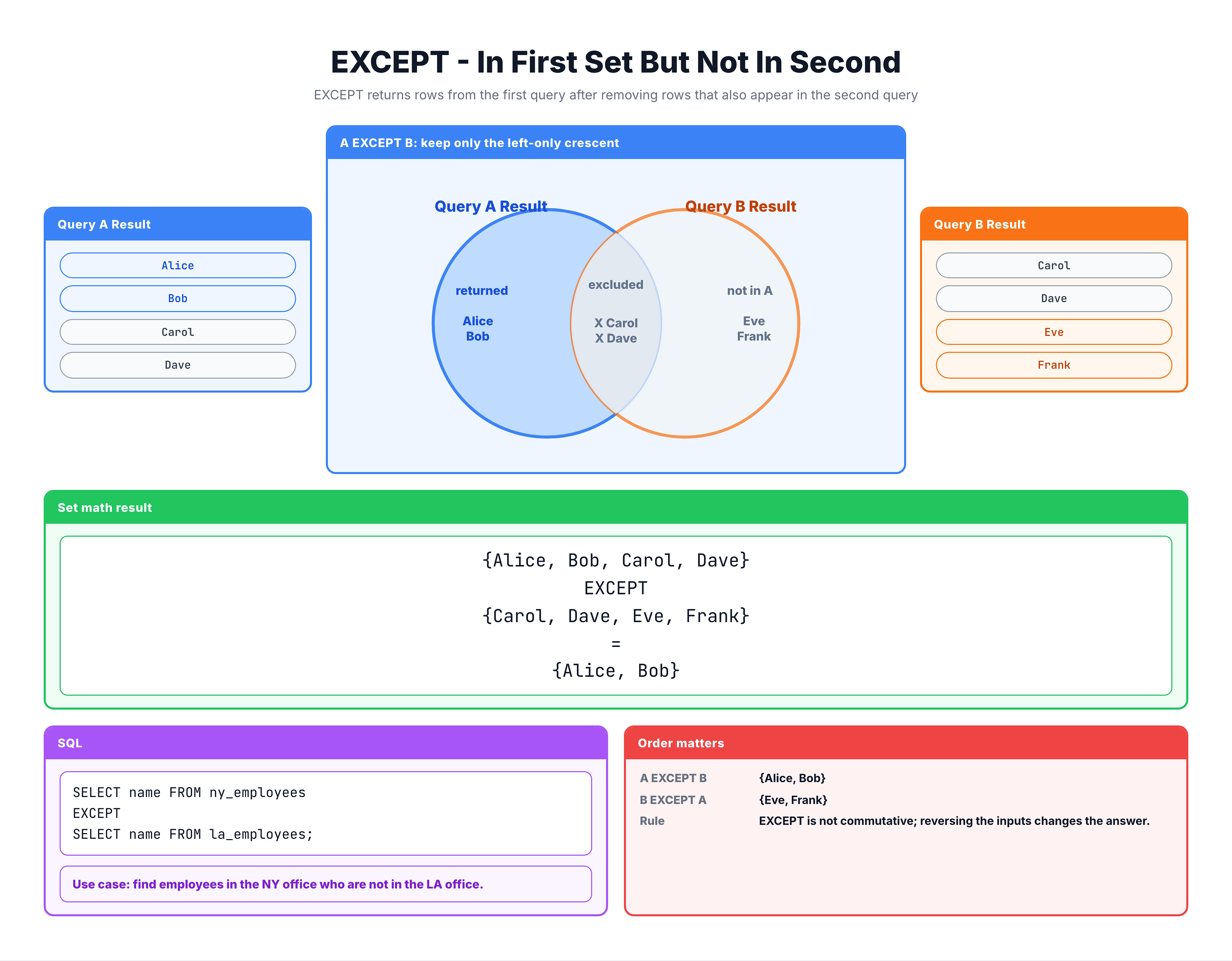
EXCEPT — Finding Rows in One Query but Not Another
EXCEPT Syntax
Basic Syntax
SELECT column1, column2, ...
FROM table1
[WHERE condition]

EXCEPT

SELECT column1, column2, ...
FROM table2
[WHERE condition];
With ORDER BY
SELECT city FROM customers
EXCEPT
SELECT city FROM sellers
ORDER BY city;
Multiple EXCEPT Operations
-- A EXCEPT B EXCEPT C
-- Returns: rows in A that are not in B, minus rows in C
SELECT columns FROM table1
EXCEPT
SELECT columns FROM table2
EXCEPT
SELECT columns FROM table3;
Note: MINUS in Oracle
In Oracle databases, the equivalent operator is called MINUS:
-- Oracle syntax
SELECT columns FROM table1
MINUS
SELECT columns FROM table2;
SQLite and most other databases use EXCEPT.
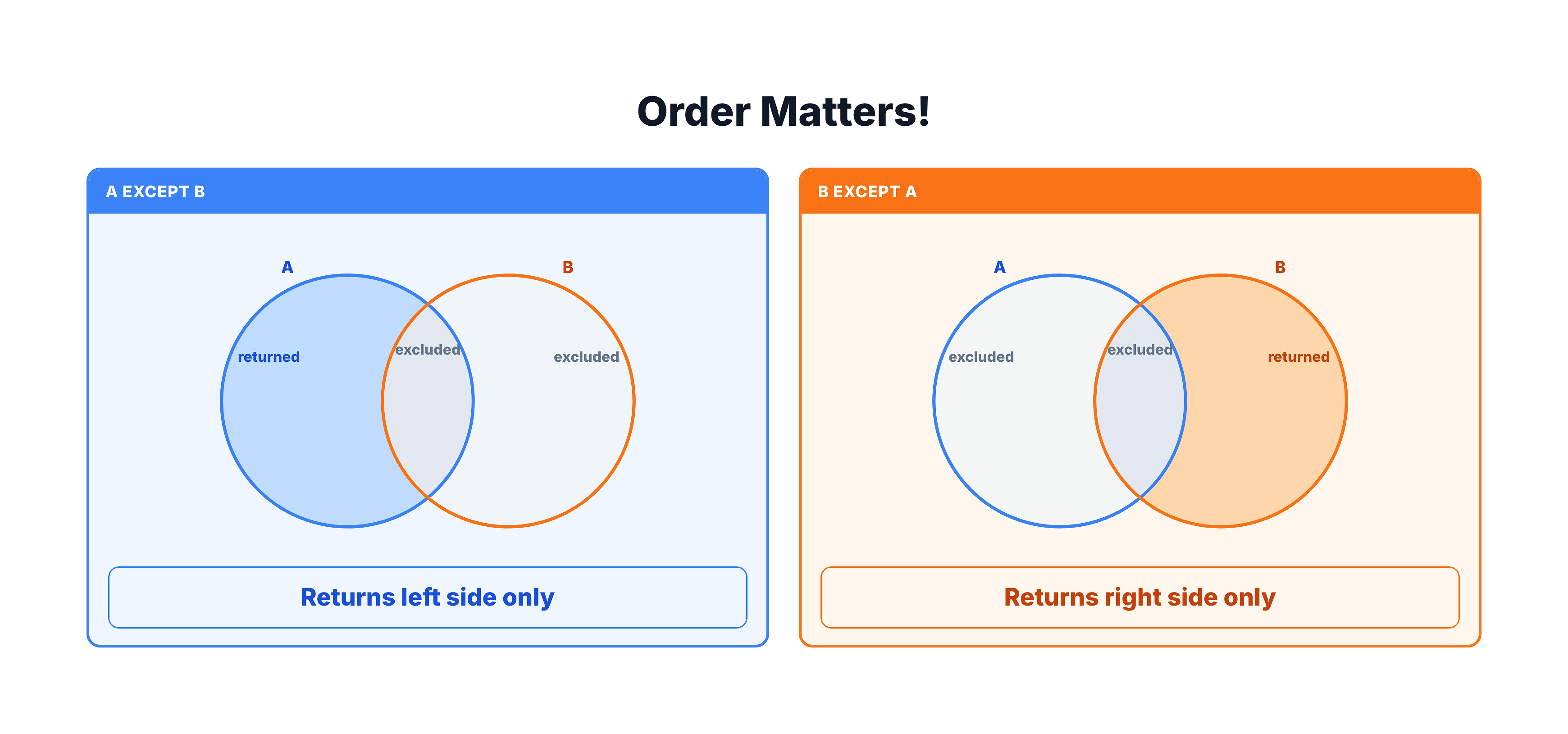
Order Matters!
Unlike UNION, the order of queries in EXCEPT changes the result.
Example: Order Changes Everything
Data Setup:
Customer Cities: São Paulo, Rio, Campinas
Seller Cities:   São Paulo, Rio, Curitiba
Query 1 EXCEPT Query 2:
SELECT city FROM customers
EXCEPT
SELECT city FROM sellers;

-- Result: Campinas
-- (Cities with customers but no sellers)
Query 2 EXCEPT Query 1:
SELECT city FROM sellers
EXCEPT
SELECT city FROM customers;

-- Result: Curitiba
-- (Cities with sellers but no customers)
Visual Comparison
Practice Exercises
Let's practice using EXCEPT with our e-commerce dataset.
Exercise 1: Basic EXCEPT
Find states where customers exist but no sellers:
-- States with customers but no sellers
SELECT customer_state AS state
FROM olist_customers_dataset

EXCEPT

SELECT seller_state AS state
FROM olist_sellers_dataset

ORDER BY state;
Exercise 2: Reverse EXCEPT
Now find the opposite: states with sellers but no customers:
-- States with sellers but no customers
SELECT seller_state AS state
FROM olist_sellers_dataset

EXCEPT

SELECT customer_state AS state
FROM olist_customers_dataset

ORDER BY state;
Exercise 3: EXCEPT with Multiple Columns
Find city-state combinations that have customers but no sellers:
-- City-State pairs with customers but no sellers
SELECT
    customer_city AS city,
    customer_state AS state
FROM olist_customers_dataset

EXCEPT

SELECT
    seller_city AS city,
    seller_state AS state
FROM olist_sellers_dataset

ORDER BY state, city
LIMIT 20;
Exercise 4: Finding Missing Payment Types
Compare payment types against a reference list to find gaps:
-- Create a reference list and find what's missing
-- First, see what payment types exist
SELECT DISTINCT payment_type
FROM olist_order_payments_dataset;
EXCEPT vs NOT IN vs NOT EXISTS
There are multiple ways to find rows that don't match. Here's how they compare:
Method 1: EXCEPT
SELECT customer_state FROM customers
EXCEPT
SELECT seller_state FROM sellers;
Pros: Clean syntax, handles NULLs correctly, returns distinct
Cons: Must have same column structure
Method 2: NOT IN
SELECT DISTINCT customer_state
FROM customers
WHERE customer_state NOT IN (
    SELECT seller_state FROM sellers
);
Pros: Flexible, can compare single columns
Cons: NULL handling issues, can be slower
Method 3: NOT EXISTS
SELECT DISTINCT c.customer_state
FROM customers c
WHERE NOT EXISTS (
    SELECT 1 FROM sellers s
    WHERE s.seller_state = c.customer_state
);
Pros: Best NULL handling, often good performance
Cons: More verbose syntax
Method 4: LEFT JOIN with NULL check
SELECT DISTINCT c.customer_state
FROM customers c
LEFT JOIN sellers s ON c.customer_state = s.seller_state
WHERE s.seller_state IS NULL;
Pros: Very flexible, good performance with indexes
Cons: More complex syntax
Comparison Table
| Feature | EXCEPT | NOT IN | NOT EXISTS | LEFT JOIN |
|---|---|---|---|---|
| Syntax simplicity | ✅ Simple | ✅ Simple | ⚠️ Medium | ⚠️ Medium |
| NULL handling | ✅ Good | ❌ Tricky | ✅ Good | ✅ Good |
| Multiple columns | ✅ Yes | ⚠️ Harder | ✅ Yes | ✅ Yes |
| Performance | ✅ Good | ⚠️ Varies | ✅ Good | ✅ Good |
Common Use Cases
1. Finding Gaps in Data
-- Products that have never been ordered
SELECT product_id FROM products
EXCEPT
SELECT product_id FROM order_items;
2. Data Quality Checks
-- Find orders without corresponding customers
SELECT customer_id FROM orders
EXCEPT
SELECT customer_id FROM customers;
-- Ideally this should return empty
3. Change Detection
-- Records in today's data not in yesterday's
SELECT id, name, status FROM current_data
EXCEPT
SELECT id, name, status FROM previous_data;
4. Inactive Entity Detection
-- Customers who haven't ordered in current month
SELECT customer_id FROM customers
EXCEPT
SELECT customer_id FROM orders
WHERE order_date >= '2024-01-01';
5. Missing Foreign Key Detection
-- Order items referencing non-existent products
SELECT DISTINCT product_id FROM order_items
EXCEPT
SELECT product_id FROM products;
NULL Handling in EXCEPT
How EXCEPT Treats NULL
In EXCEPT operations, NULL equals NULL. This is different from normal SQL comparisons where NULL ≠ NULL.
-- Query 1 returns: 'A', 'B', NULL
-- Query 2 returns: 'B', NULL

Query1 EXCEPT Query2
-- Result: 'A' only
-- NULL is considered a match and removed
Example with Real Data
-- If some customers have NULL cities
SELECT customer_city FROM customers  -- includes some NULLs
EXCEPT
SELECT seller_city FROM sellers;     -- also includes NULLs

-- NULL cities from customers are removed if sellers also have NULL cities
Contrast with NOT IN
-- NOT IN has problems with NULL
SELECT city FROM table1
WHERE city NOT IN (SELECT city FROM table2);

-- If table2 has ANY NULL values, this returns NOTHING!
-- EXCEPT doesn't have this problem
Common Mistakes
Mistake 1: Forgetting Order Matters
❌ Wrong assumption: A EXCEPT B = B EXCEPT A
-- These give DIFFERENT results!
SELECT city FROM customers EXCEPT SELECT city FROM sellers;
SELECT city FROM sellers EXCEPT SELECT city FROM customers;
Mistake 2: Wrong Column Order
❌ Wrong:
SELECT city, state FROM customers
EXCEPT
SELECT state, city FROM sellers;  -- Columns swapped!
This compares cities to states, giving incorrect results.
Mistake 3: Expecting Multiple Occurrences
❌ Wrong assumption: EXCEPT preserves duplicates
EXCEPT always returns distinct rows:
-- Even if 'sao paulo' appears 1000 times in customers
-- and 0 times in sellers, result shows 'sao paulo' once
Mistake 4: Using EXCEPT for Complex Conditions
❌ Inefficient:
-- When you only need to check one column
SELECT id, name, email, address FROM customers
EXCEPT
SELECT id, name, email, address FROM inactive_customers;
✅ Better:
-- Use NOT EXISTS for more flexibility
SELECT id, name, email, address
FROM customers c
WHERE NOT EXISTS (
    SELECT 1 FROM inactive_customers i WHERE i.id = c.id
);
Summary
Key Takeaways
-
EXCEPT returns rows from Query 1 that don't exist in Query 2
-
Order matters: A EXCEPT B ≠ B EXCEPT A
-
Returns distinct rows (duplicates automatically removed)
-
Syntax:
SELECT columns FROM table1
EXCEPT
SELECT columns FROM table2;
-
NULL handling: Two NULLs are considered equal
-
Common use cases:
- Finding gaps in data
- Data quality checks
- Change detection
- Missing foreign key detection
- Alternatives:
- NOT IN (watch for NULL issues)
- NOT EXISTS (good NULL handling)
- LEFT JOIN + IS NULL
- Same rules apply:
- Same number of columns
- Compatible data types
- ORDER BY only at the end
What's Next?
Next, we'll learn about INTERSECT, which returns only rows that exist in both queries.