Rate Limiter: Policies, Failures and Hot Keys Deep Dives
How do you deploy and update rate limit policies without restarting gateways?
Level: Senior
An attacker starts hammering /v1/login. You need to tighten the limit there from 100 a minute to 10 — right now. If the limits live in the gateways' configuration files, that is a rolling restart of every gateway, and the attack goes on meanwhile.
Distributing Rules
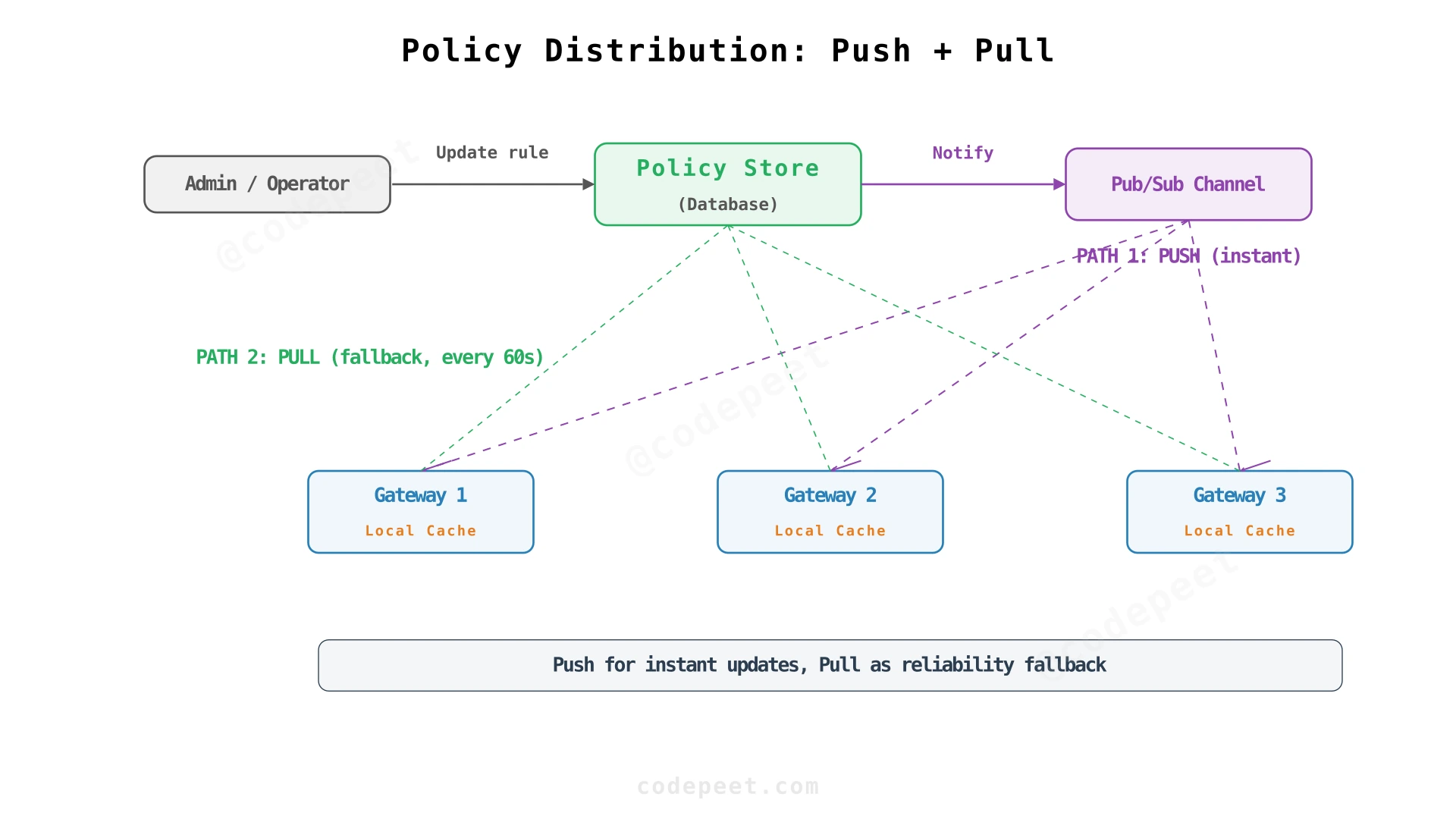
The rules live in the policy store (PostgreSQL), behind the admin API. Every gateway keeps all of them in memory, so the hot path never asks the store anything, and refreshes its copy in the background:
- Push: after a change, the admin API publishes the new version number; a gateway that hears it fetches the changes immediately. The change is live in seconds.
- Pull: every 30 seconds, each gateway asks for everything after the last version it has.
The pull is not optional. Redis Pub/Sub, for one, has "at-most-once" delivery: a gateway that is disconnected at the moment of the publish never gets the message. Polling by version bounds the delay at one poll interval and never misses or repeats a change, because a gateway always asks for "everything after N".
A gateway applies a fetch as a whole: its copy is at version N or at the newer version, never half of a change.
Testing with Shadow Mode
You want to tighten /v1/search from 100 a minute to 50. But what if your best customers regularly send 80?
Deploy the new rule with mode: shadow. The gateways evaluate it, record what it would have rejected, and let every request through. Watch it for a day or two: who would have been blocked — abusers, or customers? Then switch it to enforce, or change it and watch again. No customer sees anything while you find out.
Production systems have the same switch under other names: Envoy's rate limit service has a shadow_mode in which "whatever the outcome of the evaluation of the rule, the end-result will always be" OK, and Stripe's advice from running its own limiters is the same: "Dark launch each rate limiter to watch the traffic they would block."
Exceptions
An enterprise customer's contract allows 10 times the standard limit; an internal monitoring service must not be limited at all. Exceptions are rows in the overrides table — a different capacity and rate for one identity, or exempt — and the gateways keep them in memory with the rules, so applying them costs nothing.
Rolling Out and Rolling Back
Roll out by client, not by gateway. It is tempting to switch a new rule on for 10% of the gateways first. But a client's requests are spread over all gateways, so its limit would change from one request to the next. Enable the rule for a share of clients instead: with rollout_pct at 10, every gateway applies the rule only to identities whose hash falls in the first 10%, so each client sees one consistent limit. To tighten a limit this way, add the tighter rule beside the old one and raise its share step by step; a request has to pass every rule that applies to it, so the tighter rule decides wherever it applies. At 100, delete the old rule.
Roll back with a new version. The store keeps every version of a rule, so a rollback is a new change that restores the previous values. It reaches every gateway the same way any change does: in seconds by push, within 30 seconds by pull.
What happens to the buckets. Nothing needs resetting. The script takes the capacity and the rate as arguments on every call: a lower capacity caps the bucket on its next check, and a new rate refills from then on.
What happens when Redis is slow or unavailable?
Level: Senior
Redis stops answering. What happens to the 1 million requests a second hitting the gateways?
The Cascading Failure
Without protection, every request's check waits on Redis. A Redis client's default timeouts are measured in seconds — redis-py, for example, waits up to 5 seconds for a reply by default — so each request holds a connection and a gateway worker for that long. The gateways run out of both within seconds; new requests queue, latency goes from milliseconds to seconds, and clients see timeouts.
The services behind the gateways are fine. Only Redis is broken. But because the check waits on Redis, the whole API is down: a feature meant to protect the system has become its weakest point.
Step 1: Timeouts in Milliseconds
Give the check a timeout of a few milliseconds — 5 ms keeps it inside the 10 ms budget — and a short connect timeout. When Redis does not answer in time, the gateway stops waiting and applies the failure policy (step 3). A Redis outage now costs each request at most 5 ms, not seconds.
But every request still tries Redis and waits out its 5 ms first.
Step 2: A Circuit Breaker
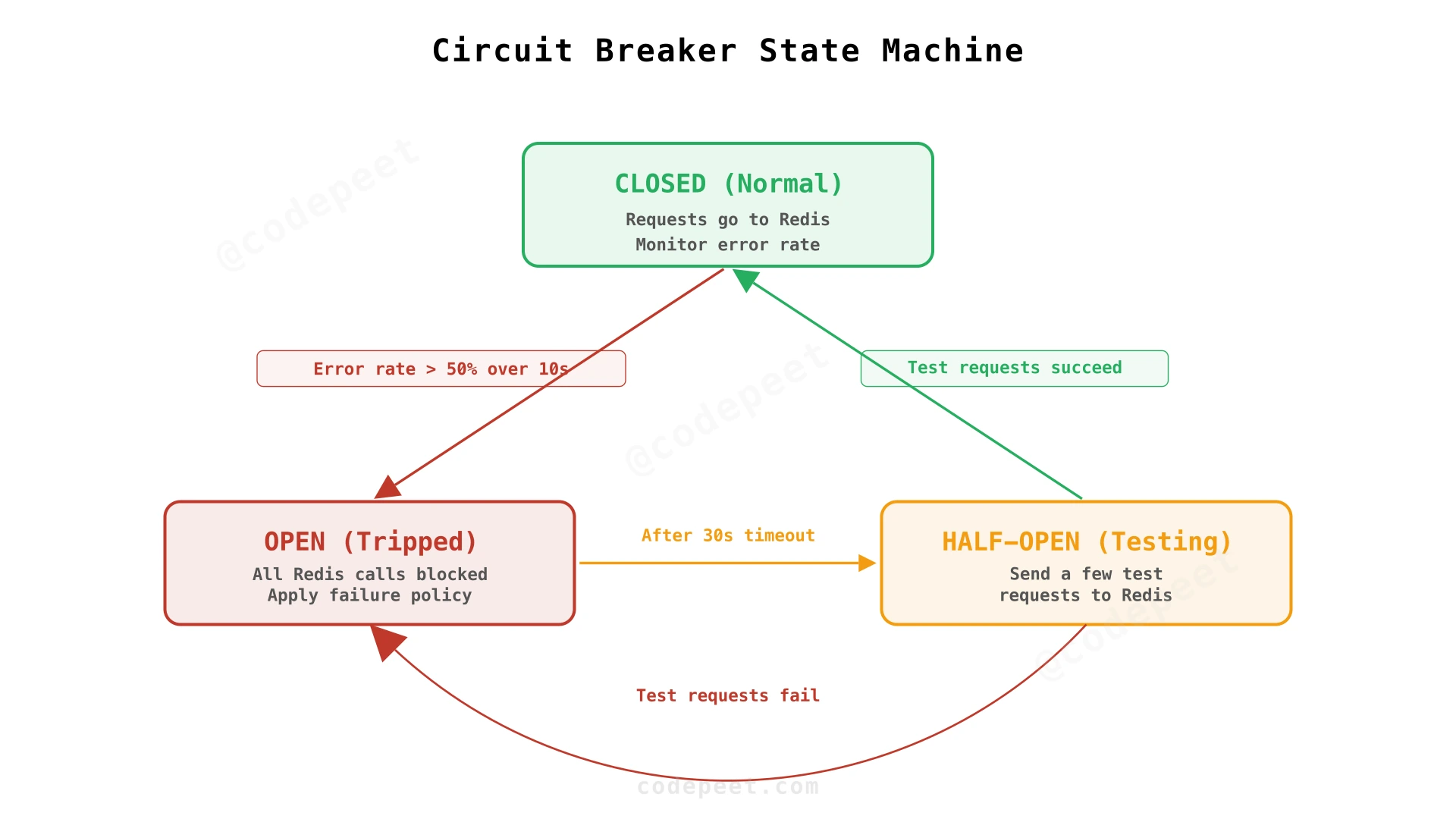
A circuit breaker stops calling Redis while it is clearly broken. It has three states:
- Closed (normal): calls go to Redis, and the breaker counts the failures.
- Open (tripped): too many calls failed, so the breaker stops calling Redis and applies the failure policy at once, without waiting.
- Half-open (testing): after a pause, a few calls go through as probes. If they succeed, the breaker closes; if they fail, it opens again.
The thresholds are settings, for example: open when half the calls fail within 10 seconds, try again after 30.
Step 3: The Failure Policy
The breaker is open; there are no counts. Two choices:
Fail open: allow the request. The API keeps working, without limits for a while. This is the usual default: Envoy lets requests through when its rate limit service cannot be reached unless failure_mode_deny is set, and Stripe built its limiters so that "any coding or operational errors would fail open and the API would still stay functional".
Fail closed: reject the request, with 503 Service Unavailable. Only for endpoints where unlimited traffic would do lasting harm, such as login during an attack or an endpoint that spends money.
Step 4: Coarse Local Limits
Failing open with no limit at all is risky. The middle ground: while the breaker is open, each gateway keeps its own token buckets in memory.
The gateways cannot coordinate without Redis, so a local limit has to be set above each gateway's share. If the global limit is 100 a minute across 10 gateways, give each gateway a local limit of 50 a minute, not 10: a client whose requests happen to land on one or two gateways is not cut off for nothing. A client spread over all 10 gets up to 500 a minute instead of 100 — not exact, but it stops the obvious abuse, a single key sending 50,000 requests a second.
Local buckets that have been idle for a few minutes are dropped, so memory does not grow while the outage lasts.
Recovery
When Redis answers again, the breaker's probes succeed and it closes; the local buckets are dropped. Each Redis bucket continues from its last state plus what the time since has refilled, capped at the capacity. A token bucket carries no debt: there is nothing to reconcile, because the overshoot during the outage happened and is over.
Limits that count totals are different. For a daily or monthly quota — and for anything billed — the requests allowed during the outage still count: record them durably (in a log or queue) and add them to the totals once the store is back.
Failover
When a primary fails, Redis Cluster (or Sentinel) promotes its replica once the failure has lasted longer than a timeout — 15 seconds by default in Redis Cluster. Until then, that shard's checks fail, and the breaker and the local buckets take over for its keys. After the switch, two things to expect: writes the old primary acknowledged but had not yet sent to its replica are lost, so a few clients get a few extra requests; and the new primary's script cache is empty, so the first calls fail with NOSCRIPT until the clients load the script again (or use functions, which are replicated).
Putting It Together
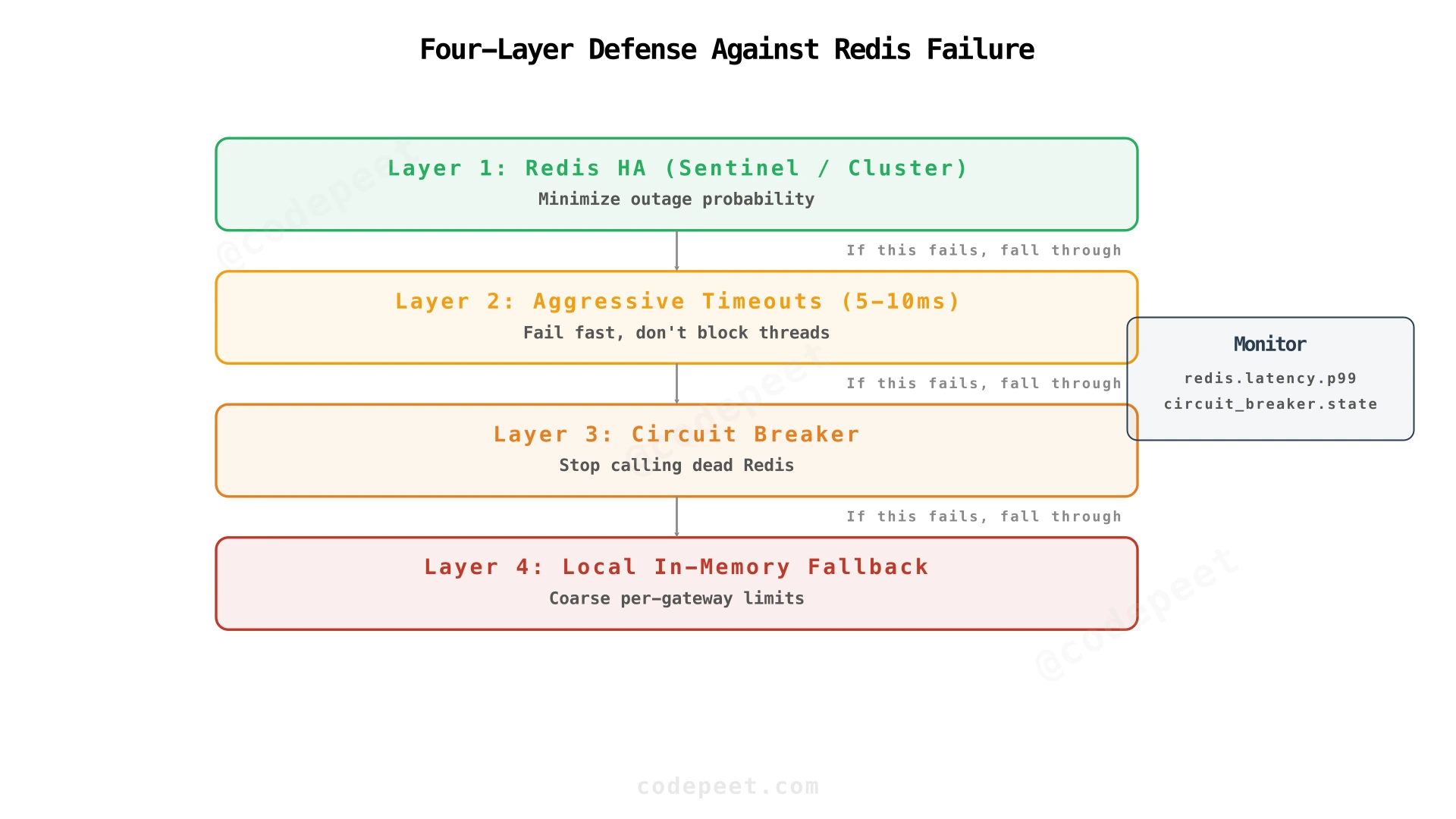
- High availability (Redis Cluster or Sentinel) makes outages rare and short.
- Timeouts in milliseconds keep a slow Redis from slowing the API.
- A circuit breaker stops calling a Redis that is down.
- Local buckets keep coarse limits while it is down.
Watch the Redis latency at p99, the breaker's state, how many requests were decided by the local fallback, and the NOSCRIPT count.
What happens if one tenant or API key dominates traffic (hot key problem)?
Level: Staff
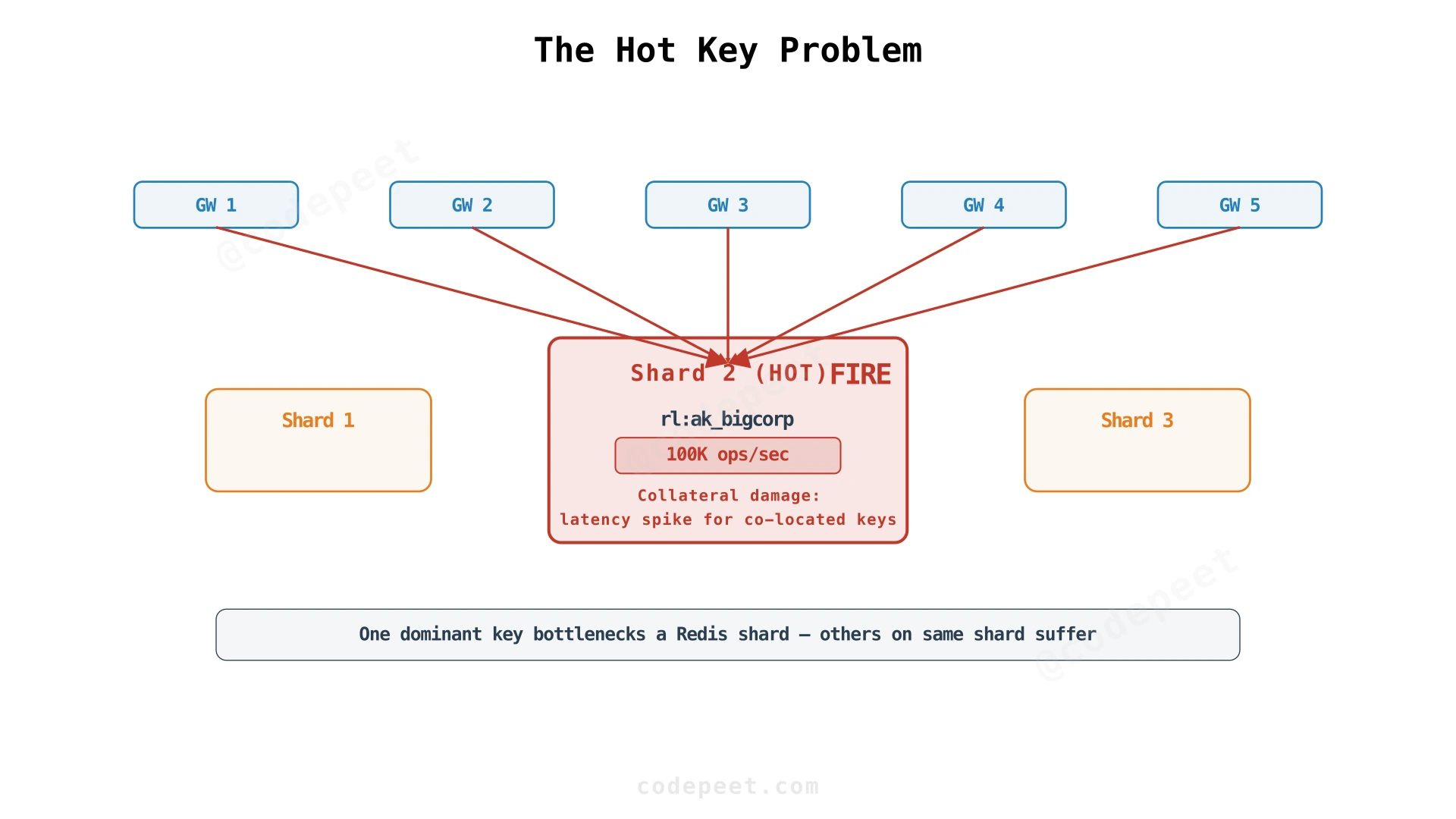
Your largest customer sends 100,000 requests a second with one API key. Every one of them is a check of the same key, rl:key:ak_bigcorp, so every one runs on the same shard, on its single command thread, one after another. In a test, one Redis process ran the script on a single key about 132,000 times a second on a laptop, and about 200,000 times a second in a Linux VM. 100,000 a second is most of a shard, and on slower production processors all of it — while every other key that lives on that shard waits behind it.
This is the hot key problem: one key's checks are more than one Redis process can serve.
Containing the Blast Radius
A Redis Cluster spreads keys over shards, so the other customers on other shards do not notice. That contains the problem; it does not solve it, because a cluster cannot split one key.
Remember Rejections Locally
Much of a hot key's traffic is often traffic that is being rejected. Once Redis has answered "rejected, retry in 400 ms" for a key, the gateway can answer that key's requests itself, with a 429, until the 400 ms are up, without asking Redis again. Nothing is lost: the bucket could not have served those requests anyway, so the limit stays exact. Envoy's rate limit service has this built in: its local cache "stores the over-the-limit cache keys, and thus avoids reading the redis cache again".
With a token bucket the local block lasts only until the next token, so the saving grows with how far over its limit a key is. In a simulation, a key sending ten times its limit still got exactly its limit, and about one of its requests in five reached Redis; at fifty times its limit, one in twenty.
Lease Tokens in Batches
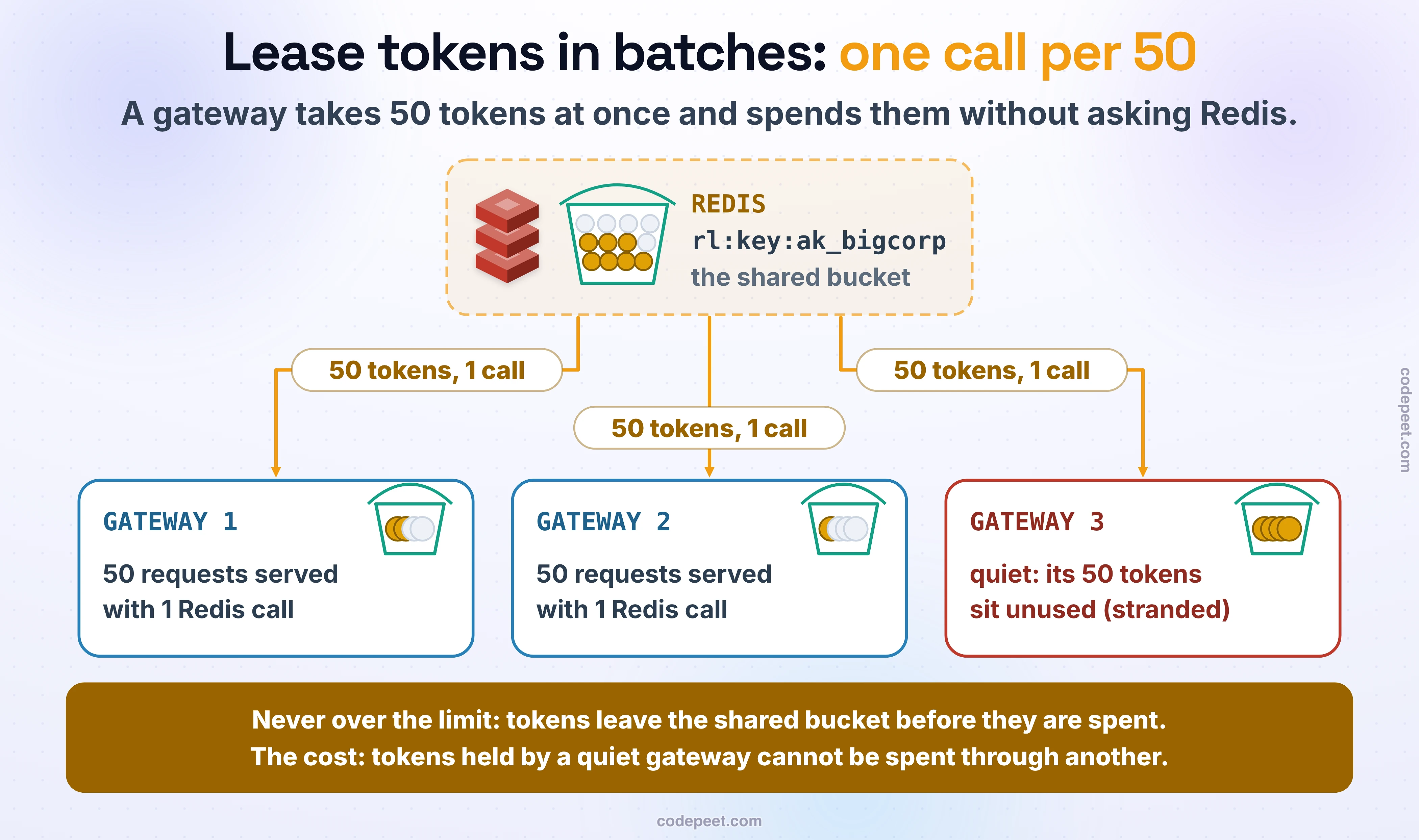
For allowed traffic, a gateway can take tokens from the shared bucket in batches: call the script with a cost of 50 instead of 1, spend those 50 tokens locally, and ask for another batch when they run out. Redis then sees one call per 50 requests from that gateway.
It never overshoots, because the tokens leave the shared bucket before they are spent: in a test, 10 gateways asking for 100 tokens each from a bucket of 100 got 100 in all. What it can do is strand tokens: tokens held by one gateway cannot be spent through another, so a client whose next requests land elsewhere can be rejected while tokens sit idle. Size each batch to what a gateway spends in a fraction of a second, and give back what is left when the key goes quiet.
Split the Key
Split one bucket into several: rl:key:ak_bigcorp:0 to rl:key:ak_bigcorp:9, each with a tenth of the capacity and of the rate, and pick one at random for each request. The ten keys hash to different slots, so ten shards share the load.
The cost is variation: by chance, one part can run dry while others still have tokens, so the client sees some rejections before reaching its full limit. And do not put the shared part of the name in braces (rl:key:{ak_bigcorp}:0): in a Redis Cluster, braces are a hash tag, and every key with the same tag lands in the same slot — on one shard again.
Sample, and Block Locally
For the very hottest keys, check only some requests: one in ten, at a cost of 10 tokens each. The other nine pass without a check, so this works only together with the local block above: when a sampled check is rejected, the gateway rejects that key's requests itself until the retry time. Without the block, the unchecked requests pass even when the bucket is empty.
Even with the block, the limit holds only roughly, because the requests before a rejected sample have already passed unpaid. In a simulation of a client sending ten times its limit, sampling with the block let through about 1.9 times the limit, and without the block about 8 times. That is the trade: a tenth of the checks for a limit that holds only to within a factor of two.
| Approach | When to use it | What it costs | Redis load |
|---|---|---|---|
| Redis Cluster | Always | Nothing; one key still lives on one shard | Spread by key |
| Remember rejections locally | Keys far over their limit | Nothing: the limit stays exact | 1 call in 5 requests at 10× the limit, 1 in 20 at 50× |
| Lease tokens in batches | A few very busy keys | Tokens stranded on one gateway | One call per batch |
| Split the key | One key larger than a shard | Some rejections below the limit | Shared by N shards |
| Sample with a local block | The very hottest keys, as a last resort | Up to about 2× the limit | One call per 10 requests |