What is Columnstore Index?
Introduction
Up until now, every index we have discussed stores data row by row — these are called rowstore indexes. Columnstore indexes take a completely different approach: they store data column by column. This design is optimized for analytical queries that aggregate large volumes of data.
In this tutorial, you will learn:
- What a columnstore index is and how it differs from rowstore
- Why column-oriented storage is better for analytics
- The concept of column segments and row groups
- Compression benefits of columnstore indexes
- When to use columnstore indexes
Row Storage vs Column Storage
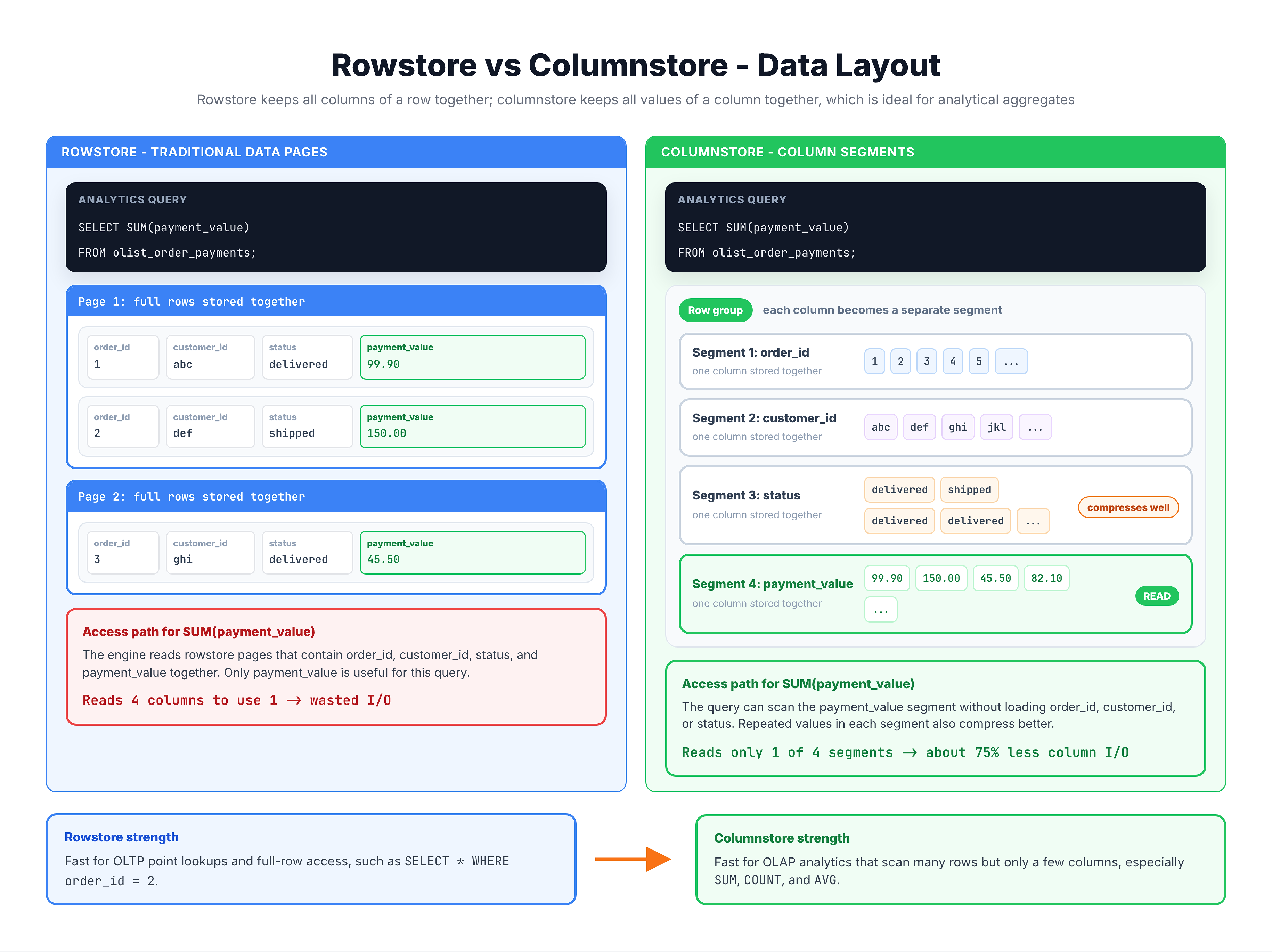
To understand columnstore indexes, you first need to see the fundamental difference between how rowstore and columnstore organize data.
Why Columnstore is Faster for Analytics
Analytical queries typically have three characteristics that make columnstore indexes shine:
1. They Read Few Columns but Many Rows
-- This query reads ALL rows but only needs 1 column (amount)
SELECT SUM(price) FROM order_items;
| Storage Type | Data Read from Disk |
|---|---|
| Rowstore | Reads ALL columns of ALL rows (even unused columns) |
| Columnstore | Reads ONLY the price column |
2. Compression is Much Better
When the same data type is stored together, compression algorithms work much more effectively:
| Column | Values | Compression |
|---|---|---|
order_status | delivered, delivered, delivered, shipped, delivered... | Repeating values compress extremely well |
customer_state | SP, SP, SP, RJ, SP, MG... | Dictionary encoding: SP=1, RJ=2, MG=3 |
price | 150.00, 155.00, 149.00... | Delta encoding: store differences only |
Columnstore indexes typically achieve 10x compression compared to rowstore.
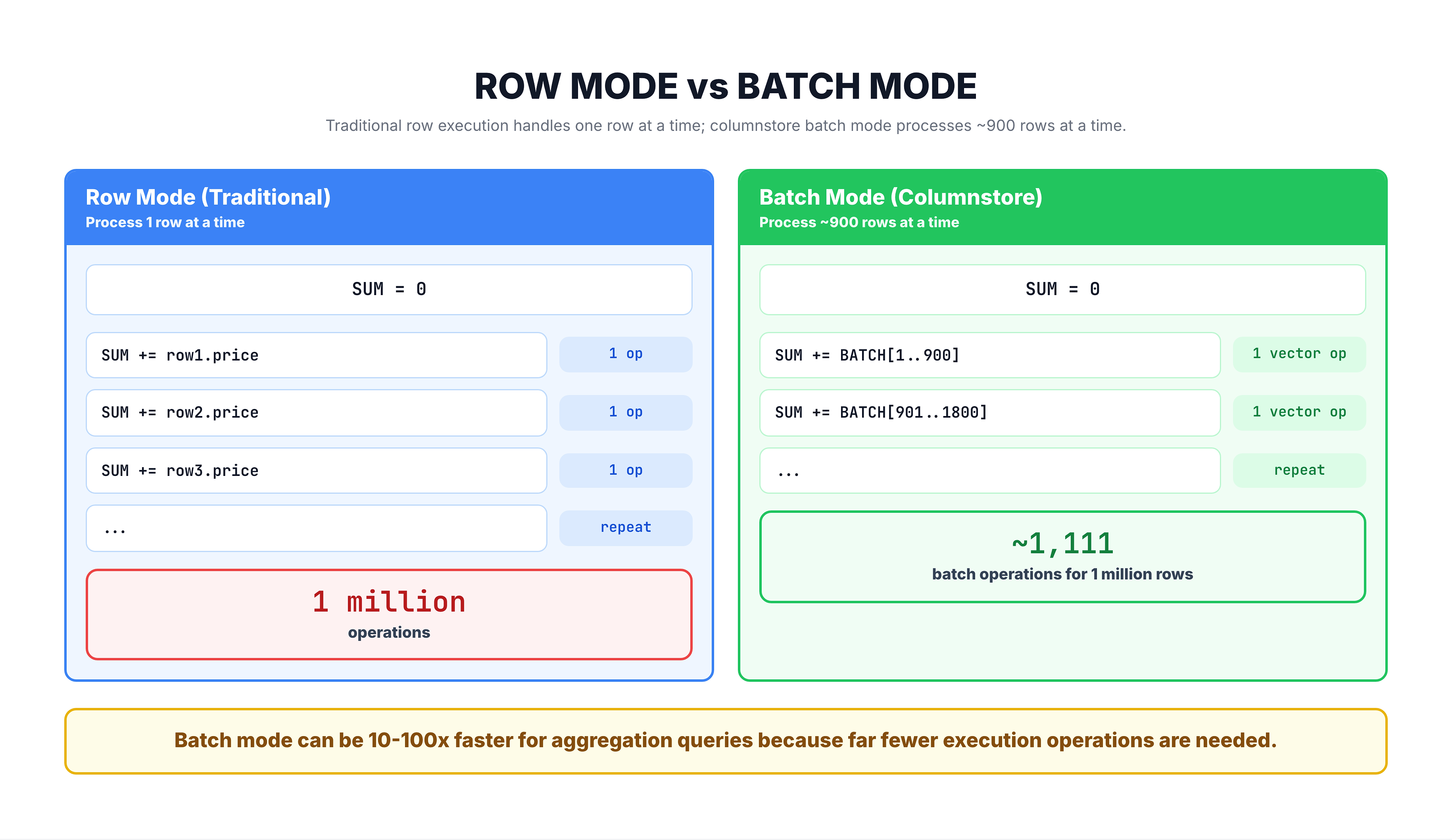
3. Batch Mode Processing
Columnstore indexes enable batch mode execution, where the query engine processes data in batches of up to 900 rows at once instead of one row at a time.
Columnstore Architecture: Row Groups and Segments
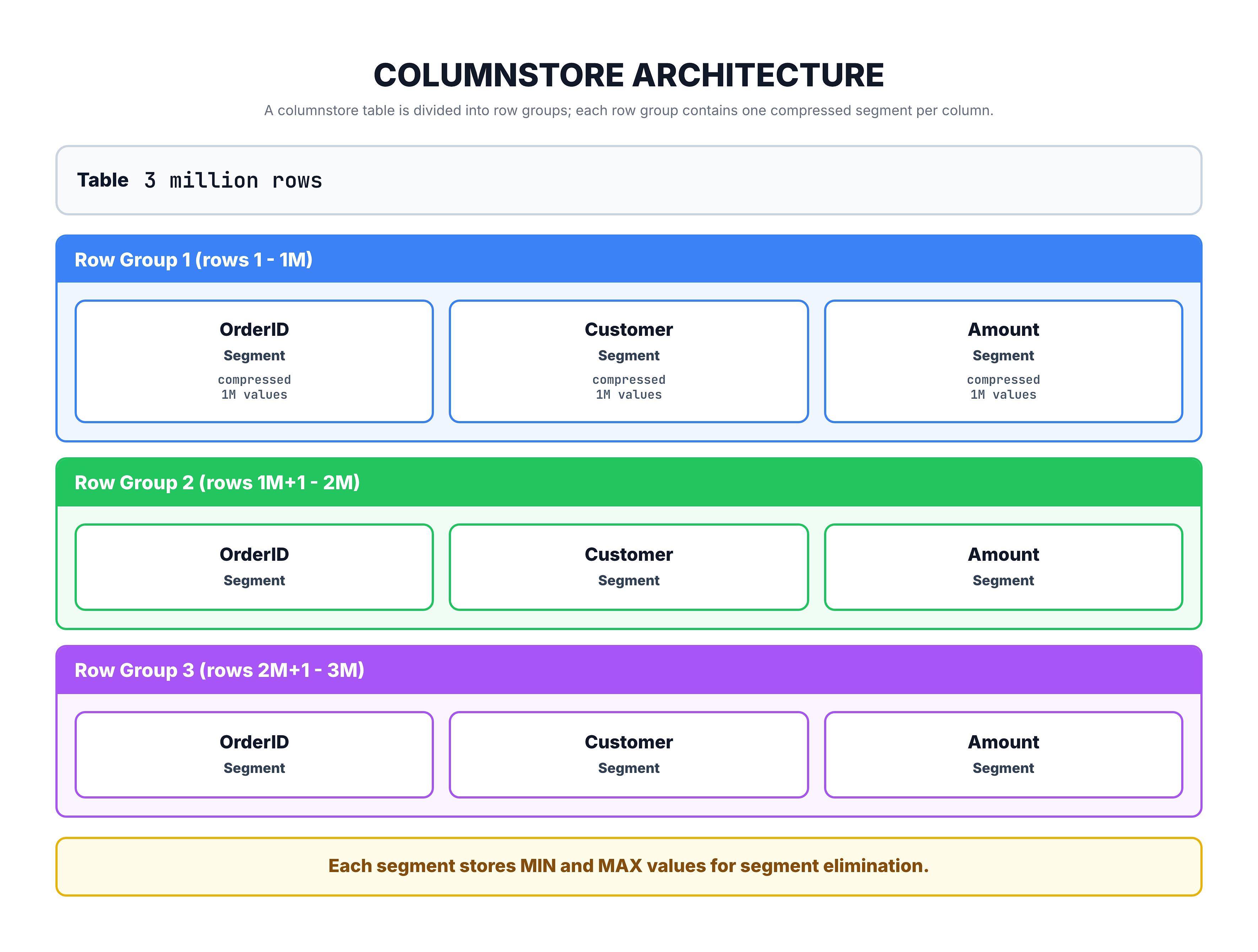
Columnstore indexes organize data into two key structures:
Row Groups
Data is divided into chunks called row groups, each containing up to approximately 1,048,576 rows (about 1 million rows).
Column Segments
Within each row group, each column's data is stored as a compressed column segment.
Segment Elimination
Each column segment stores the minimum and maximum values it contains. When a query has a WHERE clause, SQL Server can skip entire segments that cannot contain matching data — this is called segment elimination.
| Segment | Min Value | Max Value | Query: WHERE Amount > 500 |
|---|---|---|---|
| Segment 1 | 10.00 | 200.00 | Skip (max < 500) |
| Segment 2 | 150.00 | 800.00 | Read (range overlaps) |
| Segment 3 | 5.00 | 50.00 | Skip (max < 500) |
Types of Columnstore Indexes
SQL Server offers two types of columnstore indexes:
| Type | Description | Key Characteristics |
|---|---|---|
| Clustered Columnstore | Converts the entire table to columnstore format | One per table, replaces the rowstore table |
| Nonclustered Columnstore | Adds a columnstore index alongside the existing rowstore table | Can coexist with a clustered rowstore index |
When to Use Each
| Scenario | Recommendation |
|---|---|
| Data warehouse / analytics table | Clustered Columnstore |
| Table needs both fast point lookups AND analytics | Nonclustered Columnstore + Clustered Rowstore |
| Reporting on an OLTP table | Nonclustered Columnstore |
| Pure analytics, rarely updated | Clustered Columnstore |
Summary
Here is what you should remember about columnstore indexes:
| Concept | Key Takeaway |
|---|---|
| What | Stores data column by column instead of row by row |
| Best for | Analytical queries: SUM, COUNT, AVG over millions of rows |
| Not ideal for | Point lookups (SELECT * WHERE id = X) |
| Compression | Typically 10x better than rowstore |
| Batch mode | Processes hundreds of rows at once for aggregations |
| Row groups | Data is organized in ~1 million row chunks |
| Segment elimination | Skips irrelevant data based on min/max values |
Rowstore vs Columnstore Quick Decision
| Workload | Best Index Type |
|---|---|
| OLTP (transactions, point lookups) | Rowstore (Clustered + NonClustered) |
| OLAP (analytics, reporting) | Columnstore |
| Mixed (both transactions and analytics) | Rowstore + NonClustered Columnstore |
In the next tutorial, you will learn the detailed process of how SQL Server builds a columnstore index.