Composite Index
Introduction
Most real-world queries filter on more than one column. When your WHERE clause or JOIN condition involves multiple columns, a single-column index may not be enough. A composite index — an index on two or more columns — is the answer.
In this tutorial, you will learn:
- What a composite index is
- How column order affects query performance
- The "leftmost prefix" rule
- When to use composite indexes vs multiple single-column indexes
- How to design effective composite indexes
What is a Composite Index?
A composite index (also called a multi-column index or compound index) is an index that includes two or more columns as its key columns.
-- A composite index on two columns
CREATE NONCLUSTERED INDEX IX_Orders_Customer_Status
ON orders (customer_id, order_status);
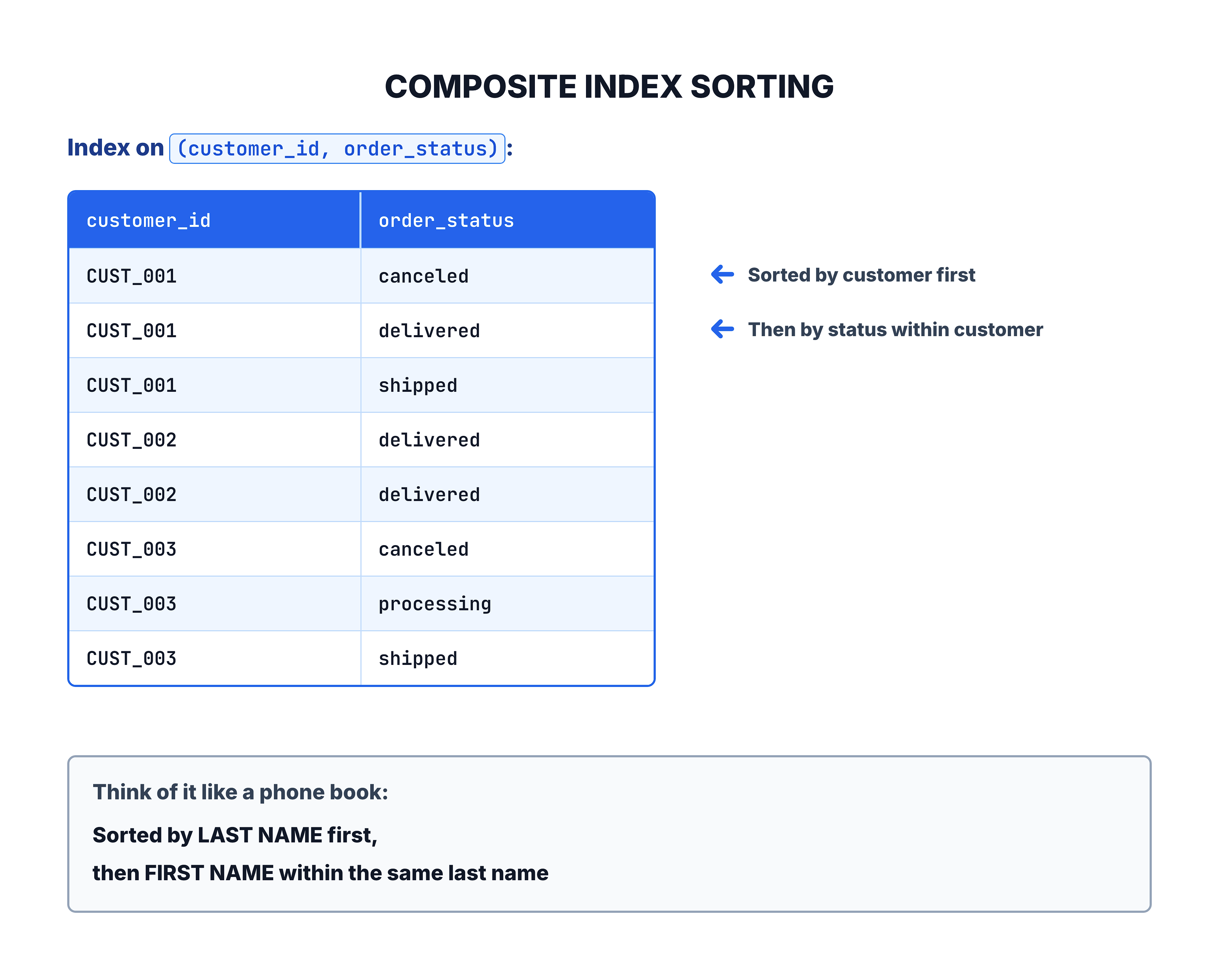
The data in this index is sorted first by customer_id, and then within each customer, it is sorted by order_status.
The Leftmost Prefix Rule
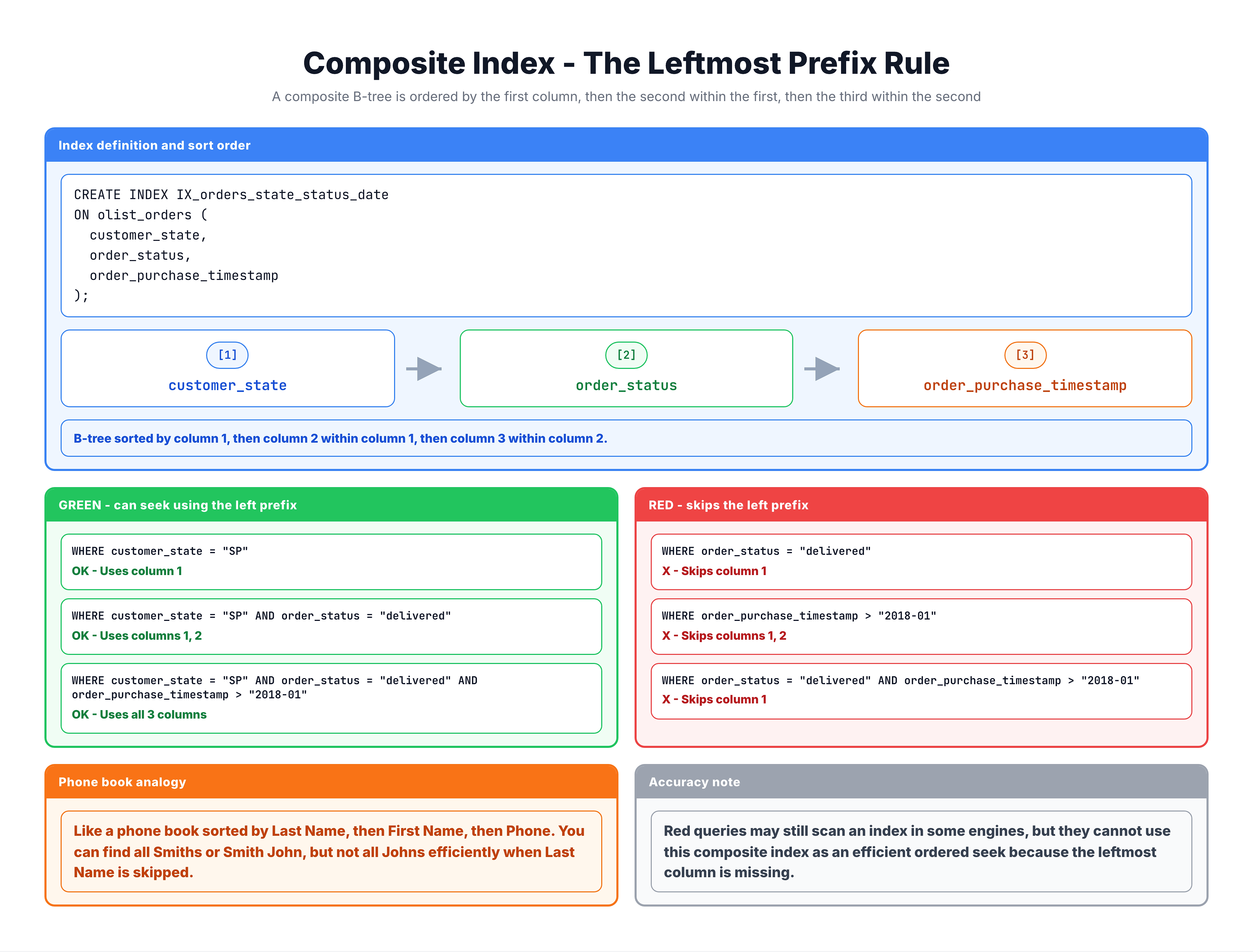
The most important concept for composite indexes is the leftmost prefix rule. A composite index can only be used efficiently if the query filters on the leftmost (first) column of the index.
Given Index: (customer_id, order_status, order_date)
| Query Filter | Uses This Index? | Why |
|---|---|---|
WHERE customer_id = 'X' | ✅ Yes | Matches first column |
WHERE customer_id = 'X' AND order_status = 'Y' | ✅ Yes | Matches first two columns |
WHERE customer_id = 'X' AND order_status = 'Y' AND order_date = 'Z' | ✅ Yes | Matches all three columns |
WHERE order_status = 'Y' | ❌ No (or limited) | Skips first column |
WHERE order_date = 'Z' | ❌ No | Skips first two columns |
WHERE order_status = 'Y' AND order_date = 'Z' | ❌ No | Skips first column |
WHERE customer_id = 'X' AND order_date = 'Z' | ⚠️ Partial | Uses customer_id, skips status |
Phone Book Analogy
Column Order Matters
The order of columns in a composite index is a critical design decision. Here is how to choose:
Guidelines for Column Order
| Position | Choose Column That... | Reason |
|---|---|---|
| 1st (leftmost) | Is used in the most queries | Maximizes index reuse |
| 2nd | Further narrows the search after the first column | Improves selectivity |
| 3rd+ | Used in ORDER BY or further filtering | Additional refinement |
Example: Two Different Orders
-- Option A: customer_id first
CREATE INDEX IX_A ON orders (customer_id, order_status);

-- Option B: order_status first
CREATE INDEX IX_B ON orders (order_status, customer_id);| Query | IX_A (cust, status) | IX_B (status, cust) |
|---|---|---|
WHERE customer_id = 'X' | ✅ Used | ❌ Not used |
WHERE order_status = 'Y' | ❌ Not used | ✅ Used |
WHERE customer_id = 'X' AND order_status = 'Y' | ✅ Used | ✅ Used |
If most queries filter by customer_id, Option A is better. If most queries filter by order_status, Option B is better.
Selectivity Rule
Another consideration: place the most selective column first (the column with the most unique values).
| Column | Unique Values | Selectivity |
|---|---|---|
customer_id | ~99,000 | Very high |
order_status | ~8 | Very low |
Putting customer_id first is generally better because it narrows down the search to a small set of rows immediately.
Composite Index vs Multiple Single-Column Indexes
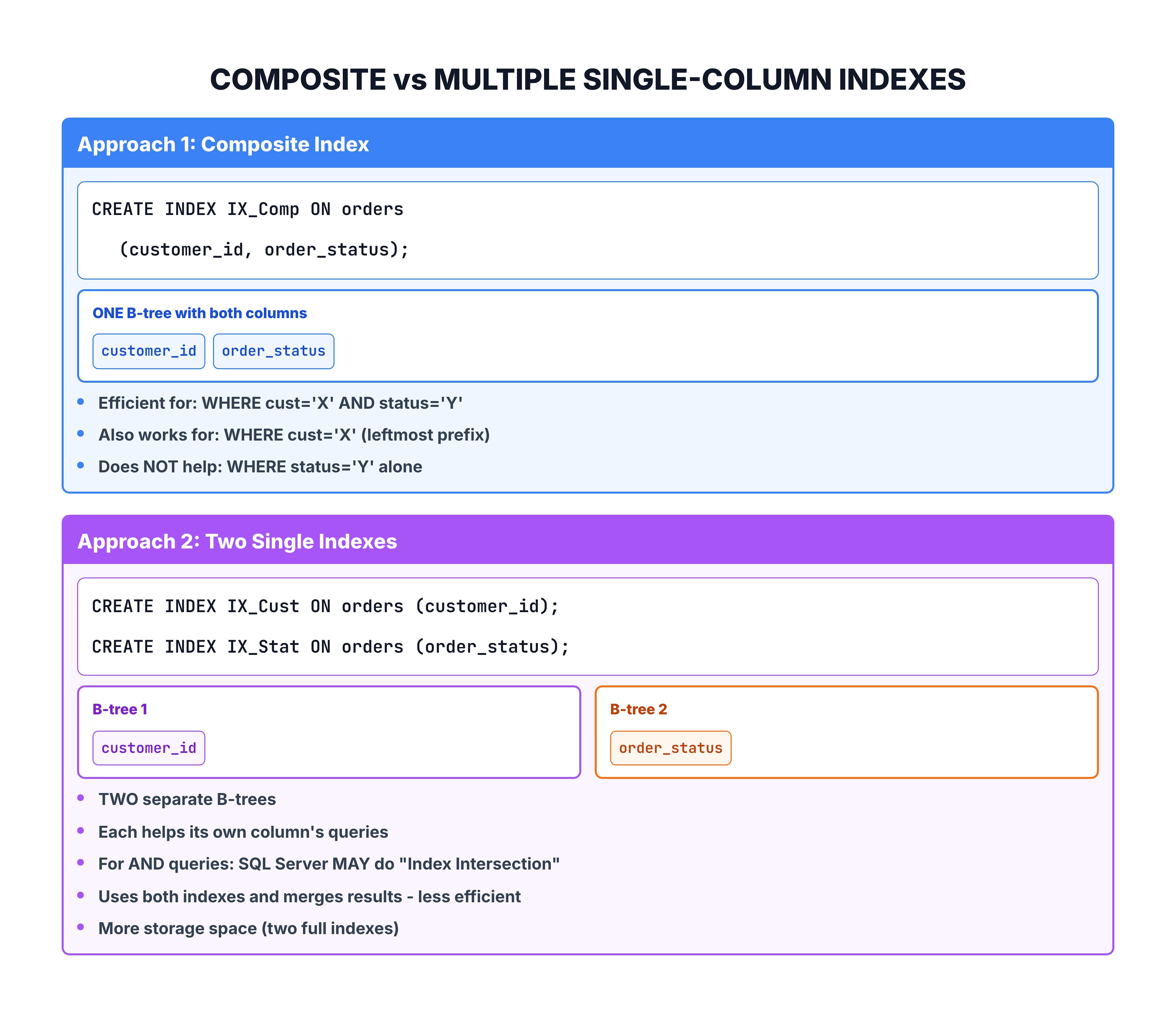
A common question: should I create one composite index or multiple single-column indexes?
Recommendation
| Situation | Best Choice |
|---|---|
| Queries always filter on both columns together | Composite index |
| Queries sometimes filter on only one column | Composite (with that column first) + possibly a separate single index |
| Columns are never queried together | Separate single-column indexes |
Practical Design Example
Let's walk through designing composite indexes for real queries.
The Queries
-- Query 1: Find orders for a customer
SELECT * FROM orders WHERE customer_id = 'CUST_001';

-- Query 2: Find delivered orders for a customer
SELECT * FROM orders
WHERE customer_id = 'CUST_001' AND order_status = 'delivered';

-- Query 3: Find recent delivered orders for a customer
SELECT * FROM orders
WHERE customer_id = 'CUST_001'
  AND order_status = 'delivered'
ORDER BY order_purchase_timestamp DESC;
The Index Design
-- One composite index serves ALL THREE queries:
CREATE NONCLUSTERED INDEX IX_Orders_Cust_Status_Date
ON orders (customer_id, order_status, order_purchase_timestamp DESC)
INCLUDE (order_delivered_timestamp);
Why this works:
| Query | How Index Is Used |
|---|---|
| Query 1 | Seeks on customer_id (leftmost prefix) |
| Query 2 | Seeks on customer_id + order_status (first two columns) |
| Query 3 | Seeks on first two columns; ORDER BY is free because order_purchase_timestamp DESC is the third key column |
One well-designed composite index replaced what would have required multiple separate indexes.
Summary
Here is what you should remember about composite indexes:
| Concept | Key Takeaway |
|---|---|
| What | An index on two or more columns |
| Sorting | Sorted by first column, then second, then third... |
| Leftmost prefix | Index is only used if the query filters on the leftmost column(s) |
| Column order | Put the most commonly queried and most selective columns first |
| vs Single indexes | One composite index is better than multiple single indexes for multi-column queries |
| Max columns | Up to 16 key columns (plus INCLUDE columns) |
Column Order Decision Checklist
- Which column appears in the most queries? → Put it first
- Which column has the highest selectivity? → Put it early
- Is there an ORDER BY? → Consider making it a key column
- Are there additional SELECT columns? → Use INCLUDE
In the next tutorial, you will learn about a fundamentally different approach to indexing — Columnstore Indexes.