Clustered vs NonClustered Index
Introduction
Now that you understand both clustered and nonclustered indexes individually, it is time to put them side by side. Knowing the differences between these two index types is essential for making good database design decisions.
In this tutorial, you will learn:
- A direct comparison of clustered vs nonclustered indexes
- How each type stores data internally
- Performance differences for common operations
- How they work together on the same table
- Decision guidelines for choosing between them
Side-by-Side Comparison
Here is the complete comparison between clustered and nonclustered indexes:
| Feature | Clustered Index | NonClustered Index |
|---|---|---|
| Number per table | Exactly 1 | Up to 999 |
| Physical data order | Defines the physical sort order | Does not affect physical order |
| Leaf level contains | The actual data rows | Index key + row locator (pointer) |
| Separate structure | No — the index IS the table | Yes — a separate B-tree |
| Size | Same as table data | Smaller (subset of columns) |
| Key Lookup needed | Never | Yes, when query needs extra columns |
| Default creation | With PRIMARY KEY | With UNIQUE constraint |
| Range queries | Excellent (sequential reads) | Good (but may need lookups) |
| Point lookups | Fast | Fast (plus optional lookup) |
| INSERT impact | Row must go in sorted position | Entry added to separate structure |
| UPDATE on key | Row may need to physically move | Index entry updated in place |
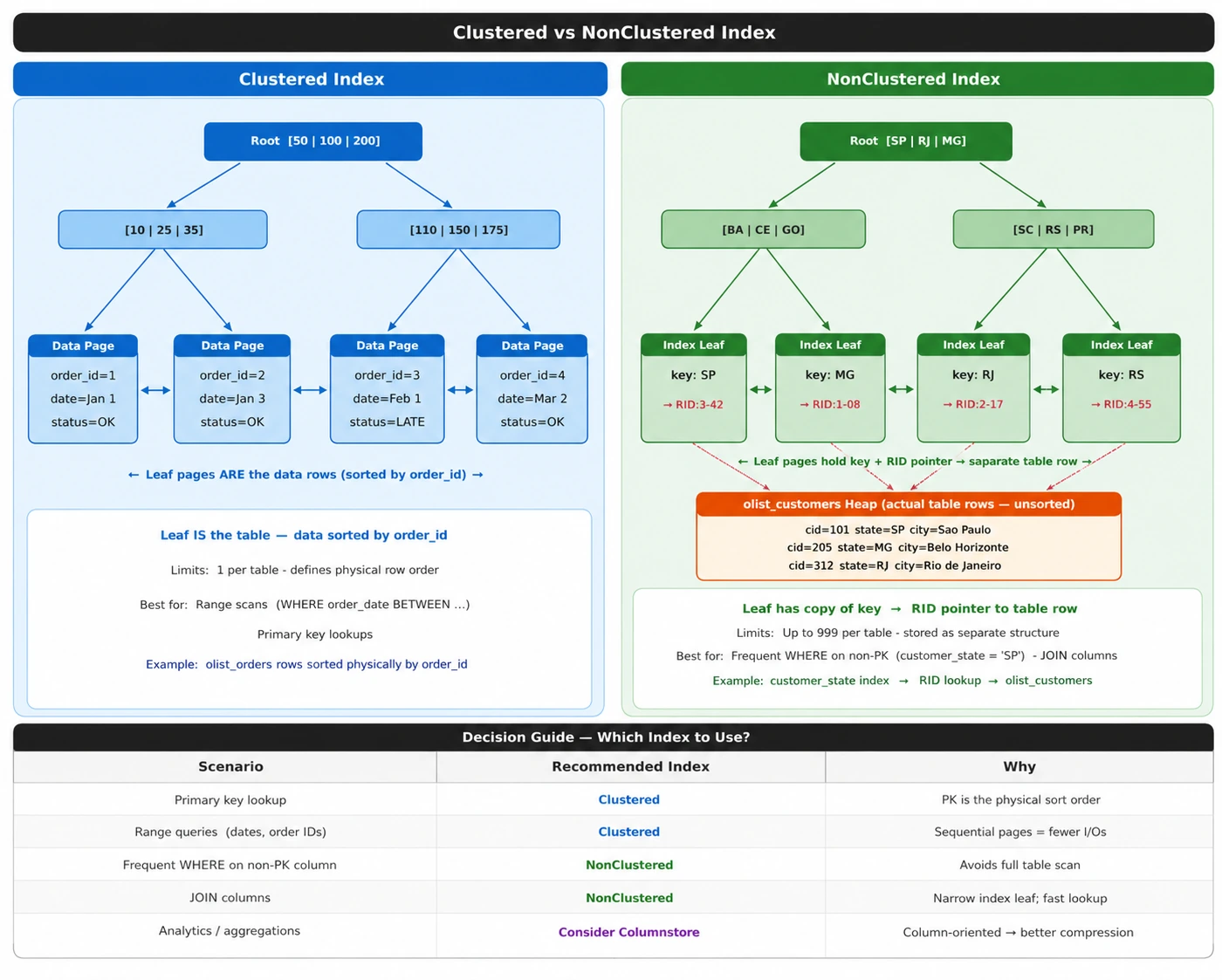
Visual Comparison: Data Storage
The most important difference is WHERE the data lives:
Performance Comparison by Query Type
Different query patterns perform differently depending on the index type:
1. Point Lookup (Single Row)
SELECT * FROM orders WHERE order_id = 42;
| Index Type | Steps | Performance |
|---|---|---|
| Clustered (on order_id) | Seek B-tree → leaf has the data | Very fast |
| NonClustered (on order_id) | Seek B-tree → get pointer → lookup full row | Fast (one extra step) |
2. Range Query
SELECT * FROM orders WHERE order_date BETWEEN '2017-01-01' AND '2017-06-30';
| Index Type | Steps | Performance |
|---|---|---|
| Clustered (on order_date) | Seek to start → read consecutive pages | Excellent |
| NonClustered (on order_date) | Seek to start → lookup EACH row back to table | Slower (many random I/Os) |
3. Covering Query (All Needed Columns in Index)
SELECT customer_id, order_status FROM orders WHERE customer_id = 'ABC';
| Index Type | Steps | Performance |
|---|---|---|
| NC Index on (customer_id) INCLUDE (order_status) | Seek B-tree → leaf has all needed columns | Very fast (no lookup!) |
4. Full Table Scan
SELECT * FROM orders;
| Index Type | Behavior |
|---|---|
| Clustered | Reads the table in sorted order (sequential I/O) |
| NonClustered | Not used — SQL Server reads the table directly |
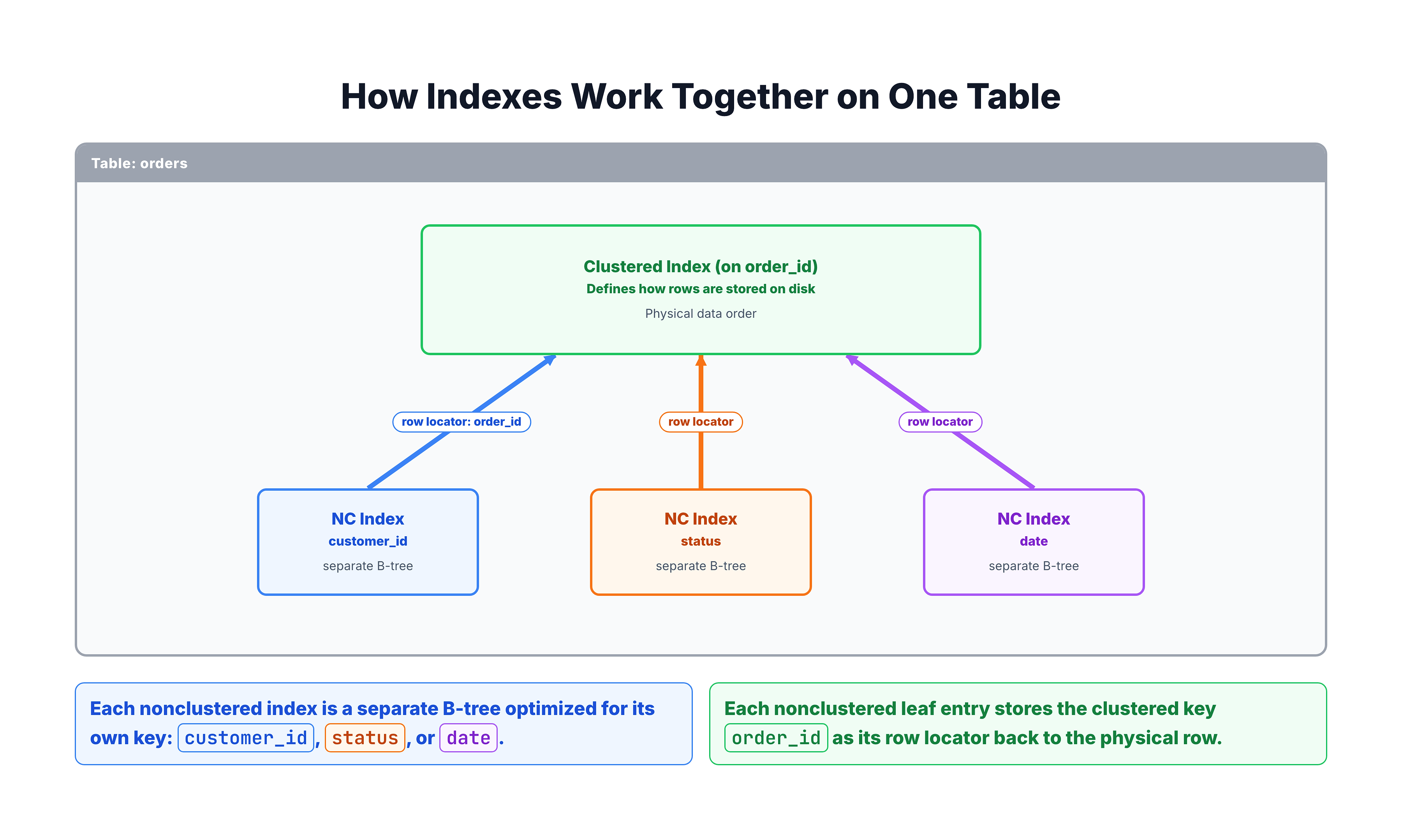
How They Work Together
In practice, a well-designed table has one clustered index and several nonclustered indexes that work together:
Important Implication: Clustered Key Width
Since every nonclustered index stores the clustered key in its leaf pages, a wide clustered key (like a GUID) makes ALL nonclustered indexes larger:
| Clustered Key Type | Size | Impact on NC Indexes |
|---|---|---|
| INT | 4 bytes | Minimal — NC indexes stay small |
| BIGINT | 8 bytes | Small — acceptable |
| UNIQUEIDENTIFIER (GUID) | 16 bytes | Significant — NC indexes grow |
| NVARCHAR(100) | Up to 200 bytes | Large — NC indexes become bloated |
Decision Guide: When to Use Which
Choose Clustered Index For:
| Scenario | Why |
|---|---|
| Primary key lookups | Direct access to data, no extra step |
| Range queries (date ranges, price ranges) | Sequential reading of sorted data |
| Columns frequently used in ORDER BY | Data comes pre-sorted |
| The most commonly queried column | Maximizes benefit of physical sorting |
Choose NonClustered Index For:
| Scenario | Why |
|---|---|
| Secondary lookup columns | Provides alternative access paths |
| Foreign key columns | Speeds up JOIN operations |
| Columns in WHERE clauses | Enables index seeks instead of scans |
| Multiple search patterns | Can create many NC indexes for different queries |
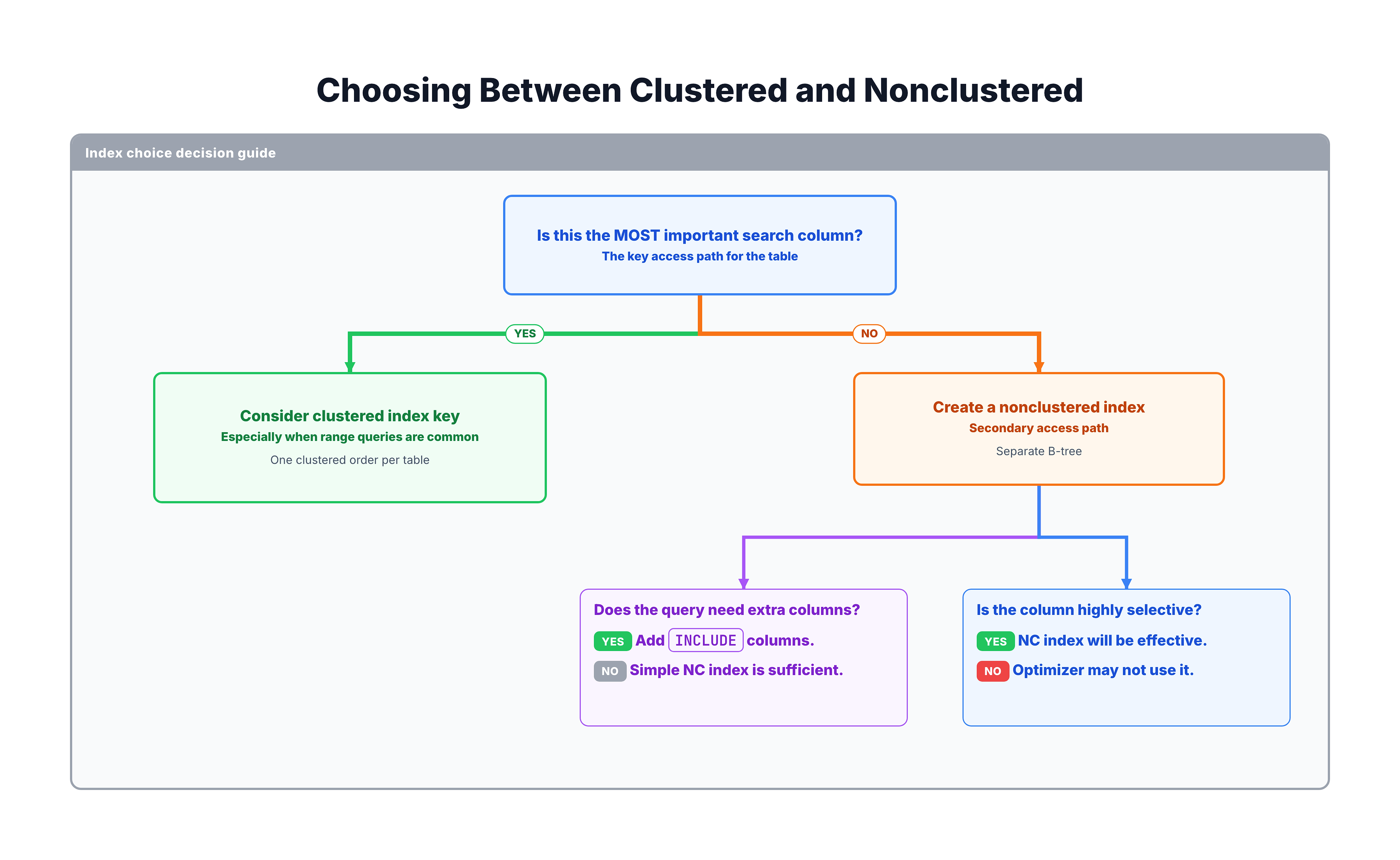
Decision Flowchart
Summary
Here are the key takeaways from comparing clustered and nonclustered indexes:
| Aspect | Clustered | NonClustered |
|---|---|---|
| Data storage | Leaf = actual rows | Leaf = pointers to rows |
| Per table | 1 | Up to 999 |
| Best for | Range queries, primary lookups | Secondary lookups, JOINs |
| Key lookup | Never needed | May be needed |
| Physical order | Defines it | Independent |
| Key width impact | Affects ALL NC indexes | Affects only this index |
Golden Rules
- Every table should have a clustered index (avoid heaps)
- Choose the clustered key carefully — it affects everything
- Keep the clustered key narrow (INT or BIGINT preferred)
- Use nonclustered indexes for secondary access patterns
- Use INCLUDE columns to create covering indexes and avoid key lookups
In the next tutorial, you will learn the exact SQL syntax for creating indexes.