Introduction to Partitions
Introduction
As your database tables grow to tens of millions or even billions of rows, even well-indexed queries can start to slow down. At a certain scale, managing a single massive table becomes a real challenge — not just for query performance, but also for maintenance operations like backups, index rebuilds, and data archival.
This is where table partitioning comes in. Partitioning allows you to split a large table into smaller, more manageable pieces while still treating it as a single logical table from a query perspective.
In this tutorial, you will learn:
- What partitioning is and why it exists
- The core concept behind horizontal partitioning
- How partitioning differs from simply creating multiple tables
- Real-world scenarios where partitioning makes a significant difference
- The key terminology you need before diving deeper
What is Table Partitioning?
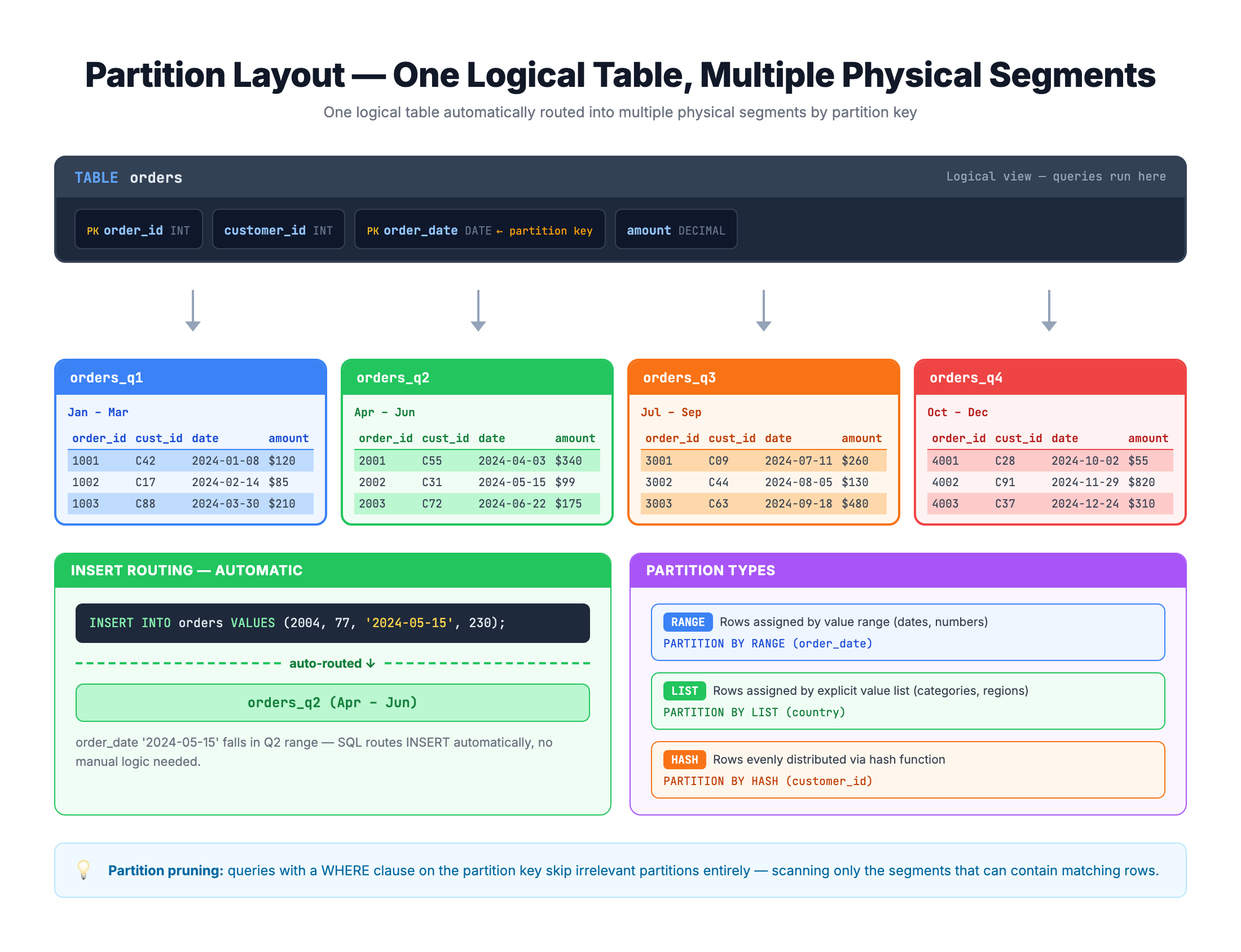
Table partitioning is the process of dividing a large table into smaller physical segments called partitions. Each partition holds a subset of the table's rows based on a specific rule — typically the value of a chosen column.
The crucial point is this: while the data is physically split across partitions, it still appears as one single table to the user. You query it, join it, and filter it exactly as before. The database engine handles the complexity of knowing where each row lives.
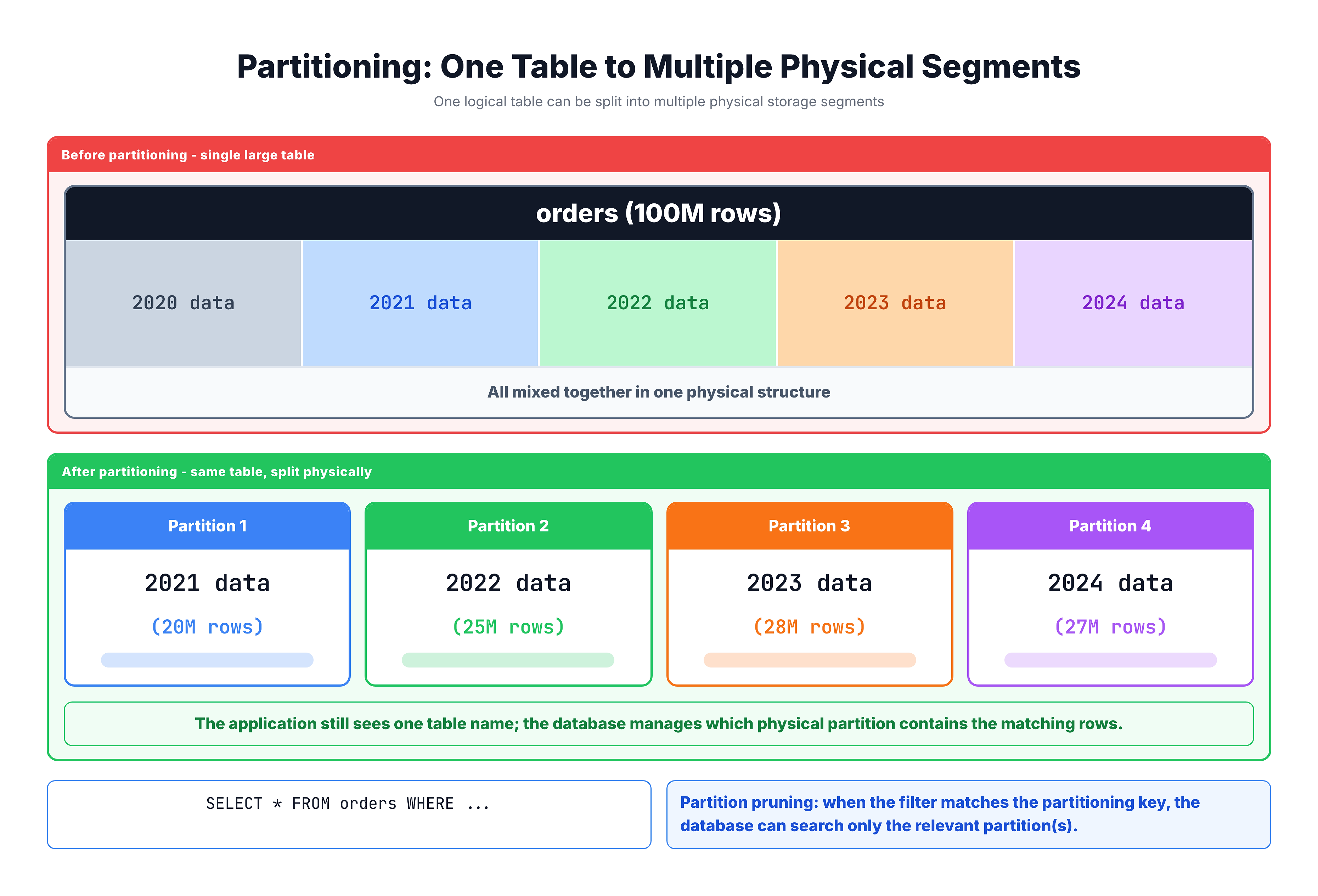
Think of it like organizing a massive filing cabinet. Instead of dumping every document into one giant drawer, you create labeled drawers — one for each year, each month, or each region. When someone asks for a document from 2023, you go straight to the 2023 drawer instead of searching through everything.
Visualization
Horizontal vs Vertical Partitioning
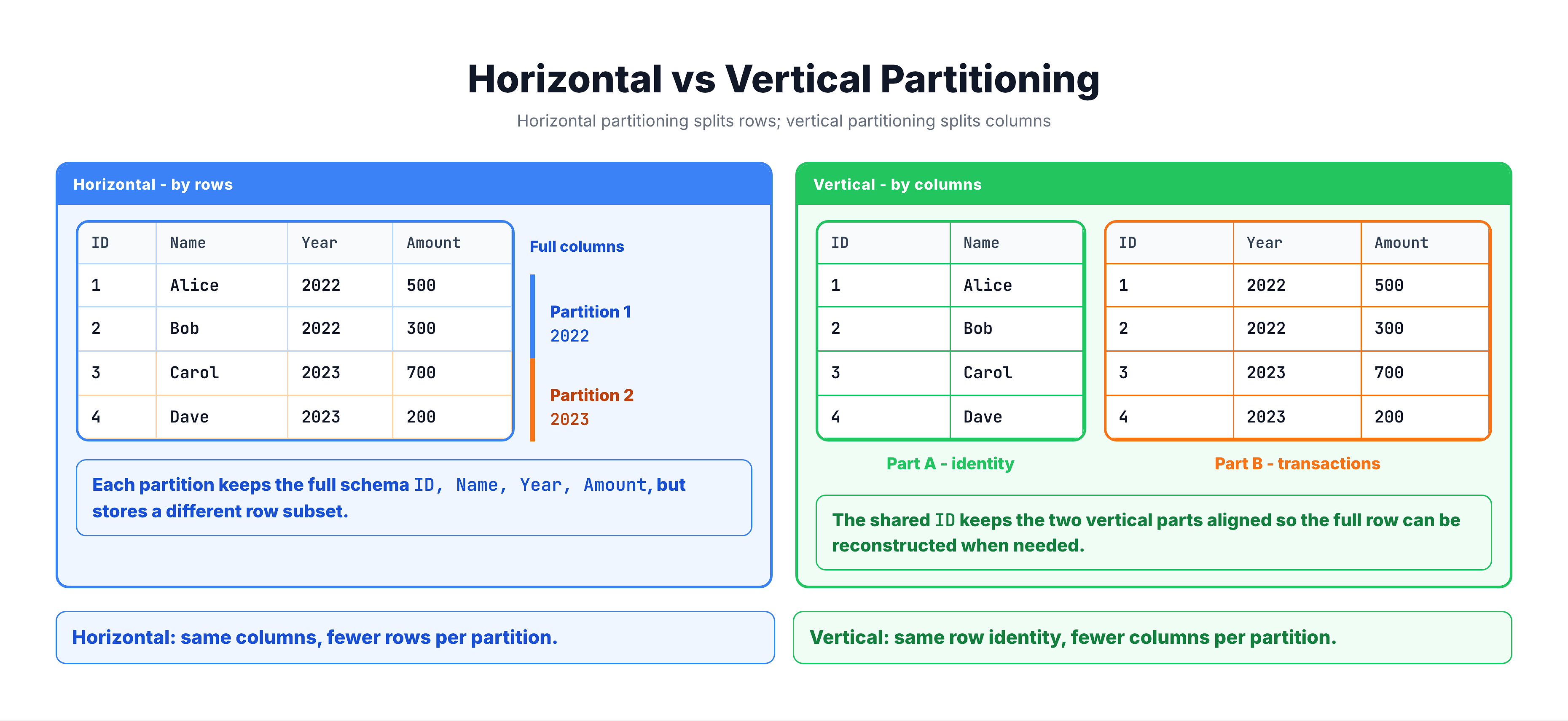
There are two ways to partition data, and it is important to know the difference:
Horizontal Partitioning (Row-Based)
This is what people usually mean when they say "partitioning." The table is split by rows — each partition contains a subset of the rows based on some column value.
Vertical Partitioning (Column-Based)
The table is split by columns — less commonly used and more of a database normalization or design concern than a built-in feature.
| Type | Splits By | Common Use |
|---|---|---|
| Horizontal | Rows | Large tables with time-series or category-based data |
| Vertical | Columns | Tables with many columns where some are rarely accessed |
For the rest of this module, when we say "partitioning" we mean horizontal partitioning — dividing a table by rows.
Why Not Just Create Separate Tables?
You might wonder: why not just create separate tables like orders_2022, orders_2023, orders_2024? That achieves the same physical separation, right?
While separate tables do split data physically, partitioning provides significant advantages over that manual approach:
| Aspect | Separate Tables | Partitioned Table |
|---|---|---|
| Query syntax | Must use UNION ALL across tables | Single table name in queries |
| Schema changes | Must ALTER every table | ALTER once, applies to all partitions |
| Constraints | Must define per table | Defined once at the table level |
| Foreign keys | Cannot easily reference | Standard foreign key references |
| Application code | Must know which table to query | No application changes needed |
| Adding new partitions | Create new table, update all queries | Add partition — queries work automatically |
| Cross-partition queries | Complex UNION ALL statements | Handled transparently by the engine |
The Key Benefit: Transparency
With partitioning, your application code does not change at all. A query like this works before and after partitioning:
SELECT *
FROM orders
WHERE order_date BETWEEN '2023-01-01' AND '2023-12-31';
The database engine automatically knows to look only in the 2023 partition. This behavior is called partition elimination (or partition pruning), and it is one of the biggest performance gains of partitioning.
When Should You Use Partitioning?
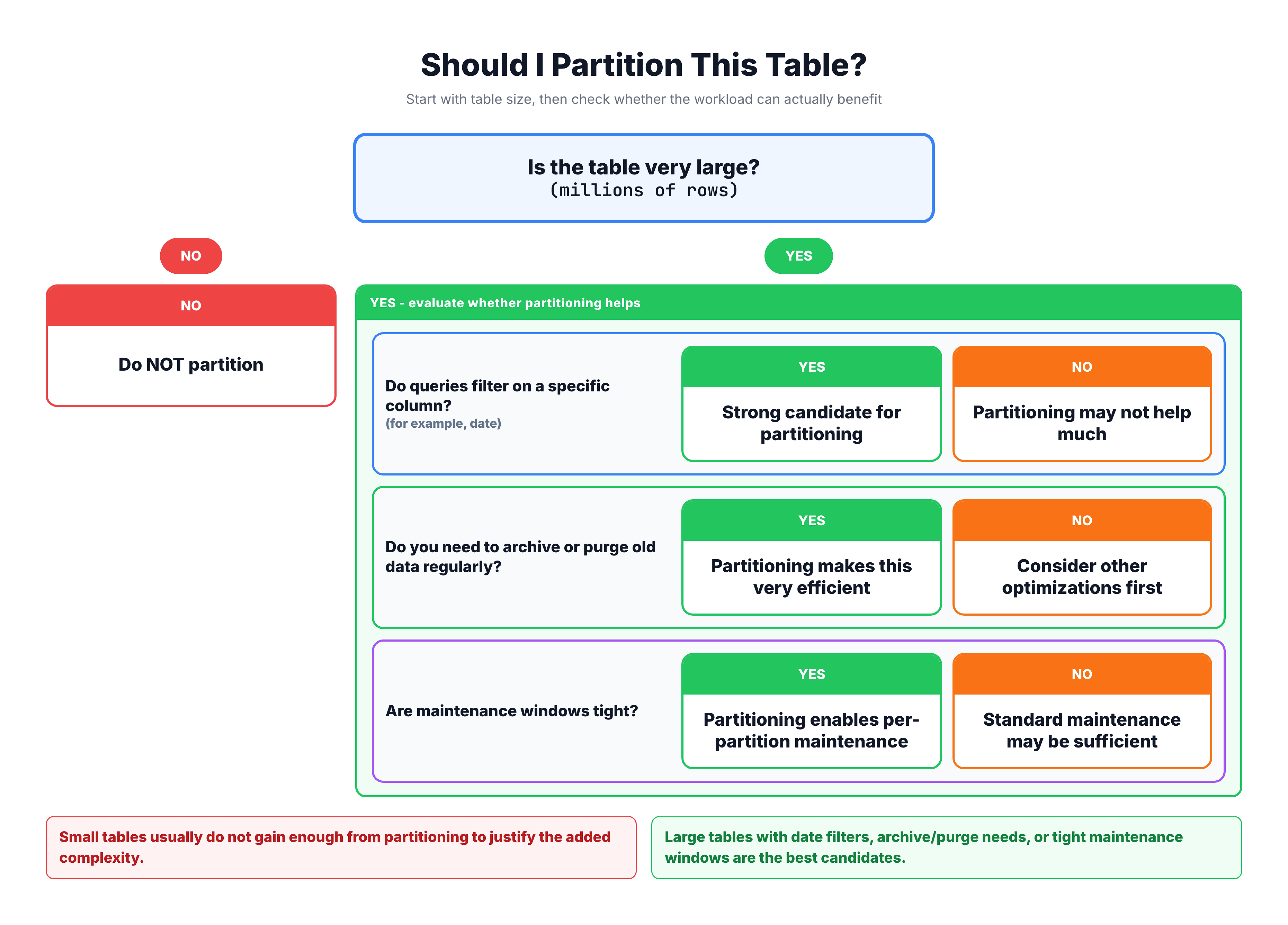
Partitioning is not for every table. It adds complexity to your database design and should be used when the benefits clearly outweigh the overhead.
Good Candidates for Partitioning
| Scenario | Why Partitioning Helps |
|---|---|
| Very large tables (millions+ rows) | Smaller partitions are faster to scan and maintain |
| Time-series data (logs, orders, events) | Old data can be archived by dropping entire partitions |
| Rolling window queries | Queries that always filter by date benefit from partition elimination |
| Data lifecycle management | Easy to purge old data without expensive DELETE operations |
| Maintenance operations | Index rebuilds and backups can target individual partitions |
Poor Candidates for Partitioning
| Scenario | Why Partitioning May Hurt |
|---|---|
| Small tables (under 1M rows) | Overhead of partitioning is not justified |
| Queries that span all partitions | No partition elimination means no benefit |
| Highly transactional OLTP | Cross-partition transactions add complexity |
| Frequently updated partition keys | Moving rows between partitions is expensive |
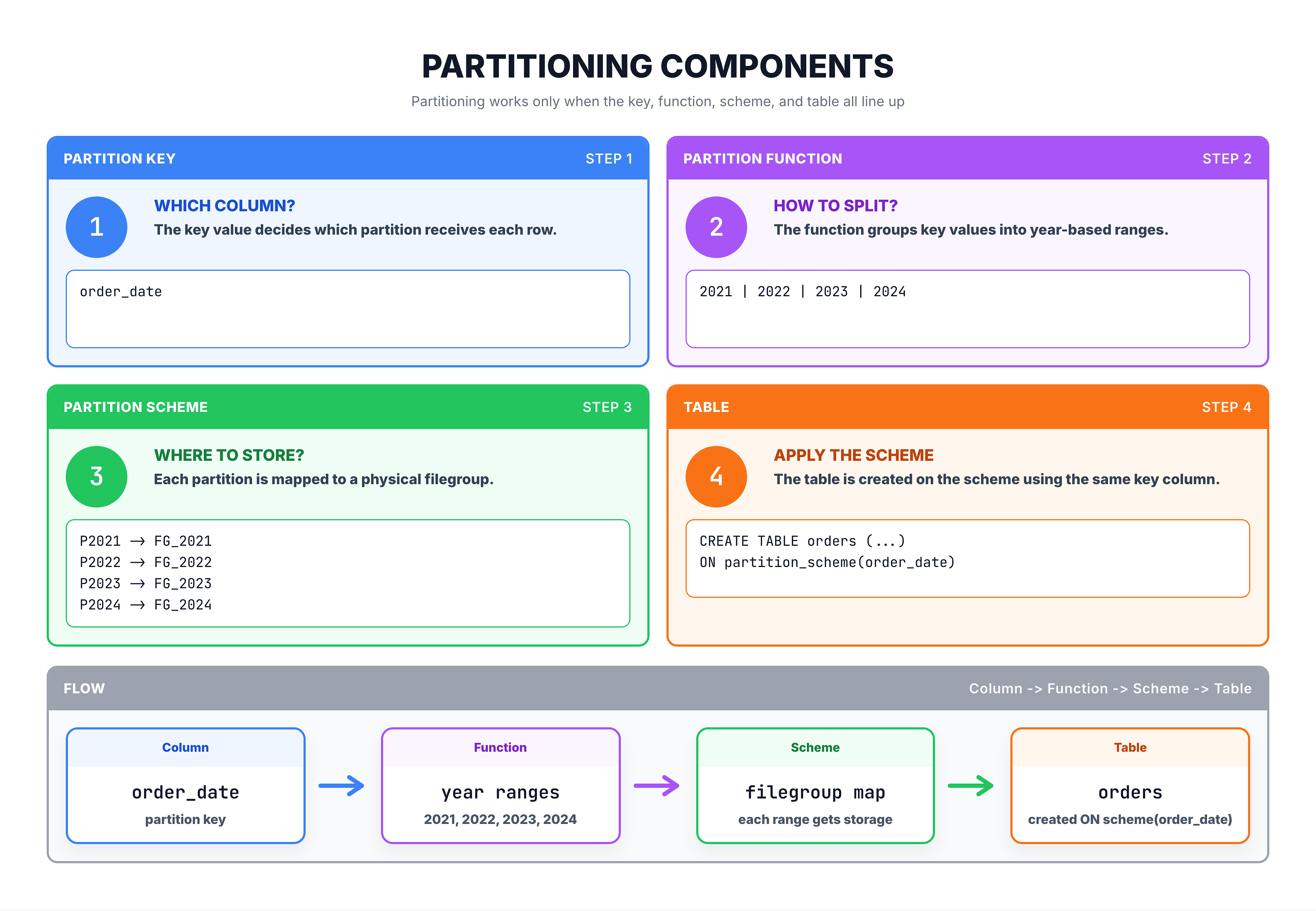
Key Partitioning Terminology
Before going deeper into partitioning, here are the essential terms you need to know:
| Term | Definition |
|---|---|
| Partition Key | The column used to determine which partition a row belongs to (e.g., order_date) |
| Partition Function | A rule that maps column values to partition numbers (e.g., each year maps to a partition) |
| Partition Scheme | Maps partitions to physical storage locations (filegroups) |
| Partition Elimination | The optimizer's ability to skip irrelevant partitions during query execution |
| Boundary Values | The cutoff points that define where one partition ends and the next begins |
| Range LEFT / RIGHT | Determines whether the boundary value belongs to the left or right partition |
| Filegroup | A logical storage container where partition data is physically stored |
| Sliding Window | A pattern where you regularly add new partitions and remove old ones |
How These Pieces Fit Together
Summary
Here is what you should remember about table partitioning:
| Concept | Key Takeaway |
|---|---|
| What | Splitting a large table into smaller physical segments (partitions) |
| Why | Improves query performance, simplifies maintenance, enables efficient data lifecycle management |
| How | Based on a partition key column and boundary values |
| Transparency | Queries treat the partitioned table as a single table — no code changes needed |
| Best for | Very large tables with time-series data, rolling window queries, and data archival needs |
| Not for | Small tables, queries that always scan all data, or frequently changing partition keys |
Key Differences from Other Optimization Techniques
| Technique | What It Does |
|---|---|
| Indexes | Speed up lookups within a table by creating sorted data structures |
| Partitioning | Splits the table itself into smaller physical pieces |
| Views | Provide a virtual layer over data, no physical changes |
| CTAS/Temp Tables | Create copies of data for specific use cases |
Partitioning and indexing work together — you can (and should) create indexes on partitioned tables. In the next tutorials, we will explore the step-by-step process of setting up partitioning and learn how to create partitioned tables.