NonClustered Index
Introduction
While a clustered index defines the physical order of data in a table, you often need to search by columns other than the clustered key. This is where nonclustered indexes come in. A nonclustered index is a completely separate structure from the table data that acts like a lookup reference.
In this tutorial, you will learn:
- What a nonclustered index is and how it differs from a clustered index
- The internal structure of a nonclustered index
- What a Key Lookup (bookmark lookup) is
- How covering indexes eliminate lookups
- How INCLUDE columns work
- When and why to create nonclustered indexes
What is a NonClustered Index?
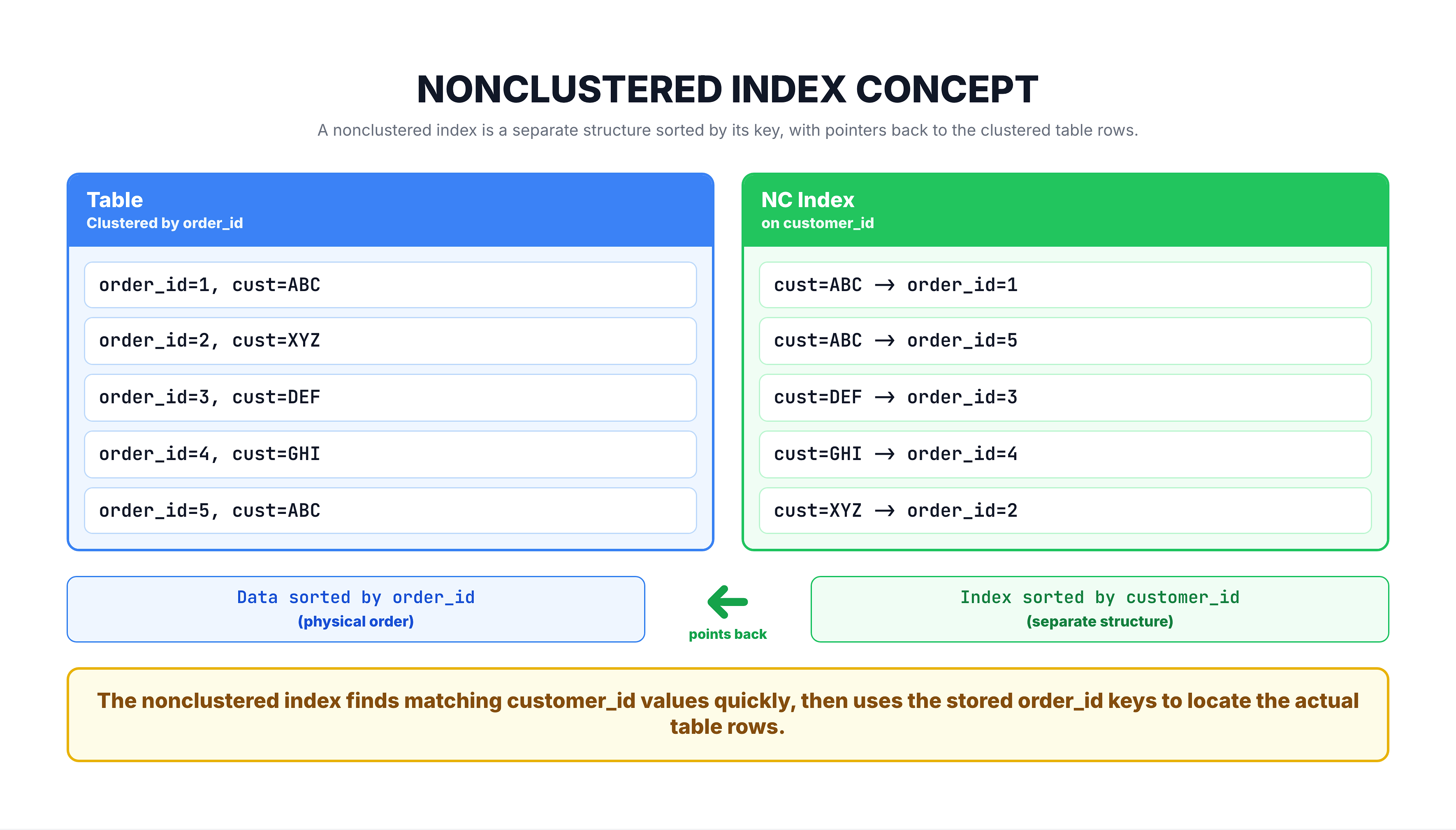
A nonclustered index is a separate data structure that contains a copy of selected columns from the table, sorted in a specific order, along with a pointer back to the full row in the table.
Think of it like the index at the back of a textbook. The index is a separate section from the actual content. It contains keywords sorted alphabetically, and each keyword has page numbers that tell you where to find the full content.
Key Properties
| Property | Detail |
|---|---|
| Separate structure | Lives outside the main table data |
| Multiple allowed | Up to 999 nonclustered indexes per table |
| Contains pointers | Each entry points back to the corresponding row in the table |
| Sorted independently | Sorted by the indexed column(s), regardless of table order |
| Smaller than table | Contains only the indexed columns, not the full row |
Internal Structure
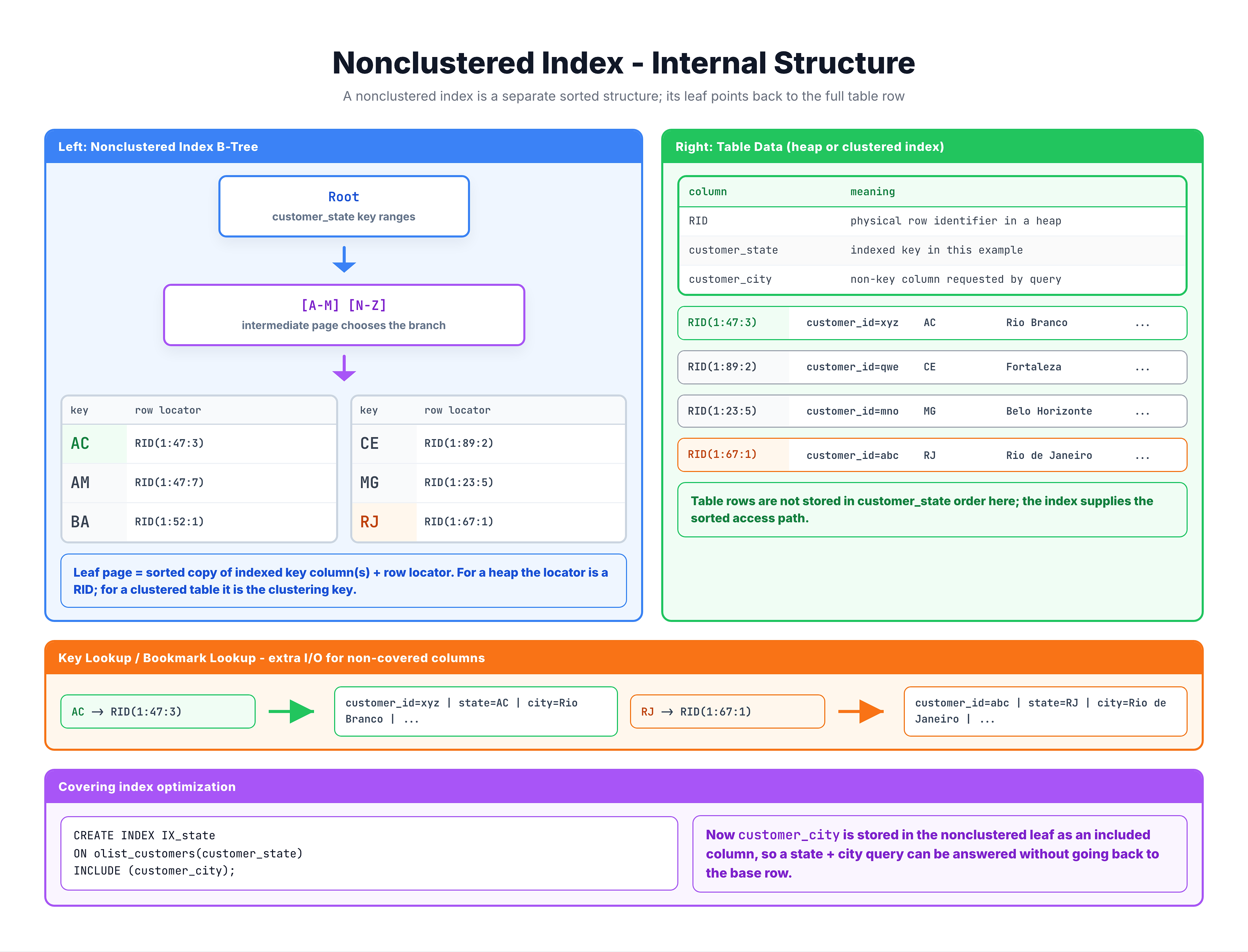
Like a clustered index, a nonclustered index uses a B-tree structure. But there is one critical difference: the leaf level does NOT contain the actual data rows. Instead, it contains the indexed column values plus a row locator that points back to the table.
What is the Row Locator?
The pointer stored in the nonclustered index depends on whether the table has a clustered index:
| Table Type | Row Locator Contains |
|---|---|
| Table with clustered index | The clustered index key value |
| Heap (no clustered index) | A Row Identifier (RID) = File:Page:Slot |
Key Lookup (Bookmark Lookup)
When a query uses a nonclustered index but needs columns that are not in the index, SQL Server must perform an extra step called a Key Lookup (also known as a Bookmark Lookup).
Example Scenario
-- Nonclustered index exists on customer_id
-- But query also needs order_status and order_date

SELECT order_id, customer_id, order_status, order_purchase_timestamp
FROM orders
WHERE customer_id = 'CUST_12345';
How It Works
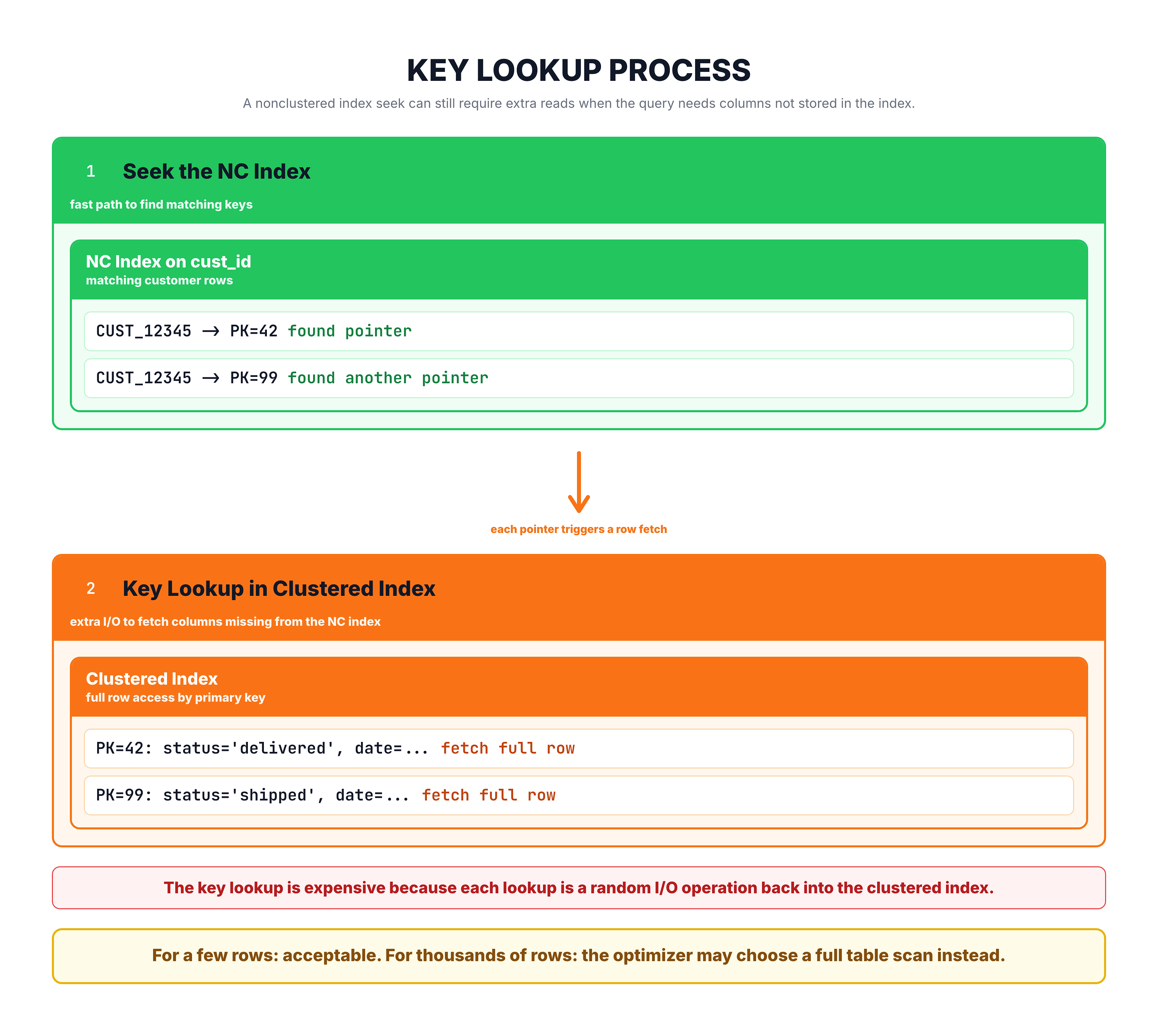
Key lookups are the main performance concern with nonclustered indexes. If too many lookups are needed, SQL Server may decide the nonclustered index is not worth using and fall back to a full scan.
Covering Indexes and INCLUDE Columns
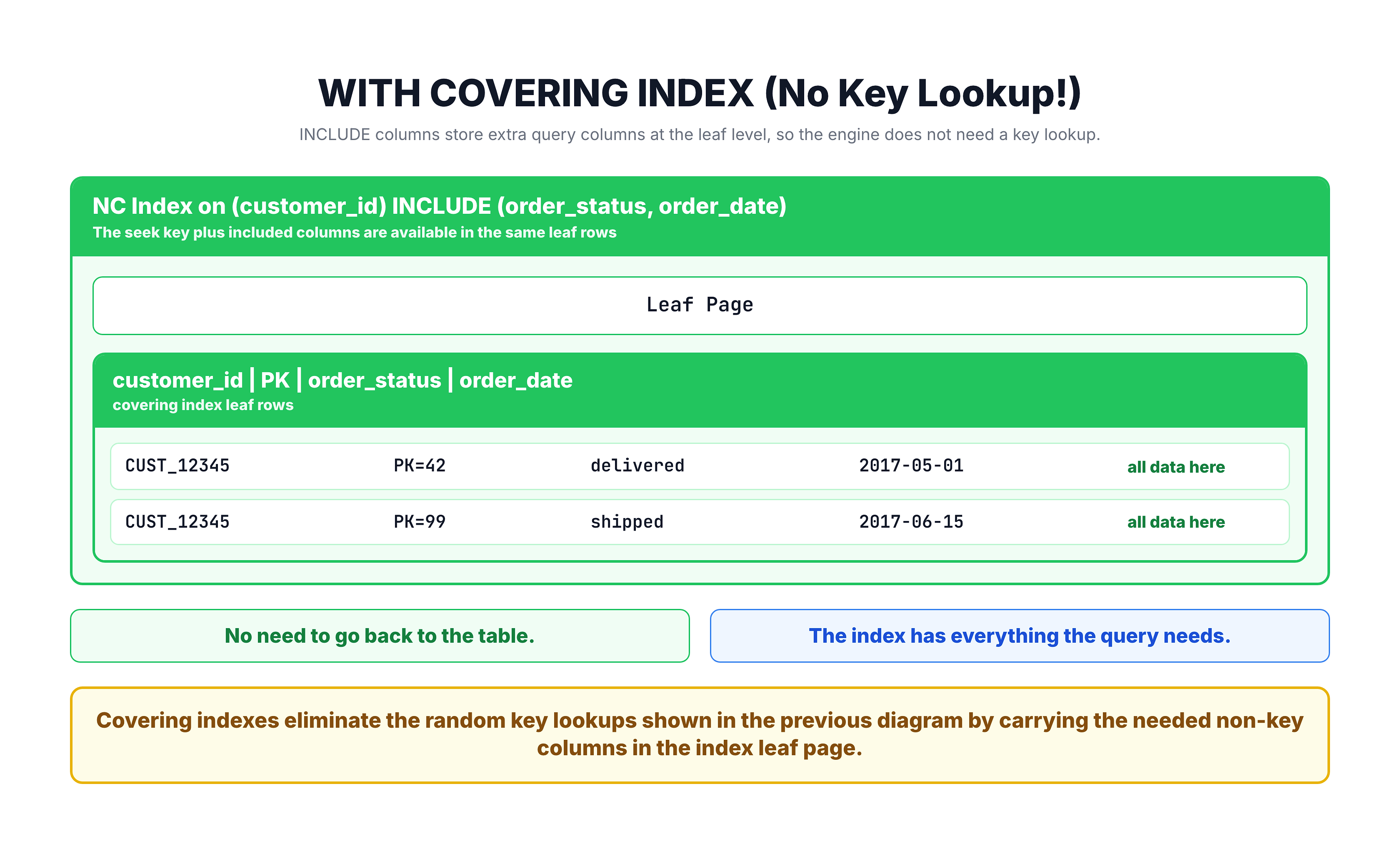
The solution to key lookups is to create a covering index — an index that contains all the columns the query needs, so no key lookup is required.
Using INCLUDE Columns
You can add extra columns to a nonclustered index using the INCLUDE clause. These columns are stored in the leaf level of the index but are NOT part of the sort key.
-- Create a covering index
CREATE NONCLUSTERED INDEX IX_Orders_CustomerID
ON orders (customer_id)
INCLUDE (order_status, order_purchase_timestamp);
Now, the previous query can be satisfied entirely from the index:
Key Columns vs INCLUDE Columns
| Feature | Key Columns | INCLUDE Columns |
|---|---|---|
| Sorted | Yes — used for seeking/scanning | No — just stored in leaf |
| Used in WHERE/JOIN/ORDER BY | Yes | No (not useful for filtering) |
| Purpose | Enable index seeks | Avoid key lookups |
| Stored in | All levels of the B-tree | Leaf level only |
| Size limit | Up to 16 columns, 900 bytes | Up to 1023 columns |
When to Create NonClustered Indexes
Good Candidates for NonClustered Indexes
| Scenario | Example |
|---|---|
| Columns in WHERE clauses | WHERE customer_id = ... |
| Columns in JOIN conditions | ON orders.customer_id = customers.id |
| Columns in ORDER BY | ORDER BY order_date DESC |
| Foreign key columns | Speeds up referential integrity checks |
| Frequently searched columns | Columns users commonly filter on |
Warning Signs of Too Many Indexes
| Warning | Why It Matters |
|---|---|
| Slow INSERT/UPDATE/DELETE | Every write must update all indexes |
| Excessive storage usage | Each index consumes disk space |
| Index not being used | Wasted space and maintenance overhead |
| Overlapping indexes | Redundant indexes serving the same queries |
Summary
Here is what you should remember about nonclustered indexes:
| Concept | Key Takeaway |
|---|---|
| What | A separate B-tree structure that points back to table data |
| Limit | Up to 999 per table |
| Leaf level | Contains index key + row locator (not full data rows) |
| Key Lookup | Extra step needed when query needs columns not in the index |
| Covering Index | An index that contains all columns a query needs |
| INCLUDE | Adds columns to the leaf level without making them sort keys |
| Best for | Point lookups, foreign keys, frequently filtered columns |
Clustered vs NonClustered Quick Reference
| Aspect | Clustered | NonClustered |
|---|---|---|
| Contains data | Yes (leaf = data) | No (leaf = pointer) |
| Per table | 1 | Up to 999 |
| Physical order | Defines it | Independent |
| Lookup needed | Never | Sometimes (key lookup) |
In the next tutorial, we will do a detailed side-by-side comparison of clustered versus nonclustered indexes.