Basics of Stored Procedures
Introduction
Now that you understand what stored procedures are and why they are useful, it is time to get hands-on with the fundamentals. In this tutorial, you will learn the four essential operations for working with stored procedures: creating, executing, modifying, and deleting them.
In this tutorial, you will learn:
- How to create a stored procedure using
CREATE PROCEDURE - How to execute a stored procedure using
EXEC - How to modify an existing procedure using
ALTER PROCEDURE - How to remove a procedure using
DROP PROCEDURE - The complete lifecycle of a stored procedure
CREATE PROCEDURE
Basic Syntax
The CREATE PROCEDURE statement defines a new stored procedure and saves it in the database.
 CREATE PROCEDURE procedure_name
   AS
   BEGIN
       -- SQL statements go here
       SELECT ...
       INSERT ...
       UPDATE ...
   END;
Key Components
| Component | Purpose | Required |
|---|---|---|
CREATE PROCEDURE | Tells the database to create a new procedure | Yes |
procedure_name | A unique name to identify the procedure | Yes |
AS | Separates the procedure header from the body | Yes |
BEGIN...END | Wraps the SQL statements that form the procedure body | Yes |
-- Creating a simple stored procedure
CREATE PROCEDURE GetAllCustomers
AS
BEGIN
    SELECT
        customer_id,
        customer_city,
        customer_state
    FROM customers;
END;
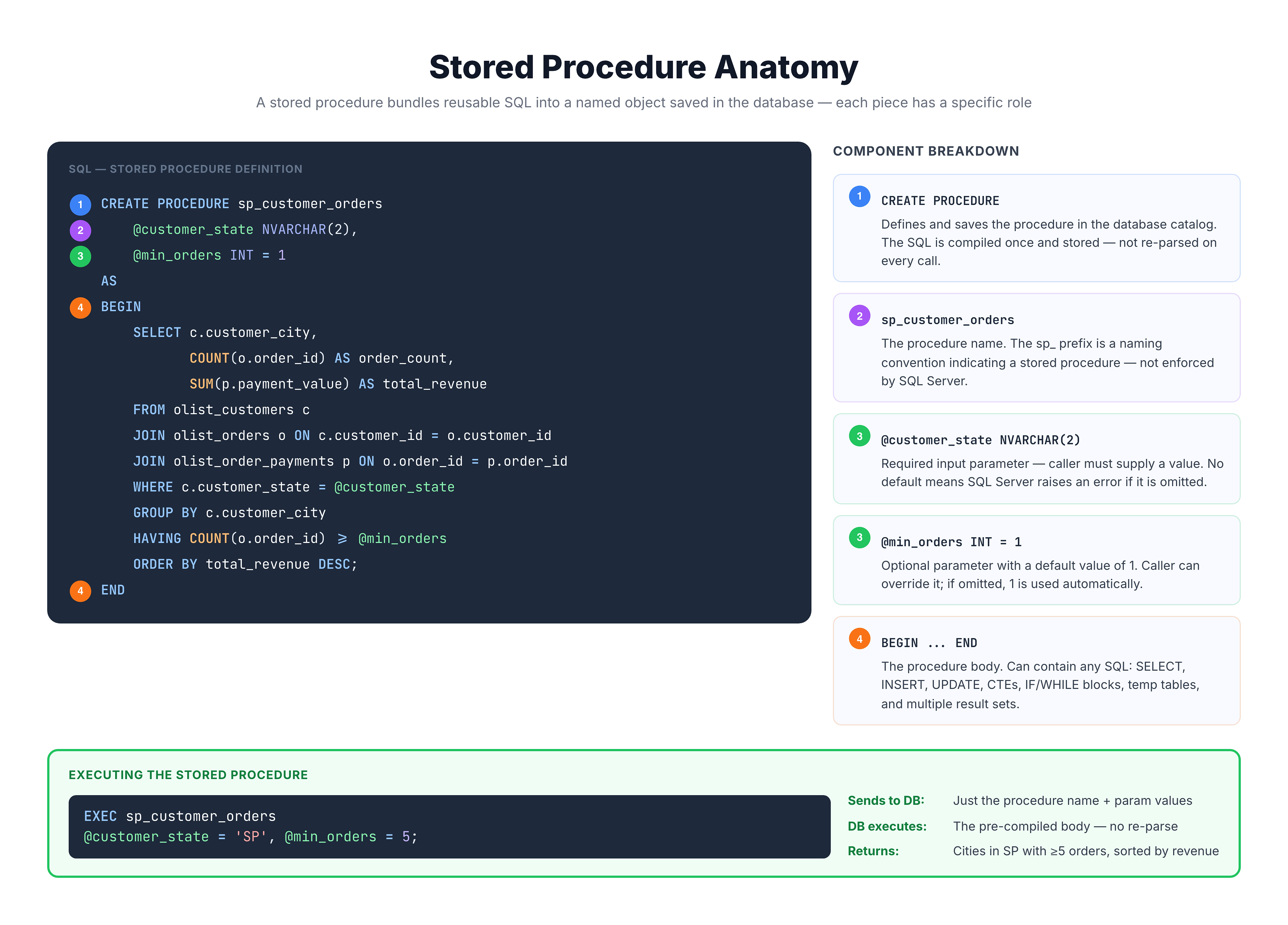
This procedure, named GetAllCustomers, contains a single SELECT statement. Once created, it is saved in the database and ready to be called at any time.
Naming Conventions
Choosing good names for your stored procedures makes your database easier to manage:
| Convention | Example | Description |
|---|---|---|
| Action + Object | GetCustomers | Describes what the procedure does |
| Prefix + Name | usp_GetCustomers | usp_ stands for "user stored procedure" |
| Module + Action | Sales_GetTopProducts | Groups by business module |
Avoid using the sp_ prefix — in SQL Server, this prefix is reserved for system stored procedures and using it can cause performance issues because the server checks the master database first.
Executing a Stored Procedure
The EXEC Statement
Once a stored procedure is created, you call it using the EXEC (or EXECUTE) keyword.
Syntax
EXEC procedure_name;
or the full form:
EXECUTE procedure_name;
Both EXEC and EXECUTE do the same thing — EXEC is just the shorthand version.
-- Execute the stored procedure we created
EXEC GetAllCustomers;
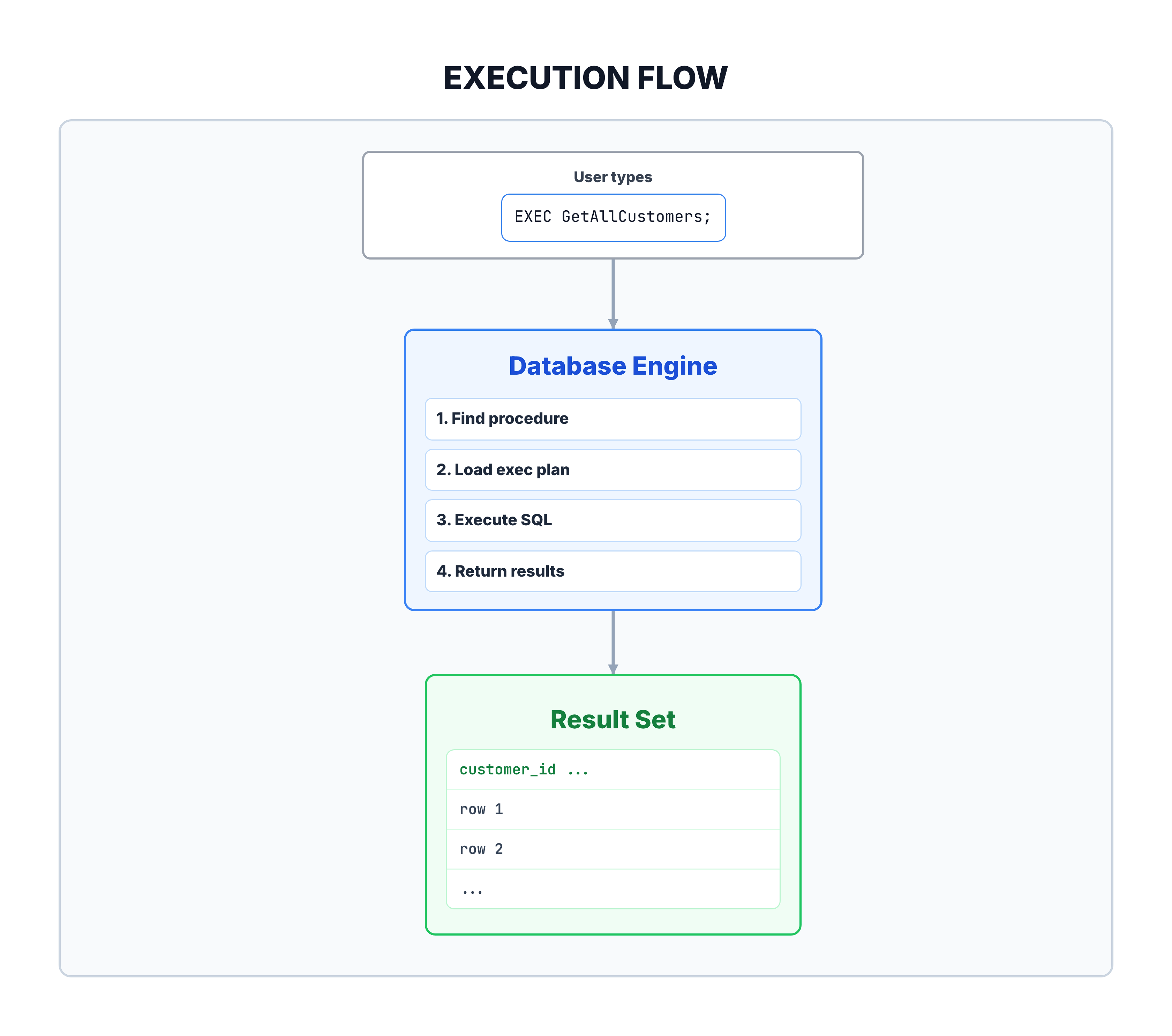
When you execute this command, the database server:
- Looks up the procedure named
GetAllCustomers - Finds its pre-compiled execution plan
- Runs the SQL statements inside it
- Returns the results to the caller
Execution Flow
A Practical Example
Let's walk through a complete example of creating and using a stored procedure.
Scenario
You work for an e-commerce company and frequently need to pull a summary of orders by status. Instead of writing the same query every time, you create a stored procedure.
-- Step 1: Create the procedure
CREATE PROCEDURE GetOrderStatusSummary
AS
BEGIN
    SELECT
        order_status,
        COUNT(*) AS total_orders
    FROM orders
    GROUP BY order_status
    ORDER BY total_orders DESC;
END;
-- Step 2: Execute the procedure
EXEC GetOrderStatusSummary;Expected Output:
| order_status | total_orders |
|---|---|
| delivered | 96478 |
| shipped | 1107 |
| canceled | 625 |
| unavailable | 609 |
| processing | 301 |
Now, anytime someone needs this report, they just run EXEC GetOrderStatusSummary; — no need to remember the full query.
ALTER PROCEDURE
Modifying an Existing Procedure
Requirements change over time. The ALTER PROCEDURE statement allows you to modify an existing stored procedure without dropping and recreating it.
Syntax
ALTER PROCEDURE procedure_name
AS
BEGIN
    -- Updated SQL statements
END;
Why ALTER Instead of DROP and CREATE?
| Approach | Preserves Permissions | Preserves Dependencies | Risk |
|---|---|---|---|
ALTER PROCEDURE | Yes | Yes | Low |
DROP then CREATE | No (must re-grant) | May break references | Higher |
-- Original procedure returned all statuses
-- Let's modify it to only show statuses with more than 100 orders

ALTER PROCEDURE GetOrderStatusSummary
AS
BEGIN
    SELECT
        order_status,
        COUNT(*) AS total_orders
    FROM orders
    GROUP BY order_status
    HAVING COUNT(*) > 100
    ORDER BY total_orders DESC;
END;
After running this ALTER statement, the procedure is updated. The next time anyone calls EXEC GetOrderStatusSummary;, they will get the updated version that filters out statuses with fewer than 100 orders.
DROP PROCEDURE
Removing a Stored Procedure
When a stored procedure is no longer needed, you can permanently remove it from the database using DROP PROCEDURE.
Syntax
DROP PROCEDURE procedure_name;
Safe Drop with IF EXISTS
To avoid errors when the procedure might not exist:
DROP PROCEDURE IF EXISTS procedure_name;
-- Remove the procedure permanently
DROP PROCEDURE IF EXISTS GetOrderStatusSummary;
Warning
⚠️ Permanent Action: Dropping a procedure deletes it permanently. There is no undo. Make sure you have a backup or are certain you no longer need the procedure before dropping it.
Before Dropping, Check Dependencies
Before removing a procedure, consider:
- Are any applications calling this procedure?
- Are other procedures calling this one?
- Are any scheduled jobs using it?
- Is it referenced in any documentation?
Stored Procedure Lifecycle
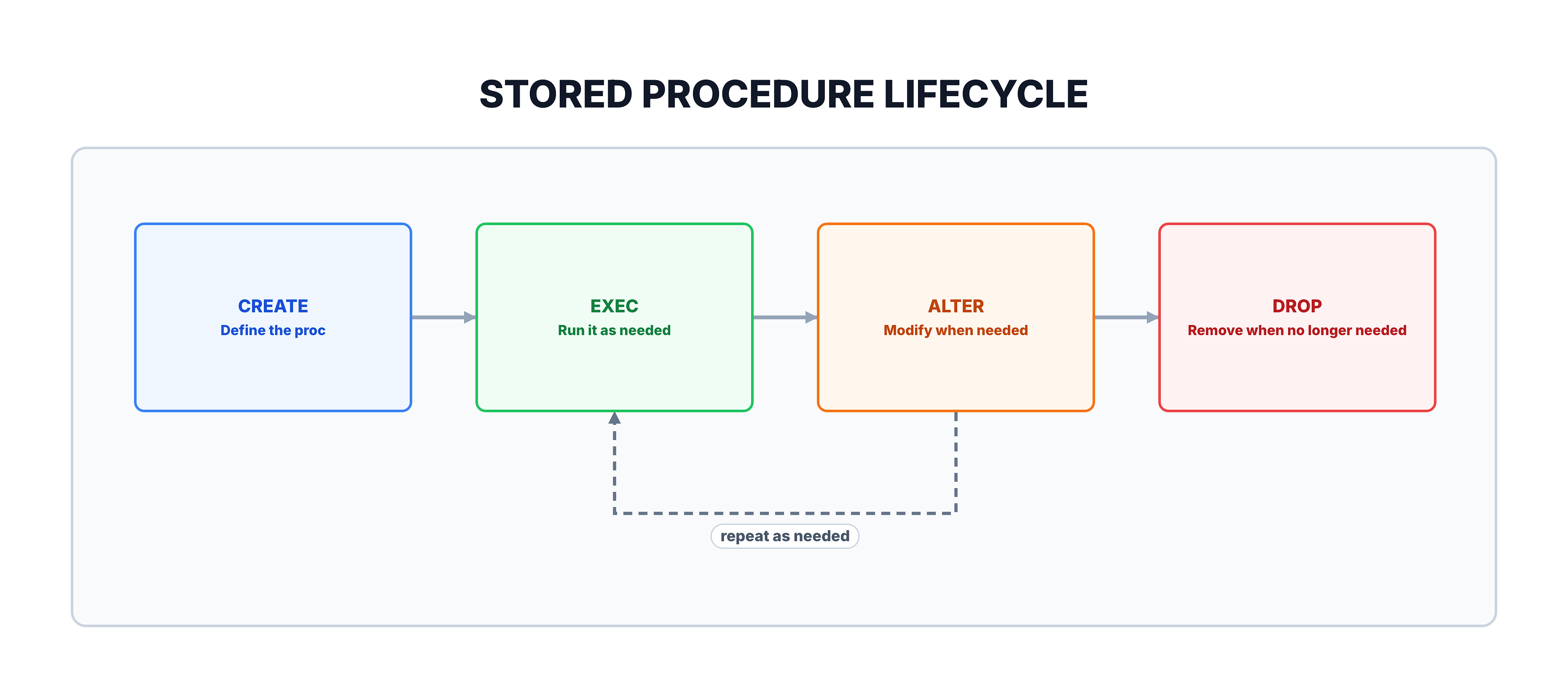
The Complete Lifecycle
Quick Reference
| Operation | Statement | Purpose |
|---|---|---|
| Create | CREATE PROCEDURE name AS BEGIN ... END; | Define a new procedure |
| Execute | EXEC name; | Run the procedure |
| Modify | ALTER PROCEDURE name AS BEGIN ... END; | Update the procedure |
| Delete | DROP PROCEDURE name; | Remove the procedure |
MySQL Syntax Comparison
While we use SQL Server syntax as our primary examples, here is how the same operations look in MySQL for reference:
-- MySQL: Creating a stored procedure
DELIMITER //

CREATE PROCEDURE GetAllCustomers()
BEGIN
    SELECT
        customer_id,
        customer_city,
        customer_state
    FROM customers;
END //

DELIMITER ;
Key Differences from SQL Server
| Feature | SQL Server | MySQL |
|---|---|---|
| Parentheses after name | Optional (only with params) | Always required () |
| Body wrapper | AS BEGIN...END | BEGIN...END |
| Delimiter handling | Not needed | Requires DELIMITER change |
| Execute | EXEC proc_name | CALL proc_name() |
MySQL uses CALL instead of EXEC:
-- MySQL execution
CALL GetAllCustomers();
Summary
Key Takeaways
| Concept | What You Learned |
|---|---|
| CREATE PROCEDURE | Defines and saves a new procedure in the database |
| EXEC / EXECUTE | Runs a stored procedure by name |
| ALTER PROCEDURE | Modifies an existing procedure while preserving permissions |
| DROP PROCEDURE | Permanently removes a procedure from the database |
| Naming | Use meaningful names; avoid the sp_ prefix in SQL Server |
What is Next?
In the next tutorial, we will learn about parameters — how to pass input values into stored procedures and receive output values back, making your procedures dynamic and flexible.