Heap Structure
Introduction
Before you can fully appreciate what indexes do, you need to understand what happens when a table has no index at all. In SQL Server, a table without a clustered index is called a heap. Understanding heaps gives you the baseline against which all index improvements are measured.
In this tutorial, you will learn:
- What a heap is and how it stores data
- How SQL Server reads data from a heap
- Why heaps can be slow for certain operations
- When a heap structure might actually be acceptable
- How to identify if a table is a heap
What is a Heap?
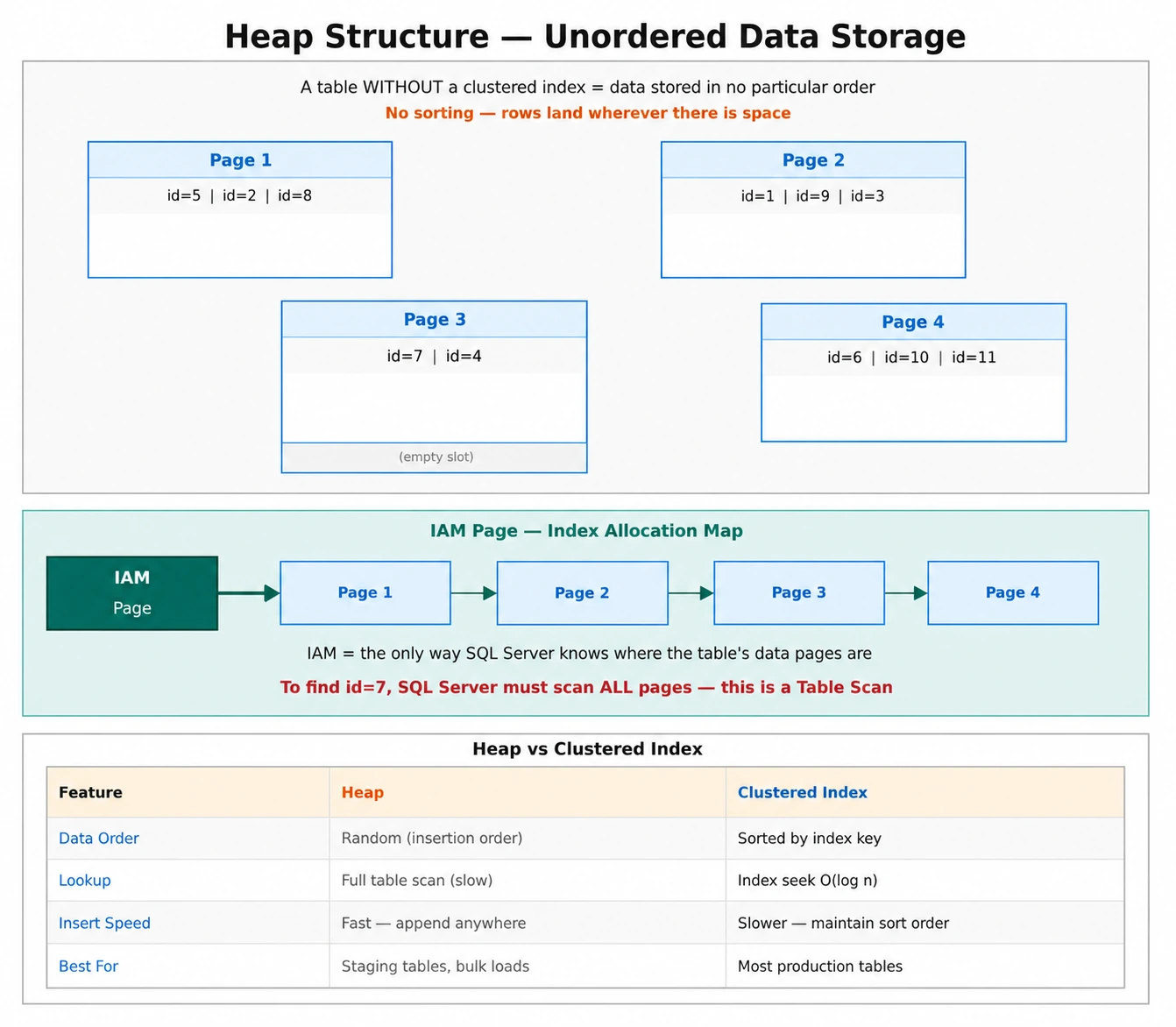
A heap is a table that has no clustered index. The word "heap" literally means "a pile" — and that is exactly how data is stored: in no particular order, just piled up as it arrives.
When you insert rows into a heap, SQL Server places them wherever there is available space. There is no sorting, no organizing, no structure to the data layout.
Key Characteristics of a Heap
| Characteristic | Description |
|---|---|
| No order | Rows are not stored in any specific sequence |
| No clustered index | The defining trait — no clustered index exists |
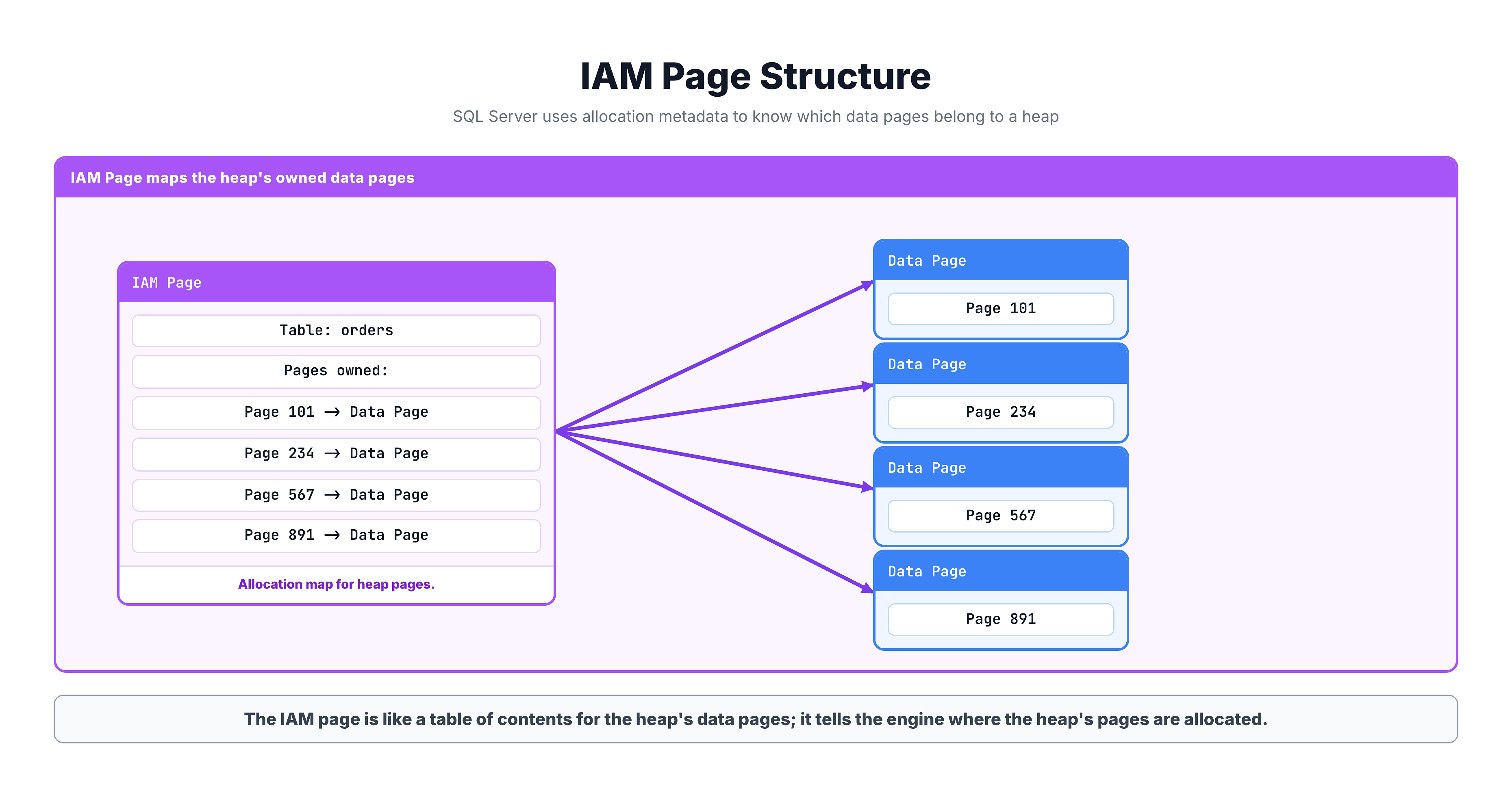
| IAM pages | SQL Server uses Index Allocation Map pages to track which pages belong to the table |
| Insert anywhere | New rows go wherever there is free space |
| No automatic reorganization | Data stays where it was first placed |
How SQL Server Reads from a Heap
When you query a heap, SQL Server must perform a table scan — reading every single data page from beginning to end.
Table Scan Process
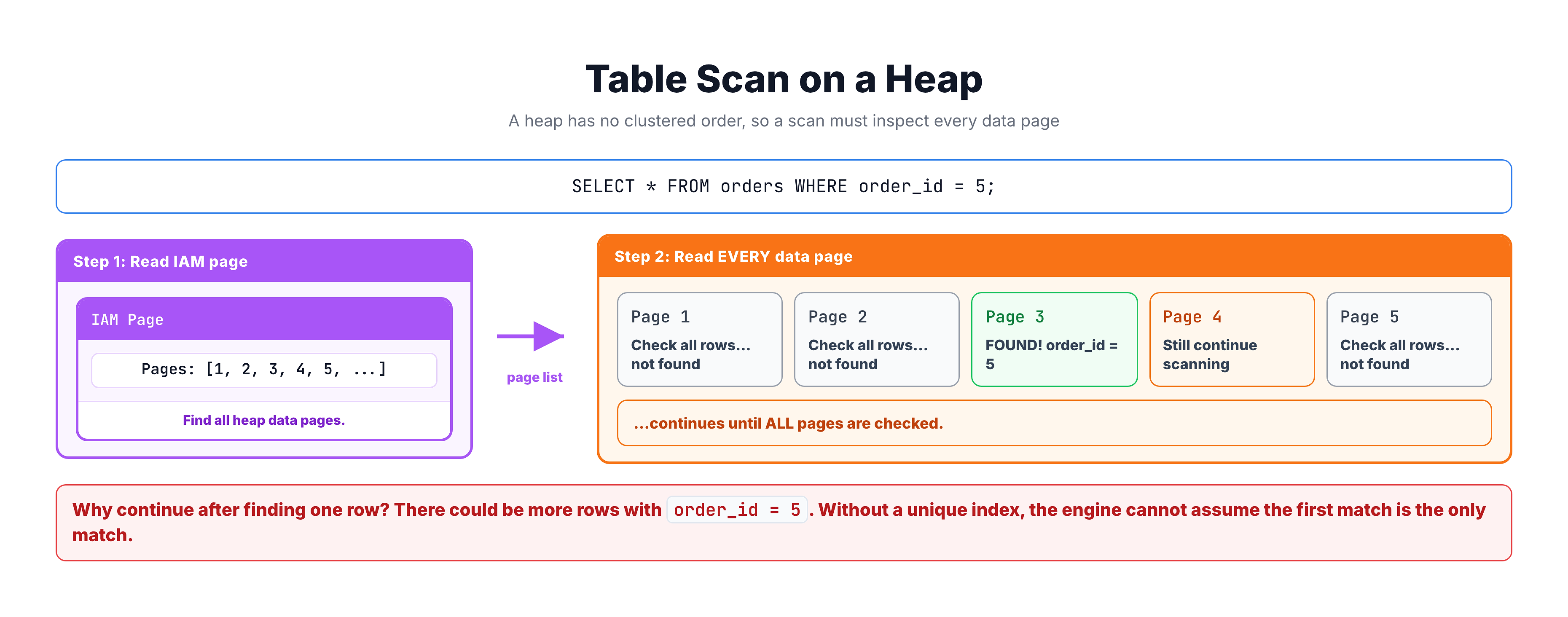
Even if your query only needs one row, the database engine may need to read the entire table because it has no way of knowing whether more matching rows exist elsewhere.
IAM Pages: How Heaps Are Tracked
Since heap data has no order, SQL Server needs a way to know which pages belong to a table. It uses Index Allocation Map (IAM) pages for this.
How Data Pages Work
Each data page in SQL Server is 8 KB in size. A single page can hold multiple rows depending on the row size. Pages are the fundamental unit of I/O — SQL Server always reads at least one full page at a time.
| Component | Size | Purpose |
|---|---|---|
| Page Header | 96 bytes | Metadata about the page |
| Data Rows | ~8,060 bytes | Actual row data |
| Row Offset Array | Variable | Pointers to rows within the page |
Performance Implications of Heaps
Heaps have significant performance implications that you should be aware of:
Problems with Heaps
| Problem | Explanation |
|---|---|
| Full table scans | Every query that searches by a non-indexed column must read all pages |
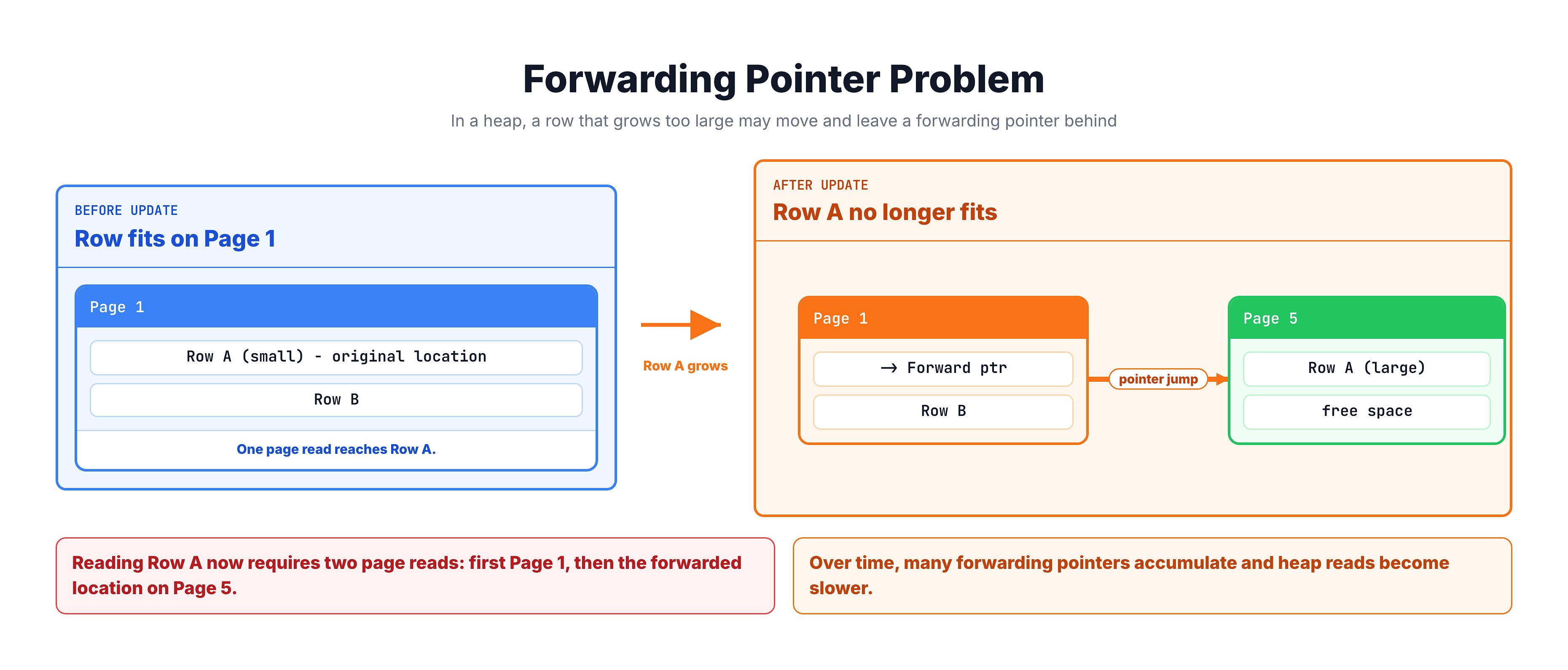
| Forwarding pointers | When a row is updated and grows larger, it may be moved to a new page, leaving behind a pointer that adds extra I/O |
| No sorted access | Range queries (BETWEEN, >, <) cannot benefit from data ordering |
| Space fragmentation | Deleted rows leave gaps that may not be efficiently reused |
Forwarding Pointers Explained
This is a unique problem for heaps that does not affect tables with clustered indexes:
When Heaps Are Acceptable
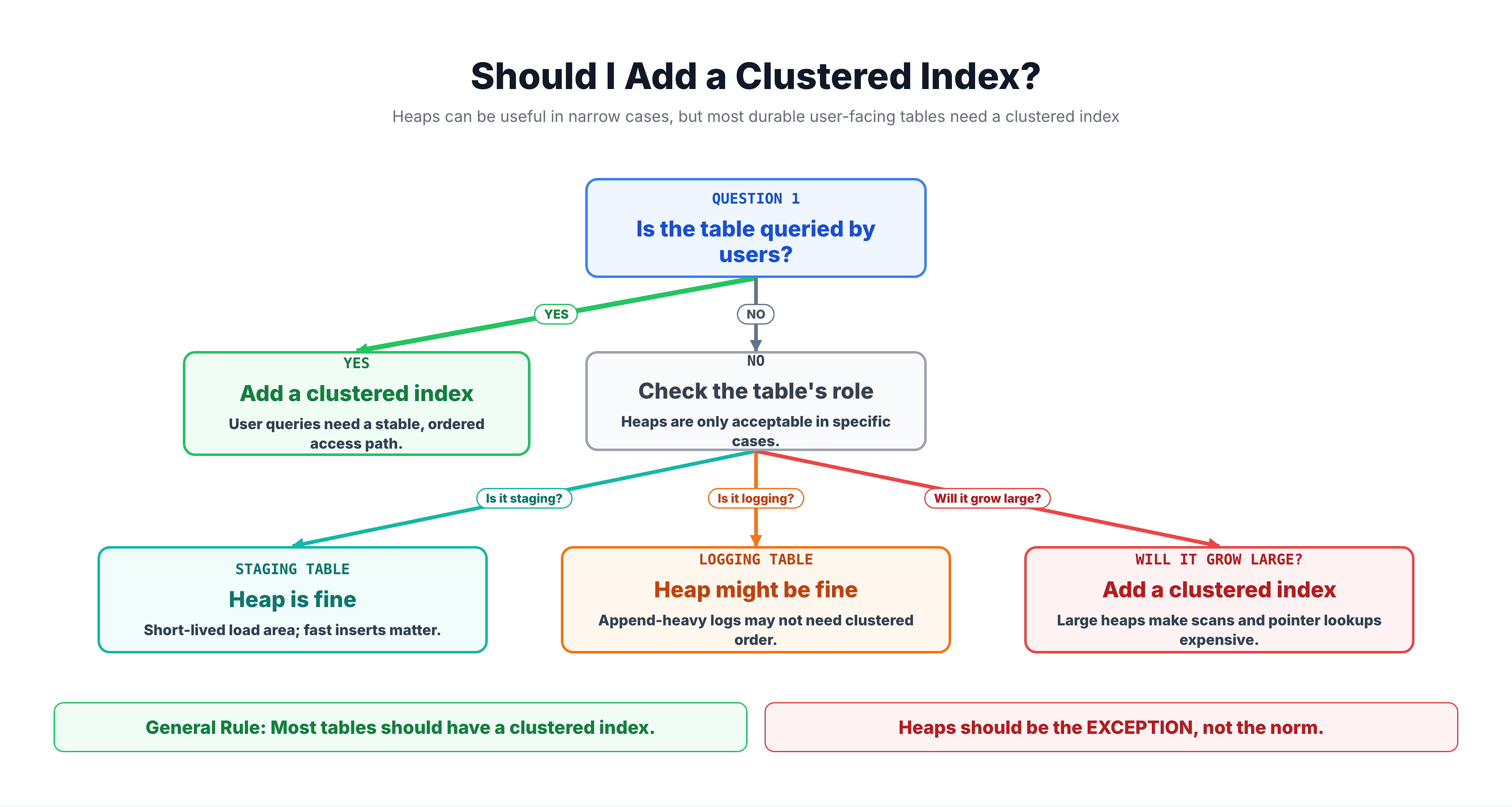
Despite their limitations, heaps are not always bad. There are situations where a heap is acceptable or even preferred:
| Scenario | Why Heap Works |
|---|---|
| Staging/loading tables | Data is bulk loaded and then moved elsewhere; no queries run against it |
| Very small tables | A few hundred rows — full scan is fast enough |
| Insert-heavy, rarely queried | Logging tables where data is written but seldom read |
| Temporary data | Short-lived data that will be dropped soon |
Heap vs Clustered Index Decision
How to Check if a Table is a Heap
You can query the system catalog to find out which tables in your database are heaps:
-- Find all heap tables in the current database
SELECT
    t.name AS table_name,
    p.rows AS row_count
FROM sys.tables t
INNER JOIN sys.indexes i ON t.object_id = i.object_id
INNER JOIN sys.partitions p ON i.object_id = p.object_id AND i.index_id = p.index_id
WHERE i.type = 0  -- type 0 = HEAP
ORDER BY p.rows DESC;
In the sys.indexes system view, the type column tells you the index type:
| type Value | Meaning |
|---|---|
| 0 | Heap (no clustered index) |
| 1 | Clustered index |
| 2 | Nonclustered index |
| 5 | Clustered columnstore index |
| 6 | Nonclustered columnstore index |
Summary
Here is what you should remember about heap structures:
| Concept | Key Takeaway |
|---|---|
| What is a heap | A table without a clustered index |
| How data is stored | No particular order — rows go wherever there is space |
| How data is read | Full table scan — every page must be checked |
| IAM pages | Track which pages belong to the heap |
| Forwarding pointers | Caused by row updates that outgrow their page — add extra I/O |
| When acceptable | Staging tables, small tables, insert-heavy logs |
| Best practice | Most tables should have a clustered index, not be a heap |
Now that you understand what happens without any index (a heap), the next tutorial will show you how a clustered index transforms data storage and dramatically improves query performance.