CTAS Syntax
Editorial
Introduction
Now that you understand why and when to use CTAS, let's master the syntax. CREATE TABLE AS SELECT is straightforward but has several variations and options you should know.
In this tutorial, you will learn:
- Basic CTAS syntax structure
- How column names and types are determined
- Variations across different database systems
- Best practices for writing CTAS statements
Basic Syntax
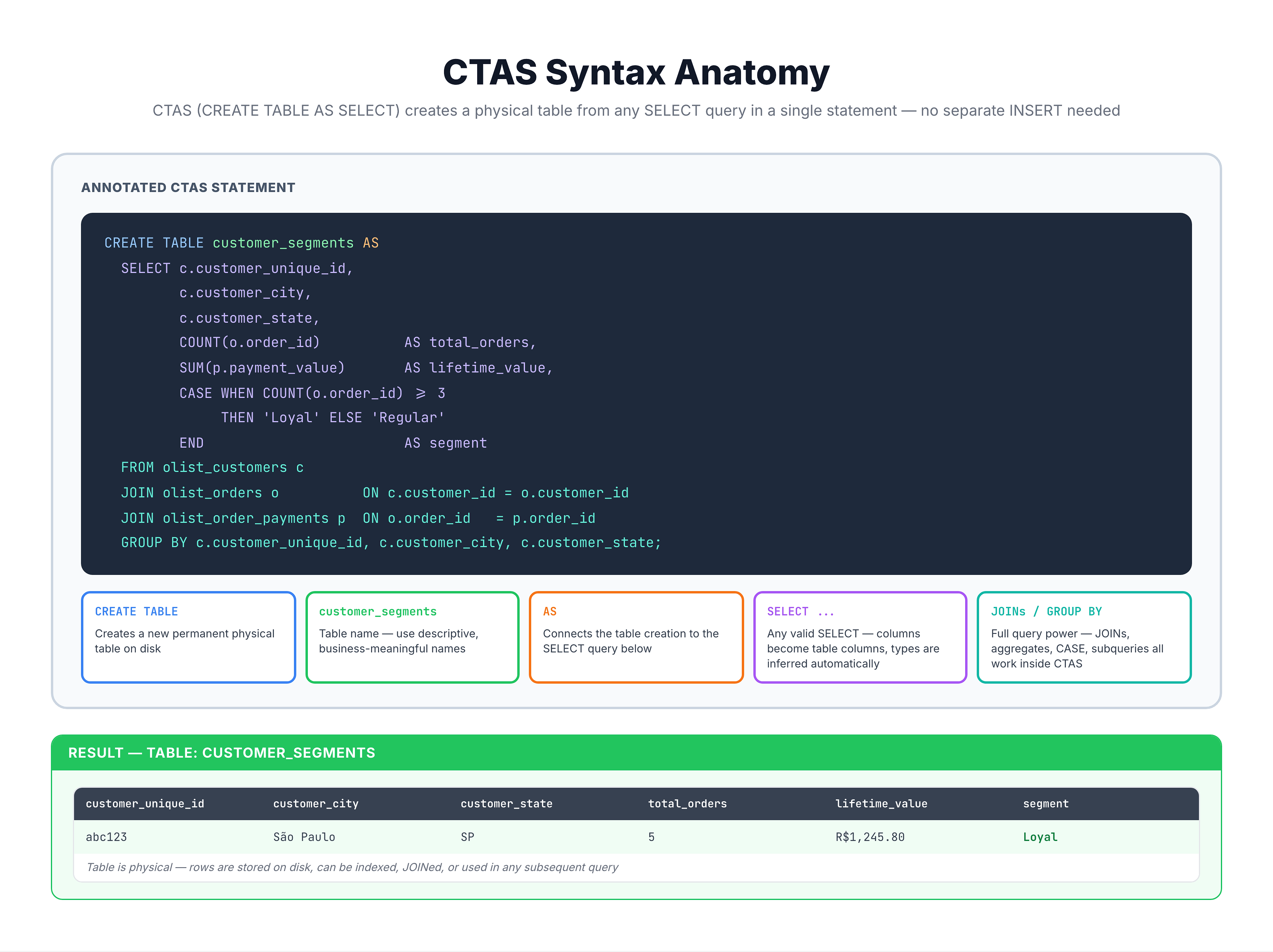
The CTAS Statement Structure
Simple Example
-- Create a table with customer counts by state
CREATE TABLE state_customer_count AS
SELECT
customer_state,
COUNT(*) AS customer_count
FROM olist_customers_dataset
GROUP BY customer_state;
What Happens
- Database executes the SELECT query
- Creates a new table with inferred schema
- Inserts all result rows into the new table
- Returns success (or error if table exists)
Column Names and Types
How Schema is Inferred
CTAS automatically determines column names and data types from your SELECT:
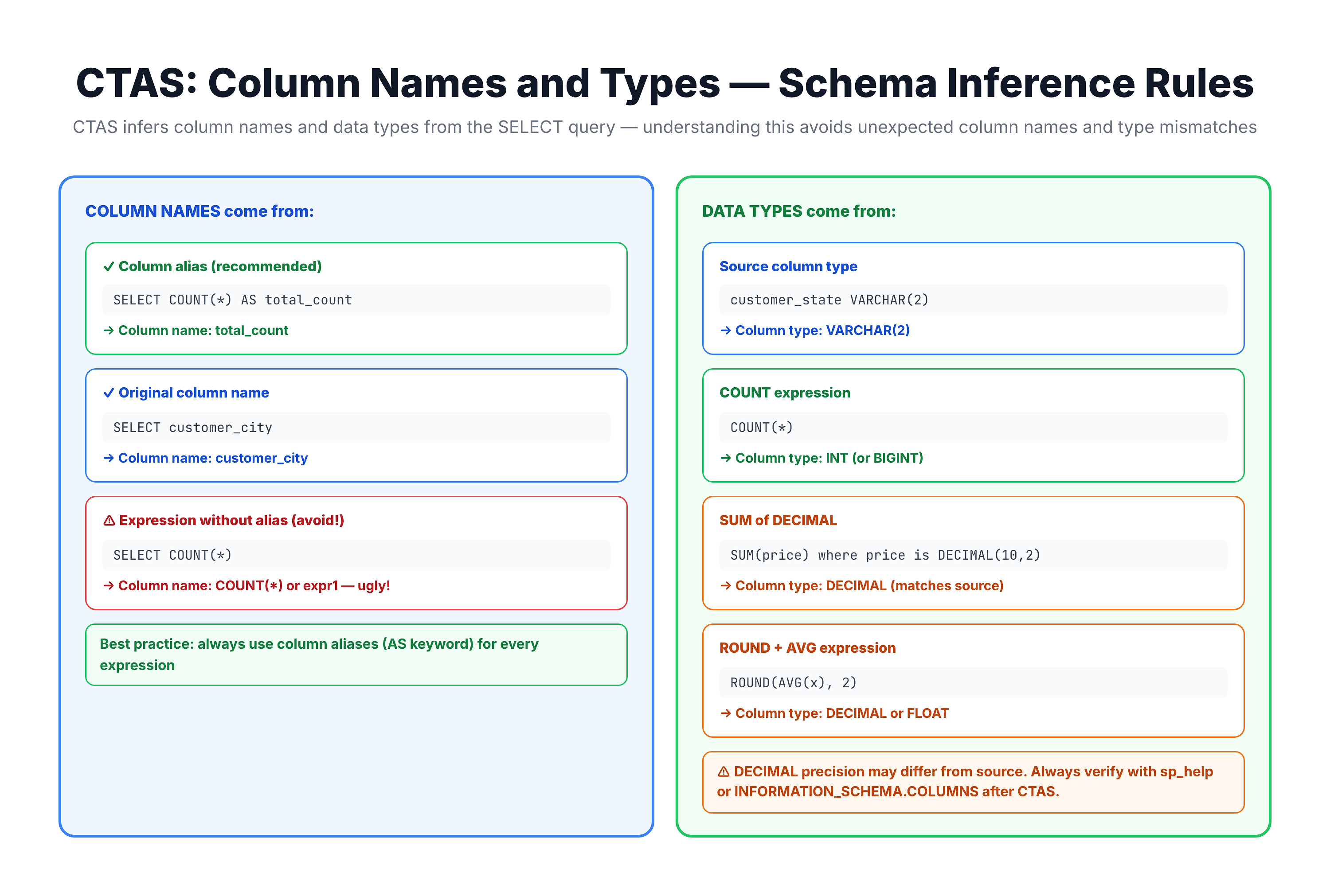
Best Practice: Always Use Aliases
-- ❌ Bad: Expression without alias
CREATE TABLE summary AS
SELECT customer_state, COUNT(*), SUM(order_value)
FROM orders
GROUP BY customer_state;
-- Results in columns: customer_state, COUNT(*), SUM(order_value) - ugly!

-- ✅ Good: Clear column aliases
CREATE TABLE summary AS
SELECT
    customer_state,
    COUNT(*) AS order_count,
    SUM(order_value) AS total_revenue
FROM orders
GROUP BY customer_state;
-- Results in: customer_state, order_count, total_revenue - clean!
Syntax Variations
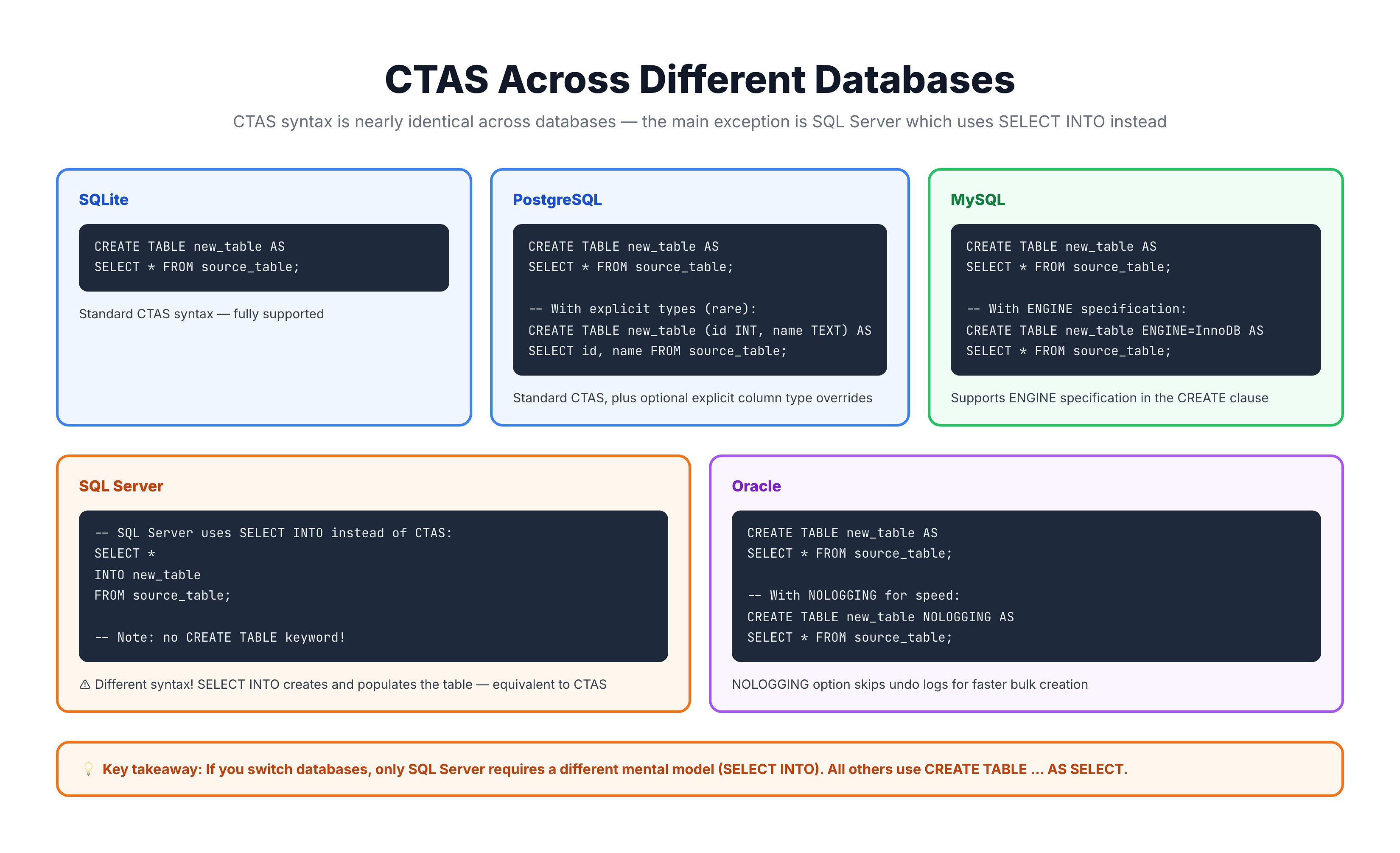
Database-Specific Variations
Different databases have slightly different CTAS syntax:
Handling Existing Tables
-- Standard behavior: Error if table exists
CREATE TABLE summary AS SELECT ...;
-- ERROR: Table 'summary' already exists

-- PostgreSQL/SQLite: Check existence first
DROP TABLE IF EXISTS summary;
CREATE TABLE summary AS SELECT ...;

-- Some databases support IF NOT EXISTS
CREATE TABLE IF NOT EXISTS summary AS SELECT ...;
-- Only creates if table doesn't exist (data NOT refreshed!)
Practical Examples
Let's see various CTAS patterns with our e-commerce database:
-- Pattern 1: Simple aggregation
-- This would create a table of customer counts per state

SELECT
    customer_state,
    COUNT(*) AS customer_count,
    COUNT(DISTINCT customer_city) AS city_count
FROM olist_customers_dataset
GROUP BY customer_state
ORDER BY customer_count DESC
LIMIT 10;

-- As CTAS:
-- CREATE TABLE state_summary AS
-- SELECT customer_state, COUNT(*) AS customer_count, ...
-- GROUP BY customer_state;
-- Pattern 2: Complex JOIN with aggregation
-- Perfect CTAS candidate for reporting tables
SELECT
c.customer_state,
strftime('%Y-%m', o.order_purchase_timestamp) AS year_month,
COUNT(DISTINCT o.order_id) AS orders,
COUNT(DISTINCT c.customer_unique_id) AS unique_customers,
ROUND(SUM(p.payment_value), 2) AS revenue,
ROUND(AVG(p.payment_value), 2) AS avg_payment
FROM olist_orders_dataset o
JOIN olist_customers_dataset c ON o.customer_id = c.customer_id
JOIN olist_order_payments_dataset p ON o.order_id = p.order_id
WHERE o.order_status = 'delivered'
GROUP BY c.customer_state, strftime('%Y-%m', o.order_purchase_timestamp)
HAVING COUNT(DISTINCT o.order_id) >= 5
ORDER BY year_month DESC, revenue DESC
LIMIT 20;
-- As CTAS:
-- CREATE TABLE monthly_state_revenue AS
-- SELECT ...-- Pattern 3: Filtering rows (subset table)
-- Create a table of only São Paulo customers
SELECT
customer_id,
customer_unique_id,
customer_city,
customer_state,
customer_zip_code_prefix
FROM olist_customers_dataset
WHERE customer_state = 'SP'
LIMIT 15;
-- As CTAS:
-- CREATE TABLE sp_customers AS
-- SELECT * FROM olist_customers_dataset
-- WHERE customer_state = 'SP';-- Pattern 4: Denormalized reporting table
-- Combine multiple tables for easy querying
SELECT
o.order_id,
o.order_status,
o.order_purchase_timestamp,
c.customer_city,
c.customer_state,
oi.product_id,
ROUND(oi.price, 2) AS item_price,
ROUND(oi.freight_value, 2) AS freight,
COALESCE(t.product_category_name_english, 'Unknown') AS category
FROM olist_orders_dataset o
JOIN olist_customers_dataset c ON o.customer_id = c.customer_id
JOIN olist_order_items_dataset oi ON o.order_id = oi.order_id
JOIN olist_products_dataset p ON oi.product_id = p.product_id
LEFT JOIN product_category_name_translation t
ON p.product_category_name = t.product_category_name
WHERE o.order_status = 'delivered'
LIMIT 15;
-- As CTAS:
-- CREATE TABLE order_details_denormalized AS
-- SELECT ... (all the joins pre-computed)Best Practices
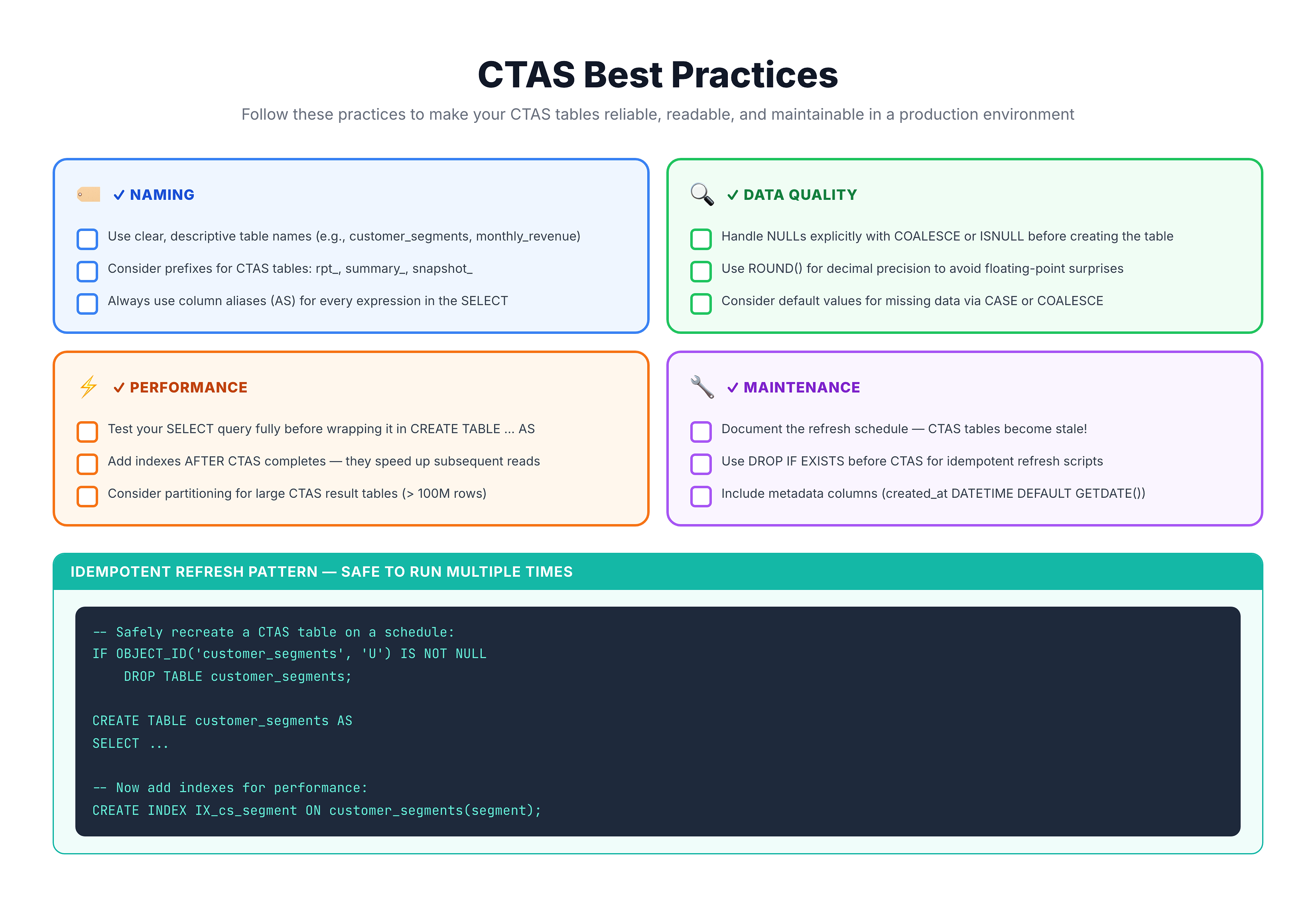
CTAS Best Practices Checklist
Common Patterns
-- Pattern: Idempotent CTAS (safe to run multiple times)
DROP TABLE IF EXISTS my_summary;
CREATE TABLE my_summary AS
SELECT ... ;

-- Pattern: Include metadata
CREATE TABLE my_summary AS
SELECT
    column1,
    column2,
    CURRENT_TIMESTAMP AS created_at  -- Know when data was generated
FROM source_table;

-- Pattern: Explicit NULL handling
CREATE TABLE my_summary AS
SELECT
    id,
    COALESCE(name, 'Unknown') AS name,
    COALESCE(amount, 0) AS amount
FROM source_table;
Summary
Key Takeaways
-
Basic syntax:
CREATE TABLE name AS SELECT ... -
Column names come from SELECT aliases (always use them!)
-
Data types are inferred from source columns and expressions
-
SQL Server uses
SELECT INTOinstead ofCREATE TABLE AS -
Best practices:
- Always use column aliases
- Handle NULLs explicitly
- Use DROP IF EXISTS for idempotency
- Test SELECT before CREATE
Quick Reference
-- Standard CTAS
CREATE TABLE new_table AS
SELECT col1, col2, COUNT(*) AS cnt
FROM source
GROUP BY col1, col2;`

`-- Idempotent CTAS
DROP TABLE IF EXISTS new_table;
CREATE TABLE new_table AS
SELECT ...;`

`-- SQL Server equivalent
SELECT col1, col2, COUNT(*) AS cnt
INTO new_table
FROM source
GROUP BY col1, col2;
What's Next?
Now that you know the syntax, let's explore a key use case: Optimize Performance with CTAS.