What are Triggers
Introduction
Imagine you want the database to automatically log every time someone deletes a customer record, or automatically update an inventory count whenever a new order is placed. You could add this logic to every application that touches the database — but that is error-prone and hard to maintain. What if you could tell the database itself to perform these actions automatically?
That is exactly what triggers do.
In this tutorial, you will learn:
- What triggers are and how they differ from stored procedures
- The different types of triggers
- How triggers fire in response to data changes
- The special
INSERTEDandDELETEDtables - How to create, modify, and remove triggers
- When triggers are appropriate and when to avoid them
What is a Trigger?
Definition
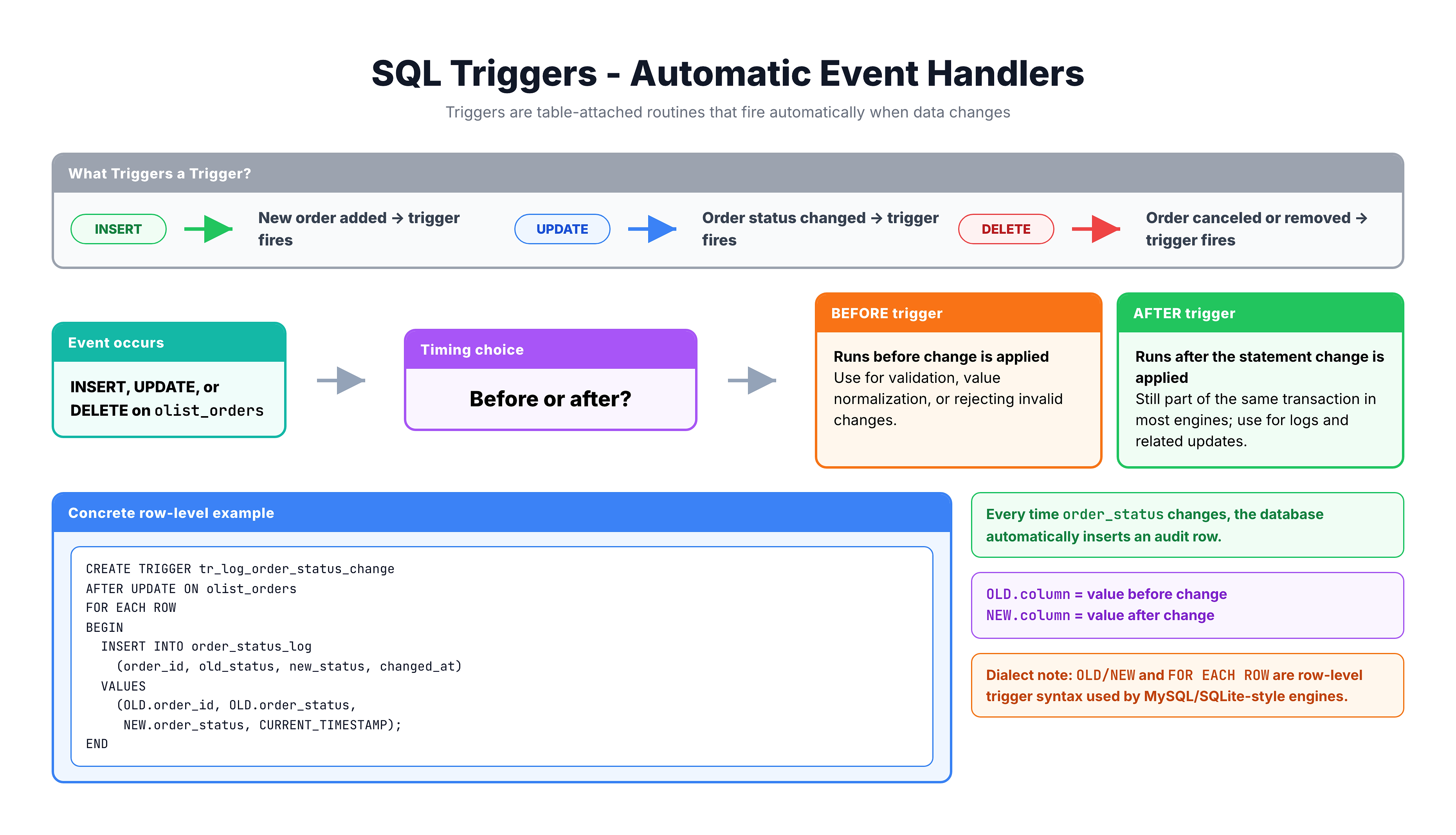
A trigger is a special type of stored procedure that runs automatically when a specific event occurs on a table. You do not call a trigger manually — it fires on its own in response to INSERT, UPDATE, or DELETE operations.
Simple Analogy
Think of a trigger like a motion-sensor light. You do not flip a switch — the light turns on automatically when it detects movement. Similarly, a trigger activates automatically when it detects a data change on its table.
Triggers vs Stored Procedures
Key Differences
| Feature | Stored Procedure | Trigger |
|---|---|---|
| Invocation | Manually called with EXEC | Automatically fired by events |
| Parameters | Can accept input/output params | No parameters |
| Attached to | Database (standalone) | A specific table |
| When it runs | When you call it | On INSERT, UPDATE, or DELETE |
| Can be called directly | Yes | No |
| Return values | Yes (result sets, output params) | No |
| Transaction context | Creates its own | Runs within the triggering statement's transaction |
Important: Transaction Behavior
A trigger runs inside the same transaction as the statement that caused it. This means:
- If the trigger fails, the original statement is rolled back
- If the trigger succeeds but the transaction is rolled back, the trigger's changes are also rolled back
This is a very powerful feature — and also a common source of unexpected behavior.
Types of Triggers
DML Triggers (Most Common)
DML triggers fire in response to Data Manipulation Language operations on a table.
| Trigger Event | Fires When |
|---|---|
INSERT | A new row is added to the table |
UPDATE | An existing row is modified |
DELETE | A row is removed from the table |
Timing: AFTER vs INSTEAD OF
| Type | When It Runs | Use Case |
|---|---|---|
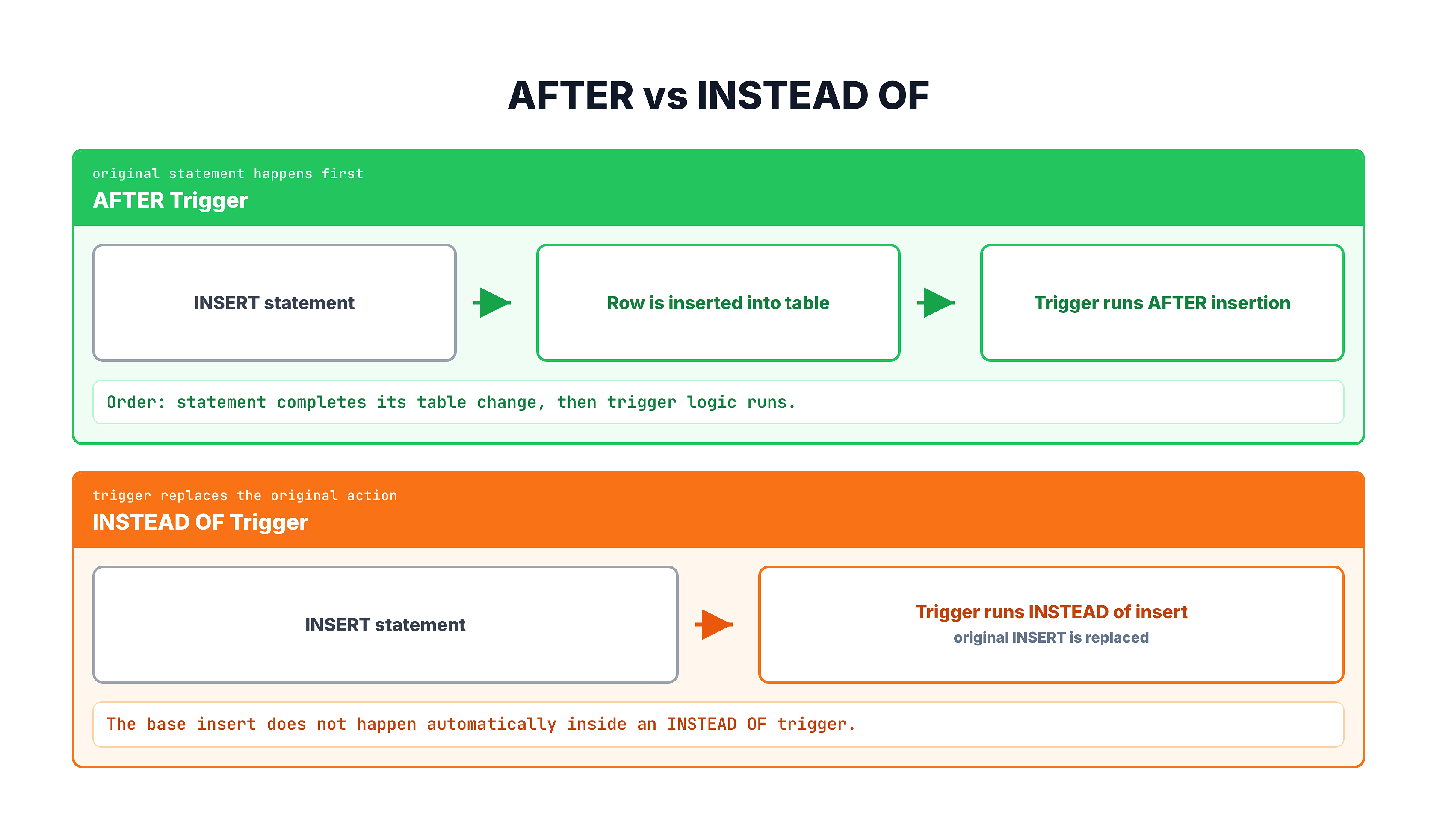
AFTER (default) | After the triggering statement completes | Logging, auditing, cascading changes |
INSTEAD OF | Replaces the triggering statement entirely | Custom validation, view updates |
DDL Triggers
DDL triggers fire on Data Definition Language operations like CREATE TABLE, ALTER TABLE, or DROP TABLE. These are less common and used primarily for database administration and governance.
Logon Triggers
Logon triggers fire when a user session is established. They are used for security auditing and session management.
The INSERTED and DELETED Tables
Magic Tables
When a trigger fires, SQL Server provides two special temporary tables that contain the data involved in the operation:
| Table | Contains | Available In |
|---|---|---|
INSERTED | New rows (the data being added or the new version after update) | INSERT, UPDATE triggers |
DELETED | Old rows (the data being removed or the old version before update) | DELETE, UPDATE triggers |
How They Work for Each Operation
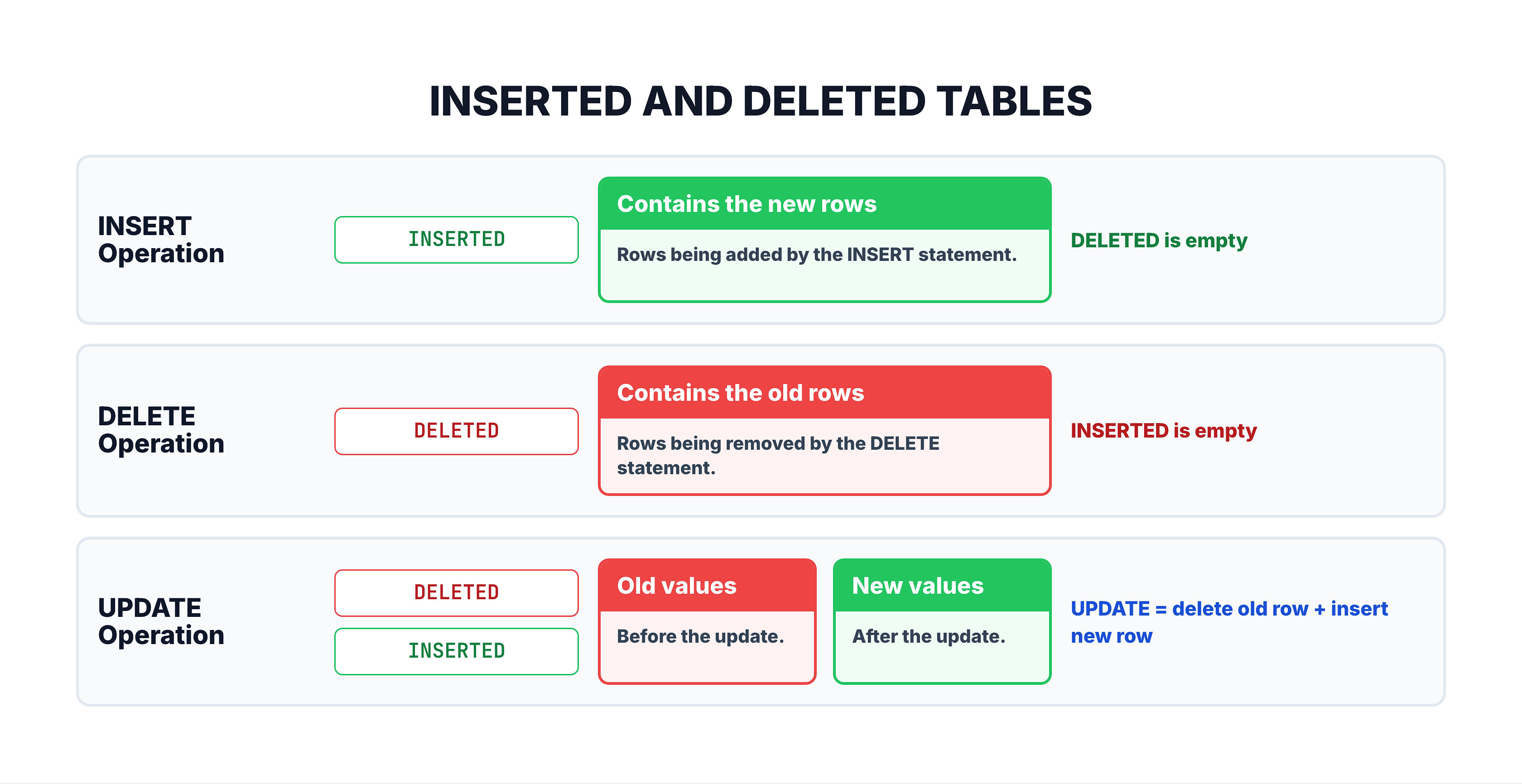
These tables have the exact same structure (columns) as the table the trigger is attached to.
Creating a Trigger
Basic Syntax (SQL Server)
CREATE TRIGGER trigger_name
ON table_name
AFTER INSERT | UPDATE | DELETE
AS
BEGIN
    -- Trigger logic here
END;
Components
| Component | Purpose |
|---|---|
CREATE TRIGGER | Creates a new trigger |
trigger_name | Unique name for the trigger |
ON table_name | The table the trigger is attached to |
AFTER INSERT | When the trigger fires (event type) |
AS BEGIN...END | The body containing the trigger logic |
-- Trigger that logs every new order insertion
CREATE TRIGGER trg_OrderInserted
ON orders
AFTER INSERT
AS
BEGIN
    SET NOCOUNT ON;

    -- Log the new order into an audit table
    INSERT INTO order_audit_log (
        order_id,
        action,
        action_timestamp
    )
    SELECT
        order_id,
        'INSERT',
        GETDATE()
    FROM INSERTED;
END;
How This Works
- Someone runs
INSERT INTO orders VALUES (...) - The row is inserted into the
orderstable - SQL Server detects the INSERT and fires
trg_OrderInserted - The trigger reads the new row from the
INSERTEDtable - The trigger inserts a log entry into
order_audit_log
All of this happens automatically — the person inserting the order does not even know the trigger exists.
Trigger for Multiple Events
Handling INSERT, UPDATE, and DELETE in One Trigger
You can create a single trigger that fires on multiple events.
-- Single trigger handling multiple events
CREATE TRIGGER trg_OrderChanges
ON orders
AFTER INSERT, UPDATE, DELETE
AS
BEGIN
    SET NOCOUNT ON;

    DECLARE @Action NVARCHAR(10);

    -- Determine which action triggered this
    IF EXISTS (SELECT 1 FROM INSERTED) AND EXISTS (SELECT 1 FROM DELETED)
        SET @Action = 'UPDATE';
    ELSE IF EXISTS (SELECT 1 FROM INSERTED)
        SET @Action = 'INSERT';
    ELSE
        SET @Action = 'DELETE';

    -- Log the action
    IF @Action IN ('INSERT', 'UPDATE')
    BEGIN
        INSERT INTO order_audit_log (order_id, action, new_status, action_timestamp)
        SELECT order_id, @Action, order_status, GETDATE()
        FROM INSERTED;
    END

    IF @Action = 'DELETE'
    BEGIN
        INSERT INTO order_audit_log (order_id, action, new_status, action_timestamp)
        SELECT order_id, @Action, order_status, GETDATE()
        FROM DELETED;
    END
END;
How to Detect the Action Type
| Condition | Action |
|---|---|
INSERTED has rows AND DELETED has rows | UPDATE |
INSERTED has rows AND DELETED is empty | INSERT |
INSERTED is empty AND DELETED has rows | DELETE |
Managing Triggers
Modifying a Trigger
ALTER TRIGGER trigger_name
ON table_name
AFTER INSERT
AS
BEGIN
    -- Updated trigger logic
END;
Dropping a Trigger
DROP TRIGGER trigger_name;

-- Safe drop
DROP TRIGGER IF EXISTS trigger_name;
Disabling and Enabling Triggers
Sometimes you need to temporarily turn off a trigger (for example, during a bulk data load):
-- Disable a specific trigger
DISABLE TRIGGER trg_OrderInserted ON orders;

-- Re-enable it
ENABLE TRIGGER trg_OrderInserted ON orders;

-- Disable ALL triggers on a table
DISABLE TRIGGER ALL ON orders;

-- Re-enable ALL triggers on a table
ENABLE TRIGGER ALL ON orders;
Viewing Existing Triggers
-- List all triggers in the database
SELECT
    name AS trigger_name,
    OBJECT_NAME(parent_id) AS table_name,
    is_disabled
FROM sys.triggers
ORDER BY table_name, trigger_name;
When to Use and Avoid Triggers
Good Use Cases for Triggers
| Use Case | Description |
|---|---|
| Audit logging | Track who changed what and when |
| Data validation | Enforce complex business rules |
| Cascading updates | Automatically update related tables |
| Maintaining derived data | Keep summary/aggregate tables in sync |
| Security enforcement | Prevent unauthorized changes |
When to Avoid Triggers
| Concern | Why |
|---|---|
| Complex business logic | Hard to debug; use stored procedures instead |
| Performance-critical paths | Triggers add overhead to every DML operation |
| Cascading triggers | Trigger A fires Trigger B fires Trigger C — nightmare |
| Hidden logic | Developers may not realize triggers exist |
| Heavy processing | Triggers should be fast; offload heavy work elsewhere |
The Hidden Logic Problem
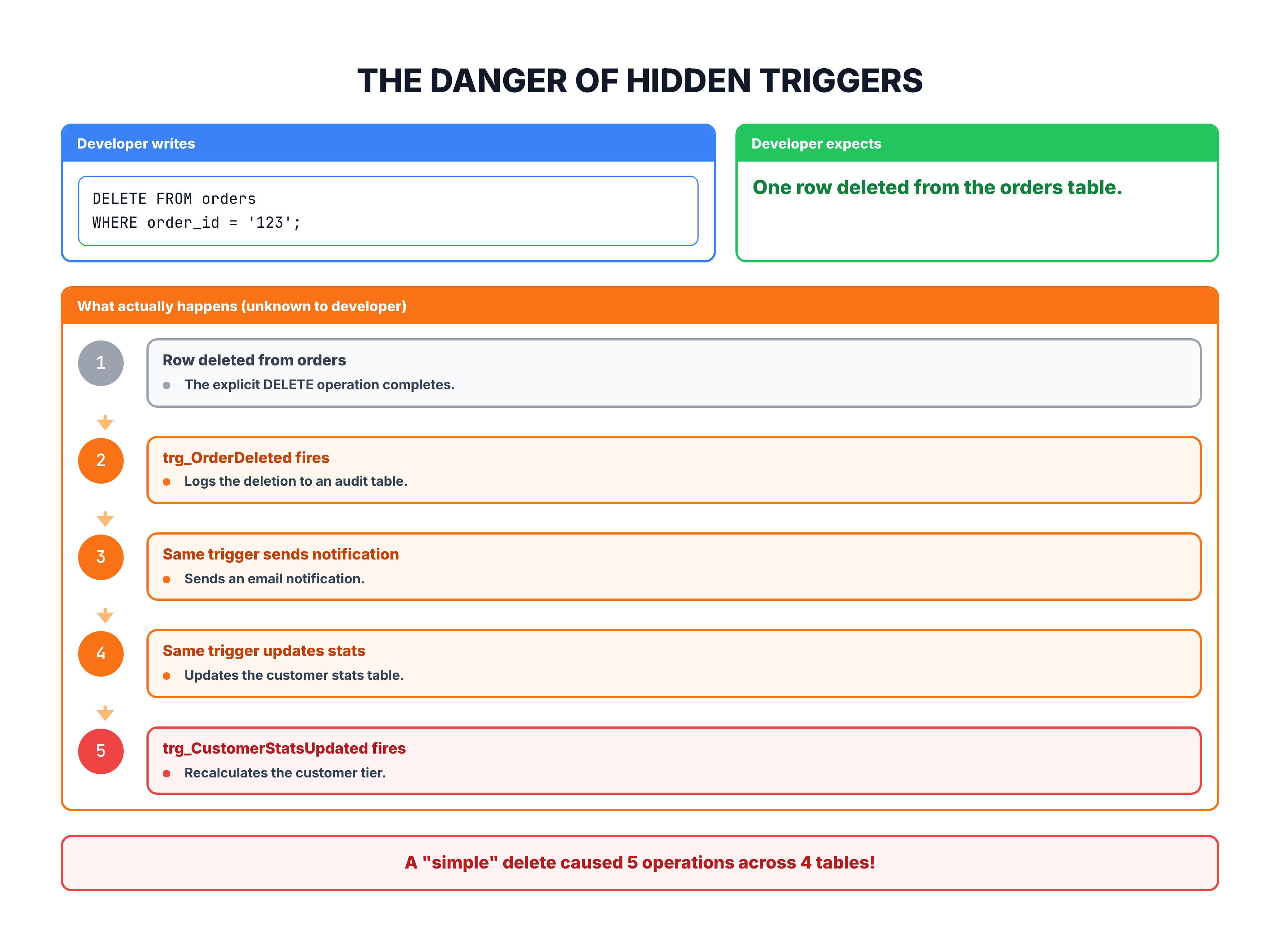
Best Practice: Document all triggers thoroughly. Any developer working with a table should know what triggers exist on it.
MySQL Trigger Syntax
MySQL triggers use a slightly different syntax:
-- MySQL: Creating a trigger
DELIMITER //

CREATE TRIGGER trg_order_inserted
AFTER INSERT ON orders
FOR EACH ROW
BEGIN
    -- In MySQL, use NEW and OLD instead of INSERTED/DELETED
    INSERT INTO order_audit_log (order_id, action, action_timestamp)
    VALUES (NEW.order_id, 'INSERT', NOW());
END //

DELIMITER ;
Key Differences
| Feature | SQL Server | MySQL |
|---|---|---|
| New data reference | INSERTED table | NEW.column_name |
| Old data reference | DELETED table | OLD.column_name |
| Timing keywords | AFTER, INSTEAD OF | BEFORE, AFTER |
| Row scope | Set-based (all affected rows) | Row-by-row (FOR EACH ROW) |
| Multiple events | AFTER INSERT, UPDATE | Separate trigger per event |
Summary
Key Takeaways
| Concept | What You Learned |
|---|---|
| What | Triggers are auto-firing stored procedures attached to tables |
| When | They fire on INSERT, UPDATE, or DELETE events |
| INSERTED/DELETED | Special tables holding new and old row data |
| AFTER vs INSTEAD OF | Run after the event vs replace the event |
| Caution | Triggers add hidden complexity — use wisely |
What is Next?
In the next tutorial, we will explore trigger use cases — real-world scenarios where triggers provide significant value, with complete working examples you can adapt for your own projects.