Window ROW_NUMBER
Introduction
The ROW_NUMBER() function is the most straightforward ranking function in SQL. It assigns a unique sequential integer to each row within a partition, starting from 1 for the first row.
In this lesson, you will learn:
- How ROW_NUMBER() works and its syntax
- Using ROW_NUMBER with PARTITION BY
- Common use cases and practical examples
- Important behaviors with tied values
Basic Syntax
The ROW_NUMBER function follows this pattern:
ROW_NUMBER() OVER (
    [PARTITION BY column(s)]
    ORDER BY column(s) [ASC|DESC]
)
Key Points
- No Arguments: ROW_NUMBER() takes no arguments inside the parentheses
- ORDER BY Required: Must specify an ORDER BY clause to determine row sequence
- Always Unique: Every row gets a different number, even with identical values
- Starts at 1: Numbering begins at 1, not 0
Visualization
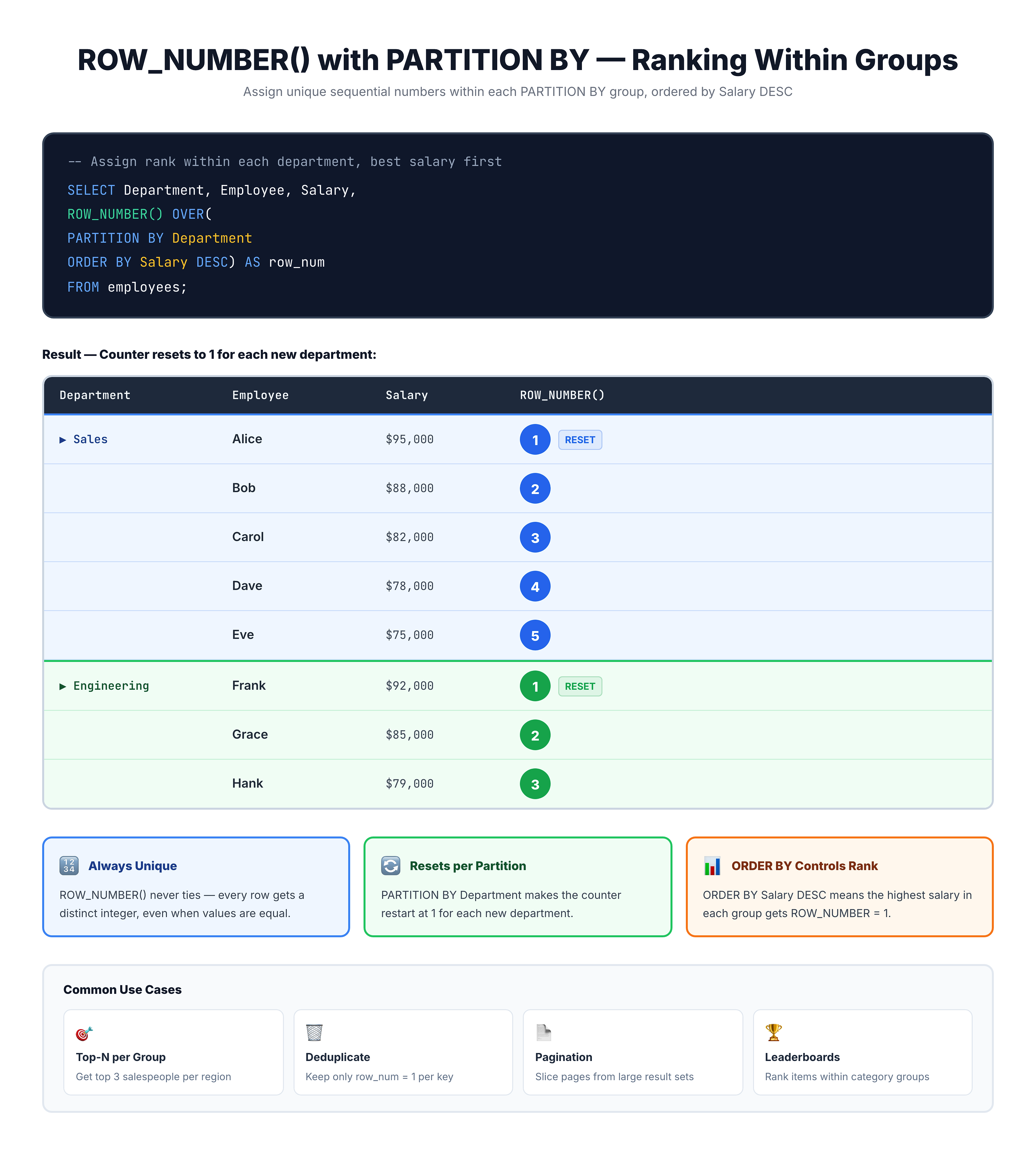
ROW_NUMBER -- Sequential Numbering
Simple ROW_NUMBER Example
Let's start with a basic example - numbering orders by purchase date:
-- Assign a row number to orders by purchase date
SELECT
    order_id,
    customer_id,
    order_purchase_timestamp,
    ROW_NUMBER() OVER (ORDER BY order_purchase_timestamp) AS row_num
FROM olist_orders_dataset
LIMIT 15;
Each order receives a unique sequential number based on when it was purchased, from earliest to latest.
ROW_NUMBER with PARTITION BY
Adding PARTITION BY restarts the numbering for each group. This is incredibly useful for ranking within categories.
Numbering Orders per Customer
-- Number each customer's orders (1st order, 2nd order, etc.)
SELECT
    customer_id,
    order_id,
    order_purchase_timestamp,
    ROW_NUMBER() OVER (
        PARTITION BY customer_id
        ORDER BY order_purchase_timestamp
    ) AS order_sequence
FROM olist_orders_dataset
LIMIT 20;
Now each customer's orders are numbered independently. The first order for each customer gets 1, the second gets 2, and so on.
Numbering Items per Order
-- Number items within each order
SELECT
    order_id,
    product_id,
    price,
    ROW_NUMBER() OVER (
        PARTITION BY order_id
        ORDER BY price DESC
    ) AS item_rank_by_price
FROM olist_order_items_dataset
LIMIT 20;
Items are numbered within each order, with the most expensive item getting rank 1.
Handling Tied Values
An important characteristic of ROW_NUMBER is that it always assigns unique numbers, even when values are identical.
Example: Same Prices, Different Row Numbers
-- ROW_NUMBER with tied values
SELECT
    order_id,
    price,
    ROW_NUMBER() OVER (ORDER BY price DESC) AS row_num
FROM olist_order_items_dataset
WHERE price = 59.90  -- Many items have this price
LIMIT 10;
Even though all these items have the same price, each gets a unique row number. The order among ties is non-deterministic - it may vary between query executions unless you add additional ORDER BY columns.
Making Row Numbers Deterministic
To ensure consistent ordering with ties, add secondary sort columns:
-- Deterministic ROW_NUMBER with tie-breaker
SELECT
    order_id,
    product_id,
    price,
    ROW_NUMBER() OVER (
        ORDER BY price DESC, order_id, product_id
    ) AS row_num
FROM olist_order_items_dataset
LIMIT 15;
Adding order_id and product_id ensures that even items with identical prices get consistent numbering.
Descending Order
You can reverse the ordering to rank from highest to lowest:
-- Rank products by price (highest first)
SELECT
    product_id,
    price,
    ROW_NUMBER() OVER (ORDER BY price DESC) AS price_rank
FROM olist_order_items_dataset
LIMIT 15;
Now the most expensive item gets row number 1.
Common Use Cases
Use Case 1: Get First/Last Record per Group
ROW_NUMBER is perfect for selecting one record per group, like the first order per customer:
-- Get the first order for each customer
SELECT customer_id, order_id, order_purchase_timestamp
FROM (
    SELECT
        customer_id,
        order_id,
        order_purchase_timestamp,
        ROW_NUMBER() OVER (
            PARTITION BY customer_id
            ORDER BY order_purchase_timestamp
        ) AS rn
    FROM olist_orders_dataset
) ranked
WHERE rn = 1
LIMIT 15;
Use Case 2: Pagination
ROW_NUMBER enables efficient pagination for large result sets:
-- Pagination: Get rows 11-20 (page 2, 10 per page)
SELECT *
FROM (
    SELECT
        order_id,
        order_purchase_timestamp,
        order_status,
        ROW_NUMBER() OVER (ORDER BY order_purchase_timestamp DESC) AS row_num
    FROM olist_orders_dataset
) numbered
WHERE row_num BETWEEN 11 AND 20;
Use Case 3: Top N per Category
Find the top 3 most expensive items per seller:
-- Top 3 items per seller
SELECT seller_id, order_id, product_id, price
FROM (
    SELECT
        seller_id,
        order_id,
        product_id,
        price,
        ROW_NUMBER() OVER (
            PARTITION BY seller_id
            ORDER BY price DESC
        ) AS rank_in_seller
    FROM olist_order_items_dataset
) ranked
WHERE rank_in_seller <= 3
LIMIT 20;
Practice
Practice using ROW_NUMBER with these exercises.
Exercise 1: Number Orders by Date
Assign a row number to orders, ordered by purchase timestamp (most recent first):
-- Number orders by date (most recent first)
SELECT
    order_id,
    order_purchase_timestamp,
    order_status,
    ROW_NUMBER() OVER (ORDER BY order_purchase_timestamp DESC) AS row_num
FROM olist_orders_dataset
LIMIT 20;
Exercise 2: Rank Items per Order
Number items within each order by price (highest first):
-- Number items per order by price
SELECT
    order_id,
    product_id,
    price,
    ROW_NUMBER() OVER (
        PARTITION BY order_id
        ORDER BY price DESC
    ) AS item_rank
FROM olist_order_items_dataset
LIMIT 20;
Exercise 3: Find Most Expensive Item per Order
Get only the most expensive item from each order:
-- Most expensive item per order
SELECT order_id, product_id, price
FROM (
    SELECT
        order_id,
        product_id,
        price,
        ROW_NUMBER() OVER (
            PARTITION BY order_id
            ORDER BY price DESC
        ) AS rn
    FROM olist_order_items_dataset
) ranked
WHERE rn = 1
LIMIT 20;
Key Takeaways
Here's what you've learned about ROW_NUMBER:
- Unique Numbers: Always assigns unique sequential integers starting from 1
- ORDER BY Required: Must specify how to order rows for numbering
- PARTITION BY: Restarts numbering for each group
- Tie Behavior: Ties get different numbers (order is non-deterministic without tie-breakers)
- Common Patterns: Top-N per group, first/last record, pagination
Common Patterns
| Pattern | Purpose |
|---|---|
ROW_NUMBER() OVER (ORDER BY col) | Sequential numbering |
ROW_NUMBER() OVER (PARTITION BY grp ORDER BY col) | Numbering within groups |
WHERE rn = 1 | First record per group |
WHERE rn BETWEEN x AND y | Pagination |