What is View
Introduction
A View is one of the most powerful and commonly used database objects in SQL. It provides a way to create virtual tables that simplify data access, enhance security, and promote code reusability.
In this tutorial, you will learn:
- The definition and purpose of SQL views
- How views differ from regular tables
- Basic view syntax and structure
- When and why to use views
Definition
What is a SQL View?
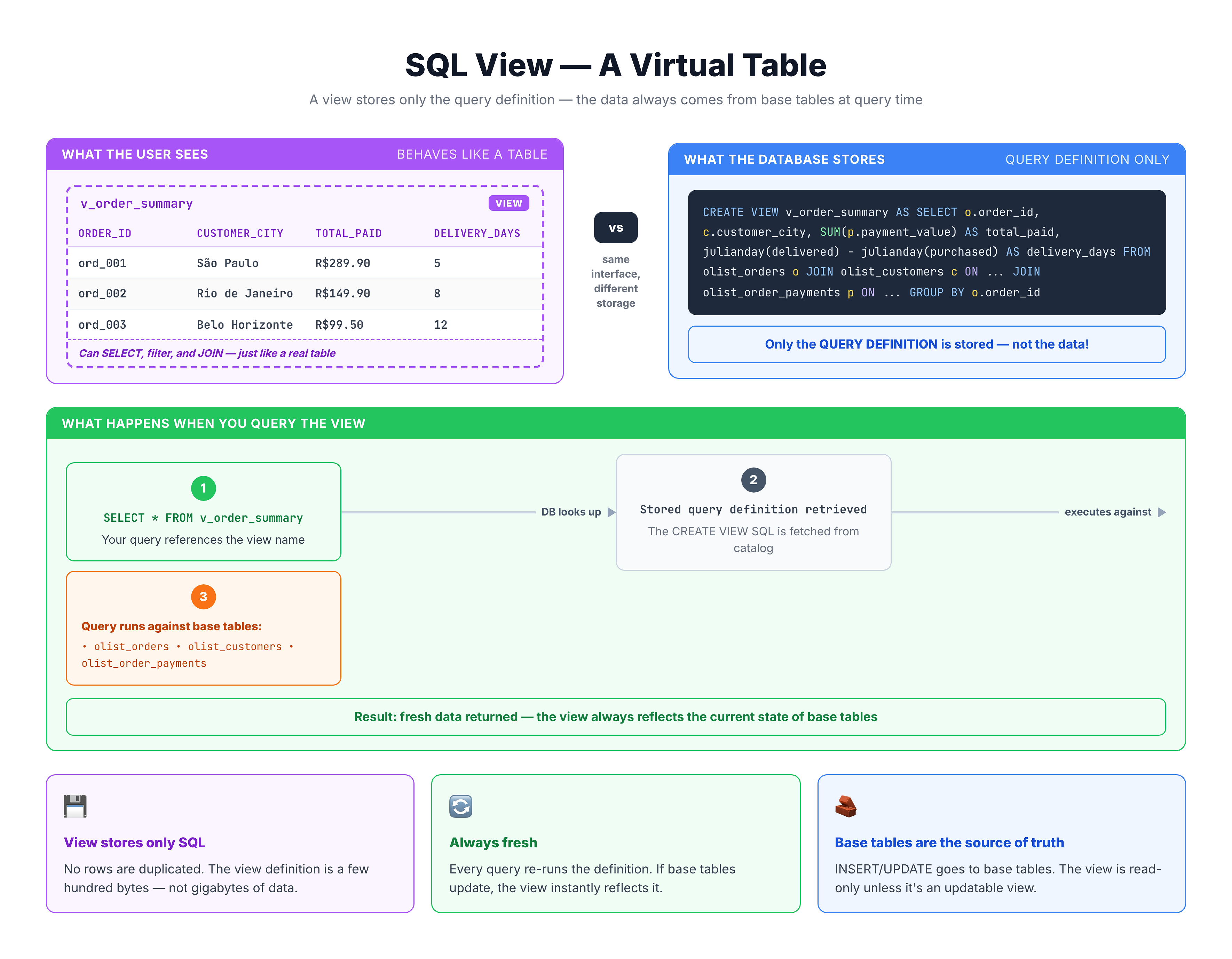
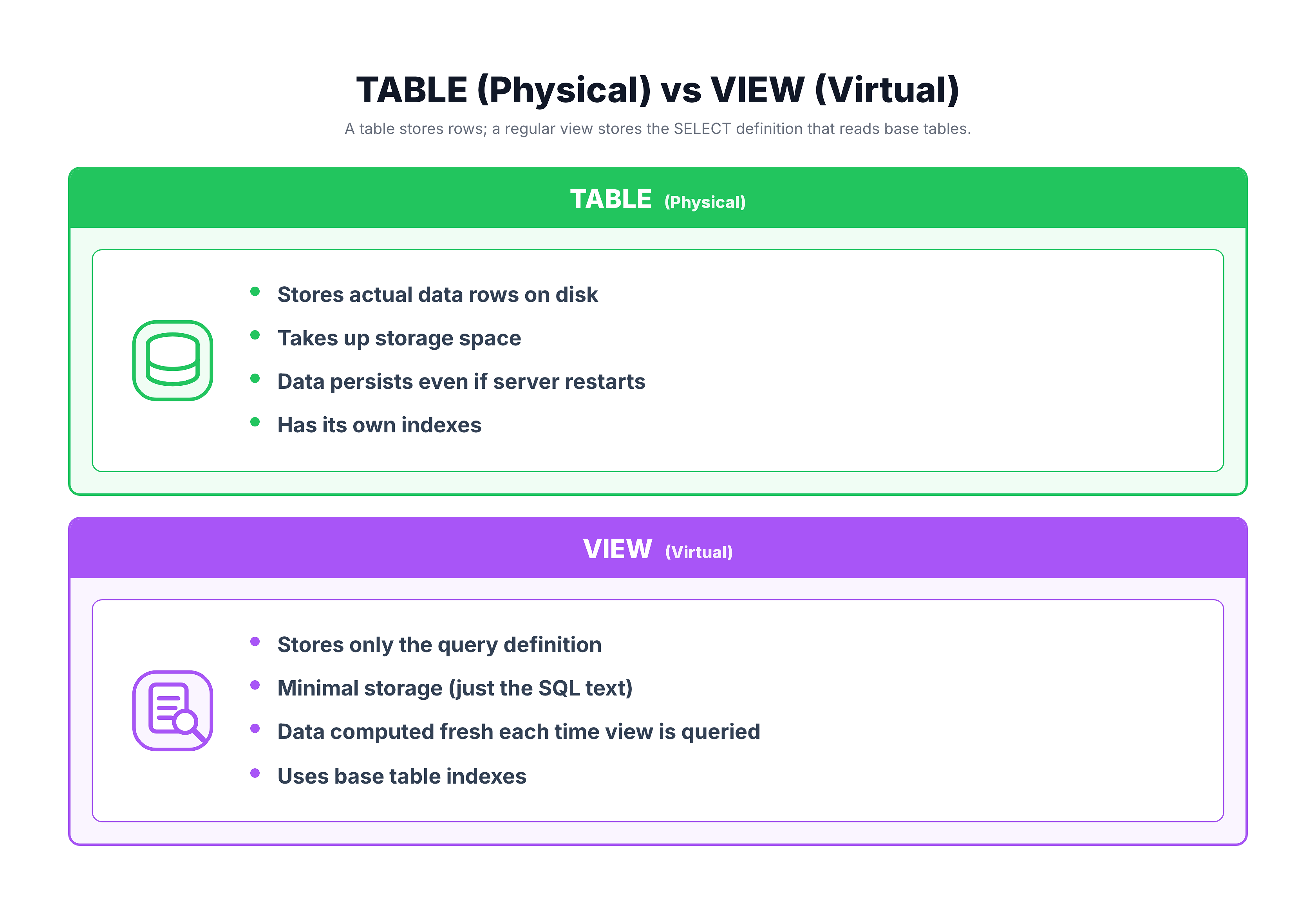
A View is a virtual table based on the result of a SELECT statement. It doesn't store data itself but stores the query definition that produces data when accessed.
Key Characteristics
| Characteristic | Description |
|---|---|
| Virtual | No physical data storage - data comes from base tables |
| Named | Has a name like any other database object |
| Queryable | Can be used in SELECT, JOIN, and other statements |
| Dynamic | Always reflects current data from underlying tables |
| Defined by Query | Stores a SELECT statement, not rows |
View vs Physical Data
The Virtual Nature of Views
Understanding that views don't store data is crucial:
What Happens When You Query a View?
- User runs:
SELECT * FROM my_view - Database retrieves: The stored query definition
- Database executes: The underlying SELECT statement
- Database returns: Results as if from a table
The user sees results that look like they came from a table, but the data was actually fetched from one or more base tables at query time.
Basic Syntax
Creating a View
CREATE VIEW view_name AS
SELECT column1, column2, ...
FROM table_name
WHERE condition;
Syntax Components
| Component | Description | Required |
|---|---|---|
CREATE VIEW | DDL command to create a view | Yes |
view_name | Name for your view (follows table naming rules) | Yes |
AS | Keyword connecting name to query | Yes |
SELECT ... | The query that defines the view's data | Yes |
Example Definitions
-- Simple view: Filter customers from São Paulo state
CREATE VIEW sp_customers AS
SELECT customer_id, customer_city, customer_state
FROM olist_customers_dataset
WHERE customer_state = 'SP';

-- View with JOIN: Customer orders
CREATE VIEW customer_orders AS
SELECT
    c.customer_id,
    c.customer_city,
    o.order_id,
    o.order_status
FROM olist_customers_dataset c
JOIN olist_orders_dataset o ON c.customer_id = o.customer_id;

-- View with aggregation: State statistics
CREATE VIEW state_statistics AS
SELECT
    customer_state,
    COUNT(*) AS customer_count,
    COUNT(DISTINCT customer_city) AS city_count
FROM olist_customers_dataset
GROUP BY customer_state;
Using Views
Querying Views
Once created, views are used exactly like tables:
-- Simple SELECT from view
SELECT * FROM sp_customers;

-- SELECT with WHERE clause
SELECT * FROM sp_customers
WHERE customer_city = 'sao paulo';

-- JOIN view with another table
SELECT v.*, p.payment_value
FROM customer_orders v
JOIN olist_order_payments_dataset p ON v.order_id = p.order_id;

-- Aggregate data from a view
SELECT customer_city, COUNT(*) AS order_count
FROM customer_orders
GROUP BY customer_city
ORDER BY order_count DESC;
Benefits of Using Views
- Simplified Queries - Complex joins written once, used many times
- Consistent Logic - Standard calculations defined in one place
- Security - Expose only necessary columns/rows
- Abstraction - Hide complex table structures from users
Types of Views
Categories of SQL Views
1. Simple Views
Based on a single table without complex operations:
-- Simple view: single table, basic filter
CREATE VIEW delivered_orders AS
SELECT order_id, customer_id, order_status
FROM olist_orders_dataset
WHERE order_status = 'delivered';
Characteristics:
- Single table source
- No aggregations
- No DISTINCT, GROUP BY, or HAVING
- Usually updatable (can INSERT/UPDATE through the view)
2. Complex Views
Involve joins, aggregations, or multiple tables:
-- Complex view: multiple tables with aggregation
CREATE VIEW order_summary AS
SELECT
    c.customer_state,
    COUNT(DISTINCT o.order_id) AS total_orders,
    SUM(p.payment_value) AS total_revenue
FROM olist_customers_dataset c
JOIN olist_orders_dataset o ON c.customer_id = o.customer_id
JOIN olist_order_payments_dataset p ON o.order_id = p.order_id
GROUP BY c.customer_state;
Characteristics:
- Multiple table sources
- May include aggregations, JOINs, subqueries
- Usually read-only (cannot INSERT/UPDATE through view)
3. Materialized Views (Database-Specific)
Store computed results physically for performance:
-- Materialized view syntax (PostgreSQL, Oracle)
CREATE MATERIALIZED VIEW cached_stats AS
SELECT customer_state, COUNT(*) AS count
FROM customers
GROUP BY customer_state;
Note: SQLite does not support materialized views natively.
Practical Examples
Let's explore practical examples of how views work with our e-commerce dataset. While we can't create views in our read-only environment, we can see the queries that would define them:
-- Example 1: Simple View - São Paulo Customers
-- This query would be stored in a view named 'sp_customers'

SELECT
    customer_id,
    customer_city,
    customer_state,
    customer_zip_code_prefix
FROM olist_customers_dataset
WHERE customer_state = 'SP'
LIMIT 10;
-- Example 2: Complex View - Order Details with Customer Info
-- This query joins multiple tables - perfect for a view
SELECT
o.order_id,
c.customer_city,
c.customer_state,
o.order_status,
o.order_purchase_timestamp,
ROUND(SUM(oi.price), 2) AS order_total
FROM olist_orders_dataset o
JOIN olist_customers_dataset c ON o.customer_id = c.customer_id
JOIN olist_order_items_dataset oi ON o.order_id = oi.order_id
GROUP BY o.order_id, c.customer_city, c.customer_state,
o.order_status, o.order_purchase_timestamp
ORDER BY order_total DESC
LIMIT 10;-- Example 3: Aggregated View - State Performance Summary
-- This provides a high-level business view of performance
SELECT
c.customer_state,
COUNT(DISTINCT c.customer_id) AS unique_customers,
COUNT(DISTINCT o.order_id) AS total_orders,
ROUND(COUNT(DISTINCT o.order_id) * 1.0 /
COUNT(DISTINCT c.customer_id), 2) AS orders_per_customer
FROM olist_customers_dataset c
LEFT JOIN olist_orders_dataset o ON c.customer_id = o.customer_id
GROUP BY c.customer_state
HAVING COUNT(DISTINCT o.order_id) > 100
ORDER BY total_orders DESC;Summary
Key Takeaways
-
A View is a virtual table - It stores a query definition, not actual data
-
Syntax:
CREATE VIEW name AS SELECT ... -
Views are queried like tables - Use SELECT, WHERE, JOIN, etc.
-
Data is always current - Views fetch fresh data from base tables each time
-
Types of views:
- Simple views (single table)
- Complex views (joins, aggregations)
- Materialized views (cached results)
Quick Reference
-- Create a view
CREATE VIEW view_name AS
SELECT columns FROM table WHERE conditions;`

`-- Use a view
SELECT * FROM view_name WHERE filter;`

`-- Join with a view
SELECT * FROM view_name v
JOIN other_table t ON v.id = t.id;
What's Next?
Now that you understand what views are, let's compare Views vs Tables to understand the key differences and when to use each approach.