Syntax of Window Functions
Introduction
Now that you understand the difference between window functions and GROUP BY, it's time to learn the syntax of window functions in detail.
In this lesson, you will learn:
- The complete syntax structure of window functions
- The OVER clause and its components
- Different types of window functions
- How to read and write window function expressions
The Basic Syntax
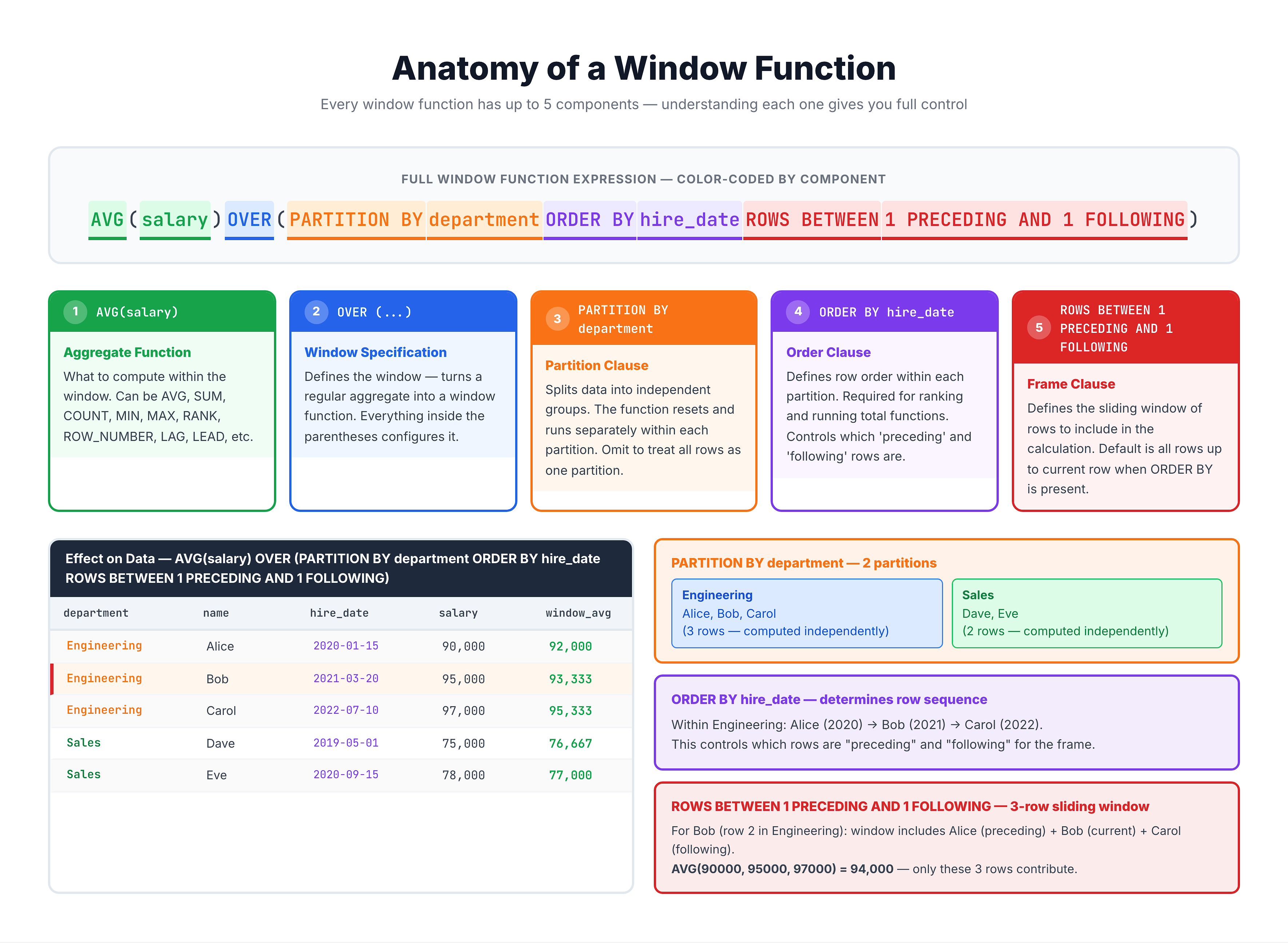
Every window function follows this general pattern:
function_name(arguments) OVER (
    [PARTITION BY partition_expression]
    [ORDER BY order_expression]
    [frame_clause]
)
Breaking It Down
| Component | Required? | Purpose |
|---|---|---|
function_name() | Yes | The aggregate or window function (COUNT, SUM, ROW_NUMBER, etc.) |
OVER() | Yes | Signals this is a window function |
PARTITION BY | Optional | Divides rows into groups (like GROUP BY) |
ORDER BY | Optional* | Orders rows within each partition |
frame_clause | Optional | Defines which rows to include in the calculation |
*Some functions like ROW_NUMBER, RANK require ORDER BY
Visualization
The OVER Clause
The OVER clause is what transforms a regular aggregate function into a window function. Without OVER, there's no window function.
Simplest Form: Empty OVER()
-- OVER() with no arguments = entire result set is the window
SELECT
    order_id,
    price,
    SUM(price) OVER () AS total_all_prices
FROM olist_order_items_dataset
LIMIT 10;
When OVER() is empty, the window includes ALL rows in the result set. Every row shows the same total.
OVER with PARTITION BY
-- PARTITION BY divides rows into groups
SELECT
    seller_id,
    order_id,
    price,
    SUM(price) OVER (PARTITION BY seller_id) AS seller_total
FROM olist_order_items_dataset
LIMIT 15;
OVER with ORDER BY
-- ORDER BY creates running calculations
SELECT
    order_id,
    price,
    SUM(price) OVER (ORDER BY order_id) AS running_total
FROM olist_order_items_dataset
LIMIT 15;
OVER with Both PARTITION BY and ORDER BY
-- Combine PARTITION BY and ORDER BY
SELECT
    seller_id,
    order_id,
    price,
    SUM(price) OVER (
        PARTITION BY seller_id
        ORDER BY order_id
    ) AS running_seller_total
FROM olist_order_items_dataset
LIMIT 20;
Types of Window Functions
Window functions fall into three main categories:
1. Aggregate Window Functions
These are the same aggregate functions you know, but used with OVER():
| Function | Purpose |
|---|---|
COUNT() | Count rows in the window |
SUM() | Sum values in the window |
AVG() | Average of values in the window |
MIN() | Minimum value in the window |
MAX() | Maximum value in the window |
2. Ranking Window Functions
These assign a rank or position to each row:
| Function | Purpose |
|---|---|
ROW_NUMBER() | Unique sequential number (1, 2, 3, 4...) |
RANK() | Rank with gaps for ties (1, 2, 2, 4...) |
DENSE_RANK() | Rank without gaps (1, 2, 2, 3...) |
NTILE(n) | Divide into n equal groups |
PERCENT_RANK() | Relative rank as percentage |
CUME_DIST() | Cumulative distribution |
3. Value Window Functions
These access values from other rows:
| Function | Purpose |
|---|---|
LAG(column, n) | Value from n rows before |
LEAD(column, n) | Value from n rows after |
FIRST_VALUE(column) | First value in the window |
LAST_VALUE(column) | Last value in the window |
NTH_VALUE(column, n) | Value from nth row in window |
Aggregate Functions as Window Functions
Let's see how aggregate functions work as window functions:
COUNT OVER
-- Count items per order, shown on each row
SELECT
    order_id,
    product_id,
    price,
    COUNT(*) OVER (PARTITION BY order_id) AS items_in_order
FROM olist_order_items_dataset
LIMIT 15;
SUM OVER
-- Total price per order, shown on each item row
SELECT
    order_id,
    product_id,
    price,
    SUM(price) OVER (PARTITION BY order_id) AS order_total
FROM olist_order_items_dataset
LIMIT 15;
AVG OVER
-- Average price per seller, compare each item
SELECT
    seller_id,
    price,
    AVG(price) OVER (PARTITION BY seller_id) AS seller_avg_price,
    price - AVG(price) OVER (PARTITION BY seller_id) AS diff_from_avg
FROM olist_order_items_dataset
LIMIT 15;
Ranking Functions
Ranking functions REQUIRE an ORDER BY clause to define how rows should be ranked.
ROW_NUMBER
-- Assign unique row numbers to orders
SELECT
    order_id,
    order_status,
    order_purchase_timestamp,
    ROW_NUMBER() OVER (ORDER BY order_purchase_timestamp) AS row_num
FROM olist_orders_dataset
LIMIT 15;
ROW_NUMBER with PARTITION BY
-- Row number within each status group
SELECT
    order_id,
    order_status,
    order_purchase_timestamp,
    ROW_NUMBER() OVER (
        PARTITION BY order_status
        ORDER BY order_purchase_timestamp
    ) AS row_within_status
FROM olist_orders_dataset
LIMIT 20;
RANK and DENSE_RANK
These handle ties differently:
-- Compare RANK vs DENSE_RANK
SELECT
    review_score,
    order_id,
    ROW_NUMBER() OVER (ORDER BY review_score DESC) AS row_num,
    RANK() OVER (ORDER BY review_score DESC) AS rank_val,
    DENSE_RANK() OVER (ORDER BY review_score DESC) AS dense_rank_val
FROM olist_order_reviews_dataset
LIMIT 20;
Value Functions (LAG and LEAD)
LAG and LEAD let you access values from other rows relative to the current row.
LAG: Access Previous Rows
-- Compare each order to the previous one
SELECT
    order_id,
    order_purchase_timestamp,
    LAG(order_purchase_timestamp, 1) OVER (ORDER BY order_purchase_timestamp) AS previous_order_time
FROM olist_orders_dataset
LIMIT 15;
LEAD: Access Next Rows
-- See the next order's timestamp
SELECT
    order_id,
    order_purchase_timestamp,
    LEAD(order_purchase_timestamp, 1) OVER (ORDER BY order_purchase_timestamp) AS next_order_time
FROM olist_orders_dataset
LIMIT 15;
Multiple Window Functions in One Query
You can use multiple window functions in the same SELECT statement:
-- Multiple window functions in one query
SELECT
    seller_id,
    order_id,
    price,
    COUNT(*) OVER (PARTITION BY seller_id) AS seller_item_count,
    SUM(price) OVER (PARTITION BY seller_id) AS seller_total,
    AVG(price) OVER (PARTITION BY seller_id) AS seller_avg,
    ROW_NUMBER() OVER (PARTITION BY seller_id ORDER BY price DESC) AS price_rank
FROM olist_order_items_dataset
LIMIT 20;
Syntax Summary
Complete Syntax Template
SELECT
    columns,
    function() OVER (
        [PARTITION BY partition_columns]
        [ORDER BY order_columns [ASC|DESC]]
        [ROWS|RANGE BETWEEN start AND end]
    ) AS alias
FROM table
Quick Reference
| Clause | Effect |
|---|---|
OVER () | Entire result set is the window |
OVER (PARTITION BY col) | Separate windows per col value |
OVER (ORDER BY col) | Order within window, enables running calcs |
OVER (PARTITION BY a ORDER BY b) | Ordered windows per partition |
Practice
Practice writing window function syntax.
Exercise 1: Empty OVER()
Use empty OVER() to show total count on every row:
-- Total count on every row

SELECT
    customer_id,
    customer_city,
    customer_state,
    COUNT(*) OVER () AS total_customers
FROM olist_customers_dataset
LIMIT 10;
Exercise 2: PARTITION BY
Use PARTITION BY to count within each state:
-- Count per state, shown on each row

SELECT
    customer_id,
    customer_city,
    customer_state,
    COUNT(*) OVER (PARTITION BY customer_state) AS state_count
FROM olist_customers_dataset
LIMIT 15;
Exercise 3: ORDER BY for Running Total
Use ORDER BY to create a running total:
-- Running total of payment values

SELECT
    order_id,
    payment_value,
    SUM(payment_value) OVER (ORDER BY order_id) AS running_total
FROM olist_order_payments_dataset
LIMIT 15;
Exercise 4: Combined PARTITION BY and ORDER BY
Combine both clauses for partitioned running totals:
-- Running total within each payment type

SELECT
    payment_type,
    order_id,
    payment_value,
    SUM(payment_value) OVER (
        PARTITION BY payment_type
        ORDER BY order_id
    ) AS running_type_total
FROM olist_order_payments_dataset
LIMIT 20;
Summary
Key Takeaways
-
OVER() is required for window functions
-
Empty OVER() uses the entire result set as the window
-
PARTITION BY divides rows into groups (similar to GROUP BY)
-
ORDER BY orders rows within the window
-
Three types of window functions:
- Aggregate (COUNT, SUM, AVG, MIN, MAX)
- Ranking (ROW_NUMBER, RANK, DENSE_RANK, NTILE)
- Value (LAG, LEAD, FIRST_VALUE, LAST_VALUE)
-
Multiple window functions can be used in one query
Coming Up Next
In the next lessons, we'll dive deeper into each component:
- PARTITION BY - How to divide data into windows
- ORDER BY - How to order rows within windows
- Window Frame - How to define exact row ranges