What is Subquery?
Introduction
A subquery is one of the most powerful tools in SQL. It allows you to nest one query inside another, enabling complex data retrieval that would otherwise require multiple separate queries.
In this tutorial, you will learn:
- The formal definition of a subquery
- Basic syntax and structure
- How subqueries relate to outer queries
- Common terminology and naming conventions
Definition
What is a Subquery?
A subquery (also called an inner query or nested query) is a SQL query embedded inside another SQL query.
Think of it as a query within a query – the inner query runs first, and its result is used by the outer query.
Simple Analogy
Imagine you're asking a question that requires two steps:
- Question: "What is the average price?"
- Question: "Show me all products above that average price."
A subquery lets you combine these into a single question:
"Show me all products above the average price."
The database handles both steps for you.
Visualization
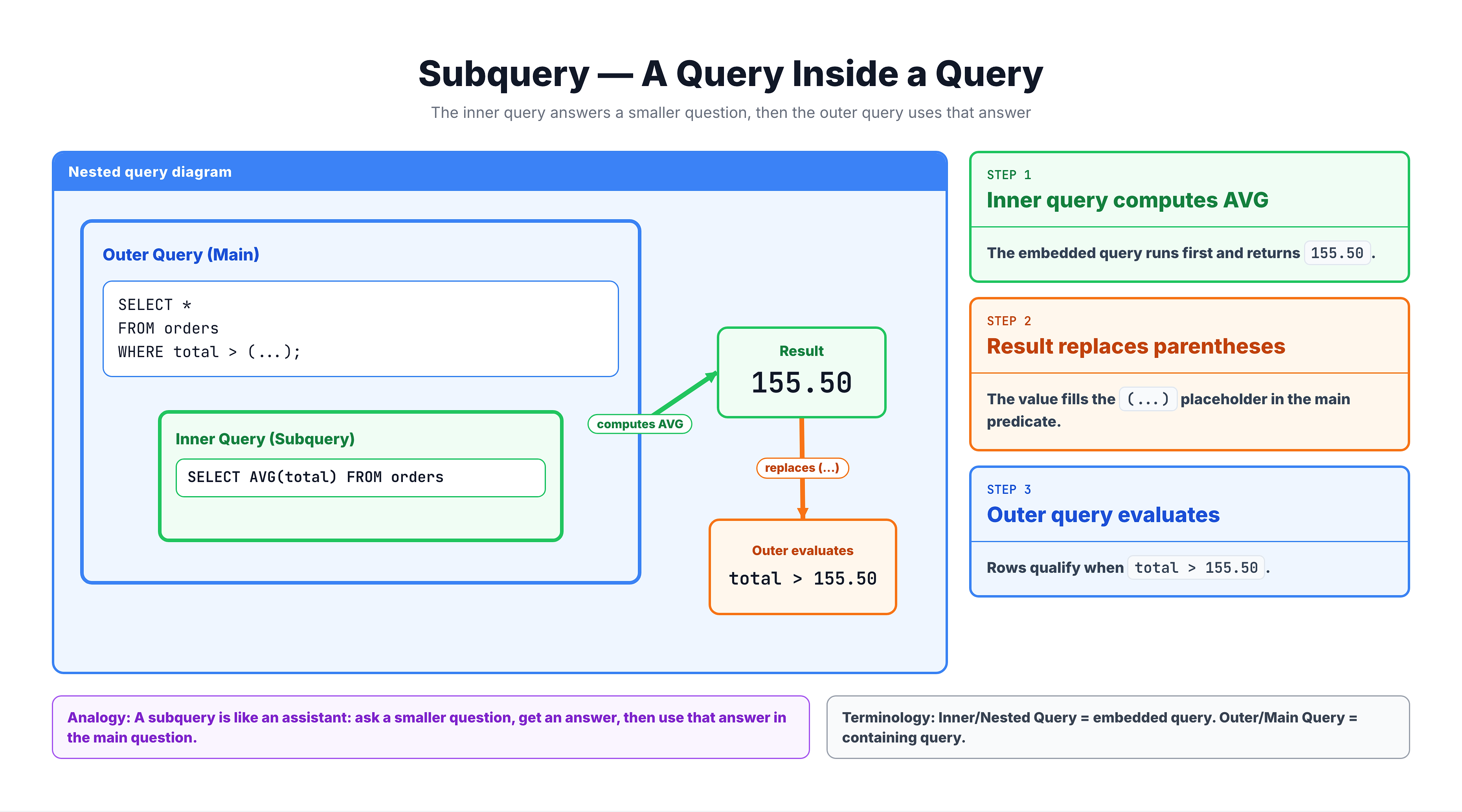
What is a Subquery? -- Nested Query Execution
Basic Syntax
General Structure
SELECT column1, column2
FROM table_name
WHERE column_name operator (
    SELECT column
    FROM another_table
    WHERE condition
);
Key Points
- Parentheses are required – The subquery must be enclosed in
( ) - The subquery runs first – Its result is available to the outer query
- The outer query uses the result – As a value, list, or table
Example: Basic Subquery
SELECT order_id, payment_value
FROM olist_order_payments_dataset
WHERE payment_value > (
    SELECT AVG(payment_value)
    FROM olist_order_payments_dataset
);
How it works:
- Inner query calculates:
AVG(payment_value)→ returns ~154.10 - Outer query becomes:
WHERE payment_value > 154.10 - Final result: All orders with payment above average
Terminology
Common Terms
| Term | Definition | Example |
|---|---|---|
| Subquery | The nested (inner) query | (SELECT AVG(price) FROM products) |
| Outer Query | The main query containing the subquery | SELECT * FROM products WHERE price > ... |
| Inner Query | Same as subquery | - |
| Nested Query | Same as subquery | - |
| Parent Query | Same as outer query | - |
Subquery Locations
Subqueries can appear in several places:
-- In WHERE clause
WHERE column > (subquery)

-- In FROM clause (derived table)
FROM (subquery) AS alias

-- In SELECT clause
SELECT column, (subquery) AS calculated_value

-- In JOIN clause
JOIN (subquery) AS alias ON ...

-- In HAVING clause
HAVING COUNT(*) > (subquery)
Subquery vs Main Query
Execution Order
Unlike regular SQL clauses (which have a specific execution order), subqueries follow a logical dependency:
1. Subquery executes FIRST
   └── Returns a result (value, list, or table)

2. Outer query executes SECOND
   └── Uses the subquery result
Independence
A subquery is a complete, valid SQL statement on its own. You can run it separately:
-- This subquery works independently:
SELECT AVG(payment_value)
FROM olist_order_payments_dataset;

-- Result: 154.10
Dependency
While subqueries are syntactically independent, their meaning depends on the outer query's context:
-- Subquery asks: What is the average?
-- Outer query asks: Which orders are above that average?

SELECT * FROM olist_order_payments_dataset
WHERE payment_value > (
    SELECT AVG(payment_value) FROM olist_order_payments_dataset
);
Together, they answer a more complex question.
Types of Subqueries (Overview)
By Return Type
| Type | Returns | Example Use |
|---|---|---|
| Scalar | Single value | WHERE price > (subquery) |
| Row | Single row, multiple columns | WHERE (col1, col2) = (subquery) |
| Table | Multiple rows and columns | FROM (subquery) AS t |
| Column | Multiple rows, single column | WHERE id IN (subquery) |
By Relationship to Outer Query
| Type | Description |
|---|---|
| Non-correlated | Independent of outer query; runs once |
| Correlated | References outer query; runs for each row |
By Location
| Location | Common Name |
|---|---|
| FROM clause | Derived table, inline view |
| WHERE clause | Filter subquery |
| SELECT clause | Scalar subquery |
| JOIN clause | Subquery join |
Each type will be covered in detail in upcoming tutorials.
Practice
Let's practice identifying and writing basic subqueries.
Exercise 1: Identify the Subquery
Run this query and observe how the subquery provides a single value for comparison:
-- Find orders with payment above average
-- The subquery calculates the average payment

SELECT
    order_id,
    payment_type,
    payment_value
FROM olist_order_payments_dataset
WHERE payment_value > (
    SELECT AVG(payment_value)
    FROM olist_order_payments_dataset
)
ORDER BY payment_value DESC
LIMIT 10;
Exercise 2: Run the Subquery Alone
A subquery is a valid query on its own. Let's see what the average payment value is:
-- Run the subquery independently
-- This shows the value being used for comparison

SELECT AVG(payment_value) AS average_payment
FROM olist_order_payments_dataset;
Exercise 3: Subquery with COUNT
Find customers from cities that have more customers than the average city:
-- Find cities with above-average customer count
-- Step 1: Calculate average customers per city
-- Step 2: Find cities exceeding that average

SELECT
    customer_city,
    COUNT(*) AS customer_count
FROM olist_customers_dataset
GROUP BY customer_city
HAVING COUNT(*) > (
    SELECT AVG(city_count)
    FROM (
        SELECT COUNT(*) AS city_count
        FROM olist_customers_dataset
        GROUP BY customer_city
    )
)
ORDER BY customer_count DESC
LIMIT 10;
Common Mistakes
Mistake 1: Missing Parentheses
❌ Wrong:
SELECT * FROM orders
WHERE amount > SELECT AVG(amount) FROM orders;
✅ Correct:
SELECT * FROM orders
WHERE amount > (SELECT AVG(amount) FROM orders);
Mistake 2: Subquery Returns Multiple Values When One Expected
❌ Wrong:
SELECT * FROM orders
WHERE customer_id = (
    SELECT customer_id FROM customers  -- Returns MANY values!
);
✅ Correct (use IN for multiple values):
SELECT * FROM orders
WHERE customer_id IN (
    SELECT customer_id FROM customers
);
Mistake 3: Forgetting Alias for FROM Subquery
❌ Wrong:
SELECT * FROM (
    SELECT customer_city, COUNT(*) AS cnt
    FROM customers
    GROUP BY customer_city
);  -- Missing alias!
✅ Correct:
SELECT * FROM (
    SELECT customer_city, COUNT(*) AS cnt
    FROM customers
    GROUP BY customer_city
) AS city_counts;  -- Alias required!
Summary
Key Takeaways
-
A subquery is a query nested inside another query
-
Also known as: inner query, nested query
-
Syntax: Must be enclosed in parentheses
( ) -
Execution order: Subquery runs first, result used by outer query
-
Independence: A subquery is a valid SQL statement on its own
-
Locations: Can appear in WHERE, FROM, SELECT, JOIN, and HAVING clauses
-
Return types: Can return a single value, row, column, or full table
Quick Reference
-- Basic structure
SELECT columns
FROM table
WHERE column operator (subquery);`

`-- Example
SELECT * FROM payments
WHERE amount > (SELECT AVG(amount) FROM payments);
What's Next?
Now that you know what a subquery is, let's explore why you would use subqueries and the benefits they provide over alternative approaches.