Aggregate Functions
Introduction
Before diving deep into window functions, you need a solid understanding of aggregate functions. These are the building blocks that power both traditional GROUP BY queries and window functions.
In this lesson, you will learn:
- The five core aggregate functions
- How each function handles NULL values
- Practical examples of each function
- Common patterns and best practices
What are Aggregate Functions?
Aggregate functions perform calculations on a set of values and return a single result. They "aggregate" (combine) multiple values into one.
The Core Aggregate Functions
| Function | Purpose | Returns |
|---|---|---|
COUNT() | Counts rows or non-NULL values | Integer |
SUM() | Adds up numeric values | Numeric |
AVG() | Calculates arithmetic mean | Numeric |
MIN() | Finds the smallest value | Same as input type |
MAX() | Finds the largest value | Same as input type |
How They Work
Aggregate functions can be used:
- Without GROUP BY - Aggregates the entire table into one row
- With GROUP BY - Aggregates each group into one row
- With OVER() - Creates a window function (keeps all rows)
Visualization
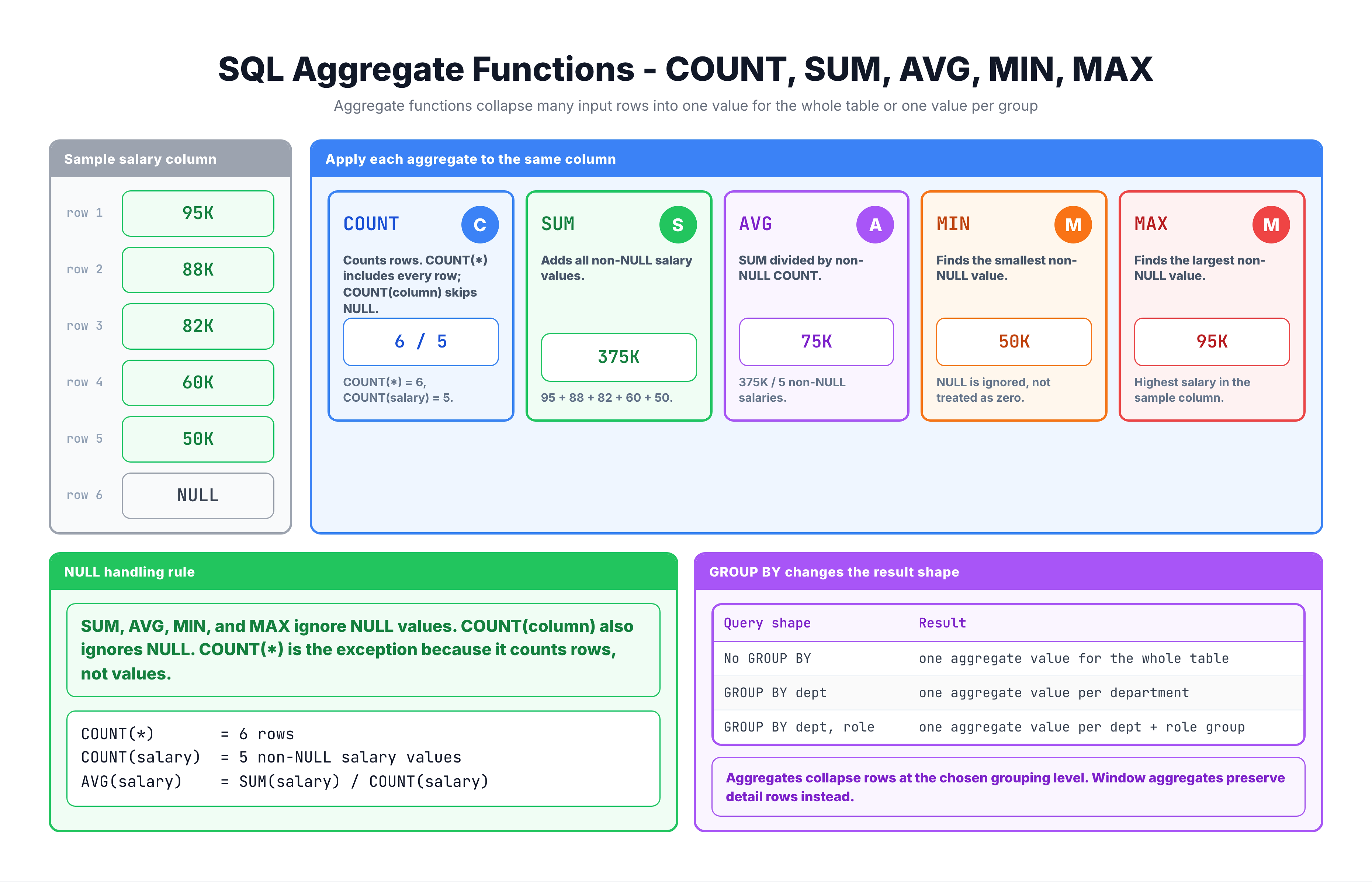
Aggregate Functions -- GROUP BY Aggregation
COUNT Function
COUNT is the most frequently used aggregate function. It counts rows.
Three Forms of COUNT
| Syntax | What It Counts |
|---|---|
COUNT(*) | All rows, including those with NULL values |
COUNT(column) | Rows where the column is NOT NULL |
COUNT(DISTINCT column) | Unique non-NULL values in the column |
COUNT(*) vs COUNT(column)
This distinction is crucial:
Data:
| order_id | review_comment |
|----------|----------------|
| O001     | Great product! |
| O002     | NULL           |
| O003     | Fast delivery  |
| O004     | NULL           |
| O005     | Love it!       |

COUNT(*) = 5          (all rows)
COUNT(review_comment) = 3  (only non-NULL values)
-- Demonstrating COUNT variations
SELECT
    COUNT(*) AS total_reviews,
    COUNT(review_comment_message) AS reviews_with_comments,
    COUNT(DISTINCT review_score) AS unique_scores
FROM olist_order_reviews_dataset
LIMIT 1;
SUM Function
SUM adds up all values in a numeric column.
Key Characteristics
- Works only with numeric data types
- Ignores NULL values automatically
- Returns NULL if all values are NULL
Example: Total Revenue
-- Calculate total revenue from order items
SELECT
    SUM(price) AS total_revenue,
    SUM(freight_value) AS total_freight
FROM olist_order_items_dataset;
SUM with GROUP BY
SUM becomes powerful when combined with GROUP BY to calculate totals per group:
-- Total payment value per payment type
SELECT
    payment_type,
    SUM(payment_value) AS total_value,
    COUNT(*) AS transaction_count
FROM olist_order_payments_dataset
GROUP BY payment_type
ORDER BY total_value DESC;
AVG Function
AVG calculates the arithmetic mean (average) of numeric values.
Key Characteristics
- Works only with numeric data types
- Ignores NULL values (does not count them in denominator)
- Returns a decimal/floating-point result
Example: Average Order Value
-- Calculate average price per order item
SELECT
    AVG(price) AS avg_price,
    AVG(freight_value) AS avg_freight
FROM olist_order_items_dataset;
Understanding AVG with NULLs
Data: 10, 20, NULL, 30

AVG = (10 + 20 + 30) / 3 = 20
NOT (10 + 20 + 0 + 30) / 4 = 15
NULL values are completely excluded from both the sum and the count!
-- Average review score per product category
SELECT
    p.product_category_name,
    AVG(r.review_score) AS avg_review_score,
    COUNT(*) AS review_count
FROM olist_order_reviews_dataset r
JOIN olist_orders_dataset o ON r.order_id = o.order_id
JOIN olist_order_items_dataset i ON o.order_id = i.order_id
JOIN olist_products_dataset p ON i.product_id = p.product_id
WHERE p.product_category_name IS NOT NULL
GROUP BY p.product_category_name
ORDER BY avg_review_score DESC
LIMIT 10;
MIN and MAX Functions
MIN and MAX find the smallest and largest values respectively.
Key Characteristics
- Work with numeric, string, and date data types
- Ignore NULL values
- For strings, MIN/MAX use alphabetical ordering
With Numeric Data
-- Find price range of products
SELECT
    MIN(price) AS cheapest_item,
    MAX(price) AS most_expensive_item,
    MAX(price) - MIN(price) AS price_range
FROM olist_order_items_dataset;
With Date Data
MIN and MAX are extremely useful for finding date ranges:
-- Find the date range of orders in the dataset
SELECT
    MIN(order_purchase_timestamp) AS first_order,
    MAX(order_purchase_timestamp) AS last_order
FROM olist_orders_dataset;
With String Data
For strings, MIN returns the first alphabetically, MAX returns the last:
-- Find alphabetically first and last cities
SELECT
    MIN(customer_city) AS first_city_alphabetically,
    MAX(customer_city) AS last_city_alphabetically
FROM olist_customers_dataset;
Combining Multiple Aggregates
You can use multiple aggregate functions in a single query to get comprehensive statistics:
-- Complete statistics for order items
SELECT
    COUNT(*) AS total_items,
    COUNT(DISTINCT order_id) AS unique_orders,
    COUNT(DISTINCT seller_id) AS unique_sellers,
    SUM(price) AS total_revenue,
    AVG(price) AS avg_price,
    MIN(price) AS min_price,
    MAX(price) AS max_price
FROM olist_order_items_dataset;
Statistics Per Group
Combine multiple aggregates with GROUP BY for detailed breakdowns:
-- Statistics per seller
SELECT
    seller_id,
    COUNT(*) AS items_sold,
    SUM(price) AS total_revenue,
    AVG(price) AS avg_price,
    MIN(price) AS min_price,
    MAX(price) AS max_price
FROM olist_order_items_dataset
GROUP BY seller_id
ORDER BY total_revenue DESC
LIMIT 10;
NULL Handling Summary
Understanding how aggregate functions handle NULL is critical:
| Function | NULL Behavior |
|---|---|
COUNT(*) | Counts all rows INCLUDING those with NULLs |
COUNT(column) | Ignores NULL values |
SUM() | Ignores NULL values |
AVG() | Ignores NULL values (affects both numerator AND denominator) |
MIN() | Ignores NULL values |
MAX() | Ignores NULL values |
Important Consideration
If ALL values are NULL:
COUNT(column)returns 0SUM(),AVG(),MIN(),MAX()return NULL
Practice
Practice using aggregate functions with these exercises.
Exercise 1: Basic Aggregates
Calculate overall statistics for the payments table:
-- Calculate payment statistics

SELECT
    COUNT(*) AS total_payments,
    SUM(payment_value) AS total_value,
    AVG(payment_value) AS avg_value,
    MIN(payment_value) AS min_value,
    MAX(payment_value) AS max_value
FROM olist_order_payments_dataset;
Exercise 2: COUNT Variations
Explore different COUNT patterns:
-- Explore COUNT variations

SELECT
    COUNT(*) AS total_reviews,
    COUNT(review_comment_title) AS reviews_with_title,
    COUNT(review_comment_message) AS reviews_with_message,
    COUNT(DISTINCT review_score) AS unique_scores
FROM olist_order_reviews_dataset;
Exercise 3: Aggregates with GROUP BY
Calculate statistics per order status:
-- Statistics per order status

SELECT
    order_status,
    COUNT(*) AS order_count,
    MIN(order_purchase_timestamp) AS first_order,
    MAX(order_purchase_timestamp) AS last_order
FROM olist_orders_dataset
GROUP BY order_status
ORDER BY order_count DESC;
Exercise 4: Complex Aggregation
Calculate revenue statistics per payment type with multiple aggregates:
-- Revenue breakdown by payment type

SELECT
    payment_type,
    COUNT(*) AS transaction_count,
    SUM(payment_value) AS total_value,
    AVG(payment_value) AS avg_value,
    AVG(payment_installments) AS avg_installments
FROM olist_order_payments_dataset
GROUP BY payment_type
ORDER BY total_value DESC;
Summary
Key Takeaways
-
COUNT - Counts rows or non-NULL values
COUNT(*)includes NULLsCOUNT(column)excludes NULLsCOUNT(DISTINCT column)counts unique values
-
SUM - Adds up numeric values (ignores NULLs)
-
AVG - Calculates mean (ignores NULLs in both numerator and denominator)
-
MIN/MAX - Find extremes (work with numbers, strings, and dates)
Best Practices
- Always consider NULL handling for your use case
- Use
COUNT(*)when you want total rows - Use
COUNT(column)when you want non-NULL counts - Combine multiple aggregates for comprehensive analysis
Coming Up Next
In the next lesson, we'll compare Window Functions vs GROUP BY and understand when to use each approach.