Window RANK
Introduction
The RANK() function assigns a rank to each row based on the specified order, with a key difference from ROW_NUMBER: when rows have the same value, they receive the same rank, and the next rank skips accordingly.
In this lesson, you will learn:
- How RANK() works and handles tied values
- The difference between RANK and ROW_NUMBER
- Using RANK with PARTITION BY
- Practical scenarios where RANK is the right choice
Basic Syntax
The RANK function follows this pattern:
RANK() OVER (
    [PARTITION BY column(s)]
    ORDER BY column(s) [ASC|DESC]
)
Key Characteristics
- Same Value = Same Rank: Rows with identical values get the same rank
- Gaps After Ties: The next rank skips numbers based on how many ties occurred
- Competition-Style Ranking: Think of sports rankings where ties share a position
Visualization
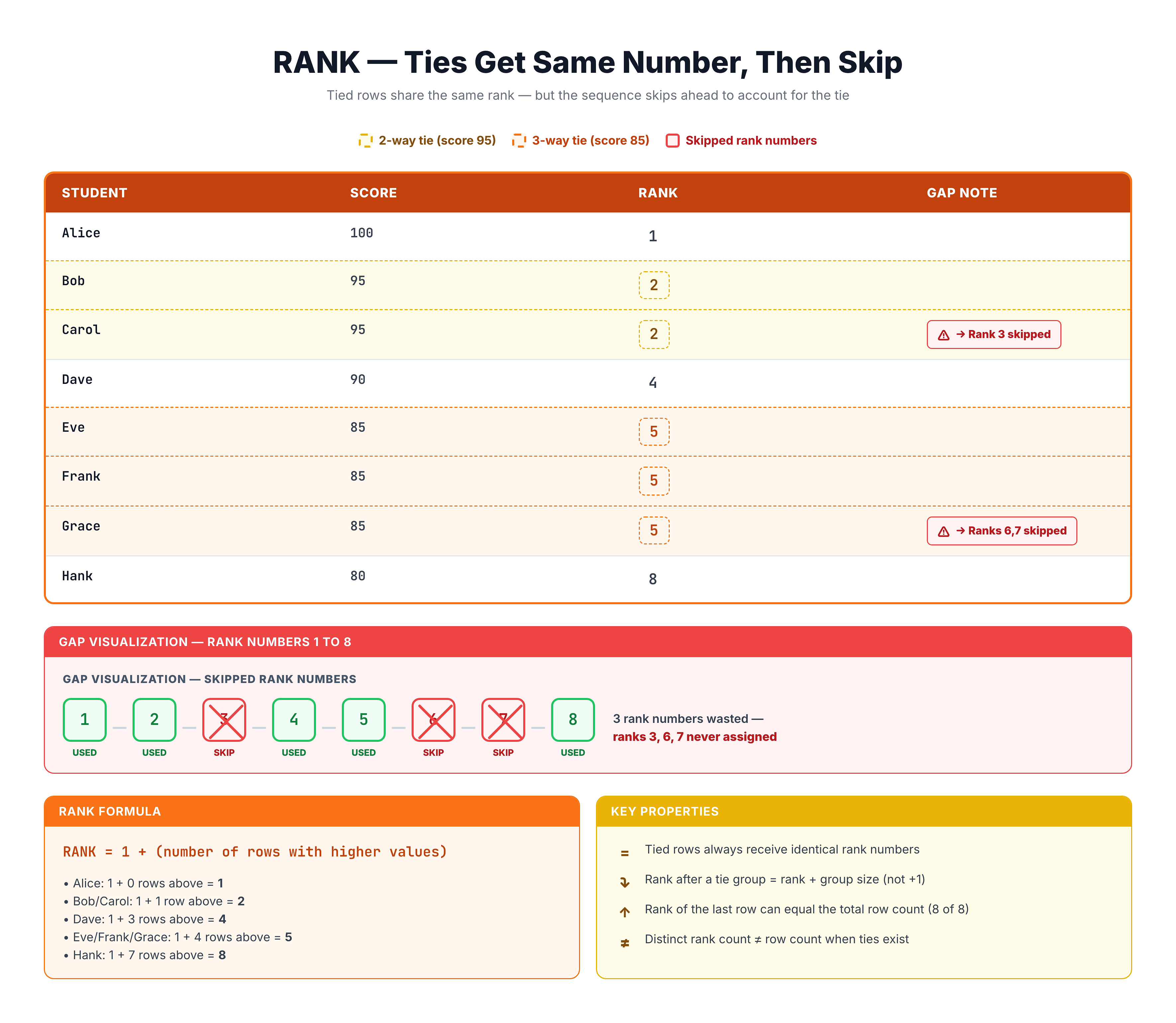
RANK -- Ranking with Gaps for Ties
How RANK Handles Ties
Let's see how RANK handles tied values with an example:
Understanding Gap Behavior
If two rows tie for rank 1, the next row gets rank 3 (not 2). This is like a competition where:
- Two competitors tie for 1st place
- No one gets 2nd place
- The next competitor gets 3rd place
| Value | RANK |
|---|---|
| 100 | 1 |
| 100 | 1 |
| 90 | 3 |
| 80 | 4 |
Notice how rank 2 is skipped because two rows tied for rank 1.
-- See how RANK handles ties
SELECT
    price,
    RANK() OVER (ORDER BY price DESC) AS price_rank
FROM olist_order_items_dataset
LIMIT 20;
When multiple items have the same price, they receive identical ranks, and subsequent ranks reflect the gap.
RANK vs ROW_NUMBER
Let's compare RANK and ROW_NUMBER side by side:
-- Compare RANK vs ROW_NUMBER
SELECT
    order_id,
    price,
    ROW_NUMBER() OVER (ORDER BY price DESC) AS row_num,
    RANK() OVER (ORDER BY price DESC) AS rank_val
FROM olist_order_items_dataset
LIMIT 20;
Key Differences
| Aspect | ROW_NUMBER | RANK |
|---|---|---|
| Ties | Different numbers | Same number |
| Gaps | Never | After ties |
| Uniqueness | Always unique | May repeat |
| Use Case | Need unique ID | Need fair ranking |
RANK with PARTITION BY
Like other window functions, PARTITION BY restarts ranking for each group.
Ranking Products by Price within Each Order
-- Rank items by price within each order
SELECT
    order_id,
    product_id,
    price,
    RANK() OVER (
        PARTITION BY order_id
        ORDER BY price DESC
    ) AS price_rank_in_order
FROM olist_order_items_dataset
LIMIT 20;
Each order's items are ranked independently, with the most expensive item getting rank 1.
Ranking Sellers by Total Revenue
-- Rank sellers by their total revenue
SELECT
    seller_id,
    total_revenue,
    RANK() OVER (ORDER BY total_revenue DESC) AS revenue_rank
FROM (
    SELECT
        seller_id,
        SUM(price) AS total_revenue
    FROM olist_order_items_dataset
    GROUP BY seller_id
) seller_revenue
LIMIT 15;
When to Use RANK
RANK is the appropriate choice when:
1. Fair Competition Ranking
When ties should share the same position (like sports rankings)
2. Top-N with Ties
When you want to include all items that tie for a position
3. The Gap Matters
When it's important to know how many items are ranked higher
Example: Top 3 Sellers (Including All Ties)
-- Top 3 selling products (including ties)
SELECT
    product_id,
    order_count,
    product_rank
FROM (
    SELECT
        product_id,
        COUNT(*) AS order_count,
        RANK() OVER (ORDER BY COUNT(*) DESC) AS product_rank
    FROM olist_order_items_dataset
    GROUP BY product_id
) ranked_products
WHERE product_rank <= 3
LIMIT 20;
Using RANK ensures that if multiple products tie for 3rd place, all of them are included in the result.
Multiple Order By Columns
You can order by multiple columns to refine how ties are determined:
-- Rank with multiple order columns
SELECT
    seller_id,
    order_id,
    price,
    freight_value,
    RANK() OVER (
        ORDER BY price DESC, freight_value DESC
    ) AS combined_rank
FROM olist_order_items_dataset
LIMIT 15;
Only rows with identical values in all ORDER BY columns will receive the same rank.
Practical Examples
Example 1: State Ranking by Customer Count
-- Rank states by customer count
SELECT
    customer_state,
    customer_count,
    RANK() OVER (ORDER BY customer_count DESC) AS state_rank
FROM (
    SELECT
        customer_state,
        COUNT(*) AS customer_count
    FROM olist_customers_dataset
    GROUP BY customer_state
) state_counts
ORDER BY state_rank;
Example 2: Review Score Rankings
-- Rank orders by review score (within delivered orders)
SELECT
    o.order_id,
    r.review_score,
    RANK() OVER (ORDER BY r.review_score DESC) AS score_rank
FROM olist_orders_dataset o
INNER JOIN olist_order_reviews_dataset r ON o.order_id = r.order_id
WHERE o.order_status = 'delivered'
LIMIT 20;
Practice
Practice using RANK with these exercises.
Exercise 1: Rank Items by Price
Rank all order items by price (highest first):
-- Rank items by price
SELECT
    order_id,
    product_id,
    price,
    RANK() OVER (ORDER BY price DESC) AS price_rank
FROM olist_order_items_dataset
LIMIT 20;
Exercise 2: Rank Payment Methods by Usage
Rank payment types by how frequently they're used:
-- Rank payment types by usage
SELECT
    payment_type,
    usage_count,
    RANK() OVER (ORDER BY usage_count DESC) AS type_rank
FROM (
    SELECT
        payment_type,
        COUNT(*) AS usage_count
    FROM olist_order_payments_dataset
    GROUP BY payment_type
) payment_counts;
Exercise 3: Rank Within Partitions
Rank items by freight value within each seller:
-- Rank items by freight within seller
SELECT
    seller_id,
    order_id,
    freight_value,
    RANK() OVER (
        PARTITION BY seller_id
        ORDER BY freight_value DESC
    ) AS freight_rank
FROM olist_order_items_dataset
LIMIT 20;
Key Takeaways
Here's what you've learned about RANK:
- Same Rank for Ties: Identical values receive the same rank
- Gaps After Ties: Ranks skip numbers when there are ties
- Competition Style: Works like sports rankings (1st, 1st, 3rd)
- Fair Selection: Use when you want to include all ties in Top-N
- ORDER BY Required: Must specify ordering for ranking
When to Choose RANK
| Scenario | Use RANK? |
|---|---|
| Fair competition ranking | ✅ Yes |
| Top-N including ties | ✅ Yes |
| Need unique identifiers | ❌ No (use ROW_NUMBER) |
| Continuous ranking without gaps | ❌ No (use DENSE_RANK) |