Window COUNT
Introduction
The COUNT function is one of the most frequently used aggregate functions, and it becomes even more powerful when used as a window function. With COUNT() OVER(), you can count rows while keeping every individual row in your result set.
In this lesson, you will learn:
- How to use COUNT as a window function
- Different variations: COUNT(*), COUNT(column), COUNT(DISTINCT)
- Practical use cases for window COUNT
- Common patterns and best practices
Basic Syntax
The window COUNT function follows this pattern:
COUNT(*) OVER (
    [PARTITION BY column(s)]
    [ORDER BY column(s)]
    [frame_clause]
)
Three Forms of Window COUNT
| Syntax | What It Counts |
|---|---|
COUNT(*) OVER (...) | All rows in the window |
COUNT(column) OVER (...) | Non-NULL values in the column within the window |
COUNT(DISTINCT column) OVER (...) | Unique non-NULL values in the window |
Visualization
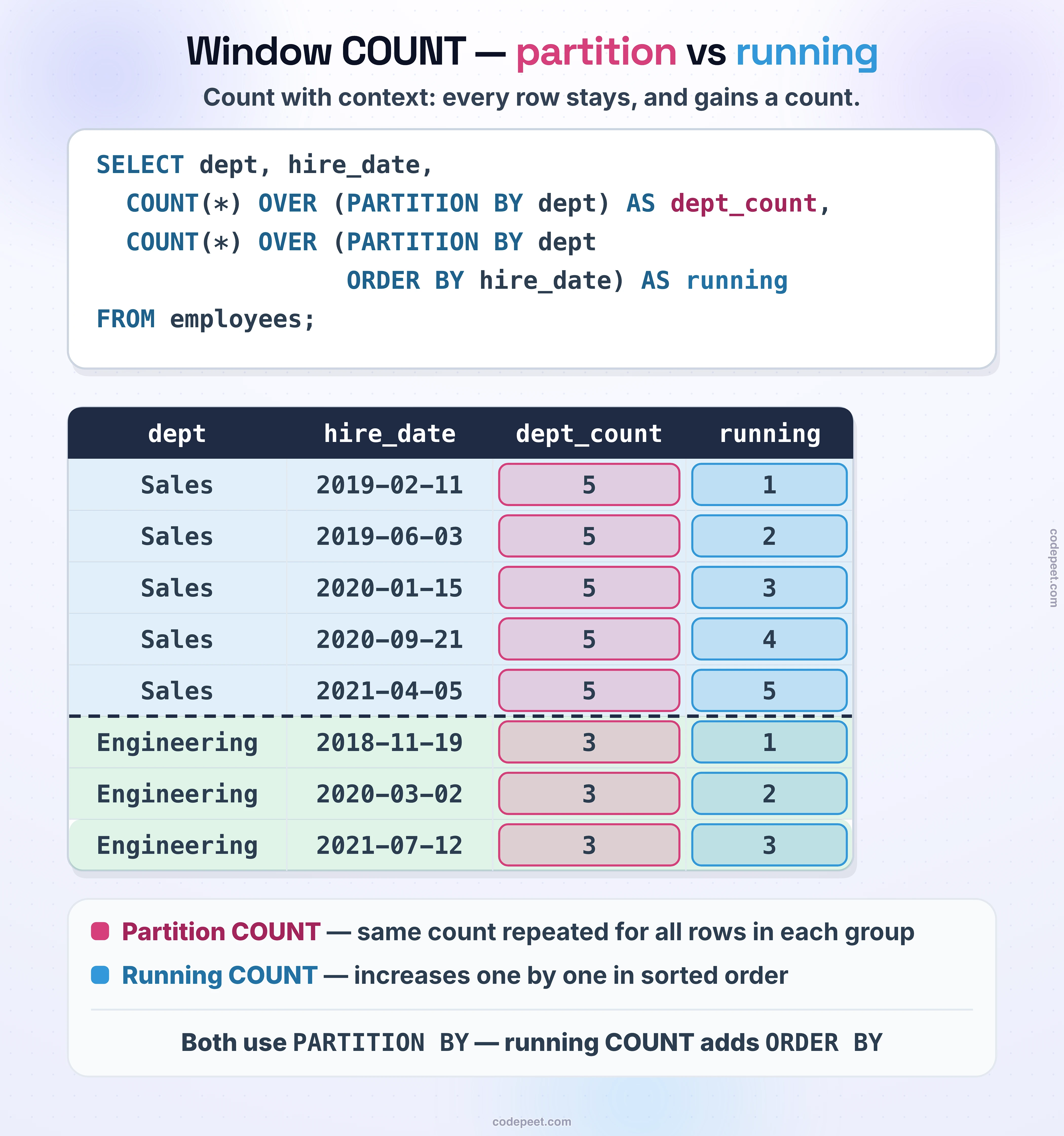
Window COUNT -- Counting Within Partitions
COUNT with PARTITION BY
The most common use of window COUNT is counting rows within each partition (group) while keeping all rows visible.
Counting Items per Order
-- Count items in each order, shown on every item row
SELECT
    order_id,
    product_id,
    price,
    COUNT(*) OVER (PARTITION BY order_id) AS items_in_order
FROM olist_order_items_dataset
LIMIT 20;
Each row now shows how many items are in its order. Orders with multiple items will show the same count repeated.
Counting Orders per Customer
-- Count orders per customer, shown on every order row
SELECT
    customer_id,
    order_id,
    order_status,
    order_purchase_timestamp,
    COUNT(*) OVER (PARTITION BY customer_id) AS customer_order_count
FROM olist_orders_dataset
LIMIT 20;
This pattern helps identify repeat customers directly in your query results.
COUNT with Empty OVER()
When OVER() has no arguments, the window includes the entire result set. This lets you see the total count on every row.
Total Count on Every Row
-- Show total count on every row
SELECT
    order_id,
    price,
    COUNT(*) OVER () AS total_items
FROM olist_order_items_dataset
LIMIT 15;
Use Case: Calculate Percentage of Total
Combining COUNT() OVER () with the row count allows percentage calculations:
-- What percentage of orders has each status?
SELECT
    order_status,
    COUNT(*) AS status_count,
    COUNT(*) * 100.0 / SUM(COUNT(*)) OVER () AS percentage
FROM olist_orders_dataset
GROUP BY order_status
ORDER BY status_count DESC;
COUNT with ORDER BY (Running Count)
Adding ORDER BY to your window COUNT creates a running count - a cumulative count that increases as you move through the ordered rows.
Running Count Example
-- Running count of orders over time
SELECT
    order_id,
    order_purchase_timestamp,
    COUNT(*) OVER (ORDER BY order_purchase_timestamp) AS running_order_count
FROM olist_orders_dataset
LIMIT 20;
The running count starts at 1 for the first row and increases by 1 for each subsequent row.
Running Count within Partitions
-- Running count of items within each order
SELECT
    order_id,
    product_id,
    price,
    COUNT(*) OVER (
        PARTITION BY order_id
        ORDER BY product_id
    ) AS item_sequence
FROM olist_order_items_dataset
LIMIT 20;
This gives each item a sequence number within its order (1, 2, 3, etc.) and restarts for each new order.
COUNT(column) vs COUNT(*)
Just like regular COUNT, the window version handles NULL values differently depending on what you count.
Difference Explained
COUNT(*)counts all rows, including rows with NULL valuesCOUNT(column)counts only rows where the column is NOT NULL
Example: Counting Non-NULL Values
-- Compare COUNT(*) vs COUNT(column)
SELECT
    order_id,
    review_score,
    review_comment_message,
    COUNT(*) OVER (PARTITION BY review_score) AS total_with_score,
    COUNT(review_comment_message) OVER (PARTITION BY review_score) AS with_comments
FROM olist_order_reviews_dataset
LIMIT 20;
This shows how many reviews have each score (total) versus how many of those actually have a comment message (non-NULL).
Practical Use Cases
Use Case 1: Identify Multi-Item Orders
Find orders with more than one item and see details of each item:
-- Find items in orders with multiple items
SELECT
    order_id,
    product_id,
    price,
    COUNT(*) OVER (PARTITION BY order_id) AS items_in_order
FROM olist_order_items_dataset
WHERE order_id IN (
    SELECT order_id
    FROM olist_order_items_dataset
    GROUP BY order_id
    HAVING COUNT(*) > 1
)
LIMIT 20;
Use Case 2: Seller Activity Analysis
See each seller's item along with their total activity level:
-- Seller activity with item details
SELECT
    seller_id,
    order_id,
    price,
    COUNT(*) OVER (PARTITION BY seller_id) AS seller_total_items,
    CASE
        WHEN COUNT(*) OVER (PARTITION BY seller_id) >= 100 THEN 'High Volume'
        WHEN COUNT(*) OVER (PARTITION BY seller_id) >= 10 THEN 'Medium Volume'
        ELSE 'Low Volume'
    END AS seller_category
FROM olist_order_items_dataset
LIMIT 20;
Use Case 3: Customer Order Frequency
Identify repeat customers and see their order history:
-- Identify repeat customers
SELECT
    customer_id,
    order_id,
    order_purchase_timestamp,
    COUNT(*) OVER (PARTITION BY customer_id) AS total_orders,
    CASE
        WHEN COUNT(*) OVER (PARTITION BY customer_id) > 1 THEN 'Repeat Customer'
        ELSE 'First-Time Customer'
    END AS customer_type
FROM olist_orders_dataset
LIMIT 20;
Practice
Practice using window COUNT with these exercises.
Exercise 1: Count Items per Seller
Show each item with the total number of items sold by that seller:
-- Count items per seller

SELECT
    seller_id,
    order_id,
    product_id,
    price,
    COUNT(*) OVER (PARTITION BY seller_id) AS seller_item_count
FROM olist_order_items_dataset
LIMIT 20;
Exercise 2: Running Count
Create a running count of payments ordered by payment value:
-- Running count of payments

SELECT
    order_id,
    payment_type,
    payment_value,
    COUNT(*) OVER (ORDER BY payment_value DESC) AS running_count
FROM olist_order_payments_dataset
LIMIT 20;
Exercise 3: Count by Payment Type
Show each payment with the count of payments for that payment type:
-- Count by payment type

SELECT
    order_id,
    payment_type,
    payment_value,
    COUNT(*) OVER (PARTITION BY payment_type) AS type_count,
    COUNT(*) OVER () AS total_count
FROM olist_order_payments_dataset
LIMIT 20;
Key Takeaways
Here's what you've learned about window COUNT:
- Basic Syntax:
COUNT(*) OVER (PARTITION BY column)counts rows per group - Empty OVER():
COUNT(*) OVER ()counts all rows in the result - Running Count: Add
ORDER BYto create cumulative counts - NULL Handling:
COUNT(*)includes NULLs;COUNT(column)excludes them - Use Cases: Multi-item detection, customer segmentation, activity analysis
Common Patterns
| Pattern | Purpose |
|---|---|
COUNT(*) OVER (PARTITION BY group_col) | Count per group |
COUNT(*) OVER () | Total count |
COUNT(*) OVER (ORDER BY sort_col) | Running count |
COUNT(*) OVER (PARTITION BY group ORDER BY sort) | Running count per group |