Window Functions vs Group By
Introduction
One of the most important concepts to understand is the difference between window functions and GROUP BY. Both perform aggregations, but they work in fundamentally different ways.
In this lesson, you will learn:
- The key differences between window functions and GROUP BY
- When to use each approach
- Side-by-side comparisons with practical examples
- How to convert between the two approaches
The Fundamental Difference
GROUP BY: Collapses Rows
When you use GROUP BY, multiple rows are collapsed into a single summary row per group. Individual row details are lost.
Window Functions: Preserves Rows
When you use a window function with OVER(), all rows are preserved. The aggregation is calculated and added as a new column to each row.
Visual Comparison
Original Data (5 rows):
| order_id | customer_id | price |
|---|---|---|
| O001 | C001 | 100 |
| O002 | C001 | 150 |
| O003 | C001 | 200 |
| O004 | C002 | 75 |
| O005 | C002 | 125 |
After GROUP BY (2 rows):
| customer_id | total_price |
|---|---|
| C001 | 450 |
| C002 | 200 |
After Window Function (5 rows):
| order_id | customer_id | price | customer_total |
|---|---|---|---|
| O001 | C001 | 100 | 450 |
| O002 | C001 | 150 | 450 |
| O003 | C001 | 200 | 450 |
| O004 | C002 | 75 | 200 |
| O005 | C002 | 125 | 200 |
Visualization
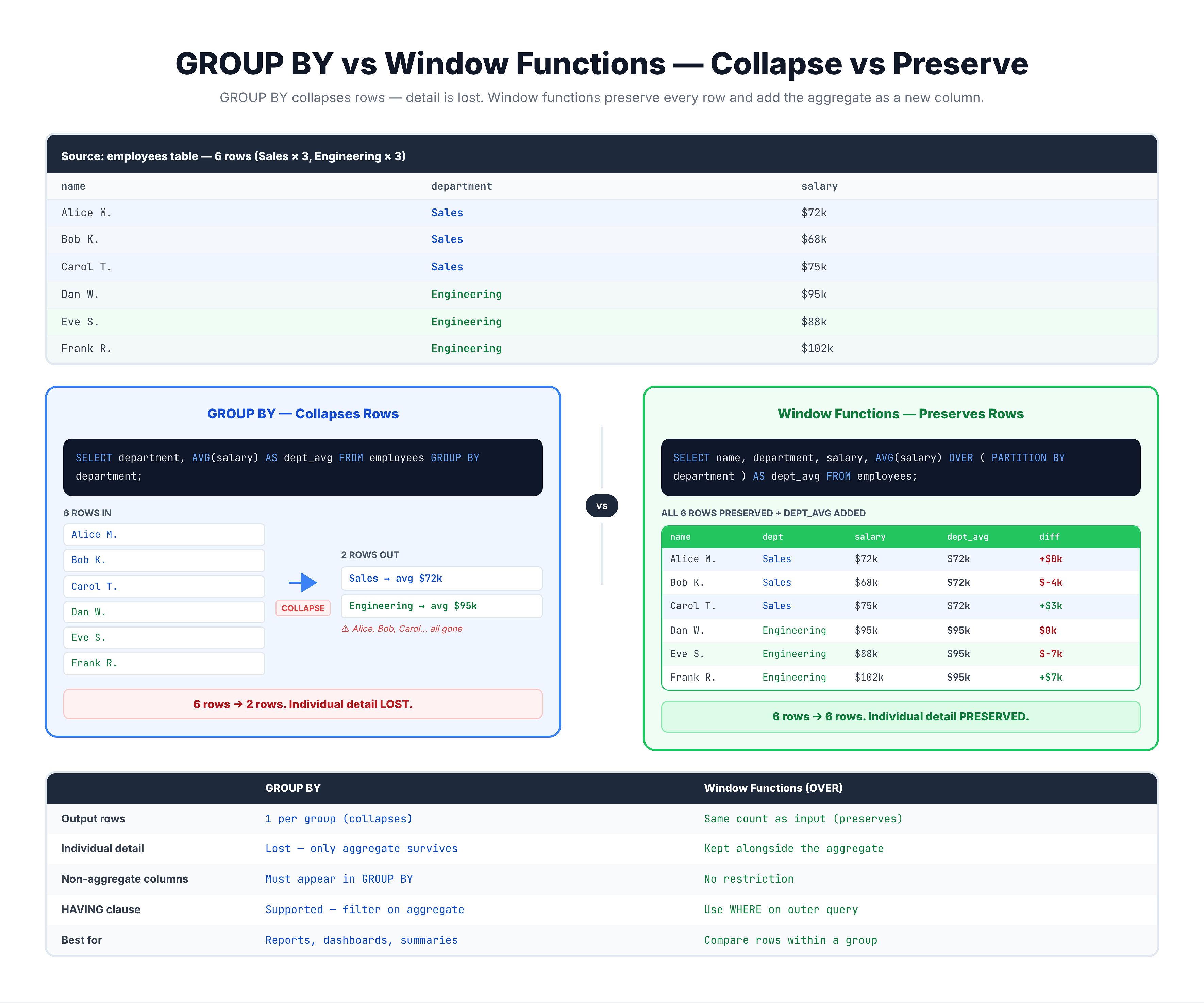
Window Functions vs GROUP BY -- Side-by-Side Comparison
Side-by-Side Code Comparison
Let's see the exact SQL syntax for each approach.
GROUP BY Approach
-- GROUP BY: Collapses to one row per customer state
SELECT
    customer_state,
    COUNT(*) AS customer_count
FROM olist_customers_dataset
GROUP BY customer_state
ORDER BY customer_count DESC
LIMIT 5;
Result: You get only state-level summaries. Individual customer details are gone.
Window Function Approach
-- Window Function: Preserves all rows, adds aggregate column
SELECT
    customer_id,
    customer_city,
    customer_state,
    COUNT(*) OVER (PARTITION BY customer_state) AS state_customer_count
FROM olist_customers_dataset
LIMIT 10;
Result: You keep every customer row AND see how many customers are in their state.
When to Use GROUP BY
Use GROUP BY when you:
1. Only Need Summary Data
You want to see totals, counts, or averages per group—not individual records.
Example: Monthly sales report showing totals only
-- Monthly order count (summary only)
SELECT
    strftime('%Y-%m', order_purchase_timestamp) AS order_month,
    COUNT(*) AS order_count
FROM olist_orders_dataset
GROUP BY strftime('%Y-%m', order_purchase_timestamp)
ORDER BY order_month
LIMIT 12;
2. Building Reports or Dashboards
Aggregated data is smaller and faster to display.
3. Filtering on Aggregated Values
Using HAVING to filter groups based on aggregate results.
-- Find sellers with more than 100 items sold
SELECT
    seller_id,
    COUNT(*) AS items_sold
FROM olist_order_items_dataset
GROUP BY seller_id
HAVING COUNT(*) > 100
ORDER BY items_sold DESC
LIMIT 10;
When to Use Window Functions
Use window functions when you:
1. Need Individual Rows + Aggregates
You want to see each record AND related aggregate information.
-- Each order with its customer's total orders
SELECT
    order_id,
    customer_id,
    order_purchase_timestamp,
    COUNT(*) OVER (PARTITION BY customer_id) AS customer_total_orders
FROM olist_orders_dataset
LIMIT 15;
2. Calculating Running Totals
Accumulating values row by row.
-- Running total of payment values
SELECT
    order_id,
    payment_value,
    SUM(payment_value) OVER (ORDER BY order_id) AS running_total
FROM olist_order_payments_dataset
LIMIT 15;
3. Comparing Each Row to Its Group
Showing how each value relates to the group average or total.
-- Each item's price vs category average
SELECT
    i.order_id,
    p.product_category_name,
    i.price,
    AVG(i.price) OVER (PARTITION BY p.product_category_name) AS category_avg_price,
    i.price - AVG(i.price) OVER (PARTITION BY p.product_category_name) AS diff_from_avg
FROM olist_order_items_dataset i
JOIN olist_products_dataset p ON i.product_id = p.product_id
WHERE p.product_category_name IS NOT NULL
LIMIT 15;
4. Ranking and Numbering Rows
Assigning ranks or row numbers within groups.
-- Rank orders by price within each seller
SELECT
    seller_id,
    order_id,
    price,
    ROW_NUMBER() OVER (PARTITION BY seller_id ORDER BY price DESC) AS price_rank
FROM olist_order_items_dataset
LIMIT 20;
Comparison Table
| Feature | GROUP BY | Window Functions |
|---|---|---|
| Output rows | One per group | All original rows |
| Individual details | Lost | Preserved |
| Can use HAVING | Yes | No |
| Running totals | Difficult | Easy |
| Row ranking | Not possible | Easy |
| Compare row to group | Not directly | Easy |
| Performance | Often faster | May be slower |
| Syntax keyword | GROUP BY | OVER() |
Common Mistake: Mixing Them Incorrectly
A common mistake is trying to mix GROUP BY and window functions incorrectly.
Rule
You cannot use window functions in a GROUP BY clause directly, and you cannot include non-aggregated columns in a GROUP BY query without grouping by them.
Incorrect Approach
-- This would be an ERROR:
-- SELECT
--     customer_id,
--     customer_city,  -- Not in GROUP BY!
--     COUNT(*)
-- FROM olist_customers_dataset
-- GROUP BY customer_id;

-- The above fails because customer_city is not
-- in GROUP BY or an aggregate function
Correct Approach with Window Function
-- This WORKS - window function preserves all columns
SELECT
    customer_id,
    customer_city,
    customer_state,
    COUNT(*) OVER () AS total_customers
FROM olist_customers_dataset
LIMIT 10;
Converting Between Approaches
Sometimes you need to convert one approach to the other.
GROUP BY to Window Function
If you have a GROUP BY query but realize you need individual rows:
Original GROUP BY:
SELECT seller_id, SUM(price) AS total_sales
FROM order_items
GROUP BY seller_id;
Converted to Window Function:
SELECT order_id, seller_id, price,
       SUM(price) OVER (PARTITION BY seller_id) AS seller_total
FROM order_items;
Window Function to GROUP BY
If you have a window function but only need summaries:
Original Window Function:
SELECT seller_id, price,
       SUM(price) OVER (PARTITION BY seller_id) AS total
FROM order_items;
Converted to GROUP BY:
SELECT seller_id, SUM(price) AS total
FROM order_items
GROUP BY seller_id;
Practice
Practice identifying when to use each approach and see the differences in output.
Exercise 1: GROUP BY Only
Count orders by status using GROUP BY. Notice you only see summary data:
-- GROUP BY: Only summary rows

SELECT
    order_status,
    COUNT(*) AS status_count
FROM olist_orders_dataset
GROUP BY order_status
ORDER BY status_count DESC;
Exercise 2: Window Function Only
Same count, but using a window function. Notice all individual rows are preserved:
-- Window Function: All rows preserved with aggregate

SELECT
    order_id,
    order_status,
    order_purchase_timestamp,
    COUNT(*) OVER (PARTITION BY order_status) AS status_count
FROM olist_orders_dataset
LIMIT 20;
Exercise 3: Comparing Row to Group Average
This task requires window functions—you cannot do this with GROUP BY alone:
-- Compare each payment to its type's average
-- This requires window functions!

SELECT
    order_id,
    payment_type,
    payment_value,
    AVG(payment_value) OVER (PARTITION BY payment_type) AS type_avg,
    payment_value - AVG(payment_value) OVER (PARTITION BY payment_type) AS vs_average
FROM olist_order_payments_dataset
LIMIT 20;
Exercise 4: Running Total
Calculate a running total—only possible with window functions:
-- Running total of prices
-- Not possible with GROUP BY!

SELECT
    order_id,
    price,
    SUM(price) OVER (ORDER BY order_id) AS running_total
FROM olist_order_items_dataset
LIMIT 20;
Summary
Key Takeaways
-
GROUP BY collapses rows into summaries; window functions preserve all rows
-
Use GROUP BY when:
- You only need aggregated summaries
- Building reports or dashboards
- Filtering with HAVING
-
Use Window Functions when:
- You need individual rows AND aggregates
- Calculating running totals
- Comparing each row to its group
- Ranking or numbering rows
-
The key syntax difference:
- GROUP BY:
GROUP BY column - Window:
function() OVER (PARTITION BY column)
- GROUP BY:
Decision Flowchart
Do you need individual row details?
├── NO → Use GROUP BY
└── YES → Do you also need aggregates?
    ├── NO → Just use SELECT
    └── YES → Use Window Functions
Coming Up Next
In the next lesson, we'll learn the syntax of window functions in detail—the OVER clause, PARTITION BY, ORDER BY, and more.