Correlated Subquery
Introduction
A correlated subquery is a subquery that references columns from the outer query. Unlike regular (non-correlated) subqueries that execute once, correlated subqueries execute once for each row in the outer query.
In this tutorial, you will learn:
- What makes a subquery "correlated"
- How correlated subqueries execute differently
- When to use correlated subqueries
- Performance considerations and alternatives
Correlated vs. Non-Correlated
Non-Correlated Subquery (Regular)
-- Executes ONCE, then uses result for all outer rows
SELECT *
FROM olist_order_items_dataset
WHERE price > (
    SELECT AVG(price) FROM olist_order_items_dataset  -- No reference to outer
);
Execution:
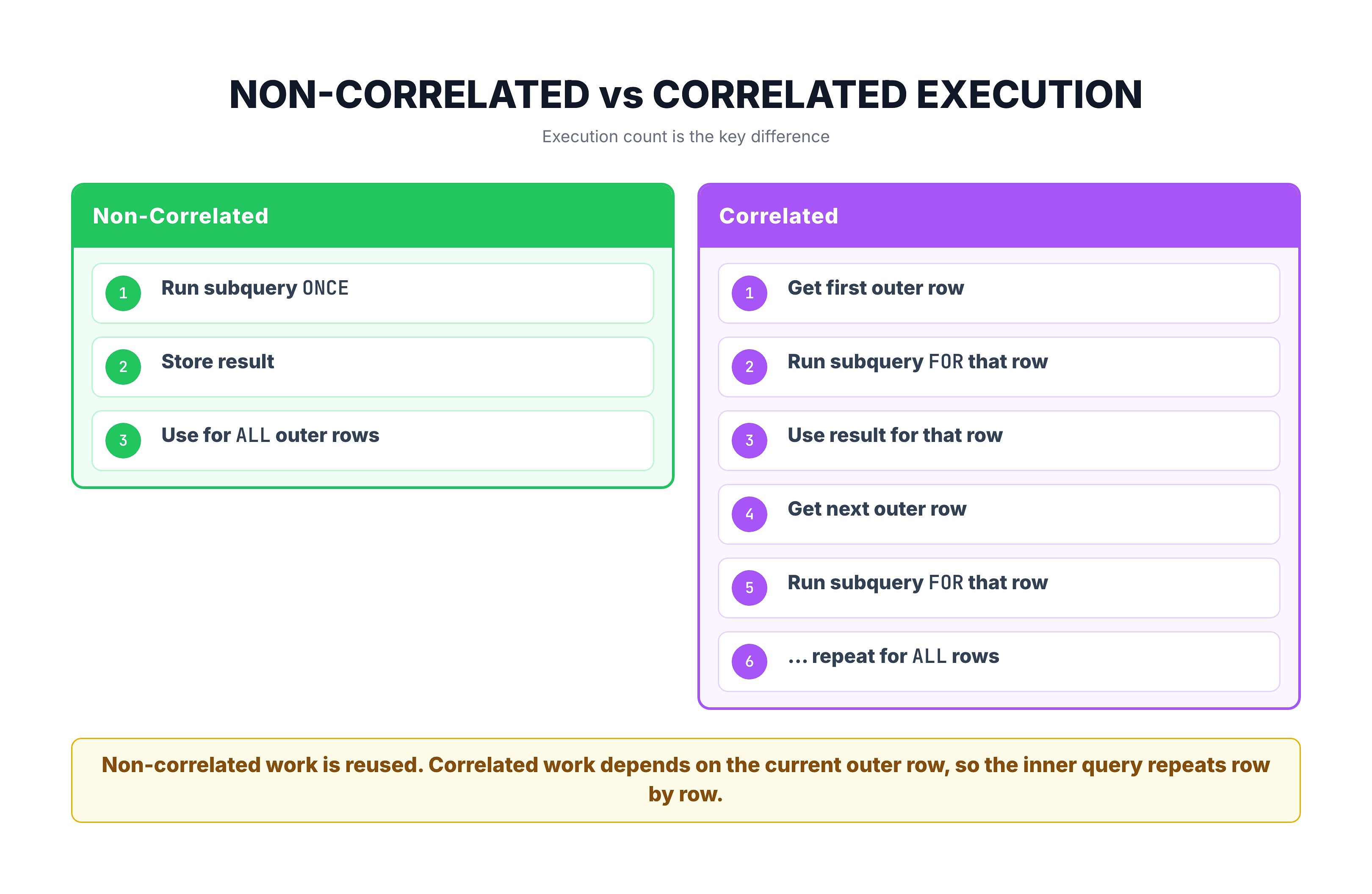
- Execute subquery once → returns single average price
- Use that value to filter all rows
Correlated Subquery
-- Executes ONCE PER ROW of outer query
SELECT oi.*
FROM olist_order_items_dataset oi
WHERE oi.price > (
    SELECT AVG(oi2.price)
    FROM olist_order_items_dataset oi2
    WHERE oi2.seller_id = oi.seller_id  -- References outer query!
);
Execution:
- For each row in outer query:
- Execute subquery with that row's seller_id
- Compare result to that row's price
- Repeat for all rows
Visualization
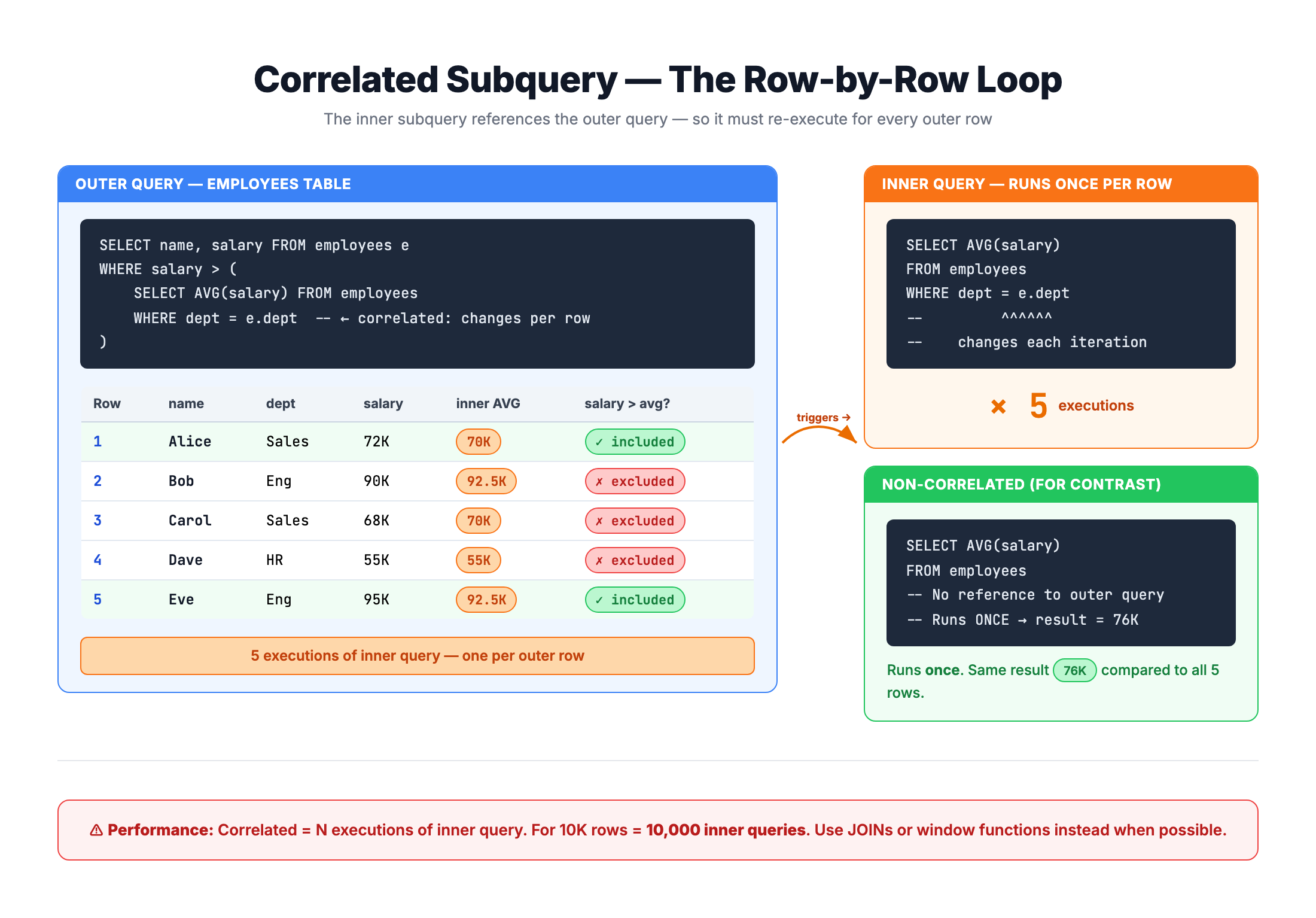
Correlated Subquery -- Row-by-Row Dependent Execution
Identifying Correlated Subqueries
The Key Indicator
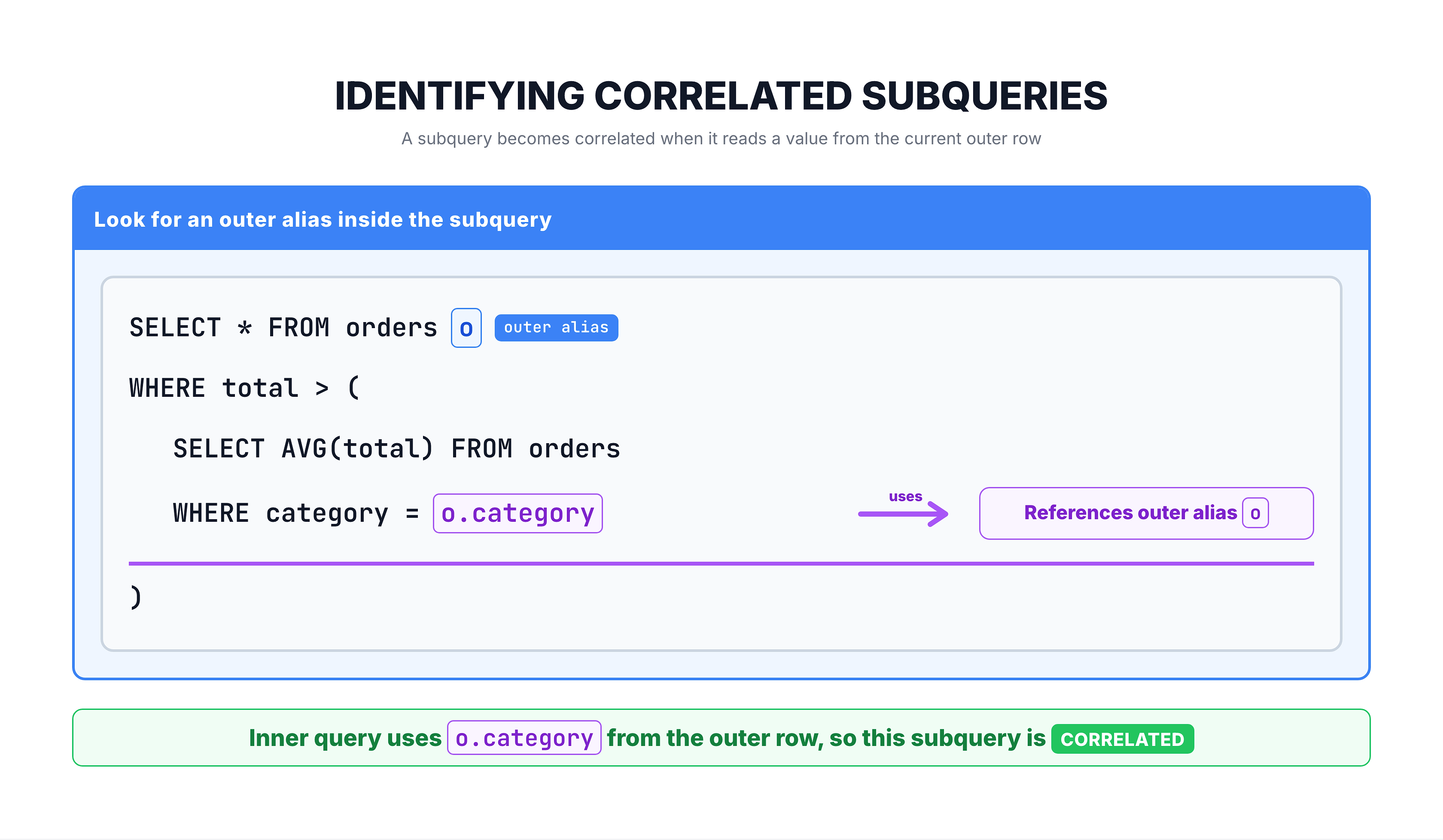
Look for references to the outer query's table alias inside the subquery:
SELECT *
FROM olist_orders_dataset o      -- Outer alias: 'o'
WHERE EXISTS (
    SELECT 1
    FROM olist_order_items_dataset oi
    WHERE oi.order_id = o.order_id   -- ← References 'o' from outer!
);
Visual Identifier
Execution Flow Comparison
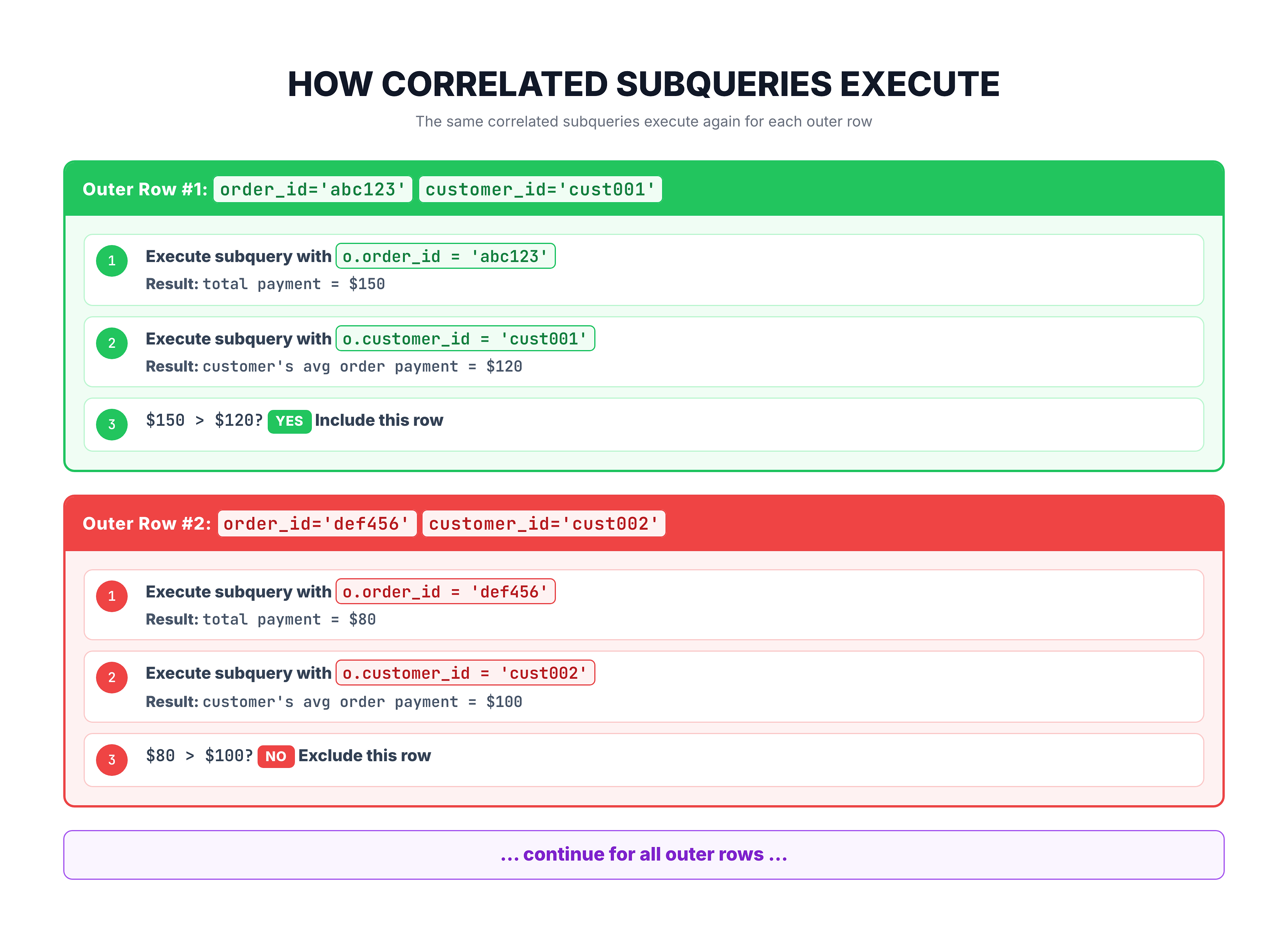
How Correlated Subqueries Execute
Step-by-Step Execution
Query: Find orders where the payment is above average for that customer.
SELECT o.order_id, o.customer_id
FROM olist_orders_dataset o
WHERE (
    SELECT SUM(payment_value)
    FROM olist_order_payments_dataset p
    WHERE p.order_id = o.order_id
) > (
    SELECT AVG(total_payment)
    FROM (
        SELECT o2.customer_id, SUM(p2.payment_value) AS total_payment
        FROM olist_orders_dataset o2
        JOIN olist_order_payments_dataset p2 ON o2.order_id = p2.order_id
        WHERE o2.customer_id = o.customer_id   -- Correlated!
        GROUP BY o2.order_id
    )
);
Conceptual Execution
Common Use Case 1: Row-Specific Comparisons
Compare Each Row to Its Group Average
Find products priced above average for their seller:
SELECT
    oi.product_id,
    oi.seller_id,
    oi.price,
    (
        SELECT ROUND(AVG(oi2.price), 2)
        FROM olist_order_items_dataset oi2
        WHERE oi2.seller_id = oi.seller_id
    ) AS seller_avg_price
FROM olist_order_items_dataset oi
WHERE oi.price > (
    SELECT AVG(oi2.price)
    FROM olist_order_items_dataset oi2
    WHERE oi2.seller_id = oi.seller_id   -- Same seller
)
LIMIT 10;
Why Correlation is Needed
Each product must be compared to its own seller's average, not a global average. The subquery must know which seller we're currently looking at.
Common Use Case 2: Finding Related Records
Find Orders with High-Value Items
SELECT o.order_id, o.order_status
FROM olist_orders_dataset o
WHERE EXISTS (
    SELECT 1
    FROM olist_order_items_dataset oi
    WHERE oi.order_id = o.order_id    -- Correlated!
    AND oi.price > 500
)
LIMIT 10;
Find Customers Who Made Multiple Orders
SELECT DISTINCT c.customer_id, c.customer_city
FROM olist_customers_dataset c
WHERE (
    SELECT COUNT(*)
    FROM olist_orders_dataset o
    WHERE o.customer_id = c.customer_id   -- Correlated!
) > 1
LIMIT 10;
Common Use Case 3: Running Totals
Cumulative Calculations
Correlated subqueries can compute running totals:
-- Running count of orders by date
SELECT
    DATE(order_purchase_timestamp) AS order_date,
    COUNT(*) AS orders_today,
    (
        SELECT COUNT(*)
        FROM olist_orders_dataset o2
        WHERE DATE(o2.order_purchase_timestamp) <= DATE(o.order_purchase_timestamp)
    ) AS cumulative_orders
FROM olist_orders_dataset o
GROUP BY DATE(order_purchase_timestamp)
ORDER BY order_date
LIMIT 10;
Note on Window Functions
In modern SQL, window functions are often preferred for running calculations:
-- Modern approach with window function
SELECT
    DATE(order_purchase_timestamp) AS order_date,
    COUNT(*) AS orders_today,
    SUM(COUNT(*)) OVER (ORDER BY DATE(order_purchase_timestamp)) AS cumulative
FROM olist_orders_dataset
GROUP BY DATE(order_purchase_timestamp)
LIMIT 10;
Window functions are typically faster than correlated subqueries for these patterns.
Performance Considerations
The Performance Challenge
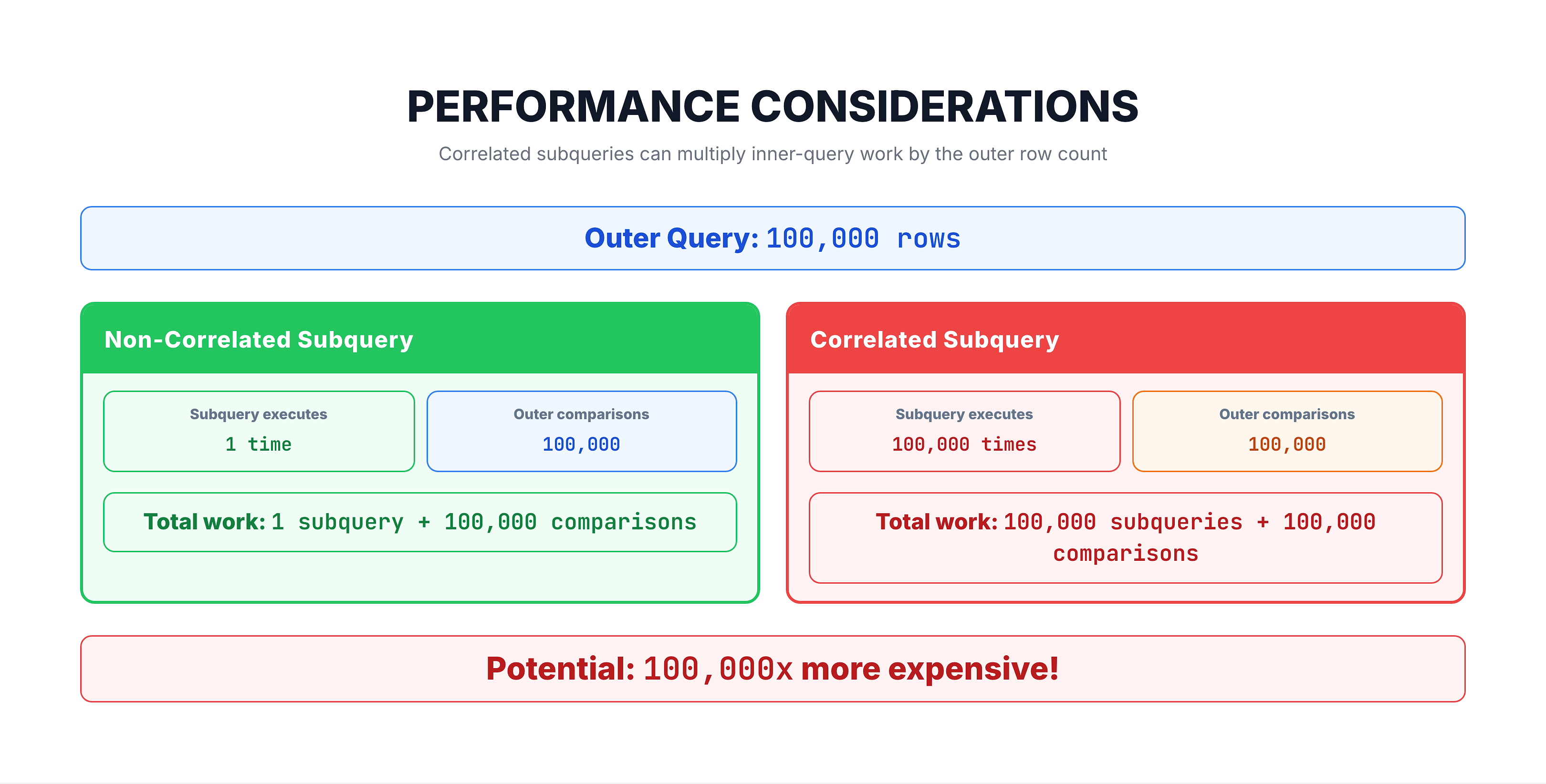
Optimization Tips
- Ensure indexes exist on columns used in correlation
- Consider rewriting as JOIN when possible
- Use EXISTS instead of COUNT for existence checks
- Consider window functions for running calculations
Rewriting as JOIN
Correlated Subquery Version
-- Find products priced above their seller's average
SELECT oi.product_id, oi.price
FROM olist_order_items_dataset oi
WHERE oi.price > (
    SELECT AVG(oi2.price)
    FROM olist_order_items_dataset oi2
    WHERE oi2.seller_id = oi.seller_id
);
JOIN Version (Often Faster)
-- Same result, often more efficient
SELECT oi.product_id, oi.price
FROM olist_order_items_dataset oi
JOIN (
    SELECT seller_id, AVG(price) AS avg_price
    FROM olist_order_items_dataset
    GROUP BY seller_id
) seller_stats ON oi.seller_id = seller_stats.seller_id
WHERE oi.price > seller_stats.avg_price;
Why JOINs Can Be Faster
- Aggregation computed once per group, not per row
- Better use of indexes
- Query optimizer has more optimization options
When Correlated Subqueries Are Necessary
Scenarios Where Correlation is Required
- Existence Checks with EXISTS/NOT EXISTS
SELECT * FROM sellers s
WHERE NOT EXISTS (
    SELECT 1 FROM order_items WHERE seller_id = s.seller_id
);
- Row-by-row conditional calculations
-- Different calculation per row based on row's data
SELECT product_id,
    CASE WHEN price > (
        SELECT AVG(price) FROM order_items
        WHERE category = oi.category
    ) THEN 'Above Avg' ELSE 'Below Avg' END
FROM order_items oi;
- Latest/First record per group
-- Get each customer's most recent order
SELECT *
FROM olist_orders_dataset o1
WHERE order_purchase_timestamp = (
    SELECT MAX(order_purchase_timestamp)
    FROM olist_orders_dataset o2
    WHERE o2.customer_id = o1.customer_id
);
- Complex filtering that varies by row
Practice
Let's practice writing correlated subqueries.
Exercise 1: Products Above Seller Average
Find order items priced above their seller's average price:
-- Find products priced above their seller's average

SELECT
    oi.order_id,
    oi.product_id,
    oi.seller_id,
    oi.price,
    (
        SELECT ROUND(AVG(oi2.price), 2)
        FROM olist_order_items_dataset oi2
        WHERE oi2.seller_id = oi.seller_id
    ) AS seller_avg_price
FROM olist_order_items_dataset oi
WHERE oi.price > (
    SELECT AVG(oi2.price)
    FROM olist_order_items_dataset oi2
    WHERE oi2.seller_id = oi.seller_id
)
LIMIT 10;
Exercise 2: Count Related Records
Show orders with the count of items in each order:
-- Show orders with item count using correlated subquery

SELECT
    o.order_id,
    o.order_status,
    (
        SELECT COUNT(*)
        FROM olist_order_items_dataset oi
        WHERE oi.order_id = o.order_id
    ) AS item_count,
    (
        SELECT SUM(price)
        FROM olist_order_items_dataset oi
        WHERE oi.order_id = o.order_id
    ) AS total_value
FROM olist_orders_dataset o
LIMIT 10;
Exercise 3: Orders Above Customer Average
Find orders with payment above the customer's average payment:
-- Find orders with above-average payment for that customer

SELECT
    o.order_id,
    o.customer_id,
    (
        SELECT SUM(payment_value)
        FROM olist_order_payments_dataset p
        WHERE p.order_id = o.order_id
    ) AS order_payment
FROM olist_orders_dataset o
WHERE (
    SELECT SUM(payment_value)
    FROM olist_order_payments_dataset p
    WHERE p.order_id = o.order_id
) > (
    SELECT AVG(customer_order_total)
    FROM (
        SELECT SUM(p2.payment_value) AS customer_order_total
        FROM olist_orders_dataset o2
        JOIN olist_order_payments_dataset p2 ON o2.order_id = p2.order_id
        WHERE o2.customer_id = o.customer_id
        GROUP BY o2.order_id
    )
)
LIMIT 10;
Common Mistakes
1. Missing Table Alias
-- ❌ Ambiguous - which table does 'seller_id' refer to?
SELECT * FROM order_items
WHERE price > (
    SELECT AVG(price) FROM order_items WHERE seller_id = seller_id
);

-- ✅ Clear with aliases
SELECT * FROM order_items oi
WHERE price > (
    SELECT AVG(oi2.price) FROM order_items oi2
    WHERE oi2.seller_id = oi.seller_id
);
2. Forgetting It's Per-Row
-- This runs the subquery for EVERY row, even if seller_id repeats
-- Can be very slow on large tables!
SELECT *, (
    SELECT COUNT(*) FROM orders WHERE seller_id = s.seller_id
) FROM sellers s;
3. Not Considering Alternatives
Always ask: "Can I rewrite this as a JOIN or use a window function?"
Summary
Key Takeaways
-
Correlated subqueries reference the outer query through table aliases
-
They execute once per row in the outer query (not once total)
-
Common use cases:
- Row-specific comparisons (vs. group average)
- Existence checks (EXISTS/NOT EXISTS)
- Finding latest/first per group
- Running totals (though window functions preferred)
-
Performance considerations:
- Can be slow on large tables
- Ensure proper indexes
- Consider rewriting as JOIN when possible
-
Always use clear aliases to distinguish inner vs. outer tables
Quick Reference
-- Pattern: Correlated subquery in WHERE
SELECT * FROM outer_table o
WHERE o.value > (
    SELECT AGG(i.value) FROM inner_table i
    WHERE i.key = o.key   -- ← Correlation!
);

-- Pattern: Correlated subquery in SELECT
SELECT
    o.*,
    (SELECT COUNT(*) FROM inner_table i WHERE i.key = o.key) AS count
FROM outer_table o;
What's Next?
Next, we'll explore the EXISTS operator – a powerful way to check for the existence of related rows.