Window Partition By
Introduction
The PARTITION BY clause is one of the most important components of window functions. It determines how rows are grouped for the window calculation.
In this lesson, you will learn:
- What PARTITION BY does and how it works
- The difference between PARTITION BY and GROUP BY
- How to partition by single and multiple columns
- Common use cases and patterns
What is PARTITION BY?
PARTITION BY divides the result set into partitions (groups) and performs the window function calculation separately for each partition.
Conceptual Understanding
Think of PARTITION BY as creating "mini datasets" within your data:
Original Data:
| order_id | customer_id | price |
|---|---|---|
| O001 | C001 | 100 |
| O002 | C001 | 150 |
| O003 | C002 | 200 |
| O004 | C002 | 75 |
| O005 | C003 | 300 |
With PARTITION BY customer_id:
| Partition | Rows |
|---|---|
| C001 | O001, O002 |
| C002 | O003, O004 |
| C003 | O005 |
Each partition is treated as an independent window for calculations.
Visualization
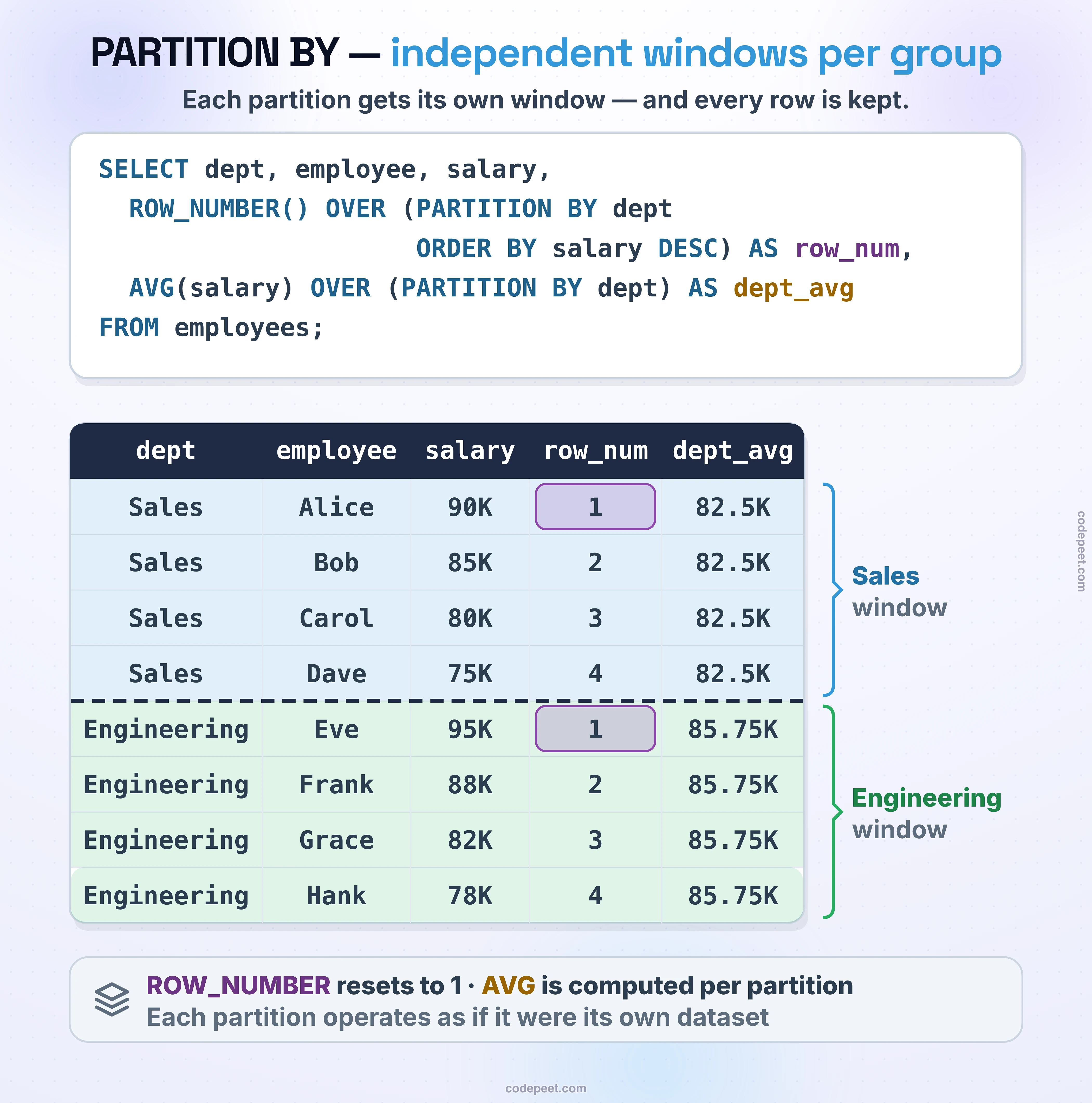
PARTITION BY -- Creating Independent Window Groups
Basic PARTITION BY Syntax
Syntax
function() OVER (PARTITION BY column1, column2, ...)
Without PARTITION BY
-- Without PARTITION BY: total across ALL rows
SELECT
    seller_id,
    order_id,
    price,
    SUM(price) OVER () AS grand_total
FROM olist_order_items_dataset
LIMIT 10;
Notice: Every row shows the same grand_total because the entire result set is one window.
With PARTITION BY
-- With PARTITION BY: total per seller
SELECT
    seller_id,
    order_id,
    price,
    SUM(price) OVER (PARTITION BY seller_id) AS seller_total
FROM olist_order_items_dataset
LIMIT 15;
Now each seller has their own total. Rows with the same seller_id share the same seller_total.
PARTITION BY vs GROUP BY
Both divide data into groups, but they work differently:
| Aspect | PARTITION BY | GROUP BY |
|---|---|---|
| Purpose | Defines window for calculation | Defines groups for aggregation |
| Output rows | All original rows preserved | One row per group |
| Used with | Window functions (OVER) | Aggregate functions |
| Column access | All columns available | Only grouped/aggregated columns |
Side-by-Side Example
GROUP BY (Collapses Rows):
-- GROUP BY: One row per state
SELECT
    customer_state,
    COUNT(*) AS customer_count
FROM olist_customers_dataset
GROUP BY customer_state
ORDER BY customer_count DESC
LIMIT 5;
PARTITION BY (Preserves Rows):
-- PARTITION BY: All rows preserved with count
SELECT
    customer_id,
    customer_city,
    customer_state,
    COUNT(*) OVER (PARTITION BY customer_state) AS state_count
FROM olist_customers_dataset
LIMIT 10;
Single Column Partitioning
The most common pattern is partitioning by a single column.
Example: Count Orders per Customer
-- Each order shows the customer's total order count
SELECT
    order_id,
    customer_id,
    order_status,
    COUNT(*) OVER (PARTITION BY customer_id) AS customer_order_count
FROM olist_orders_dataset
LIMIT 15;
Example: Average Price per Product Category
-- Each item shows its category's average price
SELECT
    i.order_id,
    p.product_category_name,
    i.price,
    AVG(i.price) OVER (PARTITION BY p.product_category_name) AS category_avg
FROM olist_order_items_dataset i
JOIN olist_products_dataset p ON i.product_id = p.product_id
WHERE p.product_category_name IS NOT NULL
LIMIT 15;
Example: Total Revenue per Seller
-- Each item shows the seller's total revenue
SELECT
    seller_id,
    order_id,
    price,
    SUM(price) OVER (PARTITION BY seller_id) AS seller_revenue
FROM olist_order_items_dataset
LIMIT 15;
Multiple Column Partitioning
You can partition by multiple columns to create more specific groups.
Syntax
function() OVER (PARTITION BY column1, column2)
Example: Count per State AND City
-- Partition by both state and city
SELECT
    customer_id,
    customer_city,
    customer_state,
    COUNT(*) OVER (PARTITION BY customer_state) AS state_count,
    COUNT(*) OVER (PARTITION BY customer_state, customer_city) AS city_count
FROM olist_customers_dataset
LIMIT 15;
Notice:
state_countgroups only by state (larger groups)city_countgroups by state AND city (smaller, more specific groups)
Example: Statistics per Payment Type and Installments
-- Partition by payment_type and installments
SELECT
    order_id,
    payment_type,
    payment_installments,
    payment_value,
    AVG(payment_value) OVER (
        PARTITION BY payment_type, payment_installments
    ) AS avg_for_type_and_installment
FROM olist_order_payments_dataset
WHERE payment_installments <= 6
LIMIT 20;
Using Multiple Partitions in One Query
You can use different PARTITION BY clauses for different calculations in the same query.
-- Multiple different partitions
SELECT
    i.seller_id,
    p.product_category_name,
    i.price,
    -- Total for this seller
    SUM(i.price) OVER (PARTITION BY i.seller_id) AS seller_total,
    -- Total for this category
    SUM(i.price) OVER (PARTITION BY p.product_category_name) AS category_total,
    -- Grand total (no partition)
    SUM(i.price) OVER () AS grand_total
FROM olist_order_items_dataset i
JOIN olist_products_dataset p ON i.product_id = p.product_id
WHERE p.product_category_name IS NOT NULL
LIMIT 15;
This single query shows:
- Each item's price
- The total for that seller
- The total for that category
- The grand total of everything
Percentage of Total Calculations
A powerful use case: calculate what percentage each row contributes to its group.
-- What percentage of the category's revenue is each item?
SELECT
    i.order_id,
    p.product_category_name,
    i.price,
    SUM(i.price) OVER (PARTITION BY p.product_category_name) AS category_total,
    ROUND(
        i.price * 100.0 / SUM(i.price) OVER (PARTITION BY p.product_category_name),
        4
    ) AS pct_of_category
FROM olist_order_items_dataset i
JOIN olist_products_dataset p ON i.product_id = p.product_id
WHERE p.product_category_name IS NOT NULL
LIMIT 15;
Percentage of Grand Total
-- What percentage of ALL payments is each payment?
SELECT
    order_id,
    payment_type,
    payment_value,
    SUM(payment_value) OVER () AS grand_total,
    ROUND(
        payment_value * 100.0 / SUM(payment_value) OVER (),
        6
    ) AS pct_of_total
FROM olist_order_payments_dataset
LIMIT 15;
Comparing Rows to Group Statistics
Use PARTITION BY to compare each row to its group's average, min, max, etc.
-- Compare each price to its seller's statistics
SELECT
    seller_id,
    order_id,
    price,
    AVG(price) OVER (PARTITION BY seller_id) AS seller_avg,
    MIN(price) OVER (PARTITION BY seller_id) AS seller_min,
    MAX(price) OVER (PARTITION BY seller_id) AS seller_max,
    price - AVG(price) OVER (PARTITION BY seller_id) AS diff_from_avg
FROM olist_order_items_dataset
LIMIT 15;
This helps identify:
- Items priced above/below the seller's average
- Outliers within each seller's inventory
- Price consistency across sellers
Practice
Practice using PARTITION BY in different scenarios.
Exercise 1: Simple PARTITION BY
Count customers per state:
-- Customer count per state

SELECT
    customer_id,
    customer_city,
    customer_state,
    COUNT(*) OVER (PARTITION BY customer_state) AS state_count
FROM olist_customers_dataset
LIMIT 15;
Exercise 2: Multiple Column Partition
Count by both state and city:
-- Count by state AND city

SELECT
    customer_id,
    customer_city,
    customer_state,
    COUNT(*) OVER (PARTITION BY customer_state, customer_city) AS city_count
FROM olist_customers_dataset
LIMIT 15;
Exercise 3: Percentage Calculation
Calculate percentage of payment type total:
-- Percentage of each payment type's total

SELECT
    order_id,
    payment_type,
    payment_value,
    SUM(payment_value) OVER (PARTITION BY payment_type) AS type_total,
    ROUND(
        payment_value * 100.0 / SUM(payment_value) OVER (PARTITION BY payment_type),
        4
    ) AS pct_of_type
FROM olist_order_payments_dataset
LIMIT 20;
Exercise 4: Compare to Group Average
Compare each item price to its seller's average:
-- Compare to seller average

SELECT
    seller_id,
    order_id,
    price,
    AVG(price) OVER (PARTITION BY seller_id) AS seller_avg,
    price - AVG(price) OVER (PARTITION BY seller_id) AS vs_avg,
    CASE
        WHEN price > AVG(price) OVER (PARTITION BY seller_id) THEN 'Above Average'
        WHEN price < AVG(price) OVER (PARTITION BY seller_id) THEN 'Below Average'
        ELSE 'At Average'
    END AS comparison
FROM olist_order_items_dataset
LIMIT 15;
Summary
Key Takeaways
-
PARTITION BY divides rows into groups for window calculations
-
Without PARTITION BY, the entire result set is one window
-
Unlike GROUP BY, PARTITION BY preserves all rows
-
You can partition by multiple columns for more specific groups
-
Different window functions in the same query can use different partitions
Common Use Cases
| Use Case | Pattern |
|---|---|
| Count per group | COUNT(*) OVER (PARTITION BY group_col) |
| Total per group | SUM(value) OVER (PARTITION BY group_col) |
| Group average | AVG(value) OVER (PARTITION BY group_col) |
| Percentage of group | value / SUM(value) OVER (PARTITION BY ...) |
| Compare to group avg | value - AVG(value) OVER (PARTITION BY ...) |
Coming Up Next
In the next lesson, we'll explore ORDER BY in window functions and how it enables running totals, rankings, and more.